
The right audio interface can make guitar recording, amp simulation, and low-latency practice feel dramatically easier. The best choice depends on your guitar’s output, preferred software, device compatibility, and whether you need microphone or expansion inputs.
We compare 10 standout interfaces across portable, entry-level, and more capable recording setups so you can match features to your playing and workflow.
Best 10 Audio Interface for Guitar Picks for 2026
Best All-Around Choice
Focusrite Scarlett Solo 3rd Gen

- Hi-Z input for guitar or bass
- 24-bit/192kHz recording support
- Includes recording software and plug-ins
Best For: Guitarists and singer-songwriters building a compact home studio
Best for Mobile Guitar Practice
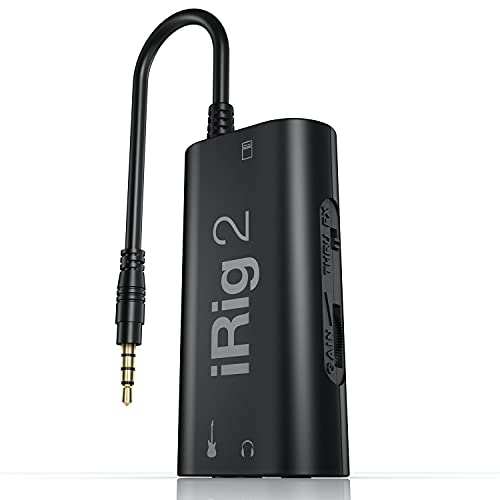
- Portable guitar interface for iOS and Mac
- Includes headphone and amplifier outputs
- Works with AmpliTube CS effects
Best For: Mobile guitarists using iOS devices, headphones, or an amplifier
Best Updated Studio Pick
Focusrite Scarlett Solo 4th Gen

- 120dB dynamic range
- Hi-Z guitar input and improved Air modes
- Includes software and production plug-ins
Best For: Home-studio guitarists who want current-generation recording features
Best Budget 2-Input Option

- Two combo inputs with Hi-Z guitar support
- 24-bit/192kHz recording
- Direct monitoring and USB-C bus power
Best For: Guitarists who need two inputs and simple direct monitoring for home recording
Portable Starter Pick

- Dedicated instrument input for guitar
- Combo mic/line input with phantom power
- USB/direct zero-latency monitoring
Best For: Compact guitar recording, streaming, and podcast setups
High-Resolution Value

- Two-channel recording interface
- Up to 24-bit/192 kHz support
- Direct monitoring and metal chassis
Best For: Two-channel home recording with high-resolution capture
Feature-Rich Guitar Pick
Focusrite Scarlett 2i2 4th Gen

- Two Hi-Z instrument inputs
- Auto Gain and Clip Safe level tools
- Air mode and extensive software bundle
Best For: Guitarists wanting easy setup and a capable home studio
Portable Pick

- 24-bit/48 kHz recording
- USB-C connectivity for Mac, PC, and iPad
- Headphone monitoring and dedicated amp output
Best For: Portable guitar recording and silent practice
Rugged Studio Choice

- 24-bit/192 kHz, 2-in/2-out recording
- Hi-Z guitar input and Onyx mic preamp
- Bus-powered with zero-latency monitoring
Best For: Durable desktop recording with guitar and microphone inputs
Expandable Creator Pick
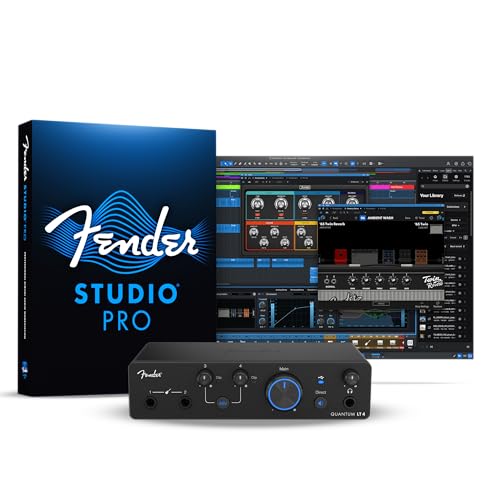
- Four-in/two-out USB-C connectivity
- Dual instrument inputs and 75 dB mic preamps
- Loopback, balanced outputs, and Fender amp software
Best For: Guitar recording, streaming, and expanding home studios
Best All-Around Choice – Focusrite Scarlett Solo 3rd Gen
If you want an audio interface for guitar that also handles vocals, the Focusrite Scarlett Solo 3rd Gen offers a practical home-recording setup. Its Hi-Z instrument input, Air mode, low-noise outputs, and 24-bit/192kHz support suit guitarists who want clear takes without a complicated workflow.
Best For: Guitarists and singer-songwriters building a compact home studio.
Pros:
- Hi-Z instrument input is designed for guitar or bass.
- Air mode can add clarity to acoustic instruments.
- Records at up to 24-bit/192kHz with low-noise balanced outputs.
- Includes useful recording software and plug-ins.
Cons:
- Only one XLR microphone preamp is included.
- Requires a computer or compatible iOS device for recording.
The Solo 3rd Gen is a strong fit when guitar recording is the priority but vocal capture and podcasting are also part of the plan. Its included software and straightforward two-channel design make it easy to start creating.
Best for Mobile Guitar Practice – IK Multimedia iRig 2
The IK Multimedia iRig 2 is an audio interface for guitarists who want to record or use effects on a phone, tablet, iPod touch, or Mac. Its portable design, adjustable gain, headphone connection, and direct amplifier output make it useful for mobile playing and compact live setups.
Best For: Mobile guitarists using iOS devices, headphones, or an amplifier.
Pros:
- Compact plug-and-play design with an adjustable gain dial.
- 1/4-inch output connects to an amplifier without an extra adapter.
- Works with AmpliTube CS for modeled effects and amps.
- Thru switch can preserve a clean analog signal path.
Cons:
- Newer devices may require a Lightning or USB-C headphone adapter.
- Its mobile-focused design is less suited to multi-input studio recording.
Choose the iRig 2 when portability and direct guitar-to-device connectivity matter more than studio expansion. It is especially convenient for practicing, tuning, recording ideas, and routing a guitar signal to an amp.
Best Updated Studio Pick – Focusrite Scarlett Solo 4th Gen
The Focusrite Scarlett Solo 4th Gen is an audio interface for guitar that combines a Hi-Z input with a microphone preamp and improved converter performance. Its 120dB dynamic range, enhanced Air modes, and 24-bit/192kHz capability make it a compelling choice for detailed guitar and vocal recordings.
Best For: Home-studio guitarists who want current-generation recording features.
Pros:
- Hi-Z input supports direct guitar recording.
- 120dB dynamic range uses the newest generation of Scarlett converters.
- Improved Air mode adds presence and harmonic drive.
- Includes recording software and a collection of production plug-ins.
Cons:
- Provides one XLR microphone preamp.
- Its two-channel layout may be limiting for larger recording setups.
The 4th Gen Solo is a sensible upgrade-focused option for guitarists who want a refined compact interface. It keeps the basic songwriter-friendly layout while adding converter performance and updated Air processing.
Best Budget 2-Input Option – PIYONE Q2 Alloy Red
The PIYONE Q2 Alloy Red is a 2×2 audio interface for guitar and general home recording. It offers combo inputs, a Hi-Z guitar connection, 48V phantom power, USB-C bus power, and zero-latency direct monitoring for a flexible PC, Mac, or mobile-style setup.
Best For: Guitarists who need two inputs and simple direct monitoring for home recording.
Pros:
- Two combo inputs support microphones and guitar sources.
- 24-bit/192kHz recording with high-fidelity converters.
- USB-C connection provides data transfer and bus power.
- Direct monitoring and a 3.5mm headphone jack support low-latency tracking.
Cons:
- Supplied operating-system details list Windows compatibility, so broader support should be confirmed.
- It is heavier than the compact Scarlett Solo models at 0.74 kg.
This interface makes sense for players who want more flexible input connectivity than a single-input guitar adapter provides. Its two-channel design, phantom power, and direct monitoring cover the essentials for guitar-and-vocal recording.
Portable Starter Pick – M-Audio M-Track Solo
If you need an affordable audio interface for guitar that also handles vocals, podcasts, or live streams, the M-Audio M-Track Solo is a compact two-channel option. Its dedicated instrument input, combo mic/line input, phantom power, and USB/direct monitoring make it practical for basic home recording.
Best For: Guitarists who want a small, versatile interface for recording, streaming, and practice setups.
Pros:
- Dedicated 1/4-inch instrument input for guitar and other line-level sources
- Combo XLR/line input with phantom power for compatible condenser microphones
- USB/direct switch supports zero-latency monitoring
- Includes MPC Beats and supports 48 kHz audio resolution
Cons:
- Maximum sample rate is 48 kHz
- Only one dedicated instrument input is provided
The M-Track Solo is a straightforward choice when portability and flexible monitoring matter more than advanced recording specifications. It covers the essentials for a guitar-and-vocal workstation without taking up much desk space.
High-Resolution Value – Behringer UMC202HD
The Behringer UMC202HD is a useful audio interface for guitar when you want two-channel recording and high-resolution capture. It combines two inputs, phantom power, direct monitoring, and a metal chassis for a practical home studio setup.
Best For: Home recordists who need two channels for guitar, microphones, or other instruments and prefer high-resolution recording support.
Pros:
- Supports recording resolutions up to 24-bit/192 kHz
- Two-channel design accommodates microphones and instruments
- Includes phantom power for compatible microphones
- Features a powerful headphone output with level control and direct monitoring
Cons:
- The supplied notes do not specify a dedicated Hi-Z instrument input
- USB connectivity is less broadly described than the input and monitoring features
Choose the UMC202HD if two-channel flexibility and a rugged metal enclosure are priorities. It is particularly suited to a fixed recording space where high sample-rate support and direct monitoring are useful.
Feature-Rich Guitar Pick – Focusrite Scarlett 2i2 4th Gen
The Focusrite Scarlett 2i2 4th Gen is a strong audio interface for guitarists who want easy level control and polished recording features. It offers two Hi-Z instrument inputs, Auto Gain, Clip Safe, Air modes, and a substantial software bundle for getting started quickly.
Best For: Guitarists building a modern home studio who want automatic gain assistance, tone-shaping options, and extensive included software.
Pros:
- Two Hi-Z instrument inputs support guitar recording
- Auto Gain helps set levels, while Clip Safe helps prevent clipping
- Air mode adds presence and harmonic drive to vocals and guitars
- Includes Pro Tools Intro+, Ableton Live Lite, Cubase LE, and Hitmaker Expansion
Cons:
- The supplied notes do not mention a direct-monitoring control
- Its larger feature set may be more than beginners need for basic recording
With two Hi-Z inputs and practical level-management tools, the Scarlett 2i2 4th Gen is well suited to guitarists who want to focus on playing instead of constant setup adjustments. Its included software also gives a new recording rig a strong starting point.
Portable Pick – IK Multimedia iRig USB
The IK Multimedia iRig USB is a compact audio interface for guitarists who want a straightforward way to record and practice with a Mac, PC, iPad, or compatible iPhone 15. Its 24-bit/48 kHz recording, USB-C connection, and bundled software make it a practical option for mobile setups.
Best For: Guitarists seeking a lightweight interface for home recording, silent practice, and portable amp-modeling setups.
Pros:
- Records at 24-bit/48 kHz for detailed guitar capture.
- Includes headphone output and direct monitoring for silent practice.
- Dedicated amp output supports processed or direct-through signals.
- Compact 1.9-ounce design includes a USB-C cable and recording software.
Cons:
- USB-C cable is required; the supplied notes state it will not work properly with a Lightning cable.
- Its single 1/4-inch instrument input is aimed primarily at simple guitar-focused setups.
Choose this model when portability and guitar-oriented connections matter more than higher sample rates or expanded input counts. The included AmpliTube and TONEX support also gives new users a useful starting point for recording and amp modeling.
Rugged Studio Choice – Mackie Onyx Artist 1-2
The Mackie Onyx Artist 1-2 is a versatile audio interface for guitar players who also need a quality mic preamp and two-in, two-out recording. Its Hi-Z instrument input, 24-bit/192 kHz support, and bus-powered USB design suit both desktop and mobile recording workflows.
Best For: Guitarists and singer-songwriters who want a durable two-channel interface with microphone, instrument, and monitoring flexibility.
Pros:
- Hi-Z input is designed for guitar, bass, and other instruments.
- Onyx mic preamp provides high gain and includes 48V phantom power for condenser microphones.
- Supports 24-bit/192 kHz recording with two inputs and two outputs.
- Bus-powered construction and direct monitoring simplify mobile recording.
Cons:
- Its two-channel layout offers less expansion than larger interfaces.
- The supplied operating-system details list Windows 10, so buyers should verify compatibility with their specific computer.
This is a strong fit for a compact home studio that needs more than a guitar-only input. The dedicated monitor outputs, headphone output, bundled software, and tank-like build add practical value for regular recording use.
Expandable Creator Pick – Fender Quantum LT 4
The Fender Quantum LT 4 is an audio interface for guitar players who need room to grow. With dual instrument inputs, two MAX-HD mic preamps, four-in/two-out connectivity, USB-C, loopback, and 24-bit/192 kHz support, it is equipped for recording, streaming, and broader studio workflows.
Best For: Growing creators who record guitars alongside vocals, multiple instruments, streaming audio, or other content.
Pros:
- Provides two dedicated instrument inputs for guitars, basses, and line-level sources.
- Dual 75 dB MAX-HD mic preamps support detailed vocal and instrument recording.
- Loopback routing, balanced outputs, and a strong headphone amp suit streaming and content creation.
- Includes access to Fender amp and effects software through the Fender Studio app.
Cons:
- Its expanded features and 1.8-pound chassis may be more than a basic guitar-only setup requires.
- Software access requires registration and downloading the Fender Studio app.
The Quantum LT 4 makes the most sense for musicians building a flexible recording station rather than seeking only the smallest interface. Its dual instrument inputs and loopback functionality provide useful headroom for collaborative recording, live streaming, and future expansion.
How We Picked the Best Audio Interface for Guitar
We focused on interfaces with a dedicated instrument input, dependable computer or mobile compatibility, and practical monitoring features for guitarists. We also considered conversion quality, input and output flexibility, driver support, portability, ease of setup, and value. Since guitarists have different goals, the lineup includes simple one-input models, compact mobile adapters, and interfaces with two or more simultaneous inputs.
Specifications such as 24-bit recording and sample rates up to 192 kHz can be useful, but they do not automatically guarantee better recordings. Stable drivers, suitable input gain, low monitoring latency, and a quality instrument circuit are usually more important in everyday use.
Quick Comparison
| Best For | What to Look For |
|---|---|
| Solo guitar recording | One instrument input, direct monitoring, and a headphone output |
| Guitar and vocals | At least one instrument input plus a microphone preamp |
| Two musicians or stereo gear | Two independent inputs and flexible monitoring |
| Mobile practice | Low power use, compact size, and iOS or USB-C compatibility |
| Future expansion | Two or more inputs, MIDI or additional outputs, and reliable drivers |
Key Buying Factors for an Audio Interface for Guitar
Instrument Input and Impedance
Choose a model with a true Hi-Z instrument input for passive electric guitars and basses. It should preserve brightness and dynamics without requiring excessive gain. Active pickups and pedals may have different output levels, so a responsive gain control and ample headroom are helpful.
Inputs, Outputs, and Monitoring
A one-input interface is sufficient for recording guitar alone. Select a 2×2 model if you may record vocals, another instrument, stereo effects, or a second player. Direct monitoring lets you hear the input without software delay, while a dedicated headphone control makes practice more convenient.
Compatibility and Latency
Confirm support for your computer, iPad, or iPhone before buying, especially with USB-C devices that may require an adapter or compatible cable. Low-latency drivers matter when using amp simulators and effects. Windows users should pay particular attention to driver stability; Mac and iPad setups are often more plug-and-play, but compatibility still varies.
Recording Quality and Build
24-bit recording is a sensible baseline, while high sample-rate support is optional for most guitar projects. Prioritize clean preamps, useful meters, solid knobs, and a durable enclosure over headline specifications alone.
Who Should Buy Which Audio Interface for Guitar?
Choose a compact mobile interface if you mainly practice or record guitar with an iPhone, iPad, or laptop and want the smallest possible setup. Choose a basic one-input USB model for affordable home recording with a single guitar and headphones. Choose a 2×2 interface if you record vocals, collaborate, or want room to grow. Choose a higher-capacity model if you need multiple instrument inputs, more flexible monitoring, or a long-term home-studio hub.
Finally, check the included cable, software bundle, and power requirements. Those details can determine whether an interface works immediately with your current guitar, pedals, computer, and recording software.