
PCCOOLER DC360 360mm AIO CPU Cooler review: this is a strong fit for builders who want a showpiece cooler with practical modern support.
The LCD, ARGB fans, and 360mm radiator make the value proposition clear.
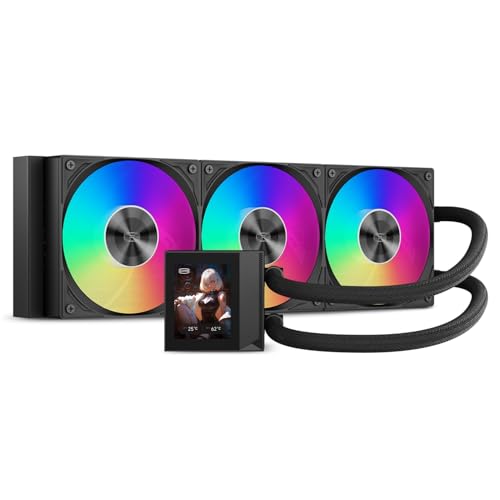
PCCOOLER DC360 Review Summary
The PCCOOLER DC360 is best for buyers who want their cooling hardware to contribute to the look of the system, not just the thermals.
Its 2.4-inch IPS LCD and ARGB fans make it especially appealing for gaming rigs, creator PCs, and windowed cases where visual presentation matters as much as socket compatibility.
It is also a sensible pick for users who need a mainstream 360mm AIO with current platform support.
The listing covers Intel LGA1851/1700/1200/115X and AMD AM5/AM4, so it fits a wide range of newer builds without forcing a niche mounting choice.
Review Scorecard
| Category | Score | Rationale |
|---|---|---|
| Visual impact | 9/10 | The customizable LCD and ARGB fans are the main reason to buy it. |
| Cooling setup | 8/10 | A 360mm radiator, 2600 RPM pump, and three fans target demanding CPUs. |
| Compatibility | 9/10 | Broad Intel and AMD socket support makes it easy to place in many builds. |
| Installation friendliness | 7/10 | Pre-installed fans and organized cabling help, but case fit still matters. |
| Cable management | 8/10 | The design aims to reduce loose cables and keep the build cleaner. |
| Buyer value fit | 8/10 | Good match for users who care about display features and modern platform support. |
Verdict: if you want an AIO that looks intentional in a showcase build and still checks the usual compatibility boxes, the DC360 makes a credible case.
Key Features and Specifications of PCCOOLER DC360
The key selling point is the 2.4-inch IPS LCD on the pump block.
PCCOOLER says it can show real-time system information and also display custom PNG, JPG, GIF, and MP4 content through its software.
For builders who treat the cooler as part of the build theme, that is a meaningful feature, not a gimmick.
The cooling hardware is straightforward and modern.
The unit uses a 360mm aluminum radiator, a 2600 RPM pump, and three 120mm high-static-pressure fans.
PCCOOLER lists the fan range at 500 to 2500 RPM, with PWM control for balancing airflow and acoustics.
The lighting setup is standard but useful.
The ARGB lighting connects through a 5V 3-pin header, so it can sync with motherboard lighting ecosystems rather than forcing a separate controller-driven approach.
Compatibility is broad for current systems.
Included mounting hardware supports:
- Intel LGA1851
- Intel LGA1700
- Intel LGA1200
- Intel LGA115X
- AMD AM5
- AMD AM4
The physical fit details matter here.
PCCOOLER says the cooler needs support for a 394 x 120 x 27mm radiator plus 25mm fans, and the case should have an available internal USB connection for the LCD.
That is the kind of requirement buyers should check before ordering, especially if they are using a compact case or a chassis with tight top-mount clearance.
The installation-focused details are practical.
The fans are pre-installed, and the cabling is arranged to reduce clutter.
The tubing is listed at 400mm, which should give some flexibility for top or front radiator placement in compatible cases.
Pros and Cons of PCCOOLER DC360
Pros
- The LCD gives the cooler a real visual function, not just decorative lighting.
- Broad socket support makes it easier to reuse across current Intel and AMD platforms.
- The 360mm radiator and high-RPM fan range point to serious cooling intent.
- Pre-installed fans and cleaner cabling should reduce setup friction.
- ARGB via a standard motherboard header keeps lighting integration simple.
Cons
- The LCD adds setup requirements, including an internal USB connection.
- A 360mm radiator narrows case compatibility compared with 240mm AIOs.
- Buyers who only want quiet, hidden cooling may not need the extra display hardware.
- The best fit depends on case clearance, so this is not a universal install.
Who Should Buy PCCOOLER DC360?
Buy the DC360 if you are building a gaming PC or creator workstation and want the cooler to be part of the visual identity of the machine.
It makes the most sense in glass-panel builds, RGB-heavy systems, and showcase desktops where an LCD pump block adds something tangible to the experience.
It also fits buyers who want a current-platform AIO with fewer compatibility worries.
If you are on AM5, AM4, LGA1700, or LGA1851 and have room for a 360mm radiator, the compatibility list is broad enough to make planning easier.
Skip it if your case is compact, if you do not have a spare internal USB header, or if you simply want an understated thermal solution.
In those situations, the LCD and larger radiator become requirements rather than benefits.
Cooling and Build Fit of PCCOOLER DC360
LCD Customization and System Readout
The LCD is the feature most likely to influence a purchase.
Being able to show system stats or custom media means the cooler can serve both function and presentation.
That matters for builders who like their hardware to feel coordinated, especially when the rest of the system uses RGB, themed cables, or a matching case interior.
Radiator, Pump, and Fan Package
The cooling package is designed around a 360mm radiator with three 120mm fans and a 2600 RPM pump.
That combination is the right shape for modern high-heat CPUs, especially if the user is prioritizing headroom under heavy gaming or creator workloads.
The listing does not promise miracle performance, but the hardware layout is clearly aimed at demanding builds.
Installation and Case Planning
The DC360 is easiest to recommend when the case is already known to support 360mm radiators.
The radiator dimensions and the USB requirement mean planning matters more than with simpler AIOs.
The upside is that PCCOOLER has tried to make the install cleaner by pre-mounting the fans and organizing the cabling.
Lighting and Motherboard Sync
The ARGB implementation is practical rather than exotic.
Because it uses a standard 5V 3-pin connection, it should integrate cleanly with motherboard lighting control in systems that already rely on synced RGB behavior.
That keeps the cooler from becoming a disconnected visual island inside the build.
Alternatives to PCCOOLER DC360
If you want similar 360mm AIO options with different design priorities, look at the Corsair iCUE H150i series for ecosystem-heavy builds, the NZXT Kraken 360 series for another LCD-forward option, and the DeepCool LS720 for a more performance-first 360mm AIO look.
For buyers who want a simpler visual approach, the ARCTIC Liquid Freezer III 360 is worth comparing as a more restrained 360mm option, while the Thermaltake TH360 line is another mainstream alternative if you are shopping by radiator size first.
Is PCCOOLER DC360 Worth It?
Yes, if your priority is a 360mm AIO that combines display features, ARGB styling, and broad platform support in one package.
The DC360 is most worth it for showcase builds and users who will actually use the LCD, not for buyers who only want the simplest possible cooling upgrade.
If your case supports the size and you have the required USB header, it is a sensible buy for a modern gaming or creator PC.
If those fit checks are shaky, or if you do not care about the screen, a simpler 360mm AIO will likely be the better choice.