
A good laptop stand can do more than lift your screen. The right model also helps tame charging cords, dock cables, and desk clutter so your setup feels cleaner and works better.
Below, we’ve rounded up 10 options with cable management features for different needs, from portable risers to dock-friendly stands and more permanent desk solutions.
Best 10 Laptop Stand with Cable Management Picks for 2026
Adjustable Cooling Pick
DAC Height and Angle Adjustable Laptop Stand
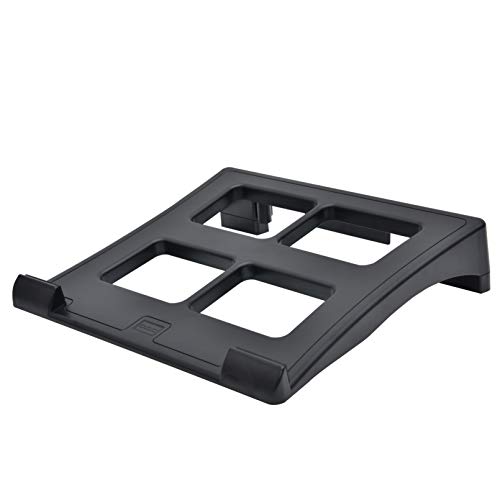
- 3 height and angle settings
- Ventilated platform for airflow
- 6-slot cable organizer included
Best For: A simple adjustable stand with cord routing and cooling support
Space-Saving Organizer
3M Vertical Notebook Computer Riser

- 3 inches of vertical height adjustment
- Built-in cable management feature
- Non-skid base for stability
Best For: A compact riser for organized desks and docking stations
Foldable Cable Organizer
Spigen Adjustable Laptop Desk Stand

- Built-in cable holders and 4 Velcro ties
- Height-adjustable and foldable design
- Anti-slip pads and front stoppers
Best For: A portable stand with integrated cord management
Wall-Mounted Laptop Lift
WALI Adjustable Laptop Arm Stand

- Supports laptops up to 17 inches and 22 lbs.
- Arm adjusts for height, tilt, swivel, and rotation.
- Ventilated tray and clamp/grommet mounting options.
Best For: A space-saving mounted setup with flexible positioning.
Swivel Stand with Port-Friendly Access

- Built-in cable ring supports easier cord access.
- 360-degree swivel base improves repositioning.
- Adjustable height and aluminum build add stability.
Best For: A tabletop riser with simple cable access and rotation.
Organized Desk Riser with Storage
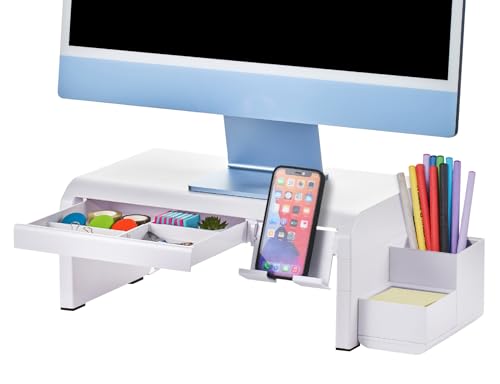
- Four height levels for adjustable positioning.
- Built-in cable management plus drawer storage.
- Includes phone and pencil holders with rubber feet.
Best For: A tidy desk setup with extra storage and cord control.
Rotating Workspace Pick
ENHANCE R1 Laptop Stand with Cable Holders

- 3 adhesive cable holders for routing power and USB cords
- Foldable metal design for easy travel and storage
- Open-frame build supports airflow and laptop cooling
Best For: Portable desk setups that need simple cable routing
Organized Desk Upgrade
BONTEC Adjustable Monitor Stand Riser with Drawer
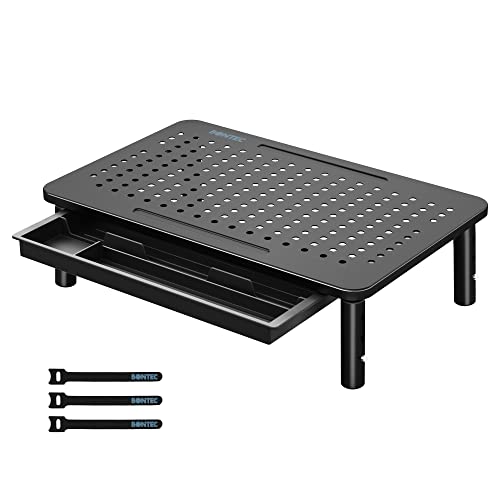
- Three height settings for better viewing comfort
- Drawer and pen slot add small-item storage
- Included hub helps reduce cable clutter
Best For: Ergonomic desk setups that need storage and cable tidiness
Hidden Cable Hub Pick
Elevate & Hide Aluminum Monitor Stand Riser

- Rear compartment stores power strips and cords
- Foldable aluminum build needs no assembly
- Lower tier adds space for keyboards and accessories
Best For: Permanent desks that need hidden cable and power-strip storage
Adjustable Cooling Pick – DAC Height and Angle Adjustable Laptop Stand
If you want a laptop stand with cable management that stays simple and functional, this DAC riser is built around the basics that matter: adjustability, cooling, stability, and cord organization. The ventilated platform helps with airflow, while the 6-slot cable organizer keeps cords in a ready-to-connect position.
Best For: Users who want a straightforward adjustable stand with built-in cord routing and a ventilated deck.
Pros:
- 3 height and angle settings for dialing in a more comfortable setup
- Ventilated platform design supports laptop cooling
- Non-skid feet help keep the stand steady during typing or gaming
- 6 cable slots help keep cords organized and connection-ready
Cons:
- Does not include docking or USB expansion features
- More basic design than multi-function workstation stands
Overall, this is a practical pick if you mainly need a stable riser with useful cable management and better airflow. It focuses on the essentials without adding extra complexity.
Docking Hub Upgrade – BENFEI Laptop Stand with USB-C 7-in-1 Dock
For buyers who want a laptop stand with cable management and more desktop connectivity, this BENFEI model combines an adjustable stand with a USB-C docking station. It adds HDMI, card readers, power delivery, and extra USB ports, which can reduce the need for separate adapters on a busy desk.
Best For: People who want a stand-plus-dock setup to keep their workspace cleaner and more connected.
Pros:
- Adjustable height and angle for a more comfortable viewing position
- Built-in USB-C docking station adds HDMI, SD, Micro SD, and USB ports
- 100W power delivery support helps keep a compatible laptop charged
- Aluminum alloy construction with anti-skid silicone for added stability
Cons:
- Heavier and more complex than a basic stand
- Best value depends on whether you need docking features
This is a strong choice if your cable-management goal is also to cut down on dongles and clutter. It fits users who want one stand to do more than just lift the laptop.
Space-Saving Organizer – 3M Vertical Notebook Computer Riser
This 3M vertical riser is a practical laptop stand with cable management for people who want a more compact desk setup. It offers 3 inches of vertical height adjustment, a non-skid base, and a cable management feature to help keep cords organized.
Best For: Users who want a space-saving riser with a simple cord-organization feature.
Pros:
- 3 inches of vertical height adjustment for a better viewing position
- Built-in cable management helps keep cords tidy
- Non-skid base adds stability on the desk
- Compatible with most docking stations
Cons:
- Less adjustable than multi-angle laptop stands
- No extra charging or hub functionality
If your priority is desk organization rather than feature density, this riser keeps the setup clean and straightforward. It is best suited to basic use where a compact footprint matters most.
Foldable Cable Organizer – Spigen Adjustable Laptop Desk Stand
If you are shopping for a laptop stand with cable management that looks clean on a modern desk, this Spigen model emphasizes organization and portability. It uses built-in cable holders and four Velcro ties to help manage USB, HDMI, and power cords, while the foldable aluminum structure makes storage easier.
Best For: People who want a portable, foldable stand with integrated cable organization.
Pros:
- Integrated cable holders plus 4 Velcro ties help reduce cord clutter
- Height-adjustable design supports a more ergonomic setup
- Anti-slip silicone pads and front stoppers help secure the laptop
- Foldable, detachable design saves space when not in use
Cons:
- No dock, HDMI, or charging features built in
- Best suited to laptops up to 17 inches
This stand is a good fit if you want a cleaner desktop without moving into a full docking solution. Its cable-management extras make it especially appealing for portable workspaces and minimalist setups.
Wall-Mounted Laptop Lift – WALI Adjustable Laptop Arm Stand
If you want a laptop stand with cable management that also frees up desk space, this WALI desk mount is built for a more elevated setup. It supports laptops up to 17 inches and 22 lbs, and the arm lets you fine-tune height, tilt, swivel, and rotation for a more ergonomic viewing angle.
Best For: Users who want a mounted laptop solution with flexible positioning and a cleaner desk layout.
Pros:
- Fits laptops or notebooks up to 17 inches and supports up to 22 lbs.
- Height-adjustable arm with tilt, swivel, and 360-degree rotation.
- Ventilated tray helps support airflow from the laptop fan.
- Includes both C-clamp and grommet mounting options for different desks.
Cons:
- Designed for mounting, so it is less portable than a basic riser.
- Best suited to desks that fit the clamp or grommet mounting range.
This is a practical pick if you want a more adjustable, space-saving laptop setup. The ventilated tray and mount options make it especially useful for a tidy workstation where cable and surface clutter matter.
Swivel Stand with Port-Friendly Access – POUT E4 Laptop Stand
This laptop stand with cable management is a strong fit if you want easier access to ports without giving up an organized desk. The POUT E4 includes a built-in cable ring and a 360-degree rotating base, making it simpler to route cords while keeping your laptop at a more comfortable angle.
Best For: People who want a tabletop laptop riser with swiveling convenience and easier cable access.
Pros:
- Built-in cable ring helps keep cords accessible and organized.
- 360-degree rotating base makes it easy to reposition your laptop.
- Adjustable height supports a more ergonomic viewing setup.
- Sturdy aluminum construction with rubber feet for stability.
Cons:
- Tabletop design does not provide the same full desk clearance as a mounted arm.
- Designed for laptops up to 17 inches, so larger machines are not a fit.
For users who plug and unplug often, the cable ring is the standout feature here. It is a good blend of ergonomic support and practical port access for everyday desk use.
Organized Desk Riser with Storage – Bostitch Konnect Laptop Stand
If you are shopping for a laptop stand with cable management and built-in desk organization, this Bostitch Konnect riser is aimed at keeping essentials in one place. It offers four height levels, a cable management system, and useful extras like a drawer, phone stand, and pencil holder for a more streamlined workspace.
Best For: Users who want a laptop or monitor riser with storage features and tidy cord control.
Pros:
- Four height levels help you choose a more comfortable viewing position.
- Built-in cable management system keeps wires neater.
- Integrated drawer, phone holder, and pencil holder add desk storage.
- Supports up to 25 lbs and includes non-slip rubber feet.
Cons:
- Fixed riser design offers less flexibility than an arm-style mount.
- Best for lighter setups within the 25 lb capacity.
This is a good option if you value organization as much as elevation. The added storage features make it especially practical for compact desks where cable clutter and small accessories can pile up quickly.
Rotating Workspace Pick – ENHANCE R1 Laptop Stand with Cable Holders
If you want a laptop stand with cable management that also travels well, the ENHANCE R1 is a practical desk upgrade. It pairs a foldable metal build with three adhesive cable holders, so your power and USB leads stay routed while the open-frame design helps airflow and keeps the laptop elevated.
Best For: Mobile users, students, and desk setups that need a foldable stand with simple cable routing.
Pros:
- Includes 3 adhesive cable holders to help organize power and USB cables.
- Foldable, lightweight design makes it easy to pack for work, travel, or study.
- Open-frame construction supports airflow to help reduce overheating.
- High-grip pads help keep the stand stable and protect the laptop.
Cons:
- Cable management relies on adhesive holders rather than a built-in channel.
- It is designed as a riser, so it does not add storage for accessories.
- The rotating design may be more than some minimalist setups need.
Overall, this is a solid choice if you want a portable stand that keeps cords tidier without adding bulk. It focuses on practical ergonomics, airflow, and basic cable routing in one straightforward package.
Organized Desk Upgrade – BONTEC Adjustable Monitor Stand Riser with Drawer
This laptop stand with cable management leans more toward a monitor-riser style workspace solution. The BONTEC stand adds three height settings, a ventilated mesh platform, and a small drawer, while the included hub helps reduce cable clutter for a cleaner desk.
Best For: Users who want an ergonomic riser with storage and basic cable organization for a shared desk or home office.
Pros:
- Three height options help create a more comfortable viewing position.
- Ventilated mesh platform improves airflow for laptops and monitors.
- Built-in drawer and pen slot add handy storage for small items.
- Included hub helps simplify cable management and reduce clutter.
Cons:
- It is a monitor riser, so it is not as portable as a folding laptop stand.
- Height changes are limited to the three preset levels.
- Cable management is functional, but not as enclosed as a dedicated cable tray.
For a desk that needs both organization and ergonomic lift, this BONTEC model is easy to recommend. It combines storage, airflow, and cable tidiness in a sturdy riser that works well for everyday office use.
Hidden Cable Hub Pick – Elevate & Hide Aluminum Monitor Stand Riser
If you prefer a laptop stand with cable management built into the structure, the Elevate & Hide riser is a strong option. Its rear compartment is made to store a power strip and cords inside the frame, while the foldable aluminum design arrives ready to use and creates a cleaner-looking workstation.
Best For: Users who want a sturdy, no-assembly stand with built-in cord and power-strip storage.
Pros:
- Built-in rear compartment organizes power strips and cords inside the frame.
- Foldable design requires no assembly and sets up in seconds.
- Solid aluminum construction provides a stable platform for office devices.
- Lower tier leaves space for a keyboard and accessories underneath.
Cons:
- It is larger and heavier than lightweight portable laptop stands.
- Cable storage is integrated, so there is less flexibility than with add-on holders.
- Its 19.7 x 9.5-inch footprint may take up noticeable desk space.
This is the best fit if your main priority is hiding cords rather than just guiding them. The built-in cable hub and sturdy aluminum frame make it a practical pick for a tidier, more permanent desk setup.
How We Picked the Best Laptop Stand with Cable Management
We focused on stands that combine real ergonomic value with practical cable control. That means looking for stable construction, height or angle adjustability, airflow, portability when relevant, and cable-routing features that actually help keep cords organized. We also considered desk footprint, weight support, and whether the design suits everyday office, home, or hybrid work use.
Quick Comparison
Not every Laptop Stand with Cable Management serves the same purpose. Some are best for simple lift-and-tuck setups, while others are designed to hold docks, accessories, or even a laptop alongside a monitor. If you want maximum portability, choose a foldable or compact riser. If your desk setup includes multiple peripherals, look for built-in channels, holders, or storage areas that can keep power and accessory cables under control.
Key Buying Factors for a Laptop Stand with Cable Management
Height and Viewing Angle
A stand should raise your laptop to a more comfortable eye line without forcing awkward wrist or neck positions. Adjustable designs are especially useful if you switch between typing, docking, and external keyboard use.
Cable Routing and Access
Look for features like cable rings, pass-through openings, rear channels, or dedicated holders. Good cable management should keep cords accessible, not trapped or hard to unplug.
Stability and Weight Support
If you use a heavier laptop, consider stands with higher load ratings, reinforced metal frames, or non-skid contact points. A wobbly platform can defeat the purpose of a cleaner, more efficient workspace.
Cooling and Ventilation
Raised or ventilated designs can help airflow around your device, which is useful for long work sessions or warmer environments.
Storage and Desk Fit
Some users need a compact riser; others want a riser with drawer space or room for a power strip. Measure your desk before buying so the stand complements your setup instead of crowding it.
Who Should Buy Which Laptop Stand with Cable Management?
If you want a simple, tidy desktop upgrade, choose a basic adjustable or ventilated stand with built-in cable organization. If you use a docking station, external monitor, or multiple USB devices, prioritize a more feature-rich model with extra routing and storage. Frequent travelers and hybrid workers should lean toward foldable, lightweight options. For larger or more permanent setups, a monitor riser or desk mount can offer better cable control and a more polished workstation.
In short, the best Laptop Stand with Cable Management is the one that matches your laptop size, desk space, and accessory load. Focus on stability, ergonomic height, and cable features that make your daily routine simpler, not just neater.