
A laptop stand with built-in cooling can help reduce heat, improve posture, and make long work sessions feel more comfortable.
Below, we’ve narrowed the field to the best options for buyers who want practical cooling, adjustable ergonomics, and desk-friendly features.
Best 10 Laptop Stand with Built-In Cooling Picks for 2026
Quiet 5-Fan Cooling Value
Kootek 12"-17" Laptop Cooling Pad

- 5 built-in fans with selectable fan modes
- 6 adjustable height settings for comfort
- Dual USB hub for extra device connections
Best For: People who want wide cooling coverage and desk-friendly ergonomics
Open-Frame Cooling Riser
ZMYPPYA Adjustable Laptop Stand

- Active cooling fan for better airflow
- Supports 14-inch to 18-inch laptops
- Foldable 1.3-inch design for easy storage
Best For: People who want a portable open-frame stand with cooling
Slim 3-Fan Portable Pick

- Three ultra-quiet fans for airflow
- Two height settings for ergonomic comfort
- Slim, lightweight build for portability
Best For: Travelers who want compact cooling with simple ergonomics
Heavy-Duty Adjustable Stand
Craftreasure Turbo Cooling Holder

- Quiet built-in fan with one-touch control
- 0-90° angle and 0-30cm height adjustment
- Carbon steel frame supports up to 10kg
Best For: People who want a sturdy cooling stand with broad adjustability
9-Fan Cooling Power
TECKNET 12–17.3" Laptop Cooler

- 9 fans with up to 2600 RPM stepless control
- 5 height settings with up to 6 in lift
- Dual USB ports and built-in phone holder
Best For: Desk users who want powerful cooling and ergonomic adjustment
Portable RGB Cooling Stand

- 2 quiet fans with 3-speed cooling
- Foldable aluminum alloy frame
- Fits 10–16 inch laptops
Best For: Portable use where RGB lighting and adjustable cooling both matter
Lap Desk Cooling Workstation
MAX SMART Lap Pad with Mouse Tray

- Silent USB fan for heat control
- Detachable mouse tray on either side
- 5 angles plus cushion and carry handle
Best For: Lap or sofa use when you want a portable cooling workstation
Thermoelectric Cooling Stand
Metfut Detachable Fan & Cooler
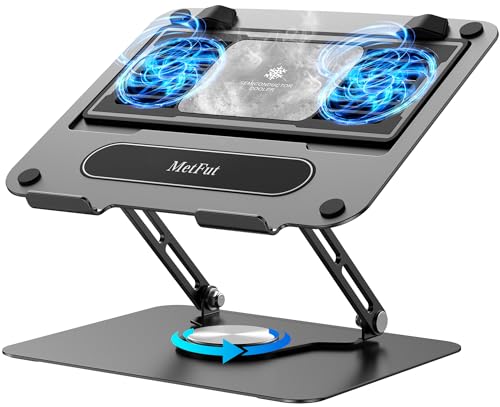
- Peltier-based cooling plus dual fans
- Detachable cooler for flexible use
- Carbon steel frame with adjustable height
Best For: Users who want active temperature reduction in an adjustable stand
Adjustable Desk Lap Stand

- Two fans and 3 USB ports
- Adjustable height, tilt, and 360-degree rotation
- Foldable aluminum build for home use
Best For: People who want a versatile lap desk and cooling stand
Smart Gaming Cooling Stand

- Software-controlled fan speed modes
- 5.5-inch turbo fan for large laptops
- 3 height settings plus USB 3.0 hub
Best For: Owners of large gaming laptops who want smart cooling
Quiet 5-Fan Cooling Value – Kootek 12"-17" Laptop Cooling Pad
If you want a laptop stand with built-in cooling that can handle everyday work or gaming sessions, this Kootek pad offers a strong mix of airflow, height adjustability, and extra USB convenience. Its 5-fan layout, quiet operation, and 6 angle settings make it a practical pick for users who want cooling and comfort in one desk accessory.
Best For: Users who want broad cooling coverage, adjustable viewing angles, and a built-in USB hub for a busy desk setup.
Pros:
- Five built-in fans with separate controls for 1, 4, or all 5 fans running
- Very quiet operation designed to reduce distraction
- Six adjustable height settings for more comfortable typing and viewing
- Dual USB hub adds extra connectivity for peripherals
Cons:
- USB-to-USB cable is included, so Type-C devices need an adapter
- Bulkier than ultra-slim cooling pads because of the larger fan setup
The Kootek stands out if you want a laptop stand with built-in cooling that does more than just move air. It combines wide compatibility, ergonomic positioning, and flexible fan control, making it a sensible all-around choice for work, study, or entertainment.
Open-Frame Cooling Riser – ZMYPPYA Adjustable Laptop Stand
For shoppers seeking a laptop stand with built-in cooling in a more open, stand-style design, this ZMYPPYA riser adds an active fan while staying foldable and lightweight. It is aimed at users who want better airflow, a higher working position, and support for larger laptops without taking up much storage space.
Best For: Users who want an open-frame cooling stand with adjustable support for larger laptops and easy portability.
Pros:
- Active cooling fan helps reduce overheating during long sessions
- Fits 14-inch to 18-inch laptops with screw-based load adjustment up to 5kg
- Foldable design measures only 1.3 inches thick for storage and travel
- Includes a phone mount and USB-A/USB-Type-C ports
Cons:
- Only one fan, so cooling coverage is more focused than multi-fan pads
- Adjustment depends on screw setup rather than quick preset height levels
This model is a good fit if your priority is portability and a sturdier stand format instead of a large cooling pad. The open-frame design and built-in fan make it a practical option for helping keep laptops cooler during long desk sessions.
Slim 3-Fan Portable Pick – havit HV-F2056 Cooling Pad
The havit HV-F2056 is a straightforward laptop stand with built-in cooling for users who want a slim, portable pad that is easy to carry and simple to use. Its three quiet fans, ergonomic height options, and lightweight build make it a dependable choice for travel-friendly cooling.
Best For: Travelers and everyday users who want a slim cooling pad with quiet fans and basic ergonomic lift.
Pros:
- Three ultra-quiet fans help circulate air under the laptop
- Two adjustable height settings improve typing and viewing comfort
- Slim and lightweight design is easy to carry
- Extra USB port adds convenience for additional devices
Cons:
- Only two height settings, so adjustability is limited
- Type-C devices need an adapter for the included USB-to-USB cable
If you want a no-fuss cooling solution that balances portability and comfort, this havit model is a solid fit. It is especially appealing for users who need a compact laptop stand with built-in cooling rather than a larger, more adjustable workstation accessory.
Heavy-Duty Adjustable Stand – Craftreasure Turbo Cooling Holder
This Craftreasure model is a laptop stand with built-in cooling for users who want a sturdier desk holder with strong adjustment range and simple fan control. With a quiet fan, carbon steel construction, and broad angle and height settings, it works well when posture support matters as much as cooling.
Best For: Users who want a sturdy adjustable stand with one-touch cooling and a wide height range.
Pros:
- Built-in quiet cooling fan with one-touch switch
- 0-90° angle adjustment and 0-30cm height range
- Heavy-duty carbon steel build with 10kg load-bearing rating
- Foldable and portable for office, gaming, or DJ use
Cons:
- Only one fan, so it is less aggressive than multi-fan cooling pads
- Designed for 10-16 inch laptops, so it does not suit larger models
This is a good option if you want a more rigid laptop stand with built-in cooling and a bigger focus on posture and stability. The wide adjustment range makes it useful for users who spend long hours at a desk and want a comfortable viewing position.
9-Fan Cooling Power – TECKNET 12–17.3" Laptop Cooler
If you want a laptop stand with built-in cooling for long work or gaming sessions, this TECKNET model puts airflow first. Its 9-fan array, stepless speed control, and 360° surround cooling are aimed at keeping larger laptops from overheating while the adjustable height helps improve comfort at the desk.
Best For: Users who want strong cooling, multiple height settings, and a built-in phone holder for desktop use.
Pros:
- 9 fans with stepless speed control up to 2600 RPM for strong cooling
- 5 height settings, with up to 6 inches of lift and 34° tilt
- Dual USB ports let you power the pad without giving up a laptop port
- Whisper-quiet operation rated below 40 dB
Cons:
- Bulkier than a simple passive stand because it includes a full cooling system
- Best suited to desk use rather than ultra-portable setups
The TECKNET is a practical choice if cooling performance matters more than minimalism. Between the wide compatibility, quiet operation, and ergonomic adjustability, it fits well for extended office work, study, or gaming.
Portable RGB Cooling Stand – YICOSUN Foldable Laptop Stand
This laptop stand with built-in cooling is a good pick if you want a compact, adjustable setup that also adds some visual flair. The YICOSUN uses 2 quiet fans with 3-speed cooling and RGB lighting, while its foldable aluminum alloy frame keeps it light enough for travel or small desks.
Best For: People who want a portable cooling stand for work, gaming, or DJ use.
Pros:
- 2 ultra-quiet fans with 3-speed adjustable cooling
- Height-adjustable, foldable design for easier transport and storage
- Aluminum alloy construction with anti-slip silicone pads
- Fits 10–16 inch laptops, including MacBook, Lenovo, ASUS, and Dell models
Cons:
- Cooling system is smaller than multi-fan laptop coolers
- Requires removing the device before adjusting height or angle
For buyers who value portability and a more polished desktop look, this model balances function with convenience. It is especially appealing if you need a stand that can move between home, office, and travel use without much hassle.
Lap Desk Cooling Workstation – MAX SMART Lap Pad with Mouse Tray
For shoppers looking for a laptop stand with built-in cooling that works away from a desk, this MAX SMART lap pad is a practical all-in-one setup. It combines a cushion base, adjustable angles, a detachable mouse tray, and a silent USB fan to create a comfortable mobile workstation for bed, couch, or car use.
Best For: Users who want a lap desk style stand for comfortable use on sofas, beds, or while traveling.
Pros:
- Built-in silent USB fan helps disperse heat during long sessions
- Detachable mouse tray adds usable workspace on either side
- 5 adjustable angles from 0° to 30° for better posture
- Soft cushion and built-in handle improve comfort and portability
Cons:
- Less suited to a permanent desktop setup than a conventional stand
- Cooling is quieter and simpler than multi-fan gaming-style pads
This model stands out when comfort and mobility matter as much as cooling. If you want a stable lap workstation with extra features instead of a standard desk riser, it offers a well-rounded design.
Thermoelectric Cooling Stand – Metfut Detachable Fan & Cooler
If you want a laptop stand with built-in cooling that goes beyond basic airflow, this Metfut model uses thermoelectric Peltier cooling plus dual fans to actively drop surface temperature. It also adds height and angle adjustment, so it can work as both a cooling accessory and an ergonomic desk stand for laptops, tablets, and even DJ gear.
Best For: Users who want active temperature reduction in a sturdy, adjustable stand for everyday work or lighter gaming.
Pros:
- Thermoelectric cooling with a semiconductor panel for more aggressive heat reduction than standard fan-only pads
- Detachable cooler lets you remove the cooling section when you just want the stand
- Carbon steel frame supports up to 20 lbs and includes anti-slip pads for stability
- Height and angle adjustments help improve comfort during long sessions
Cons:
- Maximum 20W cooling requires a compatible 20W USB adapter sold separately
- May produce mist on the cooling panel in high humidity or when idle
- Best fit is up to 15.6-inch laptops, so larger machines may be less ideal
This is a strong pick if cooling performance matters more than portability. The detachable design and rigid build make it practical, while the quiet operation keeps it usable on a desk or in shared spaces.
Adjustable Desk Lap Stand – WorkEZ Cooling Laptop Riser
This WorkEZ laptop stand with built-in cooling is aimed at comfort first, with a foldable aluminum body, two fans, and a rotating panel that helps you work from a desk, couch, or bed. It combines laptop cooling with an ergonomic tray-style design, making it a practical option if you want one setup that can move around the house.
Best For: People who want a versatile lap desk and cooling stand for bed, couch, or desktop use.
Pros:
- Two fans help cool laptops while you work or relax
- 3 USB ports add useful connectivity for accessories
- 360-degree rotating panel and adjustable height/tilt improve positioning
- Foldable aluminum construction makes it easier to store and move
Cons:
- Designed for laptops up to 15.6 inches, so larger models may not fit as well
- Cooling is fan-based rather than a more aggressive thermal system
- 90-day warranty is shorter than some alternatives
For buyers who value flexibility, this model is easy to recommend. It works as both a portable lap desk and a functional cooling stand, which makes it a solid everyday companion for casual work setups.
Smart Gaming Cooling Stand – llano V12 Ultra Laptop Fan
If you’re shopping for a laptop stand with built-in cooling for a larger gaming machine, the llano V12 Ultra is built around high airflow and software-controlled fan speed. It pairs a 5.5-inch turbo fan with three height settings and a USB hub, so it serves as both a cooling pad and a more complete desk accessory for demanding laptops.
Best For: Owners of 15.6- to 19-inch gaming laptops who want smart cooling and extra desk connectivity.
Pros:
- Smart software control offers automatic Low/Medium/High cooling modes
- 5.5-inch turbo fan is rated to reduce CPU/GPU temperatures quickly
- Three adjustable height settings help improve comfort and posture
- Includes an integrated 3-port USB 3.0 hub and RGB lighting
Cons:
- Software features add complexity if you prefer simple plug-and-play use
- Built specifically for larger laptops, so it is not a good fit for smaller machines
- Single-fan design may be less appealing if you want a dual-fan cooling layout
This model is best suited to serious laptop users who want more than a basic cooler. The combination of strong airflow, adjustable ergonomics, and USB expansion makes it a compelling pick for performance-focused setups.
How We Picked the Best Laptop Stand with Built-In Cooling
We focused on stands that combine steady cooling with usable ergonomics, since a Laptop Stand with Built-In Cooling should do more than just move air. Priority went to models with effective fan coverage, stable construction, sensible adjustment options, and everyday features like USB ports, phone holders, or foldable designs.
We also considered laptop size compatibility, noise level, portability, and whether the cooling system looked suitable for casual use, heavy workloads, or gaming-style heat management.
Quick Comparison
Some buyers will want maximum airflow, while others care more about quiet operation or a more comfortable typing angle. Multi-fan pads usually suit larger laptops and hotter environments. Adjustable riser-style stands are better if you want a more desk-friendly setup and improved posture. Portable picks are best for remote work, while models with RGB lighting or software controls are better for users who want more customization.
Key Buying Factors for a Laptop Stand with Built-In Cooling
Cooling Strength
Check fan count, fan size, and whether airflow is concentrated or spread across the base. More fans do not always mean better performance, but they often help with broader coverage.
Noise and Power
A quieter fan matters if you work in shared spaces or take calls often. USB power is standard, but some models add controls for speed, fan shutoff, or extra ports.
Ergonomics and Adjustability
The best stand should lift the screen to a more comfortable viewing height without feeling unstable. Adjustable angle and height settings are especially useful if you alternate between typing, reading, and meetings.
Fit and Stability
Make sure the stand supports your laptop size and holds the device securely. Wider bases, anti-slip surfaces, and reinforced frames are helpful for heavier machines.
Portability and Extra Features
If you move between rooms or travel often, a foldable, lightweight design can be a major advantage. Extras like phone stands, RGB lighting, detachable fans, or mouse pads are nice, but they should not replace solid cooling and build quality.
Who Should Buy Which Laptop Stand with Built-In Cooling?
If you want the strongest airflow for a larger laptop, choose a multi-fan cooling pad. If comfort and posture matter most, go for an adjustable stand with active cooling. If you need something for commuting, dorms, or hybrid work, look for a slim portable model. If you want a premium desk setup, a more customizable Laptop Stand with Built-In Cooling and speed controls may be the best fit.
In the end, the right choice depends on how hot your laptop runs, how often you work for long stretches, and whether your priority is cooling, comfort, or both.