
If you need dependable disc duplication for backups, media, or business use, the right optical drive duplicator can save time and reduce errors. The best models balance burn speed, target count, and broad disc support.
Below, you’ll find a focused roundup of options for everything from single-disc copying to higher-volume tower setups.
Best 10 Optical Drive Duplicator Picks for 2026
Standalone 5-Target Tower
24X SATA 1 to 5 CD/DVD M-Disc Duplicator

- Standalone operation with no PC required
- Copies one master to five discs
- Supports 24x DVD, 52x CD-R, and M-Disc
Best For: Businesses needing fast standalone DVD/CD duplication
Standalone USB Cloner
StarTech 1:2 USB Flash Drive Duplicator Eraser

- Standalone 1-to-2 USB cloning and erasing
- Supports USB 3.0/2.0 flash drives
- Includes quick erase and overwrite modes
Best For: IT pros managing USB boot drives and drive sanitizing
Standalone 1-Target Tower
24X 1 to 1 CD/DVD M-Disc Duplicator

- Standalone 1-to-1 disc copying
- Supports 24x DVD and 52x CD-R speeds
- Includes M-Disc and free DVD video copy protection
Best For: Simple one-to-one disc duplication and archiving
Portable External Optical Drive
Amicool USB 3.0 USB-C DVD/CD Burner

- Plug-and-play USB 3.0 and Type-C connection
- Reads, writes, and burns common CD/DVD formats
- Slim portable design for laptops and desktops
Best For: Portable disc burning and reading on modern computers
Standalone Duplication Tower
5-Target DVD Duplicator with Software Bundle

- 1-to-5 standalone copying without a PC
- Supports common DVD and CD blank media
- Includes Nero Multimedia Suite 10 Essentials
Best For: Small-batch disc duplication and bundled software convenience
Internal SATA Burner Kit
Lite-On 24x SATA DVD±RW Drive with Install Kit

- 24x DVD writing speed for quick burns
- Supports dual-layer DVDs plus CD formats
- Includes SATA cable and mounting screws
Best For: Desktop upgrades and internal duplicator builds
Standalone 1-to-1 Copier
M-Disc 24x DVD Duplicator Tower

- Standalone operation with no PC required
- Selectable speeds up to 24x DVD and 52x CD-R
- Supports M-Disc and audio CD copy modes
Best For: Basic one-to-one copying and audio CD duplication
Portable USB Burner

- USB-powered plug-and-play setup
- USB 3.0 with wide OS support
- Portable design with built-in cable
Best For: portable disc reading and basic burning on laptops or desktops
Standalone 1-to-1 Tower
Vinpower 1-to-1 DVD/CD Duplicator

- No PC required for operation
- Up to 24x DVD and 52x CD-R speeds
- Supports M-Disc and common CD formats
Best For: standalone single-disc duplication and archival DVD/CD workflows
Multi-Target DVD Tower
BestDuplicator BD-LG-10T 10-Target Tower
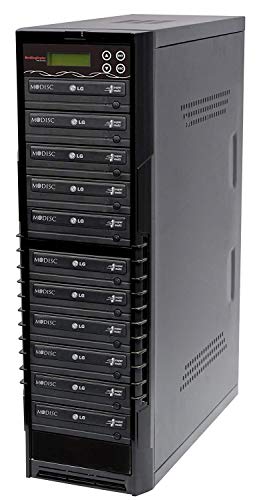
- Stand-alone 1-to-10 disc copying
- Recognizes source disc formats automatically
- Supports common DVD and CD media
Best For: small standalone duplication runs that need multiple copies at once
Standalone 5-Target Tower – 24X SATA 1 to 5 CD/DVD M-Disc Duplicator
If you need an optical drive duplicator for fast, self-contained disc copying, this 1-to-5 tower is built for standalone operation with no PC required. It supports up to 24x DVD and 52x CD-R write speeds, plus M-Disc recording for archival projects.
Best For: Small businesses and studios that need a standalone CD/DVD duplicator with 5-target output.
Pros:
- No computer required for operation
- Copies from one master to up to five discs
- Supports 24x DVD and 52x CD-R write speeds
- Can record to M-Disc media for long-term archiving
Cons:
- Will not copy encrypted discs
- Best suited to SATA-compatible optical media workflows
For buyers focused on straightforward duplication rather than PC-based control, this tower keeps the workflow simple and business-friendly while adding M-Disc support for archival use.
Standalone USB Cloner – StarTech 1:2 USB Flash Drive Duplicator Eraser
While not an optical drive duplicator, this standalone USB duplicator is a practical choice for anyone who needs to clone or erase flash drives without a computer. It handles USB 3.0/2.0 media, offers multiple erase modes, and includes a copy-and-compare verification option.
Best For: IT teams and technicians cloning, wiping, or verifying USB flash drives.
Pros:
- Standalone 1-to-2 USB duplication with no computer required
- Supports cloning and erasing of USB 3.0/2.0 flash drives
- Includes quick erase and secure overwrite options
- Copy-and-compare mode helps verify completed clones
Cons:
- Designed for USB media, not CDs or DVDs
- Asynchronous copy mode is limited by 64 MB source content
If your workflow includes drive sanitizing as well as duplication, this unit is built for efficient bench-side use and simple standalone operation.
Standalone 1-Target Tower – 24X 1 to 1 CD/DVD M-Disc Duplicator
PlexCopier 24X 1 to 1 CD DVD M-Disc Supported Duplicator Copier Tower with Free Copy Protection
Check Price On AmazonThis optical drive duplicator is a compact 1-to-1 tower for users who need a standalone disc copier with M-Disc support and high-speed DVD/CD burning. It offers up to 24x DVD and 52x CD-R write speeds, plus free copy protection for DVD Video using OptoDisc MID media.
Best For: Users who want a simple standalone disc duplicator for one-to-one copying and archiving.
Pros:
- Standalone operation with no PC required
- Supports up to 24x DVD and 52x CD-R write speeds
- Can record to M-Disc media for archival use
- Includes lifetime free tech support
Cons:
- Only duplicates one disc at a time
- Will not copy encrypted discs
For straightforward disc-to-disc copying, this tower keeps things simple while adding archival and copy-protection features that suit business use.
Portable External Optical Drive – Amicool USB 3.0 USB-C DVD/CD Burner
If you need an optical drive duplicator-style external burner for a laptop or desktop, this slim USB 3.0/Type-C drive is built for plug-and-play use. It supports common CD and DVD formats, offers up to 5Gbps data transfer, and is designed for quick setup on modern computers.
Best For: Laptop and desktop users who need a portable external DVD/CD burner and reader.
Pros:
- Plug-and-play connection through USB 3.0 or Type-C
- Supports reading, writing, and burning CD/DVD media
- Portable slim design with built-in cable
- Compatible with Windows, macOS, and Linux
Cons:
- Does not support Blu-ray or DVD-RAM
- Designed for computers only, not TVs or game consoles
This is a practical pick if portability matters more than bulk duplication capacity, especially for users who need an easy-to-carry optical drive for everyday disc work.
Standalone Duplication Tower – 5-Target DVD Duplicator with Software Bundle
If you need an optical drive duplicator for straightforward disc cloning, this Bestduplicator tower is built for small batch duplication without needing a host PC. It supports DVD and CD blank media formats, recognizes the source disc format automatically, and includes Nero Multimedia Suite 10 Essentials for basic burning tasks.
Best For: Small offices, media archives, and users who want a standalone 1-to-5 duplicator with bundled software.
Pros:
- Standalone tower design works without a computer
- Supports DVD+/-R, DVD+/-RW, dual-layer DVD, CD-R, and CD-RW media
- Automatic source disc format recognition
- Includes Nero Multimedia Suite 10 Essentials
Cons:
- Copies are limited to 5 targets per run
- Plastic enclosure may not feel as rugged as metal units
Overall, this is a practical choice if your priority is simple standalone copying with broad disc compatibility and a useful software bundle. It also comes with a 3-year labor warranty and lifetime technical support, which adds value for ongoing use.
Internal SATA Burner Kit – Lite-On 24x SATA DVD±RW Drive with Install Kit
This optical drive duplicator pick is really an internal Lite-On DVD±RW drive with the connectivity and speed needed for desktop builds and duplicator systems. It supports reading and writing CDs and DVDs, including dual-layer discs, and comes with a SATA cable and screws for easier installation.
Best For: Desktop PCs, servers, workstations, and custom duplicator builds that need a reliable internal DVD burner.
Pros:
- 24x DVD writing speed for faster burns
- Supports DVD±R, DVD±RW, dual-layer DVDs, CD-R, and CD-RW
- Includes SATA cable and mounting screws
- Compatible with Windows, Linux, and other SATA-supported systems
Cons:
- Not a standalone duplicator tower
- Designed for internal installation only
If you want a dependable drive for a duplicator chassis or a desktop upgrade, this model keeps the focus on compatibility and speed. It’s a straightforward internal solution rather than a full copying system on its own.
Standalone 1-to-1 Copier – M-Disc 24x DVD Duplicator Tower
For a compact optical drive duplicator that runs on its own, this Optiarc tower is designed for 1-to-1 disc copying with selectable write speeds and M-Disc support. It handles DVD and CD duplication without a PC, and it also offers CD audio copy modes like DAO, TAO, and Mix Audio Compilation.
Best For: Users who want a simple standalone 1-to-1 duplicator for basic disc copying and audio CD workflows.
Pros:
- Standalone operation with no PC required
- Supports selectable DVD speeds up to 24x and CD-R speeds up to 52x
- M-Disc support for compatible use cases
- Useful audio CD duplication modes, including DAO and TAO
Cons:
- Copies only 1 disc at a time
- Cannot copy protected discs
This is a focused choice if you only need basic one-to-one copying and want the convenience of standalone operation. The firmware upgradeability and broad OS compatibility add flexibility, but the system is still best for straightforward duplication tasks.
Portable USB Burner – Rioddas External CD/DVD Drive
If you need an optical drive duplicator for occasional disc reading or burning on a laptop or desktop, this Rioddas external USB 3.0 drive is a straightforward plug-and-play option. It powers from the USB port, offers wide OS compatibility, and is built for users who want a simple, portable drive without extra adapters or software setup.
Best For: Laptop and desktop users who want a portable USB CD/DVD burner for everyday disc reading and basic burning.
Pros:
- Plug-and-play setup with no external driver or power adapter needed.
- USB 3.0 support for fast data transfer, with backward compatibility for USB 2.0.
- Physical eject button and embedded cable design add convenience for daily use.
- Works with Windows, macOS, and Linux across many laptop and desktop systems.
Cons:
- Not compatible with Blu-ray or 4K discs.
- Needs a high-power rear USB port on some desktops for best performance.
- Not suitable for ChromeOS, tablets, phones, TVs, or projectors.
This is a practical choice if your priority is easy disc access rather than high-volume duplication. It is best viewed as a compact external optical drive for flexible everyday use.
Standalone 1-to-1 Tower – Vinpower 1-to-1 DVD/CD Duplicator
Vinpower Digital Standard 1 to 1 Target 24x DVD CD Disc Duplicator Tower SATA Optical Drives - Black
Check Price On AmazonThis optical drive duplicator is built for standalone disc copying without needing a PC, making it a strong fit for users who want a dedicated tower system. With support for up to 24x DVD and 52x CD-R write speeds, it is aimed at straightforward one-to-one duplication, archival media, and controlled disc production.
Best For: Users who need a standalone 1-to-1 DVD/CD duplicator tower with no computer required.
Pros:
- Standalone operation means no PC is required.
- Supports up to 24x DVD and 52x CD-R write speeds.
- Handles common CD formats plus CD-TEXT, ISRC, and over-burned CD.
- Supports M-Disc DVD media for archival use.
Cons:
- Will not copy encrypted discs.
- Large 14-pound tower design is not portable.
- Only a 1-to-1 duplicator, so it is not built for multi-target output.
For buyers who want a purpose-built, no-computer disc duplicator, this model stays focused on the core job. Its feature set is best suited to dependable single-disc copying and archival workflows.
Multi-Target DVD Tower – BestDuplicator BD-LG-10T 10-Target Tower
BestDuplicator BD-LG-10T 10 Target 24x SATA DVD Duplicator with Built-in LG Burner (1 to 10)
Check Price On AmazonIf you need an optical drive duplicator that can copy one source disc to multiple targets at once, this 10-target tower is built for that job. It operates as a fully stand-alone system with intelligent source-format recognition, so it is aimed at users who want a simpler multi-disc duplication setup without connecting to a computer.
Best For: Small duplication jobs that need stand-alone 1-to-10 DVD copying.
Pros:
- Copies to 10 targets in a fully stand-alone design.
- Intelligent disc format recognition simplifies source handling.
- Supports DVD+/-R, DVD+/-RW, dual-layer DVD, CD-R, and CD-RW media.
- Includes 1-year warranty and lifetime USA tech support.
Cons:
- Read speed is listed at 8x, which is modest for a duplicator tower.
- At 42 pounds, it is heavy and not easy to move.
- Best suited to optical disc copying rather than general-purpose drive use.
This model makes sense when you need more than a basic burner and want multi-target copying in a dedicated tower. It is a practical pick for users who value standalone operation and support coverage over portability.
How We Picked the Best Optical Drive Duplicator Models
We focused on practical specs that matter in real use: target count, supported disc formats, burn speed, M-Disc support, and whether the unit is standalone or computer-dependent. We also considered build quality, included software or copy protection features, and how well each setup fits home, office, or small-production workflows.
Quick Comparison: Which Setup Fits Your Needs?
A smaller 1-to-1 Optical Drive Duplicator is ideal when you only need occasional copies and want a simple, lower-cost setup. A 1-to-5 or 1-to-10 tower makes more sense for batch duplication, letting you produce multiple discs from one source in a single run. External USB drives are better for laptops or light use, while SATA tower systems are a stronger fit for dedicated duplication workstations.
Key Buying Factors for an Optical Drive Duplicator
Target Count and Workflow
Choose your target count based on volume, not just price. If you duplicate discs regularly, a higher-capacity tower can reduce overall labor. For small jobs, a 1-to-1 unit is simpler and usually easier to manage.
Disc Compatibility
Look for support for CD-R, CD-RW, DVD±R, DVD±RW, and dual-layer media if you need flexibility. M-Disc support is worth considering for long-term archiving. If Blu-ray is part of your workflow, make sure the model explicitly supports it rather than assuming DVD capability is enough.
Standalone Vs. Computer-Based
Standalone duplicators are often the easiest choice for straightforward copying because they don’t rely on a PC. Computer-based drives can be useful for software control, file management, or a simpler desktop upgrade, but they may be less convenient for repeated bulk jobs.
Burn Speed and Reliability
Higher speed is helpful, but stability matters more than raw numbers. A well-matched drive and quality media usually produce better results than a faster setup using low-grade discs.
Who Should Buy Which Optical Drive Duplicator?
Buy a 1-to-1 Optical Drive Duplicator if you want a compact, budget-friendly way to copy discs or add a reliable burner to a workstation. Choose a 1-to-5 tower if you need efficient small-batch duplication for business, training, or media production. Go with a 1-to-10 system if throughput matters most and you want to minimize repeat runs. If you mainly need portable disc reading or burning on a laptop, an external USB optical drive may be the better fit than a full tower.
For buyers prioritizing archiving, compatibility, and repeatable performance, the best choice is usually the one that matches your media type, output volume, and setup environment instead of the one with the biggest spec sheet.