
Building a large game collection means thinking beyond raw speed. The right drive can make installs smoother, keep your library organized, and give you enough space for today’s huge game files.
Below, we focus on the best options for gamers who want dependable internal storage without overpaying for features they may not need.
Best 10 Internal Hard Drive for Gaming Library Picks for 2026
Atlas Drive
Toshiba X300 5TB Gaming Performance HDD
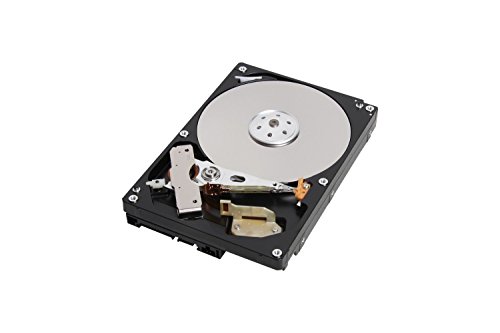
- 7200 RPM with 128MB cache
- 5TB capacity for large game libraries
- CMR SATA desktop internal drive
Best For: desktop gamers needing fast, roomy HDD storage
Retro Vault
Kinhank 4TB Retro Game Hard Drive

- 75,000+ games with 200+ emulators
- 7200 RPM and 256MB cache
- Easy plug-and-play retro setup
Best For: retro gamers wanting a preloaded library on Windows
Black Cache
WD_BLACK 8TB Gaming Internal HDD

- 8TB capacity for large libraries
- 7200 RPM with 128MB cache
- 5-year limited warranty
Best For: gamers who want big internal storage and long warranty coverage
Workhorse Pro
Seagate IronWolf Pro 6TB SATA Drive
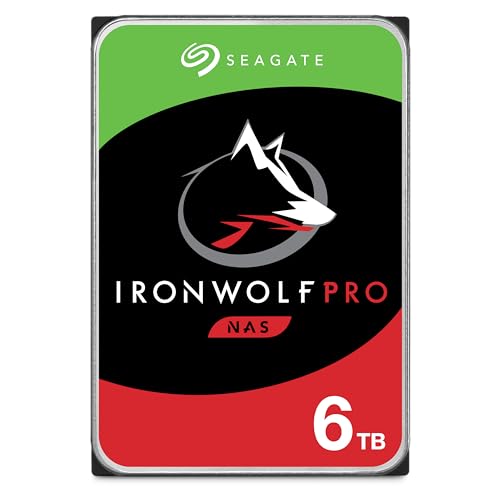
- 6TB desktop internal storage
- 256MB cache with 7200 RPM
- 24/7 operation with vibration sensor
Best For: durable always-on storage for a desktop game library
Performance desktop choice
WD Black 4TB Performance Desktop Drive

- 7200 RPM desktop mechanical drive
- 256MB cache with Dynamic Cache Technology
- 5-year limited warranty
Best For: Gamers and PC builders wanting performance-focused 4TB storage
High-capacity storage pick

- 8TB capacity for large libraries
- 7200 RPM with NAS reliability features
- 5-year limited warranty
Best For: Big storage needs where reliability and capacity come first
Seagate 8TB Storage Pick

- 8TB capacity for large game libraries
- 256 MB cache and 190 MB/s sustained transfer rate
- 5400 RPM desktop internal drive
Best For: Large-capacity game storage on a desktop PC
WD_BLACK Performance Pick

- 7200 RPM with 64 MB cache
- SATA 6 Gb/s internal drive
- Built for gamers and PC builders
Best For: Performance-focused 1TB storage for a gaming PC
Atlas Drive – Toshiba X300 5TB Gaming Performance HDD
If you want an internal hard drive for gaming library storage with a focus on speed and capacity, the Toshiba X300 5TB is built for exactly that job. Its 7200 RPM spindle, 128MB cache, and CMR design make it a practical pick for storing large game installs on a desktop while keeping load performance more responsive than slower capacity drives.
Best For: Desktop gamers who want a fast, high-capacity 3.5-inch HDD for a large local game library.
Pros:
- 7200 RPM performance with a 128MB cache
- 5TB capacity suits growing game libraries
- CMR SATA 6.0 Gb/s design for desktop use
- Built for gaming PCs and high-end workstations
Cons:
- Mechanical drive, so it will not match SSD speed
- Requires internal desktop installation
- Limited to a 2-year warranty
Overall, this is a straightforward high-capacity gaming HDD for users who want more room without giving up the performance features typical of a premium desktop drive. It is especially sensible if your priority is storing many large titles on one reliable internal drive.
Retro Vault – Kinhank 4TB Retro Game Hard Drive
This internal hard drive for gaming library use is really aimed at retro fans who want a ready-made game collection rather than a blank storage disk. The Kinhank 4TB drive includes 6 game front ends, 75,000+ games, and support for 200+ emulators, making it a plug-and-play style option for turning a Windows PC into a retro gaming setup.
Best For: Retro gaming setups on Windows 7/8/10/11 that want a huge preloaded library and easy setup.
Pros:
- Includes 75,000+ games and 200+ emulators
- 7200 RPM drive with 256MB cache
- SATA 3.0 to USB 3.0 interface for faster transfers
- Simple operation with no complicated setup
Cons:
- Designed for retro gaming rather than modern AAA installs
- External-style USB 3.0 connectivity, not internal SATA installation
- Large games may need stronger CPU and GPU hardware
For anyone building a retro library, this is less about raw drive storage and more about convenience and content. It makes the most sense if you want a broad selection of classic games in one portable package and do not mind the system requirements for heavier titles.
Black Cache – WD_BLACK 8TB Gaming Internal HDD
For a larger internal hard drive for gaming library storage, the WD_BLACK 8TB is built around capacity, speed, and long-term reliability. It uses a 7200 RPM mechanism, 128MB cache, and Western Digital’s StableTrac and Dynamic Cache Technology, so it is aimed at gamers and builders who need a desktop drive for big installs and everyday use.
Best For: Gamers and system builders who want an 8TB desktop HDD with strong warranty support.
Pros:
- Large 8TB capacity for extensive game libraries
- 7200 RPM speed with 128MB cache
- StableTrac and Dynamic Cache Technology for reliability
- 5-year limited warranty
Cons:
- Mechanical HDD performance is slower than SSDs
- Requires internal desktop installation
- Bulky 3.5-inch form factor
This drive makes a strong case when storage size matters as much as performance features. If you want one internal disk to hold a lot of games and prefer a longer warranty, the WD_BLACK is a practical premium option.
Workhorse Pro – Seagate IronWolf Pro 6TB SATA Drive
If you need an internal hard drive for gaming library storage with a focus on durability and sustained operation, the Seagate IronWolf Pro brings server-style endurance to a desktop-friendly 3.5-inch form factor. Its 7200 RPM speed, 256MB cache, and SATA 6Gb/s interface make it a capable choice for a large game library, especially if you also value 24/7 operation features.
Best For: Users who want a durable 6TB drive for a desktop game library and always-on use.
Pros:
- 6TB capacity provides plenty of room for games
- 256MB cache and 7200 RPM speed
- Built for 24/7 continuous operation
- Includes vibration sensor and AgileArray features
Cons:
- Mechanical drive is not as fast as solid-state storage
- Primarily marketed for storage durability, not gaming-specific flair
- Smaller capacity than some higher-end gaming HDDs
As a gaming library drive, this is the most durability-minded option in the group. It is a good fit if you want dependable storage that can stay on and keep up with heavy use rather than the absolute highest capacity.
Performance desktop choice – WD Black 4TB Performance Desktop Drive
If you want an internal hard drive for gaming library storage with a stronger performance focus, the WD Black 4TB is built for desktop use, 7200 RPM operation, and a 256MB cache. It is aimed at gamers, system builders, and creative professionals who want a fast mechanical drive for large installs, media, and general PC storage.
Best For: Gamers and PC builders who want a performance-oriented 4TB drive for a large local game library.
Pros:
- 7200 RPM design with SATA 6 Gb/s connectivity for desktop performance use
- 256MB cache and WD Dynamic Cache Technology help optimize responsiveness
- StableTrac is included to improve drive stability and reliability
- 5-year limited warranty adds long-term support
Cons:
- Mechanical hard drive, so it will not match SSD-level load times
- 4TB capacity may be limiting if you keep very large game libraries
This is a sensible pick if you want a reliable, performance-focused storage drive without moving to an SSD. It is best viewed as a high-capacity game library drive where speed, warranty coverage, and desktop tuning matter.
High-capacity storage pick – WD Red Pro 8TB NAS Drive
WD Red Pro 8TB 3.5-Inch SATA III 7200rpm 128MB Cache NAS Internal Hard Drive (WD8001FFWX)
Check Price On AmazonFor an internal hard drive for gaming library storage where capacity matters more than flashy branding, the WD Red Pro 8TB gives you a large 3.5-inch SATA drive with 7200 RPM performance. It is designed for NAS use, but its 8TB size, vibration protection, and reliability features can also make sense in a desktop that needs lots of room for games, backups, and shared files.
Best For: Users who want a high-capacity 8TB drive and value reliability features for heavy storage use.
Pros:
- 8TB capacity leaves plenty of space for a big game library
- 7200 RPM and SATA III support for solid mechanical-drive performance
- 3D Active Balance Plus, NASware 3.0, and vibration/shock protection improve reliability
- 5-year limited warranty
Cons:
- NAS-focused design may be more than some desktop users need
- Package includes the drive only, so cables and mounting hardware are separate
If your priority is sheer capacity and dependable operation, this drive stands out as a storage-heavy option. It is especially appealing when you want one large internal drive to hold a growing library without worrying about space as quickly.
Balanced gaming storage – WD_Black 6TB Performance Drive
The WD_Black 6TB is a straightforward internal hard drive for gaming library storage if you want a desktop-focused mechanical drive with a good balance of capacity and performance. It runs at 7200 RPM, uses SATA 6 Gb/s, and includes up to 256MB of DRAM cache to support faster read operations for large files and game installs.
Best For: Gamers and creative users who want a 6TB desktop drive with performance-minded features.
Pros:
- 6TB capacity is a strong middle ground for a sizable game library
- 7200 RPM class with SATA 6 Gb/s for desktop performance
- Up to 256MB DRAM cache helps with faster read operations
- Designed for gamers, creative professionals, and system builders
Cons:
- Mechanical drive speeds are still below SSD performance
- Listed cache details vary in the supplied specs, so confirm before buying
This model is a practical choice when you want more room than a 4TB drive but do not need to jump all the way to 8TB. It fits well as a dedicated game library drive in a desktop build where capacity and performance both matter.
Seagate 8TB Storage Pick – BarraCuda 8TB Desktop HDD
If you want an internal hard drive for gaming library storage, this Seagate BarraCuda 8TB model is built for sheer capacity. It uses a 3.5-inch SATA 6 Gb/s connection, 5400 RPM speed, and a 256 MB cache, making it a practical pick when your main goal is to store a lot of games, media, and other desktop files reliably.
Best For: Gamers who need maximum storage space for a large game library on a desktop PC.
Pros:
- Massive 8TB capacity for large game installs and other files
- 256 MB cache and up to 190 MB/s sustained transfer rate
- Built on BarraCuda reliability backed by 20 years of innovation
- Works as a desktop internal drive and is also listed for gaming console compatibility
Cons:
- 5400 RPM speed is slower than performance-focused gaming HDDs
- Frustration-Free Packaging means anti-static bag only, with no cables or box
For a gaming library drive, this BarraCuda is best when capacity matters more than speed. It is a straightforward storage upgrade for users who want a dependable place to keep a growing collection of games.
WD_BLACK Performance Pick – WD Black 1TB 7200 RPM HDD
If you need an internal hard drive for gaming library use and want a faster-feeling mechanical drive, this WD_BLACK 1TB model is aimed at performance-oriented builds. It runs at 7200 RPM with a 64 MB cache and SATA 6 Gb/s connectivity, making it a solid choice for users who value responsiveness over raw storage size.
Best For: Gamers and PC builders who want a performance-focused 1TB internal HDD.
Pros:
- 7200 RPM speed for stronger everyday performance
- 64 MB cache and SATA 6 Gb/s interface
- Designed for gamers, creative professionals, and system builders
- Available in capacities up to 10TB in the product line
Cons:
- 1TB capacity is modest for very large game libraries
- Product notes list it as portable, but it is a 3.5-inch internal hard drive
This WD_BLACK drive makes more sense if you want a faster boot/game storage companion rather than a huge archive drive. It is a practical performance pick for a smaller gaming library or for supplementing an SSD.
Seagate Value Gaming Drive – BarraCuda 1TB 7200 RPM HDD
This Seagate BarraCuda 1TB drive is a simple internal hard drive for gaming library storage when you want a basic, dependable desktop option. It uses a 3.5-inch SATA design, 7200 RPM speed, and a 64 MB cache, so it fits well as a straightforward secondary drive for games, files, and everyday PC use.
Best For: Budget-conscious users who want a general-purpose 1TB gaming library drive.
Pros:
- 7200 RPM speed for a snappier mechanical drive experience
- 64 MB cache and SATA 6 Gb/s support
- Good general-purpose fit for music, video, photo editing, and PC gaming
- Frustration-Free Packaging and a 2-year warranty
Cons:
- 1TB capacity may fill quickly for larger game collections
- Frustration-Free Packaging means no box or accessories
If you just need an affordable gaming library drive for a smaller install set, this BarraCuda is an easy fit. It does not try to be flashy, but it covers the essentials well for desktop storage.
How We Picked the Best Internal Hard Drive for Gaming Library
For an Internal Hard Drive for Gaming Library storage, we prioritized capacity, sustained performance, cache size, spindle speed, interface compatibility, and track record for reliability. We also weighed whether each drive makes sense for a gaming desktop, a high-capacity archive, or mixed-use storage alongside an SSD.
Quick Comparison
Use a faster 7,200 RPM drive if you want better responsiveness for large installs and frequent game launches. Choose a high-capacity 5,400 RPM model if you mainly need cheap bulk space for a growing library. NAS-oriented drives can be a smart fit when durability and 24/7-style workloads matter more than peak game load speed.
Key Buying Factors for an Internal Hard Drive for Gaming Library
Capacity
Modern games can easily exceed 100GB each, so 4TB is a practical starting point and 6TB to 8TB is better for serious collectors. If you keep many installed titles at once, prioritize total terabytes over small gains in benchmark speed.
Speed and Cache
7,200 RPM drives generally offer snappier file transfers and better overall responsiveness than 5,400 RPM models. A larger cache can help with bursty loads, but it does not replace a faster spindle speed or good system balance.
Form Factor and Interface
Most desktop gaming builds use 3.5-inch SATA drives, so check your case bays, motherboard ports, and power connectors before buying. These drives are best paired with an SSD for the operating system and frequently played titles.
Reliability and Usage Pattern
If your library is mostly cold storage, a standard desktop drive is often enough. If you expect constant downloads, transfers, or heavier use, consider a more durable model designed for demanding workloads.
Who Should Buy Which Internal Hard Drive for Gaming Library?
Choose a 1TB drive only if you want a low-cost secondary drive for a smaller selection of older or less demanding games. Go with 4TB to 6TB if you want the best balance of price and usable game storage. Pick 8TB if you want to future-proof your library and minimize uninstalling and reinstalling.
If you are building a larger desktop library, a high-capacity 7,200 RPM model is usually the sweet spot. If your priority is simply maximum room for the money, a slower high-capacity drive can still be a strong value as long as you are realistic about load-time expectations.