
Need a reliable webcam for overhead recording? The right setup can make tabletop demos, lessons, unboxings, and craft videos look clear and professional without a complicated rig.
Below, we’ve rounded up 10 buyer-friendly options for different budgets and use cases, from document cameras to adjustable overhead mounts and AI-framed webcams.
Best 10 Webcam for Overhead Recording Picks for 2026
3-in-1 Teaching Camera
Webcam and Overhead Camera for Classroom

- Document camera, webcam, and visualiser in one
- 5-level fill light plus adjustable brightness
- USB-C plug-and-play for Mac, Windows, and Chromebooks
Best For: Teachers and tutors who need one camera for overhead demos and meetings
Tripod Video Webcam
1080p Webcam for Recording and Calls

- 1080p/30fps video with fast autofocus
- Includes a stable telescopic tripod
- Dual noise-cancelling mics for clearer audio
Best For: People who want a basic webcam with a tripod for flexible recording angles
Pro Document Camera

- 8MP sensor with up to 3264 x 2448 capture
- Up to 30 fps at full HD for smoother streaming
- Fast autofocus and Mac, Windows, Chromebook support
Best For: Teachers and presenters who need a purpose-built overhead document camera
Overhead Mount Stand
Webcam Stand for Desk Recording
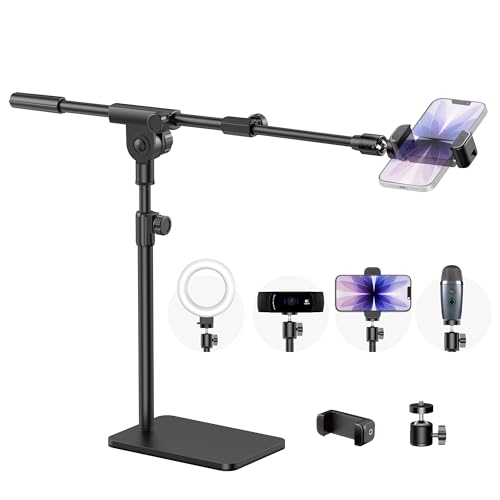
- Heavy metal base helps reduce wobble
- Universal 1/4-inch thread fits many devices
- 180-degree ball head for flexible overhead angles
Best For: Creators who need a stable overhead stand for a webcam or phone
AI Framing Overhead Pick
OBSBOT Meet SE 1080P 100FPS Webcam

- 1080p at 100FPS with 720p at 150FPS option
- AI framing and gesture control for easier operation
- 1/2.8" stacked CMOS with low-light enhancements
Best For: Creators who want smooth video and smart auto-framing
Document Camera Overhead Pick
4K USB Document Camera for Teacher

- 8MP/2448P document camera with 30fps output
- Manual image reversal and adjustable brightness
- Foldable multi-joint design covers A3-size work
Best For: Teachers and presenters recording documents or demos from above
Mounting Solution Overhead Pick

- 22-inch articulated arm for overhead positioning
- 600g capacity with anti-deflection interface
- Clamp fits desktops and round tubes
Best For: Creators who need a stable overhead mount for cameras or phones
Everyday Webcam Pick
Logitech Brio 101 Full HD 1080p Webcam

- 1080p video with auto-light correction
- Built-in mic and USB-A plug-and-play
- Privacy shutter for quick coverage
Best For: Straightforward meetings, streaming, and light overhead-use setups
Overhead Mount Solution
Overhead Camera Mount Desk Stand

- Adjustable arm and 360° ballhead
- Works with webcams, phones, lights, mics
- Clamp fits desks up to 1.77 inches
Best For: Adjustable top-down webcam and light setups
Top-Down Creator Kit
Overhead Camera Mount with Ring Light

- 6-inch ring light with 3 modes and 10 levels
- Flexible joints for top-down angles
- Fits lightweight webcams and phones
Best For: Overhead recording setups that need built-in lighting
3-in-1 Teaching Camera – Webcam and Overhead Camera for Classroom
If you want a webcam for overhead recording that can also switch into a regular webcam, this 3-in-1 document camera is built for teaching, demos, and home office use. Its flexible hose-style body makes it easier to aim at worksheets, crafts, or products, while the built-in LED lighting helps in dim rooms. It also supports image invert and autofocus for a cleaner workflow during live lessons or recorded presentations.
Best For: Teachers, tutors, and presenters who need one camera for overhead demos and standard video calls.
Pros:
- Works as a document camera, webcam, and visualiser in one unit
- 5-level fill light and adjustable brightness help in low light
- Image invert and autofocus make live teaching easier
- USB-C plug-and-play compatibility with Mac, Windows, and Chromebooks
Cons:
- Maximum practical video capture is listed at 1080p in the details
- Best suited to desk-based use rather than portable field recording
This is a strong pick if your priority is flexibility: it handles overhead content, web teaching, and video chat without needing separate devices. The tradeoff is that it is more of a classroom-style camera than a travel-friendly webcam.
Tripod Video Webcam – 1080p Webcam for Recording and Calls
This webcam for overhead recording is a practical choice if you want a standard USB camera that can sit on a tripod for a better top-down or angled setup. It records at 1080p/30fps, uses fast autofocus, and includes low-light correction for more consistent results in everyday rooms. The included tripod and 360-degree rotation make it easier to position for tutorials, meetings, and general recording.
Best For: Users who want a simple 1080p webcam with a tripod for flexible recording angles.
Pros:
- 1080p at 30fps delivers smooth video for calls and recording
- Included tripod supports desk positioning and adjustable height
- Dual noise-cancelling mics help keep speech clear
- Autofocus, low-light correction, and 360-degree rotation add convenience
Cons:
- It is a general webcam, not a dedicated document camera
- Overhead use depends on how you place the tripod and camera angle
For buyers who want a straightforward webcam setup that can adapt to overhead-style recording, this model covers the essentials without much fuss. It is especially appealing if you value the included tripod and mic performance more than specialty teaching features.
Pro Document Camera – 8MP USB Camera for Live Demo
If you need a webcam for overhead recording that is really designed around documents and tabletop demos, the IPEVO V4K stands out. Its 8MP sensor, fast focusing, and high frame-rate streaming make it well suited to showing books, objects, or handwritten material in real time. It also works across Mac, Windows, and Chromebook setups, which is helpful for classrooms and remote presentations.
Best For: Teachers, remote presenters, and demo creators who want a purpose-built document camera.
Pros:
- 8MP camera captures up to 3264 x 2448 images
- Up to 30 fps at full HD for smooth live streaming
- Fast focusing and Sony CMOS sensor help reduce interruptions
- Compatible with Mac, PC, and Chromebook workflows
Cons:
- Requires more powerful system specs for the best recording performance
- No zoom function
This is the most specialized option in the group if your main goal is overhead teaching or live demos. It is less of a general webcam and more of a serious document camera, which is exactly what many recording workflows need.
Overhead Mount Stand – Webcam Stand for Desk Recording
If you already have a camera and want a better webcam for overhead recording setup, this overhead mount is built to hold webcams, phones, and similar gear steady above the desk. The heavy metal base is designed to reduce wobble, and the adjustable ball head gives you more control over angle and framing. That makes it useful for tutorials, crafting videos, live demos, and other tabletop work.
Best For: Creators who need a stable overhead stand for webcams, phones, or small cameras.
Pros:
- Heavy 3.62 lb metal base adds stability and lowers wobble
- Universal 1/4-inch thread works with webcams, phones, lights, and more
- 180-degree rotation and ball head allow precise angle adjustments
- Tool-free setup is quick and portable
Cons:
- It is a stand, not a camera, so you need your own webcam or phone
- Better suited to desk setups than fast-moving shooting environments
This is the right choice if your biggest problem is camera positioning rather than image quality. For overhead recording, a stable mount can matter just as much as the camera itself, and this one is built to keep your framing steady.
AI Framing Overhead Pick – OBSBOT Meet SE 1080P 100FPS Webcam
If you want a webcam for overhead recording that can also handle regular desktop use, the OBSBOT Meet SE stands out for its 100FPS 1080p capture, AI framing, and flexible control features. It is a strong choice when you need smooth motion, automatic composition, and a compact camera that plugs in easily.
Best For: Creators and streamers who want fast-frame 1080p recording with AI-assisted framing and gesture control.
Pros:
- Up to 1080P at 100FPS for smoother recording, with 720P at 150FPS as another high-frame option.
- AI framing can recognize individuals or groups and adjust composition in real time.
- 1/2.8″ stacked CMOS sensor, Dual Native ISO, and Staggered HDR help improve low-light video quality.
- Gesture control and OBSBOT Center software add convenient hands-free operation and tuning.
Cons:
- Requires OBSBOT software settings for 100FPS output.
- Better suited to a general camera workflow than a dedicated document-style overhead setup.
This is a versatile webcam if you need premium video motion and smart framing in a small, USB-C package. For overhead recording, it works best when paired with a mount that positions the camera exactly where you need it.
Document Camera Overhead Pick – 4K USB Document Camera for Teacher
For a webcam for overhead recording focused on papers, products, or demos, this 4K USB document camera is built more like a visualiser than a standard webcam. Its foldable arm, A3 coverage, manual image reversal, and adjustable LED lighting make it practical for teaching, live demonstrations, and close-up capture.
Best For: Teachers, presenters, and demo creators who need a document camera for overhead-style recording.
Pros:
- 8MP/2448P capture with 30fps output for high-resolution image and video transmission.
- Manually adjustable image reversal helps switch between mirrored and normal views.
- 3-level LED light and brightness controls help in both dark and bright environments.
- Foldable, multi-joint design supports angled shooting of 2D and 3D objects up to A3 size.
Cons:
- Its document-camera design is less suitable if you mainly want a traditional face webcam.
- Maximum capture speed is 30fps, so it is not aimed at high-frame motion recording.
If your priority is overhead recording of documents, books, or hands-on demos, this model is a strong fit. It brings the right mix of lighting control, macro focus, and flexible positioning for classroom or presentation use.
Mounting Solution Overhead Pick – SMALLRIG 22" Magic Arm Clamp
If you already have a webcam for overhead recording and just need a stable way to position it, this SMALLRIG magic arm clamp is the kind of accessory that makes a desk setup work. The 22-inch articulated arm, strong clamp, and anti-deflection interface are designed to hold a camera, phone, light, or other lightweight gear in place.
Best For: Users building an overhead webcam mount for filming, streaming, or video calls.
Pros:
- 22-inch arm gives more reach than typical magic arms for overhead positioning.
- 600g load capacity and anti-deflection 1/4″-20 interface improve stability.
- Clamp opens up to 63.5mm and can attach to desktops or round tubes.
- Includes 1/4″-20 screws, adapter, and phone holder for flexible setups.
Cons:
- It is a mount accessory, not a camera, so you still need a separate webcam or phone.
- Recommended load capacity is 600g, so it is best for lighter gear.
This is a useful support piece if your main challenge is getting the right overhead angle rather than buying a new camera. For creators who want a more flexible desk rig, it can be the missing link between the webcam and the shot.
Everyday Webcam Pick – Logitech Brio 101 Full HD 1080p Webcam
If you need a webcam for overhead recording as well as regular calls, the Logitech Brio 101 is a simple plug-and-play option that covers the basics well. It brings 1080p video, auto-light correction, and an integrated privacy shutter, making it a practical choice for desks where you want an easy setup and dependable image quality.
Best For: Users who want a straightforward 1080p webcam with auto-light correction for meetings, streaming, and light overhead-use setups.
Pros:
- 1080p Full HD video with automatic light balancing for brighter-looking images
- Built-in microphone and easy USB-A plug-and-play connection
- Integrated privacy cover for quick on/off protection
- Compatible with Teams, Zoom, Google Meet, and more
Cons:
- Fixed-focus design limits fine adjustment for close overhead work
- 60-degree viewing angle is fairly narrow for larger tabletop scenes
- Not a purpose-built overhead mount or arm solution
For buyers who mainly want a reliable webcam for overhead recording support and everyday video use, the Brio 101 is best viewed as a budget-friendly, easy-to-live-with camera rather than a specialized capture tool. It does the essentials well, especially in lower light, but you’ll need separate mounting hardware if your workflow depends on true top-down framing.
Overhead Mount Solution – Overhead Camera Mount Desk Stand
This overhead camera mount is built for a webcam for overhead recording when you need the camera positioned above the desk instead of sitting in front of it. The adjustable desk clamp, overhead arm, ballhead, and included phone holder give you several ways to set up a webcam, light, or phone for top-down content.
Best For: Creators who want an adjustable overhead mount for webcams, phones, lights, and compact recording setups.
Pros:
- Overhead arm and 360° ballhead help dial in a better top-down angle
- Supports webcams, smartphones, microphones, and video lights
- C-clamp design fits desks up to 1.77″ / 4.5 cm thick
- Steel and ABS construction for a practical desktop setup
Cons:
- Max load is only 0.5 kg, so it is not for heavier gear
- Best suited to lightweight webcams and accessories only
- Requires some adjustment to find the ideal overhead position
For overhead recording workflows, this mount matters more than the camera itself because it gives you the positioning flexibility a normal webcam stand cannot. If your setup uses a lightweight webcam and you need repeatable top-down framing for classes, crafts, or demos, this is the more useful part of the system.
Top-Down Creator Kit – Overhead Camera Mount with Ring Light
If you want a webcam for overhead recording with built-in lighting support, this mount combines a flexible arm system with a dimmable 6-inch ring light. The swivel ball head, multiple clamp and arm joints, and broad device compatibility make it a versatile desktop option for cooking videos, crafting, and other top-down content.
Best For: Creators who want an overhead recording setup with adjustable lighting and flexible webcam positioning.
Pros:
- 6-inch ring light offers 3 lighting modes and 10 brightness levels each
- Flexible arm and ball joints support top-down recording at different angles
- Compatible with lightweight cameras, webcams, phones, and ring lights
- Universal 1/4 threaded heads fit many common webcam models
Cons:
- 3 lb max load means it is not for heavy-duty cameras
- Best suited to lightweight devices rather than larger rigs
- Desk clamp is limited to surfaces up to 2 inches thick
This is a strong choice when overhead recording needs both positioning flexibility and extra light in one package. It is especially useful if you shoot food, craft, or tutorial content and want a compact setup that can adapt to different desk layouts without a separate lighting rig.
How We Picked the Best Webcam for Overhead Recording
We focused on products that make overhead capture easier, clearer, and more stable. Priority went to image quality, mounting flexibility, compatibility with common operating systems and conferencing apps, low-light performance, and practical features like autofocus, mic quality, LED lighting, and image inversion. We also considered whether each option suits teaching, streaming, product demos, or desk-based content creation.
Quick Comparison
If you want the simplest all-in-one solution, document cameras are usually the most straightforward. If you already own a good webcam, an overhead mount or articulating arm can be the more affordable path. AI webcams can work well for face-to-camera use, but they are best for overhead setups only when paired with a stable arm and the right angle.
Key Buying Factors for Webcam for Overhead Recording
Stability and Mounting
A Webcam for Overhead Recording should stay locked in place once positioned. Look for sturdy clamps, metal arms, and joints that hold angle under the weight of the camera or phone. Any wobble will be obvious in tabletop footage.
Image Quality and Framing
For close-up demos, sharp detail matters more than flashy extras. Higher resolution, good autofocus, and wide enough framing help keep hands, tools, and products visible. If you film documents or larger boards, make sure the camera can capture the full working area without heavy distortion.
Lighting and Low-Light Performance
Overhead setups often cast shadows from your hands or gear. Built-in LEDs, strong low-light correction, and a clean sensor can reduce noise and improve readability. If the room lighting is poor, consider a camera with integrated lights or plan for external lighting.
Software Compatibility
Check that the device works with your operating system and the apps you use most, such as Zoom, OBS, Teams, or classroom software. Features like image invert, tripod support, and plug-and-play USB connectivity can save setup time.
Who Should Buy Which Webcam for Overhead Recording?
Teachers and presenters often benefit most from document cameras because they are designed for overhead viewing and fast classroom use. Creators who already have a preferred webcam may get better value from a solid overhead arm or mount. Streamers and video makers who want smoother tracking and a more polished on-camera look may prefer an AI webcam, especially when overhead shooting is only one part of their workflow.
In short, the best choice depends on whether you want convenience, flexibility, or the highest possible image quality for a fixed tabletop setup.