
If you want a compact Proxmox host with serious performance, Minisforum has become one of the most interesting options for homelabs and edge virtualization. The right model can handle containers, lightweight VMs, and even more demanding lab workloads without taking up much space.
This roundup focuses on Minisforum mini PCs that make sense for Proxmox users who care about upgradeability, network speed, and efficient 24/7 operation.
Best 9 Minisforum Mini PC for Proxmox Picks for 2026
Best for Heavy Virtualization
MINISFORUM AI X1 Pro Ryzen AI 9 HX370
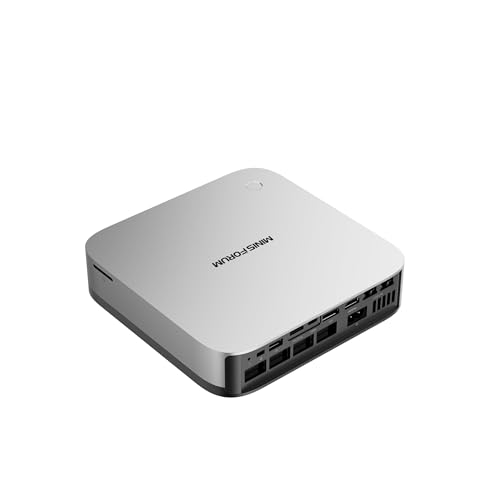
- 12C/24T CPU handles multiple VMs and containers
- Dual 2.5GbE, Wi‑Fi 7, and USB4 improve connectivity
- OCuLink and triple PCIe 4.0 SSD support aid expansion
Best For: Proxmox users who want a compact, high-performance host with strong expansion and networking.
Best for 10GbE Labs
MINISFORUM Ryzen 9 9955HX MS-A2 Mini PC

- Ryzen 9 9955HX with 16 cores and 32 threads
- Dual 10G SFP+ plus dual 2.5G LAN
- Three M.2 slots and PCIe x16 expansion
Best For: Proxmox homelabs that need fast networking, strong CPU performance, and expansion headroom.
Best High-Performance Proxmox Pick

- 12-core Ryzen AI 9 HX 370 for demanding VM workloads
- Dual 2.5GbE and WiFi 7 for flexible home lab networking
- Dual USB4 and OCuLink expand connectivity and passthrough options
Best For: Home lab users who want a compact Proxmox host with strong CPU performance and expansion headroom.
Best for Proxmox Homelab
MINISFORUM UM870 Slim Ryzen 7 8745H

- 8-core Ryzen 7 8745H is well-suited to VMs and containers
- Dual DDR5 slots and dual PCIe 4.0 M.2 bays leave room to expand
- 2.5G LAN and Wi‑Fi 6E make it easy to slot into a homelab
Best For: Homelab users building a compact, upgradeable Proxmox server.
Best for eGPU Expansion
MINISFORUM AI X1-255 Ryzen 7 Mini PC

- Ryzen 7 255 with 8 cores and 16 threads
- 32GB DDR5 and dual PCIe 4.0 M.2 slots
- OCuLink, USB4, 2.5G LAN, and Wi-Fi 7
Best For: Proxmox users who want a compact host with strong CPU performance and expansion flexibility.
Best for Proxmox Performance

- Fast Ryzen 5 7640HS for VM and container workloads
- 2.5G Ethernet with Wi‑Fi 6E for flexible lab networking
- Dual PCIe 4.0 M.2 slots for easy storage expansion
Best For: Home lab users running Proxmox who want a compact AMD mini PC with strong everyday virtualization performance.
Best for Proxmox Networking
MINISFORUM X1 Lite-255 Ryzen 7 Mini PC
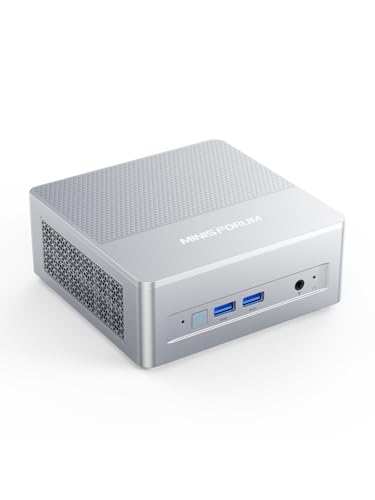
- 8-core / 16-thread Ryzen 7 255 suits VMs and containers
- 2.5G LAN with Wi-Fi 6E for flexible homelab networking
- Dual M.2 PCIe 4.0 slots plus DDR5 support for upgrades
Best For: Proxmox users who want a compact AMD mini PC with strong CPU headroom and fast networking.
Best for Proxmox VM Density
MINISFORUM UM870 Slim Ryzen 7 8745H

- 8-core/16-thread CPU is well-suited to multiple VMs and containers
- 32GB DDR5 with dual M.2 slots gives you useful upgrade headroom
- 2.5GbE LAN and USB4 make it a flexible home-lab host
Best For: Proxmox users who want a compact, upgradeable mini PC for a busy home lab.
Best for Heavy Virtualization – MINISFORUM AI X1 Pro Ryzen AI 9 HX370
If you want a minisforum mini pc for proxmox that leans hard into raw CPU threads, fast networking, and flexible storage, the AI X1 Pro is a compelling high-end barebone. The Ryzen AI 9 HX370 gives you 12 cores, 24 threads, dual 2.5GbE, Wi‑Fi 7, and multiple high-speed expansion paths, making it a strong fit for compact homelabs and mixed virtualized workloads.
Best For: Proxmox users who want a compact, future-ready host with strong multi-core performance, fast I/O, and room to grow.
Pros:
- 12C/24T Ryzen AI 9 HX370 is well suited for multiple VMs and containers
- Dual 2.5GbE plus Wi‑Fi 7 gives you flexible, fast networking options
- USB4 and OCuLink support make expansion and external GPU use easier
- Triple PCIe 4.0 SSD support helps with fast, dense local storage
Cons:
- Barebone configuration means you still need to add RAM and storage
- Feature-rich platform is likely overkill for a basic Proxmox node
- Premium specs put it above simpler budget mini PCs
For buyers comparing a minisforum mini pc for proxmox, this model stands out more for headroom and expansion than for low-cost simplicity. If your setup needs a small host that can handle heavier virtualization, fast networking, and a lot of attachable storage, it’s one of the more capable options in this class.
Best for 10GbE Labs – MINISFORUM Ryzen 9 9955HX MS-A2 Mini PC
If you want a high-end minisforum mini pc for proxmox, the MS-A2 stands out for its Ryzen 9 9955HX CPU, dual 10G SFP+ networking, and PCIe x16 expansion. It is aimed at builders who want a compact host that can handle multiple VMs, fast storage, and serious networking without moving to a full tower.
Best For: Proxmox users building a compact homelab, virtualized router, or high-throughput VM server with 10GbE.
Pros:
- 16-core/32-thread Ryzen 9 9955HX is strong for multi-VM and container workloads
- Dual 10G SFP+ plus dual 2.5G LAN make it ideal for fast homelab networking
- Three M.2 slots and PCIe x16 expansion add storage and add-in card flexibility
- Active cooling and 24/7-oriented design suit always-on Proxmox use
Cons:
- More expensive than typical mini PCs
- Overkill if you only need a basic low-power Proxmox node
- Expansion-focused design may be more than casual users need
This is one of the most capable minisforum mini pc for proxmox buyers who care about networking, expansion, and raw CPU headroom. If your homelab plan includes 10GbE, storage pools, or passthrough-heavy workloads, the MS-A2 is built for that role.
Best for 2.5GbE Proxmox Labs – MINISFORUM AI X1-255 Ryzen 7 Mini PC
If you want a minisforum mini pc for proxmox that can pull double duty as a compact homelab host, the AI X1-255 stands out for its Ryzen 7 255 CPU, dual PCIe 4.0 SSD slots, and 2.5GbE networking. It has enough headroom for virtualization, NAS-style storage workloads, and everyday desktop use without taking up much space.
Best For: Proxmox users who want strong CPU performance, fast storage expansion, and modern networking in a small barebone system.
Pros:
- 8-core/16-thread Ryzen 7 255 is a solid fit for light-to-moderate virtual machine loads
- Dual M.2 PCIe 4.0 slots make it easier to separate the OS and VM storage
- 2.5GbE, Wi-Fi 7, USB4, and OCuLink provide unusually flexible connectivity
- Barebone design lets you choose the RAM and SSD capacity you need
Cons:
- No included memory or storage, so total cost rises after configuration
- OCuLink depends on the M.2 slot, which may limit storage layout choices
- Overkill if you only need a very small, low-power Proxmox node
For a minisforum mini pc for proxmox, this model makes sense when you care more about expansion, fast networking, and CPU throughput than absolute budget pricing.
Best High-Performance Proxmox Pick – MINISFORUM AI X1 Pro-370
If you want a minisforum mini pc for proxmox that can handle heavier lab work, the AI X1 Pro-370 stands out with a Ryzen AI 9 HX 370, 32GB of DDR5, fast PCIe 4.0 storage, and dual 2.5GbE networking. It is a strong fit for running multiple VMs, containers, and storage-heavy services while still leaving room for GPU passthrough and expansion.
Best For: Home lab users who want a compact Proxmox host with strong CPU performance, fast networking, and upgrade headroom.
Pros:
- 12-core/24-thread Ryzen AI 9 HX 370 offers plenty of compute for virtualization
- Dual 2.5GbE plus WiFi 7 make it versatile for lab networking
- Dual USB4 and OCuLink add useful expansion options for eGPU or high-speed peripherals
- Upgradeable memory and storage support make it more future-ready
Cons:
- Higher price than entry-level mini PCs
- AI features and built-in speakers are less relevant for a Proxmox-first setup
For a minisforum mini pc for proxmox, this model makes sense when you want more than a basic headless box and need serious CPU headroom plus flexible I/O. Its cooling, storage, and networking specs make it better suited to ambitious home labs than ultra-cheap virtualization starters.
Best for Proxmox Homelab – MINISFORUM UM870 Slim Ryzen 7 8745H
If you want a minisforum mini pc for proxmox that has enough CPU headroom for multiple VMs, light container workloads, and a fast storage/networking setup, the UM870 Slim is a strong barebone option. The Ryzen 7 8745H, dual DDR5 memory support, dual M.2 PCIe 4.0 slots, and 2.5G wired LAN make it a practical base for a compact virtualization box.
Best For: Homelab users who want a compact Proxmox server with strong CPU performance, modern connectivity, and room to grow with their own RAM and SSDs.
Pros:
- Ryzen 7 8745H gives you solid 8-core performance for VMs and containers
- Dual DDR5 SODIMM slots and 2x M.2 2280 PCIe 4.0 bays add upgrade flexibility
- 2.5G Ethernet plus Wi‑Fi 6E/BT 5.3 fits lab, firewall, and networking tasks
- Quiet active cooling helps it stay stable under sustained loads
Cons:
- Sold as a barebone system, so you must buy RAM, SSD, and an OS separately
- No ECC memory support for users who want server-style error correction
- Driver updates may be needed before installing or updating the system
For a minisforum mini pc for proxmox, the UM870 Slim stands out when you want desktop-class speed in a small, upgradeable chassis. It is especially appealing if you plan to build a compact homelab with local SSD storage and reliable 2.5G networking.
Best for eGPU Expansion – MINISFORUM AI X1-255 Ryzen 7 Mini PC
If you want a minisforum mini pc for proxmox that leaves room to grow, the AI X1-255 stands out with a Ryzen 7 255, 32GB of DDR5, dual M.2 slots, and OCuLink support for easy eGPU or high-speed expansion. It has the core performance and connectivity mix that makes it a strong fit for lab work, lightweight virtualization, and always-on home setups.
Best For: Proxmox users who want a compact host with strong CPU performance, fast storage options, and expansion flexibility.
Pros:
- Ryzen 7 255 CPU with 8 cores/16 threads handles multitasking and small VM loads well
- Dual PCIe 4.0 M.2 slots make storage expansion straightforward
- OCuLink, USB4, and 2.5G LAN give it unusually flexible connectivity
- 32GB DDR5 and Wi-Fi 7 make it ready for modern workloads out of the box
Cons:
- OCuLink and advanced expansion are more than some Proxmox buyers need
- Single-unit memory and storage config may still require upgrades for heavier labs
- Not as power-efficient as lower-end mini PCs for very light virtualization
For a minisforum mini pc for proxmox, this model is especially appealing if you want a compact system that can double as a serious home server and still offer expansion headroom later. It is less of a bare-minimum budget pick and more of a flexible small-form-factor platform for growing projects.
Best for Proxmox Performance – MINISFORUM UM760 Slim Mini PC
If you want a compact minisforum mini pc for proxmox with strong single-core speed, modern I/O, and enough headroom for light-to-moderate virtualization, the UM760 Slim is an appealing fit. Its Ryzen 5 7640HS and DDR5 memory make it a capable host for homelabs, small containers, and a few VMs without taking up much desk space.
Best For: Home lab users and Proxmox beginners who want a fast, small, and quiet AMD mini PC with strong networking and upgrade-friendly storage.
Pros:
- Ryzen 5 7640HS delivers solid Zen 4 performance for Proxmox and everyday multitasking.
- 2.5G Ethernet plus Wi‑Fi 6E gives you flexible networking for lab use.
- Dual M.2 PCIe 4.0 slots make storage expansion straightforward.
- USB4, HDMI 2.1, and DisplayPort offer plenty of display and peripheral options.
Cons:
- 16GB RAM is usable, but heavier VM workloads may benefit from an upgrade.
- Only one Ethernet port, so advanced network segmentation may require a USB adapter or switch.
- Integrated graphics are fine for management and light media work, not GPU-heavy tasks.
For a minisforum mini pc for proxmox, the UM760 Slim stands out as a balanced choice: fast enough for everyday virtualization, compact enough for tight spaces, and flexible enough to grow as your lab needs expand.
Best for Proxmox Networking – MINISFORUM X1 Lite-255 Ryzen 7 Mini PC
If you want a minisforum mini pc for proxmox that can handle VMs, containers, and fast local networking without feeling underpowered, the X1 Lite-255 is a strong candidate. Its Ryzen 7 255 chip, DDR5 support, dual M.2 slots, and 2.5G LAN make it a practical compact host for homelab users who also want room to grow.
Best For: Proxmox users who want a compact AMD mini PC with strong CPU headroom, fast storage options, and solid wired networking.
Pros:
- Ryzen 7 255 gives you 8 cores / 16 threads for VM and container workloads.
- 2.5G LAN plus Wi-Fi 6E helps with flexible homelab networking.
- Dual M.2 PCIe 4.0 slots and DDR5 support make expansion straightforward.
- USB4 and OCuLink add useful high-speed connectivity for advanced setups.
Cons:
- Barebone configuration means you must add your own RAM and SSDs.
- Not the cheapest option if you only need a very basic Proxmox node.
For buyers comparing a minisforum mini pc for proxmox, this model stands out because it balances modern AMD performance with expansion-friendly hardware and stronger networking than many entry-level boxes. It’s a sensible pick when you want one machine that can serve as both a capable virtualization host and a versatile everyday mini PC.
Best for Proxmox VM Density – MINISFORUM UM870 Slim Ryzen 7 8745H
If you want a compact minisforum mini pc for proxmox that still has enough CPU headroom for several VMs and containers, the UM870 Slim is a strong fit. Its Ryzen 7 8745H, 32GB of DDR5 memory, and 1TB PCIe 4.0 SSD give it a solid starting point for virtualization, homelab services, and light-to-moderate lab workloads without taking up much desk space.
Best For: Proxmox users who want a small but capable mini PC with fast networking, upgrade room, and enough performance for a busy home lab.
Pros:
- 8-core/16-thread Ryzen 7 8745H handles VMs and container workloads well
- 32GB DDR5, dual M.2 slots, and upgradeable RAM/storage support future expansion
- 2.5GbE LAN plus Wi‑Fi 6E makes it easy to build a responsive lab host
- USB4 and triple-display support add flexibility for setup and management
Cons:
- Single 2.5GbE port may be limiting for more advanced networking needs
- Higher-performance Proxmox builds may still want more RAM out of the box
- Not the quietest or cheapest option in the mini PC category
For a minisforum mini pc for proxmox, this model stands out because it balances strong CPU performance, modern I/O, and practical expandability in a very small chassis. It is a smart pick if you want a capable lab host now and room to grow later.
How We Picked the Best Minisforum Mini PC for Proxmox
For a Minisforum Mini PC for Proxmox, the most important factors are CPU core count, sustained performance, memory expandability, SSD flexibility, and networking. We favored systems with modern AMD processors, strong multi-threaded performance, and practical port layouts for homelab use. Barebone models were also considered because Proxmox users often prefer to choose their own RAM and storage.
Quick Comparison
Higher-end options like the Ryzen AI 9 HX370 and Ryzen 9 9955HX models are the best fit for users running several VMs, test clusters, or heavier services. Midrange Ryzen 7 systems are a strong balance for typical home labs, while Ryzen 5 models are best for simpler Proxmox installs, firewall appliances, or container-first builds.
Key Buying Factors for Minisforum Mini PC for Proxmox
CPU Performance
Proxmox benefits more from core count and sustained all-core performance than from integrated graphics. Look for 8 cores or more if you expect multiple VMs, nested virtualization, or always-on services.
Memory Capacity
RAM is often the first bottleneck in a virtualized setup. Choose a model that supports at least 32GB, and preferably more if you plan to run several guests or use ZFS, caching, or memory-hungry containers.
Storage and Expansion
Dual M.2 support, PCIe Gen 4 drives, and easy access to internals make maintenance much simpler. If you need a boot drive plus fast VM storage, expansion room matters more than raw GPU specs.
Networking
For Proxmox clusters, 2.5GbE is a strong baseline and 10GbE is ideal if you move large VM images or use shared storage. Faster networking can matter more than extra CPU headroom in a busy lab.
Cooling and Reliability
Mini PCs used for Proxmox should stay cool under long loads. Slim designs can still work well, but models with better thermal headroom are a safer choice for nonstop operation.
Who Should Buy Which Minisforum Mini PC for Proxmox?
If you want the best overall headroom, choose the Ryzen 9 or Ryzen AI 9 options. If you need a balanced home lab node, a Ryzen 7 model is usually the sweet spot. If your build is for containers, light services, or a compact test box, a Ryzen 5 Minisforum mini PC can deliver excellent value.
For most buyers, the best Minisforum Mini PC for Proxmox is the one that gives you enough RAM capacity, enough SSD space, and the networking speed you need now, with a little room to grow later.