
Choosing the right mini PC for a NAS build is mostly about connectivity, storage expansion, and power efficiency—not just raw CPU speed.
In this roundup, we focus on Minisforum models and close alternatives that can handle file sharing, media streaming, backups, and light virtualization without wasting space or electricity.
Best 10 Minisforum Mini PC for Nas Picks for 2026
Best for Storage-Heavy NAS Builds

- Six M.2 slots for large SSD-based storage expansion
- Dual 2.5G LAN suits NAS and home server use
- Quiet cooling and built-in PSU keep setup simple
Best For: Compact NAS and home-server buyers who want lots of SSD expansion in a tiny, quiet box.
Best for High-Speed NAS Expansion

- Ryzen 7 255 + Radeon 780M for strong NAS multitasking
- 10GbE + 5GbE networking with link aggregation
- 5 bays, 3× M.2 slots, and PCIe/USB4 expansion
Best For: Power users and small teams needing a fast, highly expandable NAS platform.
Best for High-Speed NAS Networking
MINISFORUM Ryzen 9 9955HX MS-A2 Mini PC

- Dual 10G SFP+ plus dual 2.5G LAN
- Ryzen 9 9955HX for heavy multitasking
- Three M.2 slots and PCIe x16 expansion
Best For: Power users building a compact NAS, homelab, or small server with fast networking.
Best for High-Speed NAS Builds
MINISFORUM UM790 Pro Ryzen 9 Mini PC

- Ryzen 9 7940HS is strong for NAS and multitasking.
- Dual PCIe 4.0 M.2 slots support fast SSD storage and RAID.
- 2.5GbE plus USB4 and Wi-Fi 6E add flexible connectivity.
Best For: Home NAS builders who want fast storage expansion and strong all-around performance.
Best for High-Speed Storage
MINISFORUM M1 Pro-285H AI Mini PC
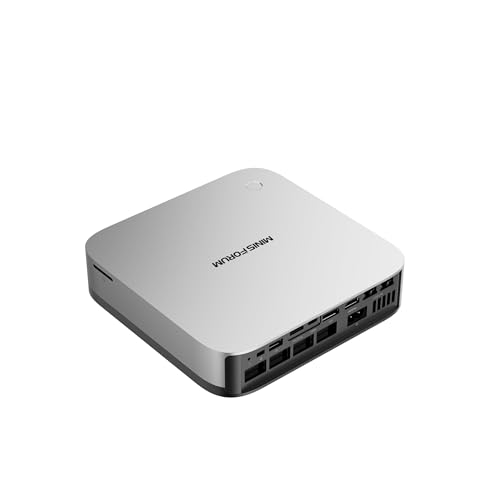
- Core Ultra 9 285H delivers strong multitasking performance
- Dual PCIe 4.0 M.2 slots with RAID 0/1 support
- USB4, OCuLink, and Wi-Fi 7 add modern expansion
Best For: Users who want a fast, compact NAS-capable mini PC with room to expand.
Best for Expandable NAS Builds
MINISFORUM AI X1-255 Ryzen 7 255 Mini PC

- Ryzen 7 255 provides strong multitasking and NAS headroom
- Dual M.2 PCIe 4.0 slots support flexible storage expansion
- 2.5G LAN, Wi-Fi 7, USB4, and OCuLink add modern connectivity
Best For: Users building a compact, upgrade-friendly NAS with fast networking and expansion options.
Best Heavy-Duty Pick
MINISFORUM UM760 Slim Ryzen 5 Mini PC

- Ryzen 5 7640HS is fast enough for NAS, streaming, and light virtualization
- 2.5G LAN and Wi-Fi 6E make it easy to wire into a modern home network
- Dual PCIe 4.0 M.2 slots give you room to expand storage later
Best For: Home NAS builders who want a compact, fast mini PC with strong networking and storage expansion.
Best for Quiet NAS Expansion
MINISFORUM X1 Lite-255 Mini PC
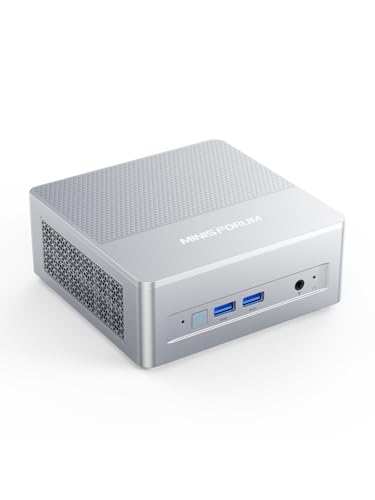
- Strong Ryzen 7 255 performance for NAS and multitasking
- Dual PCIe 4.0 M.2 slots for fast SSD storage
- 2.5G LAN plus Wi‑Fi 6E for flexible networking
Best For: Home NAS builders who want a compact, fast mini PC for storage sharing and media streaming.
Best for Maximum NAS Expansion – Beelink ME Pro N95 Mini PC NAS
If you want a minisforum mini pc for nas-style home storage without giving up wired speed or expandability, the Beelink ME Pro N95 is built around that idea. It pairs an Intel N95 chip with dual high-speed Ethernet, Wi‑Fi 6, and a storage-heavy chassis that can scale well beyond a basic mini PC.
Best For: Home NAS builders who want lots of drive capacity, fast network transfers, and a compact box for private cloud or office storage.
Pros:
- Supports massive storage expansion with 2 HDD bays and 3 M.2 slots.
- Dual 2.5G + 5G Ethernet is ideal for faster file transfers and link aggregation.
- Quiet, NAS-friendly design with vibration damping and improved cooling.
- Extra ports and Wi‑Fi 6/BT 5.4 make it versatile beyond storage duty.
Cons:
- Intel N95 is fine for light NAS tasks, but not a powerhouse for heavy compute.
- Base configuration includes only 128GB SSD, so you’ll likely need upgrades.
- Drive support is great, but full capacity depends on adding your own storage.
For buyers prioritizing storage flexibility over raw CPU performance, this is a strong fit in the minisforum mini pc for nas category. It makes the most sense when you want a compact DIY NAS or private cloud box with room to grow.
Best for NAS Networking – MINISFORUM MS-02 Ultra Workstation Mini PC
If you want a minisforum mini pc for nas duties with serious headroom, the MS-02 Ultra stands out for its 10GbE port, secondary 2.5GbE, and expansion-friendly design. It is built more like a compact workstation than a basic home server, so it suits buyers who need fast transfers, high memory capacity, and room to grow.
Best For: Power users building a high-speed NAS, virtualization host, or compact lab with demanding networking and expansion needs.
Pros:
- 10GbE plus 2.5GbE networking is ideal for fast NAS transfers and redundancy
- 4 DDR5 SODIMM slots support up to 256GB for VMs and heavy multitasking
- PCIe 5.0 x16 slot and dual M.2 slots leave plenty of upgrade room
- USB4 v2 and Wi-Fi 7 add modern connectivity for a flexible setup
Cons:
- Barebone configuration means you must supply RAM, storage, and OS
- More expensive and overkill for simple file sharing or light media use
- Not a turnkey NAS chassis, so storage planning takes more effort
The MS-02 Ultra is a compelling minisforum mini pc for nas builders who care more about throughput, memory ceiling, and expansion than low-cost simplicity. If your goal is a compact, high-performance network appliance that can also double as a workstation, this one is a strong fit.
Best for Storage-Heavy NAS Builds – Beelink ME mini N150 Mini PC
If you want a minisforum mini pc for nas alternative that leans hard into local storage, the Beelink ME mini N150 is worth a look. It pairs a low-power Intel N150 chip with 16GB LPDDR5, a 1TB SSD, and six M.2 slots, making it a practical base for a compact home NAS, media server, or soft router.
Best For: Buyers who want a compact, quiet NAS-ready mini PC with lots of expansion for SSD-based storage.
Pros:
- Six M.2 NVMe slots support large expandable storage in a very small chassis.
- Dual 2.5G LAN is a strong fit for NAS and network-heavy home lab setups.
- Quiet cooling and built-in power supply help keep the setup simple and tidy.
- 16GB RAM and 1TB SSD provide a ready-to-use starting point.
Cons:
- The Intel N150 is efficient, but not ideal for heavier virtualization workloads.
- Storage is SSD-only, so it may not suit users who prefer traditional drive bays.
For a minisforum mini pc for nas-style build focused on quiet operation and easy expansion, this Beelink stands out more for its SSD flexibility than raw speed. It is a smart fit if you want a low-maintenance NAS box that can also handle everyday home server tasks.
Best for High-Speed NAS Expansion – MINISFORUM N5 Air 5-Bay NAS
If you want a minisforum mini pc for nas that goes beyond basic home storage, the N5 Air stands out with a Ryzen 7 255, Radeon 780M graphics, and serious expansion options. It’s built for users who need fast file sharing, smooth multitasking, and room to grow into 10GbE workflows, cache drives, and even GPU or PCIe add-ons.
Best For: Power users, small studios, and homelab builders who want a high-performance NAS platform with strong networking and expansion headroom.
Pros:
- Ryzen 7 255 and Radeon 780M provide strong multitasking and transcoding performance
- 10GbE + 5GbE networking with link aggregation supports fast transfers and team use
- 5-bay design plus 3× M.2 NVMe slots offers large storage and cache flexibility
- OCuLink, USB4, and PCIe x16 expandability make it unusually future-proof
Cons:
- No RAM or hard drives included, so the upfront build cost is higher
- Most buyers won’t need the extra expansion if they only want simple file backup
- Full performance depends on choosing compatible drives and network gear
For buyers comparing a minisforum mini pc for nas, the N5 Air is a strong pick when speed, capacity, and upgrade flexibility matter more than simplicity. It’s especially compelling if you want one box that can handle storage, media, and light workstation duties at the same time.
Best for High-Speed NAS Networking – MINISFORUM Ryzen 9 9955HX MS-A2 Mini PC
If you want a minisforum mini pc for nas that can also handle heavy network traffic, the MS-A2 stands out with its Ryzen 9 9955HX CPU, dual 10G SFP+ ports, and multiple SSD options. It’s built for users who want fast storage, strong multitasking, and room to grow without moving to a full tower.
Best For: Power users building a compact NAS, homelab, or small server who need fast networking and serious expandability.
Pros:
- Dual 10G SFP+ plus dual 2.5G LAN for fast NAS networking and flexible segmentation
- Ryzen 9 9955HX delivers excellent multitasking and server-side headroom
- Three M.2 slots and PCIe x16 expansion make storage and add-in upgrades easier
- Designed for 24/7 use with improved cooling and direct exhaust airflow
Cons:
- Pricier than simple NAS-focused mini PCs
- High-end features may be overkill for basic file sharing only
- Expansion and storage upgrades can add to total build cost
For buyers comparing a minisforum mini pc for nas setups, this model makes the most sense when networking speed, PCIe expansion, and future-proof storage matter more than keeping the build minimal. It’s a strong pick if you want one compact machine to do NAS, homelab, and light compute work all at once.
Best for High-Speed NAS Builds – MINISFORUM UM790 Pro Ryzen 9 Mini PC
If you want a minisforum mini pc for nas that can also handle heavier multitasking, the UM790 Pro stands out with a Ryzen 9 7940HS, dual PCIe 4.0 SSD support, and 2.5GbE networking. It’s a strong fit for users who want a compact box for storage, media, and light server duties without giving up extra ports or upgrade headroom.
Best For: Home NAS builders who want fast storage expansion, strong CPU performance, and a compact all-in-one system for mixed workloads.
Pros:
- Ryzen 9 7940HS delivers excellent performance for NAS, media, and multitasking.
- Dual M.2 PCIe 4.0 slots support fast SSD storage and RAID setups.
- 2.5GbE, Wi-Fi 6E, and USB4 provide flexible, high-speed connectivity.
- Compact mini PC design with strong cooling for continuous use.
Cons:
- Not a true multi-bay NAS, so storage expansion is limited to SSDs and external drives.
- Higher-end specs may be more power than casual file-sharing users need.
For buyers comparing a minisforum mini pc for nas, this model is appealing because it combines fast networking, strong CPU headroom, and dual NVMe storage in a small chassis. It’s better suited to performance-focused home lab and media setups than to simple, low-cost storage-only use.
Best for High-Speed Storage – MINISFORUM M1 Pro-285H AI Mini PC
If you want a minisforum mini pc for nas that also doubles as a powerful everyday workstation, the M1 Pro-285H is built around speed, expandability, and modern connectivity. Its Core Ultra 9 chip, dual PCIe 4.0 M.2 slots, and RAID support make it a strong fit for fast local storage, while USB4, OCuLink, and Wi-Fi 7 give you room to grow.
Best For: Buyers who want a compact NAS-capable mini PC with strong multitasking performance and flexible storage options.
Pros:
- Intel Core Ultra 9 285H gives it plenty of headroom for NAS duties plus other workloads
- Dual M.2 PCIe 4.0 slots with RAID 0/1 support are ideal for fast or mirrored storage setups
- USB4 and OCuLink make it easier to expand storage or add external GPU/peripheral support
- Wi-Fi 7, Bluetooth 5.4, and quad 4K display support add modern connectivity
Cons:
- Only two internal M.2 slots, so it is not a true multi-bay NAS replacement
- Higher-end specs likely put it above budget-focused NAS mini PCs
- Overkill if you only need basic file sharing and media storage
This is a compelling minisforum mini pc for nas if you care about fast SSD-based storage, RAID options, and enough CPU power to multitask beyond simple file serving. It is more of a high-performance compact storage hub than a traditional low-power NAS box.
Best for Expandable NAS Builds – MINISFORUM AI X1-255 Ryzen 7 255 Mini PC
If you want a minisforum mini pc for nas duties with room to grow, the AI X1-255 stands out for its Ryzen 7 255 CPU, dual M.2 storage, and 2.5G networking. It also adds OCuLink, Wi-Fi 7, and USB4, making it a strong fit for a compact home server that may eventually need faster storage or external GPU support.
Best For: Builders who want a fast, compact NAS-focused mini PC with upgrade room, modern networking, and flexible expansion.
Pros:
- Ryzen 7 255 (8C/16T) with Radeon 780M gives it plenty of headroom for NAS tasks and multitasking
- Dual M.2 PCIe 4.0 slots make it easy to scale storage for media, backups, or containers
- 2.5G LAN plus Wi-Fi 7 helps keep transfers fast and connectivity modern
- OCuLink and USB4 add uncommon expansion options for a mini NAS chassis
Cons:
- Not the cheapest way to build a NAS-capable mini PC
- OCuLink depends on using the M.2 slot and the right dock setup
- May be more power than needed for very basic file-sharing only
Overall, this is a compelling minisforum mini pc for nas buyers who value speed, expandability, and modern I/O over bare-minimum simplicity. It makes the most sense if you want a compact system that can start as a NAS and later handle heavier home-lab or media tasks.
Best Heavy-Duty Pick – MINISFORUM UM760 Slim Ryzen 5 Mini PC
If you want a compact system that can pull double duty as a home server, the MINISFORUM UM760 Slim is a strong minisforum mini pc for nas setups thanks to its Ryzen 5 7640HS processor, dual PCIe 4.0 SSD slots, and 2.5G wired networking. It has the speed headroom for file sharing, light virtualization, and always-on tasks without taking up much desk or rack space.
Best For: Users building a fast, quiet NAS or small home server that also needs everyday desktop performance.
Pros:
- Ryzen 5 7640HS delivers strong multitasking performance for NAS and server duties
- 2.5G Ethernet plus Wi-Fi 6E/BT 5.3 support for flexible, modern connectivity
- Two M.2 PCIe 4.0 slots allow meaningful storage expansion for NAS use
- Active cooling helps maintain stable performance under sustained loads
Cons:
- 16GB RAM may be limiting for heavier virtualization or advanced NAS workloads
- No built-in multi-bay storage design, so you’ll need external or M.2-based expansion
For buyers who want a compact, quiet, and capable machine, this minisforum mini pc for nas use stands out more for performance and connectivity than for raw storage flexibility. It’s a smart pick if you want one box to handle storage services, light media tasks, and normal PC work.
Best for Quiet NAS Expansion – MINISFORUM X1 Lite-255 Mini PC
If you want a minisforum mini pc for nas duties with more headroom than a basic Celeron box, the X1 Lite-255 is a strong option. Its Ryzen 7 255, dual M.2 PCIe 4.0 slots, 2.5G LAN, and Wi‑Fi 6E make it well suited to fast file sharing, media storage, and light server workloads.
Best For: Home NAS builders who want a compact, fast mini PC for storage sharing, media streaming, and multitasking.
Pros:
- Ryzen 7 255 gives it plenty of CPU power for Docker, backups, and light virtualization.
- Dual M.2 2280 PCIe 4.0 slots support high-speed SSD-based storage setups.
- 2.5G LAN is a good fit for faster local transfers and NAS use.
- Wi‑Fi 6E, Bluetooth 5.2, and USB4 add flexible connectivity.
Cons:
- Barebone design means you still need to add RAM and storage.
- No built-in drive bays, so it is better for SSD-based NAS builds than large HDD arrays.
- Overkill if you only need a very simple file server.
For buyers comparing a minisforum mini pc for nas setups, this model stands out for speed, expansion, and networking rather than pure low-power efficiency. It is a smart pick if you want a compact machine that can double as a media box or desktop when needed.
How We Picked These Minisforum Mini PC for Nas Options
For a Minisforum Mini PC for Nas, the best choices balance low idle power, enough CPU headroom for background services, and the connectivity needed for fast, stable networking. We prioritized systems with multi-gig Ethernet, usable M.2 or SATA expansion, and platforms that can handle NAS software, containers, or a small media stack.
We also considered whether a model is better as a dedicated storage box or as a more flexible hybrid system that can serve files while also running apps, VMs, or transcode tasks.
Quick Comparison: What Matters Most
If you want the simplest NAS setup, look at lower-power Intel N-series systems with dual 2.5GbE and multiple M.2 slots. If you want higher throughput or heavier multitasking, step up to Ryzen or Core Ultra systems with 10GbE, more USB bandwidth, and stronger integrated graphics.
For buyers comparing Minisforum options, the main tradeoff is clear: efficiency and quiet operation versus expansion, virtualization potential, and network speed.
Key Buying Factors for a Minisforum Mini PC for Nas
Networking
Ethernet speed matters more than most people expect. Dual 2.5GbE is a strong baseline for home NAS use, while 10GbE or SFP+ is better if you move large video files, use shared editing storage, or run multiple clients at once.
Storage Expansion
Check how many M.2 slots are available, whether the system supports SATA or U.2-style expansion, and whether the chassis can physically handle drives and cooling. More slots are helpful, but only if airflow and power delivery are solid.
Processor Class
For backups and basic file serving, efficient low-watt CPUs are usually enough. For Docker, Plex/Jellyfin transcoding, ZFS, or virtualization, choose a stronger Ryzen or Core Ultra chip with more cores and better sustained performance.
Memory and Upgradability
NAS software benefits from ample RAM, especially if you plan to cache data or run apps. Barebone models are often the smarter long-term choice because you can choose your own memory and storage.
Who Should Buy Which Minisforum Mini PC for Nas?
Choose an entry-level Minisforum or Beelink-style unit if you want a quiet, affordable NAS for backups, photo libraries, and light media streaming. Go for a higher-end Minisforum model with 10GbE if speed and multi-user access matter more than price.
If you want one box to do everything, pick a more powerful Minisforum Mini PC for Nas with strong CPU cores, lots of RAM support, and premium networking. If you want the most efficient storage appliance, stick to the simpler, low-power designs and keep the workload focused on storage duties.