
If you’re looking to elevate your gaming experience on PC, finding the right wireless adapter for your console controller is essential. With so many options available, it can be overwhelming to determine which one suits your needs. From seamless connectivity to low latency, the right choice can make all the difference. Let’s explore the top 10 wireless adapters that promise to enhance your gameplay and guarantee compatibility across various platforms.
Mcbazel Wireless USB 2.0 Gaming Receiver Adapter for Xbox 360

If you’re a gamer looking to use your Xbox 360 controllers on a Windows PC, the Mcbazel Wireless USB 2.0 Gaming Receiver Adapter is your best bet. It’s compatible with Windows 11 and supports up to four controllers and headsets simultaneously, giving you ample gaming freedom. Setting it up is a breeze; just download the driver via the QR code on the package. Pairing is simple too—press the round button on the receiver, then the controller’s pairing button. Do note, though, it won’t work with Scuf controllers designed for Xbox One or PC due to different wireless protocols.
Best For: Gamers who want to use their Xbox 360 controllers on a Windows PC for enhanced gaming flexibility.
Pros:
- Supports up to four wireless controllers and headsets simultaneously, allowing for multiplayer gaming.
- Easy setup process with a downloadable driver and quick pairing instructions.
- Offers a 30-foot range for wireless connectivity, providing freedom of movement while gaming.
Cons:
- Not compatible with Scuf controllers designed for Xbox One or PC due to different wireless protocols.
- Requires downloading a driver, which may be inconvenient for some users.
- Limited to Xbox 360 controllers, excluding newer controller models.
Wireless Adapter Compatible with Xbox One Controller for Windows 10/8.1/8/7

The Wireless Adapter compatible with Xbox One Controllers is a game-changer for PC gamers who want to elevate their gaming experience on Windows 10, 8.1, 8, or 7. Manufactured by CIPON, this adapter offers official-quality performance, enabling seamless connectivity for your Xbox One Wireless Controller. You can easily connect up to eight controllers, making multiplayer sessions a blast. While wired chat headsets work, wireless headsets are limited to Windows 10. Just remember, you’ll need to download drivers for initial use. The package includes the adapter, a user manual, and elegant packaging, making it a fantastic addition to your gaming setup.
Best For: PC gamers looking to enhance their gaming experience with Xbox One controllers on Windows devices.
Pros:
- Supports up to 8 wireless controllers, allowing for enjoyable multiplayer gaming sessions.
- Easy binding process for quick setup with Xbox One controllers.
- High-quality stereo audio and in-game chat support, enhancing the overall gaming experience.
Cons:
- Driver download may be required for initial use, which can be a hassle for some users.
- Limited headset support for wireless headsets, only compatible with Windows 10.
- Not compatible with Xbox 360 controllers, restricting options for some gamers.
Wireless Adapter for Xbox One Controller (Compatible with PC Windows 10/11)

For gamers looking to seamlessly connect their Xbox One controller to a Windows 10 or 11 PC, the Wireless Adapter is an essential tool. This compact adapter, featuring an original IC chip, enables gameplay on PCs, laptops, and tablets. You can easily bind it to your controller for a smooth gaming experience. Plus, it supports in-game chat and high-quality stereo audio, enhancing your multiplayer interactions. With the ability to connect up to eight controllers and four chat headsets, it’s perfect for group gaming sessions. Just remember, it’s not compatible with Xbox 360 controllers, so keep that in mind!
Best For: Gamers who want a reliable and easy way to connect their Xbox One controllers to Windows 10 or 11 PCs for an enhanced gaming experience.
Pros:
- Supports connection of up to eight controllers for multiplayer gaming sessions.
- High-quality stereo audio and in-game chat capabilities for improved communication.
- Compact design makes it easy to transport and set up.
Cons:
- Not compatible with Xbox 360 controllers, limiting options for some users.
- Requires Windows 10 or 11, excluding those on older operating systems.
- May need additional setup for optimal performance, which could be challenging for less tech-savvy users.
GuliKit Hyperlink 2 Fast Wireless Adapter for Xbox and PlayStation Controllers

Looking to enhance your gaming experience across multiple platforms? The GuliKit Hyperlink 2 Fast Wireless Adapter is your solution. Compatible with Xbox One, Xbox Series X|S, PS5 Dual Sense, and more, it connects seamlessly to PC, Switch, Android, and SteamOS. With its HyperLink 2 technology, you’ll enjoy an impressive 2.95ms latency, cutting delays by up to 50%. Setup is a breeze—just plug it in and pair your controller without any software hassle. Plus, it supports motion control and vibration on Switch, elevating your gameplay. Just remember, it only connects one controller at a time. Happy gaming!
Best For: Gamers who use multiple controllers across various platforms and want a low-latency wireless connection.
Pros:
- Ultra-low latency: Enjoy 2.95ms latency, significantly reducing input delay for fast-paced gaming.
- Wide compatibility: Works with multiple controller types (Xbox, PS4, PS5, Switch Pro) and platforms (PC, Switch, Android).
- Easy setup: Plug & Play design allows for quick connection without the need for software installation.
Cons:
- Single controller connection: Only one controller can be connected at a time, which may limit multiplayer setups.
- OTG cable required for handhelds: Additional accessories needed for use with devices like Switch Lite and Steam Deck.
- No support for Xbox headphones: Users looking for audio connectivity with Xbox controllers will need alternative solutions.
Zopsc Wireless USB Gaming Receiver Adapter for PC and Console

Gamers seeking a versatile solution for their Xbox 360 controllers will find the Zopsc Wireless USB Gaming Receiver Adapter an ideal choice. This compact adapter connects easily to PCs, desktops, and laptops, offering reliable long-distance control for an enhanced gaming experience. With the ability to support up to four controllers and four headphones simultaneously, you can game with friends effortlessly. Its plug-and-play design makes installation a breeze, eliminating complex setups. Constructed from lightweight, durable ABS material, the Zopsc adapter is portable, ensuring you can enjoy gaming anywhere. With a solid 4.1-star rating, it’s a reliable addition to your gaming arsenal.
Best For: Gamers looking for a reliable and easy-to-use wireless adapter for Xbox 360 controllers on PCs and consoles.
Pros:
- Supports connection of up to four controllers and headphones simultaneously for multiplayer gaming.
- Plug-and-play functionality allows for quick and hassle-free installation.
- Made from durable and lightweight ABS material, making it portable for gaming on the go.
Cons:
- Limited to Xbox 360 controllers, may not be compatible with newer controller models.
- Performance may vary depending on the distance from the receiver.
- Some users may experience connectivity issues with specific PC configurations.
BIGBIG WON R100 Pro Wireless Controller Adapter

The BIGBIG WON R100 Pro Wireless Controller Adapter stands out as an ideal choice for console enthusiasts who want seamless compatibility across various platforms. It works effortlessly with Xbox One X|S, Xbox Series X|S, Elite Series 2, PS5, PS4, and Switch controllers. Setup is a breeze with its plug-and-play design, allowing for quick connections and automatic recognition for future use. You can enjoy features like vibration adjustment and turbo settings without lag within five meters. Its compact design makes it perfect for gaming on the go. Plus, you’ll benefit from a 30-day replacement policy and lifetime customer support.
Best For: Gamers seeking a versatile controller adapter that supports multiple gaming consoles including Xbox, PS5, PS4, and Switch.
Pros:
- Plug-and-play design allows for easy setup and automatic recognition for future connections.
- Supports multiple features like vibration adjustment, turbo settings, and joystick calibration for an enhanced gaming experience.
- Compact and lightweight design makes it portable, ideal for gaming on the go.
Cons:
- Not compatible with Xbox consoles or 3rd-party controllers, limiting its use for some users.
- Headphones are not supported, which may be a drawback for those wanting audio integration.
- Only PS4 games are supported on PS5, limiting access to newer titles for PS5 users.
8BitDo Wireless USB Adapter 2 for Switch, Windows PC, Mac & Raspberry Pi

For those seeking seamless connectivity across multiple platforms, the 8BitDo Wireless USB Adapter 2 stands out as an ideal choice. Compatible with Switch, Windows PC, macOS, Steam Deck, and Raspberry Pi, it guarantees versatility in your gaming setup. You’ll enjoy compatibility with a range of controllers, including Xbox Series X|S, PS5, and even Wii Motes. This adapter supports 6-axis motion on the Switch and offers customizable features like button mapping and vibration control. Plus, with the ultimate software, you can fine-tune your settings for a personalized gaming experience. Available in sleek black, it fits right into modern gaming aesthetics.
Best For: Gamers looking for a versatile wireless adapter that connects multiple controllers across different platforms.
Pros:
- Compatible with a wide range of controllers including Xbox, PlayStation, and Nintendo.
- Supports advanced features like 6-axis motion and customizable button mapping.
- Sleek black design that complements modern gaming setups.
Cons:
- Requires a firmware update for compatibility with Switch 2.
- May have a learning curve for advanced configuration through software.
- Limited to specific platforms; not all controllers may work seamlessly.
JZW-Shop Wireless Adapter for Switch/PC/PS4/PS3/Xbox One X/S Controllers
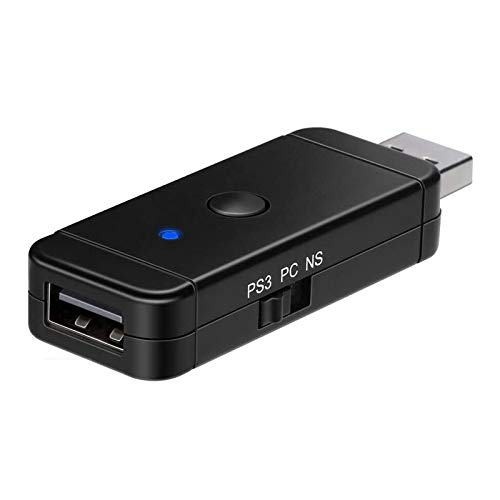
If you’re looking to enhance your gaming experience across multiple platforms, the JZW-Shop Wireless Adapter is an excellent choice. It supports a variety of controllers, including PS3, PS4, Xbox One X/S, and Switch, making it versatile for both PC and Switch gaming. However, it doesn’t work with wireless Xbox One controllers or Xbox Series X/S. The compact design features a mode switcher, SYNC button, and LED indicator for easy use. Just remember to enable Pro Controller Wired Communication on your Switch for compatibility. It’s lightweight, so you can easily take it on the go for gaming adventures.
Best For: Gamers who use multiple controllers across different platforms and seek a versatile adapter for enhanced gameplay.
Pros:
- Supports a wide range of controllers including PS3, PS4, Xbox One X/S, and Switch for versatile gaming.
- Compact and lightweight design makes it portable and easy to carry for gaming on the go.
- User-friendly features such as a mode switcher, SYNC button, and LED indicator for convenient operation.
Cons:
- Not compatible with wireless Xbox One controllers or Xbox Series X/S, limiting options for Xbox users.
- Third-party controllers are not supported, which may restrict some users from utilizing their preferred controllers.
- PS5 games are not supported despite the PS5 controller being compatible, which may disappoint PS5 gamers.
Xbox Wireless Adapter for PC & Controller
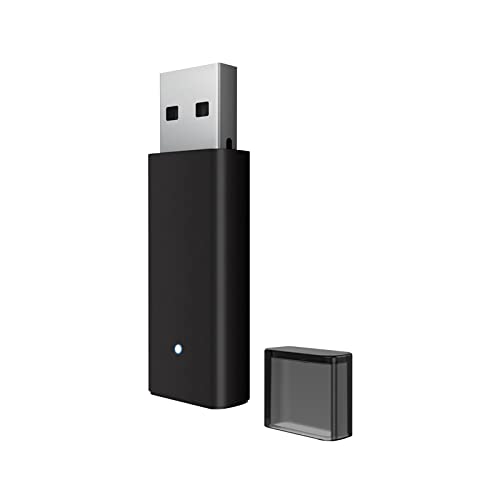
Gamers seeking seamless connectivity between their Xbox controllers and PC will find the Xbox Wireless Adapter an essential tool. Compatible with Xbox One, One X|S, Elite, and Series X|S controllers, it works effortlessly on Windows 10/8/7 devices. You can connect up to 8 controllers or 4 chat headsets, ensuring a great multiplayer experience. The adapter guarantees stable transmission, keeping you in the game without interruptions, with an ideal range of 20 feet. Setup is a breeze—just plug it in and press the pairing button. Plus, customer support is available for any post-purchase questions. Enjoy uninterrupted gaming!
Best For: Gamers who want to easily connect multiple Xbox controllers to their PC for a seamless multiplayer experience.
Pros:
- Supports multiple controllers: Connect up to 8 wireless controllers and 4 chat headsets simultaneously.
- Stable transmission: Guarantees no disconnections or delays during gameplay, enhancing the gaming experience.
- Easy setup: Simple plug-and-play installation with a straightforward pairing process.
Cons:
- Limited compatibility: Does not support Xbox 360 controllers, third-party controllers, or wireless headsets.
- Driver download required for older systems: Windows 7/8 users must download drivers manually for the adapter to function.
- Headset support restricted: Only Xbox-designed wireless headsets can connect, and only on Windows 10.
Pro Wireless Adapter for Xbox and PlayStation Controllers
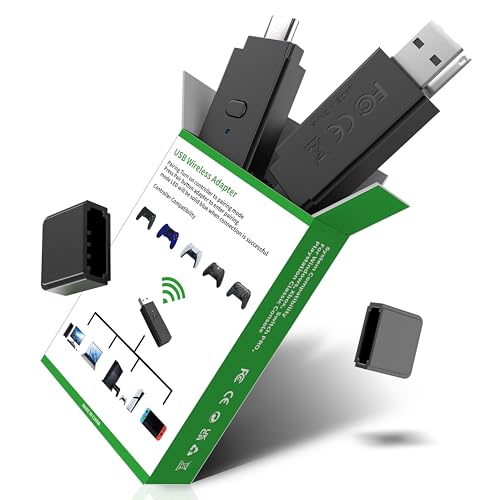
The Pro Wireless Adapter is an ideal choice for players who want seamless connectivity across multiple platforms, including PS5, PS4, Xbox Series X/S, Xbox One, and even the Switch Pro Controller. With its plug-and-play design, you won’t need to install drivers; just plug it into your device and start gaming. The dual-port receiver includes USB-A and USB-C ports, ensuring compatibility without extra cables. You’ll appreciate its low latency and extended range, providing a stable connection for immersive gameplay. Weighing only 1.76 ounces, it’s compact and easy to transport, making it a solid pick for gamers on the go.
Best For: Gamers seeking a versatile and easy-to-use wireless adapter for connecting controllers across multiple gaming platforms.
Pros:
- Plug and Play: No driver installation required, allowing for immediate use once plugged in.
- Dual-Port Receiver: Includes both USB-A and USB-C ports for flexible connectivity options.
- Low Latency: Designed for a rapid, stable connection to enhance gaming performance.
Cons:
- Limited Compatibility: Not compatible with Switch 2, which may restrict usage for some players.
- Moderate Customer Rating: With a 3.6 out of 5 stars rating, some users may have concerns about performance or reliability.
- Weight and Size: While compact, some may prefer a more robust design for durability during transport.
Factors to Consider When Choosing a Wireless Adapter for Console Controller on PC
When you’re picking a wireless adapter for your console controller on PC, there are several key factors to keep in mind. You’ll want to check compatibility with your controllers, assess the range and performance, and consider how easy the setup and installation are. Don’t forget to look into supported platforms and multiplayer capabilities to guarantee a smooth gaming experience.
Compatibility With Controllers
Choosing the right wireless adapter for your console controller involves several important factors, especially compatibility. First, confirm that the adapter works with your specific console controller, as many are tailored exclusively for Xbox or PlayStation. Next, verify it supports your controller’s version; for instance, adapters for Xbox One may not work with Xbox 360 controllers. If you’re gaming with friends, look for adapters that can connect multiple controllers simultaneously—some support up to eight. Also, check the adapter’s compatibility with your PC’s operating system, as certain models may only support Windows 10 or 11. Finally, consider whether it offers extra features like in-game chat or audio support, which can be limited based on your controller’s compatibility.
Range and Performance
After ensuring compatibility with your console controller, it’s time to contemplate range and performance. Most wireless adapters offer an effective range of up to 30 feet, giving you the freedom to game without being tethered. Look for adapters that minimize latency, ideally reducing input delay to as low as 2.95 milliseconds for a smooth experience. If you enjoy multiplayer gaming, consider adapters that support multiple devices, with some allowing connections for up to 8 controllers. Signal stability is another critical factor; advanced transmission technologies can remarkably reduce disconnections or delays during gameplay. Finally, keep in mind that adapters optimized for specific console controllers enhance overall performance, ensuring a seamless connection across various platforms.
Setup and Installation Ease
Many gamers appreciate the convenience of a wireless adapter that’s easy to set up and install. Look for options featuring Plug & Play functionality, which lets you dive straight into gaming without fussing over drivers or software. Clear setup instructions are a must; they should detail pairing methods and include LED indicators to confirm successful connections. It’s also smart to choose adapters that support various devices and controllers, simplifying the process if you switch between systems. Consider the adapter’s design, too—compact and portable options are easier to transport and connect in different gaming setups. Finally, double-check compatibility with your specific console and controller to avoid frustrating installation issues down the line.
Supported Platforms and Devices
Selecting the right wireless adapter for your console controller can greatly enhance your gaming experience. First, make sure it’s compatible with your specific controller model, as some adapters only support certain generations. Next, check the adapter’s compatibility with your operating system; for instance, some may work with Windows 10 or 11 but not with older versions. Also, consider how many controllers the adapter can support simultaneously—some allow multiple connections, while others are limited to one or two. Don’t forget to look at the range of the wireless connection; many adapters offer up to 30 feet or more for added mobility. Finally, choose adapters with easy setup processes, like plug-and-play functionality, to simplify your installation.
Multiplayer Capabilities
When you’re gearing up for multiplayer gaming, the capabilities of your wireless adapter can make all the difference. Look for adapters that support multiple controllers simultaneously; some can connect up to eight, enhancing your multiplayer experience notably. It’s also essential to guarantee the adapter allows for wired chat headsets, especially if you plan on engaging in in-game communication. Be mindful of the wireless range; ideal signals of around 30 feet let you play comfortably without being tethered. Additionally, consider adapters that support other accessories, like multiple headsets, to boost interaction. Finally, check compatibility with third-party controllers and headsets, as some adapters might limit your device options in a multiplayer setting.
Audio and Communication Features
How essential are audio and communication features to your gaming experience? If you enjoy multiplayer sessions, these aspects are vital. Many wireless adapters support in-game chat, enhancing your communication with teammates. Look for those offering high-quality stereo audio for an immersive experience on PC. However, be aware that compatibility with wired chat headsets often hinges on specific Windows versions, especially Windows 10. If you plan to game with friends, some adapters allow multiple headsets to connect simultaneously, boosting interaction without compromising audio quality. Keep in mind that performance varies; some adapters provide low latency for real-time audio feedback, making your gaming sessions smoother and more enjoyable. Prioritize these features for a thorough gaming experience.
Design and Portability
Designing a wireless adapter for your console controller involves prioritizing portability and compactness, especially if you’re often gaming on the go. A lightweight, smaller design makes it easier to transport and store, keeping your gaming setup tidy and organized. Look for adapters that feature visual indicators, like LED lights, so you can quickly check the connection status without hassle. The materials used in the adapter’s construction affect both durability and weight; high-quality materials strike a balance between sturdiness and portability. Additionally, consider options with dual-port functionality, allowing you to connect multiple devices directly without extra cables. This versatility simplifies your setup and enhances your gaming experience, whether at home or on the move.