
In the fast-paced world of competitive gaming, having the right monitor can greatly impact your performance. With 2026 approaching, it’s time to explore the best 1080p esports monitors that promise high refresh rates and ultra-low response times. These models are designed to enhance your gaming experience with vibrant colors and advanced technologies. Curious about which monitors made the cut and what features to prioritize? Let’s take a closer look.
ASUS TUF Gaming Series 5 23.8” 1080P Monitor (VG249QML5A)
The ASUS TUF Gaming Series 5 23.8” 1080P Monitor (VG249QML5A) is a standout choice for competitive gamers who demand speed and precision. With a 240Hz refresh rate and a lightning-fast 0.3ms response time, you’ll experience ultra-smooth gameplay. The Fast IPS panel guarantees vibrant colors with 99% sRGB coverage, while G-SYNC and FreeSync Premium compatibility eliminates screen tearing. ELMB SYNC technology enhances clarity, letting you focus on your enemies without distraction. Plus, its adjustable design and DisplayWidget Center make it easy to customize settings for superior comfort and performance. You’ll also enjoy a three-year warranty, boosting your confidence in this purchase.
Best For: Competitive gamers seeking high-speed performance and vibrant visuals in a versatile monitor.
Pros:
- 240Hz refresh rate and 0.3ms response time provide ultra-smooth gameplay and reduced motion blur.
- Fast IPS panel with 99% sRGB coverage ensures vivid colors and excellent viewing angles.
- Compatibility with G-SYNC and FreeSync Premium eliminates screen tearing for a seamless gaming experience.
Cons:
- Limited screen size may not be suitable for users preferring larger displays for multitasking.
- Weight of 10.8 pounds might make it less portable compared to lighter monitors.
- Additional features might require time to adjust for users unfamiliar with advanced settings.
Alienware 25 Gaming Monitor AW2523HF (24.5″ Full HD, 360Hz)

For serious competitive gamers, the Alienware 25 Gaming Monitor AW2523HF stands out with its blistering 360Hz refresh rate, delivering an ultra-smooth experience that can give you the edge in fast-paced matches. With a 24.5-inch Full HD display and a lightning-fast 0.5ms response time, it guarantees stutter-free, tear-free gaming. The monitor features AMD FreeSync Premium technology and HDR support for vibrant visuals. Its ergonomic design, including height and tilt adjustments, caters to long gaming sessions. Plus, the integrated headset hanger keeps your desk organized. Rated 4.5 stars by users, it’s a top choice for serious esports contenders.
Best For: Serious competitive gamers looking for high refresh rates and responsive visuals to enhance their gaming performance.
Pros:
- Ultra-fast 360Hz refresh rate for smooth gameplay and reduced motion blur.
- 0.5ms response time ensures quick reactions in fast-paced gaming situations.
- Ergonomic design with adjustable height, tilt, swivel, and integrated headset hanger for comfort during long gaming sessions.
Cons:
- Limited resolution at Full HD (1920 × 1080) may not satisfy users seeking higher pixel density.
- Relatively heavy at 12.72 pounds, which could make it less portable.
- 30-day return policy may not provide enough time for thorough testing before deciding on a purchase.
ASUS ROG Strix Ace 24” 1080P Esports Gaming Monitor (XG248QSG)
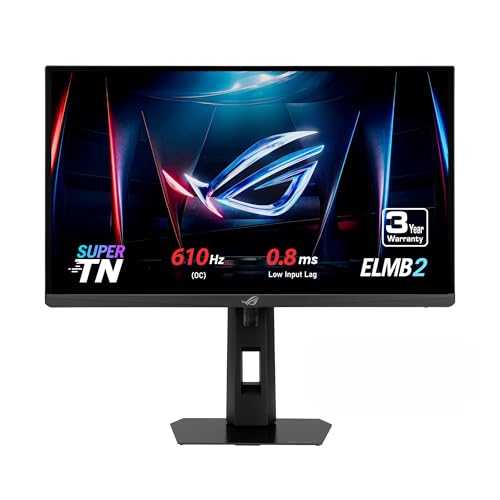
Designed specifically for professional esports gamers, the ASUS ROG Strix Ace 24” 1080P Esports Gaming Monitor (XG248QSG) stands out with its astonishing 610Hz refresh rate. This 24.1-inch FHD Super TN panel boasts a lightning-fast 0.1ms response time and an impressive input lag of just 0.8ms, considerably lower than other 600Hz monitors. Enhanced with ASUS Extreme Low Motion Blur 2 technology, it delivers 3X brighter visuals for a competitive edge. Connectivity options like HDMI 2.1 and a tripod socket make setup easy. Plus, enjoy a 3-month Adobe Creative Cloud access with your purchase. It’s a gamer’s dream!
Best For: Professional esports gamers seeking unparalleled performance and speed in their gaming monitor.
Pros:
- Incredibly high refresh rate of 610Hz provides ultra-smooth visuals for competitive gaming.
- Fast response time of 0.1ms significantly reduces motion blur and enhances gameplay clarity.
- Includes a 3-month complimentary access to Adobe Creative Cloud, adding value for content creators.
Cons:
- Limited to a 24.1-inch screen size, which may not be suitable for users preferring larger displays.
- Super TN panel may not offer the same color accuracy and viewing angles as IPS panels.
- High refresh rate may require powerful hardware to fully utilize its capabilities, potentially increasing overall setup costs.
LG 24G411A-B 24-inch Ultragear Full HD Gaming Monitor

Gamers who crave a competitive edge will find the LG 24G411A-B 24-inch Ultragear Full HD Gaming Monitor an outstanding choice. With a Full HD resolution of 1920 x 1080, its 120Hz refresh rate—overclockable to 144Hz—ensures smooth gameplay. The ultra-fast 1ms response time minimizes motion blur, enhancing your competitive play. Compatible with NVIDIA G-SYNC and AMD FreeSync, you’ll enjoy tear-free gaming. HDR10 support covers 99% of sRGB, delivering vibrant colors through its IPS technology. Plus, features like Dynamic Action Sync and customizable layouts make multitasking effortless, keeping you focused during intense gaming sessions.
Best For: Gamers seeking a high-performance monitor that enhances their gaming experience with smooth visuals and vibrant colors.
Pros:
- High Refresh Rate: 120Hz native refresh rate, overclockable to 144Hz for fluid gameplay.
- Low Response Time: 1ms response time minimizes motion blur, perfect for fast-paced action.
- Color Accuracy: HDR10 support and 99% sRGB coverage provide vivid and accurate colors.
Cons:
- Limited Connectivity: Only includes HDMI and DisplayPort options, lacking USB-C or additional ports.
- Tilt-Only Stand: The stand is adjustable only in tilt, lacking height or swivel adjustments.
- Weight: At 7.3 pounds, it may be heavier compared to some other monitors in its category.
ASUS TUF Gaming Series 5 24” 1080P Gaming Monitor (VG249QM5A)

With a blistering 240Hz refresh rate and an astonishing 0.3ms minimum response time, the ASUS TUF Gaming Series 5 24” 1080P Gaming Monitor (VG249QM5A) stands out as an ideal choice for competitive players seeking an edge. Its 23.8” Fast IPS panel delivers vibrant visuals, while FreeSync Premium and G-SYNC compatibility prevent tearing. ASUS’s Extreme Low Motion Blur Sync (ELMB SYNC) technology guarantees sharp images during intense action. The TUF Gaming A.I technology enhances your experience, and the DisplayWidget Center makes adjustments a breeze. Plus, you’ll get a 3-month Adobe Creative Cloud trial and a 3-year warranty with your purchase.
Best For: Competitive gamers who demand high performance and fast response times in their gaming monitors.
Pros:
- 240Hz refresh rate and 0.3ms response time ensure smooth gameplay and reduced motion blur.
- FreeSync Premium and G-SYNC compatibility eliminate screen tearing for a seamless gaming experience.
- TUF Gaming A.I technology and DisplayWidget Center provide user-friendly enhancements and easy adjustments.
Cons:
- Limited to 1080P resolution, which may not meet the needs of users seeking higher resolutions.
- Size of 23.8 inches may feel small for some users who prefer larger displays.
- The 3-month Adobe Creative Cloud trial may not appeal to all gamers, as it’s focused on creative software.
ASUS ROG Strix 25” 1080P HDR Gaming Monitor (XG259QNG)
The ASUS ROG Strix 25” 1080P HDR Gaming Monitor (XG259QNG) stands out as an exceptional choice for professional esports enthusiasts, thanks to its jaw-dropping 380 Hz refresh rate and lightning-fast 0.3 ms response time. With ASUS Fast IPS technology, you’ll enjoy sharp visuals without sacrificing frame rates. The ELMB SYNC feature eliminates ghosting and tearing, ensuring smooth gameplay. Plus, the DisplayWidget Center makes adjusting settings a breeze, while ASUS Aura Sync lets you sync ambient lighting with your gear. Weighing just 5.51 pounds, it’s easy to set up, and you’ll appreciate the included 3-year warranty for peace of mind.
Best For: Professional esports gamers seeking high-performance displays for competitive gameplay.
Pros:
- Incredible refresh rate of 380 Hz for ultra-smooth motion and responsiveness.
- Fast IPS technology provides sharp visuals and vibrant colors at high frame rates.
- ELMB SYNC feature effectively eliminates ghosting and tearing, enhancing the gaming experience.
Cons:
- Limited resolution of 1080p may not satisfy users looking for higher resolutions like 1440p or 4K.
- Price point may be higher compared to standard monitors without specialized gaming features.
- Only 25-inch screen size might be too small for some users who prefer larger displays for immersive gaming.
Amzfast 25 Inch FHD Gaming Monitor 320Hz

For competitive gamers seeking an edge in fast-paced matches, the Amzfast 25 Inch FHD Gaming Monitor with a staggering 320Hz refresh rate stands out as an exceptional choice. Its 1ms response time guarantees ultra-responsive gameplay, while the vibrant Fast IPS panel delivers stunning visuals with 130% sRGB color coverage. Equipped with adaptive-sync technology, it eliminates screen tearing for a seamless experience. You’ll appreciate features like AI crosshair assist and night vision, enhancing your performance in FPS and RTS games. Plus, its TÜV Rheinland certified eye care options make long gaming sessions comfortable. With a solid customer rating, this monitor is a must-consider option.
Best For: Competitive gamers looking for high refresh rates and responsive gameplay to enhance their gaming performance.
Pros:
- Ultra-high 320Hz refresh rate ensures smooth visuals and gameplay, ideal for fast-paced gaming.
- Vibrant Fast IPS panel provides rich colors and excellent viewing angles, enhancing the visual experience.
- Adaptive-sync technology eliminates screen tearing, resulting in a seamless gaming experience.
Cons:
- Limited size at 25 inches may not satisfy those who prefer larger screens for immersive gaming.
- Weight of 11.03 pounds could make it less portable for gamers who travel frequently.
- Availability starting June 12, 2025 means potential buyers will have to wait before purchase.
ASUS ROG Strix 25” Esports Gaming Monitor (XG259QNS)

Professional esports gamers looking for a competitive edge will find the ASUS ROG Strix 25” Esports Gaming Monitor (XG259QNS) hard to beat. With a stunning Full HD resolution of 1920 x 1080 and an impressive refresh rate of 380Hz, this monitor delivers ultra-smooth gameplay. Its 0.3ms response time and Fast IPS technology guarantee you won’t miss a beat. Featuring ASUS ELMB SYNC to eliminate ghosting, along with FreeSync Premium for a tear-free experience, it’s designed for peak performance. Plus, the ergonomic design and convenient connectivity options make it a practical choice for serious gamers.
Best For: Professional esports gamers seeking a high-performance monitor for competitive gaming.
Pros:
- Ultra-fast refresh rate of 380Hz provides smooth and responsive gameplay.
- Fast IPS technology ensures vibrant colors and wide viewing angles.
- Ergonomic design with convenient connectivity options enhances user comfort and accessibility.
Cons:
- Limited resolution of 1920 x 1080 may not satisfy those seeking higher pixel density.
- Heavier weight of 12.3 pounds may require a sturdy setup for stability.
- Higher price point compared to standard monitors could be a concern for budget-conscious buyers.
ZZA 27″ Curved Gaming Monitor
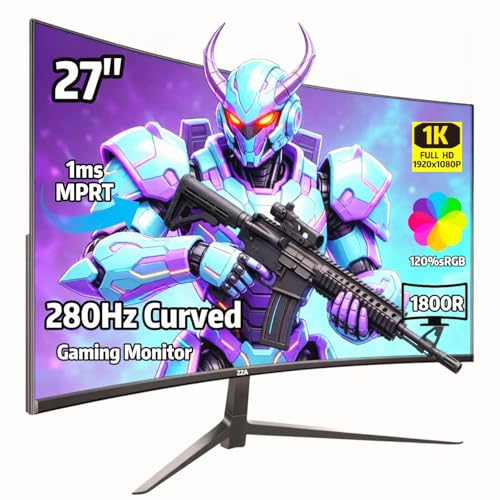
If you’re an esports enthusiast seeking an edge in competitive gaming, the ZZA 27″ Curved Gaming Monitor is a top choice with its impressive 280Hz refresh rate and 1ms GTG response time. This monitor boasts a 1800R VA panel and 120% sRGB color accuracy, ensuring vibrant visuals. Designed for FPS and competitive gaming, it features AMD FreeSync for ultra-smooth gameplay and minimal input lag. The curved display enhances focus and comfort, while low blue light technology reduces eye strain. With multiple connectivity options and a sleek design, the ZZA 27″ fits perfectly into any gaming setup or home office.
Best For: Esports enthusiasts and competitive gamers looking for a high-performance monitor with exceptional refresh rates and minimal input lag.
Pros:
- 280Hz refresh rate provides ultra-smooth gameplay, ideal for fast-paced gaming.
- Curved display design enhances comfort and focus during extended gaming sessions.
- Multiple connectivity options including HDMI and DisplayPort for versatile setups.
Cons:
- Requires a DisplayPort cable to achieve the full 280Hz refresh rate; HDMI is limited to 144Hz.
- The monitor’s size and weight may not be suitable for all desk setups.
- Some users may experience eye strain despite low blue light technology.
Acer Nitro 27 Inch Full HD Gaming IPS Monitor (KG271 X1biip)

The Acer Nitro 27 Inch Full HD Gaming IPS Monitor (KG271 X1biip) stands out as an exceptional choice for competitive gamers seeking an immersive experience, thanks to its impressive 200Hz refresh rate. With a 1920 x 1080 resolution and a 16:9 aspect ratio, you’ll enjoy vivid, high-quality images. Its AMD FreeSync Premium technology guarantees smooth gameplay by eliminating screen tearing. Plus, the 0.5ms response time minimizes ghosting during fast-paced action. The monitor supports 99% sRGB for accurate color reproduction, making it a solid option for gamers and creators alike. With versatile connectivity options, you’ll easily set it up with your devices.
Best For: Competitive gamers and content creators seeking a high-performance monitor with excellent color accuracy and fast response times.
Pros:
- High refresh rate: 200Hz refresh rate ensures ultra-smooth gameplay for fast-paced gaming.
- Low response time: 0.5ms GTG response time minimizes ghosting and smearing during action scenes.
- Accurate color reproduction: Supports 99% sRGB for vibrant and true-to-life colors, ideal for creative work.
Cons:
- Limited resolution: Full HD (1920 x 1080) may not meet the needs of users looking for higher resolutions like 1440p or 4K.
- No built-in speakers: Lacks integrated audio output, requiring external speakers or headphones for sound.
- Limited adjustability: May have restricted ergonomic adjustments compared to other high-end monitors.
Factors to Consider When Choosing a 1080P Esports Monitor
When you’re picking a 1080p esports monitor, there are several key factors to keep in mind. You’ll want to take into account refresh rates, response times, and panel types to guarantee you get the best performance. Don’t forget about adaptive sync technology and monitor size, as they can notably impact your gaming experience.
Refresh Rate Importance
Choosing a 1080p esports monitor means considering refresh rate, as it plays an important role in your gaming performance. A higher refresh rate, like 240Hz or 360Hz, greatly enhances gameplay smoothness, reducing motion blur and allowing quicker reactions in fast-paced scenarios. Monitors exceeding 144Hz are particularly beneficial for competitive gaming, providing a fluid visual experience that makes tracking fast-moving objects easier. Higher refresh rates also mean lower input lag, vital for precision in esports. Many pro players prefer monitors with 240Hz or higher to gain an edge, as these can display more frames per second, offering better clarity during intense moments. Pairing high refresh rates with low response times minimizes ghosting and screen tearing, ensuring an immersive experience.
Response Time Considerations
While selecting a 1080p esports monitor, response time is a critical factor to take into account, as it directly impacts your gaming experience. A lower response time, typically measured in milliseconds (ms), is essential for reducing motion blur and ghosting during fast-paced gaming. Look for monitors with response times of 0.1ms to 1ms; these allow you to see fast-moving objects clearly without trailing effects. Pay attention to response time specifications, particularly gray-to-gray (GtG) shifts, as lower GtG times generally deliver smoother visuals. Many esports monitors incorporate technologies like Extreme Low Motion Blur (ELMB) to enhance clarity further. Cutting-edge models can achieve response times as low as 0.3ms, giving you a significant edge in high-speed gaming situations.
Panel Type Differences
Understanding panel type differences is essential for selecting the right 1080p esports monitor. You’ll encounter IPS, TN, and VA panels, each with unique advantages. Fast IPS panels offer vibrant colors and wide viewing angles, perfect for immersive gaming. If speed is your priority, super TN panels deliver ultra-fast response times, sometimes as low as 0.1ms, making them ideal for competitive play. On the other hand, VA panels excel in contrast ratios and provide deeper blacks, enhancing visual depth during gameplay, though they may lag behind TN panels in response times. When choosing, also consider refresh rates—higher rates like 240Hz paired with fast panel types can greatly reduce motion blur, improving your overall gaming experience.
Adaptive Sync Technology
When it comes to competitive gaming, Adaptive Sync technology can make a notable difference in your experience. This tech, like AMD FreeSync and NVIDIA G-SYNC, syncs your monitor’s refresh rate with your graphics card’s frame rate, reducing screen tearing and stuttering. In fast-paced esports games, having consistent frame rates and smooth visuals is vital. Monitors with Adaptive Sync usually offer lower input lag, giving you an edge where every millisecond matters. Plus, many esports monitors combine Adaptive Sync with features like ELMB (Extreme Low Motion Blur) to minimize motion blur and ghosting. Keep in mind that the effectiveness varies; some monitors reach refresh rates up to 360Hz, greatly enhancing your competitive gaming performance.
Size and Resolution
Size and resolution play an essential role in your gaming experience, especially in competitive esports. A 1080P esports monitor typically offers a resolution of 1920 x 1080 pixels, delivering sharp and clear visuals that help you stay focused in intense matches. Monitors usually range from 24 to 27 inches; larger sizes enhance immersion while keeping the same resolution. The standard 16:9 aspect ratio optimizes your screen space for gameplay, ensuring visual fidelity isn’t compromised. Additionally, a bigger screen improves your peripheral vision, critical during fast-paced gaming. To elevate your performance, pair a 1080P resolution with a fast refresh rate of 120Hz or higher for smoother, more responsive gameplay. These factors are essential for securing a competitive edge in esports.
Ergonomics and Design
To maximize your gaming experience, prioritize ergonomics and design when selecting a 1080P esports monitor. Look for adjustable features like height, tilt, swivel, and pivot to maintain comfort during long sessions. A monitor with a smaller footprint not only saves desk space but also allows room for your keyboard and mouse, enhancing your setup. Consider integrated features like headset hangers and phone sockets to keep your gaming area organized. Ultra-slim bezels can improve aesthetics and expand your screen real estate, making gameplay more immersive. Finally, guarantee compatibility with VESA mounts for flexible positioning, letting you customize your setup for ideal comfort and accessibility. These factors can greatly impact your performance and enjoyment in competitive gaming.
Connectivity Options Available
Choosing the right connectivity options for your 1080P esports monitor can greatly enhance your gaming setup. Look for monitors with multiple HDMI and DisplayPort inputs to guarantee compatibility with various gaming consoles and PCs. This versatility allows you to switch between devices effortlessly. Advanced connectivity features, such as USB ports, make it easy to connect peripherals and accessories. Additionally, support for adaptive sync technologies like AMD FreeSync or NVIDIA G-SYNC can reduce screen tearing and improve performance, often requiring specific ports. If you’re planning a multi-monitor setup, check for VESA mounting support for better ergonomics. Finally, consider legacy ports like VGA or DVI to connect older devices, broadening your connectivity options even further.