
When it comes to managing your data effectively, choosing the right hot swap drive enclosure can make all the difference. These enclosures not only streamline your workflow but also provide essential protection for your valuable information. With various options available, each boasting unique features, you’ll want to understand what suits your needs best. Let’s explore the top choices and find the one that meets your requirements for seamless data management.
ICY DOCK 6 Bay 2.5” SATA HDD/SSD Hot Swap Backplane Enclosure (MB326SP-B)
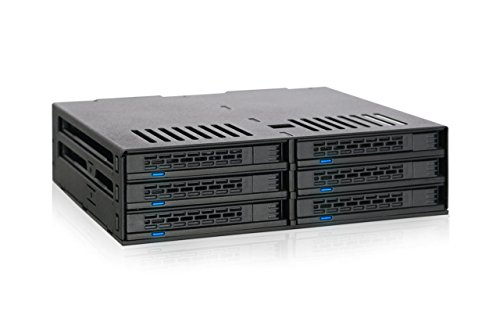
If you’re a power user or system builder looking for an efficient way to manage multiple drives, the ICY DOCK 6 Bay 2.5” SATA HDD/SSD Hot Swap Backplane Enclosure (MB326SP-B) is an excellent choice. This enclosure supports up to six 2.5” SATA III drives, accommodating various heights of 5mm, 7mm, and 9.5mm. With a tool-less installation, you can quickly set up your drives without hassle. The hot-swappable bays let you swap drives easily without shutting down your system. Plus, dual 40mm fans keep everything cool, with adjustable speeds for peak performance. Enjoy seamless data management and reliability!
Best For: Power users and system builders seeking an efficient, space-saving solution for managing multiple 2.5” SATA drives.
Pros:
- Tool-less installation allows for quick and easy setup of drives.
- Hot-swappable bays enable seamless drive replacements without system downtime.
- Dual 40mm fans with adjustable speeds provide effective cooling for optimal performance.
Cons:
- Limited to 2.5” drives, excluding compatibility with larger 3.5” HDDs.
- The cooling fans may produce noise, which could be a concern in quiet environments.
- Requires sufficient space in the case for installation due to its multi-bay design.
Rosewill Internal Hard Drive Enclosure (RSV-SATA-Cage-34)

The Rosewill Internal Hard Drive Enclosure (RSV-SATA-Cage-34) stands out for users seeking a reliable solution for expanding storage capabilities without the hassle of downtime. This enclosure converts 3 x 5.25 CD-ROM spaces into support for 4 x 3.5 or 2.5 SATA and SAS HDDs. Weighing just 1 pound, it’s compact yet robust, made from durable steel and ABS. The single rear 120mm exhaust fan guarantees effective cooling, vital for maintaining peak performance. With a 4.3-star rating from over 610 reviews, it’s a popular choice for those looking to enhance their data management seamlessly.
Best For: Users seeking an efficient and reliable solution to expand storage capabilities in their systems without downtime.
Pros:
- Hot-Swap Support: Allows for easy swapping of drives without needing to power down the system.
- Effective Cooling: The rear 120mm exhaust fan ensures optimal airflow to keep drives cool during operation.
- Durable Construction: Made from sturdy steel and ABS, ensuring long-lasting use.
Cons:
- Limited Compatibility: Only compatible with specific Rosewill models (L4000U, L4500U, R4000U).
- Noisy Operation: Some users may find the exhaust fan to be noisy during operation.
- Weight: At 1 pound, it may be considered heavier compared to other lightweight enclosures on the market.
Kingwin Universal Hot Swap Mobile Rack for SSD/HDD

Looking for a reliable solution to manage your storage needs? The Kingwin Universal Hot Swap Mobile Rack for SSD/HDD has you covered. Designed for both 2.5” and 3.5” drives, it fits seamlessly into one 5.25” bay, allowing for effortless hot swapping. With support for SATA I/II/III, it guarantees high-speed data transfer up to 6Gbps. Its tray-less design promotes easy installation, while the open-air construction enhances ventilation, optimizing your drives’ lifespan. Weighing just 0.4 pounds, it’s compatible with various PCs and servers. Plus, with a solid customer rating, you can trust its performance for your data management needs.
Best For: The Kingwin Universal Hot Swap Mobile Rack is best for users in need of efficient storage management for server computers, cloud computing, and desktop PCs.
Pros:
- Hot swap capability allows for easy drive replacement without powering down the system.
- High-speed data transfer of up to 6Gbps ensures quick access to files and applications.
- Tray-less design simplifies the installation process and offers flexible drive options.
Cons:
- May require additional adapters for certain drive configurations or cases.
- Limited to systems with a 5.25” bay, which may not be available on all PC cases.
- Some users may find the open-air design less protective against dust and debris.
RackChoice Internal Hard Drive Enclosure for SATA/SAS Hard Drives

Transform your storage options with the RackChoice Internal Hard Drive Enclosure, perfect for tech enthusiasts needing a reliable solution for managing multiple SATA or SAS drives. This enclosure converts three 5.25″ bays into a hot-swappable interface for five 2.5”/3.5” SATA or SAS drives. With support for SATA 3.0 and speeds up to 6 Gbps, you’ll enjoy efficient data transfer. It also accommodates RAID configurations 0, 1, 5, 6, and 10, although you’ll need a RAID card. The robust metal body and 80mm cooling fan guarantee peak heat dissipation. Plus, you get five SATA cables for easy connectivity.
Best For: Tech enthusiasts and professionals who need a reliable and efficient solution for managing multiple SATA or SAS hard drives.
Pros:
- Hot-swappable interface allows for easy drive replacement without shutting down the system.
- Supports multiple RAID configurations for enhanced data protection and performance.
- Robust cooling system with an 80mm fan ensures optimal heat dissipation, prolonging drive lifespan.
Cons:
- Power supply not included, requiring additional components for setup.
- Requires a RAID card for RAID configurations, which may add to overall costs.
- Limited to 3x 5.25″ bays, which may restrict compatibility with some cases.
Sata HDD & SSD Hot Swap Cage, 6 Bay Hard Drive Dock

For tech enthusiasts and professionals who frequently swap out drives, the Sata HDD & SSD Hot Swap Cage stands out as an essential tool. This 6 Bay Hard Drive Dock fits neatly into a 5.25” enclosure, allowing you to support up to six 2.5” SATA HDDs or SSDs, ranging from 5mm to 9.5mm. You can quickly and easily swap drives without powering down your system, ensuring smooth operation. It’s compatible with various setups, making it a versatile addition to your configuration. Plus, built-in cooling fans keep your drives running efficiently during those high-demand tasks. Enjoy effortless data management with this reliable dock!
Best For: Tech enthusiasts and professionals who need efficient drive swapping capabilities without system downtime.
Pros:
- Hot swap capability allows for quick drive changes without powering down the system.
- Supports up to six drives, providing ample storage options for various configurations.
- Built-in cooling fans ensure optimal performance during high-demand tasks.
Cons:
- Limited to 2.5” drives, which may not accommodate larger 3.5” HDDs.
- Requires a 5.25” enclosure, which may not be available in all setups.
- Cooling fans may produce noise, potentially affecting a quiet workspace.
Silverstone Technology FS304-V 5.25″ to 3.5″ Trayless Hot-swap Cage

If you’re seeking a reliable solution for managing multiple drives, the Silverstone Technology FS304-V Trayless Hot-swap Cage stands out with its impressive capacity to fit four 3.5″ SAS 12G/SATA 6Gbit/s drives into just three 5.25″ bays. This sturdy steel enclosure features independent LED indicators for monitoring drive status and a built-in cooling fan for optimal heat dissipation. Enjoy seamless hot-swap functionality with a maximum data transfer rate of 12Gbit/s, ensuring efficient data management. Weighing only 2.4 pounds, it’s compact yet powerful, making it an excellent choice for those who prioritize performance and convenience.
Best For: Users looking for an efficient and compact solution to manage multiple 3.5″ drives with hot-swap capabilities.
Pros:
- Supports up to four 3.5″ SAS 12G/SATA 6Gbit/s drives in just three 5.25″ bays, maximizing storage efficiency.
- Features independent LED indicators for easy monitoring of drive status and a built-in cooling fan for effective heat management.
- Hot-swap functionality allows for seamless drive replacement without downtime.
Cons:
- Limited to four drives, which may not meet the needs of users requiring more extensive storage options.
- The plastic HDD trays may not be as durable as metal alternatives, potentially impacting longevity.
- Requires three 5.25″ bays, which may not be available in all setups, limiting compatibility.
SABRENT 4-Bay USB 3.2 Gen 2 SATA Docking Station for HDD/SSD
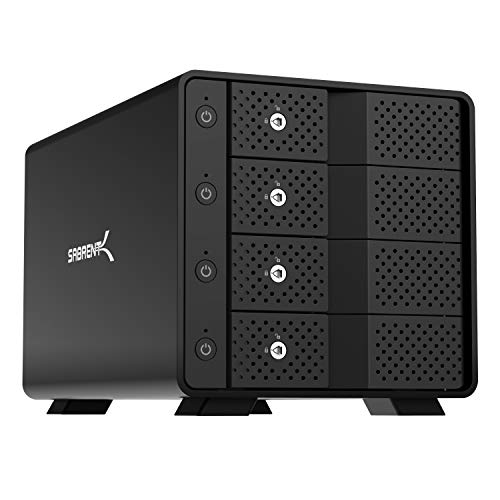
The SABRENT 4-Bay USB 3.2 Gen 2 SATA Docking Station is perfect for professionals who need to manage multiple drives efficiently. You can connect up to four 3.5” SATA HDDs or SSDs through a single USB-C port, with impressive transfer speeds up to 10Gbps. The tray-less hot-swap feature allows for quick drive insertion and removal without fuss. Each bay has an independent power switch and locking key, ensuring safe operation and preventing accidental ejection. Built from durable aluminum with a cooling fan, this docking station is designed for reliable, long-term use, making it ideal for your data management needs.
Best For: Professionals and content creators who require efficient management of multiple HDDs or SSDs for high-capacity storage and fast data transfers.
Pros:
- High-speed transfers with USB 3.2 Gen 2, reaching up to 10Gbps.
- Tray-less hot-swap capability allows for quick and easy drive changes without tools.
- Durable aluminum construction with active cooling to ensure reliability during extended use.
Cons:
- No built-in RAID functionality, which may limit data redundancy options.
- Limited to 3.5” drives, which may not accommodate users with 2.5” drives.
- Requires USB-C connection, which may necessitate additional adapters for compatibility with older systems.
StarTech.com Trayless Hot Swap Mobile Rack for 3.5in Hard Drive
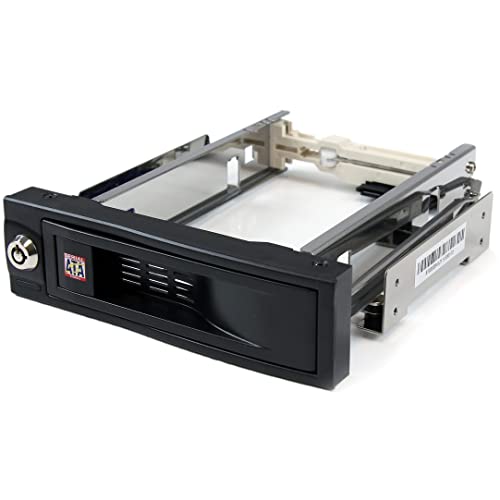
Designed for users who demand quick access and versatility, the StarTech.com Trayless Hot Swap Mobile Rack for 3.5in Hard Drive offers a standout trayless feature that simplifies drive installation and removal. You’ll appreciate its front-accessible 5.25-inch bay, which accommodates a 3.5 SATA drive effortlessly. Built from solid aluminum, this rack guarantees durability, while internal rubber shock absorbers protect your drives during operation. With a lockable drive bay, your data remains secure. Plus, it’s rated for over 50,000 insertions, guaranteeing longevity. Experience hassle-free access to your hard drives without needing to open your chassis—just insert and go!
Best For: Users who require quick and efficient access to 3.5 SATA hard drives without the hassle of trays.
Pros:
- Trayless design allows for easy installation and removal of drives, improving efficiency.
- Durable aluminum construction ensures long-lasting use and protection for drives.
- Lockable drive bay adds an extra layer of security for sensitive data.
Cons:
- Requires a 5.25-inch bay, which may not be available in all systems.
- Internal components may be less effective against extreme vibrations compared to some traditional enclosures.
- Limited to 3.5 SATA drives, which may not suit users with other drive types.
StarTech.com 3-Bay Hot Swap Backplane for 3.5in HDD

For those seeking a reliable and efficient solution for managing multiple hard drives, the StarTech.com 3-Bay Hot Swap Backplane stands out as an exceptional choice. This backplane converts two 5.25-inch bays into a hot-swappable interface for up to three 3.5-inch SATA or SAS drives. With its quick installation and individual ejection levers, swapping drives is effortless. The vented aluminum enclosure facilitates excellent heat dissipation, while the built-in fan maintains peak temperatures. Plus, the key-lock design adds security for your data. Backed by a two-year warranty and lifetime support, it’s perfect for enterprise applications.
Best For: Users looking for a reliable and efficient way to manage multiple hard drives in enterprise system applications.
Pros:
- Quick and easy installation with individual ejection levers for seamless drive swapping.
- Excellent heat dissipation due to the vented aluminum enclosure and built-in fan with speed control.
- Added security features including a key-lock design to protect sensitive data.
Cons:
- Limited to 3 drives, which may not be sufficient for users with larger storage needs.
- Requires two 5.25-inch bays, which may not be available in all systems.
- Aluminum construction may be less durable compared to other materials like steel.
Silverstone Technology FS305-12G Hot-Swap Hard Drive Cage
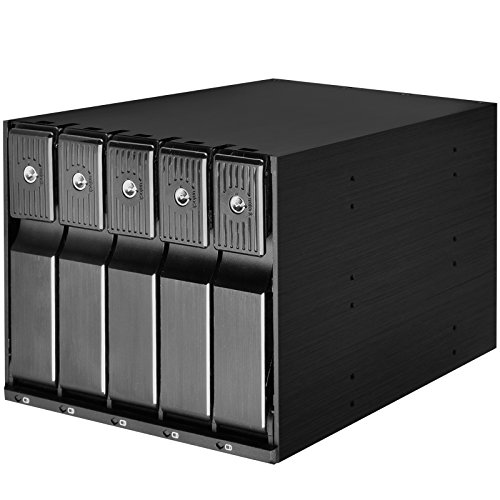
Looking for a reliable hot-swap drive solution? The Silverstone Technology FS305-12G Hot-Swap Hard Drive Cage lets you effortlessly manage up to five 3.5″ SATA/SAS drives within three 5.25″ bays. With a sleek aluminum construction, it supports transfer rates up to 12 Gbit/s. You’ll appreciate the trayless, screwless design for easy installation, along with adjustable drive status LEDs and a built-in cooling fan for peak performance. Each drive comes with its own metal key lock, ensuring security. Rated 4.4 stars by users, this cage is a top choice for enhancing your PC’s data management capabilities.
Best For: This product is best for PC enthusiasts and professionals looking for an efficient and secure solution to manage multiple hard drives.
Pros:
- Trayless and screwless design allows for quick and easy drive installation and replacement.
- Built-in cooling fan ensures optimal heat dissipation, prolonging the lifespan of the drives.
- Individual metal key locks provide enhanced security for each drive, safeguarding your data.
Cons:
- Limited to 3.5″ drives, which may not accommodate users with different drive sizes.
- Requires three 5.25″ bays, which might be a limitation for compact cases with fewer bays.
- Weight of 3.12 pounds may be considered heavy for some users looking for lightweight solutions.
Factors to Consider When Choosing a Hot Swap Drive Enclosure
When choosing a hot swap drive enclosure, you need to take into account several key factors. Drive compatibility options, hot swap functionality, and cooling system efficiency play essential roles in performance. Don’t forget about installation ease and build quality materials, as they can greatly impact your overall experience.
Drive Compatibility Options
Choosing the right hot swap drive enclosure involves understanding various compatibility factors to assure seamless performance. First, confirm the enclosure supports the specific drive types you plan to use, like SATA I, II, III, or SAS HDDs, as compatibility can vary. Next, check its capacity; some enclosures accommodate multiple 2.5” or 3.5” drives, while others are limited to specific configurations. Pay attention to the physical dimensions of your drives, since enclosures may only support certain heights, such as 5mm, 7mm, or 9.5mm for 2.5” drives. Finally, verify the data transfer rates; most support up to 6 Gbps, but some newer models can handle up to 12 Gbps for SAS drives, enhancing your data management experience.
Hot Swap Functionality
Hot swap functionality is essential for anyone needing to replace or add drives without interrupting their workflow. This feature enhances operational efficiency and minimizes downtime, making it a must-have for busy environments. When choosing a hot swap drive enclosure, look for support for both SSDs and HDDs, ensuring seamless integration into your system. Tool-less installation features are also a big plus, allowing for quick and straightforward drive changes without extra tools. Additionally, consider compatibility with SATA I/II/III and SAS drives, which provides versatility for various setups. Overall, a well-designed hot swap enclosure will keep your data management smooth and efficient while maintaining peak performance.
Cooling System Efficiency
An efficient cooling system plays an essential role in the performance of hot swap drive enclosures, especially when you’re frequently swapping out drives. Overheating can lead to drive failures and data loss, so it’s important to choose enclosures with effective cooling solutions. Look for models featuring built-in fans, like dual 40mm or single 120mm exhaust fans, which help maintain airflow and dissipate heat. Adjustable fan speed controls can enhance cooling efficiency, allowing you to switch between HIGH, LOW, and AUTO modes based on your system’s needs. Additionally, consider enclosures with open-air configurations for natural ventilation. Pay attention to heat dissipation ratings, as those capable of handling up to 12 Gbit/s transfer rates will better manage thermal output during intense data transfers.
Installation Ease
When you’re setting up a hot swap drive enclosure, installation ease can greatly impact your overall experience. Look for enclosures that offer tool-less installation, allowing you to set up quickly without the hassle of tools or screws. A design with a hot-swap feature lets you replace drives without powering down your system, enhancing convenience. Opt for tray-less designs, as they simplify the insertion and removal of drives, cutting down installation time and effort. Clear installation instructions and user-friendly designs also minimize complexity, making the process smoother. Finally, verify the enclosure is compatible with various drive sizes and types to meet your specific storage needs seamlessly, guaranteeing a hassle-free setup.
Build Quality Materials
A solid installation experience sets the stage for evaluating build quality materials in hot swap drive enclosures. You’ll want enclosures made of durable materials like aluminum or steel, which provide vital structural integrity and protect against wear and tear. High-quality models often include internal shock absorbers, safeguarding your drives and enhancing their longevity. Look for designs that promote effective heat dissipation, featuring built-in cooling fans and ventilation to prevent overheating. Trayless designs, often crafted from robust ABS plastic, allow for easy drive swaps without extra tools. Ultimately, a well-constructed enclosure can support higher insertion rates and guarantee reliability in environments requiring frequent drive changes, making it a significant factor in your choice.