
If you’re serious about diagnosing your PC issues efficiently, having the right tools is essential. PCIe slot testers can help you pinpoint problems with your graphics cards and motherboards quickly. With various options on the market, you might wonder which ones stand out. In this guide, we’ll explore ten of the best PCIe slot testers, each offering unique features that can enhance your troubleshooting efforts. Let’s find out which one might be the perfect fit for you.
PC Computer PSU and Motherboard Tester Tool

If you’re troubleshooting an old desktop PC or laptop, the PC Computer PSU and Motherboard Tester Tool is your go-to solution. This handy diagnostic kit includes a large PCI test board, a small laptop test board, and essential accessories like a BIOS speaker and motherboard power switch cable. Weighing only 7 ounces, it’s portable enough for quick checks. It effectively diagnoses issues such as no power or boot failures, thanks to its fault-tolerant PSU testing. With a user-friendly manual and free lifetime support, you’ll feel confident tackling any PC problems that arise. It’s an invaluable tool for tech enthusiasts and students alike!
Best For: Tech enthusiasts, students, and anyone troubleshooting old desktop PCs or laptops.
Pros:
- Comprehensive Diagnostic Tools: Includes both PCI and laptop test boards for versatile testing.
- User-Friendly Support: Comes with a detailed manual and free lifetime customer service for assistance.
- Portable Design: Weighs only 7 ounces and packs neatly in a carrying case for easy transport.
Cons:
- Limited to Older Systems: Primarily designed for older desktop PCs and laptops, may not be suitable for newer models.
- Compatibility Issues: Requires correct slot compatibility, which may not be straightforward for all users.
- Learning Curve: May take some time for beginners to fully understand the diagnostic features and usage.
PCI-E 16X 8X Slot Tester Card for Motherboard

The PCI-E 16X 8X Slot Tester Card is an invaluable tool for technicians and DIY enthusiasts looking to diagnose motherboard issues effectively. This card connects to your motherboard’s PCI-E slot and requires a 12V DC power supply to operate. When functioning correctly, the lights illuminate, indicating a healthy connection. If they don’t light up, it suggests potential problems like open Southbridge pins, short circuits, or damaged isolation capacitors. It’s perfect for troubleshooting non-functional motherboards or when video cards display “FF” errors. Use it to pinpoint issues quickly and get your system back up and running smoothly.
Best For: Technicians and DIY enthusiasts seeking to diagnose and repair non-functional motherboards effectively.
Pros:
- Accurate diagnostics for identifying Southbridge issues such as shorts or opens.
- User-friendly design with lights that indicate proper functionality.
- Versatile usage for troubleshooting various motherboard video card problems.
Cons:
- Requires external power supply, which may limit portability.
- May not address all motherboard issues, focusing mainly on Southbridge-related problems.
- Limited to PCI-E slots, restricting use to compatible motherboards only.
PC Diagnostic 4-Digit Card for Motherboard Testing
For anyone troubleshooting motherboard issues, the PC Diagnostic 4-Digit Card is an essential tool that simplifies the diagnostic process. This compact device connects to PCI or ISA interfaces and displays critical POST status codes, helping you identify errors quickly. With its 4-digit display, you’ll see both current and previous error codes, making it easy to track issues. It works without needing a CPU, diagnosing problems like incorrect card fitting or bad slots. Lightweight and compatible with various operating systems, this card is a must-have for any DIY PC builder or technician looking to streamline their troubleshooting efforts.
Best For: DIY PC builders and technicians looking to efficiently diagnose motherboard issues.
Pros:
- Compact Design: Lightweight and easy to connect to PCI or ISA interfaces.
- Clear Display: Dual 4-digit read-out for current and previous error codes simplifies monitoring.
- No CPU Required: Can diagnose motherboard issues independently, saving time in troubleshooting.
Cons:
- Limited Compatibility: Only works with motherboards featuring PCI or ISA bus slots.
- Moderate Customer Rating: Average rating of 3.5 out of 5 stars suggests mixed user experiences.
- Not Comprehensive: Primarily focuses on motherboard diagnostics, may not address other PC components.
New V8 PCIe USB Post Test Card Motherboard Diagnostic Tester Kit
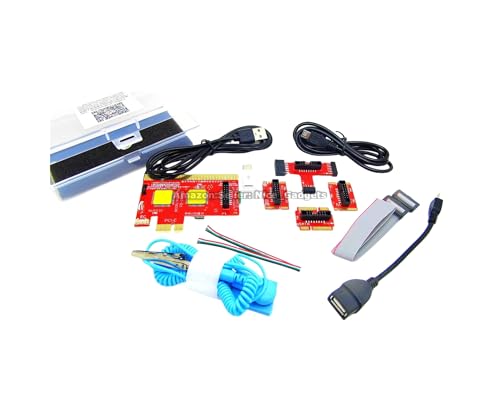
Designed with versatility in mind, the New V8 PCIe USB Post Test Card is perfect for PC technicians and DIY enthusiasts who need a reliable diagnostic tool. It supports USB, micro USB, and Type C connections, making it compatible with various devices like PCs, laptops, and even Android phones. You’ll appreciate the included user guides and app that streamline your diagnostic process, eliminating manual code lookups. Remember to unplug the USB cable between tests to clear cached data. With a compact design and solid customer rating, this tool is an excellent addition to your troubleshooting arsenal.
Best For: The New V8 PCIe USB Post Test Card is best for PC technicians, DIY enthusiasts, and computer owners who require an efficient and versatile diagnostic tool.
Pros:
- Versatile Compatibility: Supports standard USB, micro USB, and Type C connections for use with various devices.
- User-Friendly: Includes comprehensive guides and an app that simplifies the diagnostic process by eliminating manual code lookups.
- Compact Design: Lightweight and portable, making it easy to carry and use in different locations.
Cons:
- No Traditional Display: Results are shown through an app rather than a physical digital display, which may not be preferred by all users.
- Requires Preparation: Users must study the guides before use, which could be time-consuming for those unfamiliar with diagnostic tools.
- Cached Data Issue: Users must remember to unplug the USB cable between tests to avoid cached data affecting results.
PCI-E Slot Tester Card for Motherboard

If you’re a technician or DIY enthusiast looking to troubleshoot PCI-E slots on motherboards, this PCI-E Slot Tester Card is an ideal tool. It supports PCI-E 16X, 8X, and 4X slots, allowing you to quickly identify short or open connections. The integrated light tester provides visual diagnostics, making it easy to assess the status of your PCI-E slots at a glance. Manufactured by a reputable electronic components supplier, it’s reliable for your diagnostic needs. For any questions, their customer support is ready to assist you. Explore more options in their store to enhance your diagnostic toolkit!
Best For: Technicians and DIY enthusiasts looking to diagnose and troubleshoot PCI-E slots on motherboards.
Pros:
- Compatible with multiple PCI-E slot sizes (16X, 8X, and 4X) for versatile use.
- Integrated light tester provides quick and easy visual diagnostics.
- Reliable product from a reputable electronic components manufacturer.
Cons:
- Limited to detecting only short or open connections, may not cover other issues.
- Requires some familiarity with electronic components for effective use.
- No advanced features beyond basic diagnostics offered.
Computer Accessory Graphics Card Tester

A Computer Accessory Graphics Card Tester is essential for both DIY tech enthusiasts and professional repair technicians who need to quickly diagnose graphics card issues. This versatile tool supports AGP and PCIe cards, efficiently detecting problems like no display, blurry visuals, and instability. You won’t need multimeter measurements, as it identifies short circuits and CPU failures with ease. The user-friendly setup requires just inserting the faulty card, applying a 12V power supply, and pressing a switch. Indicator lights give clear feedback on the graphics card’s condition, allowing for accurate fault localization and ensuring you can tackle repairs effectively.
Best For: DIY tech enthusiasts and professional repair technicians who need to quickly diagnose graphics card issues.
Pros:
- Quickly detects faults such as no display, blurry visuals, and unstable performance.
- User-friendly setup allows for easy operation without the need for multimeter measurements.
- Indicator lights provide clear feedback, aiding in accurate fault localization for effective repairs.
Cons:
- Limited to AGP and PCIe cards, which may not cover all types of graphics cards.
- Requires a 12V power supply, which may not be readily available for all users.
- Does not provide detailed diagnostics, so further confirmation with a multimeter may still be necessary for thorough troubleshooting.
PCIe 5.0 Riser Test Card Adapter for Motherboard

For professionals and DIY enthusiasts alike, the PCIe 5.0 Riser Test Card Adapter stands out as an essential tool for motherboard testing and component evaluation. This adapter supports PCIe x16, x8, and x1 configurations, ensuring compatibility with both PCIe 4.0 and 5.0 standards. Its half-height bracket allows for versatile installation in various chassis. You’ll appreciate the reliable protection it offers, preventing wear and damage during repeated testing. Constructed from high-quality PCB material, it guarantees stable signal integrity and durability. Whether for hardware testing, PC builds, or workstation upgrades, this adapter is a must-have for safe extension and evaluation of your PCIe devices.
Best For: Professionals and DIY enthusiasts seeking a reliable solution for motherboard testing and component evaluation.
Pros:
- Versatile Compatibility: Supports both PCIe 4.0 and 5.0 standards across various configurations (x1, x4, x8, x16).
- Durable Construction: Made from high-quality PCB material, ensuring stable signal integrity and long-lasting use.
- Motherboard Protection: Prevents wear and damage during repeated plug-ins, extending the lifespan of PCIe slots.
Cons:
- Limited Height Options: Only available in half-height and full-height brackets, which may not fit all chassis types.
- Specialized Use: Primarily designed for testing and evaluation, which may limit its appeal to general consumers.
- Potential Overkill for Casual Users: Might be more advanced than what is needed for basic PC builds or upgrades.
Jadeshay TL631 Pro Motherboard Analyzer Diagnostic Card
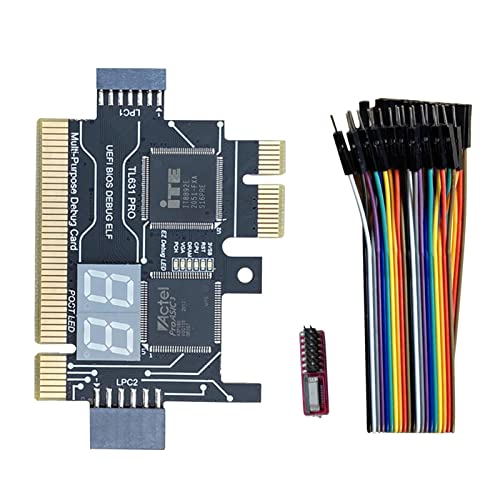
Engineered for both laptop and desktop users, the Jadeshay TL631 Pro Motherboard Analyzer Diagnostic Card stands out with its compatibility across PCI, PCI-E, mini PCI-E, and LPC slots. This universal design lets you integrate it seamlessly with popular motherboards from ASÛS, Gîgabyte, and MSÎ. With advanced diagnostic technology, it boasts a high recognition rate for detecting motherboard issues. Its multi-channel LED indicators provide real-time status monitoring for essential components like power supply, CPU, and graphics card. Whether you’re a professional or enthusiast, this tool enhances your troubleshooting experience, allowing you to resolve PC issues swiftly and efficiently.
Best For: The Jadeshay TL631 Pro Motherboard Analyzer Diagnostic Card is best for computer technicians and DIY enthusiasts seeking efficient troubleshooting solutions for both laptops and desktops.
Pros:
- Wide Compatibility: Works seamlessly with various motherboard types, including ASÛS, Gîgabyte, and MSÎ, across multiple slots.
- Advanced Diagnostics: High recognition rate for detecting motherboard issues, enhancing troubleshooting capabilities.
- Real-time Monitoring: Multi-channel LED indicators provide instant feedback on critical components like power supply and CPU.
Cons:
- Limited to Motherboard Issues: Primarily focuses on motherboard diagnostics, may not address issues outside the motherboard scope.
- Learning Curve: New users might require some time to fully understand the card’s functionalities and indicators.
- No Built-in Repair Features: While it identifies issues, it does not provide repair capabilities, requiring additional tools for fixes.
Kingwin Digital Power Supply Tester for PC Power Supply Testing

The Kingwin Digital Power Supply Tester stands out as an essential tool for both beginners and seasoned PC builders who need reliable power supply diagnostics. You’ll appreciate its extensive testing capabilities, covering various PSUs like ATX, ITX, and SATA. Its user-friendly design makes it easy to use, with plug-and-play functionality and a lightweight build for portability. The clear digital LCD display shows real-time voltage levels, ensuring accurate measurements of critical rails. Quick diagnostic results help you swiftly identify any faulty power supplies, while built-in safety features protect your components against short circuits and overvoltage. It’s a must-have for your toolkit!
Best For: The Kingwin Digital Power Supply Tester is best for both novice and experienced PC builders seeking efficient and accurate power supply diagnostics.
Pros:
- Comprehensive testing capabilities for a wide range of power supply units including ATX, ITX, and SATA.
- User-friendly design with plug-and-play functionality, making it accessible for all skill levels.
- Clear digital LCD display provides real-time voltage readings, ensuring accurate monitoring of power levels.
Cons:
- May not support very specific or rare power supply types.
- Limited to testing power supplies only, lacking additional diagnostic features for other components.
- The lightweight design may feel less durable for some users compared to heavier models.
Graphics Card Diagnostic Analyzer Tester for Detecting Faults

Identifying faults in video graphics cards can be a challenging task, but the Graphics Card Diagnostic Analyzer Tester simplifies the process for technicians and DIY enthusiasts alike. This lightweight tool quickly pinpoints issues like no display or unstable visuals without the hassle of individual PCI bus measurements. It effectively tests data bus connections for open and short circuits, while also allowing inspection for burn marks and abnormal voltages. With a straightforward setup—just insert the card, apply 12V power, and press the switch—you’ll get clear feedback through indicator lights, making fault diagnosis efficient and user-friendly.
Best For: Technicians and DIY enthusiasts looking to efficiently diagnose and repair video graphics card faults.
Pros:
- Quickly identifies various display issues without extensive measurements.
- User-friendly setup with clear indicator lights for status feedback.
- Allows for thorough inspections of physical damage and voltage irregularities.
Cons:
- Limited to testing AGP and PCI E graphics cards only.
- May require confirmation of anomalies with additional tools like a multimeter.
- Not suitable for diagnosing issues outside of the graphics card itself.
Factors to Consider When Choosing a PCIe Slot Tester
When choosing a PCIe slot tester, you should consider several key factors. Compatibility with your motherboard is essential, along with the diagnostic features and functions that will best meet your needs. Don’t overlook ease of use, power supply requirements, and the display and indicators that will make your testing process smoother.
Compatibility With Motherboard Types
Confirming your PCIe slot tester is compatible with your motherboard types is vital for effective diagnostics. First, check that the tester supports the specific PCIe versions, like PCIe 4.0 or 5.0, to avoid any operational issues. It’s also important to confirm that the tester accommodates various slot sizes, such as x1, x4, x8, and x16, to fit different motherboard configurations. Additionally, assess compatibility with motherboard types like ATX, microATX, and mini-ITX for broader application. If your motherboard has other interfaces, like PCI or ISA, verify the tester can work with those as well. Finally, check that it can interface with both desktop and laptop motherboards, as some designs may be specific to either category.
Diagnostic Features and Functions
While selecting a PCIe slot tester, you’ll want to prioritize diagnostic features and functions that enhance your troubleshooting experience. Look for LED indicators that shine a light on proper functionality or signal issues like open pins and short circuits. A display for error codes or statuses can help you quickly identify problems during the Power On Self Test (POST). Consider models with multi-port support for various PCIe sizes (x1, x4, x8, x16) to fit different motherboard configurations. Additionally, choose testers that operate without needing extra components like a CPU or RAM. Finally, assess if the tester provides visual feedback on critical components like the power supply, CPU, and memory to streamline the troubleshooting process.
Ease of Use
Choosing a PCIe slot tester that’s easy to use can greatly improve your troubleshooting experience. Look for models with plug-and-play functionality, so you can set up quickly without needing extensive technical knowledge. An intuitive user interface, especially one with visual indicators like LED lights, helps simplify diagnostics by clearly showing the status of your motherboard and components. Testers that come with thorough user guides and online resources can assist you in effectively troubleshooting and understanding error codes. Additionally, self-checking features enhance usability by verifying the tester’s operational status before diagnostics begin. Finally, a lightweight and compact design makes handling and storing your tester a breeze, especially if you often work on different systems.
Power Supply Requirements
When selecting a PCIe slot tester, understanding the power supply requirements is key to ensuring smooth operation. Most testers need an external power source, typically a 12V DC supply, to function properly. However, some models connect directly to your motherboard’s PCI-E slot, drawing power from it instead. It’s essential to match the tester’s power supply specifications to avoid any risk of damage or malfunction. Additionally, many testers come with helpful features, like indicator lights that signal when they’re powered correctly, giving you visual feedback. To prevent connectivity issues during testing, always consult the specific documentation for your PCIe slot tester to verify its power supply needs. This step will keep your testing process efficient and effective.
Display and Indicators
For effective diagnostics, a PCIe slot tester should have clear and informative display features. Look for models with bright indicator lights that signal proper functionality or highlight specific issues with the motherboard or connected components. A digital display can be particularly useful, as it provides error codes during the Power On Self Test (POST) process, enabling quick identification of problems. Testers with dual display modes enhance diagnostic capability by showing both current and historical codes, helping you pinpoint recurring issues. User-friendly designs often utilize LED lights for visual feedback on the operational status of PCIe slots. Additionally, self-checking display functions allow you to read error codes from both sides of the PCB, streamlining your troubleshooting efforts.
Testing Efficiency
Clear and informative displays are just the beginning; the efficiency of a PCIe slot tester can make all the difference in diagnosing issues quickly. High-quality testers give you immediate visual feedback through indicator lights, so you can see the status of your graphics card at a glance. This feature is essential for identifying problems like no display or unstable performance. Some testers can detect both open and short circuits, greatly speeding up your troubleshooting process. Plus, you won’t need to rely on multimeter measurements, which streamlines your workflow. The ability to test multiple PCIe slot configurations, such as x16, x8, and x4, also enhances versatility, making your diagnostics even more effective for various motherboard issues.
Build Quality and Durability
Build quality and durability are essential factors that can greatly impact your experience with a PCIe slot tester. Look for testers made with high-quality PCB materials to guarantee stable signal integrity and long-lasting performance. A durable design often includes safeguards against wear and stress, helping to prolong both the tester’s and motherboard’s lifespan. Choose testers built to withstand repeated plug-ins and removals, as frequent usage can degrade lower-quality products. Robust housings or enclosures add protection against physical impacts and environmental factors, enhancing overall durability. Finally, consider weight as an indicator of build quality; heavier testers typically use sturdier components, while lighter options may compromise on materials. Prioritizing these features guarantees you get a reliable tool for your testing needs.