
When it comes to choosing the best external SSDs for your workstation, speed and reliability really matter. You need storage that keeps up with your demands, whether you’re handling large files or running complex applications. From the rugged SanDisk series to the lightning-fast Vital X10 and dependable Samsung T7, there are several options that can meet your needs. But which one truly stands out for your specific workflow? Let’s explore the top contenders.
SanDisk 2TB Extreme Portable SSD

If you’re a professional on the go, the SanDisk 2TB Extreme Portable SSD is an outstanding choice for your workstation needs. With read speeds up to 1050MB/s and write speeds reaching 1000MB/s, it delivers exceptional performance for your data-intensive tasks. Its durability features include 3-meter drop protection and IP65 water and dust resistance, ensuring your files remain secure. You’ll appreciate the 256-bit AES hardware encryption for added privacy. Plus, its USB-C and USB 3.2 Gen 2 compatibility offer seamless connectivity, while the carabiner loop makes it easy to carry wherever you work. It’s reliability and speed you can count on.
Best For: Professionals and creatives who require high-speed, portable storage for data-intensive tasks and reliable file security.
Pros:
- Exceptional performance with read speeds up to 1050MB/s and write speeds of 1000MB/s.
- Durable design featuring 3-meter drop protection and IP65 water and dust resistance.
- Enhanced security with password protection and 256-bit AES hardware encryption.
Cons:
- Performance may vary based on host device and other factors, which could impact speed.
- Higher price point compared to traditional external hard drives.
- Limited non-operating temperature range might be a concern for extreme environments.
SanDisk 1TB Extreme Portable SSD
For creative professionals and data-heavy users, the SanDisk 1TB Extreme Portable SSD stands out with its impressive NVMe performance, delivering read speeds of up to 1050MB/s and write speeds of 1000MB/s. This SSD features USB-C and USB 3.2 Gen 2 connectivity for seamless data transfers. Durability is a highlight, offering up to 3-meter drop protection along with IP65 water and dust resistance. You’ll appreciate the added security of password protection and 256-bit AES hardware encryption. Plus, with a carabiner loop for easy attachment and the SanDisk Memory Zone app for file management, it’s built for convenience.
Best For: Creative professionals and data-heavy users seeking high-performance and durable portable storage solutions.
Pros:
- High-speed performance with read speeds up to 1050MB/s and write speeds of 1000MB/s.
- Robust durability features including 3-meter drop protection and IP65 water and dust resistance.
- Enhanced security with password protection and 256-bit AES hardware encryption.
Cons:
- Performance may vary based on the host device and other external factors.
- Higher price point compared to traditional external hard drives.
- Limited compatibility with older USB standards without an adapter.
SanDisk 4TB Extreme Portable SSD
The SanDisk 4TB Extreme Portable SSD is an ideal choice for professionals who demand speed and reliability in their workflow. With impressive read speeds up to 1050MB/s and write speeds reaching 1000MB/s, your data transfers will be lightning-fast. Designed for durability, it offers 3-meter drop protection and IP65-rated water and dust resistance. Plus, your files stay secure with 256-bit AES hardware encryption. The carabiner loop lets you attach it to bags easily, while the SanDisk Memory Zone app helps manage your files efficiently. For a robust, portable storage solution, this SSD meets all your needs.
Best For: Professionals seeking high-speed and durable portable storage for demanding workflows.
Pros:
- High-speed performance: Read speeds up to 1050MB/s and write speeds up to 1000MB/s for fast data transfers.
- Durable design: Offers 3-meter drop protection and IP65-rated water and dust resistance.
- Security features: Includes 256-bit AES hardware encryption for enhanced data protection.
Cons:
- Price point: Higher cost compared to standard external SSDs.
- Limited compatibility: Requires USB-C or USB 3.2 Gen 2 connections for optimal performance.
- Size: Larger form factor compared to traditional portable drives, which may affect portability for some users.
Crucial X10 2TB Portable SSD

Designed for creators, gamers, and students alike, the Essential X10 2TB Portable SSD stands out with its impressive read speeds of up to 2,100MB/s. You’ll love how it transfers large files like high-res photos and videos quickly, doubling the speed of the X9 model. Its compact, lightweight design makes it perfect for travel, plus it’s IP65-rated for dust and water resistance. Drop it from nearly 10 feet without worry! Compatible with a variety of devices through USB-C and USB-A, it’s versatile for any setup. With solid customer ratings, the X10 is a reliable choice for all your storage needs.
Best For: Creators, gamers, and students seeking fast and reliable portable storage solutions.
Pros:
- Fast read speeds of up to 2,100MB/s enable quick transfers of large files.
- Compact and lightweight design ensures easy portability while traveling.
- IP65-rated for dust and water resistance, plus drop-resistant up to 9.8 feet.
Cons:
- Limited to USB-C and USB-A connections, which may not be compatible with all devices without adapters.
- May be priced higher compared to traditional external hard drives with lower speeds.
- Lacks built-in encryption for data security.
Samsung T7 Portable SSD (1TB)

With lightning-fast speeds of up to 1,050 MB/s, the Samsung T7 Portable SSD (1TB) is an ideal choice for creative professionals and gamers who demand high-performance storage. Its compact design houses robust capabilities, allowing you to handle heavy-duty applications like video editing and gaming seamlessly. Thanks to its PCIe NVMe technology, you’ll experience read and write speeds nearly twice as fast as its predecessor, the T5. Plus, the SSD is shock-resistant and built with a solid aluminum unibody for durability. Compatible with various PCs and mobile devices, this reliable storage solution guarantees your data is safe and accessible wherever you go.
Best For: Creative professionals and gamers seeking high-performance, portable storage solutions with fast data transfer speeds.
Pros:
- Fast read and write speeds of up to 1,050/1,000 MB/s, enhancing productivity for demanding applications.
- Shock-resistant design with fall protection up to 6 feet, ensuring durability during travel.
- Wide compatibility with various PCs and mobile devices, making it versatile for different usage scenarios.
Cons:
- Higher price point compared to traditional external hard drives.
- Limited to USB 3.2 Gen 2 for optimal speeds, which may not be supported by older devices.
- Requires USB-C or appropriate adapter for use with certain devices, which may add to the overall cost.
Samsung T7 Portable SSD, 2TB External Solid State Drive
For creative professionals and gamers alike, the Samsung T7 Portable SSD offers lightning-fast speeds that can greatly enhance your workflow. With read speeds up to 1,050 MB/s and write speeds of 1,000 MB/s, this 2TB drive guarantees quick access to your large files and game data. Its USB 3.2 Gen 2 interface and PCIe NVMe technology make it almost twice as fast as the T5. Plus, it’s built to last, featuring a compact, shock-resistant design with fall protection up to 6 feet. Trust in Samsung’s reliability, as they’ve been the world’s #1 flash memory brand since 2003.
Best For: Creative professionals and gamers who require fast data access and reliable storage solutions.
Pros:
- High-speed performance with read speeds up to 1,050 MB/s and write speeds of 1,000 MB/s.
- Durable design featuring shock resistance and a fall protection of up to 6 feet.
- Large storage capacity of 2TB, suitable for handling large files, game data, and backups.
Cons:
- Higher price point compared to traditional external hard drives.
- Limited compatibility with older USB interfaces without an adapter.
- No included software for data management or backup solutions.
Samsung T7 Shield 2TB Portable SSD
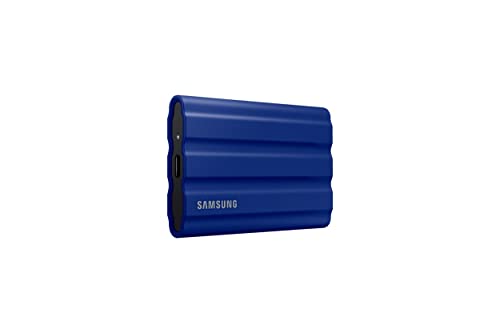
The Samsung T7 Shield 2TB Portable SSD stands out as an exceptional choice for photographers and content creators who need reliable and high-speed storage. With fast read/write speeds of up to 1,050/1,000 MB/s, it’s nearly twice as fast as its predecessor. Its rugged design, featuring an IP65 rating, resists water, dust, and drops from up to 9.8 feet. Compatible with various devices, including PCs, Macs, and gaming consoles, this compact SSD makes transporting large files easy. Plus, Samsung Magician software helps you monitor drive health and protect your data, ensuring outstanding performance for all your storage needs.
Best For: Photographers, content creators, and gamers seeking high-speed, durable storage solutions.
Pros:
- Fast read/write speeds of up to 1,050/1,000 MB/s, enhancing workflow efficiency.
- Rugged design with IP65 rating for water and dust resistance, ensuring durability in various environments.
- Compact size allows for easy portability, making it convenient for transporting large files.
Cons:
- Higher price point compared to traditional HDDs or lower-capacity SSDs.
- Limited to USB 3.2 Gen 2 connectivity, which may be incompatible with some older devices.
- Potential for overheating during extended heavy usage due to high-performance capabilities.
Samsung T7 Shield Portable SSD (2TB, MU-PE2T0S/AM)

Ideal for photographers, content creators, and gamers, the Samsung T7 Shield Portable SSD (2TB, MU-PE2T0S/AM) delivers lightning-fast read speeds of up to 1050MB/s and write speeds of 1000MB/s, ensuring you can handle heavy file transfers effortlessly. With USB 3.2 Gen 2 compatibility, it’s versatile across devices like PC, Mac, and gaming consoles. Its IP65 rating means it’s water and dust resistant, while the rugged design withstands drops from nearly 10 feet. Plus, Samsung Magician software helps you optimize performance and monitor drive health, making it a reliable choice for all your storage needs.
Best For: Photographers, content creators, and gamers seeking reliable, high-speed storage for heavy file transfers.
Pros:
- Fast read and write speeds of up to 1050MB/s and 1000MB/s, ideal for handling large files efficiently.
- Durable design with IP65 rating for water and dust resistance, plus drop resistance from up to 9.8 feet.
- Versatile compatibility with PC, Mac, Android devices, and gaming consoles, making it suitable for various users.
Cons:
- Higher price point compared to traditional external hard drives.
- Limited capacity options in comparison to some competitors offering larger storage solutions.
- Requires Samsung Magician software for optimal performance monitoring and drive health checks, which might not appeal to all users.
Crucial X9 1TB Portable SSD

If you’re seeking a reliable and high-speed storage solution, the Essential X9 1TB Portable SSD stands out with its impressive transfer speeds of up to 1050MB/s. This SSD utilizes a USB 3.2 USB-C interface, making file transfers quick and efficient. It’s perfect for casual gamers and everyday users, greatly accelerating large file transfers and media editing. With an IP55 rating for water and dust resistance and drop resistance up to 7.5 feet, it’s built for durability. Plus, it’s compatible with various devices including Windows, Mac, and gaming consoles, ensuring you can store your important files securely.
Best For: The Crucial X9 1TB Portable SSD is best for casual gamers, students, and everyday users who need reliable and high-speed storage for large files and media.
Pros:
- High transfer speeds of up to 1050MB/s for efficient file transfers and media editing.
- Durable design with IP55 rating for water and dust resistance, and drop resistance up to 7.5 feet.
- Wide compatibility with various devices, including Windows, Mac, gaming consoles, and more.
Cons:
- Limited storage capacity of 1TB may not be sufficient for users with extensive file libraries.
- Potentially higher price compared to traditional hard drives for similar storage.
- Requires USB-C or adapter for some older devices, which may limit accessibility.
SanDisk 1TB Extreme PRO Portable SSD

For professionals who demand speed and reliability, the SanDisk 1TB Extreme PRO Portable SSD stands out with its impressive read and write speeds of up to 2000MB/s. With a USB-C and USB 3.2 Gen 2×2 interface, it guarantees swift data transfers. The forged aluminum chassis acts as a heatsink, maintaining performance even under pressure, while offering up to 3-meter drop protection and IP65 water and dust resistance. Plus, you can keep your files secure with 256-bit AES hardware encryption. Managing your files is a breeze with the SanDisk Memory Zone app, making this SSD a must-have for serious professionals.
Best For: Professionals who require high-speed data transfers and reliable storage solutions for demanding tasks.
Pros:
- Up to 2000MB/s read/write speeds ensure fast data access and transfers.
- Durable design with a forged aluminum chassis, 3-meter drop protection, and IP65 water and dust resistance.
- 256-bit AES hardware encryption provides robust security for sensitive files.
Cons:
- Performance may vary depending on host device and usage conditions.
- Requires the SanDisk Memory Zone app for optimal file management, which involves additional installation.
- Higher price point compared to standard portable SSDs.
Factors to Consider When Choosing an External SSD for Workstation
When choosing an external SSD for your workstation, you’ll want to contemplate several key factors. Think about the storage capacity you need, along with the read and write speeds that will enhance your workflow. Don’t forget to check for durability, compatibility with your devices, and any available security features to protect your data.
Storage Capacity Options
Choosing the right storage capacity for your external SSD is essential, especially as your data needs evolve. Typically, capacities range from 1TB to 4TB. If you’re working with high-resolution media files, large databases, or extensive backups, a larger capacity like 2TB or 4TB is ideal. However, if your tasks are more routine—like document storage or light media editing—a 1TB SSD might suffice. Remember, higher-capacity drives often offer better speed, enhancing performance during data transfers and application loading. Also, think ahead; opting for a larger SSD can save you from frequent upgrades as your storage requirements grow. Ultimately, evaluate your workflow to choose the capacity that best fits your current and future needs.
Read and Write Speeds
As you evaluate storage capacity, it’s equally important to focus on read and write speeds, which directly impact your workflow efficiency. The read speed of an external SSD shows how quickly you can access data, with high-performance models reaching up to 2,100MB/s. On the other hand, write speed determines how fast you can save data, with top-tier drives achieving around 1,000MB/s or more. Faster read and write speeds can greatly boost your productivity, especially for tasks like video editing, 3D rendering, and data backups. Keep in mind that performance varies based on the device’s interface; for instance, USB 3.2 Gen 2 supports higher speeds compared to older standards. Real-world performance may also differ due to hardware configurations and workload requirements.
Durability and Resistance
While selecting an external SSD for your workstation, durability and resistance are vital factors that shouldn’t be overlooked. Look for SSDs with an IP65 rating or higher for solid water and dust resistance, guaranteeing protection against environmental elements. It’s also important to choose models that offer drop resistance of at least 3 meters, as this safeguards against accidental falls during transport. Consider SSDs with a forged aluminum chassis, which acts as a heatsink for consistent performance. Verify the SSD can handle a wide non-operating temperature range, ideally from -20°C to 85°C. Finally, assess the build quality and materials; rugged designs notably enhance longevity and reliability in demanding environments, making your investment worthwhile.
Compatibility With Devices
When selecting an external SSD for your workstation, ensuring compatibility with your devices is essential for a seamless experience. Look for drives that support USB-C or USB 3.2 Gen 2 connections to maximize transfer speeds with modern hardware. It’s also vital to check compatibility with various operating systems like Windows, macOS, and Linux, especially if you’re using multiple platforms. If you plan to connect the SSD to gaming consoles or tablets, verify its compatibility with those devices as well. For content creators, consider the SSD’s ability to work with high-resolution video recording equipment. Finally, search for any additional software that might enhance compatibility, such as file management tools that can streamline your workflow across different devices.
Security Features Available
After ensuring compatibility with your devices, the next key factor to contemplate is the security features of the external SSD. Many external SSDs offer password protection to secure your sensitive data and prevent unauthorized access. Look for models with 256-bit AES hardware encryption, which greatly enhances the security of your stored files. Some drives also allow you to manage user access and permissions, providing an extra layer of control over who can view your data. Additionally, certain SSDs come with software for secure file deletion, ensuring that deleted files can’t be easily recovered. Finally, consider durability features like water and dust resistance, as they protect your drive from environmental hazards, further safeguarding your data.
Portability and Design
Portability and design are essential factors to take into account when choosing an external SSD for your workstation. You’ll want a compact and lightweight form factor, especially if you travel frequently or work in various locations. Look for rugged designs with drop resistance ratings of up to 3 meters, ensuring your drive can handle accidental falls. An IP65 rating for water and dust resistance is vital if you work in challenging environments, protecting your SSD from moisture and debris. Additional features like a carabiner loop make it easy to attach the SSD to your bag or belt for quick access. Finally, consider a solid aluminum unibody construction for enhanced durability while maintaining a sleek, professional appearance.