
Need more SSD storage without filling your desk with separate adapters? A multi-bay enclosure brings several SATA drives into one desktop unit, making it easier to expand capacity or swap drives.
These 10 options range from compact two-bay models to larger 10-bay units. The right choice depends on how many drives you need, whether you also use 3.5-inch hard drives, and how quickly you need to move files.
Best 10 Multi Bay SSD Enclosure Picks for 2026
Fast Six-Bay Expansion
CENMATE 6-Bay 10Gbps Enclosure

- Six SATA drive bays
- USB 3.2 Gen 2, up to 10Gbps
- Tool-free hot swapping
Best For: Six-drive desktop storage with a 10Gbps connection
Maximum Bay Count
CENMATE 10-Bay USB 3.0 Enclosure

- Ten SATA drive bays
- USB 3.0, up to 5Gbps
- Three cooling fans
Best For: Consolidating up to ten SATA drives
Compact 10Gbps Pick

- Four SATA drive bays
- USB 3.2 Gen 2, up to 10Gbps
- Tool-free hot swapping
Best For: Four-drive setups needing a 10Gbps connection
Six-Bay USB 3.0 Option

- Six SATA drive bays
- USB 3.0, up to 5Gbps
- Tool-free hot swapping
Best For: Six-drive storage without a 10Gbps requirement
Most Drive Bays
CENMATE 4-Bay USB 3.0 Enclosure

- Four hot-swappable SATA bays
- Up to 80TB total capacity
- 5Gbps USB 3.0; 40–50 dB fan
Best For: Four-drive desktop storage setups
Fastest USB Connection
CENMATE 2-Bay USB 3.2 Gen 2 Enclosure

- 10Gbps-rated USB interface
- Two hot-swappable SATA bays
- USB HOST daisy-chain support
Best For: Two-drive setups prioritizing USB interface speed
Three-Bay Middle Ground
CENMATE 3-Bay USB 3.0 Enclosure

- Three hot-swappable SATA bays
- Up to 60TB total capacity
- 5Gbps USB; daisy-chain support
Best For: Three-drive desktop storage setups
Best Four-Bay Pick
SABRENT 2.5-Inch SATA Docking Station

- Four tool-free 2.5-inch SATA bays
- Fan with on/off switch
- USB 3.0 rated up to 5Gbps
Best For: Accessing four separate SATA drives without RAID
Best Mixed-Drive Pick
CENMATE Two-Bay Aluminum Enclosure

- Fits 2.5-inch and 3.5-inch SATA drives
- Tool-free, hot-swappable bays
- Fan noise specified around 40–50 dB
Best For: Two-drive desktop storage with mixed drive sizes
Best RAID Option
MAIWO Dual-Bay 2.5-Inch Enclosure
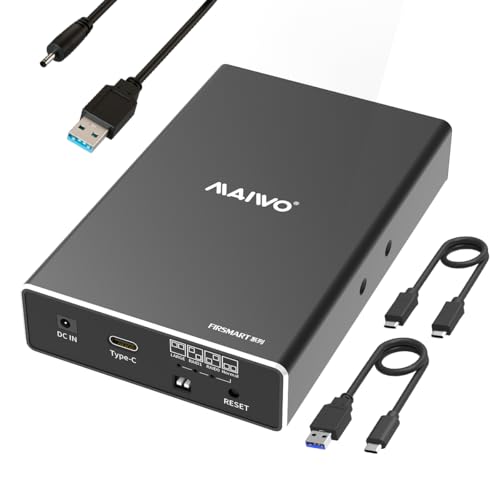
- RAID 0, RAID 1, JBOD, and normal modes
- USB 3.1 Gen 2 rated up to 10Gbps
- Requires an additional power connection
Best For: Two-drive 2.5-inch SATA setups needing RAID options
Fast Six-Bay Expansion – CENMATE 6-Bay 10Gbps Enclosure
This multi bay ssd enclosure offers six slots for 2.5-inch SATA SSDs or 2.5/3.5-inch SATA hard drives, with a USB 3.2 Gen 2 connection rated up to 10Gbps. It is direct-attached storage, not a RAID or NAS system.
Best For: Desktop users who want six hot-swappable drive bays and a faster USB connection.
Pros:
- Supports up to six drives at a stated maximum of 20TB per drive.
- Tool-free, hot-swappable bays simplify drive changes.
- Aluminum enclosure has two cooling fans and a USB host port for daisy-chain expansion.
Cons:
- Fans are rated around 40–50 dB, which may bother noise-sensitive users.
- No built-in RAID or NAS functionality.
Choose this over the 5Gbps six-bay version if the 10Gbps USB interface matters to your setup. Actual transfer speeds still depend on the installed drives and computer.
If drive count is your priority, this multi bay ssd enclosure accommodates ten 2.5-inch SATA SSDs or 2.5/3.5-inch SATA hard drives. Its USB 3.0 connection is rated up to 5Gbps, and it functions as direct-attached storage rather than RAID or NAS.
Best For: Users consolidating many SATA drives who value bay count over a 10Gbps interface.
Pros:
- Ten bays support a stated maximum of 20TB per drive.
- Tool-free, hot-swappable design makes drive access convenient.
- Aluminum housing includes three cooling fans and a 12V/20A power adapter.
Cons:
- USB 3.0 is rated up to 5Gbps, slower than the 10Gbps models here.
- Fans are rated around 40–50 dB.
- The supplied notes warn that a problematic drive can complicate detection when multiple drives are installed.
This is the capacity-focused option, with up to 200TB stated across ten drives. Check drives individually during setup if detection becomes an issue, and plan for its larger footprint.
This four-slot multi bay ssd enclosure is a practical fit when you want a USB 3.2 Gen 2 connection without filling six or ten bays. It accepts 2.5-inch SATA SSDs and 2.5/3.5-inch SATA hard drives, with up to 20TB stated per drive.
Best For: Users who need up to four hot-swappable SATA drives on a 10Gbps USB connection.
Pros:
- USB 3.2 Gen 2 interface is rated up to 10Gbps.
- Tool-free, hot-swappable bays simplify drive changes.
- Aluminum housing includes a cooling fan.
Cons:
- Four bays offer less room to expand than the six- and ten-bay options.
- Fan noise is rated around 40–50 dB; there is no built-in RAID or NAS.
Pick this model if four bays are enough and connection speed matters. Its advertised transfer results are not guaranteed; performance varies with the drives and computer.
This multi bay ssd enclosure provides six bays for 2.5-inch SATA SSDs or 2.5/3.5-inch SATA hard drives. It uses USB 3.0 rated up to 5Gbps and works as direct-attached storage, not a RAID or NAS device.
Best For: Users who need six accessible drive bays but do not require a 10Gbps USB interface.
Pros:
- Supports up to six drives at a stated maximum of 20TB each.
- Tool-free trays and hot swapping make drive changes straightforward.
- Aluminum housing has two cooling fans and a USB host port for daisy chaining.
Cons:
- USB 3.0 tops out at a stated 5Gbps, below the 10Gbps six-bay model.
- Fans are rated around 40–50 dB.
This version makes sense when bay count and easy drive access matter more than the faster interface. The notes give conflicting daisy-chain capacity figures, so confirm expansion limits before planning around them.
Most Drive Bays – CENMATE 4-Bay USB 3.0 Enclosure
If you want a multi bay ssd enclosure with room for four drives, this CENMATE model accepts both 2.5-inch SATA SSDs and 3.5-inch SATA HDDs. It supports up to 20TB per bay and connects over USB 3.0.
Best For: Desktop storage setups that need four separate, easily accessible SATA drives.
Pros:
- Four tool-free, hot-swappable bays support up to 80TB total.
- Aluminum housing and a built-in 2-inch cooling fan.
- Includes USB-A/USB-C connectivity and a 12V power adapter.
Cons:
- USB 3.0 connection is rated at 5Gbps, below the 10Gbps dual-bay option.
- Fan noise is specified at around 40–50 dB.
- Direct-attached storage only; no RAID or NAS functionality.
Choose this one when bay count matters more than the fastest listed USB interface. The fan makes it less appealing for a noise-sensitive desk.
Fastest USB Connection – CENMATE 2-Bay USB 3.2 Gen 2 Enclosure
This multi bay ssd enclosure is the speed-focused choice among these CENMATE models: its two 2.5/3.5-inch SATA bays connect through a USB 3.2 Gen 2 interface rated at up to 10Gbps. Actual read and write speeds depend on the drives and computer.
Best For: Buyers who need two accessible SATA drives and prefer a 10Gbps USB connection over extra bays.
Pros:
- Two tool-free, hot-swappable bays support up to 20TB per drive.
- USB 3.2 Gen 2 interface is rated at up to 10Gbps.
- USB HOST port supports daisy-chaining up to three devices.
Cons:
- Only two drive bays, with 40TB supported in one enclosure.
- Built-in fan is specified at around 40–50 dB.
- No RAID or NAS functionality.
Its faster-rated interface is useful if your host and drives can take advantage of it, but it offers fewer bays than the other two options.
Three-Bay Middle Ground – CENMATE 3-Bay USB 3.0 Enclosure
For a multi bay ssd enclosure that sits between the two- and four-bay models, this CENMATE unit holds three 2.5-inch SATA SSDs or 3.5-inch SATA HDDs. Each bay supports up to 20TB, with a USB 3.0 connection rated at 5Gbps.
Best For: Users who need three accessible SATA drives without moving up to a four-bay enclosure.
Pros:
- Three tool-free, hot-swappable bays support up to 60TB total.
- Aluminum housing includes a built-in 2.7-inch fan.
- USB HOST port supports daisy-chaining up to three devices.
Cons:
- USB 3.0 interface is rated at 5Gbps, not 10Gbps.
- Fan noise is specified at around 40–50 dB.
- Direct-attached storage only; no RAID or NAS functionality.
This is a practical fit when three bays are enough and daisy-chain expansion appeals, provided the listed fan noise and 5Gbps interface suit your setup.
Best Four-Bay Pick – SABRENT 2.5-Inch SATA Docking Station
If you need a multi bay ssd enclosure for keeping four 2.5-inch SATA drives accessible, this SABRENT dock offers tool-free swaps and a built-in cooling fan. It also accepts 2.5-inch SATA HDDs up to 12.5mm thick.
Best For: Managing up to four separate SATA SSDs or HDDs without needing RAID.
Pros:
- Four bays with tool-free access and a magnetic cover.
- Built-in fan with an on/off switch.
- USB 3.0 connection rated up to 5Gbps; plug-and-play support for Windows, macOS, and Linux.
Cons:
- Does not support RAID.
- Does not fit 15mm drives.
Choose this dock for convenient access to multiple individual drives; look elsewhere if you need RAID or thicker 2.5-inch disks.
Best Mixed-Drive Pick – CENMATE Two-Bay Aluminum Enclosure
This multi bay ssd enclosure is worth considering if your storage includes both 2.5-inch SSDs and larger 3.5-inch SATA drives. CENMATE pairs two tool-free, hot-swappable bays with an aluminum body and built-in fan.
Best For: A desktop setup that needs two accessible 2.5-inch or 3.5-inch SATA drives without RAID.
Pros:
- Accepts 2.5-inch and 3.5-inch SATA SSDs or HDDs, up to 20TB per drive.
- Tool-free installation and hot swapping.
- USB 3.0 rated up to 5Gbps, with USB-A and USB-C cable connections.
Cons:
- No RAID or NAS functionality.
- Fan noise is specified at around 40–50 dB, which may bother noise-sensitive users.
The flexible drive sizing is its main advantage. If you need a quiet enclosure or mirrored storage, its fan and lack of RAID make it a less suitable choice.
Best RAID Option – MAIWO Dual-Bay 2.5-Inch Enclosure
For buyers who want RAID controls in a compact multi bay ssd enclosure, this MAIWO model holds two 7mm or 9.5mm 2.5-inch SATA drives. Its USB 3.1 Gen 2 connection is rated up to 10Gbps, with RAID 0, RAID 1, JBOD, and normal modes available.
Best For: Pairing two 2.5-inch SATA SSDs for selectable RAID or separate-drive operation.
Pros:
- Offers RAID 0, RAID 1, JBOD, and normal modes.
- USB 3.1 Gen 2 interface rated up to 10Gbps.
- Tool-free installation, hot swapping, and included USB-C-to-A and USB-C-to-C cables.
Cons:
- Requires a separate power connection; a power cable is included.
- Limited to 7mm or 9.5mm 2.5-inch SATA drives.
This is the flexible choice when RAID modes matter more than larger drive support. Check your drives’ thickness and plan for the additional power cable.
How We Picked the Best Multi Bay SSD Enclosure
We compared the listed drive capacity, supported drive sizes, USB interface, cooling, and practical extras such as hot-swap access and RAID modes. The selection covers two- through 10-bay setups, including mixed-size SATA enclosures and 2.5-inch-only options. A stated USB speed is an interface rating, not a guarantee of real-world transfer speed; performance also depends on the drives, host port, cable, and how many drives are active.
Quick Comparison: Which Configuration Fits?
For a small SSD collection, a two-bay enclosure keeps the footprint manageable. Three- and four-bay models offer room to grow without committing to a large desktop chassis. Six- and 10-bay units suit people consolidating many drives, but check whether their USB connection provides enough bandwidth for your workload. The SABRENT four-bay dock is specifically for 2.5-inch SATA drives; the listed CENMATE models accept both 2.5-inch and 3.5-inch SATA drives. The MAIWO dual-bay model stands out when selectable RAID modes are a priority.
Key Buying Factors for a Multi-Bay SSD Enclosure
Drive Fit and Bay Count
Confirm both the number of bays and the physical drive sizes supported. A 2.5-inch-only unit is appropriate for standard SATA SSDs but will not accommodate a 3.5-inch hard drive. Buy enough bays for your near-term plans, with spare capacity only if you expect to add drives.
Connection Speed and Shared Bandwidth
The listed USB 3.2 Gen 2 and USB 3.1 Gen 2 options offer a 10Gbps interface, while the USB 3.0 options have a lower interface ceiling. All drives in a USB enclosure may share its host connection, so a faster port matters most when transferring large files or accessing several SSDs at once. Check your computer’s USB capabilities, too; a faster enclosure cannot outrun a slower host port.
Cooling, Swapping, and Data Protection
Fans can help manage heat during sustained use, but consider placement and potential noise on a desk. If you rotate drives often, check the stated hot-swap and tool-free features as well as the instructions for safely ejecting drives. Do not assume that multiple bays provide redundancy: confirm whether the enclosure supports RAID, which modes it offers, and whether its operating mode meets your needs. RAID 1 can mirror data, but it is not a substitute for a separate backup.
Who Should Buy Which Multi Bay SSD Enclosure?
Choose a compact two-bay model for a pair of SATA SSDs or a simple storage expansion. Pick a four-bay 10Gbps option if you want more drive slots and frequently move large files. Consider a six- or 10-bay unit when consolidating an existing drive collection; favor the interface speed that matches your access needs. Choose the 2.5-inch SABRENT dock for SSD-focused drive swapping, or consider the MAIWO dual-bay unit if its listed RAID 0/1, JBOD, and PM modes match your intended setup. Before ordering, verify drive compatibility, host connection, and the exact operating features on the current product listing.