
When it comes to keeping your PC cool during those long gaming sessions or demanding tasks, airflow is key. You need to understand how different cases and their designs can impact cooling efficiency. From perforated panels to advanced fan setups, the right choices can make a significant difference. Let’s explore the top options that can elevate your system’s performance and help you maintain ideal temperatures.
CORSAIR 4000D RS ARGB Modular Mid-Tower ATX PC Case

If you’re looking for a high-performance case that prioritizes airflow, the CORSAIR 4000D RS ARGB Modular Mid-Tower ATX PC Case is a fantastic choice. It features a high airflow design with three pre-installed RS fans, ensuring peak cooling. You’ll appreciate the modular customization options, allowing you to adapt it to your needs, like upgrading to a billet aluminum motherboard tray. The InfiniRail Fan Mounting System gives you flexibility in fan configuration, while the perforated steel front panel maximizes airflow. Plus, with zero RPM mode, you’ll enjoy near-silent operation during low loads, keeping your setup both cool and quiet.
Best For: Gamers and PC builders looking for a customizable and high-airflow case to ensure optimal cooling performance.
Pros:
- High airflow design with three pre-installed RS fans for excellent cooling.
- Modular customization options allow for easy upgrades and adaptations.
- Near-silent operation with zero RPM mode at low loads for a quieter experience.
Cons:
- Limited pre-installed fans may require additional purchases for optimal cooling.
- The aesthetic design may not appeal to all users who prefer a more minimalist look.
- Some users may find the modular features complex to set up initially.
NZXT H5 Flow Compact ATX Mid-Tower Gaming Case

The NZXT H5 Flow Compact ATX Mid-Tower Gaming Case is an ideal choice for gamers seeking superior cooling performance in a sleek package. With dimensions of 16.93 x 8.86 x 18.31 inches and a weight of 17.6 pounds, it fits comfortably in any setup. Its impressive airflow features include a perforated PSU shroud and ultra-fine mesh panels, ensuring peak cooling while filtering dust. You can easily install up to a 360mm radiator in front and benefit from two pre-installed 120mm Quiet Airflow fans. Plus, the thoughtful cable management design keeps your build tidy and organized.
Best For: Gamers looking for a compact, high-performance case with excellent cooling and airflow features.
Pros:
- Enhanced Airflow: Perforated PSU shroud and ultra-fine mesh panels maximize cooling while filtering dust.
- Flexible Cooling Options: Supports up to a 360mm radiator in front and includes two pre-installed 120mm Quiet Airflow fans.
- Efficient Cable Management: Wide channels, hooks, and straps simplify cable routing for a clean build.
Cons:
- Weight: At 17.6 pounds, it may be heavier than some other compact cases on the market.
- Limited Included Fans: Only two 120mm fans are included, which may not be sufficient for users requiring more extensive cooling.
- Size Constraints: While compact, the dimensions may limit compatibility with larger components or upgrades.
CORSAIR 7000D Airflow Full-Tower ATX PC Case

For ambitious builders seeking maximum cooling potential, the CORSAIR 7000D Airflow Full-Tower ATX PC Case stands out with its high-airflow front panel and spacious interior. It supports up to three 360mm radiators or two 420mm radiators, accommodating up to 12x 120mm or 7x 140mm cooling fans. This case features three CORSAIR 140mm AirGuide fans with PWM repeater, designed to optimize airflow with anti-vortex vanes. You’ll appreciate the CORSAIR RapidRoute cable management system, allowing easy routing through a hidden channel. Plus, the easy-access hinged door makes component installation and maintenance a breeze, ensuring a streamlined build process.
Best For: Ambitious PC builders seeking maximum cooling potential and spacious interior for high-performance builds.
Pros:
- High Airflow Design: Optimized front panel and multiple fan support enhance cooling efficiency.
- Spacious Interior: Ample room for easy component installation and upgrades.
- Effective Cable Management: RapidRoute system simplifies organization and routing of cables.
Cons:
- Full-Tower Size: May be too large for compact spaces or small setups.
- Weight: Heavier compared to smaller cases, making it less portable.
- Price Point: Higher cost may not suit budget-conscious builders.
NZXT H9 Flow Large Dual-Chamber ATX Mid-Tower PC Case

Designed with gamers and PC enthusiasts in mind, the NZXT H9 Flow Large Dual-Chamber ATX Mid-Tower PC Case excels in both performance and aesthetics. Its dual-chamber design improves thermal performance by separating components from the PSU and drives, while the seamless tempered glass panels offer a stunning view of your build. Optimized airflow is achieved through perforated steel panels and angled fans, with three 140mm and one 120mm fan pre-installed. You can also fit up to nine 140mm fans and large radiators, ensuring your high-performance setup stays cool. Plus, easy cable management keeps everything tidy and organized.
Best For: Gamers and PC enthusiasts looking for a stylish and efficient case that promotes excellent airflow and cable management.
Pros:
- Dual-chamber design enhances thermal performance and simplifies cable management.
- Panoramic tempered glass panels provide an impressive view of internal components and lighting.
- Supports extensive cooling options with multiple fan and radiator configurations for high-performance builds.
Cons:
- Larger size may not fit in compact spaces or smaller setups.
- Limited color options available, as it is primarily offered in black.
- Additional fans and radiators may require extra investment for optimal cooling.
CORSAIR 4000D RS High Airflow Mid-Tower PC Case

With its FRAME Modular Case System, the CORSAIR 4000D RS High Airflow Mid-Tower PC Case stands out as a top choice for gamers and PC builders looking for flexibility and performance. Its sleek black design and dimensions of 19.17 x 9.41 x 19.13 inches provide ample space for components. The InfiniRail Fan Mounting System supports fan configurations up to 200mm, ensuring peak cooling. You’ll appreciate the 3D Y-Pattern Airflow Panel, which minimizes obstruction for superior airflow. Plus, with three CORSAIR RS PWM fans included, your system will stay cool under pressure, making this case a must-have for serious builders.
Best For: Gamers and PC builders seeking a customizable and high-performance case for optimal cooling and airflow.
Pros:
- Customizable design with FRAME Modular Case System allows for upgrades and personalization.
- Exceptional cooling support with the InfiniRail Fan Mounting System and included CORSAIR RS PWM fans.
- Optimized airflow through the 3D Y-Pattern Airflow Panel, reducing obstruction and improving thermal performance.
Cons:
- Heavy weight at 18.04 pounds may be challenging for frequent transportation.
- Limited color options with only a black finish available.
- Potentially higher price compared to basic cases without advanced features.
CORSAIR AIR 5400 RS-R ARGB Mid-Tower PC Case

The CORSAIR AIR 5400 RS-R ARGB Mid-Tower PC Case stands out as an excellent choice for gamers and PC builders who prioritize cooling performance without sacrificing aesthetics. Its triple-chamber design optimizes airflow, featuring an isolated CPU Cooling Chamber for a 360mm radiator that prevents heat transfer. The central GPU and Motherboard Chamber enhances vertical airflow, while the dedicated PSU and storage chamber guarantees organized cable management. With three pre-installed RS120-R ARGB fans and innovative airflow ducts, you’ll enjoy efficient cooling at lower noise levels. Plus, the customizable ARGB lighting and panoramic design elevate your build’s visual appeal.
Best For: Gamers and PC builders seeking optimal cooling performance and customizable aesthetics in a mid-tower case.
Pros:
- Excellent cooling performance with a triple-chamber design and isolated CPU cooling chamber.
- Low noise levels due to innovative airflow duct technology and pre-installed ARGB fans.
- Customizable ARGB lighting and a panoramic design enhance the visual appeal of your build.
Cons:
- Limited space for larger components due to the mid-tower design.
- May require additional fans for more demanding cooling needs.
- Price point may be higher compared to standard mid-tower cases without ARGB features.
NZXT H9 Flow RGB+ Mid-Tower PC Case

If you’re a gamer or PC enthusiast seeking a case that maximizes airflow and aesthetics, the NZXT H9 Flow RGB+ Mid-Tower PC Case stands out as an excellent choice. Its dual-chamber design keeps components organized and cool, while the perforated steel panels and angled fans enhance airflow. You can install up to nine 140mm fans, ensuring your system stays chilled during intense gaming sessions. With seven RGB fans and a sleek tempered glass panel, you’ll showcase your build beautifully. This case accommodates large components and offers easy cable management, making it a top pick for high-performance setups.
Best For: Gamers and PC enthusiasts who prioritize airflow, aesthetics, and high-performance builds.
Pros:
- Dual-chamber design enhances thermal performance and cable management.
- Ample cooling options with support for up to nine 140mm fans, ensuring optimal airflow.
- Showcase your build with seamless tempered glass paneling and customizable RGB lighting.
Cons:
- Weighty design at 29.5 pounds may make it less portable.
- Limited USB ports with only 2 USB 3.0 ports might restrict connectivity options.
- Potentially high cost compared to other mid-tower cases on the market.
CORSAIR AIR 5400 LX-R RGB Mid-Tower PC Case

For gamers and PC enthusiasts who prioritize efficient cooling and aesthetics, the CORSAIR AIR 5400 LX-R RGB Mid-Tower PC Case stands out with its innovative triple-chamber design. This case features three pre-installed reverse-rotor LX-R RGB fans, ensuring low noise while maximizing airflow. The separated chambers for CPU, GPU, and PSU enhance cooling performance and allow for a 360mm radiator in the CPU cooling chamber, keeping heat at bay. Its central GPU and motherboard chamber promotes vertical airflow, effectively exhausting hot air. Plus, the dedicated PSU chamber organizes cables, improving both airflow and the overall look of your build.
Best For: Gamers and PC enthusiasts seeking high airflow, efficient cooling, and a visually appealing case for their builds.
Pros:
- Innovative triple-chamber design enhances cooling performance by isolating CPU, GPU, and PSU.
- Pre-installed RGB fans provide vibrant lighting while maintaining low noise levels.
- Dedicated PSU and storage chamber organizes cables, improving airflow and aesthetics.
Cons:
- Limited space for larger components may restrict some custom build options.
- Higher price point compared to basic mid-tower cases could deter budget-conscious buyers.
- Installation of additional cooling may be challenging due to the unique design layout.
Hyte X50 Air ATX Mid-Tower Gaming PC Case

Designed with gamers in mind, the Hyte X50 Air ATX Mid-Tower Gaming PC Case offers exceptional airflow channels that keep your system cool during intense gaming sessions. Its curved micro mesh side panel enhances airflow while the sturdy stamped steel front panel guarantees chassis rigidity. The front micro-mesh functions as a low-pressure air intake, optimizing temperatures and minimizing noise. With up to three 120mm thick fans at the bottom, air directly reaches your graphics card, considerably lowering temperatures. This modern case, available in pitch black, combines aesthetics with functionality, making it a top choice for performance enthusiasts.
Best For: Gamers and performance enthusiasts looking for a high-airflow, aesthetically pleasing PC case.
Pros:
- Exceptional airflow channels enhance cooling during intense gaming sessions.
- Sturdy construction with a stamped steel front panel ensures chassis rigidity.
- Optimized for performance with the capability to house up to three 120mm fans, directly cooling the graphics card.
Cons:
- Limited color options, only available in pitch black.
- May require additional fans for optimal cooling performance in high-demand setups.
- Curved micro mesh side panel might be challenging to clean compared to solid panel designs.
LIAN LI O11D MINI V2 Flow Compact ATX Mid-Tower Airflow Computer Case
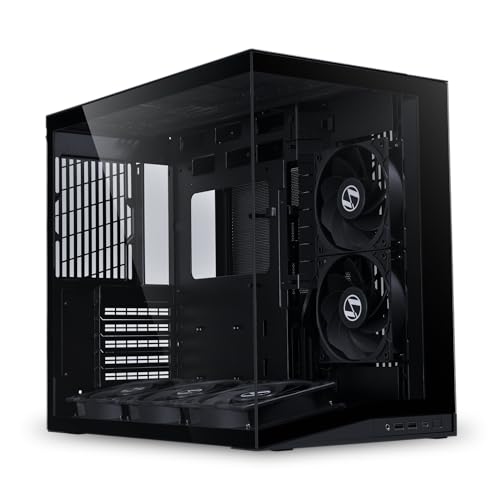
The LIAN LI O11D MINI V2 Flow is an ideal choice for gamers and PC enthusiasts seeking maximum airflow in a compact design. With five pre-installed 120mm reverse blade fans and a 10° slanted bottom, this case optimizes cold air intake, considerably enhancing GPU cooling performance. Its sleek, pillar-less tempered glass panels provide an unobstructed view of your components while accommodating full-sized ATX power supplies. Supporting standard ATX, M-ATX, and Mini-ITX motherboards, it also features robust GPU anti-sag brackets and cable management solutions, ensuring your build remains tidy and efficient. Upgrade your cooling game with this exceptional case.
Best For: Gamers and PC enthusiasts looking for a compact case with superior airflow and cooling performance.
Pros:
- Excellent cooling: Five pre-installed 120mm fans and a slanted design enhance cold air intake and GPU cooling.
- Stylish aesthetics: Pillar-less tempered glass panels provide a clear view of internal components while maintaining a sleek appearance.
- Versatile compatibility: Supports various motherboard sizes (ATX, M-ATX, Mini-ITX) and includes anti-sag brackets for heavy GPUs.
Cons:
- Limited space: The compact design may restrict additional components or upgrades.
- Potential noise: The number of fans might lead to increased noise levels during operation.
- Price point: It may be more expensive compared to other mid-tower options without similar features.
Factors to Consider When Choosing a PC Airflow Channel for Case
When choosing a PC airflow channel for your case, consider fan placement strategy and how it affects overall airflow. You’ll also want to look at cooling system compatibility and dust filtration options to keep your components running smoothly. Efficient cable management solutions can further enhance airflow, making your setup more effective and tidy.
Fan Placement Strategy
To achieve ideal cooling in your PC case, it’s essential to evaluate fan placement strategically. Aim for a balanced airflow direction, typically front-to-back and bottom-to-top, to guarantee efficient cooling. Position intake fans at the front and bottom to direct cool air over critical components, while exhaust fans should be at the rear and top to expel warm air effectively. Consider using a push-pull configuration around radiators to enhance cooling efficiency, maximizing airflow. Remember that the number and size of fans matter; larger fans move more air at lower RPMs, which keeps noise down. Finally, implementing anti-vortex features, like fan shrouds, can concentrate airflow and reduce turbulence, leading to improved cooling throughout your case.
Airflow Design Features
Choosing the right airflow design features for your PC case can greatly impact cooling performance. Look for perforated steel panels and efficient fan configurations that maximize air intake and exhaust while minimizing resistance. Advanced fan mounting systems, like multi-point setups, allow targeted airflow, enhancing cooling efficiency. Consider innovative designs, such as Y-pattern airflow panels or micro-mesh features, which improve air movement and reduce hot spots. High-performance cases typically support various radiator sizes and fan mounts, catering to extensive cooling requirements for demanding components. Additionally, features like anti-vortex vanes in fans concentrate airflow, ensuring that cool air reaches essential parts while effectively expelling hot air. By prioritizing these design elements, you can optimize your PC’s cooling capabilities.
Cooling System Compatibility
Understanding cooling system compatibility is vital for optimizing your PC’s airflow channels. Start by ensuring your case supports adequate radiator sizes—ideally up to 360mm or larger—to effectively manage heat from high-performance components. Next, look for compatibility with various fan sizes, typically 120mm and 140mm, which allows for flexible cooling configurations. Multiple fan mounting points are essential as they enable you to add fans for improved airflow and thermal management. Consider cases with dedicated cooling chambers that isolate heat-generating components, enhancing overall cooling efficiency. Finally, check for airflow optimization features like perforated panels and mesh designs that promote unrestricted air intake and exhaust, ensuring your system stays cool under pressure.
Dust Filtration Options
With a solid cooling system in place, addressing dust filtration options becomes essential for maintaining ideal airflow within your PC case. Effective options, like ultra-fine mesh panels, can drastically reduce dust ingress, ensuring peak cooling performance. Regular maintenance is vital; if filters become clogged, they’ll restrict airflow and raise temperatures inside your case. Look for cases with pre-installed filters that are easy to remove for cleaning, enhancing your convenience. Consider the placement of dust filters, too; those on intake areas capture more dust before it enters, while exhaust filters help keep internal components cleaner. A well-designed filtration system not only maintains airflow but also prolongs your components’ lifespan by preventing harmful dust accumulation.
Cable Management Solutions
Effective cable management is essential for enhancing airflow in your PC case. By organizing cables away from air pathways, you prevent obstructions that can hinder cooling efficiency. Look for modern cases featuring dedicated channels, hooks, and straps that make routing and concealing cables seamless. Utilizing separate compartments for power supplies and storage helps keep the heat they generate from mixing with critical airflow paths. Some cases even include brackets and tie-down points to secure cables, reducing clutter and enhancing your build’s aesthetic appeal. Properly managed cables contribute to better airflow dynamics, minimizing turbulence and allowing for ideal air circulation throughout your case. Prioritize these solutions to maximize your cooling system’s effectiveness.
Case Size Considerations
When selecting a PC case, size matters greatly for airflow performance. Larger cases can fit more fans and bigger radiators, boosting cooling efficiency. If you’re working with an ATX motherboard, you’ll likely find more space for effective airflow channels compared to cramped Mini-ITX cases, which can hinder airflow. A roomy interior also allows for better cable management, reducing clutter and promoting air circulation. The layout of your components is essential; dual-chamber designs can separate heat-generating parts, enhancing cooling. Additionally, cases with optimized airflow features, like perforated panels and well-placed fans, thrive in larger cases, ensuring unobstructed air intake and exhaust. Choose wisely to maximize your cooling potential!
Radiator Support Capacity
Radiator support capacity is a key factor in ensuring your PC cooling system performs at its best. It refers to the maximum size and number of radiators your case can hold, which is vital for high-performance builds. Many cases support various radiator sizes, commonly allowing up to 360mm in the front and 240mm on top. Adequate capacity is essential for liquid cooling systems, as larger radiators dissipate more heat, enhancing thermal management. Additionally, consider the positioning of radiators; ideal placement can greatly improve airflow and cooling efficiency. Don’t forget to check both the height and thickness of radiators, as some cases may limit these dimensions, affecting compatibility with your cooling setup.
Temperature Monitoring Tools
Choosing the right temperature monitoring tools is essential for optimizing your PC’s airflow channels. Software applications can give you real-time feedback on your CPU and GPU temperatures, helping you fine-tune your cooling performance. Hardware solutions, like thermal sensors and infrared thermometers, allow you to measure temperatures at various points inside your case for thorough monitoring. Many modern motherboards come with built-in monitoring features, enabling you to track thermal performance through BIOS or dedicated software. Some tools even trigger alerts or automatic fan adjustments based on your defined temperature thresholds, boosting system stability. By utilizing these tools, you can identify airflow issues, making necessary adjustments to fan placement and cooling configurations to guarantee your system runs cool and efficiently.