
When it comes to maintaining your CPU’s performance, the right thermal paste remover is essential. You want something effective and easy to use, especially if you’re regularly applying new thermal paste. From extensive kits to eco-friendly options, there’s a variety to choose from. But which ones truly stand out regarding efficiency and practicality? Let’s explore the top contenders that can keep your CPU cool and running smoothly.
Noctua NA-SCW1, Cleaning Wipes for Thermal Paste (20 pieces)
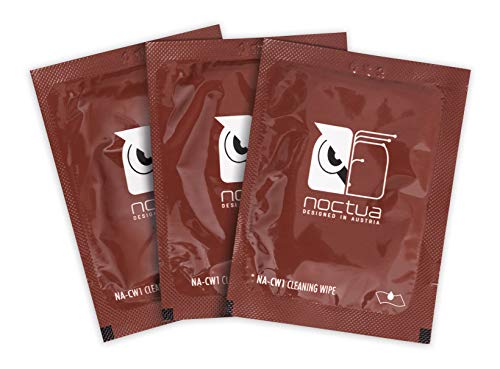
If you’re a PC enthusiast or a gamer looking to maintain peak performance, the Noctua NA-SCW1 cleaning wipes are your ideal choice. These wipes are specifically designed to remove thermal compounds like Noctua NT-H2 and NT-H1, ensuring your CPU, GPU, and other chips operate efficiently. Each large wipe measures 15×12 cm, making it easy to clean both chip and cooler surfaces. Pre-moistened with a custom detergent mixture, they provide an effective and convenient cleaning process. Individually packed for convenience, these wipes help you maintain superior thermal performance, ensuring effective heat transfer and keeping your components cool and clean.
Best For: PC enthusiasts and gamers looking to maintain optimal thermal performance of their components.
Pros:
- Conveniently individually packed wipes for easy use.
- Large size (15×12 cm) allows for efficient cleaning of both chips and coolers.
- Pre-moistened with a custom detergent for effective removal of thermal paste.
Cons:
- Limited to cleaning only thermal compounds; may not be suitable for other types of cleaning.
- Once used, wipes cannot be reused, leading to potential waste.
- Some users may prefer alternative cleaning methods or products.
OwlTree Thermal Paste Remover Kits (20 Pieces Wipes)

For PC builders and enthusiasts looking to maintain ideal performance, the OwlTree Thermal Paste Remover Kits offer an all-encompassing solution with its 20 large cleaning wipes. Each wipe, measuring 12cm x 15cm, efficiently removes old thermal compound from CPUs, GPUs, and heatsinks, ensuring no residues are left behind. The kit also includes gloves, a spreader, and a spatula to facilitate the cleaning and reapplication process. Packaged in aluminum foil, these wipes retain moisture for up to three years, making them a reliable choice for your thermal paste maintenance needs. Keep your components clean and cool with OwlTree!
Best For: PC builders and enthusiasts seeking to efficiently clean and reapply thermal paste on CPUs, GPUs, and heatsinks.
Pros:
- Efficiently removes old thermal compound without leaving residues.
- Includes essential tools such as gloves, a spreader, and a spatula for easy application.
- Packaged to retain moisture for up to three years, ensuring longevity.
Cons:
- Limited to cleaning only thermal paste; not suitable for other types of cleaning.
- Wipes may not be sufficient for extensive or heavily caked-on thermal compound.
- Requires careful handling to avoid tearing the wipes during use.
ARCTIC MX-6 Thermal Paste for CPU and Graphics Cards

ARCTIC MX-6 Thermal Paste stands out as an ideal choice for gamers and PC enthusiasts who demand top-tier performance from their CPUs and graphics cards. With a 20% improvement in thermal performance over MX-4, it guarantees efficient heat transfer and longevity. Its non-conductive formula eliminates the risk of short circuits, providing peace of mind during application. The versatile viscosity allows for various uses, including direct-die cooling for GPUs and consoles. With over 20 years of experience in PC cooling, ARCTIC assures quality and authenticity, making MX-6 a reliable option for keeping your system cool and efficient.
Best For: Gamers and PC enthusiasts seeking high-performance thermal management for their CPUs and graphics cards.
Pros:
- 20% improved thermal performance compared to MX-4 for more efficient heat dissipation.
- Non-conductive formula eliminates risks of short circuits during application.
- Versatile viscosity suitable for various applications, including direct-die cooling.
Cons:
- Limited quantity (4 g) may not be sufficient for multiple applications or large builds.
- Requires careful application to ensure optimal performance and avoid air bubbles.
- Potentially higher price point compared to standard thermal pastes on the market.
ArctiClean Thermal Grease Paste Compound Remover Kit (60ml)

The ArctiClean Thermal Grease Paste Compound Remover Kit (60ml) is the ideal choice for tech enthusiasts and professionals looking to guarantee peak thermal performance in their systems. This kit includes ArctiClean 1, which uses a unique blend of non-toxic, biodegradable solvents to effectively emulsify thermal greases and pads. After that, ArctiClean 2 purifies surfaces, removing any residues and guaranteeing a clean application of new thermal interface materials. With advanced corrosion inhibitors, it protects copper and aluminum surfaces, enhancing heat dissipation. Using both together guarantees you achieve peak thermal conductivity for your CPU and graphics components.
Best For: Tech enthusiasts and professionals seeking optimal thermal performance in electronic systems.
Pros:
- Non-toxic and biodegradable solvents ensure safe usage.
- Advanced corrosion inhibitors protect metal surfaces, enhancing heat dissipation.
- Effectively removes thermal greases and residues for a clean application.
Cons:
- Requires two-step process for optimal results, which may be time-consuming.
- Limited to a specific volume (60ml), may not be sufficient for larger projects.
- May not be effective against all types of thermal compounds.
ARCTIC MX-4 Premium Performance Thermal Paste for All Processors

If you’re looking for a reliable thermal paste that caters to various processors, the ARCTIC MX-4 is an excellent choice. This premium thermal compound, made of carbon microparticles, offers exceptional thermal conductivity, ensuring effective heat dissipation from your CPU and GPU. Its metal-free and non-electrically conductive formula eliminates short circuit risks, providing added protection for your hardware. Plus, the MX-4 lasts at least eight years without needing reapplication, maintaining consistent performance over time. With its ideal consistency, it’s easy to apply, making it perfect for beginners and seasoned users alike. Keep your system cool and efficient with ARCTIC MX-4.
Best For: Users seeking a high-performance thermal paste for CPUs and GPUs that is easy to apply and provides long-lasting thermal management.
Pros:
- Exceptional thermal conductivity due to carbon microparticles for efficient heat dissipation.
- Metal-free and non-electrically conductive, reducing the risk of short circuits.
- Lasts at least 8 years without needing reapplication, ensuring consistent performance.
Cons:
- May not be as widely available in retail stores compared to other brands.
- Slightly higher price point than some standard thermal pastes.
- Requires careful application to avoid excess paste that could affect performance.
ARCTIC MX Cleaner – Cleaning Wipes for Thermal Paste Removal (40 Pieces)

For those who want a hassle-free way to remove thermal paste, the ARCTIC MX Cleaner offers an excellent solution with its convenient cleaning wipes. Each wipe measures 11.5 x 11.5 cm and is designed to dissolve thermal paste while effectively cleaning processors and radiator bottoms. You’ll appreciate that these wipes are made from microfine cellulose cloth and are individually packaged to prevent drying out. Plus, they’re 100% biodegradable and free of harmful chemicals like benzenes and alcohols. With Limonene from citrus peel, you can trust this eco-friendly option to keep your CPU clean and your conscience clear.
Best For: Hobbyists and computer enthusiasts looking for an efficient and eco-friendly way to remove thermal paste.
Pros:
- Individually packaged wipes prevent drying out and ensure freshness.
- 100% biodegradable and free of harmful chemicals, making it an environmentally friendly choice.
- Effective microfine cellulose cloth easily dissolves thermal paste and cleans processors and radiator bottoms.
Cons:
- Limited to 40 wipes, which may not be sufficient for larger projects or frequent use.
- The presence of Limonene may cause irritation for those with citrus allergies.
- Requires proper disposal methods to ensure environmental benefits are fully realized.
ARCTIC MX-6 Thermal Paste (4g) for CPU and Graphics Cards

Designed for gamers and PC enthusiasts, ARCTIC MX-6 Thermal Paste (4g) delivers unmatched performance for CPUs and graphics cards. With 20% better thermal performance than its predecessor, MX-4, it boasts high thermal conductivity and long-lasting durability. You’ll appreciate its non-conductive and non-capacitive properties, ensuring safety from short circuits. This versatile paste works well for various applications, including direct-die cooling for GPUs and consoles. Plus, its improved viscosity makes it easy to apply in diverse scenarios. Rest assured, you’re getting a 100% original product with an authenticity check to verify its quality. Upgrade your cooling game with ARCTIC MX-6!
Best For: Gamers and PC enthusiasts looking for high-performance thermal solutions for their CPUs and graphics cards.
Pros:
- 20% better thermal performance compared to MX-4, ensuring efficient cooling.
- Non-conductive and non-capacitive properties eliminate the risk of short circuits.
- Versatile application suitable for various devices, including GPUs and consoles.
Cons:
- Limited quantity of 4g may not be sufficient for larger builds or multiple applications.
- Requires careful application to avoid excess, which could affect performance.
- Higher price point compared to some basic thermal pastes on the market.
Thermal Grizzly Kryonaut Thermal Paste with Cleaning Wipes

Thermal Grizzly Kryonaut Thermal Paste with Cleaning Wipes stands out as an excellent choice for gamers and PC enthusiasts who demand peak performance from their systems. This thermal paste boasts exceptional thermal conductivity, making it ideal for high-performance CPUs, GPUs, and even consoles like PS4 and PS5. The included 12 cleaning wipes (6 wet and 6 dry) guarantee your surfaces are perfectly prepped before application. With a specially designed syringe and spatula, you can apply it easily and precisely. Plus, its long-lasting formula doesn’t dry out at temperatures up to 80°C, guaranteeing your setup stays cool and efficient.
Best For: Gamers and PC enthusiasts seeking high-performance thermal management for their systems.
Pros:
- Exceptional thermal conductivity suitable for demanding configurations.
- Long-lasting formula that does not dry out at temperatures up to 80°C.
- Easy application with a specially designed syringe and spatula.
Cons:
- May be overkill for standard users with non-overclocked systems.
- Limited quantity (1 gram) may not be sufficient for multiple applications.
- Price may be higher compared to basic thermal pastes.
ARCTIC MX-7 Ultimate Performance Thermal Paste for CPUs and Graphics Cards

If you’re looking for a thermal paste that guarantees exceptional heat transfer for your CPU or graphics card, the ARCTIC MX-7 is an excellent choice. With its high thermal conductivity and dense, viscous consistency, it guarantees efficient heat management. You won’t have to worry about pump-out or dry-out, as it maintains stability under thermal cycles. Plus, its low adhesion allows for easy application without trapping air bubbles. Safety is paramount, too; MX-7 is electrically non-conductive, reducing the risk of short circuits. Don’t forget, it comes with MX Cleaner to help you prepare surfaces for ideal performance before application.
Best For: PC builders, gamers, and tech enthusiasts seeking high-performance thermal management solutions for CPUs and GPUs.
Pros:
- Exceptional thermal conductivity ensures efficient heat transfer and optimal performance.
- Long-term stability prevents issues like pump-out and dry-out under thermal cycles.
- Electrically non-conductive formula eliminates risks of short circuits during application.
Cons:
- Cannot be spread manually, which may be a drawback for users who prefer traditional application methods.
- Limited quantity (4g) may not be sufficient for multiple applications or larger projects.
- Requires MX Cleaner for optimal preparation of surfaces, adding an extra step in the application process.
Noctua NT-H2 3.5g, Thermal Computer Paste incl. 3 Cleaning Wipes (3.5g)

Noctua NT-H2 3.5g stands out as an ideal choice for gamers and PC builders looking for exceptional thermal performance. This premium-grade thermal paste guarantees optimal heat transfer from your CPU or GPU to the heatsink, considerably lowering temperatures compared to stock pastes. Application is hassle-free; you won’t need to spread it before installation. It’s compatible with various coolers and systems, including AMD and Intel CPUs, as well as gaming consoles. The pack includes three cleaning wipes for easy application and cleanup. With a long lifespan of up to five years, you can trust Noctua NT-H2 for reliable cooling.
Best For: Gamers and PC builders seeking exceptional thermal performance and easy application for their cooling systems.
Pros:
- Excellent thermal conductivity significantly lowers CPU/GPU temperatures compared to stock pastes.
- Easy application requires no spreading before heatsink installation, making it user-friendly.
- Long lifespan of up to five years ensures reliable cooling for extended periods.
Cons:
- Limited quantity in a 3.5g pack may not be enough for larger setups or multiple applications on various components.
- Premium price point may be higher compared to some budget thermal pastes.
- Not suitable for extreme overclocking situations where specialized compounds might be preferred.
Factors to Consider When Choosing a PC Thermal Paste Remover
When choosing a PC thermal paste remover, you need to evaluate several key factors. Look at cleaning efficiency, wipe size, and how well it removes residue. Don’t forget about safety features and the packaging’s longevity, as these aspects can really impact your overall experience.
Cleaning Efficiency
Cleaning efficiency is essential when selecting a PC thermal paste remover, as it directly impacts your ability to prepare surfaces for ideal thermal conductivity. Look for products that dissolve and emulsify thermal compounds effectively, leaving no residues behind. Biodegradable solvents often outperform traditional options, providing a safer and more environmentally friendly choice. A higher concentration of cleaning agents typically means faster removal of old paste, speeding up your application process. While the size and texture of wipes can affect efficiency, larger, more absorbent options cover more area and remove residues better. Consider two-step cleaning processes, which include a remover and a purifier, to guarantee all residues are eliminated, ultimately enhancing your thermal performance.
Wipe Size
Choosing the right size of thermal paste remover wipes can greatly enhance your cleaning efficiency. Larger wipes, typically around 12cm x 15cm, provide more surface area, allowing you to tackle dirt and residue more effectively. With larger wipes, you’ll often need fewer applications, making the cleaning process both quicker and more cost-effective. On the other hand, smaller wipes can lead to multiple uses, increasing the risk of leaving residue behind or requiring extra cleaning steps. It’s important to pick an appropriately sized wipe to guarantee you achieve a clean surface, which is vital for maximum thermal conductivity when you reapply thermal paste. So, consider wipe size carefully for the best results in your cleaning routine.
Residue Removal
To guarantee a successful thermal paste application, you’ll want a remover that effectively eliminates any residues left from old compounds. Choose a thermal paste remover that can emulsify and dissolve these compounds thoroughly, ensuring no remnants interfere with your new application. The type of solvents used in the remover is vital; opting for biodegradable and non-toxic options can benefit both you and the environment. A high-quality remover should leave your surfaces spotless, promoting ideal thermal contact. Consider a two-step process, using both a compound remover and a surface purifier, for the best results. Finally, check the packaging—moisture-preserving designs keep your cleaning wipes effective over time, ensuring consistent performance whenever you need them.
Safety Features
When it comes to selecting a PC thermal paste remover, prioritizing safety features is vital for both your health and the environment. Look for non-toxic, biodegradable options to minimize your impact. Avoid products with hazardous solvents like fluorinated or chlorinated compounds, as these can pose health risks during use. Instead, choose removers that utilize natural ingredients, such as citrus-based solvents, which effectively clean without harsh chemicals. Ascertain the remover leaves no residues; this is critical for the performance of your new thermal compound. Additionally, opt for products that include corrosion inhibitors to protect your CPU’s metal surfaces during the cleaning process. By considering these safety features, you’ll make a responsible choice for both yourself and your system.
Packaging and Longevity
Safety features are just one aspect of selecting a PC thermal paste remover; packaging and longevity also play significant roles in your decision. Look for removers packaged in materials like aluminum foil that prevent drying out, ensuring they stay effective for up to three years. It’s essential that the wipes included are individually packaged to maintain their moisture and effectiveness until you’re ready to use them. Ideally, these wipes should measure around 12cm x 15cm or larger for efficient cleaning of CPUs, GPUs, and heatsinks. If you’re environmentally conscious, choose biodegradable options that still deliver powerful cleaning. Longevity is key, so opt for products that guarantee effectiveness for at least three years without degrading ingredients.
Additional Tools Included
Choosing the right PC thermal paste remover often comes down to the additional tools included in the kit. Many kits come with gloves, spatulas, or spreaders that enhance your cleaning efficiency and guarantee safe handling. Gloves protect your hands from chemicals, while spatulas help you achieve a precise and thin layer of thermal paste for ideal heat transfer. Some kits even include specialized wipes designed to effectively remove residue, compatible with various cleaning solutions. These additional tools not only make the cleaning process smoother but also facilitate the application of new thermal paste. By having everything you need in one package, you can guarantee a clean, efficient application that keeps your CPU running cool and performing at its best.
Biodegradable Options
Many PC enthusiasts are now considering biodegradable options for thermal paste removers, especially as awareness of environmental impact grows. These removers are formulated with natural ingredients, greatly minimizing their ecological footprint compared to traditional solvents. Many utilize plant-based solvents, like citrus and soy, which effectively break down thermal greases without harmful chemicals. Plus, they’re free from hazardous substances such as acetone and benzene, making them safer for you and the environment. Biodegradable cleaning wipes also decompose naturally, reducing landfill waste and promoting sustainability. By choosing biodegradable thermal paste removers, you align your PC maintenance practices with a more eco-friendly approach, catering to the increasing consumer demand for environmentally responsible products.