
Dust and crumbs collect between keys quickly, but the right duster can clear them without taking your keyboard apart. Cordless electric blowers suit frequent cleaning; canned dusters offer a simple option for occasional touch-ups.
These picks cover both styles. Use the guide below to match airflow, controls, and upkeep to your keyboard and cleaning routine.
Best 10 PC Air Duster for Keyboards Picks for 2026
Best Lightweight Pick

- 0.45 lb with an included lanyard
- Three speeds; up to 110,000 RPM
- Four nozzles; USB-C charging
Best For: Lightweight cordless keyboard and PC dusting
Best Nozzle Variety
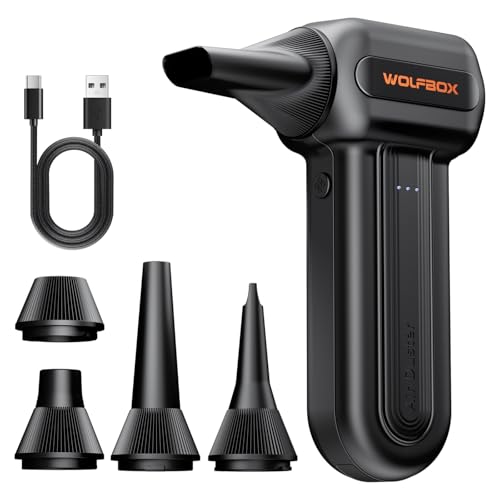
- Five task-specific nozzles
- Three speeds up to 110,000 RPM
- 0.5 lb; up to 240 minutes on low
Best For: Detailed keyboard cleaning plus broader dusting
Best for Detail Work

- Five nozzles and three brushes
- LED battery and speed display
- Built-in light for dark spaces
Best For: Attachment-assisted cleaning around keys and vents
Best Corded Option

- Mains-powered; no charging breaks
- 8.2-foot cord and two speeds
- Four brushes and two sponge filters
Best For: Long cleaning sessions near an outlet
Bulk Office Pick
Office Depot Cleaning Duster 6-Pack

- Six 10-ounce aerosol cans
- Moisture-free formula
- Purchase requires age 21+
Best For: Shared offices and frequent electronics cleaning
Small-Pack Pick
Staples Compressed Air Duster 2-Pack

- Two 10-ounce cans
- Nozzle directs airflow
- Bitterant added
Best For: Home desks and small workstations
Workbench Pick

- Three 10-ounce cans
- Suited to benches and workstations
- Bitterant added
Best For: Keyboard cleaning across varied work areas
Best Rechargeable Option
CAGIWIRU 130,000 RPM Electric Air Duster

- Three adjustable speeds
- Five nozzles and LED light
- Up to 240 minutes on lowest setting
Best For: Reusable cleaning across keyboards, PCs, and household areas
Best Single Can
Staples 10 oz Compressed Air Duster
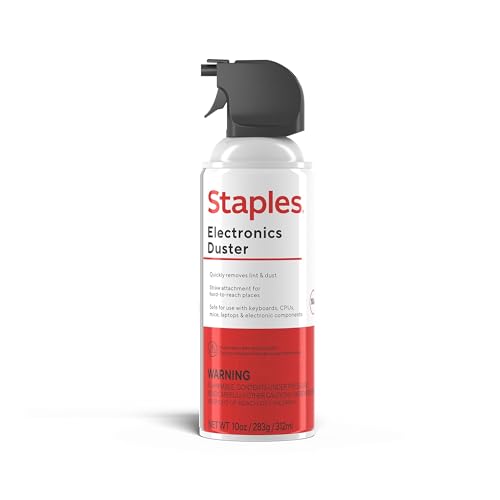
- Single 10 oz can
- Nozzle targets tight spaces
- Contains bitterant
Best For: Occasional keyboard and office-electronics cleaning
Best Three-Pack
Office Depot 10 oz Cleaning Duster
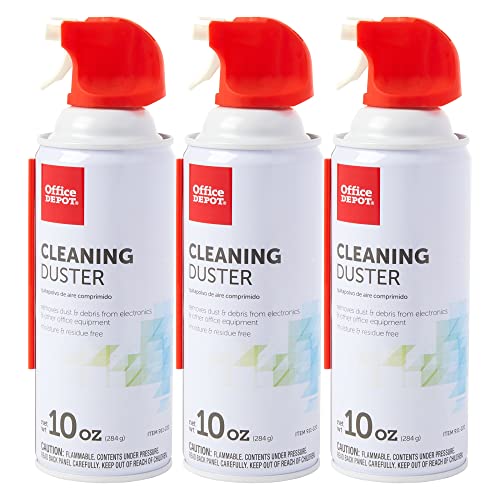
- Three 10 oz cans
- Plastic extension tube included
- Removes dust, dirt, and lint
Best For: Keeping canned dusters on hand for multiple desks
Best Lightweight Pick – WOLFBOX MegaFlow 50
If you want a portable pc air duster for keyboards and other electronics, the WOLFBOX MegaFlow 50 weighs just 0.45 lb and includes four nozzles. Its three speed settings let you adjust airflow for different cleaning jobs.
Best For: Buyers who want a lightweight, cordless duster for keyboards, PCs, and occasional home or car cleaning.
Pros:
- Up to 110,000 RPM with three adjustable speeds.
- Four nozzles and an included lanyard add versatility.
- Rated for up to 240 minutes on the lowest setting; recharges via USB-C in about 3.5 hours.
Cons:
- The 240-minute runtime applies to the lowest setting, not all speeds.
- Requires charging before use.
Choose this model when easy handling matters more than a large attachment kit. Fully charge it before the first use, as the product notes recommend.
Best Nozzle Variety – WOLFBOX MF60
The WOLFBOX MF60 is a versatile pc air duster for keyboards, computer cases, and other tight spaces. Its five nozzles include a long tip for keyboard gaps and a flat tip for broader surfaces.
Best For: Buyers who want one cordless blower for detailed keyboard cleaning and wider PC, car, or household surfaces.
Pros:
- Three stated motor settings: 25,000, 60,000, and 110,000 RPM.
- Five nozzles cover keyboard gaps, broad surfaces, and other tasks.
- Weighs 0.5 lb and is rated for up to 240 minutes on the lowest setting.
Cons:
- The maximum stated runtime is for the lowest speed.
- Its battery needs about 3.5 hours for a full recharge.
The MF60 makes sense if attachment choice is a priority: you can switch from a long nozzle for keys to a flat nozzle for the desk or PC case without changing tools.
Best for Detail Work – FRESMOL Cordless Air Duster
The FRESMOL is a pc air duster for keyboards that adds brushes and visibility features to the usual airflow options. Five nozzles, three brushes, and a built-in light help you work around key gaps, vents, and darker areas.
Best For: Buyers who want attachments and an on-device display for detailed cleaning around electronics.
Pros:
- Three adjustable speeds with a stated 100,000 RPM motor.
- Five nozzles and three brushes support cleaning in tight spaces.
- LED display shows speed mode and battery level; built-in light illuminates work areas.
Cons:
- At 0.5 kg, it is heavier than the two WOLFBOX models listed here.
- The supplied notes do not specify a runtime or recharge time.
This is the more feature-focused choice when seeing the battery status and pairing airflow with brushes matters to your cleaning routine. Check the attachments against the spaces you need to reach.
Best Corded Option – Meudeen Air Duster
If you prefer not to pause for charging, the Meudeen is a mains-powered pc air duster for keyboards and other electronics. Its 8.2-foot cord and two speed settings suit cleaning sessions near an outlet.
Best For: Buyers who prefer continuous corded operation over the portability of a battery-powered duster.
Pros:
- Runs from mains power, so there is no battery to recharge.
- Two speed settings and a stated 500W motor.
- Includes four brushes and two sponge filters.
Cons:
- The 8.2-foot cord limits where you can work without an extension.
- At 1.4 lb, it is heavier than the cordless WOLFBOX models listed here.
Pick this one for desk-side or workbench cleaning where an outlet is handy. The supplied notes describe it as mains-powered despite also calling it rechargeable, so plan on corded use rather than battery operation.
Bulk Office Pick – Office Depot Cleaning Duster 6-Pack
If you need a pc air duster for keyboards across several desks, this Office Depot six-pack supplies 10-ounce aerosol cans for blowing dust, dirt, and lint out of hard-to-reach areas. Its moisture-free formula is intended for cleaning electronics, including computers and printers.
Best For: Offices that want multiple cans on hand for routine electronics cleaning.
Pros:
- Six 10-ounce cans suit shared or frequent use.
- Compressed gas reaches fine debris in tight spaces.
- Moisture-free formula is intended for equipment cleaning.
Cons:
- Purchasers must be 21 or older.
- Six cans may be more than an occasional user needs.
Choose this pack when supply quantity matters more than buying just a can or two for occasional keyboard cleanup.
Small-Pack Pick – Staples Compressed Air Duster 2-Pack
For a pc air duster for keyboards without stocking up on a larger bundle, this Staples set includes two 10-ounce cans. Its nozzle provides controlled airflow for cleaning between keys and around vents, ports, and other tight areas on electronics.
Best For: Home desks or small workstations that need a two-can supply for keyboards and other devices.
Pros:
- Nozzle helps direct airflow into tight spaces.
- Suitable for keyboards, computers, printers, and gaming consoles.
- Contains a bitterant to discourage inhalant misuse.
Cons:
- Two cans provide less backup stock than larger multipacks.
- Disposable cans need replacing when empty.
This is a practical middle ground if targeted cleaning and a modest can count matter more than bulk supply.
Workbench Pick – Falcon Dust-Off 152a 3-Pack
Falcon Compressed Gas (152a) Disposable Cleaning Duster 3 Count, 10 oz. Can (DPSXL3)
Check Price On AmazonFalcon’s Dust-Off three-pack is a pc air duster for keyboards that also suits workstations, repair benches, labs, and photography setups. Each disposable can contains 10 ounces of 152a compressed gas for blowing away dust.
Best For: People who want several cans for keyboard cleaning and varied bench or workstation tasks.
Pros:
- Three 10-ounce cans provide a useful multipack supply.
- Listed for workstations, labs, repair benches, and photography use.
- Contains a bitterant to discourage inhalant misuse.
Cons:
- Disposable cans must be replaced when empty.
- The supplied details do not specify a precision nozzle.
Pick this set for a three-can supply across different work areas; if nozzle design is your priority, check the listing before buying.
Best Rechargeable Option – CAGIWIRU 130,000 RPM Electric Air Duster
If you want a reusable pc air duster for keyboards, this cordless CAGIWIRU blower offers three speed settings, an LED light, and five nozzles for different cleaning spots.
Best For: Buyers who want a rechargeable duster for keyboards, PCs, cars, and other household cleaning tasks.
Pros:
- Three airflow settings let you adjust the blast to the task.
- Five included nozzles and an LED light help with varied cleaning areas.
- USB-C rechargeable, with a stated runtime of up to 240 minutes on the lowest setting.
Cons:
- Stated runtime drops to 25 minutes on the highest setting.
- Listed operating noise reaches 82.5 dB on the highest setting.
The adjustable airflow makes it a flexible pick, but consider its shorter high-speed runtime and operating noise if you expect long cleaning sessions.
Best Single Can – Staples 10 oz Compressed Air Duster
For a straightforward pc air duster for keyboards, this single 10 oz Staples can provides directed airflow for clearing debris around keys, vents, and other tight spaces.
Best For: Occasional keyboard and office-electronics cleaning with a single can.
Pros:
- Nozzle directs airflow into vents, ports, and other narrow areas.
- Intended for keyboards, computers, printers, and gaming consoles.
- Contains a bitterant to discourage inhalant misuse.
Cons:
- The listing includes only one can, rather than a multipack.
- It is a canned product, not a rechargeable blower.
Choose this when you want a simple, targeted cleaning option without buying an electric duster; for multiple workstations, a multipack may be more convenient.
Best Three-Pack – Office Depot 10 oz Cleaning Duster
If you need a pc air duster for keyboards at more than one desk, this Office Depot three-pack supplies 10 oz cans with plastic extension tubes for precise blasts into hard-to-reach areas.
Best For: Buyers stocking multiple cans for keyboard, computer, and office-equipment cleaning.
Pros:
- Three-pack provides multiple cans in one purchase.
- Included plastic extension tube helps direct air into tight spots.
- Designed to remove dust, dirt, and lint from hard-to-reach places.
Cons:
- You must be 18 or older to purchase it.
- Disposable cans are not a rechargeable cleaning option.
This pack makes sense when you want cans on hand for repeat cleaning, especially where an extension tube is useful for reaching between keys or into equipment gaps.
How We Picked the Best PC Air Duster for Keyboards
We compared the listed products by power source, adjustable airflow, portability, included cleaning features, and the practical trade-offs between reusable blowers and disposable cans. Manufacturer RPM claims can help distinguish models, but they do not measure the airflow reaching your keys. The best choice depends on how often you clean, whether you need fine control, and where you plan to use it.
Quick Comparison: Electric Vs. Canned Air
Cordless electric dusters are rechargeable and can make sense for frequent keyboard, desk, and PC cleaning. Models with multiple speed settings let you use a gentler setting around loose keycaps and a stronger one for stubborn debris. Check charging requirements and runtime before buying; a compact blower is less useful if it runs out midway through a larger cleanup.
Canned dusters require no charging and are easy to store for occasional use. The trade-offs are recurring replacement costs and cans that can become cold or lose spraying performance during extended use. The list includes both single cans and multipacks, so compare the cost per can rather than the package price alone.
Key Buying Factors for a PC Air Duster for Keyboards
Airflow Control and Nozzle Fit
Look for a narrow nozzle that directs air between keys without forcing you to hold the outlet against the keyboard. Adjustable electric models offer more control when switching between a laptop keyboard, mechanical switches, and other electronics. Start with a lower setting and increase it only if needed; excessive force can scatter debris deeper into a device or dislodge loose parts.
Power, Portability, and Ongoing Cost
If you clean several keyboards or a full workstation regularly, a rechargeable unit avoids buying replacement cans. For a keyboard that needs attention only now and then, a canned duster may be more convenient. Consider the weight and grip of an electric blower, especially if you will hold it at an angle to reach between rows of keys.
Safe Cleaning Habits
Turn the keyboard off or disconnect it before cleaning. Keep the nozzle slightly away from the keys and use short bursts while tilting the keyboard so debris can escape. Follow the product’s instructions: canned dusters should generally be kept upright to reduce the chance of liquid propellant discharge. Neither type replaces a soft brush or cloth for grime stuck to key surfaces.
Who Should Buy Which PC Air Duster for Keyboards?
Choose a multi-speed cordless blower if you clean keyboards and other electronics often and want adjustable airflow. A simpler two-speed rechargeable model may be enough for routine desk use. Pick a single canned duster for infrequent cleanups, or a multipack if you prefer to keep spares at the office. Whatever style you choose, prioritize controllable airflow and careful technique over the highest advertised speed.