
If you’re looking to streamline your troubleshooting process, understanding the best POST code readers for motherboards in 2026 is crucial. These diagnostic tools can save you time and frustration by quickly identifying hardware issues. Whether you’re a DIY enthusiast or a professional technician, selecting the right reader can make all the difference. Let’s explore the top options available and consider what features you might need to enhance your diagnostic capabilities.
PC Diagnostic 4-Digit Card for Motherboard Testing
If you’re a DIY PC builder or a tech enthusiast looking to troubleshoot motherboard issues efficiently, the PC Diagnostic 4-Digit Card is an invaluable tool for you. This diagnostic card connects easily to PCI or ISA slots, providing compatibility with various motherboards. With a 4-digit display, it shows current and previous error codes, helping you quickly identify problems. Its design allows for hassle-free insertion without damaging components. The card helps diagnose issues like bad slots or motherboard failures, making it essential for resolving repeated crashes or black screens. Don’t overlook this handy tool for your troubleshooting toolkit!
Best For: DIY PC builders and tech enthusiasts looking to efficiently troubleshoot motherboard issues.
Pros:
- Easy Compatibility: Connects effortlessly to PCI or ISA slots, compatible with various motherboards.
- Clear Diagnostic Display: 4-digit display shows current and previous error codes for quick identification of problems.
- User-Friendly Design: Designed for hassle-free insertion without risking damage to components.
Cons:
- Limited Customer Ratings: Average rating of 3.5 out of 5 stars suggests mixed user experiences.
- Potential Compatibility Issues: May encounter problems with certain motherboards or configurations.
- Requires Basic Technical Knowledge: Users need some familiarity with motherboard diagnostics to effectively utilize the card.
Lingvetron V8 PCIe USB Post Test Card Motherboard Diagnostic Tester Kit
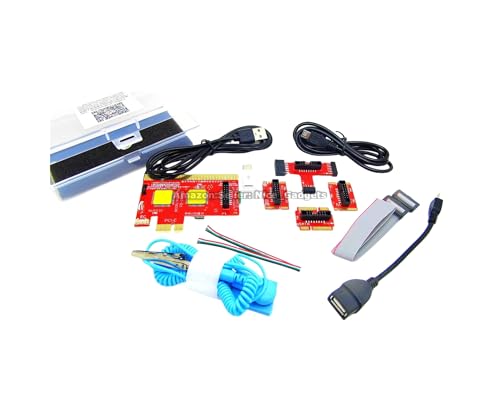
The Lingvetron V8 PCIe USB Post Test Card is an invaluable tool for PC technicians and DIY enthusiasts seeking a hassle-free diagnostic experience. This versatile kit supports various devices, including PCs, laptops, and Macs, allowing you to diagnose systems without disassembly. Its unique USB diagnosis feature makes quick component scanning a breeze. To get started, simply follow the provided guides and utilize the tested apps for accurate results. Remember to unplug the USB cable between tests to clear cached data. With its compatibility and extensive resources, the Lingvetron V8 is essential for effective computer diagnostics and repairs.
Best For: PC technicians, computer owners, students, DIY enthusiasts, and hardware traders seeking efficient diagnostic solutions.
Pros:
- Versatile Compatibility: Works with a wide range of devices, including PCs, laptops, Macs, and Android devices.
- USB Diagnosis Feature: Allows for quick and easy diagnostics without the need for disassembly.
- Extensive Resources: Includes detailed guides, apps, and support materials to facilitate effective troubleshooting.
Cons:
- No Traditional Display: Lacks a digital display for POST codes, which may be less intuitive for some users.
- Unplugging Requirement: Requires unplugging USB between tests, which can be inconvenient for rapid testing.
- Learning Curve: Users may need to spend time understanding the guides and apps for effective use.
Optimal Shop 4 Digit PCI and ISA PC Computer Motherboard Power Diagnostic Analyzer Post Tester Card

For anyone troubleshooting desktop PCs, the Optimal Shop 4 Digit PCI and ISA PC Computer Motherboard Power Diagnostic Analyzer Post Tester Card stands out as an essential tool. Its standard PCI and ISA interfaces ensure compatibility with all mainstream motherboards, making it easy to access. The 4-digit display quickly shows current and previous error codes, helping you pinpoint issues right after the power-on self-test. Plus, the provided error code table and code search function simplify understanding errors. With additional features like motherboard bus speed testing, this analyzer card is a must-have for anyone serious about diagnosing PC problems efficiently.
Best For: Those looking for an efficient and reliable tool to diagnose and troubleshoot issues in desktop PCs.
Pros:
- Easy Compatibility: Standard PCI and ISA interfaces make it suitable for all mainstream motherboards.
- Quick Error Identification: The 4-digit display instantly shows current and previous error codes after power-on self-test.
- User-Friendly Features: Includes an error code table and code search function for easier understanding of errors.
Cons:
- Limited to Desktop PCs: Not suitable for laptops or other non-desktop computing devices.
- Requires Basic Knowledge: Users should have some familiarity with error codes and PC diagnostics for effective use.
- No Online Support: Lacks real-time online support or updates for troubleshooting beyond the provided code table.
TL611 Pro Mainboard Debug Card for PC Testing

Designed with precision in mind, the TL611 Pro Mainboard Debug Card is an essential tool for PC enthusiasts and technicians seeking to diagnose motherboard issues efficiently. This versatile diagnostic kit features a 4-digit post card with LED indicators, making it perfect for testing laptops and various PCI E systems. With automatic identification, it simplifies troubleshooting by recognizing power modules quickly. You’ll appreciate its accurate diagnostics, allowing you to address system issues with ease. Plus, the multiple channels detection enhances your experience by indicating power supply, CPU, memory, and more—all essential for effective PC testing.
Best For: The TL611 Pro Mainboard Debug Card is best for PC enthusiasts and technicians looking for an efficient diagnostic tool to troubleshoot motherboard issues.
Pros:
- Versatile Compatibility: Supports various systems including PCI E, mini PCI E, and LPC.
- Automatic Identification: Quickly recognizes power modules, simplifying the troubleshooting process.
- Multiple Channels Detection: Provides LED indicators for power supply, CPU, memory, and more, enhancing the diagnostic experience.
Cons:
- Limited to PC Systems: May not be suitable for non-PC systems or specialized hardware.
- Requires Basic Technical Knowledge: Users may need some understanding of PC components to utilize effectively.
- Potential for Misdiagnosis: Accuracy can vary depending on the specific issue with the motherboard.
Aumotop Computer Motherboard Post Tester

If you’re a DIY enthusiast looking to streamline your computer troubleshooting, the Aumotop Computer Motherboard Post Tester is an excellent choice. This 4-digit diagnostic card efficiently finds faults, saving you valuable time. With clear code displays, audible alerts, and anti-insertion protection, it ensures safe and easy operation. Compatible with various motherboard types, it can diagnose critical signals even without a CPU. The package includes the diagnostic card and an English user manual for straightforward setup. Plus, with Amazon’s return policy, you can shop confidently, knowing you have options if needed. Get ready to tackle those computer issues effectively!
Best For: DIY enthusiasts looking for an efficient and reliable tool to troubleshoot computer motherboard issues.
Pros:
- Efficient Fault Finding: Quickly diagnoses computer problems, saving time and effort.
- Strong Code Display: The clear 4-digit display makes it easy to identify and resolve issues.
- User-Friendly: Comes with an English user manual for straightforward setup and operation.
Cons:
- Limited to POST Issues: Primarily designed for post diagnostics, may not cover all types of computer issues.
- Requires Basic Knowledge: Users need some understanding of computer hardware to interpret the codes effectively.
- Compatibility Constraints: While it supports various motherboard types, it may not work with all models or configurations.
PC Motherboard Diagnostic Card Post Tester

The PC Motherboard Diagnostic Card Post Tester is an ideal tool for technicians and DIY enthusiasts who need to troubleshoot computer issues quickly and accurately. This 4-digit card analyzer effectively identifies faults in PCI and ISA motherboards, displaying codes that help pinpoint problems. With its audible sound alerts, you won’t miss any critical notifications while diagnosing failures. Plus, the anti-insertion protection feature ensures that you won’t accidentally damage components during use. Whether you’re a professional or just looking to fix your own setup, this diagnostic card provides reliable, stable results to get your PC back up and running in no time.
Best For: Technicians and DIY enthusiasts looking for a reliable tool to troubleshoot and diagnose motherboard issues efficiently.
Pros:
- Accurate fault identification: Quickly displays fault codes for precise troubleshooting.
- Audible sound alerts: Provides immediate notifications for critical issues, ensuring nothing is missed during diagnosis.
- Anti-insertion protection: Prevents damage to components, promoting safe usage.
Cons:
- Limited to PCI and ISA motherboards: May not be suitable for newer motherboard types that do not use these interfaces.
- Requires some technical knowledge: Users may need familiarity with fault codes for effective troubleshooting.
- No visual display beyond fault codes: Lacks a detailed interface that could provide more in-depth information.
Yvshy Pack of 2 Automotive Fiber Optic Test Loop Adapters

For automotive technicians and DIY enthusiasts, the Yvshy Pack of 2 Automotive Fiber Optic Test Loop Adapters offers an efficient solution for diagnosing fiber optic issues in vehicles. This pack includes both male and female adapters, designed to quickly identify fault points in your car’s fiber optic network. You can seamlessly diagnose problems related to motherboard transceivers and cable connections without disrupting other devices. Compatible with popular brands like Audi, BMW, and Mercedes-Benz, these adapters make troubleshooting a breeze. Plus, with responsive customer support, you’ll get help for any questions within 24 hours on weekdays.
Best For: Automotive technicians and DIY enthusiasts looking to efficiently diagnose fiber optic issues in vehicles.
Pros:
- High Efficiency: Quickly identifies fault points in fiber optic networks, minimizing diagnostic time.
- Wide Compatibility: Works with various vehicle brands including Audi, BMW, Mercedes-Benz, Porsche, and Volkswagen.
- User-Friendly: Easy to use with both male and female adapters, allowing seamless troubleshooting without disrupting other devices.
Cons:
- Limited to Fiber Optic Systems: Only applicable for vehicles with fiber optic networks, not useful for others.
- Requires Basic Knowledge: Users should have some understanding of automotive systems for effective use.
- Potential Availability Issues: May be difficult to find in local stores, requiring online purchase.
Computer Fault Test Card for Laptop and Notebook Repair

Designed with IT professionals and tech enthusiasts in mind, the Computer Fault Test Card is your go-to solution for efficient laptop and notebook repairs. It features a clear display that shows 4-digit codes, making fault identification straightforward. With flexible power supply options via USB or computer power, you’ll enjoy versatile usage. This tool utilizes POST code analysis for accurate diagnostics and is compatible with a wide range of motherboards, ensuring it fits into any repair shop or tech center. At a compact size of 5.6 x 5.7 cm, it’s an essential addition to your diagnostic toolkit.
Best For: IT professionals and technology enthusiasts seeking reliable diagnostic tools for laptop and notebook repairs.
Pros:
- Clear 4-digit display for easy fault identification.
- Flexible power supply options via USB or computer power.
- Compatible with a wide range of motherboards for versatile usage.
Cons:
- Limited to diagnostic capabilities; does not repair faults.
- Requires some technical knowledge for effective use.
- May not be suitable for non-technical users or casual consumers.
Factors to Consider When Choosing a Post Code Reader for Motherboards
When you’re selecting a post code reader for your motherboard, consider its compatibility with your specific model. You’ll also want to check the display features—clarity matters when diagnosing issues. Lastly, think about the diagnostic capabilities and ease of use to ensure you can efficiently troubleshoot problems.
Compatibility With Motherboards
Choosing a POST code reader that’s compatible with your motherboard is crucial for effective diagnostics. Start by ensuring it has standard interfaces like PCI and ISA, which maximize compatibility across various motherboards. Check if the reader supports different types, including desktop PCs, laptops, and servers, to meet your specific needs. It’s also beneficial if the device can operate without a CPU, allowing you to assess motherboard functionality during critical failures. Additionally, verify compatibility with multiple bus speeds and types to enhance versatility across hardware configurations. Finally, aim for a reader that displays error codes clearly, preferably through a 4-digit display, to help you quickly identify issues during the diagnosis process.
Display Features and Clarity
To effectively diagnose motherboard issues, having a POST code reader with clear display features is essential. Look for a model that offers a 4-digit display, which shows both current and previous error codes for quick identification. Dual dot matrix hexadecimal read-outs enhance clarity, making it easier to interpret results. Some readers let you recall codes at the push of a button, which is great for thorough troubleshooting. A display supporting a wide range of error codes, along with an accompanying error code table, can simplify your diagnostic process significantly. Additionally, audible alerts alongside visual displays provide immediate feedback on issues, enhancing your overall user experience during diagnostics. Choose wisely to streamline your troubleshooting efforts.
Diagnostic Capabilities and Functions
Understanding the diagnostic capabilities and functions of a POST code reader is crucial for effective troubleshooting. These devices display Power On Self Test (POST) codes, helping you pinpoint specific motherboard issues through numerical error codes. Look for models that feature a dual display, as they show both current and previous error codes, making it easier to diagnose intermittent problems. Advanced diagnostic capabilities can detect issues related to power supply, CPU, memory, and other critical components. Additionally, some tools offer USB connectivity for non-invasive testing, allowing you to diagnose systems without disassembling hardware. Finally, ensure compatibility with various motherboard types and support for multiple bus interfaces like PCI and ISA to enhance the effectiveness of your POST code reader.
Ease of Use
When selecting a POST code reader for motherboards, ease of use should be a top priority. Look for diagnostic cards with a clear, easily readable 4-digit display, making it simple to identify error codes during troubleshooting. Choose a card that comes with comprehensive user manuals or guides to help you operate the device effectively. Pay attention to the design; features like anti-insertion protection can prevent damage during installation. Opt for a reader that supports multiple interfaces, such as PCI and ISA, ensuring compatibility with various motherboards without complicated setups. Lastly, consider whether the card provides audible sound alerts for fault notifications, allowing you to quickly address issues without constantly monitoring the display.
Additional Testing Features
Selecting a POST code reader goes beyond just ease of use; additional testing features can significantly enhance your troubleshooting capabilities. Look for readers that support motherboard bus speed testing to ensure comprehensive diagnostics of system performance. Some diagnostic cards include error code search functions, simplifying your troubleshooting by providing detailed explanations for specific codes. Features like audible alerts can notify you immediately of detected issues, so you won’t have to keep checking the display. Consider tools offering multiple channel detection to monitor various components, such as power supply, CPU, and memory, concurrently. Finally, cards with anti-insertion protection can prevent damage during use, ensuring that your testing process remains safe and effective.
Design and Build Quality
Choosing the right design and build quality for a POST code reader is crucial for effective troubleshooting. Look for a device that fits easily into standard PCI and ISA slots without risking damage to your motherboard. A compact and lightweight design enhances portability, making it easier to handle during diagnostics. Ensure the reader features a clear 4-digit display, as this helps you quickly identify error codes. Durability is key; opt for readers made from robust materials that can withstand repeated use and potential mishandling. Finally, check for anti-insertion protection features, which are essential to prevent damage to both the tool and your motherboard, ensuring a safe and effective diagnostic process.