
When you’re building or upgrading your PC, the choice of CPU contact frame for your LGA1700 socket can make a significant difference in cooling efficiency. Selecting the right frame not only prevents warping but also ensures optimal thermal performance for your Intel CPUs. With various options available, it’s important to understand what each frame offers. Let’s explore the top contenders that can enhance your setup and elevate your gaming experience.
Thermalright LGA1700-BCF Black V2 CPU Anti-Bend Fixer

If you’re looking to protect your Intel 12th, 13th, or 14th generation CPUs from bending due to cooler weight, the Thermalright LGA1700-BCF Black V2 CPU Anti-Bend Fixer is an excellent choice. This all-aluminium alloy bracket features anodized sandblasting for durability and a unique design for performance and aesthetics. Measuring 54x70x6mm and weighing just 20g, it precisely positions to avoid capacitors while supporting cooler weight. Installation is straightforward with the included L-shaped screwdriver, making it a simple replacement for your original CPU buckle. Plus, customer support is available for any installation questions you might have.
Best For: Users with Intel 12th, 13th, or 14th generation CPUs looking to prevent bending caused by cooler weight.
Pros:
- Durable construction made from all aluminium alloy with anodized sandblasting.
- Easy installation process with included tools and clear instructions.
- Precise design that avoids capacitors while effectively supporting cooler weight.
Cons:
- Limited compatibility only with LGA1700 chipsets.
- Replacement only for original CPU buckle, not suitable for radiator buckles.
- Additional weight may slightly increase total system weight compared to stock solutions.
Thermalright CPU Contact Frame V2 for LGA 1700 Retrofit Kit

The Thermalright CPU Contact Frame V2 for LGA 1700 Retrofit Kit stands out as the best choice for enthusiasts looking to enhance their Intel 12th, 13th, or 14th Generation CPUs. Its anti-warping design helps prevent overheating and ensures your CPU remains securely in place. Installation is a breeze, requiring just a few simple screws. Made from durable all-aluminum with a scratch-resistant finish, this frame not only looks great but will withstand the test of time. The kit includes a bending correction frame and an L-shaped screwdriver, making it an excellent value for anyone serious about maximizing their cooling efficiency.
Best For: Enthusiasts and gamers looking to enhance the performance and stability of their Intel 12th, 13th, or 14th Generation CPUs.
Pros:
- Anti-Warping Design: Prevents CPU overheating and ensures proper fixation.
- Easy Installation: Simple screw setup allows for quick assembly.
- Durable Material: All-aluminum construction with a scratch-resistant finish enhances longevity.
Cons:
- Limited Compatibility: Only compatible with specific Intel CPU generations and chipsets.
- Additional Cost: Requires a separate cooling solution for optimal performance.
- Not Universally Necessary: May not be needed for casual users or those with adequate stock cooling solutions.
Thermalright CPU Contact Frame for LGA 1700 Retrofit Kit

For those looking to enhance CPU stability in their Intel 12th, 13th, or 14th generation builds, the Thermalright CPU Contact Frame for LGA 1700 Retrofit Kit stands out as an essential upgrade. This kit replaces your original CPU buckle and is specifically designed to prevent CPU warping and bending. Made from durable all-aluminum with a sleek CNC gold anodizing finish, it features scratch-resistant oxidized edges. Installation is straightforward with the included mounting parts and L-shaped screwdriver. Plus, you’ll receive TF7 thermal paste, ensuring optimal thermal conductivity. Elevate your cooling efficiency and protect your investment with this reliable contact frame.
Best For: Enthusiasts and gamers seeking to improve CPU stability and thermal performance in Intel LGA1700 systems.
Pros:
- Easy installation with included mounting parts and L-shaped screwdriver.
- Durable all-aluminum construction with scratch-resistant finish.
- Helps prevent CPU warping and bending for enhanced performance.
Cons:
- Only compatible with LGA1700 motherboards (Intel 12th/13th/14th generation).
- Replacement part, so it doesn’t include a radiator buckle.
- May require additional thermal paste if not using the included TF7.
Thermalright LGA1700-BCF CPU Contact Frame

Engineered specifically for Intel’s 12th and 13th generation CPUs, the Thermalright LGA1700-BCF CPU Contact Frame is an ideal choice for enthusiasts seeking to eliminate CPU bending during installation. Constructed from all aluminum alloy and featuring a bending type pressure plate, this frame ensures even pressure distribution. Its lightweight design, at just 20g for the main body, supports cooler weight effectively. Installation is a breeze with the included L-shaped screwdriver, and you’ll find instructional videos helpful for a smooth setup. Compatible with LGA1700 motherboards, this contact frame is a must-have for optimal cooling performance.
Best For: Enthusiasts looking to prevent CPU bending and ensure optimal cooling performance for Intel’s 12th and 13th generation CPUs.
Pros:
- Prevents CPU bending with its specialized bending type pressure plate and contact frame design.
- Lightweight at just 20g for the main body, making it easy to install without adding excessive weight.
- Easy installation process with an included L-shaped screwdriver and helpful instructional videos.
Cons:
- Limited compatibility as it only supports Intel 12th/13th generation CPUs and LGA1700 motherboards.
- Requires additional tools for installation if the included screwdriver is misplaced or not suitable for your needs.
- Potentially unnecessary for users who do not plan to use heavy CPU coolers that could cause bending.
Thermalright Intel LGA 1700 Bending Bracket Frame

Offering a reliable solution for gamers and PC builders, the Thermalright Intel LGA 1700 Bending Bracket Frame addresses the common issue of CPU bending caused by cooler weight. Made from anodized aluminum alloy, its unique design enhances durability and heat dissipation. Weighing just 55g, this frame is compatible with Intel’s 12th, 13th, and 14th generation CPUs and various LGA1700 motherboards. Installation is straightforward with the included L-shaped screwdriver, ensuring precise positioning while avoiding capacitors. By preventing CPU bending, this frame not only protects your hardware but also provides an optimal installation experience, making it a must-have for your PC build.
Best For: Gamers and PC builders seeking to prevent CPU bending from cooler weight while ensuring optimal installation and heat dissipation.
Pros:
- Provides a reliable solution for CPU bending issues caused by heavy coolers.
- Made from durable anodized aluminum alloy for enhanced longevity.
- Easy installation with included tools and clear instructions.
Cons:
- Limited to compatibility with Intel’s 12th, 13th, and 14th generation CPUs only.
- May not be necessary for all users, particularly those with lighter cooling solutions.
- Additional weight may be a concern for some minimalistic builds.
Thermalright Intel LGA1700 Anti-Bending Buckle

The Thermalright Intel LGA1700 Anti-Bending Buckle is a must-have for anyone using Intel’s 12th or 13th Generation CPUs. This all-aluminum alloy buckle, measuring 54x70x6mm and weighing only 20g, effectively addresses CPU bending during installation. Its innovative design avoids capacitors, making installation smoother and more efficient. With original LOTES insulation pads, you won’t have to worry about wear on your CPU cover, even after multiple uses. Plus, the installation process is straightforward; just grab the included L-shaped screwdriver and follow the video guide for a seamless setup. Enhance your cooling efficiency and protect your CPU today!
Best For: Users of Intel’s 12th and 13th Generation CPUs looking to prevent CPU bending during installation.
Pros:
- Lightweight design at only 20g, making it easy to handle during installation.
- Easily installable with an included L-shaped screwdriver and a helpful video guide.
- Protective insulation pads prevent wear on the CPU cover, ensuring longevity through multiple installations.
Cons:
- Limited compatibility as it only works with Intel’s 12th and 13th Generation CPUs.
- Requires additional tools (screwdriver) that may not be readily available to all users.
- Potential learning curve for those unfamiliar with CPU installation processes.
Thermalright LGA1700-BCF Anti-Bending Fastener for Intel CPUs
If you’re looking to safeguard your Intel 12th, 13th, or 14th generation CPU from bending during installation, the Thermalright LGA1700-BCF Anti-Bending Fastener is an ideal solution. Weighing just 55g, this aluminum alloy fastener is designed for compatibility with LGA1700 chipsets like H610 and Z790. Its CNC-manufactured design ensures optimal pressure distribution, preventing damage during operation. With an included L-shaped screwdriver, installation is a breeze, especially if you watch the instructional video. Plus, the insulation foot pad protects your CPU cover from wear. Enhance your cooling efficiency and keep your CPU safe with this reliable fastener.
Best For: Users looking to prevent CPU bending during installation and enhance cooling efficiency for Intel 12th, 13th, or 14th generation CPUs.
Pros:
- Prevents CPU bending during installation and operation, ensuring longevity and stability.
- Easy installation with included L-shaped screwdriver and instructional video guidance.
- Designed for optimal pressure distribution, reducing the risk of damage to the CPU and its cover.
Cons:
- Limited compatibility only with Intel 12th, 13th, and 14th generation CPUs.
- Requires specific installation knowledge, which may be challenging for beginners without watching the video.
- Only compatible with air cooling methods, limiting options for advanced cooling setups.
AVERZELLA Intel 12th/13th Generation CPU Retrofit Kit for LGA 1700
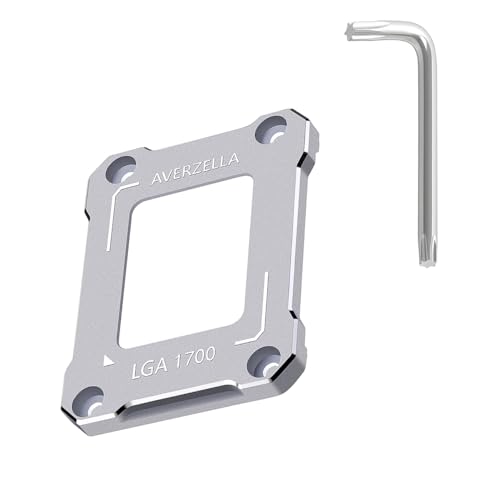
For gamers and content creators using Intel’s 12th or 13th generation CPUs, the AVERZELLA Retrofit Kit for LGA 1700 stands out as a vital upgrade. This custom-designed contact frame is compatible with both air and water cooling solutions, ensuring optimal performance. Its CNC-processed aluminum fixed fastener prevents warping by evenly distributing the load, addressing overheating issues effectively. Installation is a breeze with the included L-shaped screwdriver and trace-free screw holes. Plus, the insulated foot pad protects your motherboard from short circuits. With durable materials and anti-scratch treatments, this retrofit kit enhances your setup’s cooling efficiency and longevity.
Best For: Gamers and content creators using Intel’s 12th or 13th generation CPUs seeking improved cooling and stability.
Pros:
- Custom design ensures compatibility with Intel 12th/13th generation CPUs and motherboards.
- Anti-warping features effectively manage heat distribution, reducing the risk of overheating and bending.
- Easy installation with included tools and trace-free screw holes simplifies the setup process.
Cons:
- Limited compatibility only with Intel’s LGA 1700 socket, excluding other CPU generations.
- May require additional cooling solutions for optimal performance in high-demand scenarios.
- Initial cost may be a consideration for budget-conscious users looking for upgrades.
Thermalright LGA1700-BCF Black V2 CPU Retainer
Engineered specifically for Intel’s 12th to 14th generation CPUs, the Thermalright LGA1700-BCF Black V2 CPU Retainer stands out as an essential upgrade for users looking to enhance their LGA1700 motherboard compatibility. Made from durable aluminum alloy and featuring anodized sandblasting, this retainer ensures a robust installation. Its unique shape provides precise positioning, avoiding interference with capacitors. You’ll find the installation straightforward, thanks to the included L-shaped screwdriver and comprehensive guidance. With insulation protection foot pads from LOTES, it guarantees even pressure distribution, preventing CPU cover wear over repeated uses. Upgrade your setup with this reliable retainer for optimal performance.
Best For: Users with Intel 12th to 14th generation CPUs seeking a reliable and durable CPU retainer for LGA1700 motherboards.
Pros:
- Durable construction with aluminum alloy and anodized sandblasting for long-lasting use.
- Easy installation process with included tools and detailed guidance.
- Prevents CPU cover wear with insulation protection foot pads ensuring even pressure distribution.
Cons:
- Replaces only the original buckle, not the heat sink buckle, which may limit compatibility with certain setups.
- Specific to LGA1700 chipset motherboards, limiting use with other CPU socket types.
- Slightly heavier than some other retainers, which may be a consideration for ultra-light builds.
AsiaHorse LGA 1700 CPU Contact Frame for Intel CPUs

The AsiaHorse LGA 1700 CPU Contact Frame is a game-changer for gamers and PC builders seeking optimal cooling performance. This anti-bending frame features high-strength metal construction, ensuring durability and protection against CPU warping. It fits seamlessly with Intel LGA 1700 socket motherboards and supports 12th to 14th Gen CPUs. The frame guarantees 100% flush contact, maximizing thermal paste coverage and enhancing heat dissipation. With even pressure distribution, it stabilizes your CPU, preventing concave curvature. Installation is a breeze with included screws and a hex wrench, allowing you to boost your cooling efficiency in no time. Upgrade your setup today!
Best For: Gamers and PC builders looking for enhanced cooling performance and stability for Intel LGA 1700 CPUs.
Pros:
- Maximized Cooling Efficiency: 100% flush contact improves thermal paste coverage and heat dissipation, lowering core temperatures effectively.
- Durable Anti-Bending Design: High-strength metal construction prevents CPU warping and protects motherboard pins during installation and use.
- Easy Installation: Comes with mounting screws and a hex wrench, allowing for straightforward setup without complications.
Cons:
- Limited Compatibility: Specifically designed for Intel LGA 1700 socket motherboards and CPUs, not suitable for other socket types.
- Additional Cost: Purchasing the frame may add extra expense for those on a tight budget.
- Weight Consideration: While lightweight, some users may prefer a heavier frame for a more stable feel during installation.
Factors to Consider When Choosing a CPU Contact Frame for LGA1700
When choosing a CPU contact frame for your LGA1700 setup, you’ll want to consider several key factors. Material quality and durability are crucial for longevity, while installation ease can save you time and frustration. Don’t forget to check compatibility with your CPU and look for anti-warping features that enhance performance.
Material Quality and Durability
While selecting a CPU contact frame for your LGA1700 setup, material quality and durability should be top priorities. Aluminum alloys are a popular choice due to their lightweight nature, durability, and corrosion resistance. Look for frames with anodized finishes, like CNC gold anodizing, to boost scratch resistance and overall longevity. Opt for high-strength metal constructions to prevent bending or warping under the weight of your CPU cooler, protecting both your CPU and motherboard. Insulation features are also essential, as they help minimize wear on CPU covers during multiple installations. Finally, ensure even pressure distribution through the design, as this improves thermal conductivity and reduces the risk of overheating, highlighting the importance of quality materials in your choice.
Installation Ease and Support
Installation ease is a crucial factor to consider when selecting a CPU contact frame for your LGA1700 setup. Many frames include an L-shaped screwdriver, making the installation process straightforward. You’ll often find clear instructions and video guidance to help you set up without complications. Some models even feature precise positioning designs, ensuring you avoid interference with capacitors, which simplifies the experience further. Typically, installation involves simple screws that align perfectly with your motherboard’s original screw holes, guaranteeing a secure fit. Plus, customer support is usually available for any installation queries, boosting your confidence and satisfaction during the setup process. This support can make a significant difference, especially if you’re new to installing hardware.
Compatibility With CPUS
Choosing the right CPU contact frame for your LGA1700 setup hinges on compatibility with specific Intel generations. Make sure the frame is designed for Intel’s 12th, 13th, or 14th generation CPUs, as this ensures proper installation and optimal performance. It’s also crucial that the frame supports various chipsets like H610, B660, B760, Z690, and Z790 to fit different motherboard configurations. Look for frames that specify their ability to prevent CPU bending or warping, which is vital for maintaining CPU integrity. Additionally, check for features that allow precise positioning around capacitors to avoid interference during installation. Finally, consider the material and construction quality, as durable materials enhance compatibility and longevity with high-performance CPUs.
Anti-Warping Features
When selecting a CPU contact frame for your LGA1700 setup, it’s essential to consider anti-warping features that can protect your CPU from damage. These features help prevent overheating and bending during installation and operation. Look for frames with mechanisms that evenly distribute the load of your CPU cooler, reducing pressure points that could lead to warping. Many designs incorporate specialized materials, like all-aluminum alloys, for enhanced durability and structural integrity. Additionally, ensure the frame has precise positioning to avoid contact with capacitors, maximizing cooling performance. By implementing an anti-warping frame, you significantly boost your CPU’s stability and longevity, minimizing the risk of damage from the cooler’s weight.
Performance Enhancements
While considering a CPU contact frame for your LGA1700 setup, you’ll want to prioritize performance enhancements that directly impact thermal efficiency. A well-designed contact frame ensures 100% flush contact, maximizing the contact area for heat dissipation. Look for frames made from advanced materials that distribute pressure evenly, reducing the risk of CPU warping and ensuring optimal thermal interface. High-strength metal construction enhances structural integrity, preventing CPU bending during installation and protecting motherboard pins. Anodized finishes also add durability and resistance to oxidation, ensuring consistent performance over time. By ensuring proper installation, you can achieve lower core temperatures, ultimately improving system stability and performance during demanding workloads.