
When you’re looking to keep your PC cool, choosing the right external fan is essential. With so many options available, it can be tough to know which one suits your needs best. From powerful airflow to whisper-quiet operation, the right fan can make a significant difference in your system’s performance. Here’s a look at the 10 best external fans that could help enhance your setup and keep things running smoothly.
ELUTENG Dual USB Computer Cooling Fan (120mm)
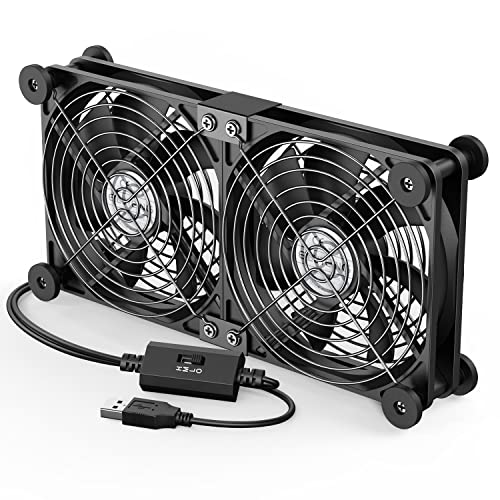
If you’re looking for an effective cooling solution for your PC or other devices, the ELUTENG Dual USB Computer Cooling Fan (120mm) is an excellent choice. This fan features dual 120mm blades, offering three adjustable speeds of 900, 1200, and 1500 RPM, allowing you to customize airflow. You can easily set it up horizontally or vertically, making it perfect for cooling everything from laptops to projectors. With its low noise levels and durable hydraulic bearings, it operates quietly, even in libraries. Plus, its safety features, like metal grids and rubber shock absorbers, ensure a secure and efficient cooling experience.
Best For: Those seeking a versatile and quiet cooling solution for their PCs, laptops, and other electronic devices.
Pros:
- Customizable Airflow: Three adjustable speeds (900, 1200, 1500 RPM) to suit different cooling needs.
- Quiet Operation: Noise levels as low as 25.6dB, making it suitable for quiet environments like libraries.
- Versatile Placement: Can be positioned horizontally or vertically, compatible with various USB-powered devices.
Cons:
- USB Powered Only: Requires a USB port for operation, limiting mobility unless connected to a power source.
- Size Limitation: The fan size (12 x 12 x 2.5 cm) may not fit in very compact setups.
- Limited Speed Options: Only three speed settings may not meet the needs of users requiring more precise airflow control.
Wathai Big Airflow Computer Fan (2 x 120mm, AC Plug)

The Wathai Big Airflow Computer Fan is an excellent choice for anyone seeking efficient cooling solutions for a variety of electronics, from PC cases to greenhouses. With two 120mm fans, each delivering 85 CFM at 2500 RPM, you’ll get powerful airflow to enhance cooling efficiency. Its AC power supply allows for adjustable speeds between 3V and 12V, letting you customize performance. Designed for durability, it features dual-ball bearings with a lifespan of 50,000 hours. Plus, the double metal protective net ensures safety by preventing foreign objects from interfering. Lay it flat or stand it upright—either way, you’ll enjoy optimal air circulation.
Best For: The Wathai Big Airflow Computer Fan is best for users looking for versatile cooling solutions for electronics such as PCs, servers, and greenhouses.
Pros:
- High Airflow: Each fan delivers 85 CFM, providing powerful cooling performance.
- Adjustable Speed Control: Offers customizable airflow with speed settings from 3V to 12V.
- Durable Design: Features dual-ball bearings with a lifespan of 50,000 hours and a protective net for safety.
Cons:
- AC Power Requirement: Requires an AC power supply, which may limit portability.
- Noise Level: At maximum speed, fans may produce noticeable noise.
- Size Limitations: The 120mm size may not fit in all compact electronic setups.
Wathai High Airflow Router Cooling Fan with Multi Speed Controller

For anyone seeking reliable cooling solutions for their tech devices, the Wathai High Airflow Router Cooling Fan boasts impressive dual 120mm fans that deliver a combined airflow of 56 CFM. Designed to cool a variety of devices like PCs, TVs, and projectors, it connects easily via a single USB cable. With a sleek square design, you can position it flat or upright, while the multi-speed controller lets you adjust airflow and noise levels. Just note, at its lowest speed, fan blades might struggle to start smoothly. It’s also perfect for DIY projects or boosting indoor air circulation.
Best For: Those looking for an efficient cooling solution for their electronics, including PCs, TVs, and gaming consoles.
Pros:
- High Airflow: Delivers a combined airflow of 56 CFM, ensuring effective cooling for various devices.
- Versatile Design: Can be positioned flat or upright, making it adaptable to different setups and spaces.
- Multi-Speed Control: Allows users to adjust fan speeds for optimal airflow and noise levels based on their needs.
Cons:
- Starting Issues at Low Speed: Fan blades may struggle to rotate smoothly at the lowest speed, leading to potential noise.
- Not Waterproof: Limits its use to indoor environments, restricting versatility in outdoor applications.
- Requires USB Power: Dependency on a USB connection may limit placement options if power outlets are not nearby.
AC Infinity MULTIFAN S7 Quiet Dual USB Fan

Looking for a reliable cooling solution for your gaming setup or electronics? The AC Infinity MULTIFAN S7 is your answer. This quiet dual 120mm USB fan is UL-certified, perfect for cooling devices like DVRs, PlayStations, and Xboxes. With its ultra-quiet operation and multi-speed controller, you can customize airflow without the noise. The dual-ball bearings offer an impressive lifespan of 67,000 hours. Plus, its compact design allows it to be positioned flat or upright. With a total airflow of 104 CFM at just 19 dBA, it enhances your system’s performance and longevity seamlessly.
Best For: Gamers and electronics users looking for an efficient and quiet cooling solution to enhance device performance and longevity.
Pros:
- Ultra-quiet operation with a noise level of just 19 dBA, making it ideal for quiet environments.
- Customizable airflow with a multi-speed controller, allowing users to adjust cooling as needed.
- Long lifespan of up to 67,000 hours thanks to dual-ball bearings, ensuring reliability over time.
Cons:
- Limited to USB power, which may not be compatible with all devices without a USB port.
- Compact size may not provide sufficient cooling for larger setups or multiple devices.
- Requires manual adjustment for speed settings, which may be less convenient for some users.
AC Infinity MULTIFAN S3 Quiet USB Fan for Cooling

Engineered for quiet yet efficient cooling, the AC Infinity MULTIFAN S3 is a perfect solution for gamers and tech enthusiasts seeking to maintain optimal performance in cramped spaces. This UL-certified USB fan measures 4.7 x 4.7 x 1 inches, delivering an impressive airflow of 52 CFM while operating at a whisper-quiet noise level of just 18 dBA. With dual ball bearings ensuring a lifespan of 67,000 hours, you can rely on its durability. The multi-speed controller lets you easily adjust the fan speed, and its USB plug allows convenient power from your devices, making it an essential accessory for your setup.
Best For: Gamers and tech enthusiasts looking to maintain optimal performance of electronics in confined spaces.
Pros:
- Ultra-quiet operation at just 18 dBA, ensuring minimal disruption during gaming or work.
- Adjustable fan speed with a multi-speed controller for customizable airflow and noise levels.
- Durable design with dual ball bearings providing a lifespan of up to 67,000 hours.
Cons:
- Limited airflow compared to larger fans, which may not be sufficient for very high-heat devices.
- Dependent on USB power, requiring available ports on devices for operation.
- Compact size may not suit all cooling needs for larger electronic setups.
havit HV-F2056 Laptop Cooler Cooling Pad (15.6″-17″)

The Havit HV-F2056 Laptop Cooler Cooling Pad stands out as an ideal choice for gamers and professionals who need reliable cooling for their 15.6″-17″ laptops. Its slim, portable design makes it easy to carry, while the three ultra-quiet fans keep your device cool without disturbing your environment. Plus, it doubles as an ergonomic stand with two adjustable height settings, enhancing your comfort during long sessions. The durable metal mesh surface ensures stability, and the built-in dual-USB hub provides extra connectivity options. Just remember, you’ll need a Type C to USB adapter for Type C devices.
Best For: Gamers and professionals seeking effective cooling solutions for their 15.6″-17″ laptops.
Pros:
- Three ultra-quiet fans ensure a noise-free environment while cooling your laptop.
- Ergonomic stand with two adjustable height settings enhances comfort for long usage periods.
- Durable metal mesh surface provides stability and wear resistance for your laptop.
Cons:
- Requires a Type C to USB adapter for compatibility with Type C devices.
- May not be suitable for laptops smaller than 15.6 inches.
- Limited cooling effectiveness for high-performance laptops under extreme conditions.
Easy Cloud Computer Fan with AC Plug, 120mm Variable Speed Axial Muffin PC Fan

For anyone seeking an efficient and versatile cooling solution, the Easy Cloud Computer Fan with AC Plug stands out with its impressive speed control range of 700RPM to 2800RPM. This 120mm axial muffin fan is compatible with various devices, including PCs, servers, and gaming consoles. With a power consumption of just 3.3W and a noise level under 41dB, it ensures silent operation while delivering an airflow of 95.8 CFM. Its dual ball bearings offer a lifespan of 50,000 hours, making it a reliable choice. Plus, Easy Cloud provides excellent customer support for any product-related inquiries.
Best For: Those seeking a reliable and versatile cooling solution for various electronic devices, including PCs, servers, and gaming consoles.
Pros:
- Adjustable speed range from 700RPM to 2800RPM for customized cooling.
- Low noise level under 41dB ensures silent operation.
- Long lifespan of 50,000 hours due to durable dual ball bearings.
Cons:
- May not be suitable for users needing extremely high airflow fans.
- Requires AC power, limiting portability compared to battery-operated fans.
- Installation may be challenging for users unfamiliar with computer hardware.
ELUTENG Dual Cooling Fan USB Fan for PS4, PS5, Router, Laptop, PC, Xbox

Looking for an effective cooling solution for your gaming setup or electronic devices? The ELUTENG Dual Cooling Fan is perfect for you. This 80mm USB fan works seamlessly with PS4, PS5, laptops, PCs, and more. Weighing just 11.7 ounces, it’s easy to place either horizontally or vertically. With three adjustable speeds, you can enjoy airflow up to 31.98 CFM while keeping noise levels low. Plus, the durable design includes hydraulic bearings and safety features like metal grids. Just plug it into any USB port to start cooling—no complicated setup needed! Your devices will thank you for it.
Best For: Gamers and users seeking a reliable cooling solution for their electronic devices, including consoles and PCs.
Pros:
- Efficient Cooling: Offers three adjustable speeds with airflow up to 31.98 CFM, ensuring optimal cooling performance.
- Versatile Placement: Can be set up horizontally or vertically for flexible positioning in any environment.
- User-Friendly: Simple plug-and-play design eliminates the need for complicated wiring or setup.
Cons:
- Noise Levels: While generally quiet, higher speed settings can reach up to 32.5 dB, which may be noticeable in quiet settings.
- USB Dependency: Requires a USB port for power, limiting placement options if ports are scarce.
- Size Limitations: The 80mm size may not provide sufficient airflow for larger devices or setups needing more cooling capacity.
Xiaoqijia Dual 120mm USB Cooling Fan

Designed with versatility in mind, the Xiaoqijia Dual 120mm USB Cooling Fan is perfect for anyone needing efficient cooling across various electronics. With a low noise level of just 16dB, it ensures a quiet experience while offering 10 adjustable speeds for tailored airflow. Compatible with both 5V and 12V systems, it fits laptops, gaming consoles, and even greenhouses. Its dustproof and moisture-proof design enhances durability, while the double ball bearings promise up to 60,000 hours of reliable use. Plus, safety features like iron grills and anti-vibration feet ensure stability, making this fan a smart choice for any setup.
Best For: The Xiaoqijia Dual 120mm USB Cooling Fan is best for gamers, tech enthusiasts, and anyone needing efficient cooling for electronics in quiet environments.
Pros:
- Low noise operation at just 16dB, ensuring a peaceful atmosphere.
- 10 adjustable speeds allow for customizable airflow to suit different needs.
- Durable design with IPX5 moisture-proof technology and a long service life of up to 60,000 hours.
Cons:
- Limited to USB and 12V power sources, which may restrict placement options.
- May not provide sufficient cooling for larger, high-performance electronics.
- Some users may find the installation process with screws and nuts cumbersome.
SCCCF Quiet 80mm USB Portable Cooling Fan
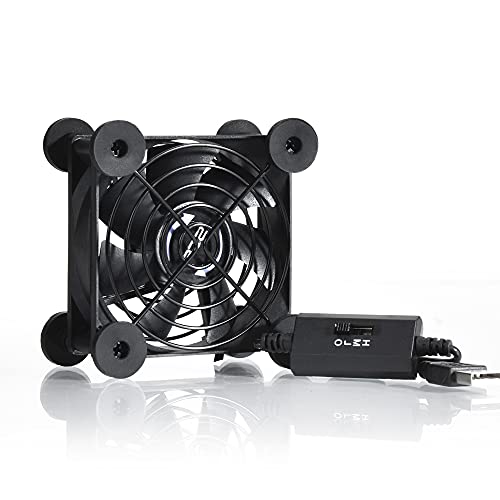
The SCCCF Quiet 80mm USB Portable Cooling Fan stands out as an ideal choice for gamers and tech enthusiasts seeking efficient cooling solutions for their devices. Its compact design makes it perfect for consoles like Xbox and PlayStation, as well as routers and DVRs. With a double ball bearing system promising 65,000 hours of service, you’ll enjoy long-lasting performance. The fan features seven blades that create powerful airflow, and a multi-speed controller lets you choose between low, medium, and high settings, all while operating quietly at just 21dB. Plus, the iron grill enhances safety during use.
Best For: Gamers and tech enthusiasts looking for an efficient and quiet cooling solution for their devices.
Pros:
- Long-lasting performance with a double ball bearing system rated for 65,000 hours.
- Powerful airflow generated by seven blades, ensuring effective cooling.
- Multi-speed controller allows customization of fan speed for optimal comfort.
Cons:
- Limited to USB power supply, which may restrict placement options.
- Small size may not provide adequate cooling for larger devices or spaces.
- Noise level at higher settings may still be noticeable despite being quiet at 21dB.
Factors to Consider When Choosing an External Fan for PC Cooling
When choosing an external fan for your PC, you need to consider several key factors. Think about airflow capacity, noise levels, and how well the fan will fit with your setup. Don’t forget to evaluate the size, power source, and efficiency to ensure you get the best cooling solution for your needs.
Airflow Capacity Considerations
Choosing the right external fan for your PC cooling needs hinges on understanding airflow capacity, which is crucial for maintaining optimal temperatures. Airflow capacity is measured in cubic feet per minute (CFM), and higher CFM values generally lead to more efficient cooling. You can adjust the fan’s speed settings to select a lower CFM for quieter operation or ramp it up for maximum cooling performance. If your setup is tightly packed, combining multiple fans can significantly enhance cooling efficiency. Keep in mind, larger fan blades typically move more air than smaller ones. Lastly, ensure the fan’s airflow capacity matches the cooling needs of your devices; gaming consoles, for example, often require higher airflow than standard desktops.
Noise Levels and Operation
While selecting an external fan for your PC cooling, noise levels are a crucial factor to consider, especially if you value a quiet environment. Noise can vary significantly, with some fans operating as quietly as 18 dBA and others exceeding 32 dBA. Look for fans with hydraulic or dual ball bearings, as they tend to produce less noise and have longer lifespans, lasting up to 67,000 hours. Adjustable speed settings can also help you balance airflow and noise, but remember that lower speeds might not provide adequate cooling for high-demand tasks. Lastly, consider designs with noise-dampening materials, like rubber shock absorbers, to minimize vibration and sound, especially in quiet settings like libraries or during nighttime use.
Compatibility With Devices
Finding the right external fan for your PC cooling goes beyond just noise levels; compatibility with your devices plays a vital role. First, ensure the fan connects easily to your device’s power source, whether that’s USB or AC. Next, check the fan’s size and design to make sure it fits well in your chosen space, whether for a desktop, laptop, or gaming console. Consider the airflow capacity and speed control options, especially for high-performance systems that generate more heat. It’s also important to choose a fan that can operate effectively in various positions, enhancing its versatility. Finally, verify that the fan’s noise levels fit your environment, particularly if you’ll use it in quiet spaces like offices or libraries.
Size and Placement Options
When selecting an external fan for PC cooling, size and placement are essential factors that can greatly influence your system’s performance. Make sure the fan fits your PC case, typically measured in millimeters; 120mm fans are a popular choice. Placement matters too—position fans to either pull cool air into the case or exhaust hot air out for maximum efficiency. Consider a dual-fan setup to enhance airflow and improve heat dissipation from critical components. To ensure optimal performance, align the fan’s airflow direction with your case’s internal design, often indicated by arrows on the fan. Finally, pay attention to the fan’s thickness; while standard fans are around 25mm thick, slimmer options are available for tighter spaces.
Power Source and Efficiency
Choosing the right power source for your external fan is crucial, as it directly impacts both convenience and cooling efficiency. You can opt for USB-powered fans, which are easy to set up and connect directly to your PC without needing a separate outlet. These are great for portable use. On the other hand, AC-powered fans offer higher performance, often delivering airflow outputs of 2500 RPM or more, making them ideal for larger setups or high-performance components. When selecting a fan, pay attention to its airflow (CFM) and noise levels (dBA)—higher airflow can mean better cooling but may also lead to increased noise. Lastly, ensure the fan’s power consumption matches your power supply to avoid any overload issues.
Speed Control Features
Speed control features are essential for optimizing the performance of your external fan, allowing you to tailor cooling based on your specific needs. With options ranging from low to high speeds, typically between 900 RPM to 2500 RPM, you can enhance airflow efficiency. Multi-speed controllers let you select the best balance between cooling performance and noise levels, measured in decibels (dB). Some fans offer a wide range of adjustable speeds, letting you customize airflow from gentle breezes to powerful blasts, which is perfect for different devices. Effective speed control not only reduces energy consumption but also extends the fan’s lifespan. Look for variable speed options that operate smoothly across various voltages for added versatility in your setup.
Durability and Lifespan
Selecting an external fan for PC cooling requires careful consideration of durability and lifespan to ensure you’re making a wise investment. Look for fans with high-quality bearings, like dual-ball or hydraulic types, which can last over 50,000 hours. Pay attention to noise levels; fans operating under 25 dB often indicate better engineering, leading to less wear and tear. Consider construction materials, too—metal grids and protective casings enhance durability during prolonged use. Fans with adjustable speed settings help manage temperature, preventing overheating and extending lifespan. Lastly, ensure the fan can run continuously for long periods without performance degradation, as this is crucial for long-term reliability. Prioritizing these factors will help you choose a more resilient fan.
Safety Features and Protection
When you’re considering an external fan for PC cooling, safety features should be at the top of your list. Look for fans with protective grills or nets to keep hands and objects away from the moving blades, minimizing injury risks. Fans with removable rubber shock absorbers enhance stability and reduce vibrations, which can prolong the fan’s life. Additionally, cable protection features, like glued corner joints, improve wear resistance and prevent electrical hazards. A durable construction, such as double ball bearings, ensures longevity and reduces the chances of mechanical failure. Finally, choose fans that operate quietly, measured in decibels (dB), to maintain a safe and comfortable environment in spaces like libraries or home offices.