
If you’re looking to enhance your computer’s storage capabilities, exploring the best PCIe expansion cards for NVMe is a smart move. These cards can dramatically increase your system’s performance by accommodating multiple M.2 NVMe SSDs. With various options available, each offering unique features and benefits, it’s essential to know what suits your needs best. Let’s take a closer look at the top contenders that can transform your storage experience.
ASUS Hyper M.2 X16 PCIe 3.0 X4 Expansion Card V2
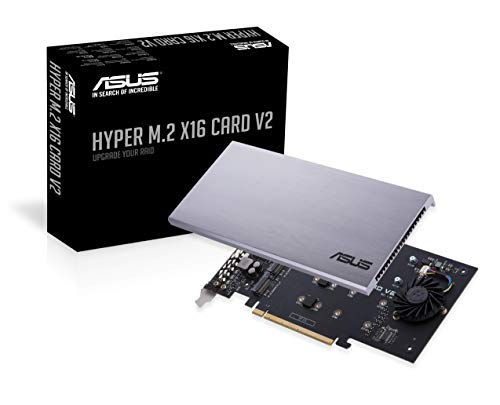
If you’re a power user seeking high-performance storage solutions, the ASUS Hyper M.2 X16 PCIe 3.0 X4 Expansion Card V2 is an excellent choice. It supports up to four NVMe M.2 drives, allowing for blistering transfer speeds of up to 128 Gbps with Intel VROC and AMD Ryzen Threadripper NVMe RAID. This card features a PCI Express 3.0 x16 interface, ensuring compatibility with x8 and x16 slots. Its stylish heatsink and integrated blower-style fan effectively prevent M.2 throttling, providing reliable performance. With an impressive 4.3 out of 5-star rating from users, it’s a solid investment for maximizing your storage potential.
Best For: Power users and enthusiasts seeking high-performance storage solutions with multiple NVMe M.2 drives.
Pros:
- Supports up to four NVMe M.2 drives, allowing for extensive storage capacity and speed.
- Blistering transfer speeds up to 128 Gbps, ideal for demanding applications and large file transfers.
- Stylish heatsink and integrated blower-style fan help prevent M.2 throttling, ensuring consistent performance.
Cons:
- Requires compatible motherboard with x8 or x16 slots, which may limit compatibility with some systems.
- Power consumption of up to 14W, potentially requiring additional power management considerations.
- Customer reviews indicate some users experienced setup challenges, which may require technical expertise.
SABRENT M.2 NVMe SSD to PCIe Adapter Card with Aluminum Heatsink

For users looking to maximize their desktop’s storage performance, the SABRENT M.2 NVMe SSD to PCIe Adapter Card with Aluminum Heatsink stands out with its compatibility across various M.2 NVMe SSD sizes, including 2230, 2242, 2260, and 2280. This adapter requires a PCIe x16/x8/x4 slot and delivers ultra-fast transfer speeds, enhancing your system’s overall performance. With an aluminum heatsink and thermal pad, it ensures optimal heat dissipation. Installation is a breeze, thanks to its tool-free design that includes screws and a screwdriver. Compatible with multiple operating systems, this card guarantees stable performance for your NVMe SSD.
Best For: Users seeking to enhance their desktop’s storage performance with compatible M.2 NVMe SSDs.
Pros:
- Wide compatibility with multiple M.2 NVMe SSD sizes (2230, 2242, 2260, and 2280).
- Ultra-fast transfer speeds utilizing PCIe lanes for improved system performance.
- Simple tool-free installation with included screws and screwdriver for quick setup.
Cons:
- Not compatible with SATA drives or PCIe x1 slots.
- Requires a PCIe x16/x8/x4 slot, which may not be available on all systems.
- Limited to specific operating systems (Windows 7 with hotfixes, Windows 8/10/11, Linux).
ASUS Hyper M.2 X16 PCIe 4.0 Expansion Card for NVMe M.2
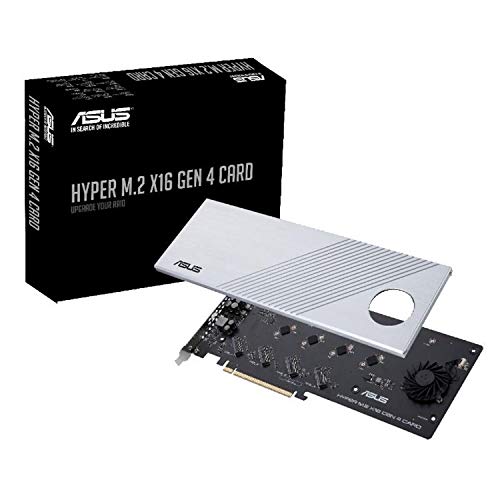
The ASUS Hyper M.2 X16 PCIe 4.0 Expansion Card is an ideal choice for power users and gamers who demand top-tier performance from their storage solutions. Supporting up to four NVMe M.2 drives, it offers impressive transfer speeds of up to 256 Gbps. This expansion card is compatible with AMD and Intel systems, ensuring versatility for your setup. Its stylish heatsink and integrated blower-style fan effectively prevent throttling, keeping your SSDs cool during intense use. Plus, with compatibility across Windows, macOS, and Linux, this card caters to a wide range of users, earning a solid 4.2-star rating from customers.
Best For: Power users and gamers seeking high-performance storage solutions with versatile compatibility.
Pros:
- Supports up to four NVMe M.2 drives for expanded storage capacity.
- Impressive transfer speeds of up to 256 Gbps enhance data transfer efficiency.
- Effective cooling features with a stylish heatsink and integrated blower-style fan prevent SSD throttling.
Cons:
- The card may require a compatible motherboard with PCIe 4.0 support for optimal performance.
- Weighs 1.95 pounds, which might be heavier compared to other expansion cards.
- Limited to 14W power consumption SSDs, which may restrict some high-performance SSD options.
KONYEAD PCIe 4.0 x16 to M.2 NVMe SSD Expansion Card

Designed for high-performance users, the KONYEAD PCIe 4.0 x16 to M.2 NVMe SSD Expansion Card enables you to maximize your storage capabilities with support for up to four NVMe M.2 2280 SSDs. You can achieve incredible read speeds of up to 14,000 MB/s in a RAID0 configuration. Installation is driver-free, making setup a breeze. Just ensure your motherboard supports PCIe bifurcation and configure it for optimal performance. With a robust aluminum alloy heat sink and DC power supply modules, your data remains secure and cool. Compatible with Windows, macOS, and Linux, this expansion card is a solid choice for any tech enthusiast.
Best For: Enthusiasts and professionals looking to enhance their system’s storage performance with high-speed NVMe SSDs.
Pros:
- Supports up to four NVMe M.2 2280 SSDs for expanded storage capacity.
- Achieves read speeds up to 14,000 MB/s in RAID0 configuration for exceptional performance.
- Driver-free installation simplifies setup and is compatible with multiple operating systems.
Cons:
- Requires motherboard support for PCIe bifurcation, limiting compatibility with some systems.
- Optimal performance relies on specific PCIe configuration, which may require additional setup.
- Potential for restocking fees if returned under misrepresented conditions.
RIITOP 4-Port NVMe PCIe Adapter

If you’re looking to maximize your storage capabilities, the RIITOP 4-Port NVMe PCIe Adapter is an excellent choice for tech enthusiasts and professionals alike. This quad NVMe PCIe adapter allows you to add up to four M.2 NVMe SSDs simultaneously through a PCI-e 4.0 or 3.0 x16 slot, supporting full-speed transmission up to 128Gbps. Its upgraded design features a heatsink to prevent overheating, ensuring optimal performance. Plus, individual LED indicators let you monitor each SSD’s status. Just ensure your motherboard supports PCIe x16 Bifurcation and you’re good to go. Enjoy enhanced storage without compromising other PCIe slots!
Best For: Tech enthusiasts and professionals looking to expand their storage capabilities with high-speed NVMe SSDs.
Pros:
- High-speed transmission of up to 128Gbps allows for rapid data access and transfer.
- Upgraded design with heatsink prevents overheating, ensuring optimal performance of SSDs.
- Individual LED indicators provide real-time monitoring of each SSD’s working status.
Cons:
- Requires motherboard support for PCIe x16 Bifurcation, which may limit compatibility with some systems.
- Only supports soft RAID formation, lacking built-in hardware RAID functionality.
- Does not support SATA-based M.2 SSDs, limiting options for users with different types of SSDs.
SABRENT M.2 NVMe SSD to PCIe x16 Tool-Free Adapter

For users seeking an effortless upgrade to their storage capabilities, the SABRENT M.2 NVMe SSD to PCIe x16 Tool-Free Adapter stands out with its tool-free installation feature. This PCIe 5.0 adapter supports various M.2 SSDs, ensuring compatibility with older models too. It boasts impressive transfer speeds of up to 16GBps and is designed with a sturdy x16 connector for maximum stability. The built-in aluminum heatsink keeps your SSD cool and quiet, eliminating the need for additional cooling solutions. With a solid 4.5-star rating from customers, this adapter is a reliable choice for enhancing your system’s performance.
Best For: Users looking for an easy-to-install and high-performance solution to upgrade their storage capabilities with NVMe M.2 SSDs.
Pros:
- Tool-free installation simplifies the process of adding or replacing drives.
- Supports a wide range of M.2 SSDs including both new and older models, ensuring compatibility.
- Built-in aluminum heatsink provides effective cooling, reducing the need for additional cooling solutions.
Cons:
- Limited to PCIe x16 slots, which may not be available on all motherboards.
- May not achieve maximum transfer speeds if used with older PCIe link speeds due to backward compatibility.
- Physical size might be a concern in compact cases where space is limited.
ECKDZMY SK1 M.2 NVME to PCI-E Expansion Card

The ECKDZMY SK1 M.2 NVME to PCI-E Expansion Card is an excellent choice for PC enthusiasts looking to expand their storage options without breaking the bank. This card supports various M.2 NVMe SSD sizes, from 2230 to 2280, and utilizes a PCIe X1 slot. While it offers solid performance, keep in mind it’s limited to PCIe X1 bandwidth, so you won’t reach the speeds of PCIe X4. Compatible with major operating systems like Windows 10 and Linux, it’s a plug-and-play solution, though older motherboards may require BIOS adjustments. With a solid 4.4-star rating, it’s a reliable addition to your setup.
Best For: PC enthusiasts looking for an affordable way to expand storage with M.2 NVMe SSDs.
Pros:
- Supports a range of M.2 NVMe SSD sizes (2230, 2242, 2260, 2280).
- Compatible with major operating systems including Windows 10 and Linux, offering plug-and-play functionality.
- High customer satisfaction with a 4.4-star rating from over 100 reviews.
Cons:
- Limited to PCIe X1 bandwidth, preventing access to higher speeds available with PCIe X4.
- Requires BIOS/UEFI configuration for booting on some older motherboards.
- Not compatible with M.2 SATA SSDs, limiting storage options.
Dual M.2 PCIe Adapter for SATA or NVMe SSD

A versatile solution, the Dual M.2 PCIe Adapter caters to users seeking to enhance their storage capabilities by allowing simultaneous connections for both SATA and NVMe SSDs. You can easily convert M.2 NVMe SSDs to a PCIe 3.0 x4 interface while connecting a SATA SSD through a 6Gbps interface. It supports various M.2 sizes and includes both regular and low-profile brackets for flexible installation. With advanced heat sinks and ventilation, it ensures efficient cooling. Compatible with major operating systems, this adapter requires no driver installation. Plus, it boasts a solid customer rating and a generous return policy for peace of mind.
Best For: Users looking to expand their computer’s storage capabilities with both SATA and NVMe SSDs simultaneously.
Pros:
- Supports various M.2 SSD sizes and interfaces for versatile storage options.
- Advanced cooling solution with heat sinks and ventilation for optimal performance.
- Compatible with multiple operating systems and requires no driver installation.
Cons:
- Requires a separate SATA cable connection for the SATA SSD.
- May not fit in all cases due to its dimensions and bracket options.
- Limited customer support details available for warranty inquiries.
Bejavr M.2 NVME to PCIe Adapter

If you’re looking to enhance your system’s storage capabilities, the Bejavr M.2 NVME to PCIe Adapter is a top choice for gamers and professionals alike. This adapter supports NVME and AHCI SSDs in various sizes, fitting seamlessly into PCI-Express X4, X8, or X16 slots. With PCIe 4.0 lanes, you get blazing speeds of up to 64Gbps, while also enjoying backward compatibility. It’s compatible with multiple operating systems, requiring no drivers for most. Plus, the included aluminum heatsink and thermal pads ensure optimal cooling. With all necessary mounting hardware included, installation is a breeze. Upgrade your storage potential today!
Best For: Gamers and professionals seeking high-speed storage solutions with versatile compatibility.
Pros:
- High Performance: Utilizes PCIe 4.0 lanes for speeds up to 64Gbps, enhancing data transfer rates significantly.
- Wide Compatibility: Supports various SSD sizes and is compatible with multiple operating systems without the need for additional drivers in most cases.
- Effective Cooling Solutions: Comes with an aluminum heatsink and thermal pads, ensuring optimal heat dissipation during intensive use.
Cons:
- Driver Requirement for Older Systems: Additional drivers are needed for Windows 7 and Server 2008 R2, which may complicate installation for some users.
- Potential Size Limitations: The adapter may not fit in all cases depending on the size and layout of the existing hardware.
- Installation Complexity: While it includes necessary hardware, some users may find the installation process challenging without prior experience.
M.2 NVME SSD to PCIe Adapter Card

For gamers and professionals seeking to maximize their system’s performance, the M.2 NVME SSD to PCIe Adapter Card offers an impressive upgrade. This adapter supports M.2 NVME SSDs using a PCIe X8 interface, delivering 2 x 32Gbps of full-speed expansion. You’ll benefit from improved game startup times and work efficiency, thanks to its compatibility with PCIe 3.0 and 4.0 standards. Ensure your motherboard can support multiple M.2 devices and the PCIe split function. With solid customer ratings and a lightweight design, this card enhances your storage potential while maintaining stability during intense workloads.
Best For: Gamers and professionals looking to enhance their system’s storage performance with fast and efficient M.2 NVME SSDs.
Pros:
- Supports both PCIe 3.0 and PCIe 4.0 standards, providing flexibility for modern systems.
- Delivers 2 x 32Gbps full-speed expansion, significantly improving game startup times and overall work efficiency.
- Lightweight design and stable construction ensure reliable performance during intense workloads.
Cons:
- Compatibility requires motherboard support for PCIe split functions, which may limit use with older systems.
- Low-end CPUs may lack sufficient PCIe channels, potentially causing recognition issues.
- Installation may require removing or replacing other PCIe devices if conflicts arise, complicating setup.
Factors to Consider When Choosing a PCIe Expansion Card for NVMe
When you’re choosing a PCIe expansion card for NVMe, it’s crucial to consider several key factors. You’ll want to check compatibility with your SSD types and supported PCIe versions to ensure optimal performance. Don’t forget about cooling solutions, installation ease, and performance metrics, as these can significantly impact your overall experience.
Compatibility With SSD Types
Choosing the right PCIe expansion card for your NVMe SSDs hinges on understanding compatibility with different SSD types. Start by ensuring the card supports the M.2 sizes of your SSDs, like 2230, 2242, 2260, 2280, or 22110. Compatibility can vary, so check this detail closely. It’s also crucial to select a card designed specifically for NVMe SSDs, as some can accommodate SATA drives, which use different interfaces. Verify that the PCIe interface (x4, x8, x16) matches your motherboard’s slots to avoid performance bottlenecks. Don’t overlook support for the latest PCIe standards, as they deliver better bandwidth and speeds. Lastly, ensure the card features adequate cooling, like heatsinks or fans, to prevent thermal throttling during intense tasks.
Supported PCIe Versions
Understanding supported PCIe versions is vital to maximizing the performance of your NVMe SSDs. The PCIe standard has evolved, with PCIe 1.0 offering 2.5 GT/s per lane, while PCIe 4.0 supports up to 16 GT/s, enabling much faster data transfers. Remember, each version is backward compatible, so a PCIe 4.0 device will work in a PCIe 3.0 slot, but it’ll be limited by the older standard’s bandwidth. Additionally, the number of lanes impacts performance; for example, a PCIe x16 slot can provide up to 64 GB/s with PCIe 4.0 versus 32 GB/s with PCIe 3.0. Always verify your motherboard’s compatibility with the desired PCIe version to ensure optimal performance and avoid data transfer bottlenecks.
Cooling Solutions Available
Effective cooling solutions are crucial for ensuring your PCIe expansion card for NVMe operates at peak performance. When you push your SSD to its limits, excessive heat can cause throttling, which hinders speed and efficiency. Look for expansion cards with integrated heatsinks made from materials like aluminum, as they enhance heat dissipation. Some models even come with active cooling mechanisms, like blower-style fans, to improve airflow and reduce overheating risks during intense data transfers. Additionally, consider cards that feature thermal pads for better heat transfer between the SSD and heatsink. Prioritizing adequate cooling features will help you maintain consistent performance and prolong the lifespan of your NVMe SSDs, ensuring they stay reliable under heavy workloads.
Installation Ease Factors
When you’re considering a PCIe expansion card for NVMe, installation ease can significantly impact your overall experience. Look for cards that offer a tool-free installation design, allowing you to mount M.2 SSDs quickly without extra tools. Make sure the adapter includes all necessary mounting hardware, like screws and a screwdriver, to simplify setup. It’s also crucial to check whether the card needs specific motherboard configurations, such as PCIe bifurcation settings, which could complicate installation if your motherboard doesn’t support them. Additionally, consider the card’s length and layout to ensure it fits comfortably in your PC case without blocking other components. Finally, review user feedback on the installation process for insights into a smoother setup experience.
Performance Metrics Comparison
After ensuring a smooth installation, evaluating performance metrics becomes vital in selecting the right PCIe expansion card for NVMe. Start by checking the maximum transfer speeds; some cards offer up to 256 Gbps with PCIe 4.0 technology, significantly boosting data transfer rates. Consider how many NVMe M.2 drives the card can support—options that accommodate four drives can dramatically expand your storage potential. Compatibility with PCIe versions matters too; newer cards supporting PCIe 4.0 or 5.0 provide faster data rates than older PCIe 3.0 cards. Finally, don’t overlook thermal management features like built-in heatsinks and fans, which are essential to prevent throttling and maintain peak performance during heavy workloads.
Power Requirements Assessment
Choosing the right PCIe expansion card for NVMe involves careful consideration of power requirements, as insufficient power can limit performance. You’ll want to ensure the card can deliver adequate power output, typically up to 14W, to optimize SSD performance. Assess the total power consumption of your NVMe SSDs; high-performance drives may need more power, which influences your card selection. Pay attention to the power delivery specifications of the expansion card, as some models support additional power supply modules for better stability. Also, check your motherboard’s PCIe slot configuration to confirm it meets the required power delivery. Finally, consider the heat management features of the card, as proper cooling is essential to prevent throttling and maintain performance under load.
Form Factor Dimensions
Form factor dimensions play a crucial role in selecting the right PCIe expansion card for NVMe. You’ll find variations in sizes, ranging from compact models at 4 x 2 x 0.5 inches to larger ones at 10.63 x 4.8 x 0.6 inches. It’s essential to ensure that the card fits your computer case without obstructing other components, especially in tight builds. Keep in mind that weight matters too; lighter cards around 2.82 ounces may offer easier installation compared to those weighing up to 1.95 pounds. Most cards fit standard PCIe x16 slots, but their dimensions can impact compatibility with your motherboard layout. Lastly, consider how many M.2 slots the card supports, as this affects both space and airflow.
Warranty and Return Policies
When you’re selecting a PCIe expansion card for NVMe SSDs, reviewing the warranty and return policies is crucial. The warranty period can vary significantly among manufacturers, so be sure to check how long you’re covered. Many products offer a 30-day return policy for defective or damaged items, but it’s important to understand the specific conditions. Look for customer support details on the manufacturer’s website; they can assist with installation or troubleshooting. Customer feedback ratings often reflect the reliability of the product and its warranty service. Finally, confirm what the warranty covers—parts, labor, and any limitations on usage—to ensure you’re protecting your investment adequately.