
If you’re looking to boost your system’s storage performance, PCIe 5.0 M.2 expansion cards might be the answer. These cards offer impressive speeds and support for multiple drives, making them perfect for gamers and professionals alike. With various options available, you’ll want to consider factors like thermal management and compatibility. Let’s explore the top contenders that can transform your data transfer capabilities and elevate your computing experience.
ASUS Hyper M.2 x16 Gen5 Card for NVMe Devices

If you’re looking to supercharge your storage capabilities, the ASUS Hyper M.2 x16 Gen5 Card is an ideal choice, especially for users who demand high performance from their NVMe devices. This card supports four NVMe M.2 drives, offering a whopping total bandwidth of up to 512 Gbps. With its PCIe 5.0 interface and robust thermal management—including a heatsink and active fan—you can maintain optimal temperatures even during heavy workloads. Plus, it allows for bootable RAID setups, enhancing reliability and transfer speeds. Compatible with Windows, macOS, and Linux, this expansion card is a game-changer for any serious user.
Best For: Users looking to enhance their storage performance with high-speed NVMe drives and RAID functionality.
Pros:
- Supports up to four NVMe M.2 devices, providing extensive storage and bandwidth.
- Effective thermal management with a large heatsink and active cooling fan to prevent throttling.
- Compatible with multiple operating systems including Windows, macOS, and Linux, ensuring versatility.
Cons:
- Requires a 6-pin PCIe power connector, which may limit compatibility with some setups.
- Larger size and weight compared to standard NVMe cards, which may not fit in all cases.
- Customer rating of 4.1 out of 5 stars indicates some user dissatisfaction or issues reported.
GLOTRENDS PA54 Quad M.2 NVMe to PCIe 5.0 X16 Adapter

The GLOTRENDS PA54 Quad M.2 NVMe to PCIe 5.0 X16 Adapter is perfect for tech enthusiasts who demand high-speed storage solutions. With the ability to expand four M.2 NVMe Key M slots, it delivers an impressive 512 Gbps bandwidth. To fully utilize its power, make sure your motherboard supports PCIe bifurcation and is compatible with PCIe 5.0. This adapter works seamlessly with Windows 11/10/8, and even macOS. However, keep in mind that you’ll need to configure your BIOS for optimal performance. Overall, it’s a solid choice for anyone looking to elevate their storage capabilities.
Best For: Tech enthusiasts and professionals seeking high-speed storage solutions with support for multiple M.2 NVMe SSDs.
Pros:
- Expands storage capacity with four M.2 NVMe SSD slots, maximizing performance.
- Delivers up to 512 Gbps bandwidth for ultra-fast data transfers.
- Compatible with various operating systems including Windows 11/10/8 and macOS.
Cons:
- Requires a motherboard that supports PCIe bifurcation for full functionality.
- Intel 12th Gen and older CPUs do not support PCIe 5.0, limiting compatibility.
- OS booting from M.2 NVMe SSDs necessitates OS reinstallation and BIOS configuration.
SABRENT M.2 NVMe SSD to PCIe Adapter with Aluminum Heatsink

For gamers and content creators seeking high-speed data transfer, the SABRENT M.2 NVMe SSD to PCIe Adapter with Aluminum Heatsink stands out as an excellent choice. This tool-free adapter allows easy installation of NVMe M.2 SSDs, supporting various sizes from 2230 to 2280. With PCIe 5.0 connectivity, you’ll enjoy transfer speeds up to 16GBps, ensuring your data moves swiftly. The built-in aluminum heatsink keeps your SSD cool while operating quietly, eliminating the need for active cooling. Weighing just 3.1 ounces and measuring 4.3 x 1.7 inches, it’s a compact solution that fits seamlessly into your setup.
Best For: Gamers and content creators seeking high-speed data transfer and easy installation of NVMe M.2 SSDs.
Pros:
- Tool-free installation makes it easy to set up and swap out drives without additional tools.
- Supports a wide range of SSD sizes (M.2 2230 / 2242 / 2260 / 2280) and types (NVMe M key and older B+M key).
- Built-in aluminum heatsink effectively keeps SSDs cool and operates quietly, enhancing performance.
Cons:
- Limited to PCIe x4 speeds, which may not fully utilize the potential of some higher-end SSDs.
- May require a compatible PCIe slot in your motherboard for optimal installation.
- Not suitable for users with non-M.2 SSDs, as it only supports M.2 form factors.
KONYEAD PCIe 4.0 x16 to M.2 NVMe Expansion Card

Looking to enhance your system’s storage capabilities? The KONYEAD PCIe 4.0 x16 to M.2 NVMe Expansion Card supports up to four NVMe M.2 2280 SSDs, delivering speeds up to 256 Gbps. Installation’s a breeze with no drivers needed, but make sure your motherboard supports PCIe bifurcation for optimal performance. With RAID0, you could achieve read speeds up to 14,000 MB/s. This card also features an aluminum alloy heat sink for effective cooling and four DC power modules for data security. Compatible with Windows, macOS, and Linux, it’s a solid choice for boosting your storage.
Best For: Those looking to significantly boost storage performance and capacity in systems that support PCIe bifurcation.
Pros:
- High-speed performance: Achieves read speeds up to 14,000 MB/s with RAID0 configuration.
- Easy installation: Driver-free setup simplifies the installation process.
- Data security and cooling: Equipped with power modules for data protection and an aluminum heat sink for effective heat dissipation.
Cons:
- Motherboard compatibility: Requires a motherboard that supports PCIe bifurcation, limiting compatibility with some systems.
- Potential configuration complexity: Users may need to configure PCIe settings for optimal performance.
- RAID support variability: RAID functionality can vary based on motherboard capabilities, which may affect performance outcomes.
SABRENT M.2 NVMe SSD to PCIe Adapter Card with Aluminum Heatsink

Experience lightning-fast data transfer speeds with the SABRENT M.2 NVMe SSD to PCIe Adapter Card, an ideal choice for users seeking to maximize their desktop storage performance. This adapter supports a wide range of M.2 NVMe SSD sizes, ensuring compatibility with your existing setup. With ultra-fast transfer speeds, it enhances your storage capabilities significantly. The aluminum heatsink and thermal pad effectively dissipate heat, promoting long-lasting performance. Installation is a breeze, thanks to the included screws and screwdriver for quick mounting. It’s compatible with various operating systems, ensuring stable system support for your needs. Upgrade your system today!
Best For: Users looking to enhance their desktop storage performance with compatible M.2 NVMe SSDs.
Pros:
- Wide Compatibility: Supports M.2 NVMe SSD sizes 2230, 2242, 2260, and 2280.
- Easy Installation: Tool-free installation with included screws and screwdriver.
- Effective Heat Dissipation: Features an aluminum heatsink and thermal pad for optimal performance.
Cons:
- Not Compatible with SATA Drives: Only supports NVMe SSDs, excluding SATA options.
- Requires PCIe x16/x8/x4 Slot: Cannot be used in systems with PCIe x1 slots.
- Limited Operating System Support: Requires specific Windows versions or modern Linux distributions for compatibility.
JEYI PCIe 5.0 to M.2 NVMe Adapter Card

The JEYI PCIe 5.0 to M.2 NVMe Adapter Card is a game-changer for gamers, content creators, and IT professionals seeking rapid storage expansion. This adapter supports PCIe Gen5 SSDs, delivering blazing speeds up to 128Gbps (16GB/s). You’ll appreciate its integrated aluminum heatsink, which ensures stable heat dissipation and prevents throttling during intense tasks like 8K video editing. Installation couldn’t be easier, thanks to its screwless design. Compatible with various M.2 sizes and backward-compatible with PCIe 4.0, it works seamlessly across Windows, Linux, and macOS. Elevate your system’s performance with the JEYI adapter and experience unmatched speed!
Best For: Gamers, content creators, and IT professionals looking for rapid storage expansion and high-speed performance.
Pros:
- Supports PCIe Gen5 SSDs, achieving speeds up to 128Gbps (16GB/s) for exceptional performance.
- Integrated aluminum heatsink for effective heat dissipation, preventing throttling during demanding tasks.
- Tool-free installation with a screwless design, making it easy to mount SSDs without additional tools.
Cons:
- May require a compatible motherboard that supports PCIe 5.0 for optimal performance.
- Limited to M.2 SSD sizes, which may not accommodate all SSD types.
- Weight might be slightly heavier compared to other simpler adapters, potentially affecting portability.
JEYI PCIe 5.0 to Quad NVMe M.2 Adapter

For gamers and content creators demanding top-tier performance, the JEYI PCIe 5.0 to Quad NVMe M.2 Adapter stands out with its impressive bandwidth of up to 512Gbps. It supports up to four M.2 2280 NVMe SSDs, allowing for a massive total storage of 32TB. With single disk read speeds exceeding 10,000MB/s and RAID 0 mode boosting performance, it’s perfect for handling 4K/8K video and large game libraries. Installation is straightforward, thanks to included components. Plus, its durable design features gold-plated connectors, ensuring reliable long-term use while remaining compatible with previous PCIe standards.
Best For: Gamers and content creators seeking high-speed storage solutions for demanding applications like 4K/8K video editing and extensive game libraries.
Pros:
- High performance: Achieves sequential read speeds exceeding 10,000MB/s and supports RAID 0 for boosted performance.
- Massive storage capacity: Accommodates up to four M.2 NVMe SSDs, totaling 32TB for extensive data storage needs.
- Easy installation: Comes with all necessary components for a straightforward setup.
Cons:
- Compatibility limitations: Requires motherboard support for PCIe Bifurcation, which may not be available on all systems.
- M-Key only: Only supports M-Key interface NVMe SSDs, making it incompatible with B-Key/B&M Key SATA SSDs.
- Potential performance variance: RAID 0 performance depends on configuration, which may not always reach theoretical speeds.
ASUS Hyper M.2 X16 PCIe Expansion Card V2
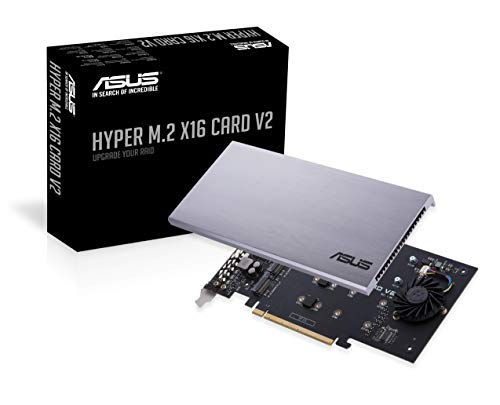
With support for up to four NVMe M.2 drives, the ASUS Hyper M.2 X16 PCIe Expansion Card V2 delivers exceptional performance for high-demand users. You can achieve transfer speeds up to 128 Gbps, making it perfect for Intel VROC and AMD Ryzen Threadripper RAID setups. Its PCI Express 3.0 x16 interface ensures compatibility with various slots, while a two-phase power solution provides up to 14W output. The stylish heatsink and integrated blower-style fan prevent throttling, keeping your drives cool. Weighing just 5.4 ounces, it’s a lightweight powerhouse. Customer ratings average 4.3 stars, and it comes with a reliable return policy.
Best For: High-performance users needing a robust storage solution for Intel VROC and AMD Ryzen Threadripper setups.
Pros:
- Supports up to four NVMe M.2 drives, allowing for extensive storage capacity.
- Achieves transfer speeds up to 128 Gbps, ideal for demanding applications.
- Includes a stylish heatsink and blower-style fan to prevent overheating and throttling.
Cons:
- Requires a compatible motherboard with PCIe x16 slot for installation.
- May be overkill for casual users or those with less demanding storage needs.
- Limited compatibility with non-Intel/AMD RAID setups.
4 Port NVMe to PCIe Host Controller Expansion Card

Offering an impressive maximum speed of 4×32Gbps, the 4 Port NVMe to PCIe Host Controller Expansion Card stands out as an ideal choice for enthusiasts looking to enhance their system’s storage capabilities. This M.2 NVMe to PCIe X16 adapter supports multiple sizes and offers compatibility with both Windows and Linux systems. With features like soft RAID functionality, it ensures consistency across four disks. Plus, the solid build quality and reinforced PCIEX16 interface provide excellent data protection. Equipped with high-power DC chips, you’ll experience stable operations without slowdowns or disk drops, making it a reliable addition to your setup.
Best For: Enthusiasts and professionals looking to enhance their PC’s storage capabilities with high-speed NVMe SSDs.
Pros:
- Supports multiple M.2 sizes (2230, 2242, 2260, 2280) for versatile installation options.
- Achieves maximum speeds of 4×32Gbps for fast data transfer and performance.
- Solid build quality with reinforced interface ensures durability and data protection.
Cons:
- Requires a compatible PCIe 3.0/4.0 X16 slot, limiting use in older systems.
- Soft RAID functionality may require technical knowledge for optimal setup and configuration.
- Limited customer reviews may not provide a comprehensive view of long-term reliability.
GLOTRENDS PA52L Dual M.2 NVMe to PCIe Adapter
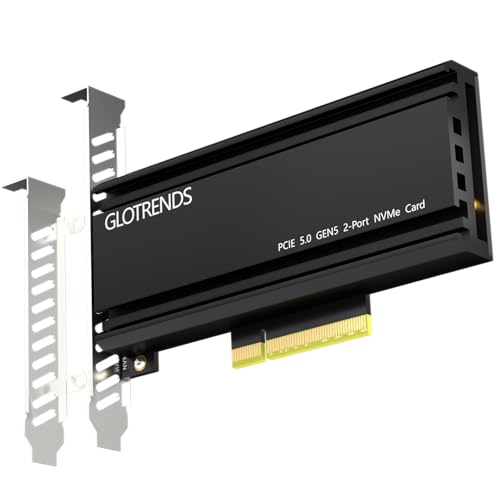
The GLOTRENDS PA52L Dual M.2 NVMe to PCIe Adapter stands out for those seeking to maximize storage performance with the latest PCIe 5.0 technology. This adapter expands two M.2 NVMe Key M slots via a PCIe 5.0 x8 interface, delivering an impressive bandwidth of up to 256Gb/s. While it supports software RAID configurations, be aware that it doesn’t support PCIe bifurcation, so your motherboard must have this capability. Installation is straightforward with plug-and-play support for various operating systems, though ensure your M.2 NVMe SSDs are initialized and formatted for proper recognition. Check compatibility with your motherboard before purchase.
Best For: Users looking to enhance their system’s storage capacity and performance with dual M.2 NVMe SSDs using PCIe 5.0 technology.
Pros:
- Supports dual M.2 NVMe SSDs for increased storage and performance.
- Delivers high bandwidth of up to 256Gb/s with compatible hardware.
- Easy installation with plug-and-play support for various operating systems.
Cons:
- Does not support PCIe bifurcation, limiting motherboard compatibility.
- Requires software RAID setup, with no hardware RAID support.
- Full performance potential is dependent on specific CPU and motherboard requirements.
Factors to Consider When Choosing a Pcie 5.0 M2 Expansion Card
When choosing a PCIe 5.0 M.2 expansion card, you need to consider several important factors. Bandwidth capabilities, compatibility with your system, and thermal management features can significantly impact performance. Additionally, think about RAID functionality options and how easy the installation process is to ensure a smooth upgrade.
Bandwidth Capabilities
Bandwidth capabilities play a crucial role in your choice of a PCIe 5.0 M.2 expansion card. With a maximum bandwidth of up to 512 Gbps, these cards significantly boost data transfer rates compared to older generations. Each M.2 slot can deliver up to 128 GT/s, enabling rapid access to large files. To harness this power, you’ll need compatible CPUs and motherboards that support PCIe bifurcation. High-performance NVMe SSDs are essential to fully utilize the increased speeds offered by PCIe 5.0. Additionally, consider using software RAID configurations, as they can aggregate multiple SSDs, further enhancing bandwidth and performance beyond what a single drive can achieve. Make sure you’re set up to take full advantage of these capabilities.
Compatibility Requirements
Maximizing the potential of your PCIe 5.0 M.2 expansion card hinges on compatibility with your system. First, ensure your motherboard supports PCIe bifurcation, especially if you’re using multi-M.2 cards. Next, check that your CPU is compatible with PCIe 5.0, as older Intel processors may not support this standard. Additionally, confirm that the M.2 NVMe SSDs you plan to use have the correct M-Key and form factor, such as 2230, 2242, 2260, or 2280. It’s also crucial to verify that your operating system can boot from NVMe drives and that any necessary BIOS/UEFI configurations are set. Remember, the full performance of PCIe 5.0 may be limited by your motherboard’s PCIe slot specifications and overall system architecture.
Thermal Management Features
To ensure your PCIe 5.0 M.2 expansion card performs at its best, effective thermal management features are crucial. Look for cards with large heatsinks and active cooling systems, as they maintain optimal temperatures during high-performance tasks. Thermal pads and aluminum heatsinks are key for dissipating heat and preventing throttling, which is essential under heavy workloads. If you prioritize quiet operation, consider designs that promote airflow while minimizing noise. Some high-performance models even include blower-style fans that actively cool the SSDs, reducing overheating risks during data-intensive applications like 4K/8K video editing. Monitoring temperature control is essential, as excessive heat can lead to decreased performance and potential SSD damage, making robust thermal solutions a must in your choice.
RAID Functionality Options
When choosing a PCIe 5.0 M.2 expansion card, considering RAID functionality is crucial, especially if you want to boost data reliability and performance. RAID can enhance your setup by allowing multiple M.2 NVMe SSDs to work together, providing both redundancy and improved speeds for data-intensive tasks. Some expansion cards support hardware RAID configurations, while others only allow software RAID, which can complicate setup and affect performance. You’ll also want to ensure the card can create bootable RAID arrays, as this impacts OS installation and recovery. Lastly, check your motherboard for PCIe bifurcation support, since certain RAID configurations require specific lane splitting to achieve optimal performance.
Installation Process Ease
Choosing a PCIe 5.0 M.2 expansion card that simplifies installation can make a significant difference in your overall user experience. Look for cards with tool-free designs, allowing you to mount M.2 SSDs effortlessly without additional tools. Ensure the adapter supports plug-and-play functionality across various operating systems to streamline your setup. Check if it includes all necessary components, like screws and a screwdriver, for quick installation. Verify compatibility with your motherboard‘s PCIe bifurcation settings, as this is crucial for optimal performance. Finally, consider the size and weight of the card, along with any cooling features, since these factors can impact installation ease and overall system integration. A well-designed card makes all the difference!