
When you’re looking to enhance both performance and aesthetics in your PC build, choosing the right AIO cooler with an OLED screen is crucial. These coolers not only provide exceptional thermal management but also elevate your setup’s visual appeal. With so many options available, narrowing it down to the best can be challenging. Let’s explore some top contenders that blend style and efficiency seamlessly, ensuring your system runs cool and looks great.
TRYX Panorama SE 360 AIO Cooler

If you’re a gamer or content creator seeking both performance and visual flair, the TRYX Panorama SE 360 AIO Cooler is an exceptional choice. With its stunning 6.67” AMOLED curved screen, you’ll enjoy a 2K display at 60Hz and impressive brightness. The G2 Curvature enhances immersion, while the tempered glass cover protects against scratches. This cooler’s ASETEK Adela technology efficiently handles 280W TDP, making it perfect for intense gaming sessions. Plus, the TRYX KANALI software lets you customize your display with various media formats. With quiet operation and reliable compatibility, this cooler elevates your setup in both style and functionality.
Best For: Gamers and content creators looking for a high-performance cooling solution that also enhances their setup with stunning visuals.
Pros:
- Offers a vibrant 6.67” AMOLED curved screen with a 2K display for immersive visuals.
- Efficient cooling capability with ASETEK Adela technology, handling up to 280W TDP.
- Customizable display options through TRYX KANALI software, supporting various media formats.
Cons:
- The curved design may not fit all setups or preferences.
- Higher price point compared to standard AIO coolers without display features.
- Potentially limited availability of compatible software updates for specific media formats.
Thermalright Wonder Vision 360 Turbo ARGB CPU Water Cooler

The Thermalright Wonder Vision 360 Turbo ARGB CPU Water Cooler stands out for gamers and PC enthusiasts seeking a blend of performance and visual flair. Featuring a stunning 6.67-inch curved screen with a resolution of 2400×1080, it displays dynamic visuals and system parameters. With a powerful pump reaching up to 3000 RPM, it ensures excellent cooling performance while maintaining noise levels under 44.7 dBA. Its PWM functionality adjusts fan speeds automatically based on CPU temperature, enhancing efficiency. Installation is straightforward with dual platform buckles, making this cooler a stylish and effective choice for your rig.
Best For: Gamers and PC enthusiasts looking for high-performance cooling with an eye-catching visual display.
Pros:
- High-performance cooling with a maximum fan speed of 3000 RPM for effective heat dissipation.
- Stunning 6.67-inch curved screen that displays dynamic visuals and system parameters.
- Easy installation with dual platform all-metal buckles.
Cons:
- Requires original motherboard backplane for AMD installation, which is not included.
- Noise levels can reach up to 44.7 dBA at maximum fan speed, which may be noticeable in quiet environments.
- Dependence on TRCC software for full functionality and customization may limit usability for some users.
TRYX PANORAMA SE 360 ARGB AIO Cooler

Gamers and content creators will find the TRYX PANORAMA SE 360 ARGB AIO Cooler an exceptional choice, thanks to its stunning 6.67” AMOLED curved screen that brings visuals to life. With a 60Hz refresh rate and a 2k display, the 372 PPI pixel density ensures crisp images. The ASETEK Adela cooling solution efficiently handles CPU-intensive tasks, while the pre-installed ARGB fans keep noise levels under 27.86 dB(A). You can customize displays using the TRYX KANALI software, featuring 3D effects and media uploads. Its all-metal mounting hardware guarantees compatibility with various Intel and AMD sockets, making installation a breeze.
Best For: Gamers and content creators seeking high-performance cooling and stunning visual displays.
Pros:
- Stunning 6.67” AMOLED curved screen provides vibrant visuals and enhances the gaming experience.
- Efficient ASETEK Adela cooling solution supports demanding CPU tasks while maintaining low noise levels.
- Customizable displays through TRYX KANALI software, allowing for personalized and engaging content.
Cons:
- Higher price point compared to traditional AIO coolers with no display features.
- Requires latest software version for full functionality, which may necessitate updates.
- Limited to specific Intel and AMD socket types, potentially reducing compatibility with older systems.
Thermalright Wonder Vision 360 UB ARGB Black AIO CPU Liquid Cooler
For users seeking a powerful cooling solution that combines performance with stunning visuals, the Thermalright Wonder Vision 360 UB ARGB Black AIO CPU Liquid Cooler stands out. With compatibility across Intel and AMD platforms, this cooler features a robust water cooling system and three pre-installed fans that deliver impressive airflow at 69 CFM while maintaining a quiet operation at just 27 decibels. The stunning 6.67-inch curved screen allows you to showcase dynamic images and monitor system stats, all customizable through TRCC software. Its easy installation process ensures you can set it up without hassle, making it a top choice for gamers and PC builders alike.
Best For: Gamers and PC builders looking for an efficient cooling solution that also offers customizable visual features.
Pros:
- High Cooling Performance: Features a robust water cooling system with three pre-installed fans, providing impressive airflow and quiet operation.
- Stunning Display: Includes a 6.67-inch curved screen for showcasing dynamic images and system monitoring with accurate color restoration.
- Easy Installation: Designed with dual platform all-metal buckles for straightforward setup, making it accessible for various users.
Cons:
- Weight: Weighs 6.49 pounds, which may be heavy for some builds.
- AMD Installation Limitation: Requires the original motherboard backplane for AMD installations, which is not included.
- Software Dependency: Customization options rely on TRCC software, which may not appeal to all users.
Thermalright Wonder Vision 360 Turbo ARGB CPU Water Cooler

With its stunning 6.67-inch 3D curved OLED screen, the Thermalright Wonder Vision 360 Turbo ARGB CPU Water Cooler stands out as the perfect choice for PC enthusiasts looking to enhance both aesthetics and performance. This cooler features a 2400×1080 resolution with a 60Hz refresh rate, ensuring vibrant visuals. You’ll appreciate the easy disassembly thanks to the magnetic suction cooling head. Equipped with three 120mm PWM fans, it delivers impressive airflow while maintaining a low noise level. The TRCC software allows you to customize themes and monitor performance effortlessly, making installation and operation a breeze for both Intel and AMD systems.
Best For: PC enthusiasts looking for a visually striking and high-performance cooling solution for their Intel or AMD systems.
Pros:
- Impressive 6.67-inch 3D curved OLED screen with high resolution for vibrant visuals.
- Efficient cooling with three 120mm PWM fans operating at up to 3000RPM while maintaining low noise levels.
- Customizable themes and monitoring capabilities via TRCC software for a personalized experience.
Cons:
- Installation on AMD platforms requires the original motherboard backplane, which is not included.
- The noise level can reach up to 44.7 DBA at maximum fan speed, which may be noticeable in quiet environments.
- The software may require downloading and setup, which could be a hassle for some users.
ASUS ROG Ryujin III 240 ARGB Liquid CPU Cooler
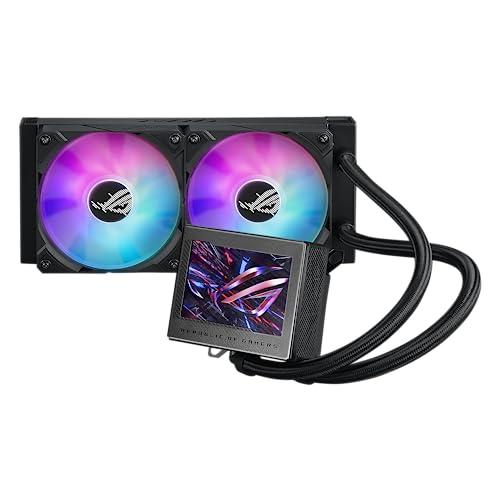
The ASUS ROG Ryujin III 240 ARGB Liquid CPU Cooler stands out for those seeking an exceptional cooling solution paired with stunning visual customization. Featuring a 240mm radiator and an advanced Asetek 8th gen pump, it delivers top-notch cooling performance with reduced noise. The dual magnetic 120mm ARGB fans, designed with a daisy-chain feature, enhance airflow and aesthetics. You can easily control fan speeds and animations through the Armoury Crate software. Plus, the 3.5” LCD display lets you monitor system stats and upload custom GIFs, making it perfect for both performance and style in your gaming rig.
Best For: Gamers and PC enthusiasts looking for high-performance cooling with customizable aesthetics.
Pros:
- Exceptional cooling performance with the advanced Asetek 8th gen pump and 240mm radiator.
- Customizable RGB lighting and animations through Armoury Crate software for a personalized look.
- 3.5” LCD display for tracking system stats and uploading custom GIFs.
Cons:
- Potentially higher price point compared to standard air coolers.
- Installation may require more effort due to liquid cooling setup.
- Compatibility limitations with certain cases due to the size of the radiator.
TRYX Panorama 360 AIO Cooler (6.67” AMOLED Curved Screen)

Gamers and PC enthusiasts looking for a cutting-edge cooling solution will appreciate the TRYX Panorama 360 AIO Cooler, featuring a stunning 6.67” AMOLED curved display. With a sharp 2K resolution and an impressive contrast ratio of 1,000,000:1, it delivers vibrant visuals and an immersive 3D experience. The Asetek 8th Gen V2 pump ensures your system stays cool, while the robust 40% thicker tubing enhances heat transfer. Customize your display effortlessly using the TRYX KANALI software, offering options like split-screen modes and temperature monitoring. Compatible with a wide range of CPUs, this cooler combines style and performance seamlessly.
Best For: Gamers and PC enthusiasts seeking a high-performance cooling solution with advanced visual features.
Pros:
- Stunning Visuals: 6.67” AMOLED curved display with 2K resolution and a high contrast ratio for immersive viewing.
- Efficient Cooling: Asetek 8th Gen V2 pump with a 320W TDP capacity for optimal system cooling.
- Customizable Display: TRYX KANALI software allows for personalized display options and media uploads.
Cons:
- Size Constraints: Requires sufficient space for installation due to its dimensions and 360mm radiator.
- Potential Noise: While fans operate under 30.97 dB(A), some users may still notice noise levels during operation.
- Compatibility Limitations: May not support older CPU models outside the listed Intel and AMD sockets.
TRYX Panorama SE 240 ARGB AIO Cooler

For those seeking a blend of cutting-edge aesthetics and high-performance cooling, the TRYX Panorama SE 240 ARGB AIO Cooler stands out with its stunning 6.67″ AMOLED curved screen. Boasting a 2K display and 60Hz refresh rate, it delivers vivid visuals with a remarkable 1,000,000:1 contrast ratio. This cooler efficiently supports Intel and AMD sockets, handling up to 260W TDP effortlessly. The included KANALI software lets you customize content, including 3D animations. With quiet operation and durable construction, installation is a breeze, ensuring stability and performance. Elevate your rig’s cooling with style and functionality using this extraordinary AIO cooler.
Best For: Gamers and PC enthusiasts who desire high-performance cooling combined with visually striking aesthetics.
Pros:
- Exceptional 6.67″ AMOLED curved display with 2K resolution and high contrast ratio for immersive visuals.
- Supports a wide range of Intel and AMD sockets with a high TDP of 260W, ensuring compatibility and efficient cooling.
- Customizable content through KANALI software, including 3D animations and media uploads, enhancing user experience.
Cons:
- Premium features may come at a higher price point compared to standard AIO coolers.
- The curved screen may not appeal to all users or fit within certain case designs.
- Potentially increased power consumption due to the display and lighting features, impacting overall system efficiency.
Thermalright Trofeo Vision 360 ARGB CPU AIO Cooler
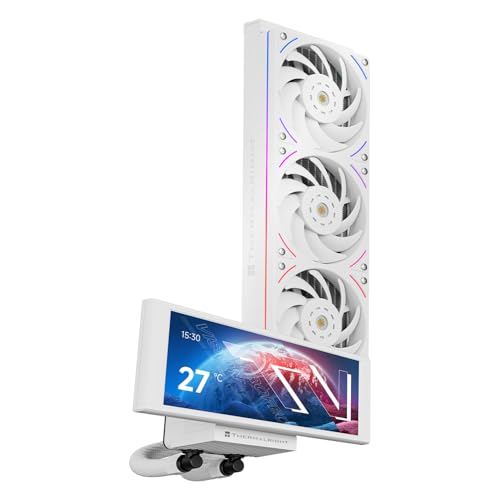
Looking for an AIO cooler that combines high performance with stunning visuals? The Thermalright Trofeo Vision 360 ARGB CPU AIO Cooler delivers just that. Its impressive 6.86-inch LCD screen boasts a 1280×480 resolution, showcasing vibrant graphics. With a robust 360mm radiator, it efficiently cools your CPU, supported by three high-speed fans spinning at 2150 RPM. The magnetic full-color display is easy to control via TRCC software, giving you real-time data. Compatible with multiple Intel and AMD sockets, installation is a breeze with its all-metal fasteners. Enhance your rig’s style and cooling efficiency with this exceptional cooler!
Best For: Gamers and PC enthusiasts seeking a high-performance AIO cooler with impressive visual features.
Pros:
- High cooling efficiency with a 360mm radiator and three high-speed fans for optimal CPU temperature management.
- Stunning visual appeal thanks to the 6.86-inch LCD screen and customizable ARGB lighting effects.
- Wide compatibility with various Intel and AMD CPU sockets, making it suitable for diverse builds.
Cons:
- Installation may require the original motherboard backplate for AMD setups, which is not included.
- Software dependency on TRCC for full functionality of the LCD display and monitoring features.
- Size may be restrictive in smaller cases, requiring ample space for proper installation.
TRYX Panorama 360 ARGB AIO Cooler
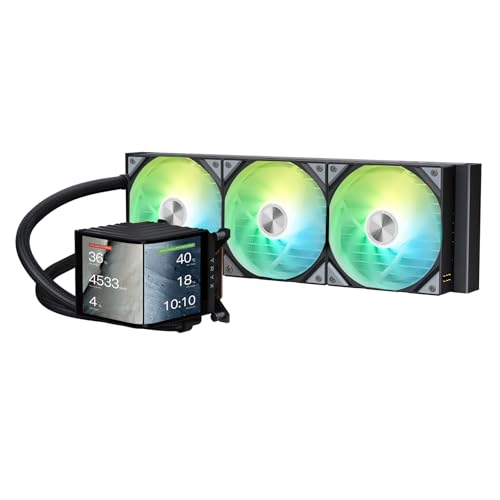
The TRYX Panorama 360 ARGB AIO Cooler stands out with its stunning 6.67” AMOLED curved screen, making it an ideal choice for enthusiasts who crave both high-performance cooling and an immersive visual experience. With a 2K resolution and 60Hz refresh rate, the display offers vibrant clarity and depth, enhanced by its 3D anamorphic effect. Under the hood, the Asetek 8th Gen V2 pump delivers an impressive 320W TDP cooling capacity. Customization is a breeze with TRYX KANALI software, allowing you to upload various media formats and monitor hardware. Plus, its all-metal mounting ensures reliable installation across multiple CPU platforms.
Best For: The TRYX Panorama 360 ARGB AIO Cooler is best for PC enthusiasts seeking a combination of high-performance cooling and stunning visual display options.
Pros:
- Exceptional 2K AMOLED curved display enhances visual aesthetics and immersion.
- High cooling capacity of 320W TDP and improved pump speed for optimal thermal performance.
- Customizable software allows for media uploads and hardware monitoring, catering to individual preferences.
Cons:
- The price point may be higher than standard AIO coolers, which could deter budget-conscious buyers.
- The unique design and features may not appeal to users who prioritize simplicity over aesthetics.
- Installation may require more effort due to the all-metal mounting hardware compared to simpler alternatives.
Factors to Consider When Choosing an Aio Cooler With Oled Screen
When you’re choosing an AIO cooler with an OLED screen, consider factors like display quality and cooling efficiency. You’ll want to ensure compatibility with your motherboard and look for customization options that suit your style. Don’t forget to check how easy it is to install and how reliable it is for long-term use.
Display Quality and Technology
Choosing an AIO cooler with an OLED screen means considering display quality and technology to ensure you get the best visuals for your setup. Look for high resolution, like 2400×1080, and a pixel density of around 372 PPI for sharp, clear imagery. OLED screens boast impressive contrast ratios of 1,000,000:1, delivering deeper blacks and more vibrant colors than traditional LCDs. A refresh rate of 60Hz helps provide smooth motion, reducing flicker for dynamic content. Additionally, curved screen technology, such as “G2 Curvature,” enhances viewing angles and immersion, making it easier to see from different positions. Finally, full adhesion technology minimizes air gaps, improving light transmittance and reducing reflections for an enhanced visual experience.
Cooling Performance and Efficiency
While aesthetics play a significant role in selecting an AIO cooler with an OLED screen, cooling performance and efficiency are equally critical. You’ll want to consider the TDP rating, as efficient coolers handle between 260W to 320W, ensuring heat dissipates effectively during demanding tasks. Pay attention to pump speed too; higher RPM ratings, up to 3600 RPM, enhance cooling efficiency and heat removal. A well-designed radiator with high-density fins improves airflow, so look for thickness variations like 27mm or 30mm. Additionally, check noise levels—models operating under 30 dB(A) provide a quieter experience. Finally, advanced fan technologies, such as PWM control and dual ball bearings, boost efficiency while minimizing noise, adapting automatically to your CPU’s needs.
Compatibility With Motherboards
AIO coolers with OLED screens not only enhance your build’s aesthetics but must also be compatible with your motherboard to function effectively. Start by ensuring the cooler supports your specific CPU socket types, like Intel LGA 1851/1700 or AMD AM4/AM5. Next, check the cooler’s physical dimensions, including radiator size and clearance, to confirm it fits your case without blocking other components. Don’t forget to verify that the mounting hardware is compatible with your motherboard’s backplane, especially for AMD setups that may need the original backplate. Also, consider the cooler’s weight, as heavier units might need extra support to prevent motherboard sag. Following manufacturer installation guidelines will ensure a secure fit and optimal performance.
Customization and Software Features
Customization and software features play a crucial role in enhancing the functionality and aesthetic appeal of your AIO cooler with an OLED screen. You’ll appreciate options that let you upload personalized media formats like PNG, JPG, GIF, MP4, and AVI, within a 500MB limit. Look for dedicated software that offers flexible display customization, including split-screen modes and instant content switching, making your user experience more engaging. Some models come with preloaded 3D animations that can be regularly updated, keeping visuals fresh. DIY themes allow you to create custom static or dynamic backgrounds while monitoring system parameters. Don’t forget to check for regular software updates, as they maintain compatibility with new media formats and enhance your overall visual experience.
Installation Ease and Reliability
When choosing an AIO cooler with an OLED screen, ease of installation and reliability are key factors that can make or break your setup experience. Look for coolers that feature all-metal mounting hardware to ensure a firm grip and proper CPU contact. Dual-platform installation kits are a great choice, as they simplify compatibility with various Intel and AMD sockets. Don’t overlook the installation instructions; some coolers might need specific components, like an original motherboard backplane for AMD setups. Opt for AIOs with pre-installed fans and clear assembly guides to speed up the process. Lastly, features like magnetic mounting options and streamlined cable management can enhance efficiency and keep your build organized.