
If you’re looking to enhance your workstation’s cooling efficiency, high RPM fans can make a significant difference. From gamers to engineers, everyone benefits from optimal airflow and heat dissipation. With a variety of options available, it’s crucial to understand what features matter most. Ready to explore the top choices that can elevate your setup? Let’s break down the best high RPM fans and what sets them apart.
Wathai 120mm PWM Computer Case Fan
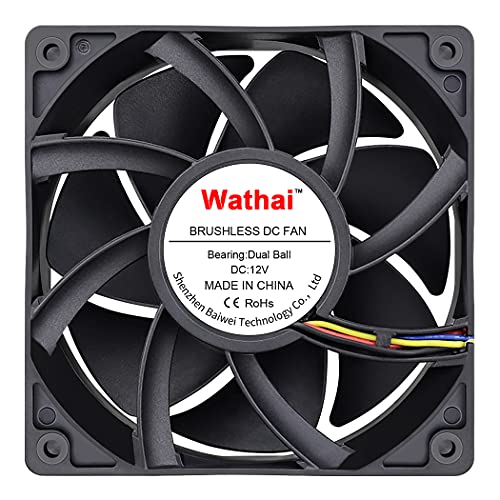
If you’re looking for a powerful cooling solution for your workstation, the Wathai 120mm PWM Computer Case Fan is an excellent choice. With a speed of 5300 RPM and airflow of 230 CFM, it delivers top-notch cooling for demanding setups. Its dual-ball bearings ensure durability, lasting up to 67,000 hours. You can easily position it flat or upright, and it comes with mounting hardware. The fan’s intelligent PWM feature allows for temperature-based speed adjustments, optimizing performance. Ideal for gaming PCs, mining rigs, and server chassis, this fan is perfect for anyone needing high airflow and efficient cooling.
Best For: Those seeking high-performance cooling solutions for gaming PCs, mining rigs, and server chassis.
Pros:
- High airflow: Delivers an impressive 230 CFM, ensuring optimal cooling for demanding setups.
- Durability: Features dual-ball bearings with a lifespan of up to 67,000 hours.
- Intelligent speed regulation: PWM support allows for temperature-based fan speed adjustments, enhancing efficiency.
Cons:
- Noise level: Operates at a maximum noise level of 60 dBA, which may be noticeable in quiet environments.
- Power consumption: Requires 22.8W of power, which could impact power supply requirements for some systems.
- Size: The fan’s 120x120x38 mm dimensions may not fit in all cases, limiting compatibility.
GUIANDJING 120mm PWM Cooling Fan (12038)
The GUIANDJING 120mm PWM Cooling Fan (12038) is an ideal choice for those who need powerful cooling solutions in demanding environments, such as gaming rigs or high-performance workstations. With a high speed of 5400 RPM and an impressive airflow of 230 CFM, this fan effectively dissipates heat, ensuring your system remains cool under pressure. Although it operates at 55 dBA, the performance outweighs the noise for many users. Its 55,000-hour lifespan and versatility make it perfect for various applications, from computer cases to medical equipment. You’ll appreciate the included grills and screws for easy installation in your setup.
Best For: Those seeking robust cooling solutions for high-performance systems, such as gaming rigs, workstations, and various industrial applications.
Pros:
- High airflow of 230 CFM and speed of 5400 RPM for effective heat dissipation.
- Long lifespan of 55,000 hours, providing reliable performance over time.
- Versatile applications across different devices, from computers to medical equipment.
Cons:
- Operating noise level of 55 dBA may be considered loud for some users.
- High rated current of 2.9A may require a more powerful power supply.
- Dimensions may not fit all cases or installation spaces without modifications.
AC Infinity AXIAL LS1238 Quiet Muffin Fan
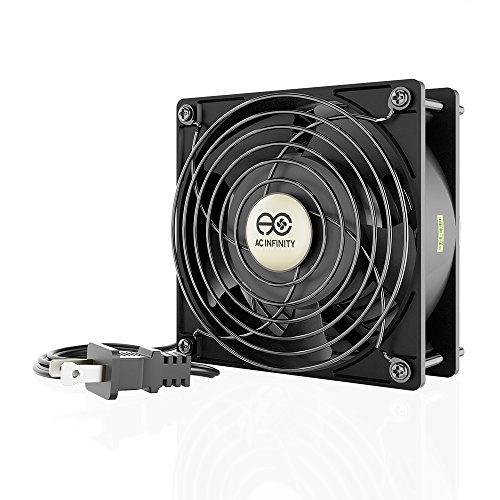
For those seeking a reliable cooling solution for their workstation, the AC Infinity AXIAL LS1238 Quiet Muffin Fan stands out with its impressive airflow capacity of 62 CFM and a maximum rotational speed of 1800 RPM. This 120mm fan operates at just 32 dBA, ensuring a quiet environment. Its durable aluminum construction and dual-ball bearings promise a lifespan of 67,000 hours. Plus, it’s designed for easy installation, including a power plug cord and mounting hardware. Whether you need it for ventilation or as a replacement, this fan’s versatility makes it a smart choice for maintaining optimal temperatures in your setup.
Best For: The AC Infinity AXIAL LS1238 Quiet Muffin Fan is best for individuals seeking an efficient and quiet cooling solution for their workstation or DIY ventilation projects.
Pros:
- Quiet Operation: With a noise level of just 32 dBA, it provides effective cooling without disturbing your environment.
- Durable Design: Constructed from heavy-duty aluminum and featuring dual-ball bearings, this fan boasts a lifespan of 67,000 hours.
- Versatile Installation: Can be mounted in any direction and comes with all necessary installation hardware, making it easy to set up.
Cons:
- Limited Airflow Capacity: While it offers 62 CFM, it may not be adequate for larger cooling needs compared to higher capacity fans.
- Fixed Voltage: Designed for 100 to 120V AC only, limiting its usage in regions with different voltage requirements.
- Weight: At 1.63 pounds, it may be heavier than some users prefer for certain installations.
GDSTIME 120mm Computer Fan with Variable Speed Controller
Engineers and creators will find the GDSTIME 120mm Computer Fan with Variable Speed Controller an invaluable asset for high-performance workstations. With its impressive airflow of 173 CFM and a maximum speed of 4000 RPM, this fan ensures optimal cooling. The variable speed controller allows you to fine-tune performance between 4V and 12V, adapting to various applications like mining rigs and solder fume extractors. Its durable design, featuring a long-lasting brushless motor, means reliability for up to 50,000 hours. Plus, with a 7.7FT cable, installation is effortless. This fan’s versatility and efficiency make it a top choice for your cooling needs.
Best For: Engineers and creators needing high-performance cooling solutions for workstations and various applications.
Pros:
- High airflow rate of 173 CFM and maximum speed of 4000 RPM ensure optimal cooling performance.
- Variable speed controller allows for precise adjustments between 4V and 12V, providing versatility for different applications.
- Durable design with a brushless motor rated for 50,000 hours guarantees long-lasting reliability.
Cons:
- Maximum noise level of 50 dBA at full speed may be considered loud for some users.
- Requires AC power supply (110V/220V), limiting flexibility in certain setups.
- Installation may require additional space due to its 120x120x38 mm dimensions.
Wathai 12V DC Brushless Small Blower Fan (9733)
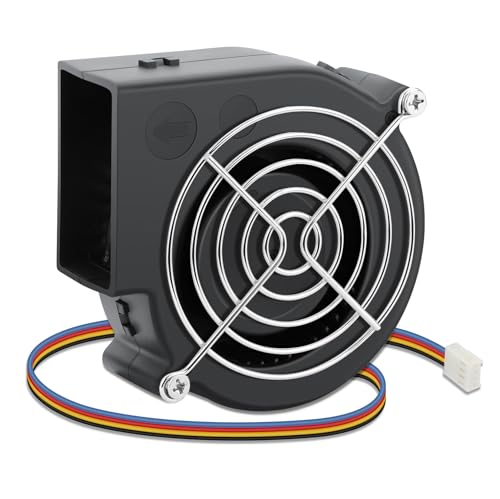
High-velocity airflow makes the Wathai 12V DC Brushless Small Blower Fan (9733) an excellent choice for those needing reliable cooling in compact spaces. With its 97mm centrifugal design, it delivers an impressive 35.8 CFM of airflow while maintaining a static pressure of 2 In H2O. You’ll appreciate the PWM speed control, allowing for automatic cooling adjustments from 1300 to 4800 RPM. It’s built to last, featuring a 50,000-hour lifespan with durable PBT plastic housing and dual-ball bearings. Perfect for various applications, this fan can easily fit into tight spots, ensuring optimal cooling for your electronics.
Best For: Those in need of efficient and high-performance cooling solutions for compact electronics and appliances.
Pros:
- High Airflow: Delivers 35.8 CFM for effective cooling in tight spaces.
- PWM Speed Control: Allows for automatic adjustments of fan speed based on workload.
- Durable Design: Built with PBT plastic housing and dual-ball bearings for a long lifespan of 50,000 hours.
Cons:
- Noise Level: Operates at 58 dBA, which may be considered loud in quiet environments.
- Power Requirement: Requires a minimum of 5.5V to start, which may limit compatibility with some devices.
- Limited Voltage Range: Optimal performance is only between 7-13.5V, potentially restricting use in variable voltage applications.
GDSTIME 4500RPM Cooling Fan (12V, 80mm)
If you’re looking for a reliable cooling solution for your workstation, the GDSTIME 4500RPM Cooling Fan stands out with its impressive airflow of 59 CFM, ensuring optimal performance even during intensive tasks. This 80mm brushless DC fan operates at a speed of 4500 RPM, providing efficient cooling while maintaining a noise level of 43 dBA. It features dual ball bearings for enhanced durability, boasting a lifespan of up to 50,000 hours at 25 degrees Celsius. Installation is straightforward, thanks to the included metal grill and mounting screws. With a start-up voltage of just 3.9V, it’s a solid choice for your setup.
Best For: Users seeking an efficient and durable cooling solution for workstations or high-performance computers.
Pros:
- High airflow of 59 CFM ensures effective cooling during intensive tasks.
- Dual ball bearings enhance durability and extend lifespan up to 50,000 hours.
- Simple installation with included metal grill and screws.
Cons:
- Operating at maximum voltage (13.8V) may reduce longevity.
- Noise level of 43 dBA may be noticeable in quiet environments.
- Requires a 2-pin connector, limiting compatibility with certain setups.
Qirssyn High CFM 120mm Computer Fan

The Qirssyn High CFM 120mm Computer Fan stands out as an excellent choice for DIY enthusiasts and professionals who demand robust cooling solutions. With a powerful 4100 RPM speed and an impressive airflow of 169 CFM, it effectively tackles overheating issues. Its dual ball bearing design ensures a six-year lifespan, providing stable operation whether mounted flat or upright. You’ll appreciate the variable speed control, allowing you to adjust from 3V to 12V for customized airflow. Ideal for various applications—from electronics cabinets to aquarium cooling—this fan comes with a one-year warranty and protective grills for added safety.
Best For: DIY enthusiasts and professionals seeking high-performance cooling solutions for electronics and other applications.
Pros:
- High airflow of 169 CFM, effectively reduces overheating issues.
- Variable speed control allows customization of airflow from 3V to 12V.
- Durable dual ball bearing design provides a lifespan of up to six years.
Cons:
- Requires AC power supply, which may limit portability.
- Some users may find the noise level at full speed to be higher than desired.
- Installation might be complicated for those unfamiliar with electrical components.
Wathai 140mm Case Fan (12V, High Airflow)
Designed for those who demand powerful airflow, the Wathai 140mm Case Fan is an excellent choice for workstations, gaming setups, and DIY projects. With a remarkable speed of 3000 RPM and an airflow capacity of 223 CFM, it ensures efficient cooling even in the most enclosed spaces. The dual ball bearing design contributes to its impressive lifespan of 50,000 hours. While it operates at a noise level of 46 dBA, the fan’s reverse design allows for concentrated airflow, making it perfect for small radiators and amplifiers. Installation is straightforward, including all necessary components for quick setup.
Best For: Users looking for high-performance cooling solutions in gaming PCs, workstations, and DIY projects that require efficient airflow.
Pros:
- High airflow capacity: Delivers an impressive 223 CFM, ensuring optimal cooling for enclosed spaces.
- Long lifespan: Durable design with a lifespan of 50,000 hours, reducing the need for frequent replacements.
- Easy installation: Comes with all necessary components for a straightforward setup, including mounting screws and a fan grill.
Cons:
- Noise level: Operates at 46 dBA, which may be too loud for quieter environments.
- Limited applications: Best suited for high-demand cooling; may not be necessary for low-performance setups.
- Power consumption: Requires 1.5A at 12V, which may be higher than what some systems can accommodate.
Tornado 12 Inch Outdoor Metal Wall Mounted Fan

For those seeking reliable airflow in both indoor and outdoor settings, the Tornado 12 Inch Outdoor Metal Wall Mounted Fan stands out with its robust IPX4 water resistance rating. Constructed from durable aluminum and steel, this fan features a rust-resistant grille and a powerful motor that delivers up to 1650 CFM across three speed settings. With a quiet operation at a maximum of 52 decibels, you can enjoy cooling without distraction. Easy to install on walls or ceilings, it offers 180-degree vertical tilt for precise airflow. Plus, it’s versatile enough to upgrade with a misting kit for added comfort.
Best For: Those in need of a powerful and water-resistant fan for both indoor and outdoor use, ideal for commercial, industrial, and residential environments.
Pros:
- High airflow capacity of 1650 CFM with three speed settings for customizable cooling.
- Durable construction with a rust-resistant grille, ensuring longevity and reliability.
- Quiet operation at a maximum of 52 decibels, making it suitable for noise-sensitive environments.
Cons:
- Requires installation with an expansion bolt, which may not be suitable for all wall types.
- The misting kit is sold separately, adding to the overall cost for enhanced functionality.
- May be considered heavy for some, weighing 8.8 pounds, which could complicate installation for certain users.
AC Infinity AXIAL 8038 Quiet Muffin Fan

Looking for a reliable cooling solution for your workstation? The AC Infinity AXIAL 8038 Quiet Muffin Fan is a top choice. Measuring 80mm x 38mm, it delivers 23 CFM of airflow while operating at a whisper-quiet 28 dBA. With a sturdy aluminum build, this fan features dual-ball bearings for a lifespan of 67,000 hours. You can mount it in any direction, making it versatile for various setups. Plus, it’s UL-certified for DIY cooling projects. With a 4.6-star rating from over 2,100 reviews, it’s a proven performer that won’t disrupt your work environment.
Best For: Those seeking a quiet and efficient cooling solution for their workstation or DIY projects.
Pros:
- UL-certified, ensuring safety in DIY cooling ventilation exhaust projects.
- Long lifespan of 67,000 hours due to dual-ball bearings.
- Versatile mounting options, allowing installation in any direction.
Cons:
- Limited airflow of 23 CFM may not suffice for high-demand cooling needs.
- Noise level of 28 dBA may still be audible in very quiet environments.
- Wattage of 7 watts could be considered higher for a small fan compared to some alternatives.
Factors to Consider When Choosing a High RPM Fan for Workstations
When choosing a high RPM fan for your workstation, you’ll want to consider several key factors. Noise level, airflow efficiency, and cooling performance are essential for maintaining a productive environment. Additionally, think about compatibility with your system and the fan’s lifespan to ensure you make the best choice.
Noise Level Considerations
Choosing a high RPM fan for your workstation involves careful consideration of noise levels, especially since fans with higher RPMs can significantly disrupt a quiet environment. Look at the decibel (dBA) rating; for instance, fans like the GUIANDJING 120mm PWM Cooling Fan max out at 55 dBA, while others can exceed 60 dBA. If you’re in a noise-sensitive space, a quieter option like the AC Infinity AXIAL LS1238, with a maximum of 32 dBA, might be ideal. Also, consider the fan’s design—dual-ball bearing models typically produce less noise compared to sleeve bearing ones. Ultimately, balancing airflow needs with acceptable noise levels is crucial for maintaining comfort and productivity in your workstation.
Airflow Efficiency Ratings
Airflow efficiency ratings play a vital role in selecting a high RPM fan for your workstation, as they directly impact cooling performance. You’ll want to look at the cubic feet per minute (CFM) measurement, which indicates how much air a fan can move. Fans operating at 5300 RPM or more often exceed 200 CFM, making them ideal for high-performance setups. Additionally, consider the static pressure, measured in inches of H2O, as it reflects the fan’s ability to push air through tight spaces. Don’t forget about noise levels, typically ranging from 55 to 60 dBA for high airflow models. Finally, opt for fans with dual-ball bearings, which can enhance longevity and reliability, lasting up to 67,000 hours.
Cooling Performance Metrics
While selecting a high RPM fan for your workstation, understanding cooling performance metrics is crucial. Start by looking at airflow, measured in CFM; fans can exceed 230 CFM for optimal air movement. Pay attention to noise levels, too; some fans operate around 60 dBA, while others are whisper-quiet at 28 dBA, affecting your environment. Fan speed, expressed in RPM, is another key factor, with top performers reaching up to 5400 RPM for enhanced cooling. Don’t forget static pressure, measured in inches of water, which indicates how well a fan can push air through tight spaces—aim for a rating around 1.17 in H2O. Lastly, consider lifespan ratings; high-quality fans can last between 50,000 to 67,000 hours, ensuring durability.
Compatibility With Systems
When selecting a high RPM fan for your workstation, compatibility with your system is key to ensuring optimal performance. First, make sure the fan’s voltage rating matches your workstation’s power supply, which is typically 12V for most PC components. Next, check the fan’s physical dimensions to confirm it fits within the designated mount area in your case. Don’t forget to verify the connector type, like 4PIN or 2PIN, to ensure it’s compatible with your motherboard or fan controller. Additionally, assess the fan’s airflow (measured in CFM) and static pressure to meet the cooling requirements of your components. Finally, consider the noise level (dBA), as higher RPM fans may produce more noise, impacting your work environment.
Fan Lifespan and Durability
Choosing a high RPM fan for your workstation means considering its lifespan and durability to ensure long-term performance. The bearing type plays a crucial role; dual-ball bearings can last between 50,000 and 67,000 hours, while sleeve bearings typically have shorter lifespans. Since high RPM fans generate more heat, efficient heat dissipation becomes essential to avoid premature failure. Additionally, the fan’s rated voltage and power consumption affect durability; higher power levels can lead to increased wear over time. Regular maintenance, like cleaning dust buildup and ensuring proper airflow, can significantly extend your fan’s life. Lastly, fans with PWM capabilities can adjust their speed based on thermal demands, potentially reducing wear and prolonging operational lifespan.
Installation and Mounting Options
Selecting the right installation and mounting options for high RPM fans is crucial for maximizing airflow and ensuring efficient cooling in your workstation. First, consider whether you need flat or upright positioning to optimize space and airflow. Make sure your fan includes mounting accessories like screws, nuts, or grills for a secure installation. Check the fan’s dimensions and mounting hole distance to ensure compatibility with your existing setup; an improper fit can hinder cooling efficiency. Flexibility in mounting direction is also important, allowing you to tailor airflow to specific components. Lastly, don’t overlook the weight of the fan; heavier models may require more robust mounting solutions to maintain stability and safety during operation.
Power Consumption and Voltage
After ensuring your high RPM fans are properly installed and mounted, it’s time to think about power consumption and voltage to keep your workstation running efficiently. Most high RPM fans operate on a rated voltage of 12V, so check compatibility with your power supply. Power consumption can vary widely—some fans may use just 9 watts, while others could need up to 35 watts. Keep in mind that fans often draw higher currents, sometimes up to 2.9A at 12V, which is crucial for power supply design. If energy efficiency is a priority, consider models with variable speed controllers to adjust power usage. Lastly, remember that higher wattage can lead to increased noise levels, impacting your work environment.