
When it comes to enhancing your productivity, having the right laptop for a multimonitor setup is crucial. You need a machine that not only handles multitasking with ease but also connects seamlessly to multiple displays. With various options available, from powerful gaming laptops to sleek business models, there’s something for everyone. Let’s explore the top picks that can transform your workstation and elevate your efficiency.
HP 17.3″ Laptop Computer with Intel Core i3, 32GB RAM, 1TB SSD

If you’re in the market for a laptop that can handle a multimonitor setup, the HP 17.3″ Laptop Computer is an excellent choice, particularly for professionals and students who demand both power and visual clarity. With its stunning 17.3″ HD+ anti-glare display, you’ll enjoy sharp visuals that enhance your multitasking capabilities. The Intel Core i3 processor, combined with 32GB RAM and a 1TB SSD, ensures smooth performance and quick data access. You’ll appreciate the full-size numeric keyboard for comfortable typing and various connectivity options, including USB-C and HDMI, making it easy to set up your ideal workspace.
Best For: Professionals and students seeking a powerful laptop with ample screen real estate for multitasking and enhanced visual clarity.
Pros:
- Large 17.3″ HD+ anti-glare display provides vibrant visuals, perfect for work, streaming, and gaming.
- 32GB DDR4 RAM and 1TB SSD ensure smooth performance and quick data access, ideal for handling multiple applications.
- Diverse connectivity options including USB-C, HDMI, and Wi-Fi 6 facilitate seamless integration with various devices.
Cons:
- Intel Core i3 processor may not be powerful enough for high-end gaming or intensive creative tasks.
- Heavier weight compared to smaller laptops may reduce portability for on-the-go users.
- Limited graphics capabilities due to Intel UHD Graphics may not meet the needs of graphic-intensive applications.
Acer Nitro V 16S AI Gaming Laptop (ANV16S-41-R2AJ)
The Acer Nitro V 16S AI Gaming Laptop (ANV16S-41-R2AJ) stands out as an excellent choice for gamers and professionals who require a powerful multimonitor setup. With its NVIDIA GeForce RTX 5060 GPU and AMD Ryzen 7 260 processor, you’ll experience top-notch performance. The 16″ WUXGA display features a 180Hz refresh rate, ensuring ultra-smooth visuals during intense tasks. Coupled with 32GB DDR5 RAM and a 1TB Gen 4 SSD, multitasking is a breeze. Plus, the robust connectivity options, including USB4 and HDMI 2.1, make it easy to link multiple displays. Enjoy enhanced graphics and productivity like never before!
Best For: Gamers and professionals seeking high-performance computing for gaming and multitasking with a multimonitor setup.
Pros:
- High-performance hardware: Equipped with NVIDIA GeForce RTX 5060 GPU and AMD Ryzen 7 260 processor for exceptional gaming and productivity.
- Ultra-smooth display: 16″ WUXGA 180Hz display ensures fluid visuals during fast-paced action.
- Robust connectivity options: Multiple ports including USB4 and HDMI 2.1 facilitate easy connection to various devices and displays.
Cons:
- Weight and portability: The advanced cooling system and powerful components may make it heavier and less portable than lighter laptops.
- Battery life: High-performance components may lead to shorter battery life during intensive tasks and gaming sessions.
- Price point: Premium specifications come at a higher cost, which may not be suitable for budget-conscious consumers.
HP 17.3 inch Laptop with Intel i3 CPU, 16GB RAM, 256GB SSD

For those seeking a powerful yet portable solution for multimonitor setups, the HP 17.3 inch laptop stands out with its impressive Intel i3 CPU and 16GB of RAM. With a turbo boost of up to 4.4 GHz and 8 cores, multitasking becomes a breeze. Its 17.3-inch HD display, featuring a resolution of 1600 x 900 and 250 nits brightness, ensures an immersive experience. Enjoy ultra-fast Wi-Fi 6 and Bluetooth 5.3 for seamless connectivity. Weighing just 4.6 pounds and measuring 0.81 inches thin, it’s easy to take anywhere. Plus, the included Lifetime Office 365 enhances your productivity on the go.
Best For: Those looking for a reliable and portable laptop for multitasking, streaming, and productivity on the go.
Pros:
- Powerful multitasking capabilities with an Intel i3 processor and 16GB RAM.
- Large 17.3-inch HD display with a resolution of 1600 x 900 for an immersive viewing experience.
- Lightweight and portable design measuring 0.81 inches thin and weighing only 4.6 pounds.
Cons:
- Limited storage capacity with only a 256GB SSD, which may require external storage for larger files.
- HD display resolution of 1600 x 900 may not satisfy those seeking Full HD or higher quality.
- Intel i3 processor may not be suitable for demanding gaming or heavy software applications.
HP 17.3 inch Laptop (17-cp2199nr)

With a spacious 17.3-inch HD+ display and powerful AMD Ryzen 5 processor, the HP 17.3 inch Laptop (17-cp2199nr) is an ideal choice for professionals and creatives who thrive in multimonitor setups. Its 16 GB RAM and 512 GB SSD ensure smooth multitasking and quick access to files. The anti-glare screen is perfect for outdoor use, while AMD Radeon Graphics enhance your viewing experience. Plus, Windows 11 Home brings improved features and connectivity. With a lift-hinge design for comfortable typing and a battery that charges rapidly, this laptop supports your productivity wherever you work. Choose the HP 17-cp2199nr for your setup.
Best For: The HP 17.3 inch Laptop (17-cp2199nr) is best for professionals and creatives who require a powerful machine for multitasking and enhanced viewing experiences.
Pros:
- Spacious 17.3-inch HD+ display provides ample screen real estate for productivity and entertainment.
- Powerful AMD Ryzen 5 processor and 16 GB RAM ensure smooth performance during multitasking.
- Rapid charging battery allows for quick power-ups, making it convenient for on-the-go use.
Cons:
- Heavy weight of 4.58 pounds may make it less portable for frequent travel.
- Lower resolution of 1600 x 900 pixels compared to other laptops with full HD displays might not meet the expectations of some users.
- Limited battery life of around 7.15 hours may require frequent charging during extended use.
KOOFORWAY Triple Screen Laptop with Core i7 and 32GB RAM

Ideal for multitaskers, the KOOFORWAY Triple Screen Laptop offers a remarkable setup that combines a 16-inch main display with two foldable 10.5-inch monitors. With a powerful Core i7-1270P processor and 32GB DDR4 RAM, it handles high-resolution gaming, video editing, and complex multitasking effortlessly. Weighing just 5.7 lbs, it’s portable enough for business travelers and remote workers. Enjoy seamless connectivity with USB-C, HDMI, and more, while dual biometric authentication keeps your data secure. Whether you’re developing software or trading stocks, this laptop provides the screen real estate and performance you need to maximize productivity on the go.
Best For: The KOOFORWAY Triple Screen Laptop is best for multitaskers, developers, video editors, financial traders, and gamers who need extensive screen real estate and high performance on the go.
Pros:
- Ample screen space with a triple monitor setup enhances productivity for multitasking.
- High-performance specifications with Core i7 and 32GB RAM ensure smooth operation for demanding tasks.
- Portable design at just 5.7 lbs makes it convenient for travel and remote work.
Cons:
- The weight may still be considered heavy for some users looking for ultra-light laptops.
- Foldable monitors may be less durable than fixed screens and could be prone to wear over time.
- Limited battery life may be a concern during intensive use with all screens active.
Acer Aspire Go 15 Laptop (AG15-32P-39R2)

The Acer Aspire Go 15 Laptop (AG15-32P-39R2) stands out as a perfect choice for those who need a reliable machine for multitasking across multiple monitors. With its 8-Core Intel Core 3 processor and 8GB DDR5 memory, you’ll experience smooth performance. The 15.6″ FHD IPS display, combined with Acer BluelightShield, ensures an immersive viewing experience while reducing eye strain. Connectivity is a breeze with Wi-Fi 6 and various USB ports, including dual USB Type-C. Plus, the eco-friendly design means you’re making a responsible choice. Whether you’re working or streaming, this laptop enhances your productivity effortlessly.
Best For: Individuals seeking a reliable laptop for multitasking, web browsing, and streaming with a focus on eco-friendliness.
Pros:
- High-performance 8-Core Intel Core 3 processor and 8GB DDR5 memory for smooth multitasking.
- Immersive 15.6″ FHD IPS display with Acer BluelightShield to reduce eye strain.
- Eco-friendly design with recyclable materials and Energy Star certification.
Cons:
- Limited storage capacity with only 128GB UFS storage.
- Windows 11 Home in S Mode may restrict the installation of certain applications.
- Integrated 720p HD camera may not meet the needs of users requiring higher video resolution for professional calls.
Apple 2025 MacBook Air 13-inch Laptop with M4 Chip

For those who thrive in multitasking environments, the Apple 2025 MacBook Air 13-inch Laptop with the M4 chip stands out as a top choice. Weighing just 2.73 pounds, it features a stunning 13.6-inch Liquid Retina display that supports up to two external 6K monitors. With its powerful 10-core CPU and 8-core GPU, you’ll enjoy seamless performance across applications. The 16GB Unified Memory and 256GB SSD ensure quick access to your projects, while the battery lasts up to 18 hours. Plus, with fast charging and excellent audio capabilities, this MacBook Air is perfect for enhancing your productivity.
Best For: Professionals and creatives who need a lightweight, high-performance laptop for multitasking and productivity.
Pros:
- Powerful M4 chip offers enhanced speed and fluidity for demanding applications.
- Long battery life of up to 18 hours ensures you can work throughout the day without needing to recharge.
- Stunning display with Liquid Retina technology supports vibrant colors and high resolutions, ideal for creative work.
Cons:
- Limited storage capacity of 256GB may require external storage solutions for larger files.
- Weight of 2.73 pounds, while portable, is slightly heavier compared to some ultra-light competitors.
- Price point may be higher than similar laptops with comparable specifications from other brands.
HP 17.3 Inch FHD Business Laptop with AMD Ryzen 5 7430U
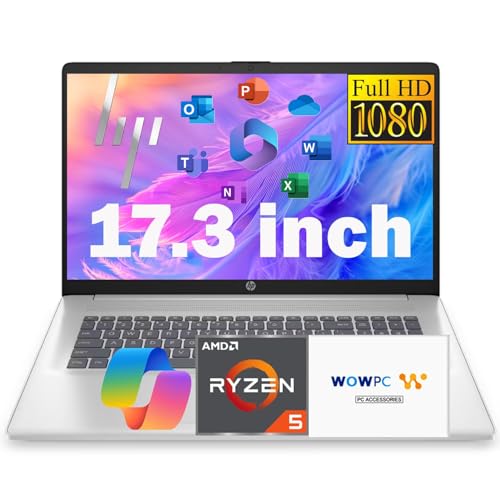
With a powerful AMD Ryzen 5 7430U processor that outperforms many Core i7 options, the HP 17.3 Inch FHD Business Laptop is perfect for professionals who rely on seamless multi-monitor setups. It features 16GB of RAM and 756GB of storage, combining a 256GB SSD with a 500GB external drive for ample space. The 15.6-inch Full HD display ensures crisp visuals, while the lightweight design at 3.84 lbs makes it easy to transport. With various connectivity options, including USB-C and HDMI, you’ll stay connected effortlessly. Plus, fast charging support keeps you productive without long downtimes.
Best For: Professionals seeking a powerful and portable business laptop with excellent multitasking capabilities and ample storage.
Pros:
- High-performance processor: AMD Ryzen 5 7430U outperforms many Intel Core i7 options, ensuring smooth performance.
- Ample storage: Combines a 256GB SSD with a 500GB external drive for extensive file storage and quick access.
- Lightweight design: At just 3.84 lbs, this laptop is easy to carry, making it ideal for on-the-go professionals.
Cons:
- Integrated graphics: Limited gaming and graphic-intensive application performance compared to dedicated graphics cards.
- Average customer ratings: With a 3.5 out of 5 stars, some users may find performance or build quality lacking.
- Limited display size: The 15.6-inch screen may not suffice for users who prefer larger displays for multitasking.
HP 17 Laptop (17.3″ HD+ Touchscreen, Intel Core i7, 32GB RAM, 1TB SSD)
Designed for professionals and multitaskers, the HP 17 Laptop stands out with its expansive 17.3″ HD+ touchscreen display, making it perfect for multimonitor setups. Powered by an Intel Core i7-1255U processor with 10 cores and 32GB of high-bandwidth RAM, it handles demanding tasks effortlessly. The 1TB PCIe NVMe SSD ensures fast boot-ups and quick data transfers, enhancing your workflow. With multiple connectivity options, including USB Type-C and HDMI, you can easily connect to other monitors. Its sleek silver design and backlit keyboard add a touch of sophistication, while Windows 11 Home ensures compatibility with your favorite apps.
Best For: Professionals and multitaskers looking for a powerful laptop with a large touchscreen for enhanced productivity.
Pros:
- High-performance Intel Core i7 processor and 32GB RAM capable of handling demanding tasks.
- Large 17.3″ touchscreen display offers an immersive viewing experience and is ideal for multimonitor setups.
- Fast storage with a 1TB PCIe NVMe SSD ensures quick boot-ups and data transfer.
Cons:
- Bulky design may not be suitable for frequent travel or portability.
- HD+ resolution (1600 x 900) may not meet the needs of users seeking higher display quality.
- Limited battery life compared to smaller, more portable laptops.
HP 17.3″ Touchscreen Laptop Computer (64GB RAM, 2.5TB Storage)

The HP 17.3″ Touchscreen Laptop is an excellent choice for professionals and creatives who demand powerful multitasking capabilities and ample storage for their multimonitor setups. With a robust AMD Ryzen 5 processor and 64GB of RAM, it handles intensive tasks effortlessly. The 2.5TB storage, split between a speedy 2TB SSD and a 512GB docking station, ensures you’ll have plenty of space for all your files. The stunning 17.3-inch touchscreen display enhances usability, while multiple ports, including USB-C and HDMI, offer seamless connectivity. Plus, its long-lasting battery life keeps you productive throughout the day, making it a solid investment for your workflow.
Best For: Professionals and creatives who require powerful multitasking capabilities and ample storage for their workflows.
Pros:
- High Performance: Equipped with an AMD Ryzen 5 processor and 64GB of RAM, it effectively handles intensive tasks and multitasking.
- Ample Storage: Features a massive 2.5TB storage capacity, allowing users to store a significant amount of files and applications.
- Enhanced Usability: The 17.3-inch touchscreen display and various connectivity options make it user-friendly and versatile.
Cons:
- Weight: At 4.6 pounds, it may be less portable compared to lighter laptops.
- Resolution: The 1600 x 900 resolution may not meet the expectations of users seeking higher display quality.
- Battery Life: While it offers up to 8 hours, heavy usage may reduce the actual battery performance.
Factors to Consider When Choosing a Lapfor Multimonitor Setup
When you’re choosing a laptop for a multimonitor setup, you need to consider several key factors. Display size and resolution can greatly impact your productivity, while processor performance and RAM are crucial for smooth multitasking. Don’t forget about storage capacity and the variety of connectivity ports to ensure all your monitors connect seamlessly.
Display Size and Resolution
Choosing the right display size and resolution is crucial for optimizing your multimonitor setup. A larger display, like a 17.3-inch screen or more, gives you ample space for multitasking and improves visibility across multiple monitors. Opt for higher resolutions such as Full HD (1920 x 1080) or WUXGA (1920 x 1200) for sharper images and detailed visuals, which are essential when working on complex projects. Look for laptops with narrow bezels to maximize your display area and create a more immersive experience. Additionally, anti-glare or low gloss panels can enhance visibility in bright settings, and refresh rates of 180Hz or higher ensure smooth motion in fast-paced applications, making your multitasking seamless and enjoyable.
Processor Performance Capability
In a multimonitor setup, processor performance capability plays a vital role in ensuring smooth multitasking and responsiveness. You’ll want a processor with a higher number of cores and threads, as this allows better management of multiple applications across your screens. The clock speed, measured in GHz, also matters—higher speeds mean quicker task completion and less lag. Keep in mind that processors with integrated graphics may struggle with demanding graphical tasks, so opting for a laptop with dedicated graphics is often best. Additionally, look for advanced technologies like Intel Turbo Boost or AMD’s Precision Boost, which dynamically enhance performance for intensive applications, ensuring your multimonitor experience is seamless and efficient.
RAM and Multitasking Support
To effectively manage a multimonitor setup, having ample RAM is crucial, as it directly impacts your laptop’s multitasking capabilities. If you’re running multiple applications simultaneously, consider opting for at least 32GB of RAM. This capacity allows for smooth performance, even during heavy workloads. For graphic-intensive tasks like gaming or video editing, 64GB can be a game-changer, ensuring quick data access and seamless operation across screens. While 16GB might suffice for basic tasks, it can struggle in a dual or triple monitor environment. Additionally, choose DDR4 or DDR5 RAM for better speed and efficiency, as higher MHz speeds significantly enhance data processing. In a multitasking scenario, every bit of RAM matters, so choose wisely!
Storage Capacity Options
Storage capacity plays a pivotal role in optimizing your multimonitor setup. For seamless multitasking, aim for laptops with at least 1TB of SSD storage, as this ensures you have enough space for multiple applications and files across screens. If you’re a professional dealing with large files, like a video editor or graphic designer, consider models with 2TB or more to avoid constant external storage reliance. Look for laptops that allow expandable storage through additional SSD slots or external drives, enabling you to adapt as your needs grow. A combination of SSD and HDD can also be beneficial—using SSD for speed and HDD for larger data sets. Lastly, ensure the storage type supports high-speed interfaces like PCIe NVMe for optimal performance.
Connectivity Ports Variety
Choosing the right connectivity ports is crucial when setting up a multimonitor workstation, as it directly affects your ability to connect and manage multiple displays. Look for laptops with multiple USB-C ports that support DisplayPort over USB-C, making it easier to connect external monitors. HDMI 2.1 ports are also essential for achieving higher resolutions and refresh rates, enhancing your visual experience. Additionally, USB 3.2 Gen 2 ports ensure faster data transfer rates for external devices. Don’t forget about multiple USB-A ports for connecting peripherals like keyboards and mice, which are vital for productivity. Lastly, an Ethernet (RJ-45) port can provide a stable internet connection, particularly important for bandwidth-heavy tasks like video streaming or gaming.
Graphics Card Quality
A robust graphics card is essential for a successful multimonitor setup, as it directly impacts the resolution and refresh rate across your displays. High-performance cards typically come with dedicated video memory (VRAM), crucial for managing the increased graphical demands of multiple screens. Look for options that support technologies like NVIDIA’s G-SYNC or AMD’s FreeSync to enjoy smoother visuals and eliminate screen tearing during fast-paced activities. Ensure the graphics card has multiple output ports—HDMI, DisplayPort, or USB-C—so you can easily connect several monitors without extra adapters. Lastly, consider its architecture and core count, as these factors significantly enhance multitasking capabilities and boost your productivity in a multimonitor environment.
Battery Life Considerations
While using multiple monitors can greatly enhance your productivity, it’s crucial to consider how this setup impacts your laptop’s battery life. Prolonged usage with multiple displays can drain power quickly, so look for models with a battery life of at least 7 hours. This ensures effective multitasking, especially when external monitors increase overall consumption. Fast charging technology is another feature to prioritize—it can recharge your battery to 50% in about 45 minutes, minimizing downtime during long work sessions. Pay attention to battery capacity, measured in watt-hours (Wh); higher capacity batteries sustain power longer. Lastly, don’t forget to utilize power-saving settings to manage energy consumption while running multiple displays simultaneously.
Weight and Portability
When setting up a multi-monitor workstation, weight and portability significantly impact your experience. A lighter laptop is easier to transport, especially if you travel frequently or work remotely. Look for models that weigh less than 5 pounds; this helps you handle them effortlessly while connecting to external monitors in different locations. Slim designs, ideally under 1 inch thick, enhance portability, making it more convenient to carry alongside additional monitors and accessories. However, don’t sacrifice performance for weight—too light a laptop may struggle with multiple displays. Lastly, consider ergonomic designs that offer a comfortable grip, as manageable weight reduces strain during frequent movement. Balancing these factors will boost your productivity on the go.