
If you’re looking to build a whisper-quiet PC in 2026, you’ll want to take into account the best silent airflow cases available. These cases not only keep your components cool but also minimize noise, creating a serene computing environment. With options like the CORSAIR 4000D RS ARGB and be quiet! Silent Base 802, you have some impressive choices. But what factors should you prioritize to guarantee you get the perfect case for your needs?
CORSAIR 4000D RS ARGB Mid-Tower ATX PC Case

If you’re looking for a mid-tower case that combines sleek aesthetics with exceptional airflow, the CORSAIR 4000D RS ARGB is a top contender. This case features a high airflow design, complete with three pre-installed RS fans and a unique InfiniRail™ mounting system. You can customize it to fit your needs, whether you’re upgrading the motherboard tray or the front I/O panel. Its cooling system effectively manages heat, allowing you to install fans up to 200mm in front. With compatibility for powerful graphics cards and a solid 4.6-star rating, it’s a reliable choice for your next PC build.
Best For: Those seeking a customizable mid-tower case with exceptional airflow and compatibility for high-performance components.
Pros:
- High airflow design with 3 pre-installed RS fans for efficient cooling.
- Modular customization options allow for personalized setups and upgrades.
- Compatible with powerful graphics cards and multiple cooling configurations.
Cons:
- Limited color options, as it only comes in black.
- Some users may find the weight of 22.7 pounds cumbersome for transport.
- Assembly and customization may require additional tools and time for some users.
be quiet! Pure Base 501 Black ATX Case
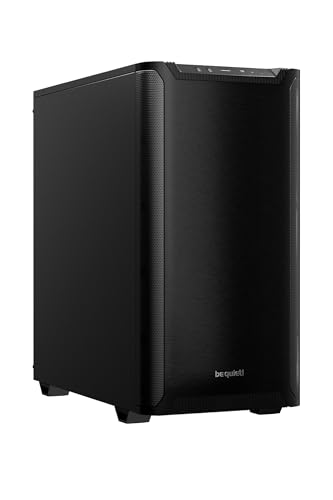
Pure Base 501 Black ATX Case is your go-to choice for a sleek, distraction-free PC build. Optimized for airflow, it features Pure Wings 3 140mm PWM fans with noise-reducing blades, ensuring quiet operation. You can install up to three fans or a 360mm radiator at the front, and the top accommodates additional cooling options. With PCIe slots that allow for vertical GPU installation, you’ll enjoy both aesthetics and performance. Plus, integrated cable management keeps your setup tidy. Front I/O ports, including USB 3.2 Gen. 2 Type C, offer fast connectivity for all your devices.
Best For: Users looking for a compact and quiet PC case that prioritizes airflow and aesthetic GPU installation.
Pros:
- Optimized airflow with Pure Wings 3 140mm PWM fans for quiet operation and enhanced cooling performance.
- Flexible cooling options supporting multiple fans and large radiators for efficient thermal management.
- Vertical GPU installation capability enhances aesthetics and supports high-end graphics cards.
Cons:
- Limited space for additional components due to compact design, which may restrict future upgrades.
- Optional riser cable for vertical GPU installation is sold separately, adding to overall cost.
- Noise levels may still be noticeable under heavy load, despite optimized fan design.
CORSAIR 4000D RS Mid-Tower PC Case

For gamers and PC enthusiasts seeking a perfect blend of performance and aesthetics, the CORSAIR 4000D RS Mid-Tower PC Case stands out with its modular design and high airflow capabilities. You’ll appreciate the FRAME Modular Case System, which allows easy upgrades and customization. With three high-performance CORSAIR RS PWM fans and a 3D Y-Pattern Airflow Panel, airflow is optimized for quiet operation. The case also accommodates various fan placements and multiple 360mm radiators, ensuring your cooling needs are met. Its clean lines and options for side fan mounting maintain an attractive, tidy appearance, making it an ideal choice for any build.
Best For: Gamers and PC enthusiasts who value performance, customization, and aesthetics in their builds.
Pros:
- Modular design allows for easy upgrades and personalization based on user preferences.
- High airflow capabilities with optimized fan placements and a perforated steel front panel ensure effective cooling.
- Clean aesthetic with options for side fan mounting keeps builds looking tidy and professional.
Cons:
- Limited out-of-the-box cooling options may require additional fans for optimal performance.
- Compatibility with only certain radiators could restrict choices for advanced cooling setups.
- Higher price point compared to basic cases may not suit budget-conscious users.
be quiet! Silent Base 802 ATX Midi Tower PC Case

Designed for enthusiasts seeking a harmonious balance between silence and airflow, the be quiet! Silent Base 802 ATX Midi Tower PC Case is your ideal choice. With interchangeable top covers and front panels, you can optimize for airflow or silent operation based on your needs. Its decoupled motherboard tray allows for an inverted layout, enhancing versatility. Three pre-installed Pure Wings 2 fans guarantee effective cooling, while the state-of-the-art IO panel features a fan controller and USB 3.2 Gen. 2 Type C. Plus, extra thick insulation mats markedly reduce noise, making this case perfect for a whisper-quiet PC build.
Best For: Enthusiasts seeking a versatile PC case that balances silent operation and effective airflow.
Pros:
- Interchangeable design allows users to optimize airflow or silence based on their preferences.
- Decoupled motherboard tray supports an inverted layout for enhanced versatility in configuration.
- Pre-installed Pure Wings 2 fans provide effective cooling right out of the box.
Cons:
- Higher price point compared to standard PC cases may not suit budget-conscious users.
- Weight may be a consideration for those needing a lightweight build.
- Limited color options, as it is only available in black, might not appeal to all aesthetic preferences.
NZXT H5 Flow 2024 Compact ATX Mid-Tower Gaming Case

Looking for a compact yet powerful gaming case that prioritizes airflow without the noise? The NZXT H5 Flow 2024 is your answer. Measuring 16.93 x 8.86 x 18.31 inches and weighing just 17.6 pounds, it’s designed for peak GPU cooling with a perforated PSU shroud. You’ll appreciate the large radiator support for up to 360mm in front and 240mm on top. With pre-installed 120mm Quiet Airflow fans and ultra-fine mesh panels, dust is kept at bay while airflow thrives. Plus, enjoy seamless cable management with wide channels. It’s no wonder it boasts a stellar 4.7 out of 5-star rating!
Best For: Gamers seeking a compact and efficient case that offers superior airflow and cooling performance.
Pros:
- Exceptional cooling capabilities with support for large radiators and pre-installed Quiet Airflow fans.
- Efficient cable management system that allows for neat and organized setups.
- High customer satisfaction with an impressive 4.7 out of 5 stars from over 2,800 reviews.
Cons:
- Limited USB ports with only four available (two USB 2.0 and two USB 3.0).
- Compact size may restrict space for larger components or upgrades.
- Weight of 17.6 pounds might be considered heavy for a mid-tower case.
be quiet! Dark Base Pro 901 White PC Case

Dark Base Pro 901 White PC Case offers incredible design versatility, letting you switch between maximum airflow and silent operation with its interchangeable top cover and front panel. It supports E-ATX motherboards and has ample space for graphics cards and water cooling systems. With three Silent Wings 4 140mm PWM White fans and an integrated fan hub, you get excellent cooling performance while maintaining a whisper-quiet environment. The touch-sensitive I/O panel and spacious interior simplify installation, while its expandability guarantees you can easily upgrade your components in the future. This case truly balances performance and silence.
Best For: Users seeking a versatile PC case that balances performance and quiet operation for high-end builds.
Pros:
- Excellent design versatility with interchangeable top cover and front panel for airflow or silence.
- Superior cooling performance with three Silent Wings 4 fans and an integrated fan hub.
- User-friendly features including a touch-sensitive I/O panel and spacious interior for easy installation.
Cons:
- Larger footprint may not fit in smaller spaces.
- Premium price point compared to standard PC cases.
- The complex design might be overwhelming for novice builders.
Antec Flux Pro Full-Tower E-ATX PC Case

If you’re seeking a PC case that balances aesthetics and performance, the Antec Flux Pro Full-Tower E-ATX is an excellent choice. Its high-airflow front panel, complemented by walnut wood accents, delivers both style and functionality. With six PWM fans and support for up to 12 fans, you’ll achieve ideal cooling. You can install a 420mm and a 360mm radiator simultaneously, ensuring your components stay cool. The innovative iShift PSU 90° mount and dual temperature display enhance usability. Plus, with USB 3.0 and Type-C ports, connectivity is a breeze. This case truly exemplifies premium design and efficient airflow for a whisper-quiet build.
Best For: Gamers and PC builders looking for a stylish and high-performance case with excellent cooling capabilities.
Pros:
- High-airflow design with walnut wood accents for a premium aesthetic.
- Supports multiple large radiators and up to 12 fans for optimal cooling.
- Innovative features like the iShift PSU 90° mount and dual temperature display enhance functionality.
Cons:
- Full-tower size may not fit in smaller spaces.
- Premium materials may increase the overall price compared to budget options.
- The complexity of fan and radiator installation may be challenging for novice builders.
NZXT H6 Flow Compact Dual-Chamber Mid-Tower Airflow Case

For those seeking a compact yet powerful solution for their gaming rig, the NZXT H6 Flow Compact Dual-Chamber Mid-Tower Airflow Case stands out. This sleek black case features wraparound glass panels, showcasing your components beautifully. With a dual-chamber design, it optimizes airflow, prioritizing GPU cooling while maintaining a clean interior. You’ll appreciate the three pre-installed 120mm fans and perforated top and side panels that enhance cooling and filter dust. The intuitive cable management system simplifies your build process. With a 4.8-star rating from over 4,000 reviews, it’s a reliable choice for whisper-quiet performance and aesthetics.
Best For: Gamers and PC builders looking for a compact case that combines aesthetic appeal with high-performance cooling capabilities.
Pros:
- Stylish Design: Wraparound glass panels provide an unobstructed view of your components, enhancing the overall aesthetic.
- Enhanced Airflow: The dual-chamber design and pre-installed fans ensure optimal cooling, particularly for the GPU.
- User-Friendly Cable Management: Intuitive cable management system simplifies the build process, making it easier for users to achieve a clean interior.
Cons:
- Limited Space: Being a compact case, it may not accommodate larger components or advanced cooling systems.
- Weight: At 20.7 pounds, it may be heavier compared to other cases in its class, which could be a consideration for portability.
- Fewer USB Ports: Some users may find the number of USB ports limited, especially if multiple peripherals are needed.
NZXT H7 Flow 2024 Mid-Tower ATX Airflow Case

Designed with ideal airflow in mind, the NZXT H7 Flow 2024 Mid-Tower ATX Airflow Case is perfect for gamers and PC builders seeking a balance between performance and aesthetics. Weighing in at 25 pounds and measuring 18.43 x 9.6 x 21.42 inches, this sleek black case includes three pre-installed 120mm front fans and supports additional fans for superior GPU cooling. Its high-performance mesh panels enhance airflow, while the intuitive cable management system keeps your setup tidy. With impressive customer ratings and a solid warranty, this case is a top choice for a whisper-quiet yet powerful PC build.
Best For: Gamers and PC builders seeking an optimal blend of performance, aesthetics, and efficient airflow in their setups.
Pros:
- High airflow design with pre-installed fans and mesh panels for excellent cooling efficiency.
- Intuitive cable management system featuring wide channels and hooks for a clean build.
- Strong customer ratings with a 4.7 out of 5 stars from over 1,000 reviews, indicating overall satisfaction.
Cons:
- Weighty design at 25 pounds, which may be cumbersome for some users to move.
- Limited USB port options with only 2 x USB 2.0 and 3 x USB 3.0, which may not suffice for users with multiple peripherals.
- Potentially higher price point compared to other mid-tower cases, which may deter budget-conscious buyers.
CORSAIR 4000D RS High Airflow Mid-Tower PC Case

The CORSAIR 4000D RS High Airflow Mid-Tower PC Case is perfect for gamers and PC builders who prioritize cooling performance without the noise. With three pre-installed CORSAIR RS PWM fans, you’ll enjoy effective airflow and the option for silent operation at low loads. Its InfiniRail Fan Mounting System allows flexible fan placement, accommodating larger fans for superior cooling. Plus, the FRAME Modular Case System lets you customize your build over time, enhancing functionality and aesthetics. The clean design features a perforated steel front panel for efficient air intake, ensuring your components stay cool while keeping noise levels low.
Best For: Gamers and PC builders who prioritize high airflow and customizable cooling solutions in their builds.
Pros:
- Modular design allows for extensive customization and future upgrades.
- Pre-installed fans provide effective cooling with optional silent operation at low loads.
- Flexible fan mounting options support larger fans and enhance airflow for optimal cooling performance.
Cons:
- Limited color options may not suit all aesthetic preferences.
- Assembly required for some customization features may be challenging for beginners.
- Size may be too large for compact setups or smaller spaces.
Factors to Consider When Choosing a Silent Airflow Case
When choosing a silent airflow case, you should consider several key factors to guarantee peak performance. Noise reduction features, airflow design efficiency, and the quality of fans all play a vital role in maintaining a quiet yet effective cooling system. Additionally, think about the materials used in the case and how flexible the cooling options are to meet your needs.
Noise Reduction Features
While you explore options for a silent airflow case, it’s vital to take into account various noise reduction features that can enhance your computing experience. Look for cases with extra thick insulation mats that effectively dampen sound, creating a quieter environment. Components like decoupled motherboard trays are essential, as they minimize vibrations that generate noise. Seek out specially designed fans with airflow-optimized blades, which can reduce noise while still delivering strong cooling performance. Additionally, cases featuring interchangeable front panels and top covers let you switch between maximum airflow and quieter operation modes to suit your needs. By selecting a case with these features, you’ll create a whisper-quiet PC build without sacrificing performance.
Airflow Design Efficiency
Achieving a quiet PC build hinges not just on noise reduction features but also on airflow design efficiency. To keep your components cool, look for cases that optimize airflow through designs like a 3D Y-Pattern Airflow Panel or perforated front panels. These features minimize resistance and enhance cool air intake. Multiple fan mounting options, including space for larger fans and radiators, can greatly improve airflow and cooling capabilities. Additionally, consider airflow-optimized fan designs that reduce noise while boosting airflow performance. Don’t overlook effective cable management systems, as they help maintain airflow efficiency by preventing cables from blocking airflow pathways. By prioritizing these aspects, you’ll create a cooler and quieter PC environment.
Fan Quality and Performance
To guarantee your silent airflow case delivers ideal performance, consider the quality and design of its fans. Look for high-quality fans with optimized blade designs that enhance cooling while reducing noise. PWM (Pulse Width Modulation) fans are a great choice, allowing for variable speed control that keeps things quiet during low loads and ramps up performance when needed. The number and shape of fan blades also matter; more blades typically improve air pressure and decrease noise levels. Additionally, fans with rubber or silicone anti-vibration mounts can further minimize noise by absorbing vibrations. Finally, consider fans with a Zero RPM mode, which guarantees silent operation during low temperatures, enhancing your overall quiet computing experience.
Build Material Considerations
When choosing a silent airflow case, the materials used in its construction play an essential role in determining how well it can dampen sound. Thicker materials generally provide better noise insulation than thinner ones. Opt for cases made with sound-dampening materials like dense foam or rubber to effectively reduce noise levels from your internal components. While metal cases are durable and excel at heat dissipation, they may need extra soundproofing for a truly silent operation. Additionally, pay attention to the design of airflow channels and panel insulation; these features can minimize noise generated by fans. A well-designed case with interchangeable panels allows you to optimize for either maximum airflow or a whisper-quiet experience, depending on your needs.
Cooling System Flexibility
While selecting a silent airflow case, you’ll want to contemplate how flexible the cooling system is, as this can greatly impact both performance and noise levels. A case that supports multiple fan and radiator installations enhances airflow and thermal management. Look for options that allow PWM fans, which adjust their speed based on temperature, leading to quieter operation during low loads. Additionally, consider cases that accommodate various fan sizes, like 200mm in the front and 140mm in the roof, so you can tailor airflow to your needs. Modular fan mounting systems make it easy to reposition fans, optimizing airflow direction and minimizing noise. Features like Zero RPM mode can also enhance silence by stopping fan operation when cooling needs are met.
Cable Management Solutions
Effective cable management is essential in a silent airflow case, as it can greatly enhance airflow and cooling performance. By preventing cable obstructions near fans and air pathways, you can guarantee your components stay cool. Look for cases with integrated routing options, like wide channels and hooks, to simplify organization and hide cables, creating a cleaner build. Using cable straps and Velcro ties helps secure cables neatly, improving airflow and making future upgrades easier. Some cases even offer removable side panels that can serve as cable covers, providing flexibility while keeping your setup visually appealing. A well-designed cable management system not only boosts airflow but also makes assembly and troubleshooting a breeze for you during the building process.
Size and Compatibility
Choosing the right size and compatibility for your silent airflow case is essential for a successful build. Start by ensuring the dimensions fit your motherboard, as cases support various form factors like ATX, E-ATX, and Micro-ATX. Next, check the case’s compatibility with your GPU, especially if you’re using high-end graphics cards. Some cases restrict installation due to internal space. Look for cases that allow multiple airflow configurations, enabling different fan sizes and placements to enhance cooling without boosting noise levels. Also, evaluate the number of cooling options, such as pre-installed fans and radiator support. Finally, consider the case’s cable management features, which can help maintain airflow and further reduce noise by preventing cables from obstructing fan paths.
Aesthetic Appeal Options
When selecting a silent airflow case, you’ll want to contemplate its aesthetic appeal as much as its functionality. Look for clean lines and a minimalist design that seamlessly blends into your environment. Many cases feature glass panels or seamless edges, allowing you to showcase your components while maintaining a sleek exterior. Color options, like classic black or white finishes, can help you match your setup and express your personal style. The materials used, such as metal, glass, and even wood accents, enhance visual appeal and performance. Additionally, customizable components like interchangeable top covers and front panels let you personalize both the look and functionality of your case, making it uniquely yours.