
When you’re looking to enhance your workstation’s cooling efficiency, the right fan controller can make all the difference. From managing noise levels to optimizing airflow, these devices offer critical features that every PC builder should consider. Whether you’re dealing with multiple fans or specific speed requirements, selecting the right model is key. Let’s explore the top options available and discover how they can elevate your cooling setup.
Thermalright ARGB Fan HUB Controller (8-Port)

If you’re a gamer or a PC enthusiast looking to streamline your workstation’s cooling system, the Thermalright ARGB Fan HUB Controller (8-Port) is an excellent choice. This compact controller supports up to eight ARGB fans, allowing for effortless wiring management. With a strong double-sided sticker and magnetic suction, you can securely attach it to your chassis. It features a SATA power cord for efficient energy transmission, though note it doesn’t support 12V 4-pin RGB devices. Just be mindful of the ARGB plug’s insertion direction to avoid equipment damage. Enjoy enhanced cooling performance while keeping your setup neat and organized!
Best For: Gamers and PC enthusiasts seeking efficient cooling management for their ARGB fan setups.
Pros:
- Supports up to 8 ARGB fans, simplifying wiring management and enhancing airflow.
- Easy installation with a strong double-sided sticker and magnetic suction for secure attachment.
- Provides stable power transmission with a SATA power cord, ensuring reliable performance under high load.
Cons:
- Does not support 12V 4-pin RGB devices, limiting compatibility with certain RGB products.
- Lacks the ability to control fan speed or adjust lighting, requiring users to manage these settings separately.
- Users must be cautious with ARGB plug insertion direction to prevent potential equipment damage.
ARCTIC Case Fan Hub – 10-fold PWM Fan Distributor with SATA Power – Black

The ARCTIC Case Fan Hub is an excellent choice for PC builders looking to enhance their workstation’s cooling capabilities. With the ability to expand your system ventilation by adding nine additional fan slots, you’ll secure ideal airflow. It features synchronous fan control, passing PWM signals to all connected fans, while the RPM of the first fan slot is monitored and returned to your system. Powered directly via SATA, you won’t experience voltage loss, assuring smooth operation. Plus, its single cable connection reduces clutter, helping you maintain a clean layout and effective cable management.
Best For: PC builders seeking to improve airflow and manage multiple fans efficiently in their workstation.
Pros:
- Expands ventilation with the addition of nine extra fan slots.
- Ensures smooth operation with direct power supply via SATA, eliminating voltage loss.
- Simplifies cable management with a single connection to the motherboard.
Cons:
- Requires a motherboard with available PWM header for optimal functionality.
- Limited to a maximum output current of 1 A per port, which may restrict fan selection.
- The physical dimensions may limit placement options in compact cases.
Wathai Dual Ball Computer Fan with AC Plug and Speed Controller

For anyone looking to enhance cooling efficiency in workstation PCs, the Wathai Dual Ball Computer Fan with AC Plug and Speed Controller is an exceptional choice. With three 120mm fans delivering a powerful 255 CFM airflow at 2500 RPM, it keeps your system cool in demanding environments. The included speed controller allows you to adjust the fan speed from 3V to 12V, ensuring you can customize performance as needed. Suitable for various applications, from gaming consoles to mining rigs, its double metal protective design offers flexibility for installation. This fan promises a lifespan of 50,000 hours, making it a reliable cooling solution.
Best For: Individuals seeking an efficient cooling solution for computers and electronic devices in various environments.
Pros:
- High airflow of 255 CFM ensures effective cooling for demanding applications.
- Variable speed control allows for customizable performance based on specific needs.
- Durable design with a lifespan of 50,000 hours provides long-term reliability.
Cons:
- Size may be cumbersome for compact setups or limited space.
- AC plug requirement may not be suitable for all setups, especially those using only DC power.
- Noise level at maximum speed might be higher than some users prefer.
4 Pin 12V PWM Fan Controller for PC Fans
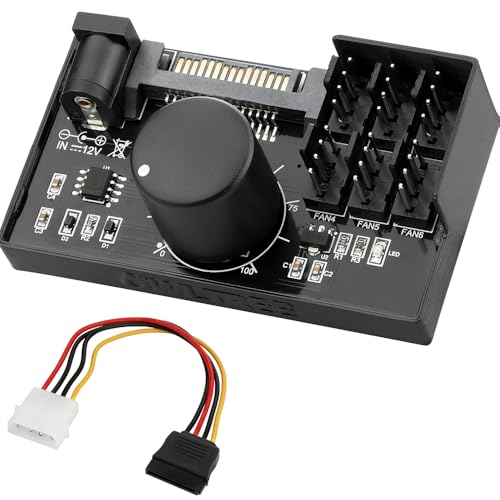
Designed specifically for advanced users, the 4 Pin 12V PWM Fan Controller is ideal for workstation PCs that require precise cooling management. This controller supports up to six fans, ensuring optimal airflow for your system. However, keep in mind it’s not compatible with 3-pin or 2-pin fans. You can power it through SATA 12V or a DC 5.5×2.5mm connection, offering flexibility. With a maximum power output of 60W, each port handles up to 2A. Plus, you can finely adjust the PWM duty cycle from 1% to 99%, allowing tailored cooling for your demanding tasks.
Best For: Advanced users looking for precise cooling management in workstation PCs with multiple fan requirements.
Pros:
- Supports up to six fans for optimal airflow.
- Flexible power supply options with SATA 12V and DC 5.5×2.5mm compatibility.
- Adjustable PWM duty cycle from 1% to 99% for customized cooling performance.
Cons:
- Not compatible with 3-pin or 2-pin fans, limiting fan options.
- Maximum total power output of 60W may restrict higher power fan setups.
- Requires careful monitoring of total combined current to avoid exceeding 5A.
12V PC Fan Speed Controller with Fan Splitter Cable

If you’re looking to fine-tune the cooling of your workstation, the V PC Fan Speed Controller with Fan Splitter Cable is an excellent choice. This 12V controller offers adjustable output between 3-12V, allowing you to customize fan speeds for ideal noise and airflow. With a maximum power of 36W and compatibility for up to four 3-pin or 4-pin fans, you can efficiently manage multiple components. The included 4-way splitter cable and extendable lengths guarantee you have flexibility in your setup. It’s perfect for maintaining stable temperatures in PCs, amplifiers, and gaming consoles. Enhance your cooling today!
Best For: PC enthusiasts and gamers looking to optimize cooling performance and noise levels in their systems.
Pros:
- Adjustable fan speed allows for customized airflow and noise control.
- Compatible with multiple fans (up to four), providing flexibility for various setups.
- Stable power output ensures reliable performance, maintaining optimal temperatures for sensitive components.
Cons:
- Limited to 12V output, which may not suit higher power fans.
- Requires AC power source, which may limit placement options.
- Cabling length might not be sufficient for larger cases or setups without additional extensions.
12V 4 Pin PWM Fan Speed Controller for PC Fans

The 12V 4 Pin PWM Fan Speed Controller is an ideal choice for enthusiasts looking to optimize their workstation PCs with efficient cooling solutions. It supports up to six PWM fans, ensuring you get the most from your setup. With flexible power supply options, including Type-C and DC 5.5×2.1mm, you can easily adapt to your needs. Plus, the adjustable PWM duty cycle offers precise control over fan speeds, indicated by color-coded lights. Just remember, this controller isn’t compatible with 3-pin or 2-pin fans, and the total combined current must not exceed 5A for proper functioning.
Best For: PC enthusiasts looking to efficiently control the cooling of their systems with PWM fans.
Pros:
- Supports up to 6 PWM fans, providing ample cooling for high-performance setups.
- Flexible power supply options (Type-C and DC) for versatile installation.
- Adjustable PWM duty cycle allows precise control over fan speeds with clear indicator lights.
Cons:
- Incompatible with 3-pin and 2-pin fans, limiting fan choices.
- Total current must not exceed 5A, requiring careful power management.
- Fans not included, necessitating additional purchases for a complete setup.
ASUS TUF Gaming ARGB PWM Fan Hub

For gamers and workstation enthusiasts seeking efficient cooling and dynamic lighting, the ASUS TUF Gaming ARGB PWM Fan Hub stands out with its ability to connect up to six case fans. This hub supports PWM and ARGB control, ensuring seamless cooling and stunning lighting effects. Weighing just 5.3 ounces and measuring 6L x 4.1W x 1.1H, it’s compact yet powerful. Dual SATA connectors deliver stable power, and built-in safety features protect against overcurrent. Installation is a breeze with its magnetic mounting, making it compatible with desktops and gaming consoles alike. Upgrade your setup and keep your components cool and stylish!
Best For: Gamers and workstation enthusiasts looking for efficient cooling and dynamic lighting options for their setups.
Pros:
- Supports connection of up to six case fans for enhanced cooling capabilities.
- Easy installation with magnetic mounting for convenient placement in various setups.
- Built-in safety features, including overcurrent protection, ensure reliable operation.
Cons:
- Limited to six fans, which may not be sufficient for larger builds.
- Requires SATA power connectors, which may not be available on all power supplies.
- May not be compatible with non-ARGB fans, limiting customization options.
12V 4-Pin PWM Fan Controller for Cooling Fans
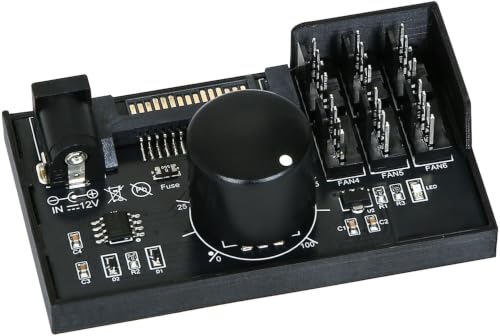
Looking to enhance your workstation’s cooling system? The 12V 4-Pin PWM Fan Controller is perfect for managing up to six standard 4-pin PWM fans, improving multi-fan setups beyond your motherboard’s limitations. With dual power input options and a max output of 60W, it’s crucial to monitor the current to avoid overload. You’ll appreciate the stepless fan speed control, letting you adjust speeds from 1% to 99% for ideal cooling and noise reduction. Designed for versatility, it’s compatible with various 12V fans, making it a must-have for your PC build. Just remember, fans and power adapters aren’t included.
Best For: Users looking to optimize cooling performance in multi-fan PC setups with 4-pin PWM fans.
Pros:
- Supports up to 6 fans: Allows for extensive cooling solutions beyond motherboard limitations.
- Stepless speed control: Customize fan speeds from 1% to 99% for optimal cooling and noise management.
- Dual power input options: Flexibility in powering the controller using either SATA 12V or DC 5.5×2.5mm 12V.
Cons:
- No fans or adapters included: Requires separate purchase of fans and power adapters to function.
- Limited to 4-pin PWM fans: Not compatible with 2/3-pin fans, limiting user choice.
- Total output limit: Must monitor total current across all ports to avoid exceeding the 5A limit, which may restrict fan selection.
Easy Cloud Computer Fan with AC Plug (120mm Variable Speed Axial Muffin PC Fan)

When it comes to versatile cooling solutions, the Easy Cloud Computer Fan with AC Plug stands out as an ideal choice for anyone needing effective airflow in their workstation PCs or other electronic devices. This 120mm variable speed axial muffin fan operates between 700RPM and 2800RPM, providing customizable cooling that suits your needs. With a noise level under 41dB, it’s perfect for silent operation. Its dual ball bearings guarantee a long lifespan of up to 50,000 hours. Compatible with various devices, this fan delivers outstanding airflow while fitting seamlessly into your setup. Optimize your cooling with this reliable fan!
Best For: Those seeking a reliable and adjustable cooling solution for PCs, gaming consoles, and various electronic devices.
Pros:
- Variable speed control allows users to customize airflow from 700RPM to 2800RPM.
- Quiet operation with a noise level under 41dB, ideal for quiet environments.
- Long lifespan of dual ball bearings, ensuring durability and reduced maintenance needs.
Cons:
- Power consumption of 3.3W may be higher than some low-power fans.
- Size limitations as it may not fit in very compact spaces or unique designs.
- AC plug requirement may not be compatible with all setups, especially in portable devices.
Noctua NA-FH1 8 Channel Fan Hub for 12V or 5V Fans

The Noctua NA-FH1 8 Channel Fan Hub is an excellent choice for enthusiasts who demand precision control and effective cooling for their workstation PCs. Supporting up to eight 12V or 5V 4-pin PWM or 3-pin fans, it boasts a sleek black design for seamless integration. You can easily connect it to your motherboard or the optional NA-FC1 controller for maximum fan management. With a total power capacity of 54W via S-ATA, installation is a breeze thanks to four strong magnets. Plus, its compliance with safety standards and a 6-year warranty guarantee you’re investing in quality and reliability.
Best For: The Noctua NA-FH1 8 Channel Fan Hub is best for PC enthusiasts and gamers who require efficient cooling and precise fan control for their systems.
Pros:
- Supports up to eight 12V or 5V fans, allowing for extensive cooling options.
- Easy installation with strong magnets for secure mounting on steel surfaces.
- Backed by a 6-year warranty, ensuring long-term reliability and quality.
Cons:
- Limited to 12V fans for S-ATA power, which may not be suitable for all setups.
- Requires additional fan controller (NA-FC1) for enhanced PWM management, which is sold separately.
- The black design may not match all PC aesthetics, depending on user preferences.
Factors to Consider When Choosing a Fan Controller for Workstation PC
When you’re selecting a fan controller for your workstation PC, you’ll want to take into account several key factors. Think about power supply compatibility, the features for controlling your fans, and how many fans the controller can support. Don’t forget to assess noise levels and ease of installation to guarantee a smooth setup.
Power Supply Compatibility
Choosing a fan controller for your workstation PC requires careful consideration of power supply compatibility to guarantee peak performance. Start by ensuring the controller matches your power supply type, such as SATA 12V or DC 5.5×2.1mm. Check the maximum power output; it typically shouldn’t exceed 60W (5A@12V) to avoid overload. Pay attention to current limitations per port, as most controllers support up to 2A, ensuring the total combined current across all connected fans remains under 5A. Additionally, consider the voltage requirements of your fans—some controllers work solely with 12V fans, while others can accommodate both 12V and 5V configurations. Dual power input options can also enhance flexibility and stability during operation.
Fan Control Features
To guarantee your workstation PC stays cool and operates efficiently, you’ll want to prioritize key fan control features when selecting a fan controller. Look for controllers with PWM (Pulse Width Modulation) functionality, which allows for precise speed control and quieter operation. Make sure the controller has multiple fan ports to connect several fans, enhancing your cooling setup. Compatibility is vital, so check if your fans are 4-pin PWM, 3-pin, or 2-pin. Options with adjustable speed settings let you balance cooling performance with your workload needs. Finally, opt for controllers that can read the RPM of connected fans, providing real-time monitoring and feedback on their performance. These features will help you optimize your workstation’s cooling like a pro.
Noise Level Management
Selecting a fan controller that effectively manages noise levels is essential for creating a peaceful workstation environment. Look for controllers with adjustable PWM duty cycles; this feature lets you optimize fan speeds for low-demand tasks, reducing noise while still keeping things cool during intense workloads. Controllers that support multiple fans help distribute airflow evenly, minimizing high RPM settings that can be loud. Opt for variable speed options so you can fine-tune noise levels, allowing fans to run slower when less cooling is needed. Pair your controller with fans that have low noise ratings to boost acoustic performance. Finally, consider controllers that monitor temperatures and adjust speeds accordingly, preventing unnecessary noise from fans running at high speeds when it’s not required.
Number of Supported Fans
One essential factor in optimizing your workstation’s cooling system is the number of fans your controller can support. Some controllers accommodate 8 to 10 fans, which can notably enhance cooling management in larger setups. With more fan ports, you can easily integrate additional cooling solutions, vital for high-performance tasks that generate heat.
Ensure the fan controller can handle the total power output required by all connected fans, as this varies with the number and power ratings of each fan. Also, consider controllers that support PWM (Pulse Width Modulation); they regulate multiple fans’ speeds based on temperature, improving cooling efficiency and reducing noise. Finally, verify compatibility with your fan types, as some controllers only support specific connectors.
Installation Ease and Design
When optimizing your workstation’s cooling system, installation ease and design play a significant role in your overall setup. Look for fan controllers with magnetic mounting features; they simplify installation on metal surfaces and help reduce clutter. Controllers that use strong adhesive backing offer secure attachment, guaranteeing stability during operation. Opt for models with single cable connections to the motherboard, minimizing cable management challenges and keeping your interior tidy. Compact designs are also essential; they’ll fit into tight spaces while accommodating multiple fan connections. Finally, verify the installation process is straightforward, with clear instructions or intuitive layouts. This way, you can set up your fan controller quickly and efficiently, without any technical difficulties.