
When you’re assembling a high-performance workstation, the case you choose can make all the difference. It’s not just about aesthetics; effective cooling is essential for maintaining peak performance during demanding tasks. Several options stand out, each offering unique features and designs. Let’s explore the top contenders that deliver both exceptional airflow and functionality, ensuring your system runs smoothly and efficiently.
MUSETEX ATX PC Case with ARGB Fans (K2)

If you’re looking for a mid-tower case that combines stunning aesthetics with exceptional cooling performance, the MUSETEX K2 ATX PC Case is an excellent choice. Featuring a sleek black design and a 270° panoramic dual tempered glass, it lets you showcase your components beautifully. With seven pre-installed PWM ARGB fans and an innovative cooling design, heat dissipation is efficient, ensuring your system runs smoothly. You’ll appreciate the customizable light modes and fan speeds, allowing you to optimize performance. Plus, the ample connectivity options and magnetic dust filters make maintenance a breeze, enhancing your overall user experience.
Best For: Those seeking a stylish mid-tower PC case with excellent cooling capabilities and customizable features for high-performance builds.
Pros:
- 270° panoramic dual tempered glass design showcases components beautifully.
- Seven pre-installed PWM ARGB fans ensure effective cooling and customizable lighting.
- Ample connectivity options including Type-C and USB 3.0 for versatile use.
Cons:
- Limited to a maximum of 10 fans, which may not satisfy extreme cooling needs.
- The weight of 15 pounds may make it less portable for frequent movers.
- Some users may find the installation layout complex if they are inexperienced.
DARKROCK EC2 Black ATX Mid Tower PC Case

The DARKROCK EC2 Black ATX Mid Tower PC Case is an ideal choice for gamers and content creators who demand both style and superior cooling performance. Its tempered glass side panels let you showcase your hardware, while the meshed front panel enhances airflow. You can support up to eight 120mm fans or a 360mm radiator, ensuring excellent cooling. It accommodates ATX, M-ATX, and ITX motherboards, along with graphics cards up to 340mm long. Plus, the Type-C connectivity offers modern convenience. With magnetic dust filters, maintenance becomes a breeze, keeping your build clean and efficient for maximum performance.
Best For: Gamers and content creators seeking a stylish PC case with outstanding cooling capabilities.
Pros:
- Spacious design allows for the installation of various motherboard sizes and large graphics cards.
- Excellent airflow with support for multiple cooling fans and a radiator, ensuring optimal performance during intense usage.
- User-friendly maintenance features, including magnetic dust filters, keep the interior clean with minimal effort.
Cons:
- Limited GPU and PSU length may restrict options for some high-end components.
- Tempered glass panels can be prone to fingerprints and smudges, requiring regular cleaning to maintain aesthetics.
- Type-C connectivity may not be essential for all users, depending on their current setup and peripherals.
Cooler Master N400 Mid Tower Computer Case (NSE-400-KKN2)
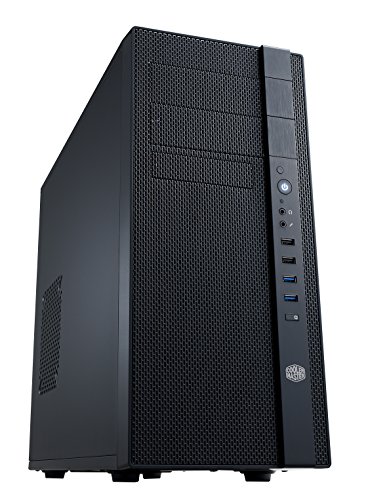
For those seeking a mid-tower case that excels in cooling performance, the Cooler Master N400 (NSE-400-KKN2) stands out with its fully meshed front panel, ensuring superior airflow. You’ll appreciate the versatility, as it supports up to eight fans and accommodates a 240 mm water cooling radiator. Two included XtraFlo 120 mm fans enhance cooling right out of the box. With three dust filters for easy maintenance and ample storage options for SSDs, this case also features two USB 3.0 ports for quick connectivity. Rated 4.1 stars, it’s a reliable choice for your workstation setup.
Best For: Those looking for a mid-tower case with excellent cooling capabilities and versatile storage options.
Pros:
- Superior airflow with a fully meshed front panel and support for multiple fans.
- Easy maintenance with three dust filters and tool-less SSD mounting.
- Quick connectivity with two USB 3.0 ports and an audio-out port.
Cons:
- Limited color options, as it only comes in one color variant.
- Weight may be a concern for users looking for a lightweight case.
- Non-LED fans might not appeal to users who prefer RGB lighting.
CORSAIR 4000D RS ARGB Mid-Tower ATX PC Case

Engineered for gamers and content creators who demand high-quality performance, the CORSAIR 4000D RS ARGB Mid-Tower ATX PC Case stands out with its exceptional cooling capabilities. Its high airflow design, featuring three pre-installed RS fans, guarantees peak temperature management. You’ll appreciate the modular FRAME system, allowing extensive customization to fit your preferences. The InfiniRail fan mounting system supports fans up to 200mm, while the 3D Y-Pattern Airflow Panel minimizes restrictions. Plus, it’s compatible with powerful graphics cards and dual 360mm radiators. With a stellar 4.6 out of 5 stars, this case is a top choice for any build.
Best For: Gamers and content creators seeking a high-performance PC case with exceptional cooling and extensive customization options.
Pros:
- High airflow design with three pre-installed RS fans for optimal temperature management.
- Modular FRAME system allows for extensive customization to fit individual preferences.
- Compatibility with powerful components, including dual 360mm radiators and large graphics cards.
Cons:
- Limited color options available, as it only comes in black.
- Weight may be a concern for those looking for a lighter case for portability.
- May require additional fans for maximum cooling efficiency depending on specific build configurations.
Thermaltake Core W200 Super Tower Computer Case (CA-1F5-00F1WN-00)
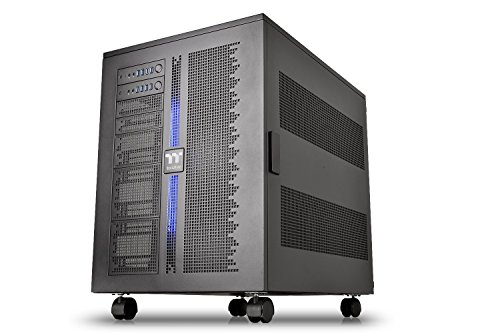
Offering unmatched versatility, the Thermaltake Core W200 Super Tower Computer Case is ideal for PC enthusiasts who crave dual system capabilities. You can easily accommodate two separate systems with back-to-back configurations, supporting motherboards from Mini ITX to XL-ATX sizes. The fully modular design allows you to customize your setup, while the extreme water cooling options support up to 2x 600mm radiators. With convenient front panel access to USB 3.0 and HD Audio ports, plus a large acrylic window for visibility, this case not only performs exceptionally but also looks great. Enjoy a 3-year warranty for added peace of mind.
Best For: PC enthusiasts seeking a high-performance, dual system capable tower case for advanced custom builds.
Pros:
- Fully modular design allows for extensive customization and configuration options.
- Supports extreme water cooling setups with the ability to install up to 2x 600mm radiators.
- Dual system capability enables the use of two separate motherboards and components for enhanced performance.
Cons:
- The large size may require significant space and may not fit in smaller setups.
- Assembly and configuration can be complicated for beginners due to its advanced features.
- The price point may be higher compared to standard cases, making it less accessible for budget-conscious users.
Rosewill 4U Rackmount Server Chassis (RSV-L4620)
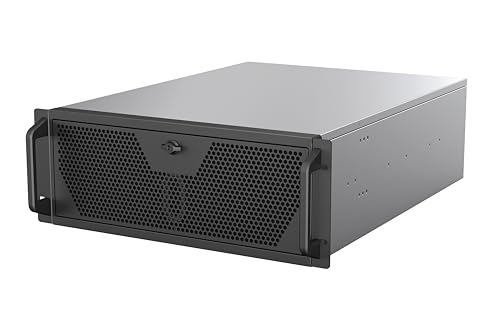
The Rosewill 4U Rackmount Server Chassis (RSV-L4620) stands out as an ideal choice for serious gamers and professionals who demand exceptional cooling performance in their workstation cases. With dimensions of 23.62 x 16.9 x 6.94 inches and a weight of 26 pounds, it supports up to 2 x 3.5″ HDD and 4 x 2.5″ SSD. You’ll appreciate its AIO support for a 360mm liquid cooler and three pre-installed 120mm PWM fans, ensuring optimal airflow. Engineered for high-performance computing, it’s perfect for rendering and AI training. Plus, the USB 3.2 Gen Type-C port makes file transfers a breeze.
Best For: Serious gamers and professionals seeking a high-performance server chassis with exceptional cooling capabilities.
Pros:
- Optimal Cooling: Features AIO support for 360mm liquid cooling and three pre-installed 120mm PWM fans for enhanced airflow.
- High Compatibility: Supports E-ATX motherboards and multiple storage options, including 2 x 3.5″ HDD and 4 x 2.5″ SSD.
- Fast Connectivity: Equipped with a USB 3.2 Gen Type-C port for quick file transfers at speeds up to 10 Gbps.
Cons:
- Weight: At 26 pounds, it may be heavier compared to other server chassis, making it less portable.
- Limited HDD Support: Only accommodates up to 2 x 3.5″ HDDs, which may not be sufficient for users requiring extensive storage.
- Size: Its large dimensions may not fit in smaller rack spaces or setups.
Thermaltake View 270 Plus TG ARGB Mid Tower Case

If you’re looking for a mid-tower case that combines style with superb cooling capabilities, the Thermaltake View 270 Plus TG ARGB is an excellent choice. It features stunning dual tempered glass panels for a panoramic view of your components. With three pre-installed 120mm ARGB Lite fans and support for up to nine fans, you’ll enjoy exceptional airflow. This case accommodates various motherboard sizes, including E-ATX, and supports a 360mm radiator for intense cooling needs. Plus, with multiple USB ports and a sleek black design, it’s both functional and aesthetically pleasing. Customer ratings are impressive, making it a top contender.
Best For: Gamers and PC builders seeking a stylish mid-tower case with excellent cooling and compatibility for various components.
Pros:
- Stunning Design: Dual tempered glass panels provide a panoramic view of your build.
- Excellent Cooling: Comes with three pre-installed ARGB Lite fans and supports up to nine fans total.
- Versatile Compatibility: Supports multiple motherboard sizes, including E-ATX, and accommodates a 360mm radiator.
Cons:
- Limited Drive Bays: Only a few drive bays available, which may be restrictive for users with extensive storage needs.
- Weight: At 6.35 kg, it may be heavier than some other mid-tower cases, potentially affecting portability.
- Price Point: It may be more expensive compared to other mid-tower cases in the same category.
Cooler Master MasterBox Q300L Micro-ATX Tower

Designed for gamers and professionals who demand high performance in a compact form factor, the Cooler Master MasterBox Q300L Micro-ATX Tower stands out with its exceptional airflow capabilities. It supports Micro-ATX and Mini-ITX motherboards, ensuring easy expansion without sacrificing cooling. With a maximum CPU cooler height of 159mm and GPU compatibility up to 360mm, it accommodates diverse setups. The case allows for a 240mm liquid cooler and up to five fans, optimizing thermal performance. Plus, its adjustable I/O panel and unique design add versatility and style, making it a top choice among users, earning a solid 4.5-star rating.
Best For: Gamers and professionals seeking a compact yet high-performance case with excellent cooling capabilities.
Pros:
- Exceptional airflow design with support for multiple cooling options, including a 240mm liquid cooler and up to five fans.
- Versatile compatibility with Micro-ATX and Mini-ITX motherboards, allowing for easy expansion and customization.
- Adjustable I/O panel and unique aesthetic enhancements, providing both functionality and style.
Cons:
- Limited maximum PSU length of 160mm may restrict some high-performance power supply options.
- Interior space may be cramped for users with larger components or extensive cable management needs.
- The transparent acrylic side panel may be prone to scratches and smudges compared to tempered glass alternatives.
Thermaltake AX500 TG Full Tower Case (CA-11D-00F1WN-00)

For professionals and gaming enthusiasts who demand exceptional cooling performance, the Thermaltake AX500 TG Full Tower Case (CA-11D-00F1WN-00) stands out with its impressive fan support, accommodating up to 9x140mm or 14x120mm fans. Weighing 29.3 pounds and measuring 21.57 x 9.76 x 21.65 inches, this sleek black case is compatible with various motherboard sizes, including ATX and SSI-EEB. With 8 PCIe slots, you can expand your GPU capabilities, while the drive support allows for up to 5×3.5” or 6×2.5” drives. Its solid design and customer rating of 4.4 out of 5 make it a reliable choice.
Best For: Professionals and gaming enthusiasts seeking a high-performance case with excellent cooling capabilities and expandability options.
Pros:
- Exceptional Cooling: Supports up to 9x140mm or 14x120mm fans for optimal airflow.
- Versatile Compatibility: Accommodates various motherboard sizes, including ATX and SSI-EEB, with hidden connector support.
- Ample Expansion: Offers 8 PCIe slots for multi-GPU setups and supports multiple storage drives.
Cons:
- Weight: At 29.3 pounds, it may be heavy for some users to move.
- Size: Its large dimensions may not fit in smaller spaces or setups.
- Assembly Complexity: Installation can be complicated for beginners due to its extensive features and options.
NZXT H7 Flow 2024 Mid-Tower ATX Airflow Case

The NZXT H7 Flow 2024 Mid-Tower ATX Airflow Case stands out as an exceptional choice for gamers and content creators who prioritize cooling performance. Weighing 25 pounds and measuring 18.43 x 9.6 x 21.42 inches, it features three pre-installed 120mm front fans and supports additional bottom-mounted fans for dedicated GPU cooling. The high-performance mesh panels optimize airflow, while large radiator support accommodates up to 420mm in the front and 360mm on top. With an intuitive cable management system and multiple USB ports, it’s both functional and stylish. With a 4.7-star rating, it’s a reliable option for any setup.
Best For: Gamers and content creators who prioritize cooling performance and efficient cable management in their builds.
Pros:
- Optimized airflow: High-performance mesh panels and multiple pre-installed fans enhance cooling efficiency.
- Spacious radiator support: Accommodates large radiators up to 420mm in the front and 360mm on top for advanced cooling setups.
- User-friendly cable management: Intuitive system with wide channels, built-in hooks, and straps simplifies cable organization.
Cons:
- Weight: At 25 pounds, it may be heavier than some users prefer for portability.
- Limited color options: Available only in black, which may not suit all aesthetic preferences.
- Potential noise from fans: Pre-installed fans may generate noise under heavy loads, depending on user sensitivity to sound.
Factors to Consider When Choosing a Workstation Case with Cooling
When you’re picking a workstation case with cooling in mind, you need to take into account several key factors. Cooling system efficiency and airflow design features play a big role in how well your components stay cool. Don’t forget to check compatibility with your parts and the overall size and build quality for durability.
Cooling System Efficiency
Choosing a workstation case with an efficient cooling system involves several essential factors that can greatly impact performance. First, consider the number and size of fans; larger fans usually provide better airflow with less noise. A case featuring a fully meshed front panel enhances airflow, allowing more air to circulate effectively. Pay attention to the design and layout of the cooling system—optimal placement of fans and radiators is vital for heat dissipation. Utilizing PWM fans can match fan speeds to thermal demands, ensuring efficient cooling while minimizing noise. Finally, don’t overlook dust filtration systems; keeping your case clean prevents dust buildup, which can obstruct airflow and reduce cooling efficiency over time.
Compatibility With Components
A well-cooled workstation relies not only on an efficient cooling system but also on how well the case accommodates your specific components. First, make certain the case supports the motherboard form factors you plan to use, like ATX, Micro-ATX, or Mini-ITX. Next, check the maximum GPU length to verify it can fit high-performance graphics cards. Don’t forget about the CPU cooler height; it must fit without obstructing airflow or other components. Assess the drive bays available for storage—confirm they support both SSDs and HDDs. Finally, look for good cable management features. Organized cables can enhance airflow and overall system performance, helping your workstation run efficiently while keeping components cool.
Airflow Design Features
To maintain ideal temperatures in your workstation, good airflow design is crucial. Look for cases with strategically placed intake and exhaust fans that enable effective air circulation. A case that supports multiple fan configurations, preferably 8 or more fans, can greatly boost cooling performance during demanding tasks. Open thermal designs featuring perforated panels or mesh front sections enhance airflow, preventing hot spots and guaranteeing your components stay cool. Additionally, consider cases with dust filters—especially magnetic ones—to keep airflow efficient by blocking dust accumulation. Finally, if you’re opting for liquid cooling, verify the case can accommodate large radiators, up to 420mm, for advanced cooling solutions that are essential for high-performance workstations.
Size and Space Considerations
When selecting a workstation case, understanding size and space considerations is vital for ideal cooling and compatibility. Start by considering the case’s dimensions and weight; larger cases can house multiple GPUs and larger CPU coolers, while heavier cases might need extra support during installation. Confirm the case supports your motherboard’s form factor—common sizes include ATX, Micro-ATX, and Mini-ITX. Check the maximum GPU length and CPU cooler height to make certain your components fit without obstruction. Adequate internal space for airflow and cable management is essential, as organized cables promote better cooling. Finally, evaluate the number of drive bays, as this affects your storage options for data-heavy applications typically used in workstations.
Build Quality and Durability
While you may be tempted to prioritize aesthetics when choosing a workstation case, build quality and durability are far more essential, especially in high-performance environments. A sturdy case guarantees long-term stability, resisting heat and vibrations that can affect your components. Look for materials like steel and tempered glass, which provide the necessary structural integrity and durability. A well-designed internal structure supports heavy components, preventing sagging and misalignment. Consider cases with modular designs for easier upgrades and maintenance, enhancing their longevity. Don’t overlook effective cooling solutions, including adequate fan support and airflow design, as they play a crucial role in preventing overheating and guaranteeing your workstation performs at its best over time.
Cable Management Options
Effective cable management isn’t just about aesthetics; it greatly impacts cooling performance in your workstation case. When choosing a case, look for options with intuitive cable routing channels, built-in hooks, and straps that help keep cables organized. A spacious interior is essential, as it allows you to route cables without obstructing airflow or components. Consider cases with modular designs, enabling you to customize your cable management setup to fit your specific needs. Integrated cable management systems can reduce clutter, improve airflow, and enhance your build’s overall functionality. Finally, look for designated cable management compartments or covers that conceal cables and connectors for a clean, professional appearance, ensuring your workstation runs efficiently and cools effectively.
Aesthetic Appeal
A workstation case isn’t just a functional component; it’s also an opportunity to showcase your personal style. Opting for a dual tempered glass design lets you display your internal components and RGB lighting, adding a striking visual element to your setup. If you enjoy customization, look for cases with RGB lighting options that allow you to create a unique aesthetic. A meshed front panel not only enhances airflow but also provides a modern look. Furthermore, a well-organized internal layout guarantees cables and components are neatly arranged, contributing to an overall pleasing appearance. Finally, choosing premium materials like aluminum or high-quality plastic can elevate your case, making it a stunning focal point in your workspace.
Maintenance and Accessibility
When choosing a workstation case with exceptional cooling, maintenance and accessibility are essential factors to evaluate. Look for cases featuring magnetic dust filters; they simplify upkeep while preventing dust buildup, which enhances airflow. Easy-to-remove side and front panels allow convenient access to internal components, making upgrades and repairs hassle-free. Confirm the case design promotes effective cable management, as this not only improves airflow but also eases maintenance tasks. Check for multiple dust filter locations on the top, bottom, and side panels, enabling regular cleaning without needing to disassemble the entire case. Finally, opt for cases that provide ample space for airflow and cooling solutions, reducing the frequency of maintenance required for ideal temperature control.