
When it comes to running a small business in 2026, choosing the right color laser printer can greatly impact your efficiency and costs. You need a device that combines speed, quality, and reliability. The market is filled with options, but not all printers are created equal. From robust security features to high-volume capabilities, the best color laser printers have something to offer. Let’s explore which models stand out and why they might be the perfect fit for your office.
HP Color Laserjet Pro MFP 4301fdw All-in-One Color Laser Printer
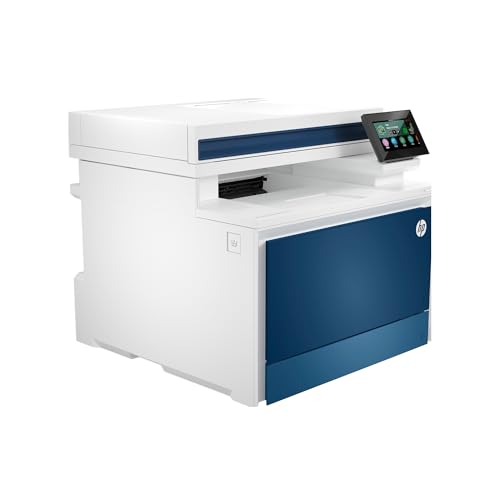
The HP Color Laserjet Pro MFP 4301fdw All-in-One Color Laser Printer is an excellent choice for small teams that need a reliable, multifunction device. It prints up to 35 color pages per minute, ensuring you won’t waste time on lengthy jobs. With auto 2-sided printing and an automatic document feeder, you’ll boost your efficiency while scanning and copying. This printer connects effortlessly via intelligent Wi-Fi, Ethernet, or Bluetooth, and supports a variety of devices, including PCs and tablets. Plus, its robust security features protect your data, making it a smart investment for small office environments of up to 10 users.
Best For: Small office teams of up to 10 users seeking a reliable all-in-one color laser printer with fast printing capabilities.
Pros:
- Prints up to 35 color pages per minute, significantly reducing wait times.
- Features auto 2-sided printing and an automatic document feeder for increased efficiency.
- Robust security measures, including HP Wolf Pro Security, protect sensitive data.
Cons:
- Requires original HP cartridges, which may limit cost-effective printing options.
- May be overkill for very small teams or home office use due to its capacity and features.
- Initial setup and connectivity may be complex for users unfamiliar with technology.
Brother All-in-One Laser Printer (MFC-L5915DW)

For busy offices and workgroups that demand high-volume printing, the Brother MFC-L5915DW stands out as an exceptional all-in-one monochrome laser printer. With impressive speeds of up to 50 pages per minute, it handles large tasks efficiently. You’ll appreciate the ultra high-yield toner cartridge, which prints up to 18,000 pages, keeping costs low. The built-in Gigabit Ethernet and dual-band wireless networking make it easy to connect and share across devices. Plus, the 5” touchscreen simplifies your workflow with customizable shortcuts. With a solid customer rating of 4.4 stars, this printer is a reliable choice for your business needs.
Best For: Busy offices and workgroups that require high-volume, efficient monochrome printing.
Pros:
- High-speed printing of up to 50 pages per minute, ideal for large tasks.
- Ultra high-yield toner cartridge that prints up to 18,000 pages, significantly reducing printing costs.
- Seamless connectivity with built-in Gigabit Ethernet and dual-band wireless networking for easy device sharing.
Cons:
- Monochrome only, limiting use for color printing needs.
- Initial cost may be higher than basic printers, though offset by low running costs.
- Size and weight may not be suitable for smaller office spaces.
HP Color LaserJet Pro MFP 3301sdw Wireless All-in-One Printer

Looking for a reliable all-in-one solution for your small business? The HP Color LaserJet Pro MFP 3301sdw is just what you need. It combines printing, scanning, and copying capabilities in one compact device. With print speeds up to 26 pages per minute and a 250-sheet input tray, your workflow stays efficient. The next-generation TerraJet toner guarantees vivid colors for professional-quality documents. Plus, it features auto 2-sided printing and an auto document feeder for added convenience. Just remember to use Original HP toner cartridges for peak performance and to keep your printer updated for the best results.
Best For: Small businesses looking for a reliable all-in-one printer that offers fast printing, scanning, and copying capabilities.
Pros:
- Fast print speeds of up to 26 pages per minute for both black and color documents.
- Compact design with a 250-sheet input tray helps maintain efficient workflow.
- Features like auto 2-sided printing and an auto document feeder enhance convenience.
Cons:
- Requires Original HP toner cartridges, limiting options for third-party cartridges.
- Periodic firmware updates may be necessary to maintain functionality with non-HP cartridges.
- May have a higher upfront cost compared to basic printers without all-in-one features.
Brother MFC-L3720CDW Wireless Color Laser Printer

Designed with small businesses in mind, the Brother MFC-L3720CDW Wireless Color Laser Printer combines essential features like scanning, copying, and faxing into a compact unit. With a print speed of up to 19 pages per minute and laser-quality output, it efficiently handles your printing needs. Its 250-sheet capacity and automatic duplex printing optimize productivity. You’ll appreciate the 3.5-inch color touchscreen and 48 customizable shortcuts for easy navigation. Plus, dual-band wireless connectivity guarantees seamless printing from any device. Monitor toner levels and manage remotely with the companion app, making this printer a reliable choice for your business.
Best For: Small businesses looking for a reliable and multifunctional printer that offers fast printing, scanning, and faxing capabilities.
Pros:
- Fast print speed of up to 19 pages per minute, enhancing productivity.
- Automatic duplex printing saves paper and reduces costs.
- Dual-band wireless connectivity allows for seamless printing from multiple devices.
Cons:
- May have a higher initial cost compared to basic printers.
- Limited color printing quality compared to some inkjet printers.
- Larger footprint may not suit very small office spaces.
Brother HL-L3280CDW Wireless Compact Digital Color Printer

The Brother HL-L3280CDW Wireless Compact Digital Color Printer stands out as an ideal choice for small offices and home-based entrepreneurs seeking reliable performance without sacrificing space. With print speeds reaching up to 27 pages per minute, it guarantees quick output for your busy workdays. The automatic duplex printing feature saves time and paper, making it eco-friendly. Plus, the integrated 2.7-inch touchscreen allows you to print directly from cloud services like Google Drive and Dropbox. You’ll appreciate the added convenience of Alexa compatibility for voice-activated printing. To top it off, you can enjoy a 2-month Refresh Subscription Trial for enhanced capabilities.
Best For: Small offices and home-based entrepreneurs looking for a reliable, compact printer that offers fast and high-quality output.
Pros:
- Fast printing speeds of up to 27 pages per minute, enhancing productivity.
- Automatic duplex printing feature saves time and reduces paper usage.
- Integrated touchscreen for easy access to cloud printing services and Alexa compatibility for voice-activated printing.
Cons:
- May have a higher upfront cost compared to inkjet printers.
- Limited paper handling capacity may require frequent refills for larger print jobs.
- Some users may find the initial setup process complex or time-consuming.
HP Color Laserjet Pro 3201dw Wireless Color Laser Printer

For small teams needing a reliable solution for high-quality document printing, the HP Color Laserjet Pro 3201dw Wireless Color Laser Printer stands out with its impressive print speeds of up to 26 pages per minute. It features a 250-sheet input tray and auto 2-sided printing, making it efficient for busy environments. The next-generation TerraJet toner enhances color vibrancy, ensuring your documents look professional. With dual-band Wi-Fi and self-reset capabilities, you’ll enjoy seamless wireless printing. Renowned for its reliability, this printer is designed to meet high business demands, though remember it’s compatible only with original HP cartridges for peak performance.
Best For: Small teams looking for a reliable and efficient printer that delivers professional-quality documents quickly.
Pros:
- Fast print speeds of up to 26 pages per minute for both black and color.
- 250-sheet input tray and auto 2-sided printing enhance productivity.
- Dual-band Wi-Fi with self-reset functionality ensures seamless wireless connectivity.
Cons:
- Only compatible with original HP cartridges, limiting toner options.
- May require firmware updates to maintain effectiveness against non-HP cartridges.
- Relatively larger footprint may not fit in all small office spaces.
Lexmark Monochrome Printer, 7″, Grey (36S0900)
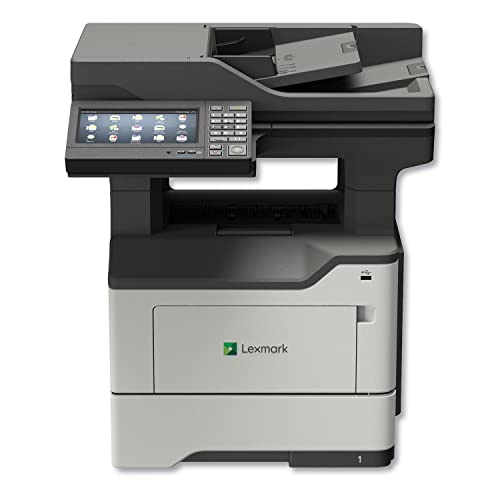
Offering impressive print speeds of up to 50 pages per minute, the Lexmark Monochrome Printer (36S0900) is ideal for small businesses that demand efficiency without sacrificing quality. This all-in-one printer boasts a 7-inch touchscreen for easy navigation and automatic duplex printing to save you time and paper. With a maximum print resolution of 600 x 600 dpi, your documents will look sharp and professional. Featuring one-pass two-sided scanning and a 250-sheet input capacity, it’s built for productivity. Plus, its networkable design guarantees seamless connectivity, making it a reliable choice for any small office environment.
Best For: Small businesses seeking an efficient, high-speed monochrome printer that delivers professional-quality documents.
Pros:
- Fast Print Speeds: Achieves up to 50 pages per minute, enhancing productivity.
- User-Friendly Interface: Equipped with a 7-inch touchscreen for easy navigation and operation.
- Automatic Duplex Printing: Saves time and reduces paper usage with one-pass two-sided printing.
Cons:
- Heavy Weight: Weighs 58.6 pounds, which may make it difficult to move.
- Limited Color Printing: Only supports black and white printing, which may not suit all users’ needs.
- Single Input Tray: Only has one tray for paper, potentially limiting workflow for larger jobs.
Canon Color imageCLASS MF665Cdw All-in-One Wireless Laser Printer

Designed with small businesses in mind, the Canon Color imageCLASS MF665Cdw All-in-One Wireless Laser Printer combines efficiency and versatility in one compact unit. With fast print speeds of up to 26 pages per minute, you won’t waste time waiting for documents. Its 5-inch color touchscreen makes navigation a breeze, while easy wireless setup lets you connect in no time. Plus, the automatic document feeder handles 50 sheets for quick scanning and copying. With high-capacity toner and ENERGY STAR certification, you’ll save on costs and energy. This printer is truly a reliable partner for your business needs.
Best For: Small businesses looking for a reliable and efficient all-in-one laser printer that can handle various tasks with speed and convenience.
Pros:
- Fast print speeds of up to 26 pages per minute, minimizing waiting time for documents.
- User-friendly 5-inch color touchscreen for intuitive navigation and easy access to features.
- Energy-efficient design with ENERGY STAR certification, helping to reduce operational costs.
Cons:
- The initial cost may be higher compared to basic printers, which could be a consideration for budget-conscious businesses.
- Limited paper handling capacity with only a 250-sheet standard cassette, which may require more frequent refills for larger print jobs.
- Mobile printing options may be constrained for users without compatible devices or apps.
HP Color Laserjet Pro MFP 4301fdw All-in-One Color Laser Printer
The HP Color Laserjet Pro MFP 4301fdw All-in-One Color Laser Printer is the perfect solution for small teams looking to enhance productivity without sacrificing quality. It prints up to 35 color pages per minute, making it efficient for busy environments. With auto 2-sided printing and an auto document feeder, you’ll save time on scanning and copying tasks. Its intelligent Wi-Fi guarantees reliable connectivity, while compatibility with various devices—including PCs, tablets, and smartphones—keeps you connected. Plus, HP Wolf Pro Security protects your data, with customizable settings to safeguard your information, making it an ideal choice for your office.
Best For: Small teams seeking a reliable all-in-one color laser printer to enhance productivity and document quality.
Pros:
- Efficient printing speeds of up to 35 color pages per minute, ideal for busy office environments.
- Auto 2-sided printing and auto document feeder streamline scanning and copying tasks, saving time.
- Strong security features with HP Wolf Pro Security and customizable settings to protect data.
Cons:
- Requires original HP cartridges, which may lead to higher ongoing costs compared to third-party options.
- Designed for optimal use by up to 10 users, which may limit scalability for larger teams.
- May have a steeper learning curve for users unfamiliar with advanced printer settings and features.
Brother DCP-L2640DW Wireless Multi-Function Laser Printer

For small businesses seeking a reliable and efficient printing solution, the Brother DCP-L2640DW stands out with its impressive speed, producing up to 36 pages per minute. This compact multi-function printer combines printing, scanning, and copying, delivering high-quality black and white prints. It features a 50-page auto document feeder, making multi-page tasks quick and easy. You’ll appreciate its flexible connectivity options, including dual-band wireless and Ethernet, as well as local USB connections. With the Brother Mobile Connect app, managing your printer remotely is a breeze, and the Refresh EZ Print Subscription Service guarantees you never run out of toner.
Best For: Small businesses seeking an efficient and compact multi-function printer that delivers high-quality black and white prints.
Pros:
- Fast printing speed of up to 36 pages per minute, enhancing productivity.
- Versatile connectivity options including dual-band wireless, Ethernet, and USB.
- Mobile management through the Brother Mobile Connect app for convenient remote access.
Cons:
- Limited to monochrome printing, not suitable for color document needs.
- Initial setup may require time and technical knowledge for some users.
- Toner replacement can be costly if not using the subscription service.
Factors to Consider When Choosing a Color Laser Printer for Small Business
When you’re choosing a color laser printer for your small business, several key factors come into play. You’ll want to evaluate print speed, connectivity options, and paper handling capacity to guarantee it meets your needs. Additionally, don’t overlook the cost of toner and any security features that could protect your sensitive documents.
Print Speed Efficiency
Choosing a color laser printer that offers ideal print speed efficiency can dramatically enhance your small business’s productivity. Look for models that can print up to 50 pages per minute, especially during high-volume tasks. Automatic duplex printing is another key feature, allowing you to print double-sided documents without extra effort, saving time and resources. An auto document feeder can further boost your workflow by enabling simultaneous scanning and copying of multiple pages. Additionally, consider printers that deliver professional-quality color prints at speeds of up to 35 pages per minute, which helps you meet tight deadlines. Finally, evaluate the monthly duty cycle to verify the printer can handle your workload effectively, aligning with your business’s printing demands.
Connectivity Options Available
To maximize your small business’s efficiency, it’s vital to evaluate the connectivity options available in color laser printers. Look for models with dual-band wireless connectivity (2.4GHz and 5GHz) to guarantee reliable, fast connections in busy office environments. Compatibility with mobile printing options like AirPrint, Google Cloud Print, and specific mobile apps is essential for printing from smartphones and tablets. Consider printers with Ethernet capabilities for stable wired connections, especially if your office setup relies on a network. Wi-Fi Direct support is a great addition, allowing easy peer-to-peer printing without a router. Finally, check for USB interfaces to enable direct connections to computers, providing flexibility in how you connect your devices.
Paper Handling Capacity
Efficient paper handling capacity is essential for small businesses that rely on consistent printing. When choosing a color laser printer, consider the input tray capacity, which typically ranges from 250 to 500 sheets for small business models. If your workload includes multi-page tasks, look for printers with automatic document feeders (ADF) that can handle 50 to 100 sheets at a time, enhancing your efficiency. Expandable paper trays are another great option for growing businesses, allowing you to adapt to increased printing demands. Additionally, automatic duplex printing can help reduce paper usage, making it an eco-friendly choice. Finally, verify the printer supports the media sizes you need, as most handle standard sizes like letter and legal, while some accommodate larger formats.
Cost of Toner
The cost of toner plays a significant role in the overall expenses associated with running a color laser printer for your small business. High-yield cartridges often provide a lower cost-per-page than standard ones, making them a smart choice if you print frequently. Some high-yield options can print up to 18,000 pages, reducing both the frequency and cost of replacements. It’s also essential to check if your printer requires original manufacturer toner, as non-genuine cartridges might be blocked, leading to unexpected costs. Regularly monitoring toner levels and considering subscription services can help manage expenses effectively. Finally, while a lower initial purchase price may be tempting, evaluating the long-term toner costs guarantees you get the best value for your needs.
Security Features Included
While managing toner costs is essential for your small business, security features in color laser printers shouldn’t be overlooked. Look for customizable settings that safeguard sensitive information and prevent unauthorized access. Advanced security protocols, like HP Wolf Pro Security, protect your data during operation and connectivity. Some printers even block non-manufacturer cartridges, ensuring security and reliability while reducing the risk of data breaches. Built-in measures such as encryption for network traffic and secure boot processes defend against malicious threats. Regular firmware updates are vital, too, as they address vulnerabilities and protect against emerging risks. Prioritizing these security features will help keep your business’s information safe while you focus on growth and success.
Dimensions and Size
Selecting the right color laser printer for your small business hinges on understanding dimensions and size. First, make certain the printer fits comfortably in your workspace, especially if you’re in a small office. Consider the weight, as lighter models are easier to move if needed. Look for compact designs that offer multifunction capabilities, like printing, scanning, and copying, without consuming too much space. Ascertain you have enough clearance for ventilation and easy access to paper trays and connectivity ports. Finally, evaluate the printer’s footprint against your desk or shelf space, remembering to account for any additional accessories or paper trays you might need. A well-sized printer will enhance your productivity without overcrowding your workspace.
User-Friendly Interface
Choosing a printer that fits your space is just the beginning; you’ll also want an easy-to-use interface that simplifies your daily tasks. Look for features like a touchscreen display, which makes navigation a breeze and allows you to create customizable shortcuts. Intuitive mobile apps can enhance your workflow, enabling you to manage and print documents right from your smartphone, perfect for your busy schedule. Quick wireless setup options like Wi-Fi Direct eliminate complicated configurations, ensuring you stay productive. Additionally, clear menu options streamline routine tasks such as printing, scanning, and copying. Don’t forget accessibility features, like voice-activated printing, to cater to a wider range of users, making your printer a versatile asset in your small business.