
In 2026, the right 49-inch monitor can truly transform your workspace and elevate your productivity. With options featuring ultra-wide displays and advanced resolutions, you’ll find it easier to multitask and manage your workload. Each model offers unique features tailored for different needs, whether you’re a gamer or a creative professional. Curious about which monitors stand out in this evolving landscape? Let’s explore the best options available for your needs.
Samsung 49-inch Odyssey G9 Curved Gaming Monitor (LS49FG910ENXZA)

The Samsung 49-inch Odyssey G9 Curved Gaming Monitor (LS49FG910ENXZA) is perfect for gamers who crave an immersive experience without sacrificing productivity. Its 49-inch ultra-wide 32:9 curved display simulates two 16:9 monitors, giving you ample screen real estate. With a 144Hz refresh rate and 1ms response time, you’ll enjoy smooth gameplay, while AMD FreeSync Premium Pro minimizes lag and screen tears. Use the split-screen functionality for side-by-side gaming or the Picture-in-Picture feature to multitask effectively. Plus, the ergonomic stand guarantees you find the ideal viewing angle, enhancing both comfort and productivity during extended sessions.
Best For: Gamers seeking an ultra-wide, immersive experience for both gaming and multitasking.
Pros:
- Ultra-wide 32:9 curved display provides an expansive view, simulating two monitors for enhanced productivity.
- 144Hz refresh rate and 1ms response time ensure smooth gameplay with minimal lag, perfect for fast-paced gaming.
- Picture-in-Picture and split-screen functionality allow for seamless multitasking and side-by-side gameplay with friends.
Cons:
- Large physical size may require significant desk space and may not fit in smaller gaming setups.
- Higher price point compared to standard monitors, which may not be suitable for budget-conscious buyers.
- Limited compatibility with older devices, as some features may require updated hardware or connections.
Samsung 49” Business Curved Ultrawide Dual QHD Computer Monitor (LS49C954UANXZA)

For professionals seeking an immersive and efficient workspace, the Samsung 49” Business Curved Ultrawide Dual QHD Monitor (LS49C954UANXZA) stands out with its impressive 1000R curved display and dual QHD resolution. This monitor doubles as a docking station, featuring DisplayPort, 2 HDMI, USB, and USB Type-C with 90W charging, reducing desk clutter. With a 120Hz refresh rate, you’ll enjoy smoother scrolling and reduced lag, enhancing your productivity and gaming experience. Built-in speakers provide convenient audio while the height-adjustable stand guarantees customizable comfort. Eye care features help minimize strain, making it perfect for long work sessions.
Best For: Professionals and gamers seeking an immersive, multi-functional workspace with enhanced productivity and comfort.
Pros:
- Large 49” curved display provides an expansive viewing area, enhancing multitasking capabilities.
- 120Hz refresh rate ensures smooth visuals and improved gaming performance, reducing lag.
- Built-in speakers eliminate the need for additional audio equipment, saving desk space.
Cons:
- High price point may not be suitable for budget-conscious consumers.
- Large size may require significant desk space, potentially limiting placement options.
- Weight may make it difficult to mount on certain wall brackets or stands.
CRUA 49″ Curved Gaming Monitor

If you’re a gamer or creative professional seeking an immersive experience, the CRUA 49″ Curved Gaming Monitor stands out with its stunning DQHD resolution of 5120 x 1440. The 1500R curvature and 32:9 ultra-wide aspect ratio enhance your field of view, making gameplay and design work more engaging. With a refresh rate of 144Hz/165Hz and AMD FreeSync technology, you’ll enjoy smooth visuals without screen tearing. The monitor offers 120% sRGB color coverage and eye-care features, ensuring vibrant images and reduced strain. Its height-adjustable stand and multiple connectivity options make setup easy and versatile for any workspace.
Best For: Gamers and creative professionals looking for an immersive and high-quality visual experience.
Pros:
- Wide DQHD resolution delivers stunning detail with a 32:9 ultra-wide aspect ratio, enhancing gameplay and design work.
- High refresh rate of 144Hz/165Hz combined with AMD FreeSync technology ensures smooth and tear-free visuals.
- Ergonomic design features height-adjustable stand and multiple connectivity options for versatile setup.
Cons:
- Large footprint may require significant desk space, which could be an issue for smaller work areas.
- No built-in speakers, necessitating external audio solutions for sound output.
- Price point may be higher compared to standard monitors, making it a larger investment for some users.
Samsung 49″ Odyssey OLED G9 Gaming Monitor (G91SD)

Experience unparalleled productivity with the Samsung 49″ Odyssey OLED G9 Gaming Monitor (G91SD), especially designed for gamers and multitaskers alike. Its QD-OLED technology delivers vibrant colors and true black levels, guaranteeing stunning visuals on the dual QHD 5120 x 1440 resolution screen. With a lightning-fast 0.03ms response time and 144Hz refresh rate, you’ll enjoy smooth gameplay without lag. The Picture-in-Picture feature lets you multitask effortlessly, while the ergonomic stand guarantees comfort during long hours. Plus, its advanced thermal management prevents burn-in, making this monitor a reliable choice for maximizing your workflow. Enjoy a 3-year warranty for added peace of mind.
Best For: Gamers and multitaskers seeking a high-performance monitor with vibrant visuals and seamless multitasking capabilities.
Pros:
- Exceptional Display Quality: QD-OLED technology provides a wider color spectrum and true blacks for stunning visuals.
- Smooth Gameplay: Lightning-fast 0.03ms response time and 144Hz refresh rate minimize lag and enhance gaming experiences.
- Multitasking Features: The Picture-in-Picture functionality allows users to efficiently manage multiple tasks without needing additional monitors.
Cons:
- Price Point: High-end specifications may come at a premium price, making it less accessible for budget-conscious consumers.
- Size Consideration: The large 49″ screen may not fit well in smaller workspaces or setups.
- Potential Overkill for Casual Users: Features tailored for gamers may be excessive for non-gaming or casual users.
Deco Gear 49″ Curved Ultrawide Dual-QHD Monitor

The Deco Gear 49″ Curved Ultrawide Dual-QHD Monitor is perfect for multitaskers and creatives who crave expansive screen real estate. With a stunning resolution of 5120×1440 and a 32:9 aspect ratio, it seamlessly replaces dual screens. The HDR400 support and 3000:1 contrast ratio deliver lifelike visuals, enhancing your workflow and entertainment. You’ll appreciate the smooth performance with a 120Hz refresh rate and 1ms response time, ideal for gaming and editing. Plus, the ergonomic stand allows for height, tilt, and swivel adjustments, while the built-in KVM switch and diverse connectivity options keep your workspace organized and efficient.
Best For: Multitaskers and creatives looking for a large, high-resolution display to enhance their productivity and entertainment experience.
Pros:
- Massive 49” curved display provides an immersive viewing experience, replacing the need for dual monitors.
- High refresh rate of 120Hz and 1ms response time ensure smooth visuals, making it ideal for gaming and video editing.
- Ergonomic stand with height, tilt, and swivel adjustments promotes comfort during long hours of use.
Cons:
- Size may be overwhelming for smaller workspaces, requiring ample desk space for setup.
- Limited HDR performance with HDR400, which may not satisfy users looking for higher HDR standards.
- Potentially higher price point compared to standard monitors, which may not fit all budgets.
INNOCN 49″ Curved Ultrawide Gaming Monitor (49C1R)

For gamers and multitaskers seeking an immersive experience, the INNOCN 49″ Curved Ultrawide Gaming Monitor (49C1R) stands out with its impressive 5120 x 1440 resolution and a 120Hz refresh rate. The R1800 curvature enhances your viewing experience, while the 99% sRGB color performance and HDR400 technology deliver vivid visuals. With multiple connectivity options, including USB-C and HDMI 2.1, you can easily hook up your favorite devices. The ergonomic design allows for tilt, swivel, and height adjustments, ensuring comfort during long sessions. Plus, the PIP/PBP technology makes multitasking a breeze, enhancing your overall productivity.
Best For: Gamers and multitaskers who seek an immersive and productive experience with stunning visuals.
Pros:
- High resolution (5120 x 1440) and 120Hz refresh rate for smooth gameplay and detailed visuals.
- Versatile connectivity options including USB-C, HDMI 2.1, and multiple USB ports for easy device integration.
- Ergonomic design with tilt, swivel, and height adjustments to enhance comfort during long usage sessions.
Cons:
- Large size may require ample desk space which could be a challenge for smaller setups.
- Curvature might not appeal to all users, especially those who prefer flat screens.
- Limited HDR performance at HDR400 compared to higher HDR ratings, potentially affecting visual quality in some scenarios.
Samsung Odyssey G9 Curved Gaming Monitor (LS49CG954ENXZA)

Designed for gamers who crave immersive experiences, the Samsung Odyssey G9 Curved Gaming Monitor (LS49CG954ENXZA) stands out with its stunning 5120×1440 Dual QHD resolution. With a 240Hz refresh rate and 1ms response time, you’ll enjoy smooth gameplay without lag or ghosting. The 1000R curvature enhances your viewing experience, making you feel fully engaged. Plus, the advanced eye comfort technology reduces blue light, ensuring you can game for hours without strain. With Picture-by-Picture functionality, you can multitask effortlessly. Its height-adjustable stand and VESA compatibility offer ergonomic comfort, making this monitor a perfect choice for both gaming and productivity.
Best For: Gamers seeking an immersive and high-performance experience with stunning visuals and ergonomic design.
Pros:
- Exceptional Dual QHD resolution (5120×1440) for detailed graphics and immersive gameplay.
- Ultra-fast 240Hz refresh rate and 1ms response time ensure smooth action with minimal lag.
- Ergonomic features, including a height-adjustable stand and advanced eye comfort technology, enhance long gaming sessions.
Cons:
- Large size (49 inches) may require ample desk space and may not fit in smaller setups.
- Higher price point compared to standard monitors may be a consideration for budget-conscious buyers.
- The curvature may not appeal to all users, particularly those who prefer flat screens.
CRUA 49″ White Curved Monitor
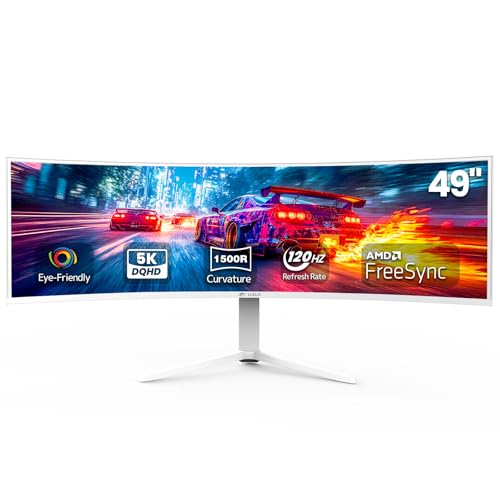
If you’re seeking an immersive experience that enhances productivity and gaming alike, the CRUA 49″ White Curved Monitor stands out with its stunning DQHD resolution of 5120 x 1440. The 1500R curvature and ultra-wide 32:9 ratio make multitasking a breeze, while the 120Hz refresh rate guarantees ultra-smooth gameplay. You’ll appreciate the 120% sRGB color coverage for vibrant visuals, perfect for graphic design or video editing. Plus, its ergonomic height-adjustable stand and various connectivity options, including HDMI 2.1, make setup a cinch. With a solid customer rating of 4.4 stars, this monitor is a worthy addition to your workspace.
Best For: Those seeking an immersive gaming and multitasking experience with vibrant visuals and ergonomic comfort.
Pros:
- Ultra-wide 32:9 ratio and 1500R curvature enhance productivity and gaming immersion.
- 120% sRGB color coverage delivers accurate and vibrant colors, ideal for graphic design and video editing.
- Height-adjustable stand and multiple connectivity options make for an ergonomic and flexible setup.
Cons:
- Large size may require ample desk space and may not fit in smaller setups.
- Weight of 23.2 pounds can make it cumbersome to move or adjust frequently.
- Limited to specific resolutions which may not be compatible with all devices or older graphics cards.
INNOCN 49″ OLED Ultrawide Curved Monitor (5K2K 144Hz)

The INNOCN 49″ OLED Ultrawide Curved Monitor is perfect for professionals who thrive on multitasking and require expansive screen real estate. With its stunning 5K2K resolution and 144Hz refresh rate, your visuals will be crisp and fluid. The 1800R curvature reduces eye fatigue, making long hours more comfortable. You’ll appreciate the versatile connectivity options, including USB-C and multiple HDMI ports, compatible with various devices. Enhanced features like PIP and PBP allow for efficient multitasking, while the high contrast ratio and HDR support guarantee vibrant colors. Adjust the stand for total comfort, and enjoy an immersive experience that boosts your productivity.
Best For: Professionals and gamers seeking an immersive multitasking experience with expansive visuals and high-performance features.
Pros:
- Stunning 5K2K resolution ensures crisp and detailed visuals for enhanced productivity and gaming experiences.
- Versatile connectivity options including USB-C and multiple HDMI ports, making it compatible with a wide range of devices.
- PIP and PBP features facilitate efficient multitasking by allowing simultaneous use of multiple input sources.
Cons:
- Large footprint may require significant desk space for proper setup and positioning.
- Higher price point compared to standard monitors, which may not fit all budgets.
- Limited HDR capability with only HDR 400 support, which may not satisfy professional content creators seeking higher standards.
Dell UltraSharp U4924DW 49″ Curved Screen Monitor

With its impressive 49-inch Dual Quad HD curved display, the Dell UltraSharp U4924DW is perfect for professionals who crave expansive screen real estate for multitasking. The 32:9 aspect ratio and stunning 5120 x 1440 resolution deliver exceptional visual clarity, whether you’re working on documents or enjoying action-packed films. With a 5 ms response time, it’s also great for gaming and sports. Plus, USB Type-C connectivity makes data transfer a breeze. You can easily mount it with VESA compatibility, ensuring your workspace remains neat. Trust the UltraSharp U4924DW to enhance productivity and provide a smooth viewing experience.
Best For: Professionals and gamers who require expansive screen real estate and exceptional visual clarity for multitasking and immersive experiences.
Pros:
- High resolution of 5120 x 1440 provides excellent visual clarity for work and entertainment.
- Fast 5 ms response time enhances the viewing experience for action films, sports, and gaming.
- USB Type-C connectivity allows for efficient data transfer and easy connection to devices.
Cons:
- The large size may not fit well in smaller workspaces.
- Curved design may take time for some users to adjust to.
- Higher price point compared to standard monitors.
Factors to Consider When Choosing a 49 Inch Monitor for Productivity
When choosing a 49-inch monitor for productivity, you should consider several key factors that can enhance your workflow. Screen resolution, connectivity options, ergonomic design, refresh rate, and color accuracy all play essential roles in your overall experience. By evaluating these aspects, you can find a monitor that truly meets your needs.
Screen Resolution Importance
Choosing the right screen resolution is essential for enhancing your productivity, as it greatly impacts how clearly you can see and interact with your work. A higher resolution, like Dual QHD (5120 x 1440), gives you more screen real estate, allowing you to view more content without constant scrolling or tab switching. This clarity is significant for reading text and working with multiple documents simultaneously. Additionally, monitors that support a wider color gamut, such as 99% sRGB, enhance visual accuracy, benefiting tasks like graphic design. Higher resolutions also reduce pixelation, making long work sessions more comfortable and minimizing eye strain. With improved resolutions, you can efficiently utilize Picture-in-Picture or Picture-by-Picture functionalities, maximizing your screen space.
Connectivity Options Available
Having a range of connectivity options is essential for maximizing your productivity with a 49-inch monitor. Look for monitors that offer various input options like DisplayPort, HDMI, USB Type-C, and USB-A ports to guarantee compatibility with your devices. USB Type-C is particularly beneficial, as it provides power delivery and data transfer, helping reduce cable clutter on your desk.
Monitors with built-in KVM switches allow you to switch seamlessly between multiple connected devices without needing separate peripherals. Also, check for VESA mount compatibility for flexible mounting options, which can save desk space and improve ergonomics. Finally, built-in docking station features can streamline connections, enhancing productivity by minimizing the need for additional hubs.
Ergonomic Design Features
While connectivity options play a significant role in your overall productivity, ergonomic design features are equally important for ensuring comfort during long hours of use. Look for a monitor that allows height, tilt, and swivel adjustments to customize your viewing angle, helping reduce neck and eye strain. A curved design, such as 1000R or 1800R, can enhance immersion and minimize visual distortion. Built-in eye care features, like low blue light and flicker-free technology, are essential for reducing eye fatigue during prolonged usage. An ergonomic stand that’s easy to adjust promotes better posture, while a wide aspect ratio, like 32:9, gives you more screen real estate for multitasking without needing multiple displays. Prioritize these features for a comfortable work environment.
Refresh Rate Considerations
When evaluating a 49-inch monitor for productivity, you’ll want to contemplate the refresh rate as an important factor that impacts your overall experience. A refresh rate of 120Hz or higher is ideal for smooth scrolling and visual clarity, especially when multitasking or handling high-frame-rate content. If you’re engaged in fast-paced tasks, consider monitors with a refresh rate of 144Hz or above; they provide a more responsive experience, reducing motion blur. Higher refresh rates can minimize lag, which is vital for detailed graphics or quick interactions. Features like AMD FreeSync or G-Sync can further enhance your experience by synchronizing the refresh rate with your graphics card, reducing stutter, and ensuring a smoother workflow.
Color Accuracy and Range
Color accuracy and range are essential factors to evaluate for anyone focused on productivity, particularly in fields like graphic design and video editing. You’ll want a monitor that offers a high percentage of color coverage—aim for 99% sRGB or even 120% sRGB to guarantee vibrant, accurate colors. A monitor with a high contrast ratio, such as 3000:1, will help you see deeper blacks and brighter whites, enhancing visual clarity. Look for HDR support, as it boosts color depth and brightness, making your images more lifelike. Finally, consider monitors with calibration options and built-in color profiles to maintain consistent color accuracy over time, ensuring your work reflects your true vision in professional applications.
Multitasking Capabilities Enhanced
As you explore the best 49-inch monitors for productivity, consider how their multitasking capabilities can greatly enhance your workflow. A monitor with a 32:9 aspect ratio can effectively replace dual setups, letting you view multiple applications side-by-side without interruptions. Features like Picture-in-Picture (PIP) and Picture-by-Picture (PBP) allow you to display content from different sources simultaneously, making multitasking seamless. Higher resolutions, such as Dual QHD (5120 x 1440), guarantee clarity and detail, so you can work on various projects without losing readability. Additionally, ergonomic designs with height-adjustable stands help you find the perfect viewing angle for extended sessions. Integrated docking stations and diverse connectivity options simplify device connections, reducing desk clutter and improving workflow efficiency.