
When it comes to color grading, choosing the right monitor can make all the difference in your workflow. With advancements in technology, the options for professional monitors have expanded considerably. From impressive color accuracy to versatile connectivity, there’s a lot to take into account. Let’s explore the top 10 monitors that have been recognized by experts for their performance and user-friendly features, ensuring you find the best fit for your needs.
ASUS ProArt Display PA278QV 27” WQHD Monitor

If you’re serious about color grading, the ASUS ProArt Display PA278QV 27” WQHD Monitor is a standout choice for professionals. With its 2560 x 1440 resolution and Delta E < 2 color accuracy, you’ll experience stunning visuals that are true to life. It covers 100% sRGB and Rec. 709 color gamuts, guaranteeing your edits remain vibrant and precise. The monitor’s extensive connectivity options, including Mini DisplayPort and HDMI, give you flexibility in setup. Plus, its ergonomic design assures comfort during long editing sessions. Don’t forget the complimentary 3-month Adobe Creative Cloud access, enhancing your creative workflow even further!
Best For: Professionals and enthusiasts in color grading and graphic design seeking a high-quality monitor with exceptional color accuracy and ergonomic features.
Pros:
- Delta E < 2 color accuracy ensures true-to-life visuals.
- Covers 100% sRGB and Rec. 709 color gamuts for vibrant and precise edits.
- Ergonomic design with tilt, pivot, swivel, and height adjustment for comfort during long sessions.
Cons:
- The 27-inch size may be too large for small workspaces.
- Limited to 2560 x 1440 resolution, which may not satisfy users seeking 4K displays.
- Some users may prefer additional advanced features like HDR support, which this monitor lacks.
ASUS ProArt Display 27” 5K HDR Professional Monitor (PA27JCV)

The ASUS ProArt Display 27” 5K HDR Professional Monitor (PA27JCV) delivers exceptional color accuracy, making it an ideal choice for photographers and videographers who demand precise color reproduction in their work. With its stunning 5K resolution (5120 x 2880) and wide color gamut—99% DCI-P3 and 100% sRGB—you’ll see every detail vividly. The IPS panel guarantees a wide 178° viewing angle, while ambient light and backlight sensors optimize brightness and color temperature. Plus, the USB-C PD 96W connectivity makes it easy to power your devices. Enjoy peace of mind with a 3-year warranty and three months of Adobe Creative Cloud access.
Best For: Photographers and videographers seeking exceptional color accuracy and resolution for their professional work.
Pros:
- Wide color gamut: 99% DCI-P3 and 100% sRGB for precise color reproduction.
- High resolution: 5K (5120 x 2880) display ensures stunning detail and clarity.
- Additional benefits: Comes with a 3-year warranty and 3 months of complimentary Adobe Creative Cloud access.
Cons:
- Price point: May be considered expensive for casual users or hobbyists.
- Size: The 27-inch display may be too large for limited desk space.
- Limited gaming features: Not optimized for high-refresh-rate gaming experiences.
BenQ PD3225U 32 Inch 4K IPS Thunderbolt Monitor

Designed specifically for creative professionals, the BenQ PD3225U 32 Inch 4K IPS Thunderbolt Monitor excels in color accuracy with its Pantone Validated and Calman verified features. With 98% P3 and 100% sRGB color coverage, you’ll experience stunning visuals and a Delta E ≤ 2 for precise color matching. The 40Gb/s Thunderbolt 3 connectivity simplifies your workflow by synchronizing images, videos, and data with just one cable. Plus, the ergonomic design, including adjustable height and tilt, guarantees comfort during long editing sessions. If you’re a Mac user, the M-Book mode enhances your creative process seamlessly.
Best For: Creative professionals and Mac users seeking exceptional color accuracy and ergonomic design in a 4K monitor.
Pros:
- Pantone Validated and Calman verified for outstanding color accuracy, ensuring precise visual representation.
- Thunderbolt 3 connectivity allows for quick data transfer and charging with a single cable, streamlining your setup.
- Ergonomic features such as adjustable height, tilt, and pivot enhance comfort during extended use.
Cons:
- Higher price point compared to standard monitors may not be suitable for budget-conscious users.
- Limited gaming features may not appeal to gamers looking for high refresh rates.
- Large size may require ample desk space, which could be a constraint for smaller workspaces.
LG 32U990A-S 32-Inch Ultrafine 6K Monitor
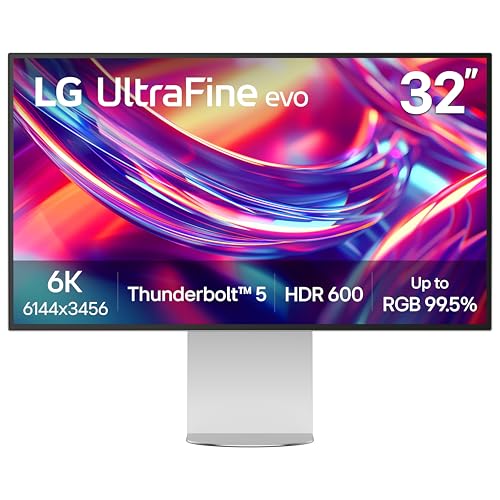
For creative professionals seeking unparalleled color accuracy, the LG 32U990A-S 32-Inch Ultrafine 6K Monitor stands out with its impressive 99.5% Adobe RGB and 98% DCI-P3 color coverage. With a stunning 6144 x 3456 resolution and a pixel density of 224 PPI, you’ll experience extraordinary detail for editing 6K video and photo retouching. Its Thunderbolt 5 connectivity guarantees rapid data transfer and daisy chaining capabilities. The ergonomic stand offers customizable viewing angles, while the TÜV Rheinland Eye Comfort certification allows for long hours of use without strain. This monitor is a game-changer for any serious color grading professional.
Best For: Creative professionals in fields such as video editing, photo retouching, and 3D rendering who require high color accuracy and detail.
Pros:
- Exceptional color coverage with 99.5% Adobe RGB and 98% DCI-P3 for accurate color representation.
- Ultra-high resolution of 6144 x 3456 and 224 PPI for stunning detail in visual projects.
- Thunderbolt 5 connectivity allows for rapid data transfer and supports daisy chaining for multi-monitor setups.
Cons:
- Higher price point compared to standard monitors, which may not be feasible for casual users.
- Limited compatibility with older devices that do not support Thunderbolt 5 or DisplayPort 2.1.
- Large physical size may not fit comfortably in smaller workspaces.
ASUS ProArt Display 34” Ultrawide Curved Monitor (PA34VCNV)

With an impressive 3440 x 1440 resolution and 100% sRGB and Rec. 709 color gamut, the ASUS ProArt Display 34” Ultrawide Curved Monitor (PA34VCNV) is a top contender for professionals in color grading. This 34.1-inch 21:9 curved IPS display features a frameless design and Calman Verified factory calibration, ensuring Delta E < 2 color accuracy. You'll appreciate its extensive connectivity options, including DisplayPort over USB-C, HDMI, and a USB hub. Plus, the ergonomic design allows for tilt, swivel, and height adjustments, enhancing your viewing comfort. With a solid 3-year warranty, this monitor is a reliable choice for your workspace.
Best For: Professionals in color grading and creative industries seeking high color accuracy and an immersive viewing experience.
Pros:
- Calman Verified factory calibration ensures exceptional color accuracy (Delta E < 2).
- Extensive connectivity options including DisplayPort over USB-C with Power Delivery, HDMI, and USB hub.
- Ergonomic design with tilt, swivel, and height adjustments for enhanced comfort during long work sessions.
Cons:
- Limited to a 3440 x 1440 resolution, which may not satisfy users needing higher pixel density.
- The curved design may not appeal to everyone and can distort viewing angles for certain tasks.
- Higher price point compared to standard monitors may not be justified for casual users.
ASUS ProArt Display 32” 4K HDR Computer Monitor (PA32UCR-K)

The ASUS ProArt Display 32” 4K HDR Computer Monitor (PA32UCR-K) stands out for its exceptional color accuracy, making it an ideal choice for professional colorists and content creators. With a 32-inch 4K HDR display and a mini-LED backlight boasting peak brightness of 1,000 cd/m², your visuals come alive. Thanks to quantum-dot technology, you’ll enjoy 99.5% Adobe RGB and 98% DCI-P3 coverage, ensuring stunning color fidelity. The ASUS ProArt Hardware Calibration optimizes color accuracy, while USB-C and HDMI connectivity make it versatile for your setup. Plus, you get a 3-month complimentary Adobe Creative Cloud subscription with your purchase!
Best For: Professionals in photography, videography, and graphic design who require high color accuracy and HDR capabilities.
Pros:
- Exceptional color performance with 99.5% Adobe RGB and 98% DCI-P3 coverage.
- Hardware calibration technology ensures consistent color accuracy over time.
- High peak brightness of 1,000 cd/m² for vibrant HDR visuals.
Cons:
- The 32-inch size may be too large for smaller workspaces.
- Higher price point compared to standard monitors lacking advanced color features.
- Limited to specific HDR formats, which may not support all user needs.
Acer Nitro 27 Inch QHD Gaming Monitor (KG271U N3bmiipx)

Gamers and creative professionals alike will appreciate the Acer Nitro 27 Inch QHD Gaming Monitor (KG271U N3bmiipx) for its stunning 2560 x 1440 QHD resolution and impressive DCI-P3 95% color accuracy. With a 27-inch IPS display and a zero-frame design, you’ll enjoy an immersive viewing experience. The monitor’s AMD FreeSync technology eliminates screen tearing, while the up to 180Hz refresh rate guarantees ultra-smooth motion. Plus, with a remarkable 0.5ms response time, fast-moving action appears crisp and clear. It’s perfect for gamers and suitable for graphic designers, photographers, and film editors needing vibrant, accurate colors.
Best For: Gamers and creative professionals seeking a high-performance monitor with exceptional color accuracy and smooth motion.
Pros:
- High QHD resolution (2560 x 1440) for stunning image clarity and detail.
- Up to 180Hz refresh rate ensures ultra-smooth motion, perfect for fast-paced gaming.
- 0.5ms response time provides crisp rendering of fast-moving action, reducing smearing and ghosting.
Cons:
- Limited to one Display Port and two HDMI ports, which may be insufficient for users with multiple devices.
- Not as versatile for general office use as some other monitors designed specifically for productivity.
- Potentially higher price point compared to standard monitors without gaming features.
BenQ SW272Q 27-inch 2K Photographer Monitor

For photographers and videographers seeking unparalleled color accuracy, the BenQ SW272Q 27-inch 2K Photographer Monitor stands out with its impressive 99% Adobe RGB and 98% DCI-P3 color support. With a stunning 2560 x 1440 resolution, you’ll experience vivid colors and remarkable depth in your work. The Nano Matte Panel enhances viewing comfort, while Paper Color Sync technology guarantees your digital edits match printed output perfectly. Plus, with hardware calibration using Palette Master Ultimate Software, achieving color perfection is faster than ever. Weighing just 18.29 pounds, this monitor combines functionality with an empathetic design, making it ideal for your creative endeavors.
Best For: Photographers and videographers who demand exceptional color accuracy and depth in their visual work.
Pros:
- Exceptional Color Accuracy: 99% Adobe RGB and 98% DCI-P3 color support for vivid and true-to-life colors.
- High Resolution: 2560 x 1440 (2K QHD) resolution provides remarkable detail and depth in images.
- User-Friendly Calibration: Palette Master Ultimate Software allows for faster and more efficient hardware calibration.
Cons:
- Weight: At 18.29 pounds, it may be less portable compared to lighter monitors.
- Price Point: Higher-end specifications may come with a premium price tag, potentially limiting accessibility for some users.
- Limited Connectivity Options: Depending on user needs, some may find the USB-C power option restrictive compared to other connection types.
ViewSonic 15.6 Inch 4K UHD Portable OLED Monitor

Looking for a portable monitor that delivers exceptional color accuracy on the go? The ViewSonic 15.6 Inch 4K UHD Portable OLED Monitor packs stunning 3840x2160p resolution into a lightweight design at just 1.5 lbs and 0.6 inches thick. Its USB-C connectivity allows fast data transfer and 60W charging with a single cable, while Mini HDMI support enhances versatility. The built-in stand lets you easily switch between portrait and landscape modes, and the durable screen cover doubles as a stand. Plus, you’ll enjoy peace of mind with a 3-year warranty and access to US-based customer support.
Best For: Professionals and creatives who need a lightweight, high-resolution portable monitor for on-the-go use.
Pros:
- Stunning 4K UHD resolution (3840x2160p) for exceptional color accuracy and detail.
- Lightweight and compact design at just 1.5 lbs and 0.6 inches thick, making it easy to transport.
- Versatile connectivity options with USB-C and Mini HDMI support for seamless integration with various devices.
Cons:
- Limited refresh rate of 60Hz may not be ideal for high-speed gaming.
- Price point may be higher compared to non-OLED portable monitors.
- Battery life may be dependent on the power source when using USB-C for charging and data transfer.
UFYQL Portable 15.6-inch FHD External Monitor

The UFYQL Portable 15.6-inch FHD External Monitor stands out with its impressive 1920 x 1080 resolution and HDR technology, making it an excellent choice for professionals who need accurate color representation on the go. Weighing just 1.41 pounds and measuring only 0.52 inches thick, it’s highly portable. The IPS display offers a 178° wide viewing angle, ensuring vibrant colors from any position. With two USB Type-C ports and a Mini-HDMI, it connects effortlessly to various devices. Plus, its eye protection features reduce blue light and flicker, making it ideal for long hours of work or gaming.
Best For: Professionals and gamers seeking a portable monitor with excellent display quality and eye protection for extended use.
Pros:
- High-resolution display: 1920 x 1080 FHD with HDR technology for vibrant visuals.
- Lightweight and slim design: Weighs only 1.41 pounds and is 0.52 inches thick, making it easy to carry.
- Versatile connectivity: Multiple ports including two USB Type-C and one Mini-HDMI for easy connectivity with various devices.
Cons:
- Limited built-in audio: Dual speakers may not provide high-quality sound for immersive experiences.
- Adjustable kickstand: While it offers angle adjustments, it may not be as sturdy as dedicated monitor stands.
- Dependence on external power: Requires power through USB-C or HDMI, which may limit usage in certain scenarios.
Factors to Consider When Choosing a Professional Monitor for Color Grading
When you’re selecting a professional monitor for color grading, it’s essential to take into account several key factors. Think about your color accuracy needs, the resolution and size that will best suit your workspace, and the connectivity options available. Also, don’t overlook calibration features and ergonomic design to guarantee your setup supports long hours of work comfortably.
Color Accuracy Requirements
Color accuracy is the cornerstone of effective color grading, and several key factors come into play when selecting a professional monitor for this task. First, look for a monitor with a Delta E value of less than 2 to guarantee precise color reproduction. A wide color gamut is essential; aim for monitors that cover 99% of Adobe RGB and at least 100% of sRGB. Factory calibration is advisable, as it assures consistent accuracy right out of the box. Additionally, choose monitors that support multiple HDR formats to enhance dynamic range and color fidelity. Finally, hardware calibration capabilities allow you to make ongoing adjustments, guaranteeing your monitor maintains color accuracy over time—vital for any professional workflow.
Resolution and Size
Achieving accurate color reproduction is just the beginning; the resolution and size of your monitor greatly influence your grading efficiency. Higher resolutions like 4K or 5K offer greater detail, helping you evaluate color accuracy in fine details. Opt for larger sizes, ideally 27 inches or more, to enhance immersion and provide ample screen real estate for multitasking. Pay attention to pixel density; higher PPI guarantees sharper images, essential for precision work. Consider an ultrawide format, which allows you to see timelines and palettes side by side without constant window switching. Finally, balance resolution and size with your viewing distance to avoid pixelation and maximize visual benefits, making sure you get the most out of your color grading experience.
Connectivity Options
A professional monitor for color grading should offer a variety of connectivity options to streamline your workflow. Look for HDMI, DisplayPort, and USB-C ports to accommodate different devices and setups. USB-C Power Delivery (PD) can simplify your connections by allowing data transfer and charging through a single cable. Additionally, consider monitors that support daisy-chaining via DisplayPort, enabling you to connect multiple displays in series, which reduces cable clutter. High bandwidth options like Thunderbolt 3 are also essential, as they provide faster data transfer speeds and support higher resolutions, important for demanding color grading tasks. Finally, verify the monitor includes audio input and headphone jacks for audio monitoring, enhancing your overall setup.
Calibration Features
When selecting a professional monitor for color grading, it’s vital to prioritize calibration features that guarantee precise color reproduction. Look for monitors with factory calibration and Delta E values under 2, securing accurate colors right out of the box. Monitors that support hardware calibration let you fine-tune settings and maintain color accuracy over time. Some models even offer software tools for creating custom color profiles tailored to your specific workflow or environment. Features like uniformity compensation guarantee consistent color across the entire screen, which is essential for professional work. Also, consider monitors with pre-calibrated settings for color spaces like Adobe RGB, sRGB, and DCI-P3 to streamline your color grading process and enhance your efficiency.
Ergonomic Design Factors
To guarantee comfort during long hours of color grading, it’s essential to choose a monitor with ergonomic design factors. Look for adjustable features like tilt, swivel, and height adjustments to accommodate different viewing angles and reduce neck strain. A frameless or ultra-thin bezel design maximizes screen real estate and minimizes distractions, enhancing your focus. Opt for monitors with an anti-glare screen to reduce reflections and eye strain, making prolonged use more comfortable. Additionally, eye care technologies like blue light reduction and flicker-free displays help protect against fatigue. Finally, ascertain your monitor has a stable and sturdy stand to maintain position, preventing any accidental movements that could disrupt your critical color correction tasks.