
When you’re working on digital art, having the right monitor can make all the difference. Color accuracy is key to bringing your vision to life, and the top monitors on the market today offer impressive features tailored for artists like you. From high resolutions to advanced calibration tools, these options can greatly enhance your creative workflow. Curious about which monitors stand out? Let’s explore the best choices available.
ASUS ProArt Display 14” Portable Touchscreen Monitor (PA148CTV)

If you’re a digital artist seeking unparalleled color accuracy, the ASUS ProArt Display 14” Portable Touchscreen Monitor (PA148CTV) stands out with its 100% sRGB and 100% Rec. 709 color gamut. This 14-inch Full HD IPS monitor features a Calman Verified display, ensuring exceptional color accuracy with a factory pre-calibrated Delta E < 2. Its capacitive 10-point multitouch functionality enhances your creative experience. With ASUS Dial for intuitive OSD control, a metal kickstand for stability, and TÜV Rheinland-certified technologies for comfortable viewing, you’ll love working on this monitor. Plus, enjoy complimentary access to Adobe Creative Cloud with your purchase until 2026!
Best For: Digital artists and creatives seeking exceptional color accuracy and a portable display solution.
Pros:
- Calman Verified for outstanding color accuracy with a Delta E < 2, ideal for professional creative work.
- 10-point multitouch functionality enhances interactivity and precision in design tasks.
- Lightweight and portable with a metal kickstand, making it easy to set up and use anywhere.
Cons:
- Limited to a 14-inch screen size, which may not be sufficient for users who prefer larger displays.
- Relatively higher price compared to standard monitors without advanced features.
- Requires external power source for full functionality, which may limit portability in certain situations.
ASUS ProArt Display 15.6” 4K Pen Display (PA169CDV)

The ASUS ProArt Display 15.6” 4K Pen Display (PA169CDV) is an exceptional choice for digital artists who demand unparalleled color accuracy in their work. With a stunning 4K UHD resolution and 100% sRGB coverage, you’ll see every detail and color as intended. The touch capability and WACOM technology provide a natural drawing experience, while the innovative kickstands allow for adjustable angles to suit your comfort. Weighing just 2.36 pounds, it’s portable and easy to set up. Plus, it comes with extensive connectivity options and a three-year warranty, making it a reliable addition to your creative toolkit.
Best For: Digital artists and creative professionals seeking high color accuracy and portability in a pen display.
Pros:
- 100% sRGB color accuracy ensures vibrant and true-to-life colors for professional work.
- Lightweight and portable design (2.36 pounds) makes it easy to transport for on-the-go creativity.
- Versatile connectivity options including USB-C and HDMI for seamless integration with various devices.
Cons:
- Limited screen size (15.6 inches) may not be ideal for all users who prefer larger displays.
- Higher price point compared to standard monitors, which might be a consideration for budget-conscious buyers.
- Touch functionality may not be as responsive or precise as some users expect for detailed work.
ASUS ProArt Display 31.5” 4K OLED Monitor (PA32DC)

Creators seeking exceptional color accuracy will find the ASUS ProArt Display 31.5” 4K OLED Monitor (PA32DC) an ideal choice. With its stunning 4K resolution and true 10-bit color depth, your artwork will come to life in vivid detail. The built-in motorized colorimeter guarantees automated calibration, delivering color accuracy of ΔE < 1 and covering 99% of the DCI-P3 gamut. Plus, multiple connectivity options like USB-C and HDMI make it easy to link your devices. You’ll also appreciate the included ASUS ProArt Calibration software and a complimentary 3-month Adobe Creative Cloud subscription to boost your creative projects.
Best For: Creators and professionals who require exceptional color accuracy and high-resolution displays for their work.
Pros:
- Built-in motorized colorimeter ensures automatic calibration for precise color accuracy.
- True 10-bit color depth and a stunning contrast ratio of 1,000,000:1 enhance the visual experience.
- Versatile connectivity options including USB-C, DisplayPort, and HDMI make it compatible with various devices.
Cons:
- Heavier weight at 26.8 pounds may make it less portable.
- Price point may be higher compared to standard monitors, which could deter budget-conscious buyers.
- Limited return window of 30 days may not provide enough time for thorough evaluation.
XPPen Artist Ultra 16 4K OLED Touchscreen Drawing Tablet

For artists seeking unparalleled color accuracy and vibrant visuals, the XPPen Artist Ultra 16 4K OLED Touchscreen Drawing Tablet stands out as an exceptional choice. Its 15.6″ 4K OLED display delivers stunning UHD resolution with a 100,000:1 contrast ratio and a Calman-verified color gamut, ensuring your artwork shines with 1.07 billion colors. The tablet’s X-Touch solution allows intuitive touch gestures, while dual pressure-sensitive styli provide precision and smooth lines. With customizable keys and versatile compatibility across various operating systems, it’s perfect for professional illustration, animation, and more. Elevate your creative workflow with this remarkable drawing tablet.
Best For: Professional artists and designers seeking high color accuracy and advanced features for digital illustration and animation.
Pros:
- Stunning Visuals: 15.6″ 4K OLED display with exceptional color accuracy and contrast ratio.
- Intuitive Touch Features: X-Touch solution supports multi-point touch gestures for enhanced interaction.
- Customizable Workflow: Includes a shortcut remote with 40 customizable keys for increased efficiency.
Cons:
- Requires Computer Connection: Not a standalone device; needs to be connected to a computer or laptop.
- Higher Price Point: May be considered expensive for casual users or hobbyists.
- Learning Curve: Advanced features may require time to master for new users.
XPPen Drawing Tablet with Screen Artist13.3 Pro

Looking for a compact yet powerful drawing tablet? The XPPen Artist13.3 Pro is your go-to solution. With its 13.3-inch fully-laminated FHD display, you’ll enjoy stunning color accuracy—88% NTSC and vibrant images from a 178-degree viewing angle. Customize your workflow with eight shortcut keys and a sleek Red Dial for quick adjustments. This battery-free stylus offers 8192 pressure levels and a 60-degree tilt for natural shading. Plus, it’s compatible with major software like Photoshop and Illustrator, making it perfect for any digital artist. Connect it easily to your computer with the included 3-in-1 cable and release your creativity!
Best For: Digital artists and illustrators seeking a compact, high-performance drawing tablet with excellent color accuracy and customizable features.
Pros:
- High color accuracy with 88% NTSC and vibrant display for detailed artwork.
- Customizable shortcut keys and Red Dial enhance workflow efficiency.
- Battery-free stylus with 8192 pressure levels for a natural drawing experience.
Cons:
- Requires connection to a computer, limiting portability for on-the-go use.
- The 13.3-inch screen may feel small for some professional artists.
- Initial setup may be complex for users unfamiliar with drawing tablets.
GAOMON Pro 19 Drawing Tablet with Screen

The GAOMON Pro 19 Drawing Tablet with Screen stands out for its stunning 4K UHD resolution, making it an ideal choice for artists seeking unparalleled color accuracy in their digital creations. Its 18.4-inch display covers 99% sRGB and 98% DCI-P3 gamuts, ensuring your colors remain true and vibrant. You’ll appreciate the battery-free G-Pro Pen, offering 16,384 pressure levels for precision and effortless strokes. With an ergonomic adjustable stand and compatibility with major software like Photoshop and Illustrator, this tablet enhances your creative workflow while providing a compact yet spacious canvas for detailed artwork. Set up is easy, keeping your workspace tidy.
Best For: Digital artists and designers who require high color accuracy and precision in their work.
Pros:
- Stunning 4K UHD resolution provides exceptional detail and color fidelity.
- Battery-free G-Pro Pen with 16,384 pressure levels ensures precise control and effortless strokes.
- Ergonomic adjustable stand allows for comfortable use at various angles.
Cons:
- Size may be cumbersome for users with limited desk space.
- Requires multiple cables for setup unless a single USB-C to C cable is purchased separately.
- Higher price point compared to non-display drawing tablets.
INNOCN Portable Monitor 13.3″ OLED 1080P
With its stunning 100% DCI-P3 color gamut, the INNOCN Portable Monitor 13.3″ OLED 1080P stands out as a top choice for digital artists and creatives who demand exceptional color accuracy. Its impressive 100,000:1 contrast ratio and 400 nits brightness guarantee vibrant visuals, perfect for photo and video editing. You’ll appreciate the low latency for smooth gaming, too. With USB-C and Mini HDMI inputs, it easily connects to various devices. Weighing just 1.39 lbs and measuring only 0.28 inches thick, it’s ultra-portable, making it ideal for on-the-go creativity. Plus, flicker-free technology guarantees comfortable viewing during long sessions.
Best For: Digital artists, photographers, and gamers seeking unparalleled color accuracy and portability in a monitor.
Pros:
- 100% DCI-P3 color gamut ensures exceptional color reproduction, ideal for creative work.
- Ultra-slim and lightweight design (0.28 inches thick and 1.39 lbs) makes it easy to carry for on-the-go use.
- Flicker-free and low blue light technologies provide comfortable viewing, reducing eye strain during extended use.
Cons:
- Limited screen size (13.3 inches) may not be suitable for users who prefer larger displays.
- Higher price point compared to standard portable monitors without OLED technology.
- Connectivity options may require adapters for some devices, limiting immediate usability.
UPERFECT Delta Pro Touch Portable Monitor (16″ 2K)
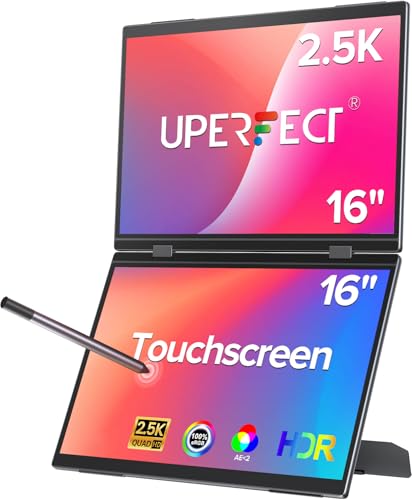
For digital artists seeking precision, the UPERFECT Delta Pro Touch Portable Monitor stands out with its groundbreaking pressure-sensitive touch technology. With 4096 levels of pen sensitivity, this monitor pairs perfectly with its Microsoft MPP-certified stylus, offering ultra-smooth input for writing and sketching. The stunning 2560×1600 2.5K resolution delivers sharper text and finer details, enhancing your visual clarity. Its innovative vertical dual-screen design boosts your productivity, allowing for seamless multitasking. Plus, its sleek metal body and ultra-slim profile make it easy to carry, ensuring you can create wherever inspiration strikes. This monitor is truly a game-changer for your digital art workflow.
Best For: Digital artists and professionals looking for a high-resolution portable monitor with advanced touch sensitivity for enhanced creativity and productivity.
Pros:
- High resolution: 2560×1600 2.5K display provides exceptional clarity and detail.
- Pressure-sensitive technology: 4096 levels of pen sensitivity allow for natural writing and sketching.
- Dual-screen functionality: Vertical design enhances multitasking capabilities.
Cons:
- Price point: May be more expensive compared to traditional portable monitors.
- Limited compatibility: Some software may not fully utilize the pressure-sensitive features.
- Size and weight: While portable, it may still be bulkier than a standard tablet.
XPPen Artist24 FHD Drawing Tablet with Screen

Artists and gamers seeking a vibrant and immersive experience will find the XPPen Artist24 FHD Drawing Tablet an excellent choice. This 23.8-inch full-laminated pen display offers a stunning 1920×1080 resolution and a color gamut of 132% sRGB, ensuring your artwork pops with accuracy. Its battery-free P05R stylus boasts 8192 levels of pressure sensitivity and lagless tracking for precise strokes. You can easily adjust the stand from 16° to 90° for comfort, and it connects seamlessly to various operating systems via USB-C. With a solid customer rating of 4.4 out of 5 stars, this tablet is a reliable addition to your creative toolkit.
Best For: Artists, gamers, and entertainment enthusiasts seeking a high-quality, immersive drawing experience with precise control.
Pros:
- Vibrant Display: The 23.8-inch full-laminated pen display with 1920×1080 resolution and 132% sRGB color gamut delivers stunning visuals.
- Advanced Stylus: The battery-free P05R stylus features 8192 levels of pressure sensitivity and lagless tracking for accurate and responsive drawing.
- Ergonomic Design: The adjustable stand allows for a comfortable drawing position between 16° to 90°, enhancing user comfort during long sessions.
Cons:
- Weight: At 19 pounds, the tablet may be less portable and more cumbersome for users who need a lightweight option.
- Limited Compatibility: While it supports many operating systems, some older systems may not be compatible.
- Price Point: As a premium drawing tablet, it may be considered expensive for casual users or beginners.
XP-PEN Artist Pro 14 Gen2 Drawing Tablet with Screen

The XP-PEN Artist Pro 14 Gen2 Drawing Tablet is an excellent choice for digital creators seeking exceptional color accuracy and a seamless drawing experience. With its 16K pressure sensitivity and X3 Pro battery-free stylus, you’ll enjoy responsive and dynamic brush strokes without the hassle of charging. The 1920 x 1200 display boasts 123% sRGB coverage, ensuring vibrant colors that pop. Its fully laminated anti-glare screen enhances visibility while reducing eye strain. Plus, it’s compatible with various operating systems and popular software, making it a versatile addition to your digital art toolkit. Just remember, it requires a connection to a computer or laptop.
Best For: Digital artists and creators looking for a high-quality drawing tablet with excellent color accuracy and pressure sensitivity.
Pros:
- 16K pressure sensitivity allows for precise and dynamic brush strokes.
- Battery-free stylus eliminates the need for charging, providing uninterrupted creative flow.
- Fully laminated anti-glare screen enhances visibility and reduces eye strain during long sessions.
Cons:
- Not a standalone product; requires connection to a computer or laptop for functionality.
- Limited portability due to dependency on external devices.
- May have a learning curve for users new to digital art tools and software.
Factors to Consider When Choosing a Color Accurate Monitor for Digital Art
When choosing a color accurate monitor for digital art, you’ll want to take into account several key factors. Look closely at color gamut coverage, calibration capabilities, and display resolution to guarantee your artwork looks its best. Additionally, think about panel technology and connectivity options to match your creative workflow.
Color Gamut Coverage
Choosing a monitor with the right color gamut coverage is essential for creating stunning digital art, as it directly affects how accurately your colors appear. Look for monitors that cover a wide range of color spaces, such as 99% Adobe RGB or 100% sRGB. These monitors can reproduce more vibrant colors, making your artwork stand out. Pay attention to the Delta E value; values below 2 are ideal for professional work, ensuring the displayed colors match your vision. If you’re working with HDR content, consider monitors that support a high percentage of the DCI-P3 color gamut, as they enhance color vibrancy and depth. This attention to color accuracy elevates your digital art to new heights.
Calibration Capabilities
Accurate color reproduction hinges not just on color gamut coverage but also on calibration capabilities. Look for monitors with low Delta E values—ideally under 2—indicating superior color fidelity. Monitors equipped with built-in calibration tools, like motorized colorimeters, can automatically adjust settings, ensuring consistent accuracy over time. Supporting wide color gamuts, such as 99% Adobe RGB or DCI-P3, is essential for displaying the rich range of colors necessary for digital art. Regular calibration with professional software can enhance your monitor’s color accuracy considerably. Additionally, some monitors come factory calibrated with Calman or Pantone validation, offering reliable color precision right out of the box. Prioritize these features to elevate your creative workflow.
Display Resolution
While you may be tempted to focus solely on color fidelity, display resolution plays an essential role in your digital art experience. A higher resolution, like 4K UHD (3840 x 2160), provides exceptional detail and clarity, enabling precise editing and rendering. Full HD (1920 x 1080) is the bare minimum for digital art, but it may lack the detail and color accuracy you need for high-quality work. Opting for displays with a resolution of 2560 x 1600 or higher grants you extra screen real estate, boosting productivity as you multitask or compare artworks side by side. Additionally, higher pixel density enhances sharpness, delivering finer details and smoother lines vital for color-critical projects.
Panel Technology
When it comes to achieving true color fidelity in your digital artwork, the type of panel technology in your monitor can’t be overlooked. IPS (In-Plane Switching) panels are often your best bet, providing wider viewing angles and superior color reproduction compared to TN (Twisted Nematic) panels. If you’re after deeper blacks and higher contrast, OLED (Organic Light Emitting Diode) technology can elevate your work’s vibrancy. Look for true 10-bit color depth panels, which display over a billion colors for smoother gradients and precise representation. Additionally, choose monitors with high color gamut coverage, like 99% Adobe RGB or 100% sRGB, to guarantee colors appear accurately across different platforms. Calibration features also enhance color accuracy, providing consistent output you can rely on.
Connectivity Options
Choosing the right connectivity options for your color accurate monitor can greatly impact your digital art workflow. Look for USB Type-C, HDMI, and DisplayPort ports to guarantee compatibility with your devices. Monitors featuring multiple input ports allow you to connect laptops, tablets, and smartphones, enhancing your creative versatility. Consider models that serve as USB hubs—these can streamline your workspace by reducing cable clutter. If you’re working on detailed projects, opt for monitors that support DisplayPort Alt mode for higher resolutions and refresh rates. Additionally, monitors with dual USB-C ports enable you to daisy chain multiple displays, creating an expansive workspace perfect for multitasking and complex creative projects.