
As an illustrator, you know how essential color accuracy is for your work. In 2026, you’ll find an impressive selection of monitors designed to meet your needs. Each option offers unique features, from vibrant displays to ergonomic designs. Whether you’re looking for something compact or a larger screen, there’s a perfect fit out there for you. Let’s explore the top contenders that can elevate your creative process and keep your colors true.
ASUS ProArt Display 27″ Monitor PA278CV

The ASUS ProArt Display 27″ Monitor PA278CV is an ideal choice for illustrators who demand exceptional color accuracy in their work. With its 2560 x 1440 WQHD resolution and IPS panel, you’ll enjoy stunning visuals from any angle. The Calman Verified calibration guarantees a Delta E < 2, ensuring your colors are true to life. Plus, it covers 100% of the sRGB and Rec. 709 gamuts. You can connect easily through USB-C, DisplayPort, or HDMI, while the USB hub and daisy-chaining options enhance your workspace. Ergonomic features like the height-adjustable stand and Eye Care technology make it a perfect fit for long hours of creativity.
Best For: Illustrators and creative professionals seeking exceptional color accuracy and ergonomic features in their workspace.
Pros:
- Calman Verified calibration ensures color accuracy with Delta E < 2, perfect for detailed artwork.
- Extensive connectivity options including USB-C with Power Delivery, DisplayPort, and HDMI for versatile setup.
- Ergonomic features like a height-adjustable stand and Eye Care technology to reduce strain during long working hours.
Cons:
- Limited refresh rate of 75Hz may not satisfy gamers looking for higher performance.
- No built-in speakers, which can be inconvenient for users needing audio output.
- Relatively higher price point compared to standard monitors without specialized features.
ASUS ProArt Display PA278QV 27” WQHD Monitor

For illustrators seeking exceptional color accuracy, the ASUS ProArt Display PA278QV 27” WQHD Monitor stands out with its impressive Delta E < 2 color performance. This 27-inch IPS monitor boasts a stunning 2560 x 1440 resolution and a frameless design, enhancing your workspace. It covers 100% sRGB and Rec. 709 color gamuts, ensuring vibrant and true-to-life visuals. With extensive connectivity options, including Mini DisplayPort and HDMI, you can easily connect your devices. It also features ergonomic adjustments and eye care technology, making long hours of work comfortable. Plus, enjoy a complimentary 3-month Adobe Creative Cloud access with your purchase!
Best For: Illustrators and creative professionals who require exceptional color accuracy and versatile connectivity options in their workflow.
Pros:
- Outstanding color performance with Delta E < 2 for true-to-life visuals.
- Extensive connectivity options including Mini DisplayPort, HDMI, and USB 3.0 ports for versatile device integration.
- Ergonomic design with adjustable height, tilt, pivot, and swivel features for comfortable long-term use.
Cons:
- Limited resolution compared to 4K monitors, which may not meet the needs of some users.
- No built-in speakers, requiring external audio solutions for sound.
- Complimentary Adobe Creative Cloud access is time-limited to 3 months, which may not be sufficient for all users.
ASUS ProArt Display PA247CV 24-inch Monitor

Looking for a monitor that meets the high standards of color accuracy essential for illustrators? The ASUS ProArt Display PA247CV is a fantastic choice. This 24-inch Full HD monitor features an IPS panel with a 178° wide viewing angle and covers 100% of the sRGB and Rec. 709 color gamuts. With Calman Verified color accuracy and a Delta E < 2 rating, your artwork will shine. Connectivity is a breeze with USB-C, HDMI, and DisplayPort options. Plus, you’ll enjoy a complimentary 3-month Adobe Creative Cloud subscription with your purchase. It’s a stellar option for any serious digital artist.
Best For: Digital artists and illustrators seeking a monitor with exceptional color accuracy and connectivity options.
Pros:
- 100% sRGB and Rec. 709 color gamut coverage ensures vibrant and true-to-life colors.
- Calman Verified with Delta E < 2 rating provides high color accuracy for professional work.
- Extensive connectivity options including USB-C, HDMI, and DisplayPort for versatile usage.
Cons:
- Limited to a Full HD resolution, which may not meet the needs of those requiring higher resolutions.
- Weight of 13.86 pounds may make it less portable for users who need to move their monitor frequently.
- The complimentary Adobe Creative Cloud subscription is time-limited, which may not appeal to all users.
ASUS ProArt 24″ Monitor (PA248QV)

Designed with illustrators in mind, the ASUS ProArt 24″ Monitor (PA248QV) offers exceptional color accuracy that elevates your creative projects. With a WUXGA resolution of 1920 x 1200 and a 16:10 aspect ratio, you’ll enjoy sharp images and vivid colors. Its IPS panel guarantees high color fidelity, covering 100% of the sRGB/Rec.709 color space with a DeltaE of less than 2. Plus, the monitor features ergonomic adjustments like tilt, pivot, swivel, and height adjustability for your comfort. Best of all, it comes with complimentary access to a 3-month Adobe Creative Cloud subscription until August 31, 2026.
Best For: Creative professionals and illustrators seeking exceptional color accuracy and ergonomic comfort in their workspace.
Pros:
- Exceptional Color Accuracy: Covers 100% of the sRGB/Rec.709 color space with a DeltaE of less than 2, ensuring true-to-life hues.
- Ergonomic Design: Features tilt, pivot, swivel, and height adjustability for optimal viewing comfort.
- Complimentary Software: Comes with a 3-month Adobe Creative Cloud subscription, enhancing creative capabilities.
Cons:
- Limited Resolution: While WUXGA is clear, some users may prefer higher resolutions for more detailed work.
- Size Restriction: At 24 inches, it may not be ideal for users who prefer larger screens for multitasking.
- Connectivity Options: Only offers DisplayPort and HDMI, which may limit compatibility with some devices.
INNOCN 27″ 4K USB-C Monitor for Laptop

The INNOCN 27″ 4K USB-C Monitor stands out as an excellent choice for illustrators who demand exceptional color accuracy and detail in their work. With a stunning 3840 x 2160 resolution and support for 1.07 billion colors, this monitor delivers vibrant images. Its HDR technology enhances contrast and color performance, making it ideal for photo editing and design. The adjustable stand allows for customizable ergonomics, ensuring comfort during long hours. Plus, the USB-C connectivity simplifies your setup, eliminating the need for traditional ports. With a DeltaE of less than 2, you can trust this monitor for precise color representation.
Best For: The INNOCN 27″ 4K USB-C Monitor is best for professionals in photography, graphic design, and video editing who require high color accuracy and detail in their work.
Pros:
- Stunning 4K UHD resolution provides exceptional clarity and detail for high-quality visuals.
- Wide color gamut with support for 1.07 billion colors ensures vibrant and accurate color representation.
- Ergonomic adjustable stand allows for customizable positioning to enhance comfort during long working hours.
Cons:
- Weight of 17.19 pounds may make it less portable for users who need to move their setup frequently.
- Limited refresh rate of 60Hz may not satisfy gamers seeking higher frame rates for competitive gaming.
- VESA mount compatibility may require additional investment in mounting hardware for wall installation.
KTC 27 Inch QHD Computer Monitor
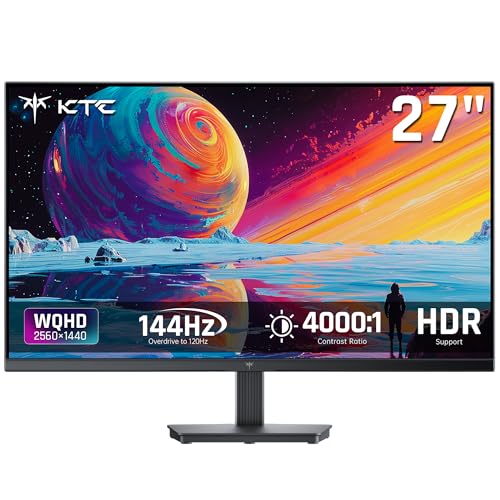
For illustrators seeking a reliable monitor that delivers exceptional color accuracy, the KTC 27 Inch QHD Computer Monitor stands out with its impressive 123% sRGB coverage. With a resolution of 2560 x 1440 and a 100Hz refresh rate, it provides crystal-clear images and vibrant colors, ensuring your artwork shines. The IPS panel offers 100% high color gamut and advanced color calibration technology for precise color reproduction. Plus, it supports FreeSync and G-Sync, eliminating screen tearing for smooth visuals. Designed with eye protection features, it’s comfortable for long hours of use, making it an excellent choice for both work and casual gaming.
Best For: The KTC 27 Inch QHD Computer Monitor is best for illustrators and casual gamers who prioritize color accuracy and smooth visuals.
Pros:
- Excellent color accuracy with 123% sRGB coverage and advanced color calibration technology.
- 100Hz refresh rate and support for FreeSync and G-Sync provide a smooth gaming experience.
- Eye protection features such as an Anti-Blue Light Screen make it comfortable for extended use.
Cons:
- Limited to 3 USB ports, which may not be sufficient for users with multiple devices.
- Some users may find the monitor’s weight (12.54 pounds) cumbersome for frequent relocation.
- The brightness level of 300 lm might not be ideal for all lighting conditions.
BenQ MA320U 32” 4K Monitor for MacBook Pro/Air

If you’re a digital illustrator using a MacBook Pro or Air, the BenQ MA320U 32” 4K Monitor is a standout choice. With a stunning 3840 x 2160 resolution and 400 nits brightness, it offers vibrant colors that truly pop. The dual USB-C ports, providing 90W power delivery, make it easy to connect and charge your MacBook simultaneously. Plus, it’s calibrated for Mac compatibility, supporting the P3 wide color gamut. The ergonomic design allows for height, tilt, swivel, and pivot adjustments, ensuring maximum comfort while you work. With a 4.5-star rating, this monitor is a dependable option for any illustrator.
Best For: Digital illustrators and creative professionals using MacBook Pro or Air who require vibrant colors and ergonomic design for their work.
Pros:
- High resolution of 3840 x 2160 (4K) for detailed visuals.
- Dual USB-C ports with 90W power delivery enable simultaneous charging and connectivity.
- Ergonomic design allows for height, tilt, swivel, and pivot adjustments for optimal comfort.
Cons:
- Weight of 33.7 pounds may make it less portable.
- Price point may be higher compared to standard monitors.
- Limited to Mac compatibility features, which may not benefit non-Mac users.
LG 27US500-W Ultrafine Monitor 27-Inch 4K UHD

With its stunning 27-inch 4K UHD display, the LG 27US500-W Ultrafine Monitor is perfect for illustrators seeking exceptional color accuracy. You’ll appreciate the impressive 1000:1 contrast ratio, delivering deeper blacks and vibrant colors. The wide viewing angles guarantee that your detailed digital imagery looks great from any position. Plus, it supports HDR10 and boasts up to 90% DCI-P3 color gamut for true-to-life colors. Its borderless design and ergonomic stand make it a sleek addition to your workspace. The onscreen control feature and split display option enhance your multitasking capabilities, making it an ideal tool for your creative projects.
Best For: Creative professionals needing high-resolution, color-accurate displays for work and design tasks.
Pros:
- Impressive 1000:1 contrast ratio for deeper blacks and vibrant colors.
- Supports HDR10 with up to 90% DCI-P3 color gamut for true-to-life color reproduction.
- Ergonomic stand with flexible tilt adjustments for comfortable viewing.
Cons:
- Limited connectivity options may restrict compatibility with some devices.
- The borderless design may not suit all aesthetic preferences.
- The price point may be high for casual users or non-professionals.
Dell S2725DS 27 Inch QHD Monitor

The Dell S2725DS 27 Inch QHD Monitor stands out for illustrators seeking exceptional color accuracy and detail. With a QHD resolution of 2560×1440, you’ll enjoy 1.77 times more detail than Full HD. The in-plane switching technology guarantees vibrant colors from wide viewing angles, and the 99% sRGB color coverage is perfect for your artwork. Plus, it features integrated dual 5W speakers for an immersive experience. Certified for eye comfort, this monitor reduces fatigue during long sessions. Weighing 13.7 pounds, it fits easily in your workspace, making it a top choice for any serious illustrator.
Best For: Illustrators and graphic designers seeking exceptional color accuracy and detail in their work.
Pros:
- QHD resolution provides 1.77 times more detail than Full HD, enhancing visual clarity.
- Wide viewing angles due to in-plane switching technology ensure vibrant colors from various positions.
- Eye Comfort certification helps reduce fatigue during long hours of use.
Cons:
- Weighing 13.7 pounds, it may be less portable compared to lighter monitors.
- Integrated speakers may not meet the audio quality expectations of audiophiles.
- Limited customizable audio profiles (only 1) might not offer enough flexibility for all users.
Dell 32 Plus 4K Monitor (S3225QS)

For illustrators seeking an exceptional visual experience, the Dell 32 Plus 4K Monitor (S3225QS) stands out with its impressive 99% sRGB and 95% DCI-P3 color coverage. This 31.5-inch monitor boasts a stunning 4K resolution, ensuring your artwork is displayed in vivid detail. With a refresh rate of up to 120Hz and ultra-low response time of 0.03ms, you’ll enjoy smooth visuals during both work and play. Its HDR readiness and ComfortView Plus feature enhance color accuracy while reducing blue light emissions. Plus, the sleek ash white design complements any workspace, making it a stylish choice for creative professionals.
Best For: Illustrators and creative professionals looking for a high-quality display with exceptional color accuracy and detail.
Pros:
- Excellent color coverage with 99% sRGB and 95% DCI-P3 for vibrant visuals.
- High refresh rate of up to 120Hz and ultra-low response time of 0.03ms for smooth performance.
- Stylish ash white design with an ultra-thin bezel that enhances any workspace aesthetic.
Cons:
- The VA panel may have slower response times compared to some IPS panels in fast-paced gaming scenarios.
- HDR performance may not fully match that of higher-end monitors specifically designed for HDR content.
- Limited ergonomic adjustments compared to some other monitors in its class.
Factors to Consider When Choosing a Color Accurate Monitor for Illustrators
When you’re looking for a color accurate monitor, several key factors come into play. Color gamut coverage, calibration accuracy, and viewing angle performance can all impact your work. Plus, don’t forget to take into account connectivity options and ergonomic design features that suit your setup.
Color Gamut Coverage
Choosing a color accurate monitor involves understanding color gamut coverage, as it directly impacts how well your artwork translates across different mediums. A monitor’s color gamut coverage expresses the range of colors it can display, typically as a percentage of standard color spaces like sRGB or Adobe RGB. For digital work, a monitor with 100% sRGB coverage is essential for accurate color reproduction. If you’re focused on print or high-quality imaging, aim for monitors covering over 90% of Adobe RGB or DCI-P3 for a broader color spectrum. Additionally, look for low Delta E values, ideally below 2, and consider monitors with factory calibration and certifications like Calman Verified to guarantee consistent color performance in your illustrations.
Calibration Accuracy Standards
Understanding calibration accuracy standards is vital for illustrators who want their digital creations to look their best. You should pay attention to Delta E values, as a Delta E of less than 2 indicates high color fidelity and precision. Look for monitors that are Calman Verified; they guarantee consistent color accuracy through factory calibration, perfect for professional work. Achieving true-to-life colors also requires monitors with 100% sRGB and 100% Rec. 709 coverage. Regular calibration is important to maintain accuracy over time, as display aging and environmental changes can impact performance. Consider utilizing calibration tools and software to verify your monitor’s color accuracy, confirming your illustrations appear as intended across various devices.
Viewing Angle Performance
Color accuracy isn’t just about calibration; it also depends on how well a monitor performs from different viewing angles. For illustrators, wide viewing angles are essential, ensuring color consistency and fidelity when viewed from various perspectives, especially during collaborative work. Look for monitors with IPS panels, as they typically offer up to 178° of color accuracy with minimal shift. A high Delta E value (less than 2) indicates better color accuracy across wide angles, which is vital for detailed illustrations. Check the specifications to see how well color and brightness are maintained off-axis, as poor performance can distort colors. Maintaining clarity and consistency enhances your workflow, reducing adjustments when sharing your work with clients or peers.
Connectivity Options Available
When you’re in the market for a color-accurate monitor, connectivity options can greatly impact your workflow. Consider the variety of connections available, like USB-C, DisplayPort, and HDMI, to guarantee compatibility with your devices. Monitors with USB-C ports not only provide video transmission but also power delivery, cutting down on clutter. If you’re looking to expand your workspace, choose monitors that support daisy-chaining via DisplayPort, letting you connect multiple displays through one cable. Additionally, having extra USB ports can make it easy to connect peripherals like external drives and input devices, boosting your efficiency. Make certain the monitor’s connectivity supports the latest standards to future-proof your setup and handle high-resolution content seamlessly.
Ergonomic Design Features
Creating stunning illustrations demands not just creativity but also a comfortable workspace, and ergonomic design features in monitors can make a significant difference. Look for height adjustment, tilt, swivel, and pivot options that let you customize your setup for ideal comfort and reduce strain during those long hours. Anti-glare screens are essential too, as they minimize reflections and improve visibility for intricate work. Eye care technologies like blue light reduction and flicker-free displays help alleviate eye fatigue, allowing you to focus longer without discomfort. Additionally, a frameless or ultra-thin bezel design enhances your immersion in the artwork, while adjustable stands support various working positions, promoting proper posture as you create your masterpieces.
Price and Value Comparison
Selecting a color accurate monitor for illustrators involves weighing multiple factors to guarantee you’re getting the best value for your investment. Start by considering the price-to-performance ratio; look for monitors offering Delta E < 2 color accuracy and wide color gamut coverage at competitive prices. Connectivity options, like USB-C and multiple HDMI ports, enhance workflow efficiency and reduce extra costs for adapters. If a monitor includes factory calibration with a Calman Verified rating, it may justify a higher price due to its precise color reproduction. Ergonomic features, such as height adjustment and tilt capabilities, contribute to comfort during long sessions, impacting productivity. Finally, access to complementary software like Adobe Creative Cloud can greatly increase perceived value.