
When you’re tackling demanding simulation tasks, having the right rackmount PC can make all the difference. With options that boast powerful processors and ample storage, these machines are designed for serious performance. Whether you need quiet operation or robust expandability, there’s a choice that fits your requirements. Let’s explore the top contenders that promise reliability and efficiency, so you can find the perfect match for your simulation needs.
Quiet Rackmount Computer (2U Rackmount Server or Workstation)

If you’re looking for a powerful yet quiet solution for simulation tasks, the 2U Rackmount Computer stands out with its AMD Ryzen 7 5700G processor. With 8 cores and 16 threads, it delivers impressive performance, reaching up to 4.6 GHz. You’ll enjoy seamless multitasking thanks to the 32GB DDR4 RAM and hyper-fast 2x512GB PCIe NVMe SSDs, which are 30 times faster than traditional hard drives. The integrated AMD Radeon graphics guarantees stunning visuals, making it perfect for gaming and content creation. Plus, with Windows 11 Pro, it’s ready to tackle any simulation challenge you throw its way.
Best For: Professionals and enthusiasts seeking a powerful, quiet workstation for simulation tasks, gaming, and content creation.
Pros:
- High-performance AMD Ryzen 7 5700G processor with 8 cores and 16 threads for efficient multitasking.
- Hyper-fast storage with dual 512GB PCIe NVMe SSDs, significantly improving bootup and data transfer speeds.
- Integrated AMD Radeon graphics provide excellent visuals for gaming and content creation without the need for a dedicated graphics card.
Cons:
- Limited upgrade options due to the mATX motherboard and only 4 expansion slots.
- The integrated graphics may not meet the demands of high-end gaming or advanced graphic design tasks.
- The 2U form factor may require specific rack setups, limiting placement flexibility.
Quiet Rackmount Computer (Intel 20-Core, 32GB RAM, 2TB SSD, W11 Pro)
The Quiet Rackmount Computer is an ideal choice for professionals who demand high performance without compromising on noise levels in their workspace. With its Intel 20-Core Ultra 7 265 CPU, you’ll experience speeds ranging from 2.4 to 5.2 GHz, ensuring seamless multitasking thanks to the 32GB of DDR5 RAM. The 2TB PCIe NVMe SSD offers lightning-fast storage, greatly enhancing your workflow. Plus, it’s designed as a 2U rack mount server, perfect for home or business use. Enjoy the benefits of Windows 11 Pro and robust connectivity options, all while basking in a quiet computing environment.
Best For: Professionals and businesses seeking a high-performance, quiet computing solution for multitasking and demanding applications.
Pros:
- Powerful Performance: Equipped with an Intel 20-Core CPU and 32GB RAM for seamless multitasking.
- Fast Storage: 2TB PCIe NVMe SSD provides lightning-fast data access and storage capabilities.
- Quiet Operation: Designed to operate quietly, making it ideal for noise-sensitive work environments.
Cons:
- Higher Cost: As a high-performance system, it may be more expensive than entry-level options.
- Limited Graphics: Integrated Intel UHD Graphics may not meet the needs of users requiring advanced graphics performance.
- Rack Mount Design: The 2U rack mount design may not be suitable for users looking for a traditional desktop form factor.
Rosewill 4U Server Chassis Rackmount Case (RSV-R4100U)

Designed for professionals who need robust performance, the Rosewill 4U Server Chassis Rackmount Case (RSV-R4100U) stands out with its impressive capacity to house multiple drives and expansion options. You’ll find seven internal 3.5” HDD bays and room for two additional 5.25” devices, along with seven PCI expansion slots, making it compatible with ATX and CEB motherboards. Its cooling system includes three pre-installed fans, ensuring excellent airflow with minimal noise. Plus, the front panel features LED indicators for power and HDD monitoring, two USB 3.0 ports for connectivity, and a built-in lock for enhanced security, making it a reliable choice.
Best For: Professionals and businesses seeking a reliable server chassis with ample storage and expansion capabilities.
Pros:
- Spacious design with seven internal 3.5” HDD bays and two additional 5.25” device slots for extensive storage options.
- Efficient cooling system featuring three pre-installed fans, ensuring optimal airflow and low noise levels.
- User-friendly features including front panel LED indicators and two USB 3.0 ports for easy connectivity.
Cons:
- Limited to ATX and CEB motherboards, which may restrict compatibility with other motherboard types.
- The size and weight of the chassis may require additional considerations for mounting and transportation.
- The built-in front panel lock might not provide the highest level of security compared to more advanced locking systems.
Quiet Rackmount Computer (2U Rack Mount Server or Workstation)
For professionals in simulation-heavy fields, a quiet rackmount computer like the 2U rack mount server or workstation stands out as an ideal choice. Powered by the AMD Ryzen 7 5700G processor with 8 cores and a max boost clock speed of 4.6 GHz, it delivers impressive performance. With 32GB DDR4 RAM and a 2TB PCIe NVMe SSD, you’ll enjoy lightning-fast bootup and data transfer speeds. Integrated AMD Radeon graphics guarantee smooth visuals, while Windows 11 Pro provides a robust operating system. Plus, you benefit from lifetime support and a 3-year warranty, assuring peace of mind for your demanding tasks.
Best For: Professionals in simulation-heavy fields who require high performance and reliability in a quiet computing environment.
Pros:
- High Performance: Equipped with an AMD Ryzen 7 5700G processor and 32GB of RAM, it offers exceptional processing power for demanding applications.
- Fast Storage: The 2TB PCIe NVMe SSD provides rapid bootup and data transfer speeds, significantly enhancing productivity.
- Robust Support: Comes with lifetime technical support and a 3-year limited hardware warranty, ensuring peace of mind for users.
Cons:
- Limited Graphics Performance: While it has integrated AMD Radeon graphics, it may not meet the needs of users requiring high-end dedicated graphics for intensive tasks.
- Noise Levels: Although designed to be quiet, some users may still find rackmount servers noisier compared to traditional workstations.
- Size Constraints: Being a 2U rackmount, it may not fit in all workspaces or require specific rack space, limiting placement options.
3U Rackmount Server Chassis
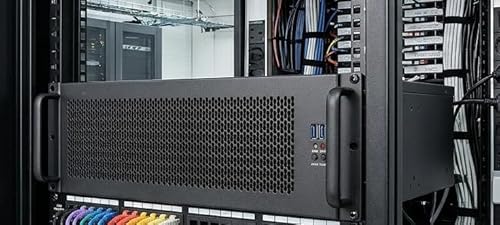
When it comes to performance and versatility, the 3U Rackmount Server Chassis stands out as an ideal choice for simulation professionals and enthusiasts alike. This black industrial computer case supports various motherboard sizes, including EATX and Mini ITX, giving you flexibility in your build. With multiple fan configurations and easy-access mounting points, cooling and storage are hassle-free. Plus, it’s compatible with ATX power supplies, allowing for top or side installation. Weighing just 16.5 pounds and measuring 15.75 x 19.02 x 5.24 inches, it fits perfectly in your setup. Customers rate it 4.1 stars, reflecting solid performance and reliability.
Best For: Simulation professionals and enthusiasts looking for a versatile and reliable server chassis for their builds.
Pros:
- Supports a wide range of motherboard sizes, providing flexibility for various setups.
- Multiple fan configurations and easy-access mounting points ensure effective cooling and storage management.
- Compatible with ATX power supplies for convenient installation options.
Cons:
- Weighing 16.5 pounds, it may be heavier compared to some other options on the market.
- The return policy includes potential additional fees for misrepresented conditions, which may be a concern for some buyers.
- The customer rating of 4.1 stars indicates that there may be some variability in user satisfaction.
Rosewill 4U Rackmount Server Chassis (RSV-H408)

The Rosewill 4U Rackmount Server Chassis (RSV-H408) stands out for those seeking robust storage capabilities and efficient cooling in a compact design. With the ability to support up to 8 x 3.5″ drives, you’ll benefit from a speedy 12Gbps bandwidth for each drive and hot-swap functionality, allowing you to replace drives without shutting down. Its cooling system features six 80mm PWM fans, ensuring ideal airflow and protecting your hard drives. Plus, with a USB 3.2 Type-C front-panel port, transferring files is a breeze. Rated 4.0 out of 5 stars, it’s a reliable choice for any simulation setup.
Best For: Those in need of a reliable and efficient rackmount server chassis with ample storage and superior cooling for demanding applications.
Pros:
- Supports up to 8 x 3.5″ drives with 12Gbps bandwidth for high-speed performance.
- Hot-swap capability allows for easy drive replacements without system downtime.
- Effective cooling system with 6 x 80mm PWM fans to maintain optimal temperatures and protect hardware.
Cons:
- Relatively heavy at 28 pounds, which may be cumbersome for some users.
- Limited to 4U size, potentially restricting compatibility with some larger server setups.
- Customer rating of 4.0 out of 5 stars indicates mixed feedback, suggesting room for improvement.
GeeekPi 8U Server Cabinet, 10 inch Rack for Network and Equipment
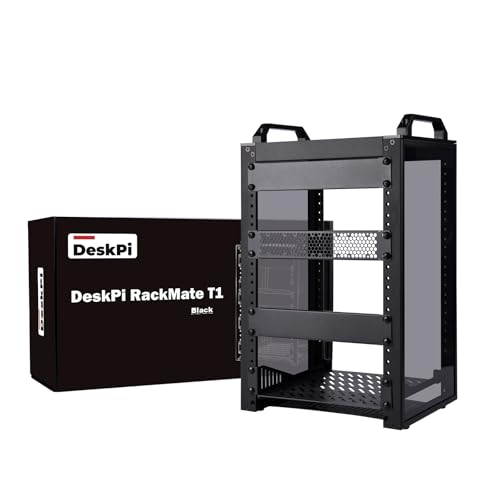
Designed with versatility in mind, the GeeekPi 8U Server Cabinet is perfect for those who need a compact solution for network and equipment storage. Measuring just 7.87 x 9.84 x 13.86 inches and weighing 9.92 pounds, this black aluminum alloy and acrylic cabinet fits seamlessly into small spaces. Its open design guarantees easy installation and maintenance while promoting airflow for maximum cooling. With a translucent frame, you can enhance your setup with ambient lighting while keeping dust at bay. Rated 4.6 out of 5 stars, it’s ideal for home offices and enterprises alike. Assembly is a breeze with included hardware.
Best For: The GeeekPi 8U Server Cabinet is best for users seeking a compact and efficient storage solution for network and audio/video equipment in small offices or home environments.
Pros:
- Versatile Design: Open and translucent design allows for easy access, maintenance, and the option to add ambient lighting.
- Space-Saving: Compact size fits comfortably in limited spaces without sacrificing storage capacity.
- High Customer Satisfaction: Rated 4.6 out of 5 stars from 219 reviews, indicating strong customer approval.
Cons:
- Flat-Packed Assembly Required: The cabinet arrives disassembled, which may require time and effort for assembly.
- Limited Height Capacity: At 8U, it may not accommodate larger equipment setups compared to larger racks.
- Weight Consideration: Weighing 9.92 pounds, it may be less portable compared to lighter alternatives.
Rackchoice 4U Rackmount Server Chassis

For professionals in need of robust computing power, the Rackchoice 4U Rackmount Server Chassis stands out with its impressive support for various motherboard sizes, including EATX and ATX. Its dimensions of 12″ x 13″ provide ample space for your components while accommodating up to eight 3.5″ drives or a combination of 3.5″ and 2.5″ drives. The pre-installed cooling system, featuring three front 12cm fans and two rear 8cm fans, guarantees ideal airflow. Plus, with seven full-height expansion slots, you can integrate large GPUs effortlessly. Front access USB 3.0 ports add convenience, making it a perfect choice for simulation tasks.
Best For: Professionals seeking a robust server chassis that supports a variety of motherboard sizes and offers ample drive and expansion capabilities.
Pros:
- Spacious design accommodates multiple motherboard types and offers flexibility for drive configurations.
- Effective cooling system with pre-installed fans ensures optimal airflow and temperature management.
- Convenient front access USB 3.0 ports enhance usability for quick connections and data transfers.
Cons:
- Limited to standard ATX power supply, which may not suit high-performance setups requiring specialized PSU options.
- Depth of 420mm may not fit in all rack environments, especially those with space constraints.
- No mention of tool-less drive bays, which could complicate drive installation and upgrades.
JINGCHENGMEI Mini Rack Mount for Dell OptiPlex Micro Form Factor Case

If you’re seeking an efficient solution for organizing your Dell OptiPlex Micro Form Factor Case, the JINGCHENGMEI Mini Rack Mount stands out with its hinged design. This 1U rack mount fits perfectly in standard 19-inch server cabinets, ensuring secure installation with dedicated slots and bolts. The easy two-step installation process, complete with bolts, screws, and zip ties, simplifies setup. With bottom cooling holes for enhanced air circulation, it keeps your equipment running smoothly. Plus, the hinged sides allow for quick access to network connections, making maintenance hassle-free. Crafted from durable cold rolled steel, it combines functionality with reliability.
Best For: Those looking for a reliable and organized solution to mount their Dell OptiPlex Micro Form Factor Case in standard server racks.
Pros:
- Easy two-step installation with included hardware simplifies setup.
- Hinged design allows for quick access to equipment and network connections.
- Constructed from high-quality cold rolled steel for durability and reliability.
Cons:
- Limited to Dell OptiPlex Micro Form Factor Cases, not compatible with other models.
- Requires a standard 19-inch server rack or cabinet for installation.
- Bottom cooling holes may not be sufficient for high-performance equipment in hot environments.
2U Micro ATX Compact Rackmount Chassis

The 2U Micro ATX Compact Rackmount Chassis stands out as an ideal choice for professionals seeking a balance of compactness and performance in simulation environments. It efficiently supports up to three 3.5-inch HDDs and one 2.5-inch SSD, ensuring ample storage. Compatible with microATX and mini-ITX motherboards, it accommodates sizes up to 9.6 inches square. You’ll appreciate the ATX PS2 standard power supply compatibility, which enhances versatility. Plus, with a maximum GPU length of 29 cm and width of 12 cm, you can fit powerful graphics cards. Front-access USB 2.0 ports make connectivity quick and easy, streamlining your workflow.
Best For: Professionals seeking a compact and efficient solution for high-performance simulations and storage.
Pros:
- Easy to install with compatibility for microATX and mini-ITX motherboards.
- Ample storage capacity with support for three 3.5-inch HDDs and one 2.5-inch SSD.
- Convenient front-access USB 2.0 ports streamline connectivity.
Cons:
- Limited maximum GPU length may restrict the use of larger graphics cards.
- Only supports ATX PS2 standard power supplies, which may limit options for some users.
- The compact design may lead to tighter internal space, making cable management more challenging.
Factors to Consider When Choosing a Rackmount PC for Simulation
When choosing a rackmount PC for simulation, you need to take into account several key factors. Processing power, memory capacity, and storage options play an essential role in ensuring your system runs smoothly. Additionally, think about the cooling system’s efficiency and the flexibility of expansion slots to accommodate future upgrades.
Processing Power Requirements
Choosing the right processing power is critical for your rackmount PC’s performance in simulation tasks, especially since these applications often demand significant computational resources. Prioritize processors with high core counts, ideally 16 or more cores, to effectively manage parallel processing. Look for CPUs with base and boost clock speeds above 3.5 GHz to guarantee efficient handling of intensive computations. Additionally, consider modern architectures like 7nm or 10nm, which offer improved performance per watt—essential for power efficiency in a rack environment. Ample RAM is important too; aim for 32GB or more to support multitasking. Finally, make sure your system has integrated graphics or the option for dedicated GPU support to enhance visual processing capabilities for demanding simulation tasks.
Memory Capacity and Speed
Memory capacity and speed play an essential role in the performance of your rackmount PC for simulation tasks. To guarantee smooth multitasking and efficient processing, aim for a minimum of 32GB of RAM, especially for complex simulations. This allows your system to handle more data simultaneously, reducing lag and enhancing performance. The speed of your RAM, measured in MHz, also matters; faster RAM can greatly boost system efficiency. Look for DDR4 RAM with speeds of 3200 MHz or higher, as this strikes a good balance between capacity and speed. If you’re working with advanced simulations, consider using ECC (Error-Correcting Code) memory. It enhances reliability by automatically detecting and correcting memory errors during processing, ensuring your simulations run smoothly.
Storage Options Available
A robust storage solution is just as important as memory capacity and speed when selecting a rackmount PC for simulations. You should consider solid-state drives (SSDs), which offer up to 30x faster performance than traditional hard drives, ensuring quick data access. Look for systems that support multiple drive bays so you can expand your storage as simulation data grows. Make sure the rackmount PC is compatible with high-capacity SSDs, like PCIe NVMe M.2 drives, to enhance read/write speeds. Evaluate total storage capacity options, ranging from 2TB to larger configurations, to store extensive simulation files. Finally, consider hot-swap capability, allowing you to replace or upgrade drives easily without powering down, essential for uninterrupted simulation processes.
Cooling System Efficiency
When selecting a rackmount PC for simulations, understanding cooling system efficiency is vital since excessive heat can hinder performance and lead to hardware failures. A well-designed cooling system is important for maintaining ideal performance in these systems. Look for multiple fan configurations, like several 120mm and 80mm fans, to guarantee adequate airflow. The arrangement of cooling fans should promote front-to-back airflow, which is common for efficient heat dissipation. High-quality materials, such as cold-rolled steel, can enhance thermal management by improving structural integrity and minimizing heat retention. Additionally, consider chassis designs with bottom cooling holes, as they facilitate air circulation and help maintain a stable operating environment for all internal components, ensuring your simulations run smoothly.
Expansion Slot Flexibility
Maintaining ideal cooling is just one aspect of guaranteeing your rackmount PC performs well during simulations. You should also consider the number of expansion slots available, as these slots are essential for adding components like graphics cards or storage controllers that boost performance. Typically, rackmount PCs come with 4 to 7 expansion slots, accommodating various add-on cards necessary for complex simulations. Verify the slots support interface standards like PCIe for compatibility with modern hardware. Check the physical layout to confirm larger graphics cards can fit without obstruction. Finally, evaluate the chassis design for easy access to these slots, as this greatly impacts future upgrades and maintenance, keeping your system scalable and efficient.