
If you’re looking to elevate your audio experience in 2026, soundbars can be a game changer for your PC setup. With options ranging from customizable RGB lighting to immersive sound quality, there’s a perfect fit for every user, whether you’re gaming or enjoying music. Discover the top contenders that not only enhance sound but also keep your workspace clutter-free. Let’s explore the soundbars that could transform your audio experience.
Razer Leviathan V2 X PC Soundbar with Bluetooth 5.0

If you’re looking for a compact sound solution that fits seamlessly under your monitor, the Razer Leviathan V2 X PC Soundbar with Bluetooth 5.0 is an excellent choice. With two full-range drivers and two passive radiators, it delivers impressive audio, reaching up to 90dB for an immersive experience. The USB Type-C connection guarantees a straightforward setup, while Bluetooth 5.0 lets you switch easily between your PC and mobile devices without lag. Plus, you can customize the vibrant RGB lighting and audio settings using the Razer Audio App, giving you full control over your sound experience, no matter what device you use.
Best For: Users seeking a compact and powerful soundbar that enhances audio quality without taking up much desktop space.
Pros:
- Impressive audio performance with two full-range drivers and two passive radiators, reaching up to 90dB.
- Seamless connectivity with USB Type-C and Bluetooth 5.0 for easy switching between devices.
- Customizable RGB lighting and audio settings via the Razer Audio App for a personalized experience.
Cons:
- Limited bass response compared to larger sound systems due to its compact size.
- May not suit audiophiles looking for high-end audio fidelity.
- Dependent on software for customization, which may not appeal to all users.
Redragon GS560 RGB Desktop Soundbar
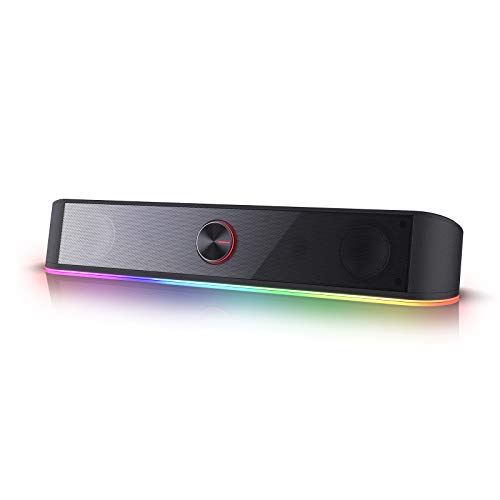
The Redragon GS560 RGB Desktop Soundbar is perfect for gamers and music lovers seeking an immersive audio experience without sacrificing desk space. Its compact 16-inch design fits seamlessly under your devices, while the upgraded drivers deliver clear sound with rich bass. You’ll appreciate the dynamic lighting bar that syncs with your audio, featuring four backlit modes for an engaging atmosphere. The handy volume knob offers precise control, combining the on/off switch for easy adjustments. Plus, with plug-and-play functionality, it’s compatible with your PC, TV, laptop, or smartphone, making setup a breeze. Enjoy exceptional sound in style!
Best For: Gamers and music enthusiasts looking for an immersive audio experience in a compact design.
Pros:
- Upgraded drivers provide clear sound quality with rich bass, enhancing music and gaming experiences.
- Dynamic lighting bar syncs with audio, offering four backlit modes for a visually engaging atmosphere.
- Plug-and-play functionality ensures compatibility with various devices, including PC, TV, laptop, and smartphone.
Cons:
- The compact size may limit bass response compared to larger speakers.
- Only available in a 2.0 channel setup, lacking surround sound options.
- Limited customization options for lighting effects beyond the four preset modes.
Sound Bar for Smart TV, 80W with Bluetooth and Detachable Design

Looking for an audio upgrade that fits seamlessly with your entertainment setup? The 80W Sound Bar for Smart TV is your answer. With Bluetooth connectivity and a detachable design, it adapts perfectly to your TV, PC, or gaming setup. Enjoy dynamic volume boost and clear sound details across tailored EQ modes for movies, music, and natural dialogue. You can place it horizontally, vertically, or even mount it on the wall for optimized sound. Plus, with effortless Bluetooth 5.3 connectivity and an 18-month warranty, you’ll have peace of mind while elevating your audio experience. Get ready for crisp, immersive sound!
Best For: Those seeking a versatile audio solution for their TV, gaming, or music experience with customizable sound features.
Pros:
- Dynamic volume boost enhances audio clarity and depth, perfect for movies and music.
- Detachable design allows for flexible placement options, fitting various entertainment setups.
- Easy connectivity with Bluetooth 5.3 and ARC mode simplifies usage with your TV remote.
Cons:
- Requires manual settings for compatibility with certain wired connections.
- TV must have ARC, OPT, or AUX ports for full functionality, which may limit compatibility with older models.
- Wall mounting may require additional hardware not included in the package.
BLUEDEE Computer Speakers for Desktop PC

For those seeking an immersive audio experience without sacrificing desk space, the BLUEDEE Computer Speakers for Desktop PC deliver exceptional sound quality and performance. With dual drivers and diaphragms, you’ll enjoy high-pitched notes and deep bass, all while anti-magnetic technology eliminates static interference. These speakers offer versatile connectivity via a 3.5mm headphone plug or Bluetooth 5.0, and they’re USB-powered for easy setup. Compact in design, they fit neatly under monitors and feature relaxing ambiance lights. Plus, the nylon-braided Y-cable keeps your workspace tidy. Made from eco-friendly materials, they also come with lifetime customer support for peace of mind.
Best For: Those looking for compact, high-quality speakers that provide versatile connectivity and immersive sound for their desktop setup.
Pros:
- Hi-Fi sound quality with deep bass and high-pitched notes for an enhanced audio experience.
- Versatile connectivity options including Bluetooth 5.0 and 3.5mm headphone plug.
- Eco-friendly materials and lifetime customer support for added peace of mind.
Cons:
- Limited to USB-powered setup, which may not suit all users’ preferences.
- The compact size might not produce as much volume as larger speakers.
- Ambiance lights may not appeal to all users’ aesthetic preferences.
LENRUE G11 Computer Speakers for Desktop

Designed with gamers and movie enthusiasts in mind, the LENRUE G11 Computer Speakers elevate your desktop audio experience like no other. With four large amplifier IC horns, you’ll enjoy distortion-free, noiseless sound, creating an immersive cinema-like atmosphere. Their compact design fits neatly under your monitor, saving desk space while the unique touch angular game lights add a stylish touch. Plus, the plug-and-play setup requires no driver installation—just connect via USB and 3.5mm audio cable. Compatible with a range of devices, including PCs and laptops, these speakers make it easy to adjust volume with a convenient top knob.
Best For: Gamers and movie enthusiasts seeking an immersive audio experience with compact desktop speakers.
Pros:
- Distortion-free sound with four large amplifier IC horns for an immersive audio experience.
- Compact design that fits neatly under monitors, saving valuable desk space.
- Easy plug-and-play setup with no driver installation required, compatible with a wide range of devices.
Cons:
- Limited customization options for sound settings, as there is no built-in equalizer.
- Touch lights may not appeal to all users, potentially affecting aesthetic preferences.
- Cables are glued together, which might make cable management more difficult for some users.
SOULION R50 Bluetooth Computer Speakers, Wired USB Powered Sound Bar

The SOULION R50 Bluetooth Computer Speakers stand out as an excellent choice for anyone seeking an affordable and versatile sound solution for their desktop setup. With a sleek, slanted design, these USB-powered speakers project sound beautifully, enhancing your movies, music, and gaming experiences. You’ll love the rich audio delivered by unique boosters and independent diaphragms. Plus, the customizable LED lighting adds a fun touch. You can easily switch between USB, Aux, and Bluetooth modes to connect various devices. Compact and stylish, the R50 fits seamlessly into your workspace while preventing dust buildup, making it a smart investment for your audio needs.
Best For: Those seeking an affordable and stylish audio solution for their desktop setup, ideal for movies, music, and gaming.
Pros:
- Compact and slanted design enhances sound projection while fitting seamlessly into any workspace.
- Multi-connectivity options including USB, Aux, and Bluetooth for versatile device compatibility.
- Customizable LED lighting with four dynamic modes adds a fun and personalized touch.
Cons:
- Bluetooth range is limited to 10 meters, which may restrict placement options.
- Wired USB power requirement may limit mobility compared to fully wireless options.
- Sound quality, while rich, may not match higher-end audio systems for audiophiles.
Computer Speakers for Desktop PC Monitor

If you’re looking to enhance your desktop audio experience, USB speakers offer a seamless solution for Windows, macOS, ChromeOS, and Linux users. These speakers feature dual ultra-magnetic drivers and passive radiators, delivering rich stereo sound with deep bass. Their adaptive-channel-switching keeps sound channels perfectly positioned when clamped to your monitor. Plus, the clip-on design saves valuable desk space, allowing you to mount them on any edge of your monitor. With three touch buttons, you can easily control volume and mute. Just verify your audio drivers are updated for peak performance, and enjoy superior sound quality while you work or game.
Best For: Users seeking a compact and high-quality audio solution for their desktop setup, compatible with various operating systems.
Pros:
- High-quality audio with dual ultra-magnetic drivers and deep bass for an immersive listening experience.
- Space-saving clip-on design allows easy mounting on monitors, freeing up desktop space.
- User-friendly controls with intuitive touch buttons for quick volume adjustment and muting.
Cons:
- Incompatibility with monitors, TVs, and projectors, limiting usage to specific devices only.
- Dependence on updated audio drivers for optimal performance, which may require additional troubleshooting.
- Limited to USB connection, restricting flexibility for users with other audio input options.
HiFi Sound Quality Computer Sound Bar Speakers

For those seeking an immersive audio experience, the Nylavee computer sound bar stands out with its HiFi sound quality, featuring 4 speaker units and 2 independent bass diaphragms. You’ll enjoy rich highs and powerful bass, perfect for gaming or music. The double layer neodymium magnets and mica fiber diaphragms guarantee superior audio performance, while the unique cavity design maximizes loudness for deep bass and clear highs. Connect effortlessly via Bluetooth 5.0 or a 3.5mm AUX cable to various devices. Plus, it’s USB powered for easy operation, and the side knob allows you to control everything with ease.
Best For: Those looking for high-quality audio performance in a compact sound bar for gaming, music, or general computer use.
Pros:
- HiFi sound quality with 4 speaker units and 2 bass diaphragms for an immersive listening experience.
- Multiple connection options including Bluetooth 5.0 and 3.5mm AUX for compatibility with various devices.
- User-friendly design featuring a side knob for easy volume control and USB power for convenient operation.
Cons:
- No built-in battery, requiring a constant power source for operation.
- Limited portability due to its USB-powered design and size, making it less ideal for on-the-go use.
- Potential sound distortion at maximum volume levels, which may affect audio clarity for some users.
Cyber Acoustics USB Speaker Bar (CA-2890)

Designed with simplicity in mind, the Cyber Acoustics USB Speaker Bar (CA-2890) is perfect for anyone seeking an easy-to-use audio solution for their PC, Mac, or Chromebook. This compact speaker connects via a single USB cable, eliminating the need for separate audio connections. It even includes a USB-A to USB-C adapter for newer laptops. Enjoy loud, crisp sound that enhances your music and videos, with a forward-projecting design for a better stereo experience. With accessible volume controls, play/pause functionality, and plug-and-play setup, you’ll be enjoying quality audio in no time. Plus, it comes with a 1-year warranty.
Best For: The Cyber Acoustics USB Speaker Bar (CA-2890) is best for users looking for a compact and easy-to-use audio solution for their PC, Mac, or Chromebook.
Pros:
- Compact design that easily clamps to monitors or stands alone, saving desk space.
- Simple plug-and-play setup with no installation required, allowing for immediate use.
- Clear and loud sound quality that enhances music and video experiences.
Cons:
- Limited to USB connection, which may not be compatible with older devices without an adapter.
- Lacks advanced features such as Bluetooth connectivity or built-in subwoofers.
- The speaker’s small size may not produce deep bass compared to larger sound systems.
VIZIO V-Series 2.0 Compact Sound Bar with Dolby Audio and Bluetooth

The VIZIO V-Series 2.0 Compact Sound Bar is perfect for those who want to elevate their PC audio experience without sacrificing space. Its sleek, all-black design fits seamlessly into small to medium rooms. With DTS Virtual:X technology, you’ll enjoy immersive, floor-to-ceiling sound that brings your favorite movies to life. The full-range speakers deliver clear, coherent audio across a frequency range of 70Hz to 20kHz, ensuring you hear every detail. Plus, Bluetooth connectivity lets you stream audio wirelessly from your devices, making it easy to enjoy your playlists or podcasts. Experience rich, high-quality sound with the VIZIO V-Series!
Best For: Those looking to enhance their audio experience in small to medium spaces without taking up much room.
Pros:
- Compact design easily fits in smaller areas while still providing powerful sound.
- DTS Virtual:X technology creates an immersive audio environment, enhancing movie-watching experiences.
- Bluetooth connectivity allows for convenient wireless streaming from compatible devices.
Cons:
- Limited to 2 speakers, which may not provide the same level of surround sound as larger systems.
- Frequency response starts at 70Hz, which might not capture the deepest bass frequencies.
- Lacks advanced features such as subwoofer support, which could enhance low-end audio performance.
Factors to Consider When Choosing a Soundbar for PC
When choosing a soundbar for your PC, you should think about several key factors. Audio quality, connectivity options, and design all play an essential role in your overall experience. Additionally, ensuring compatibility with your devices and having control over customization can enhance your setup markedly.
Audio Quality Importance
Audio quality plays a pivotal role in your overall experience when using a soundbar for your PC. For gaming, movies, and music, high-fidelity sound enhances emotional engagement, immersing you deeper into the action. Look for soundbars with multiple drivers and passive radiators; these features improve clarity and bass response, giving you a dynamic audio performance. Advanced audio technologies like Dolby Audio or DTS Virtual:X can create a lifelike surround sound effect that makes every scene enthralling. Pay attention to the frequency response range, typically between 70Hz to 20kHz, as it indicates how well the soundbar reproduces deep bass and high treble. Finally, verify the soundbar minimizes distortion at higher volumes for clear audio, even during intense scenes.
Connectivity Options Available
Choosing the right connectivity options is essential for maximizing your soundbar’s performance with your PC. Look for soundbars that feature USB Type-C, which streamlines setup with just one cable for both power and audio. Bluetooth connectivity is another must-have, allowing you to connect effortlessly to smartphones and tablets. Make certain the soundbar supports various connections like 3.5mm AUX and optical ports, as this versatility enhances usability with multiple devices. Additionally, consider options with ARC (Audio Return Channel) for easy control through your TV remote. Finally, USB-powered soundbars can keep your desktop tidy by eliminating the need for bulky power adapters. These features will guarantee you get the most out of your audio experience.
Design and Size
To enhance your PC setup, the design and size of a soundbar play an essential role in both aesthetics and functionality. Ideally, you want a soundbar that fits neatly beneath your monitor, guaranteeing it doesn’t obstruct your view. Compact options, typically ranging from 16 to 30 inches, are great for desktops, saving space while delivering quality audio. A sleek design can elevate your workspace’s aesthetic, contributing to a clutter-free environment. Pay attention to the soundbar’s height and width to ascertain it aligns well with your monitor’s dimensions, creating a balanced appearance. Additionally, consider placement options—horizontal or vertical setups can impact sound projection, so choose based on your specific workspace layout for the best audio experience.
Compatibility With Devices
When setting up your PC audio experience, compatibility with devices is a key factor. Look for soundbars that offer multiple connectivity options like USB, Bluetooth, and 3.5mm AUX. This guarantees you can easily connect to your PC, laptop, or smartphone. It’s also wise to check for modern standards like USB-C, as this is becoming more common in new devices. Make certain the soundbar is compatible with your operating system, whether it’s Windows, macOS, or ChromeOS, since some may have limitations. Additionally, consider soundbars that can connect to gaming consoles or smart TVs for more versatility. Finally, opt for models that provide plug-and-play functionality, making setup a breeze without extra drivers.
Control and Customization
As you explore options for soundbars to enhance your PC audio, control and customization play an essential role in creating the perfect listening experience. Look for soundbars with customizable RGB lighting to match your setup or mood. Dedicated software or apps can help you fine-tune audio settings for gaming, music, or movies. Easy-to-use control interfaces, like touch controls or physical knobs, allow quick adjustments to volume and settings without digging through menus. Guarantee compatibility with your existing software ecosystems for advanced control options. Opt for models that support multiple audio modes or equalizer settings, enabling you to switch between presets tailored for different content types, guaranteeing you always enjoy peak sound quality.
Lighting Features and Effects
Lighting features and effects can greatly enhance your PC audio experience, especially if you’re looking to create an immersive environment. Many soundbars now offer customizable RGB lighting options, letting you tailor colors and effects to match your gaming or entertainment setup. Dynamic lighting modes can sync with audio playback, adding a mesmerizing visual layer to your music, movies, or gaming sessions. If you prefer intuitive control, some soundbars include touch-control backlit options for easy adjustments. Consider the number of lighting zones, as more zones provide richer, more intricate displays. Additionally, models with various lighting modes—like static, breathing, or rhythm-based effects—allow you to choose a visual style that fits different activities, enhancing your overall experience.
Price and Value Comparison
Choosing the right soundbar for your PC involves more than just picking the one with the lowest price tag. You should consider audio performance specifications like driver quality and output volume, as these greatly affect value. Features such as Bluetooth connectivity and customizable RGB lighting may raise the price, but they can enhance your user experience and compatibility with various devices.
Don’t overlook the warranty and customer support options, as robust after-sales service can provide long-term value. Additionally, look for soundbars with features like adaptive EQ modes or surround sound capabilities, which can justify a higher price by improving audio versatility. Finally, verify the soundbar’s size and design fit your workspace without compromising sound quality.