
If you’re looking to enhance your typing experience, ortholinear mechanical keyboards are a game-changer. These keyboards offer ergonomic designs that can greatly reduce strain during long sessions. With a variety of options available, from customizable layouts to hot-swappable switches, your ideal setup is just a choice away. Curious about which models stand out in 2026? Let’s explore the top contenders that promise unmatched comfort and functionality.
KBDcraft 07Israfel Ergo-Split Mechanical Keyboard (56-Key, Black)

If you’re a programmer or writer seeking a keyboard that maximizes efficiency and comfort, the KBDcraft 07Israfel Ergo-Split Mechanical Keyboard is an excellent choice. Its exclusive 50% ortholinear layout aligns keys vertically and horizontally, reducing finger fatigue. You’ll appreciate the hinge-split design with seven tilt options, allowing for ergonomic adjustments that alleviate wrist strain during long sessions. The Core56 low-profile switches guarantee a responsive typing experience, while the custom keycaps enhance comfort. With gasket mount technology, vibrations diminish, resulting in a pleasant tactile feedback. Plus, you can easily customize key mappings and macros through Vial software for ultimate productivity.
Best For: Programmers and writers looking for an ergonomic and efficient typing experience.
Pros:
- Exclusive 50% ortholinear layout reduces finger fatigue and enhances input efficiency.
- Hinge-split design with seven tilt options allows for customizable ergonomic adjustments.
- High-performance customization through Vial software enables key mapping and macro setup for improved productivity.
Cons:
- Wired connection may limit portability compared to wireless options.
- Learning curve for users unfamiliar with an ortholinear layout.
- Price point may be higher than standard mechanical keyboards.
YIVU CORNE V4 Wired Split Mechanical Keyboard
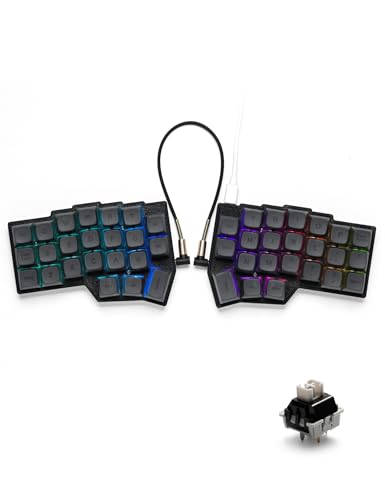
The YIVU CORNE V4 Wired Split Mechanical Keyboard stands out for its ergonomic design, making it an excellent choice for anyone who spends long hours typing. Its split layout with adjustable spacing and tilt angles reduces wrist fatigue and enhances comfort. With hot-swappable features, you can easily customize your switches and keycaps. The vibrant RGB backlighting offers 16.8 million colors and multiple modes, ensuring visibility in low light. Fully programmable keys let you remap functions to suit your workflow. Plus, with wired connectivity, you’ll enjoy reliable performance. This keyboard truly elevates your typing experience.
Best For: Those who spend long hours typing and seek an ergonomic keyboard to reduce wrist fatigue and enhance comfort.
Pros:
- Ergonomic design with adjustable spacing and tilt angles to minimize strain during extended use.
- Hot-swappable features allow for easy customization of switches and keycaps to suit personal preferences.
- Vibrant RGB backlighting with 16.8 million colors and multiple modes for improved visibility in low light conditions.
Cons:
- Wired connectivity may limit movement and flexibility compared to wireless options.
- Requires caution when using the TRS cable, as it does not support hot-swapping while powered on.
- The split layout may take time to get used to for those accustomed to traditional keyboard designs.
KBDcraft 07Israfel Ergo-Split Mechanical Keyboard (56-Key, Wired, RGB)

For programmers and writers seeking a more efficient typing experience, the KBDcraft 07Israfel Ergo-Split Mechanical Keyboard stands out with its innovative 50% ortholinear layout. The Core56 system features low-profile switches and hot-swap capability, enhancing comfort and making switch replacement a breeze. Its hinge-split design offers seven tilt options for ideal ergonomics, minimizing wrist and shoulder strain. With customizable RGB lighting and advanced programming through Vial software, you can tailor your keyboard to fit your workflow. Whether you’re typing for hours or gaming, this keyboard combines efficiency with comfort for an unmatched experience.
Best For: Programmers and writers looking for an ergonomic and efficient typing solution that reduces strain during extended use.
Pros:
- Compact 50% ortholinear layout enhances typing accuracy and minimizes finger fatigue.
- Hinge-split design offers customizable tilt options for improved ergonomics.
- Hot-swappable switches allow for easy customization and maintenance without soldering.
Cons:
- Limited key count may not suit users who prefer a full-sized keyboard with additional keys.
- Wired connectivity may restrict mobility compared to wireless options.
- Learning curve for users unfamiliar with ortholinear layouts might require an adjustment period.
YIVU Corne LP Low Profile Split Ergonomic Mechanical Keyboard

Designed for those who prioritize comfort and ergonomics, the YIVU Corne LP Low Profile Split Ergonomic Mechanical Keyboard stands out with its adjustable split layout. You can customize the spacing, tilt angle, and rotation to suit your needs, reducing wrist fatigue. With its 3×6 staggered layout and thumb key groups, it repositions essential keys for ease of access. Hot-swappable low profile linear switches guarantee quick response with minimal finger strain. Plus, the vibrant RGB backlighting and fully programmable keys via VIAL enhance your typing experience. Its compact design and versatile connectivity make it a perfect fit for any setup.
Best For: Those seeking a comfortable and ergonomic typing experience with customizable features for productivity enhancement.
Pros:
- Fully adjustable split layout reduces wrist fatigue and promotes better posture.
- Hot-swappable switches allow for easy customization and maintenance of the keyboard.
- RGB backlighting with customizable settings enhances visibility and aesthetic appeal.
Cons:
- Compact 40% layout may require a learning curve for users accustomed to standard keyboards.
- Limited key count may not suit users who rely on dedicated function keys or a full number pad.
- Some users may find the thumb key layout less intuitive for typing efficiency.
Keychron Q15 Max Wireless Custom Mechanical Keyboard

If you’re seeking a keyboard that enhances your gaming experience with minimal finger movement, the Keychron Q15 Max Wireless Custom Mechanical Keyboard is an excellent choice. Its ortholinear layout boosts your comfort, speed, and accuracy, letting you game longer without fatigue. Crafted from durable 6063 aluminum, it undergoes 24 manufacturing stages for exceptional quality. With a 2.4 GHz wireless connection and Bluetooth 5.1, you can seamlessly switch between devices. Enjoy premium acoustic foams for enhanced typing pleasure, and customize your setup easily with hot-swappable keys. The ARM Cortex-M4 chip guarantees low latency, keeping you competitive in every match.
Best For: Gamers and typists looking for a high-quality, customizable keyboard that promotes comfort and efficiency through its ortholinear design.
Pros:
- Hot-swappable keys allow for easy customization without soldering, enabling quick changes to your setup.
- Durable construction from 6063 aluminum ensures long-lasting quality and stability during intense gaming sessions.
- Multiple connectivity options (2.4 GHz wireless and Bluetooth 5.1) enable seamless switching between three devices for ultimate multitasking.
Cons:
- The ortholinear layout may require an adjustment period for those accustomed to traditional keyboard layouts.
- Limited key count (64 keys) might not suit users who prefer a full-sized keyboard with more functionality.
- Higher price point compared to standard keyboards may be a consideration for budget-conscious buyers.
EPOMAKER Luma40 Low Profile Mechanical Keyboard
The EPOMAKER Luma40 Low Profile Mechanical Keyboard stands out for its ergonomic ortholinear layout, making it ideal for programmers and writers who value comfort during long typing sessions. Crafted from CNC-cut aluminum, its minimalist design features semi-transparent keycaps that elegantly diffuse RGB backlight. You’ll appreciate the reduced finger travel, cushioned tray-mount, and lubed low-profile switches, all designed to alleviate strain. With QMK firmware, you can customize macros and layouts easily. Plus, its versatile connectivity options and customizable RGB backlighting enhance your workflow, ensuring a visually appealing and efficient typing experience across multiple devices.
Best For: Programmers and writers seeking a comfortable and customizable typing experience during extended use.
Pros:
- Ergonomic ortholinear layout minimizes finger movement and reduces strain during long typing sessions.
- Extensive customization options through QMK firmware for macros and layouts enhance productivity.
- Versatile connectivity with 2.4GHz wireless, Bluetooth, and wired modes allows seamless switching between multiple devices.
Cons:
- Limited key layout may require adjustment for users accustomed to full-sized keyboards.
- Potential learning curve for those unfamiliar with the ortholinear design and its benefits.
- Price point may be higher compared to traditional keyboards without advanced features.
EPOMAKER Split70 Wireless Ergonomic Keyboard (Black)

For those who spend long hours typing, the EPOMAKER Split70 Wireless Ergonomic Keyboard (Black) stands out with its 70% split layout, promoting a natural posture that reduces wrist and forearm strain. You’ll appreciate the creamy linear switches that offer smooth typing and the hot-swap capability for easy customization. With tri-mode connectivity, you can connect to five devices simultaneously, ensuring versatility whether you’re on a PC or tablet. Plus, the RGB lighting and cushioned design enhance your typing experience while minimizing noise. Enjoy seamless control with the programmable knob, making it perfect for both work and gaming sessions.
Best For: Those seeking an ergonomic keyboard that enhances comfort during extended typing sessions for both work and gaming.
Pros:
- Ergonomic design minimizes wrist and forearm strain, promoting a healthier typing posture.
- Tri-mode connectivity allows seamless switching between multiple devices, enhancing versatility.
- Customizable features including hot-swappable switches and programmable knobs cater to individual preferences.
Cons:
- Split layout may require an adjustment period for users accustomed to traditional keyboard designs.
- RGB lighting may not appeal to users who prefer a more minimalist aesthetic.
- Battery life may vary depending on usage of lighting and connectivity modes.
YIVU Corne V4.1 Split Ergonomic Keyboard
Designed for those seeking an ergonomic typing experience, the YIVU Corne V4.1 Split Ergonomic Keyboard offers a unique split layout that helps reduce wrist strain. Its adjustable spacing, tilt angle, and rotation allow you to customize your setup. With hot-swappable features, you can easily swap mechanical switches to suit your typing style. The vibrant RGB backlighting offers 16.8 million colors and 45 preset modes, enhancing your workspace aesthetics. Plus, fully programmable keys let you remap functions for maximum efficiency. Whether used independently or combined, this keyboard adapts to your needs, making it a perfect choice for serious typists.
Best For: The YIVU Corne V4.1 Split Ergonomic Keyboard is best for serious typists and gamers seeking an ergonomic solution to reduce wrist strain and enhance typing efficiency.
Pros:
- Fully customizable layouts with programmable keys for personalized typing experiences.
- Hot-swappable switches allow for easy customization and replacement of mechanical switches.
- Vibrant RGB backlighting with 16.8 million color options and multiple preset modes for enhanced aesthetics.
Cons:
- The TRS cable is not hot-swappable, limiting connection options when using it.
- Requires adjustment period for users new to split ergonomic keyboards.
- The split design may not suit everyone’s typing preference, potentially leading to discomfort for some users.
YMDK Sofle Wireless Split Keyboard 64 Keys Ergonomic Hotswappable Mini Gaming Keyboard Kit

Looking for a compact and ergonomic keyboard that enhances your gaming experience? The YMDK Sofle Wireless Split Keyboard is your answer. This 64-key, hotswappable mini gaming keyboard kit features a 60% layout perfect for saving desk space. With a 2.4 GHz wireless connection, you’ll enjoy freedom of movement while gaming. Just keep in mind it doesn’t support wired connections or Bluetooth. You’ll need to supply your own switches and keycaps for assembly, but once set up, you can customize every key using VIAL. Immerse yourself in a world of comfort and customization with this innovative keyboard!
Best For: Gamers looking for a compact and customizable keyboard that offers ergonomic support and wireless connectivity.
Pros:
- Hotswappable: Easily change switches without soldering for a customizable typing experience.
- Compact Design: The 60% layout saves desk space while maintaining essential functionality.
- Programmable Keys: Fully customizable keys through VIAL, allowing personalized setups for gaming.
Cons:
- No Wired Option: Limited to 2.4 GHz wireless connectivity, which may not suit all users.
- Assembly Required: Users must provide their own switches and keycaps, which adds to the overall setup time and cost.
- No LED Support: Lacks backlighting or LED features, which might be a drawback for some gamers.
YIVU Corne V4.1 Wired Split Ergonomic Mechanical Keyboard

The YIVU Corne V4.1 Wired Split Ergonomic Mechanical Keyboard is perfect for those seeking a more comfortable typing experience without sacrificing functionality. Its ergonomic design features adjustable spacing and a staggered layout, minimizing wrist fatigue. The hot-swappable switches let you customize your typing feel, while the pre-lubricated linear switches are ideal for both long typing sessions and e-sports. With 16.8 million RGB colors and programmable keys, you can enhance your setup for any mood or workflow. Plus, the reliable wired connection guarantees seamless performance, making it a fantastic choice for efficiency and comfort.
Best For: Individuals seeking an ergonomic typing solution that enhances comfort and efficiency, especially those engaged in long typing sessions or e-sports.
Pros:
- Ergonomic design reduces wrist fatigue and promotes a more natural typing posture.
- Hot-swappable switches allow for easy customization and personalization of typing experience.
- Extensive RGB backlighting options and fully programmable keys enhance aesthetics and functionality.
Cons:
- Wired connection may limit mobility compared to wireless options.
- TRS cable does not support hot-swapping, requiring careful handling while powered on.
- Initial setup and customization may be complex for some users unfamiliar with programmable keyboards.
Factors to Consider When Choosing an Ortholinear Mechanical Keyboard
When you’re picking an ortholinear mechanical keyboard, there are several key factors to keep in mind. Consider how ergonomic design can enhance your typing comfort, the types of key switches that suit your style, and the customization options you might want. Don’t forget to check the connectivity features and RGB lighting capabilities to find the perfect fit for your setup.
Ergonomic Design Benefits
Choosing an ortholinear mechanical keyboard with an ergonomic design can greatly enhance your typing experience, especially during long hours of use. An ergonomic layout promotes a more natural hand and wrist position, reducing the risk of repetitive strain injuries like tenosynovitis and carpal tunnel syndrome. The split design allows you to adjust spacing and tilt angles, customizing your setup for maximum comfort. With optimized key placement, these keyboards minimize finger travel, enhancing your typing speed and accuracy. Features like thumb clusters reposition frequently used keys for easier access, reducing strain. Plus, cushioning mechanisms dampen keypress impacts, providing a more satisfying and comfortable experience. Investing in ergonomic design is key to enjoying prolonged typing sessions without discomfort.
Key Switch Types
Key switches play a pivotal role in your typing experience on an ortholinear mechanical keyboard. You’ll find various types, including linear, tactile, and clicky switches, each catering to different preferences. Linear switches offer a smooth keystroke without any tactile bump or click, making them perfect for fast typing and gaming due to their quiet nature. Tactile switches provide a noticeable bump mid-keystroke, helping you feel when you’ve actuated the key, which enhances accuracy. If you enjoy auditory feedback, clicky switches combine a tactile bump with an audible click, delivering a satisfying experience. Keep in mind that the actuation force varies from 35g to over 70g, affecting your typing feel and overall comfort during extended use.
Customization Options Available
Customization options greatly enhance the experience of using an ortholinear mechanical keyboard, allowing you to tailor it to your specific preferences and needs. Many keyboards support hot-swappable switches, so you can easily change switches without soldering, adjusting the typing feel and sound. Key remapping and macro programming through software like VIAL or QMK let you create personalized layouts and shortcuts, boosting your workflow. RGB backlighting adds another layer of customization, offering millions of colors and lighting effects for aesthetics and visibility. Additionally, you can adjust key layouts and spacing to suit your ergonomic needs. Don’t forget about keycap profiles and materials, which let you choose the perfect combination for tactile comfort and visual appeal.
Connectivity Features
When selecting an ortholinear mechanical keyboard, connectivity features play an essential role in your overall experience. You’ll want to take into account both wired and wireless options, like Bluetooth or 2.4 GHz, for flexibility. Some models allow multiple connectivity modes, letting you switch between devices seamlessly. Pay attention to the length and type of cables, such as USB-C, as this can impact usability and portability. If customization is your thing, look for hot-swappable sockets that let you change switches easily, enhancing your typing feel. Finally, verify compatibility with various mechanical switch types, like 3-pin and 5-pin, to tailor your keyboard experience to your personal preferences. Choose wisely to enjoy maximum comfort and convenience!
RGB Lighting Capabilities
In addition to connectivity features, RGB lighting capabilities can greatly enhance your experience with an ortholinear mechanical keyboard. Many models offer customizable per-key backlighting, letting you choose from millions of colors for improved aesthetics and visibility. You can enjoy various lighting effects, like breathing or rainbow patterns, creating a dynamic typing environment. With programmable RGB lighting controlled through software, you can adjust colors, brightness levels, and animation speeds to fit your preferences or workflow needs. Plus, some keyboards come with preset lighting modes for quick access to popular effects without extensive setup. Advanced features might even sync with applications or games, providing lighting effects that respond to in-game events or system notifications, making your typing experience even more immersive.
Layout and Size
Choosing the right layout and size for your ortholinear mechanical keyboard is essential, especially if you want to enhance your typing experience. Ortholinear keyboards feature a grid layout that improves typing efficiency and accuracy, minimizing finger movement and reducing fatigue. You can choose from compact 40% layouts to larger models based on your desk space and typing preferences. Consider a split layout for better ergonomics, allowing you to adjust spacing and tilt to reduce wrist strain during long typing sessions. Additionally, pay attention to the number of keys available, as different layouts can affect accessibility to frequently used functions and shortcuts. Finding the perfect combination will ultimately elevate your typing comfort and speed.
Price and Value
Understanding the price and value of ortholinear mechanical keyboards is essential for making a smart investment. Prices typically range from about $60 for basic models to over $300 for high-end, customizable options. When evaluating value, look for features like hot-swappable switches, programmable keys, and ergonomic designs that enhance comfort and productivity. Premium keyboards often allow for advanced customization, justifying their higher price. Additionally, consider build quality; materials like aluminum and high-grade plastics affect durability and cost. Finally, don’t overlook warranty and customer support services, as these can add significant value, ensuring long-term satisfaction with your purchase. Balancing these factors will help you find the right keyboard for your needs and budget.