
If you’re looking to enhance your workspace, upgrading to a dual monitor arm could be a game-changer. These arms not only improve ergonomics but also help declutter your desk. With various models available, from HUANUO to VIVO, each offers unique features tailored to different needs. Curious which options rank as the best? Let’s explore the top picks and what they bring to your setup.
HUANUO Dual Monitor Stand for 13–32″ Screens

If you’re looking to maximize your workspace and enhance your viewing experience, the HUANUO Dual Monitor Stand is an excellent choice for 13 to 32-inch screens. This fully adjustable mount supports monitors weighing between 4.4 to 19.8 lbs and features VESA compatibility. You can easily install it using dual C-clamp or grommet mounting options, ensuring stability. With full-motion adjustments like tilt, swivel, and rotation, you can achieve the perfect viewing angle. Plus, it lifts monitors off your desk, freeing up space and promoting a healthier posture. Enjoy a tidier workspace with built-in cable management for a sleek, organized look.
Best For: Those seeking an ergonomic and space-saving solution for dual monitor setups in a wooden desk environment.
Pros:
- Fully adjustable with tilt, swivel, and rotation capabilities for optimal viewing angles.
- Sturdy and stable mounting options prevent wobbling and ensure secure installation.
- Built-in cable management helps maintain a clean and organized workspace.
Cons:
- Limited to wooden desks only, excluding plastic or glass surfaces.
- Weight capacity may not accommodate heavier monitors exceeding 19.8 lbs.
- Installation may require specific desk thickness and conditions, limiting compatibility.
VIVO Dual Monitor Desk Mount (STAND-V002O)
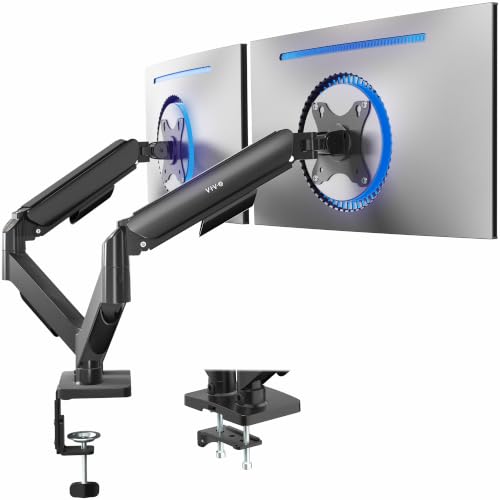
The VIVO Dual Monitor Desk Mount (STAND-V002O) is an ideal choice for professionals and gamers alike who need to optimize their workspace. It supports dual monitors up to 32 inches and 19.8 lbs each, ensuring compatibility with most screens. With mechanical spring adjustments, you can easily customize your viewing angles—tilt, swivel, and rotate as needed. The space-saving design elevates your monitors, reclaiming valuable desk space. Installation is straightforward with all necessary hardware and open-top VESA plates for effortless mounting. Choose between a heavy-duty C-clamp or a bolt-through grommet mount for flexible setup options. Upgrade your workspace today!
Best For: Professionals and gamers looking to optimize their workspace with dual monitor setups.
Pros:
- Supports dual monitors up to 32 inches and 19.8 lbs, ensuring compatibility with most screens.
- Customizable viewing angles with mechanical spring adjustments for tilt, swivel, and rotation.
- Space-saving design elevates monitors, reclaiming valuable desk space.
Cons:
- Installation may require tools if not familiar with mounting setups.
- Weight limit of 19.8 lbs per monitor may not accommodate heavier screens.
- C-clamp or grommet options may not fit all desk types, limiting installation flexibility.
Elevon Dual Monitor Stand for 13-32 inch Screens

For professionals and gamers alike, the Elevon Dual Monitor Stand is an ideal choice for anyone using screens between 13 and 32 inches. This stand supports VESA 75x75mm or 100x100mm mounting, making it compatible with most monitors. Its full-motion adjustment allows you to tilt, swivel, and rotate your screens effortlessly, guaranteeing comfort during work or gaming. The sturdy dual C-clamp ensures a secure fit on desks 0.59–3.15 inches thick, while built-in cable management keeps your workspace tidy. By lifting monitors off your desk, it frees up valuable space for other essentials, enhancing your overall efficiency.
Best For: Professionals and gamers seeking ergonomic comfort and organization with dual monitor setups.
Pros:
- Full-motion adjustment allows for easy tilt, swivel, and rotation of monitors, enhancing comfort during use.
- Sturdy dual C-clamp ensures a secure fit on a variety of desk thicknesses, providing stability for heavy monitors.
- Built-in cable management helps keep the workspace neat and organized, reducing clutter.
Cons:
- Not compatible with glass or plastic desks, limiting installation options.
- May require some assembly, which could be a drawback for users looking for a quick setup.
- Limited to supporting monitors within the 13-32 inch range, which may not suit all users.
HUANUO Dual Monitor Stand – Fully Adjustable Monitor Desk Mount

Looking to enhance your workspace? The HUANUO Dual Monitor Stand is your ideal solution. Compatible with 13 to 32-inch screens, it accommodates weights between 4.4 to 19.8 lbs per arm. You’ll appreciate its unique design that guarantees stability, whether you choose the C-clamp or grommet base for installation. With pneumatic spring arms, you can easily adjust your monitors’ position to reduce neck and shoulder strain. Plus, it includes cable management to declutter your desk and free up to 50% of your workspace. Check your monitor’s VESA compatibility and elevate your setup effortlessly!
Best For: Professionals and gamers looking to optimize their dual monitor setup for improved ergonomics and workspace organization.
Pros:
- Fully adjustable: Pneumatic spring arms allow for smooth height, swivel, and tilt adjustments to customize monitor positioning.
- Space-saving design: Frees up to 50% of desktop space, reducing clutter with integrated cable management.
- Stable installation options: Unique structural design with C-clamp or grommet base ensures stability for various monitor sizes.
Cons:
- Weight limitations: Each arm only supports monitors weighing between 4.4 to 19.8 lbs, which may not accommodate heavier screens.
- VESA compatibility check required: Users must verify their monitor’s VESA mounting holes (75x75mm or 100x100mm) before purchasing.
- Potential complexity in installation: Some users may find the installation process challenging without prior experience.
VIVO Dual Monitor Desk Mount (STAND-V002)

Designed to accommodate two monitors up to 30 inches and 22 lbs each, the VIVO Dual Monitor Desk Mount (STAND-V002) is an excellent choice for professionals, gamers, or anyone needing extra screen real estate. This heavy-duty, fully adjustable steel stand features a sleek black finish, ensuring it fits seamlessly into your workspace. You’ll appreciate the +90° to -90° tilt, 180° swivel, and 360° rotation for ideal viewing angles. With easy installation and VESA compatibility, it supports screens from 13” to 30”. Plus, the cable management clips keep your setup tidy. Enjoy peace of mind with a 3-year warranty and tech support available.
Best For: Professionals, gamers, and anyone seeking to optimize their workspace with dual monitor setups.
Pros:
- Heavy-duty steel construction ensures durability and stability for two monitors.
- Fully adjustable arms provide versatile viewing angles with tilt, swivel, and rotation options.
- Easy installation with included hardware and clear instructions, plus a 3-year warranty for peace of mind.
Cons:
- Limited to monitors up to 30 inches and 22 lbs each, which may not suit larger screens.
- C-clamp mount may not fit all desk types, especially those with unusual thicknesses or shapes.
- Grommet mount option sold separately, which adds to the overall cost if needed.
MOUNTUP Dual Monitor Stand for Desk

The MOUNTUP Dual Monitor Stand is an excellent choice for professionals and gamers alike who need versatile and ergonomic monitor positioning. It supports monitors weighing between 4.4 to 17.6 lbs, accommodating sizes from 17 to 32 inches. Designed to reduce neck and back strain, this stand elevates your monitors, enhancing your posture. With full motion capabilities, you can tilt, swivel, and rotate your screens for ideal viewing angles. Installation is a breeze, thanks to the C-clamp or grommet options. Plus, its cable management system keeps wires hidden, maximizing your desk space for a tidy and organized workspace.
Best For: Professionals and gamers seeking ergonomic and adjustable monitor positioning for enhanced productivity and comfort.
Pros:
- Ergonomic design helps reduce neck and back strain by elevating monitors for better posture.
- Full motion capabilities allow for customizable positioning with tilt, swivel, and rotation features.
- Efficient space management with cable concealment and the ability to hold two monitors off the desk surface.
Cons:
- May not be suitable for monitors heavier than 17.6 lbs.
- Requires assembly, which might be challenging for some users.
- Limited to specific VESA patterns (75×75 mm and 100×100 mm), potentially excluding some monitor models.
monTEK Dual Monitor Arm with USB (MA1011UCBK-D)
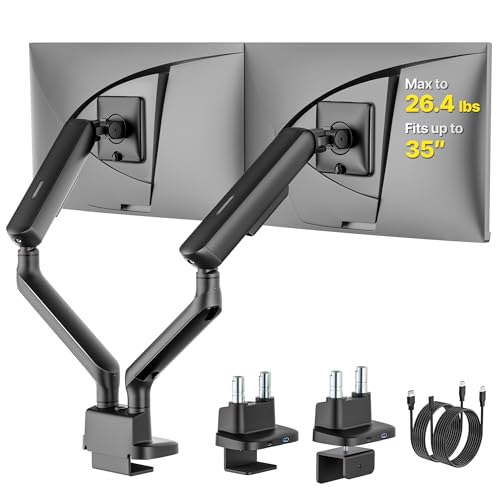
For those seeking an efficient workspace solution, the monTEK Dual Monitor Arm with USB (MA1011UCBK-D) stands out with its impressive compatibility for both flat and curved screens ranging from 17 to 35 inches. It can hold up to 24.2 lbs per arm, ensuring stability for your setup. With features like -45° to +60° tilt, ±90° swivel, and height adjustments, it promotes ergonomic comfort and reduces neck strain. The compact design saves desk space, while dual USB ports offer convenient device charging. Installation is simple, and responsive customer support is available for any questions, making this arm a solid choice for your workspace.
Best For: Individuals looking to enhance their workspace ergonomics and efficiency with dual monitor setups.
Pros:
- Supports a wide range of monitor sizes (17–35 inches) and weights (up to 24.2 lbs per arm), ensuring compatibility with various screens.
- Ergonomic adjustments including tilt, swivel, and height settings help reduce neck strain and improve overall comfort during use.
- Integrated USB ports provide convenient charging options for devices, helping to maintain a clutter-free workspace.
Cons:
- Installation may require some time and effort, especially for those unfamiliar with mounting hardware.
- Limited to VESA compliant monitors, which may exclude some older or non-standard monitors.
- Weight capacity might be insufficient for heavier monitors or additional accessories, limiting versatility.
WALI Dual Monitor Stand for 17-32 inch Computer Screens (GSMP002N)

Looking to enhance your workspace with a dual monitor setup? The WALI Dual Monitor Stand supports 17-32 inch flat and curved screens, holding up to 22 lbs with VESA compatibility. Enjoy dynamic adjustability with smooth swivel, tilt, and full rotation, allowing you to position your monitors ergonomically and reduce neck strain. With a maximum extension of 19.3 inches and adjustable height, it suits any multitasking needs. Plus, choose between C-clamp or hole base mounting for a secure fit. The package includes all necessary hardware and offers reliable US-based customer support. Upgrade your workspace today!
Best For: Individuals seeking an ergonomic and flexible dual monitor setup for enhanced productivity and comfort.
Pros:
- Dynamic adjustability allows for smooth swivel, tilt, and rotation, promoting a comfortable viewing experience.
- Flexible mounting options (C-clamp and hole base) cater to various desk configurations for a secure setup.
- Extended movement range with a maximum extension of 19.3 inches and adjustable height up to 17.3 inches supports multitasking needs.
Cons:
- May require a bit of assembly time and effort for initial setup.
- Limited weight capacity of 22 lbs may not accommodate heavier monitors.
- The installation process may be challenging for those unfamiliar with mounting hardware.
Mount-It! Dual Monitor Stand for Screens up to 32

Ideal for professionals and gamers alike, the Mount-It! Dual Monitor Stand elevates your setup with full motion flexibility. It supports two screens from 13 to 32 inches, weighing up to 19.8 lbs each. With +90°/-45° tilt, 180° swivel, and 360° rotation, you can easily adjust your monitors for peak viewing. The sturdy steel construction guarantees durability, while integrated cable management keeps your workspace tidy. Choose between C-clamp or grommet mounting options to fit your desk. Backed by a lifetime warranty and 4.4-star customer reviews, it’s a reliable choice for anyone looking to enhance their workstation.
Best For: Professionals and gamers seeking an ergonomic and flexible dual monitor setup.
Pros:
- Full motion flexibility allows for optimal monitor positioning with tilt, swivel, and rotation capabilities.
- Heavy-duty steel construction ensures stability and long-lasting support for your screens.
- Integrated cable management keeps your workspace organized and free from clutter.
Cons:
- Mounting options may be limited for certain desk thicknesses and surfaces.
- Installation may require additional tools or assistance, depending on your desk setup.
- Weight limit of 19.8 lbs per monitor may not accommodate larger or heavier displays.
HUANUO NITROGLIDE Dual Monitor Stand (HNDS7)

The HUANUO NITROGLIDE Dual Monitor Stand (HNDS7) is perfect for professionals and gamers who need a reliable setup for their 13″ to 40″ monitors. With solid aluminum arms and a larger base, this stand offers outstanding stability, especially for ultrawide monitors. You can easily adjust the height up to 21.1” and extend the arms to 25.59″, allowing for full motion adjustments. Plus, it supports various mounting options and includes convenient USB ports for charging. By keeping your desktop organized with its cable management system, it creates a clutter-free workspace that enhances productivity and comfort.
Best For: Professionals and gamers seeking a stable and adjustable dual monitor setup for their workspace.
Pros:
- Outstanding Stability: Solid aluminum arms and a larger base provide excellent support, especially for ultrawide monitors.
- Full Motion Adjustments: Offers a wide range of adjustments including height, swivel, tilt, and rotation for optimal viewing angles.
- Convenient USB Ports: Built-in USB ports and cable management system help keep devices charged and the workspace organized.
Cons:
- Limited Compatibility: Only compatible with monitors that have VESA 75×75mm or 100×100mm mounting options.
- Weight Limitations: Each arm can only hold up to 26.4 lbs, which may not accommodate heavier monitors.
- Desk Thickness Restrictions: Requires a desk thickness of up to 3.54″ for proper installation, which may not suit all setups.
Factors to Consider When Choosing a Dual Monitor Arm
When choosing a dual monitor arm, you need to take into account several key factors. Think about screen size compatibility, weight capacity limits, and the mounting options available for your setup. Also, don’t forget to check the adjustability features and installation requirements to guarantee a smooth experience.
Screen Size Compatibility
Choosing the right dual monitor arm involves understanding screen size compatibility, which can greatly impact your workspace. Many models support monitor sizes ranging from 13 to 32 inches, but some can accommodate larger screens, so always check the specific size limits. It’s essential to take into account the VESA mounting standards—typically 75x75mm or 100x100mm—to guarantee a secure attachment. Additionally, keep in mind that the size of your monitors affects their weight, which is important since most arms support weights between 4.4 to 19.8 lbs per arm. Also, the ability to adjust the height and position of your monitors varies with their size, influencing your ergonomic viewing angles and overall desk space management.
Weight Capacity Limits
Understanding screen size compatibility is just one part of the equation; weight capacity limits are equally important when selecting a dual monitor arm. Typically, these limits range from 4.4 lbs to 22 lbs per monitor, depending on the model. Each arm must support the combined weight of both monitors. For example, if each monitor weighs 15 lbs, the arm should handle at least 30 lbs in total. Always verify that your monitors fall within the specified limits to avoid instability and potential damage. You’ll find weight capacity listed in the product details, so check these figures against your monitors before purchasing. Remember, ensuring the right weight capacity is crucial for safe and effective use.
Mounting Options Available
While selecting a dual monitor arm, considering the mounting options available is essential for achieving a stable and functional setup. You typically have two choices: C-clamp and grommet mounts. C-clamp mounts attach securely to the desk’s edge and can fit various thicknesses, usually between 0.39 to 4.53 inches. On the other hand, grommet mounts require a pre-drilled hole and work with hole sizes from 0.39 to 2.36 inches in diameter. Your choice affects stability, as some designs feature dual C-clamp structures for added support. Finally, verify the mounting option suits your desk material; many arms perform best on wooden surfaces for ideal installation. Choose wisely to enhance your workspace ergonomics.
Adjustability Features Offered
When looking for the perfect dual monitor arm, you can’t overlook the adjustability features it offers. Look for models with full-motion adjustments, including tilt angles from +85° to -50°, ±90° swivel capabilities, and 360° rotation for customizable viewing. Height adjustability is essential; some arms can raise monitors up to 16.2 inches, promoting an ergonomic setup that reduces neck and back strain. Many feature tool-less mechanical spring adjustments, allowing you to easily reposition monitors without extra tools. Additionally, consider models with a maximum arm extension of 19.9 inches to enhance flexibility in positioning. Finally, verify the arm allows for height adjustments along a central pole for seamless side-by-side viewing, making multitasking a breeze.
Installation Requirements Needed
Before diving into the world of dual monitor arms, it’s essential to take into account the installation requirements that can affect your setup. First, confirm your desk material is compatible; most arms need a wooden surface and might not work well with plastic or glass. Next, check your desk’s thickness, as many mounts require a range between 0.59 to 3.54 inches for secure installation. Look underneath for any cross beams or panels that could obstruct mounting. Additionally, verify the VESA compatibility of your monitors, typically 75x75mm or 100x100mm. Finally, choose a mounting option like a C-clamp or grommet mount, considering their specific requirements for desk thickness and hole size to confirm a proper fit.
Design and Aesthetics
Choosing the right design and aesthetics for your dual monitor arm can elevate your workspace’s look and feel. A sleek, minimalistic design not only creates a modern vibe but also often includes integrated cable management systems that keep wires hidden, enhancing your setup’s visual appeal. Consider color options like black or white to guarantee your monitor arm complements your existing decor. Opting for high-quality materials, such as aluminum or heavy-duty steel, adds durability while projecting a professional touch. A visually appealing monitor arm encourages organization, helping you maintain focus on your tasks without distractions. By prioritizing design and aesthetics, you can transform your workspace into an efficient and inviting environment.