
In 2026, efficient data connectivity isn’t just a luxury; it’s a necessity. You might find yourself juggling multiple devices, and a reliable USB hub can make all the difference. From compact travel options to robust desktop solutions, the right hub can streamline your setup and enhance productivity. Curious which models stand out this year? Let’s explore the top contenders that can expand your connectivity with ease.
Acer USB Hub 4 Ports, Multiple USB 3.0 Hub

If you’re looking to expand your device connectivity, the Acer USB Hub 4 Ports is an excellent choice for anyone needing to connect multiple peripherals to their PC or laptop. With four additional USB 3.0 ports, you can easily connect flash drives, mice, keyboards, and printers. Enjoy data transfer speeds up to 5Gbps, ensuring quick file transfers. The hub’s advanced GL3510 chip guarantees safety and supports plug-and-play functionality, letting all ports work simultaneously. Plus, it’s lightweight and portable, making it perfect for travel. Just remember, the USB C port is for powering the hub and doesn’t transfer data.
Best For: Anyone looking to enhance their device connectivity by adding multiple USB ports to their PC or laptop for peripherals like flash drives, mice, keyboards, and printers.
Pros:
- High data transfer speeds of up to 5Gbps for efficient file transfers.
- Plug-and-play functionality allows all ports to work simultaneously without the need for drivers.
- Lightweight and portable design with a 2ft cable, making it convenient for travel.
Cons:
- The USB C port is only for powering the hub and cannot be used for data transfer or charging devices.
- Limited compatibility with certain devices, as the hub works mainly with USB-A connections.
- Some users may find the need to power the hub inconvenient for certain setups.
Anker USB Hub 4 Ports for Laptop and PC

The Anker USB Hub 4 Ports for Laptop and PC is perfect for individuals who need to expand their device connectivity without sacrificing speed. With USB 3.0 technology, you can sync data at impressive speeds up to 5Gbps, transferring an HD movie in just seconds. This hub cleverly converts one USB port into four, providing ample connectivity options for your devices. Designed for durability and heat resistance, it guarantees long-lasting performance. The package includes the ultra-slim hub, a welcome guide, and an 18-month warranty, along with excellent customer service for any questions you might have. Expand your setup effortlessly!
Best For: Individuals looking to expand device connectivity with high-speed data transfer capabilities.
Pros:
- High-Speed Data Transfer: Sync data at speeds up to 5Gbps, allowing for quick file transfers.
- Multiple Connectivity Options: Converts one USB port into four, ideal for connecting multiple devices.
- Durable Design: Built for heat resistance and long-lasting use, ensuring reliability.
Cons:
- Not Designed for Charging: This hub does not support charging devices, limiting its functionality.
- Limited Port Power: Each port may have restrictions on power output for connected devices.
- No Additional Features: Lacks extra features like SD card slots or built-in cables, which some users may prefer.
USB 3.0 4-Port Hub with Power Adapter

For professionals who rely on multiple devices, the USB 3.0 4-Port Hub with Power Adapter is an essential tool. This hub expands a single USB port into four, solving your connectivity issues with ease. With data transfer speeds up to 5Gbps, you can quickly transfer files and back up your data. The included 5V/2A Type-C power adapter guarantees stable power for high-demand devices like external hard drives. Its durable aluminum design protects against wear, while maintaining stability during heavy use. Compact and universally compatible, it’s perfect for your office or travel needs, keeping your workspace organized and efficient.
Best For: Professionals and travelers who need to connect multiple USB devices efficiently and reliably.
Pros:
- High-Speed Data Transfer: Achieves speeds up to 5Gbps, enabling fast file transfers and backups.
- Durable Design: Constructed with aluminum alloy for heat dissipation and protection against wear from frequent use.
- Multi-Device Functionality: All four ports function at full speed simultaneously, supporting various peripherals.
Cons:
- Limited to USB 3.0: May not support the latest USB standards for users with newer devices.
- Dependence on Power Adapter: Requires a power adapter for optimal performance with high-demand devices.
- Portability Constraints: While compact, it may still be less portable than some smaller hubs without external power needs.
USB Hub 3.0, 7-Port Splitter with On/Off Switches

Looking to expand your connectivity options? The USB Hub 3.0, 7-Port Splitter with On/Off Switches is your perfect solution. It transforms a single USB port into seven, offering data transfer speeds up to 5Gbps—over ten times faster than USB 2.0. Each port features individual on/off switches with lights, allowing you to manage power efficiently. With a 3.2ft cable, it’s compatible with a range of devices, including laptops and consoles. Plus, its slim design makes it ideal for travel. Enjoy plug-and-play functionality and a built-in high-performance chip for enhanced data safety. Say goodbye to connectivity limitations!
Best For: Users looking to expand their USB connectivity options while maintaining efficient power management and fast data transfer speeds.
Pros:
- Individual on/off switches for each port allow for better power management and energy efficiency.
- High data transfer speed of up to 5Gbps, making it suitable for quick file transfers, including HD movies.
- Slim and lightweight design makes it portable and ideal for travel with ultrabooks.
Cons:
- Extra power supply may be needed for power-hungry devices, which could be inconvenient.
- Limited to USB 3.0 devices for optimal performance; older devices may not utilize full capabilities.
- Cables may not be long enough for certain setups, depending on the distance from the power source or computer.
Wenter 11-Port USB Hub 3.0 with Smart Charging Port

With its impressive 11-port design, the Wenter 11-Port USB Hub 3.0 is perfect for tech enthusiasts who need to connect multiple devices simultaneously. You’ll appreciate the ten USB 3.0 data ports, offering a speedy data transfer rate of up to 5Gbps. Plus, the dedicated smart charging port delivers up to 2.4 amps for all your devices like tablets and phones. Individual on/off switches and LED indicators make managing power a breeze. With a generous cable length of 100cm for USB and 120cm for power, you can easily arrange your setup. Enjoy peace of mind with a 24-month warranty and friendly support!
Best For: Tech enthusiasts and professionals who require multiple device connections and fast data transfer.
Pros:
- 10 USB 3.0 data ports enable quick data transfer rates of up to 5Gbps.
- Individual on/off switches allow for easy power management without needing to unplug devices.
- Smart charging port delivers high power output of up to 2.4 amps for charging tablets and phones.
Cons:
- Limited to USB 3.0 and below; does not support newer USB standards like USB 3.1 or USB-C natively.
- Power adapter required for operation, which may add to cable clutter.
- Physical size may take up more desk space compared to smaller hubs.
intpw 9-Port USB 3.2 Hub with PD Charging Ports

The intpw 9-Port USB 3.2 Hub stands out as the ideal solution for tech-savvy users who need to connect multiple devices seamlessly. With ten ports, including four USB 3.0 and two PD 45W charging ports, you can transfer HD files at lightning speeds of up to 10Gbps. Its sleek aluminum design not only looks great but also provides stability on your desk. Plus, the included 65W power adapter guarantees reliable performance. Just remember, the PD ports are for charging only, so avoid connecting high-power devices. Enjoy a clutter-free workspace while keeping all your devices powered and connected!
Best For: Tech-savvy users who need to connect multiple devices and enjoy fast data transfer speeds.
Pros:
- High-speed data transfer with USB 3.2 ports offering up to 10Gbps, ideal for large file transfers.
- Two dedicated PD 45W charging ports for fast charging of compatible devices like iPhones and iPads.
- Sleek aluminum design with ergonomic features for easy access and stability on desktops.
Cons:
- PD ports do not support data transfer, limiting their use to charging only.
- Not recommended for high-power devices like laptops, which may require more power than the PD ports can provide.
- Optimal performance may be affected if multiple SSD drives are used simultaneously.
USB C Hub with 7 Ports (4 USB-A and 3 USB-C)
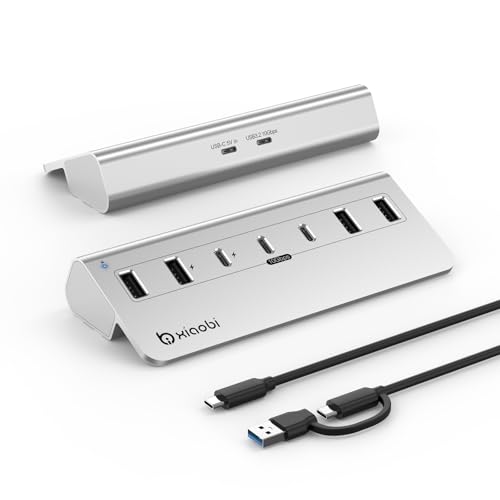
For tech enthusiasts and professionals needing versatile connectivity, the USB C Hub with 7 ports—featuring 4 USB-A and 3 USB-C connections—stands out as a top choice. Compatible with devices like the MacBook Air/Pro and iPhone 16/15, it’s powered by a 5V 3A adapter for reliable performance. Enjoy lightning-fast data transfer speeds of up to 10Gbps, and take advantage of two ports dedicated to charging. Constructed from durable aluminum alloy, this hub features an ergonomic design with a non-slip base. With a 12-month warranty and 24/7 customer support, you can trust its quality and reliability.
Best For: Tech enthusiasts and professionals seeking versatile connectivity options for their devices.
Pros:
- High data transfer speeds of up to 10Gbps, ensuring quick and efficient file transfers.
- Durable aluminum alloy construction provides longevity and effective heat dissipation.
- Plug and play compatibility with Windows, macOS, and Linux, requiring no additional drivers.
Cons:
- Limited charging power of 15W per port, which may not be sufficient for some devices.
- Not suitable for laptop charging, limiting its functionality for some users.
- Bulkier design compared to single-port adapters, which may affect portability.
4Ft 7-Port USB Hub 3.0 for Desktop

Looking to expand your desktop setup? The 4Ft 7-Port USB Hub 3.0 is your perfect solution. With four USB-A and three USB-C ports, it accommodates multiple devices like hard drives and keyboards seamlessly. Enjoy blazing-fast data transfers at 5Gbps—ten times faster than USB 2.0. The hub’s sturdy aluminum design and extra-long 4-foot cable keep your workspace organized and tangle-free. Plus, it’s compatible with Windows, Mac OS, and Linux, ensuring a hassle-free plug-and-play experience. Powered by dual high-performance chips, it guarantees stable connections for all your peripherals. Elevate your connectivity today!
Best For: Users looking to enhance their desktop connectivity with multiple high-speed USB ports for various devices.
Pros:
- Blazing-fast 5Gbps transfer speed enables quick data transfers, ideal for large files.
- Sturdy aluminum design provides durability and a sleek look for any desktop setup.
- Compatible with multiple operating systems (Windows, Mac OS, and Linux) for versatile use.
Cons:
- Supports data transmission only, meaning it cannot charge devices through the hub.
- May not be suitable for laptops with limited USB-C ports, requiring adapters for full functionality.
- 4-foot cable length might be restrictive in smaller workspaces.
TP-Link Powered USB Hub 3.0 with 7 Data Ports and 2 Smart Charging Ports

Expanding your connectivity options has never been easier with the TP-Link Powered USB Hub 3.0, which boasts 7 data ports and 2 smart charging ports. This hub transforms a single USB 3.0 port into seven, allowing you to connect various devices like keyboards, mice, and hard drives at transfer speeds up to 5Gbps. With 2.4A outputs, the smart charging ports quickly power your smartphones and tablets. Its plug-and-play functionality works seamlessly across Windows, Mac, and Linux systems. Plus, built-in safety features protect your devices, ensuring reliable and efficient usage. Enjoy the convenience of enhanced connectivity with TP-Link’s trusted performance.
Best For: Individuals and professionals who need to connect multiple USB devices simultaneously with fast data transfer and charging capabilities.
Pros:
- High-speed data transfer with USB 3.0 speeds up to 5Gbps, making it ideal for large file transfers.
- Smart charging ports deliver fast charging for smartphones and tablets, enhancing usability for mobile device users.
- Comprehensive safety features protect connected devices from overheating, overload, and short circuits.
Cons:
- Non-charging ports only support data transfer, which may limit functionality for users needing charging and data sync simultaneously.
- Size and weight might be less portable, making it less convenient for travel compared to smaller hubs.
- Power adapter required, which could be an inconvenience for those looking for a more compact, plug-and-play solution without external power needs.
UGREEN USB 3.0 Hub, 4 Ports USB A Splitter

The UGREEN USB 3.0 Hub, with its 4-port USB A splitter, is the perfect solution for anyone needing to connect multiple devices to a single USB port. This hub expands one USB A port into four, accommodating your mice, keyboards, U disks, and printers effortlessly. With a maximum file transfer speed of 5Gbps, you can transfer a 10 GB file in just 16.4 seconds, boosting your efficiency. It’s compatible with Windows, macOS, Linux, and Chrome OS, making it versatile for any setup. Plus, its compact design makes it ideal for travel, ensuring you stay connected wherever you go.
Best For: Anyone needing to connect multiple USB devices to a single port, including travelers and professionals.
Pros:
- Compact and portable design makes it easy to carry for on-the-go use.
- High-speed file transfer capability of up to 5Gbps enhances productivity.
- Plug-and-play functionality allows for easy setup without additional drivers or software.
Cons:
- Limited to USB A ports, which may not be compatible with newer USB C devices without an adapter.
- Power output may be insufficient for charging some devices when multiple devices are connected.
- Build quality could be considered basic compared to higher-end hubs.
Factors to Consider When Choosing a USB Hub for PC
When picking a USB hub for your PC, you should think about several key factors. Consider the port count and types you need, along with the data transfer speeds they offer. Don’t forget to check compatibility with your devices and the hub’s design for portability.
Port Count and Types
Choosing the right USB hub involves considering both the port count and types available. A higher port count lets you connect multiple devices simultaneously, enhancing your productivity. Look for hubs that offer a mix of USB-A and USB-C ports to guarantee compatibility with various devices, including newer laptops and peripherals. This versatility is vital as you expand your setup. Also, check for plug-and-play functionality, allowing easy connections without extra drivers. If you plan to use high-demand devices like external hard drives, evaluate the hub’s power delivery options. Some hubs come with dedicated power adapters, assuring stable performance for all your devices. Balancing port count and type will help you maximize your connectivity experience.
Data Transfer Speeds
While evaluating USB hubs, it’s important to take into account data transfer speeds, as they can greatly affect your workflow. Most USB hubs support speeds up to 5Gbps, allowing you to transfer large files, like HD movies, in seconds. If you’re looking for even greater efficiency, consider advanced hubs with USB 3.2 technology, which can reach speeds of up to 10Gbps. Keep in mind that connecting multiple devices simultaneously might slow down overall performance, as bandwidth is shared. Also, verify compatibility with older USB 2.0 and USB 1.1 devices, though they’ll operate at their respective lower speeds. Choosing the right hub can greatly enhance your productivity by streamlining your data transfer processes.
Power Supply Options
Understanding power supply options is essential for selecting the right USB hub for your PC. You’ll need to determine if the hub requires an external power supply. Hubs with dedicated power adapters can support high-demand devices like external hard drives, while unpowered hubs are limited to lower power devices. Consider hubs with individual on/off switches for each port, making it easier to manage power without unplugging devices. If you’re charging smartphones or tablets, look for hubs with higher amperage output; this can considerably reduce charging time. Always check the power ratings of USB hubs; for example, a hub with a 12V/3A power adapter can deliver sufficient power for multiple devices simultaneously.
Compatibility With Devices
When selecting a USB hub for your PC, it’s crucial to guarantee compatibility with your devices to avoid connectivity issues. First, verify the hub matches your operating system—whether it’s Windows, macOS, Linux, or Chrome OS—for seamless functionality. Next, check if it supports the types of USB devices you plan to connect, including USB 3.0, USB 2.0, or even legacy USB 1.1 peripherals. Verify that the hub can accommodate your specific devices like printers, external hard drives, or gaming consoles to guarantee peak performance. Look for hubs that mention compatibility with multiple brands and models, providing versatility. Finally, consider the number of ports available so you can connect multiple devices simultaneously without performance degradation.
Design and Portability
Selecting a USB hub that fits your needs goes beyond compatibility; design and portability play significant roles too. Look for a lightweight, slim profile that’s easy to carry in your bag or briefcase. A longer cable, ideally 2ft or more, allows you to connect devices flexibly without being constrained by the hub’s position. Choose a hub with a sturdy construction, like aluminum alloy, to guarantee durability and efficient heat dissipation while traveling. An ergonomic design with a non-slip base provides stability, preventing the hub from sliding around on your desk. Compact hubs are perfect for business trips, accommodating multiple devices while keeping your workspace clutter-free. Prioritizing these features will enhance your overall connectivity experience.