
If you’re looking to boost your mini PC’s graphics performance, eGPU enclosures are a smart choice. These compact solutions not only enhance gaming experiences but also support demanding professional applications. With various options available, from Thunderbolt 3/4 compatibility to powerful power supplies, finding the right fit can be challenging. Let’s explore the top contenders that could transform your setup and help you achieve the performance you desire.
Mini eGPU Enclosure Compatible with Thunderbolt 3/4

If you’re looking to boost your mini PC’s graphics performance, a mini eGPU enclosure compatible with Thunderbolt 3/4 is a game changer. This enclosure supports NVIDIA and AMD PCIe graphics cards and offers 40Gbps data transfer. Make sure your hardware is compatible with Thunderbolt 3/4 or USB4 before buying. You’ll find a USB A port and another TB3 port for added connectivity. With support for various power supplies, including SFX and ATX, you can customize it to fit your needs. Just remember, you’ll need some DIY skills for setup, but the performance payoff is well worth it!
Best For: Gamers and professionals looking to enhance their mini PC’s graphics performance with a portable and efficient eGPU solution.
Pros:
- Supports high-speed data transfer of up to 40Gbps with Thunderbolt 3/4 and USB4 compatibility.
- Compatible with a variety of NVIDIA and AMD PCIe graphics cards, allowing for flexible upgrades.
- Offers multiple power supply options (SFX, ATX, DC) for customizable setup.
Cons:
- Requires DIY knowledge for proper setup and compatibility, which may be challenging for some users.
- Graphics card, power supply, and laptop are not included, requiring additional purchases.
- Not recommended for handheld game consoles, limiting its use to specific devices.
External GPU Enclosure Dock for Thunderbolt 3/4

The External GPU Enclosure Dock for Thunderbolt 3/4 is an excellent choice for gamers and professionals seeking to enhance their mini PC’s graphical capabilities. This dock supports NVIDIA and AMD graphics cards, providing the power needed for gaming, AI tasks, and 3D modeling. With its JHL7440 controller, you’ll experience high performance and responsiveness. It’s compatible with NUCs, laptops, and gaming machines featuring USB4 or Thunderbolt ports. Plus, connectivity options like a 10Gbps USB A port and a daisy chain port make it a versatile hub for your devices. Just remember to confirm proper connections to avoid power issues.
Best For: Gamers and professionals looking to enhance their mini PC’s graphical performance with high-end NVIDIA or AMD graphics cards.
Pros:
- High performance: Utilizes the JHL7440 controller for superior gaming and AI processing.
- Versatile compatibility: Works with a wide range of devices including NUCs, laptops, and gaming machines.
- Multiple connectivity options: Features a 10Gbps USB A port and daisy chain support for additional external devices.
Cons:
- No included power supply or graphics card: Requires separate purchase of ATX power supply and graphics card.
- Specific port requirement: Only compatible with devices that have Thunderbolt 3/4 or USB 4 ports.
- Potential for power issues: Incorrect connections may lead to automatic power-off protection, requiring careful setup.
PCIe 4.0 x4 eGPU Dock with OCuLink SFF-8612 to PCIe x16 Cable

Designed for gamers and creative professionals seeking enhanced graphics performance, the PCIe 4.0 x4 eGPU Dock with OCuLink SFF-8612 to PCIe x16 Cable offers exceptional transfer speeds of up to 64Gbps. This dock supports various graphics cards, including the latest RTX 4090 and AMD RX 7900 XTX, guaranteeing you maximize your mini PC’s capabilities. Its detachable design improves portability, while the 10μ gold-plated contacts guarantee superior conductivity. With multi-status LED indicators for real-time monitoring, you can easily keep track of your connection. Just remember, power off your system before unplugging the OCuLink interface to guarantee safety.
Best For: Gamers and creative professionals looking to enhance their graphics performance with high-speed connectivity.
Pros:
- Exceptional transfer speeds of up to 64Gbps, ensuring smooth performance for demanding applications.
- Detachable design for improved portability, making it easy to transport and store.
- Compatibility with a wide range of graphics cards, including the latest models like RTX 4090 and AMD RX 7900 XTX.
Cons:
- OCuLink interface does not support hot plugging, requiring the system to be powered off before unplugging.
- Power supply and GPU are not included, necessitating additional purchases to fully utilize the dock.
- Limited to standard ATX power supply, which may not suit all users’ setups.
MINISFORUM DEG1 External GPU Dock Station for RTX 4090 and AMD RX 7900 XTX
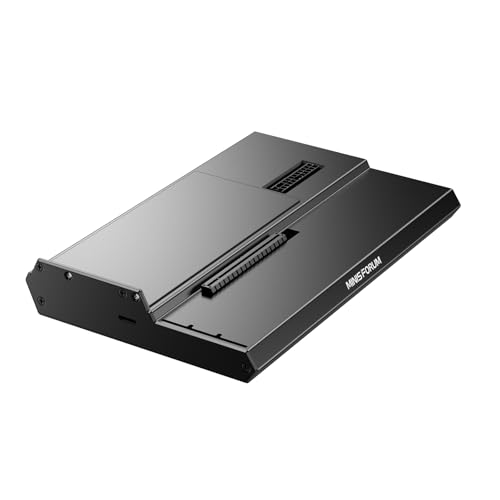
For those seeking a powerful graphics boost for their mini PCs, the MINISFORUM DEG1 External GPU Dock Station stands out with its robust support for high-end GPUs like the RTX 4090 and AMD RX 7900 XTX. With a compact design measuring 10.64 x 6.87 x 1.6 inches and weighing just 2.53 pounds, it fits seamlessly into your setup. The Oculink interface guarantees high-speed connectivity, while the ATX/SFX power supply compatibility offers flexibility. Note that it doesn’t support hot plugging, so power down your machine before connecting. With a solid customer rating of 4.2 stars, it’s a reliable choice for gamers and creators alike.
Best For: Gamers and content creators looking for a compact and powerful external GPU solution for mini PCs.
Pros:
- High compatibility with top-tier GPUs like the RTX 4090 and AMD RX 7900 XTX.
- Compact and lightweight design makes it easy to integrate into any setup.
- Oculink interface provides high-speed connectivity for optimal performance.
Cons:
- Does not support hot plugging, requiring the machine to be powered down for connection.
- Limited to MINISFORUM Mini PCs for follow-start function compatibility.
- The fixed locking interface on the Oculink connector may be cumbersome to handle.
MINISFORUM DEG1 eGPU Dock for RTX 4090 and AMD RX 7900 XTX

MINISFORUM DEG1 eGPU Dock stands out as an ideal choice for gamers and professionals looking to pair powerful graphics cards like the RTX 4090 or AMD RX 7900 XTX with mini PCs. This external GPU docking station features Oculink 4i connectivity, ensuring fast PCIe 4.0 performance. While it supports ATX and SFX standard power supplies, keep in mind that power is not included. The follow-start function works exclusively with MINISFORUM Mini PCs using original wires. Just remember, the Oculink interface doesn’t support hot plugging, so always power off your machine before connecting. Enhance your graphics experience seamlessly!
Best For: Gamers and professionals seeking to enhance their mini PC’s graphics performance with high-end graphics cards like the RTX 4090 or AMD RX 7900 XTX.
Pros:
- High-speed connectivity with Oculink 4i for PCIe 4.0 performance.
- Compatible with both ATX and SFX standard power supplies for flexible setups.
- Designed specifically for use with MINISFORUM Mini PCs, offering a seamless integration.
Cons:
- Power supply is not included, requiring an additional purchase.
- Oculink interface does not support hot plugging, necessitating a powered-off machine for connection.
- Follow-start function only works with original wires from MINISFORUM Mini PCs.
Mini eGPU Enclosure Compatible with Thunderbolt 3/4
If you’re looking to boost your mini PC’s graphics performance, a mini eGPU enclosure compatible with Thunderbolt 3 or 4 is a game changer. This enclosure supports NVIDIA and AMD PCIe graphics cards and offers impressive 40Gbps speed. It also includes PD 85W charging, daisy chaining options, and versatility with SFX, ATX, FLEX, and DC power supplies. Before purchasing, verify your hardware supports USB4 or Thunderbolt, especially if you’re using Intel or AMD CPUs. You’ll get the dock, a TB3/USB4 cable, and a user manual, but remember to provide your own graphics card and power supply.
Best For: This product is best for users looking to enhance the graphics performance of their mini PCs with compatible NVIDIA or AMD graphics cards.
Pros:
- Supports high-speed data transfer with Thunderbolt 3/4 and USB4 at 40Gbps.
- Versatile power supply options including SFX, ATX, FLEX, and DC to accommodate different setups.
- Includes additional Thunderbolt port and USB A port for connecting more devices.
Cons:
- Requires DIY knowledge for installation and compatibility checks.
- Graphics card and power supply not included, necessitating additional purchases.
- Not recommended for handheld game consoles, limiting its use for some users.
eGPU Enclosure Compatible with Thunderbolt 3/4 and USB4

The best eGPU enclosures for mini PCs shine when they support Thunderbolt 3/4 and USB4, making them ideal for users who require high-speed connections for demanding tasks. These enclosures utilize the Intel JHL7440 Chip for stable performance and can handle intense gaming, AI training, and 3D modeling. With two Thunderbolt 3 ports offering 32Gbps and a USB-A port at 10Gbps, you can easily connect additional devices. Just remember, they’re not compatible with other interfaces, and you’ll need Windows 11 for peak performance. Plus, they support various power supplies, ensuring your eGPU setup is efficient and powerful.
Best For: Users seeking high-speed connections for demanding tasks like gaming, AI training, and 3D modeling on their mini PCs.
Pros:
- Supports Thunderbolt 3/4 and USB4 for high-speed data transfer, ideal for performance-intensive applications.
- Equipped with Intel JHL7440 Chip for stable and efficient expansion, enhancing overall system performance.
- Compatible with various power supplies and offers Power Delivery charging, making it versatile for different setups.
Cons:
- Not compatible with other interfaces, limiting its use to specific devices.
- Requires Windows 11 for optimal performance, which may not suit all users.
- Daisy chaining may complicate setups for some users, potentially leading to connectivity issues if not managed properly.
ANQ-L336 Mini eGPU Enclosure for Laptop

For gamers and creative professionals seeking a compact yet powerful solution, the ANQ-L336 Mini eGPU Enclosure stands out as an exceptional choice. This PCIe external GPU dock supports a wide range of systems, including Windows, Linux, and MacOS. With a robust JHL7440 controller, it delivers up to 40Gbps data transfer rates, perfect for gaming, AI training, and 3D rendering. You can connect NVIDIA RTX 50 Series and AMD RX 9000 Series GPUs, ensuring outstanding performance. Plus, with multiple Thunderbolt 4 ports and USB-A connectivity, it acts as a versatile hub for your devices, enhancing your workstation setup.
Best For: Gamers and creative professionals looking for a powerful, compact external GPU solution to enhance their system’s performance.
Pros:
- High performance: Equipped with a JHL7440 controller, providing fast data transfer rates up to 40Gbps.
- Versatile compatibility: Supports multiple operating systems and a range of NVIDIA and AMD GPUs.
- Multiple connectivity options: Features Thunderbolt 4 and USB-A ports, acting as a hub for additional devices.
Cons:
- No power supply included: Users need to purchase a compatible PSU separately for operation.
- Weight and dimensions: At 12.9 ounces and relatively compact size, it may still be less portable than other options.
- Moderate customer rating: With a rating of 3.9 out of 5 stars, some users may have experienced issues or dissatisfaction.
AOOSTAR AG02 EGPU Dock with 800W PSU

Designed for gamers and creative professionals seeking high performance, the AOOSTAR AG02 eGPU Dock stands out with its impressive 800W power supply. With a maximum GPU power consumption of 600W, it’s compatible with most graphics cards, excluding the 5090 and 5090D models. Its compact design (22.5 x 11 x 6 cm) and lightweight build (1.5 kg) make it easy to integrate. The OCuLink interface delivers 64Gbps bandwidth, while the USB4 port supports hot swapping. Just remember to power off the dock when connecting or disconnecting the OCuLink cable. Enjoy seamless graphics performance with outstanding customer support included!
Best For: Gamers and creative professionals seeking high-performance graphics solutions with robust power support.
Pros:
- High power capacity with an 800W PSU, supporting most graphics cards up to 600W.
- Fast data transfer with OCuLink providing 64Gbps effective bandwidth.
- Compact and lightweight design, making it easy to transport and integrate into various setups.
Cons:
- Limited compatibility as it does not support 5090 and 5090D graphics card models.
- OCuLink cable requires power off when connecting or disconnecting, limiting convenience.
- Hot-swap feature is exclusive to TGX devices, restricting usability with other devices.
PCIe 4.0 eGPU Dock for Laptop & Mini PC

Release unparalleled graphics performance with a PCIe 4.0 eGPU dock, perfect for gamers and creative professionals using mini PCs or laptops. This dock features a PCIe 4.0 x4 interface, delivering an impressive 64Gbps bandwidth. It’s compatible with AMD, Intel, and NVIDIA graphics cards, enhancing your gaming, 3D modeling, and AI tasks. The included 19.7-inch OCuLink cable guarantees a stable connection, while the open-frame design accommodates various GPU sizes. With multiple LED indicators and modes for easy monitoring, this eGPU dock is an essential upgrade. Just remember, for safety, connect it only when powered off. Enjoy boosted graphics today!
Best For: Gamers and creative professionals seeking enhanced graphics performance on mini PCs and laptops.
Pros:
- High Bandwidth: Delivers 64Gbps bandwidth for superior graphics performance.
- Wide Compatibility: Supports AMD, Intel, and NVIDIA graphics cards for versatile use.
- Stable Connection: Includes a flexible OCuLink cable and features for secure GPU hold.
Cons:
- No Hot-Plugging: Must be connected/disconnected only when powered off, which can be inconvenient.
- Power Supply Not Included: Requires separate ATX power supply, adding to the overall cost.
- Driver Installation Required: GPU drivers must be installed for initial use, which may require extra setup time.
Factors to Consider When Choosing an Egpu Enclosure for Mini PC
When choosing an eGPU enclosure for your mini PC, you need to take into account several key factors. Compatibility with your graphics card, power supply options, and the type of interface can greatly impact performance. Additionally, don’t overlook cooling solutions and the overall build quality to guarantee longevity and efficiency.
Compatibility With Graphics Cards
Choosing the right eGPU enclosure for your mini PC hinges on compatibility with your specific graphics card. Make sure the enclosure supports your graphics card model, like the NVIDIA RTX 50 Series or AMD RX 7000 Series, since compatibility can vary. Check the interface requirements too; some enclosures only work with Thunderbolt 3/4 or USB4, potentially limiting your options. Additionally, verify that the power supply compatibility aligns with your card’s needs, as many enclosures use standard ATX, SFX, or DC supplies. Don’t forget to take into account the physical dimensions and mounting options, as some enclosures can accommodate larger GPUs while others have restrictions. Finally, review data transfer rates—higher bandwidths like PCIe 4.0 x4 can greatly enhance performance during demanding tasks.
Power Supply Options
While selecting an eGPU enclosure for your mini PC, it’s vital to evaluate the power supply options available. eGPU enclosures typically support various power supply types like ATX, SFX, FLEX, and DC, giving you flexibility based on your needs. Many enclosures also offer Power Delivery (PD) charging, with some supporting up to 85W, which can power connected devices efficiently. It’s important to confirm the power supply wattage is adequate, generally recommended to be about 40% higher than your graphics card’s full load to avoid shortages. Some enclosures require an external power supply, while others can operate with a DC option. Always verify compatibility with your chosen power supply’s type and voltage requirements for peak performance.
Interface Type and Speed
The interface type and speed of an eGPU enclosure are essential factors that can greatly impact your mini PC’s performance. You’ll find options like Thunderbolt 3, Thunderbolt 4, and USB4, each influencing compatibility and performance levels. Thunderbolt 3 and 4 deliver impressive data transfer speeds of up to 40Gbps, making them perfect for demanding tasks like gaming and 3D rendering. USB4 can also reach 40Gbps, but its performance might vary based on specific device implementations. Additionally, consider the PCIe version supported by the enclosure—PCIe 4.0 can provide up to 64Gbps in certain configurations. Make sure the interface matches your mini PC’s port and supports the bandwidth needed for your intended applications.
Cooling Solutions Availability
When selecting an eGPU enclosure for your mini PC, cooling solutions play a pivotal role in maintaining peak performance. Effective cooling is essential, especially during intensive tasks like gaming or 3D rendering, to prevent overheating. Look for enclosures that feature built-in fans or support for additional cooling methods, like liquid cooling systems, to enhance thermal management. The design of the enclosure also matters; open-frame designs typically offer better airflow than closed enclosures. It’s important to monitor temperatures during operation, as prolonged heat can reduce performance and even damage hardware. Finally, choose enclosures that provide easy access to internal components, making it simpler for you to maintain and upgrade cooling solutions when necessary.
Build Quality and Design
Choosing an eGPU enclosure means you should pay close attention to build quality and design, as these factors directly affect durability and performance. Look for robust materials like aluminum or high-grade plastic; they guarantee longevity and effective heat dissipation. A well-designed enclosure often features an open-frame or modular design, making it easier to install or upgrade graphics cards while maximizing space efficiency. Additionally, consider enclosures with multi-status LED indicators for real-time monitoring of power and connectivity. Effective cable management is vital to reduce clutter and enhance airflow, which boosts system cooling. Finally, verify compatibility with various power supply types, such as ATX or SFX, for flexibility in your setup.
Size and Portability
After ensuring you have a quality build with your eGPU enclosure, size and portability become important factors to evaluate, especially for mini PCs that often have limited space. You’ll want to take into account the dimensions and weight of the enclosure, ensuring it fits snugly in your workspace without creating clutter. A compact design is essential, as it optimizes your setup. Look for lightweight or detachable options that make transporting the enclosure easy between different locations. Also, evaluate the internal layout; it should accommodate your GPU and any cooling solutions while maintaining portability. Finally, choose enclosures that offer flexible mounting options, allowing for vertical or horizontal placement, maximizing space efficiency in your compact environment.
Connectivity Features
Connectivity features play an essential role in the performance and versatility of your eGPU enclosure for a mini PC. Look for enclosures that support Thunderbolt 3/4 or USB4 interfaces, offering data transfer rates up to 40Gbps, vital for efficient GPU performance. Ascertain the enclosure has multiple connectivity options, like extra Thunderbolt or USB-A ports, allowing you to daisy chain and connect other devices simultaneously. Verify the power supply options align with your GPU’s needs, supporting ATX, SFX, FLEX, or DC supplies for various setups. Check for hot-swapping capabilities for USB ports, letting you connect and disconnect devices without shutting down, though be mindful that not all interfaces support this. Finally, consider the type and length of included cables for peak compatibility.
Performance Specifications and Limitations
When evaluating eGPU enclosures for your mini PC, understanding performance specifications and limitations is essential to assure you get the most out of your setup. Look for enclosures with PCIe 4.0 x4 bandwidth capabilities, offering up to 64Gbps for demanding tasks like gaming and 3D rendering. Confirm the power supply unit (PSU) wattage exceeds your GPU’s full load by about 40% for peak performance. Be aware that some interfaces, like OCuLink, can’t be hot-plugged, requiring a powered-off system for connection. Additionally, check the supported GPU length and type, as these can greatly affect compatibility with high-end graphics cards. Finally, consider the controller module, as chips like the JHL7440 provide stable expansion and efficient data handling.