
As you look to enhance your gaming setup in 2026, the right monitor can make all the difference. With advancements in technology, you’ll find options that offer stunning visuals, high refresh rates, and immersive designs. These features cater to both casual players and serious competitors. Curious about the best models to contemplate? Let’s explore ten standout gaming monitors that could redefine your experience.
Samsung 27″ Essential S3 Curved Computer Monitor (LS27D366GANXZA)

The Samsung 27″ Essential S3 Curved Computer Monitor (LS27D366GANXZA) is perfect for gamers and creative professionals who crave an immersive experience. Its 1800R curved design enhances engagement, giving you a wider view that improves depth perception while minimizing distractions. With a 100Hz refresh rate, you’ll enjoy smooth gameplay, free from lag and motion blur. The optimizable game settings let you adjust colors and contrast for better visibility, while Game Mode fills the screen for enhanced detail. Plus, TÜV-certified eye comfort technology reduces blue light and flicker, making it easier on your eyes during long sessions. Connectivity options are plentiful, too.
Best For: Gamers and creative professionals seeking an immersive experience with reduced eye strain.
Pros:
- 100Hz refresh rate provides smooth gameplay with minimal motion blur.
- Curved design enhances depth perception and engagement, improving the overall viewing experience.
- TÜV-certified eye comfort technology reduces blue light and flicker, making it easier on the eyes during extended use.
Cons:
- Limited adjustment options for height and tilt may not suit all users’ preferences.
- The curve may not appeal to everyone, especially those used to flat screens.
- Some users may find the color accuracy less ideal for professional graphic design work.
ASUS TUF Gaming 27” 1440P HDR Monitor (VG27AQ3A)

If you’re a competitive gamer looking for an edge, the ASUS TUF Gaming 27” 1440P HDR Monitor (VG27AQ3A) stands out with its impressive 180Hz refresh rate and 1ms response time. This 27-inch QHD monitor features fast IPS technology, delivering stunning visuals with 130% sRGB color gamut. With ASUS Extreme Low Motion Blur Sync and FreeSync Premium compatibility, it eliminates ghosting and tearing for smooth gameplay. HDR-10 support enhances image quality, brightening highlights while deepening shadows. Plus, you’ll enjoy a complimentary three-month access to Adobe Creative Cloud with your purchase. Get ready to elevate your gaming experience!
Best For: Competitive gamers seeking high-performance visuals and low latency for an enhanced gaming experience.
Pros:
- High refresh rate of 180Hz provides smooth gameplay and reduces motion blur.
- Fast IPS technology ensures vibrant colors and wide viewing angles.
- AdaptiveSync technology eliminates ghosting and tearing, resulting in sharper visuals.
Cons:
- Limited HDR performance compared to higher-end monitors, as it only supports HDR-10.
- No built-in speakers, requiring external audio solutions for sound.
- May be pricier than standard 1440p monitors, which could be a consideration for budget-conscious buyers.
Acer SH273 P1si 27″ IPS Full HD Gaming Monitor

For gamers seeking an immersive experience without breaking the bank, the Acer SH273 P1si 27″ IPS Full HD Gaming Monitor stands out with its impressive 144Hz refresh rate. Its 27-inch display features a Full HD resolution of 1920 x 1080, delivering vibrant colors with 99% sRGB saturation. Thanks to AMD FreeSync technology and a fast 1ms response time, you’ll enjoy smooth gameplay without stutter or ghosting. The ergonomic stand allows for height adjustments and tilting, ensuring comfort during long sessions. Plus, the near bezel-less design makes it perfect for multi-monitor setups, maximizing your gaming visuals effortlessly.
Best For: Gamers looking for a budget-friendly monitor that offers high performance and vibrant visuals for an immersive gaming experience.
Pros:
- High refresh rate: With a refresh rate of up to 144Hz, it provides ultra-smooth motion for fast-paced games.
- Ergonomic design: Features adjustable height, tilt, and swivel for comfortable extended use.
- Seamless multi-monitor setup: The near bezel-less design maximizes screen real estate, ideal for multi-monitor configurations.
Cons:
- Moderate brightness: At 250 nits, the brightness may not be sufficient for well-lit rooms.
- Limited connectivity options: Only one HDMI port may restrict connections to multiple devices.
- No built-in speakers: Lacks integrated audio output, necessitating external speakers or headphones for sound.
Sceptre 24-inch Curved Gaming Monitor (C248W-1920RN Series)

Looking for an immersive gaming experience? The Sceptre 24-inch Curved Gaming Monitor (C248W-1920RN Series) is your perfect match. With a stunning 1080p resolution and a 1800R curvature, it pulls you right into the action. Enjoy vibrant visuals with 98% sRGB color coverage and a smooth 75Hz refresh rate, ensuring every frame is crisp. The built-in speakers enhance your audio experience, while the monitor’s generous connectivity options, including 2 HDMI ports and VGA, keep you connected. Plus, it’s VESA wall mount ready, perfect for any setup. Elevate your gaming with this sleek, performance-driven monitor!
Best For: Gamers seeking an immersive visual experience with vibrant colors and smooth performance at an affordable price.
Pros:
- High 1080p resolution and 1800R curvature for enhanced immersion.
- 98% sRGB color coverage providing vibrant and accurate colors.
- Built-in speakers and multiple connectivity options for convenience.
Cons:
- Limited to a 75Hz refresh rate, which may not satisfy competitive gamers.
- Brightness level of 250 cd/m² may not be sufficient in well-lit environments.
- No DisplayPort option for higher-end graphics cards.
SANSUI 24 Inch FHD Gaming Monitor (ES-G24F4M)
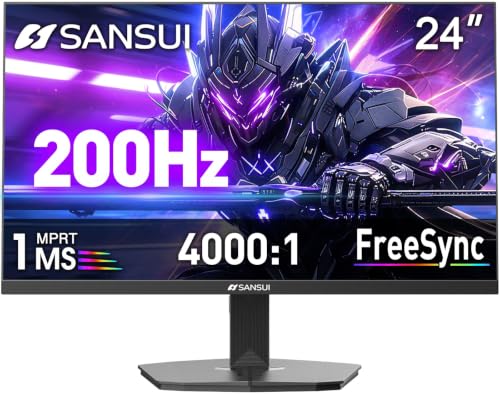
The SANSUI 24 Inch FHD Gaming Monitor (ES-G24F4M) stands out as an ideal choice for competitive gamers seeking high-performance visuals. With a stunning 1920 x 1080 resolution and a 160Hz refresh rate, you’ll enjoy smooth gameplay and crystal-clear images. The 1ms response time and FreeSync technology eliminate screen tearing, enhancing your overall experience. Plus, game assistants like CrossHair and timer features give you an edge. The monitor’s eye care technology minimizes strain, while its VESA compatibility allows for easy mounting. With a 30-day money-back guarantee and lifetime support, you can game with confidence.
Best For: Competitive gamers looking for high-performance visuals and features to enhance their gaming experience.
Pros:
- High refresh rate of 160Hz for fluid gameplay and reduced motion blur.
- 1ms response time and FreeSync technology minimize screen tearing and enhance visual clarity.
- Game assist features such as CrossHair, timer, and various game modes provide an edge in competitive situations.
Cons:
- Limited color gamut of 72% sRGB may not satisfy professional content creators needing more accurate colors.
- Brightness of 300 cd/m² may be insufficient in very bright environments.
- Only two connectivity options (HDMI and DisplayPort) might limit versatility for some users.
ASUS ROG Swift 32” 4K OLED Gaming Monitor (PG32UCDM)

Gamers seeking an immersive experience will find the ASUS ROG Swift 32” 4K OLED Gaming Monitor (PG32UCDM) hard to resist, thanks to its stunning 32-inch QD-OLED display. With a 3840 x 2160 resolution and a blistering 240 Hz refresh rate, your gameplay will look incredibly smooth. The monitor boasts a 0.03 ms response time and covers 99% of the DCI-P3 color gamut, delivering true-to-life colors. Its custom heatsink and graphene film help manage heat, reducing burn-in risks. Plus, you get a complimentary 3-month Adobe Creative Cloud access, enhancing your creative endeavors alongside your gaming.
Best For: Gamers and creative professionals seeking an ultra-high-definition display with exceptional color accuracy and fast response times.
Pros:
- Exceptional 4K resolution with a 240 Hz refresh rate for ultra-smooth gameplay.
- Covers 99% of the DCI-P3 color gamut, providing vivid and accurate colors.
- Includes a complimentary 3-month Adobe Creative Cloud access to enhance creative projects.
Cons:
- Peak brightness may vary due to color pre-calibration, potentially affecting HDR performance.
- The high-performance features may come at a premium price.
- Large size may not fit well in all gaming setups or workspaces.
Sharp DD-EA272F 27” FHD Business-Class Desktop Monitor

For professionals seeking an advanced display solution, the Sharp DD-EA272F 27” FHD Business-Class Desktop Monitor delivers outstanding performance with its IPS screen technology, ensuring ideal viewing angles. With a Full HD resolution of 1920×1080, your visuals will be sharp and vibrant. It boasts a brightness of 250 cd/m², perfect for various lighting conditions. Connectivity is a breeze, thanks to multiple inputs including DisplayPort, HDMI, USB-C, and VGA, with USB-C offering 65W power delivery. If you’re into multi-monitor setups, the DisplayPort output supports seamless video passthrough, making it an excellent choice for business environments.
Best For: Professionals seeking advanced display features in a business-class monitor.
Pros:
- IPS screen technology provides optimal viewing angles for collaborative work.
- Multiple connectivity options (DisplayPort, HDMI, USB-C, VGA) ensure compatibility with various devices.
- Supports multi-monitor configurations with video passthrough for enhanced productivity.
Cons:
- Brightness level of 250 cd/m² may not be sufficient for very bright environments.
- Limited built-in speakers may require additional audio equipment for better sound quality.
- USB-C power delivery is capped at 65W, which might not support all devices effectively.
Sceptre 22-inch Gaming Monitor (E225W-FW144 Series)

Looking for an affordable gaming monitor that doesn’t compromise on performance? The Sceptre 22-inch Gaming Monitor (E225W-FW144 Series) is your ideal choice. With a stunning 144Hz refresh rate, you’ll enjoy smooth gameplay and quick responses. HDMI and DisplayPort connectivity make it easy to set up with your devices. Integrated speakers provide rich audio without cluttering your desk. Plus, the Blue-Light Shift technology reduces eye strain during those long gaming sessions. Its minimal bezel design enhances focus, making it perfect for dual monitor setups. Elevate your gaming experience with this versatile and budget-friendly monitor!
Best For: Gamers seeking an affordable monitor that delivers high performance and comfort for extended play sessions.
Pros:
- High refresh rate of up to 144Hz for smooth gameplay and quick responses.
- Integrated speakers provide rich audio without the need for external speakers, keeping your desk clutter-free.
- Blue-Light Shift technology helps reduce eye strain during prolonged use, enhancing comfort.
Cons:
- Limited screen size may not be suitable for gamers who prefer larger displays.
- The minimal bezel design may not appeal to users who prefer a more traditional look.
- Speakers may not match the audio quality of dedicated external speakers.
Sceptre 24.5-inch Gaming Monitor (E255B-FWD240 Series)

With a rapid 240Hz refresh rate and a lightning-fast 1ms response time, the Sceptre 24.5-inch Gaming Monitor (E255B-FWD240 Series) delivers an exceptional experience that’s perfect for competitive gamers seeking an edge in their gameplay. The 1920×1080 resolution and 100% sRGB color gamut guarantee vibrant, accurate visuals, while AMD FreeSync Premium eliminates screen tearing for smooth performance. Connectivity is a breeze with two HDMI and two DisplayPort options, plus built-in speakers for audio convenience. Designed with your comfort in mind, blue light shift technology reduces eye strain during long sessions, making this monitor a fantastic addition to your gaming setup.
Best For: Competitive gamers seeking high-performance visuals and smooth gameplay.
Pros:
- Exceptional performance with a 240Hz refresh rate and 1ms response time for seamless gaming.
- Vibrant visuals thanks to the 100% sRGB color gamut, enhancing the gaming experience.
- Versatile connectivity options with multiple HDMI and DisplayPort inputs, along with built-in speakers.
Cons:
- Limited size at 24.5 inches may not suit users looking for larger displays.
- Potential glare from the screen due to its design, affecting visibility in bright environments.
- No advanced features like HDR support may be a drawback for some users.
Sceptre 24.5-inch Curved Gaming Monitor (C255B-FWT240 Series)

The Sceptre 24.5-inch Curved Gaming Monitor (C255B-FWT240 Series) stands out for gamers seeking an immersive experience without sacrificing performance. With a stunning 240Hz refresh rate and a lightning-fast 1ms response time, you’ll enjoy smooth, crisp visuals free from ghosting. The 1500R curvature pulls you into the action, enhancing your gameplay. Plus, AMD FreeSync Premium supports frame rates of at least 120Hz at 1080P FHD, ensuring fluid motion. Built-in speakers deliver robust audio, while multiple DisplayPort and HDMI options keep your setup versatile. Whether gaming or working, this monitor elevates your experience to new heights.
Best For: Gamers looking for a high-performance monitor that enhances their gameplay with immersive visuals and low latency.
Pros:
- 240Hz refresh rate provides incredibly smooth motion for fast-paced gaming.
- 1ms response time virtually eliminates ghosting, improving clarity during intense action scenes.
- AMD FreeSync Premium technology ensures a seamless experience with reduced screen tearing.
Cons:
- Limited screen size may not suit users preferring larger displays for extensive multitasking.
- Built-in speakers may not offer the best audio quality compared to dedicated sound systems.
- The 1500R curvature may not appeal to all users, particularly those who prefer flat screens.
Factors to Consider When Choosing a Gaming Monitor
When you’re choosing a gaming monitor, several key factors can greatly affect your experience. You’ll want to take into account screen size, resolution, refresh rate, response time, and panel technology to find the perfect fit for your gaming style. Each of these aspects plays an essential role in delivering the clarity and performance you crave.
Screen Size Selection
Choosing the right screen size for your gaming monitor is essential for an ideal experience. Generally, you’ll want a screen size between 24 to 32 inches, striking a balance between immersion and visibility. If you’re into action or adventure games, larger screens above 27 inches can provide a more immersive field of view. However, if competitive gaming is your focus, a 24-inch monitor can be advantageous, allowing quicker head movements and reducing eye strain during long sessions. Remember to take into account your viewing distance; for instance, a 27-inch monitor is best viewed from about 3 to 4 feet away. Finally, factor in the aspect ratio—common 16:9 or wider ratios—to enhance your visual impact.
Resolution and Clarity
Finding the right screen size sets the stage for your gaming experience, but resolution and clarity play an equally important role in how immersive and enjoyable your gameplay will be. The resolution of your gaming monitor directly impacts image clarity; options like Full HD, QHD, and 4K offer varying levels of detail. Higher pixel density enhances sharpness, allowing you to spot essential details, especially in fast-paced scenarios. The panel technology matters too—IPS panels provide better color reproduction and wider viewing angles than TN panels. To further improve visual quality, consider monitors with anti-aliasing techniques, which smooth jagged edges. All these factors combine to elevate your gaming experience, making clarity just as significant as resolution.
Refresh Rate Importance
While resolution and clarity are essential, the refresh rate is equally important in shaping your gaming experience. Measured in hertz (Hz), the refresh rate indicates how many frames per second your monitor can display. A standard 60Hz monitor may suffice for casual use, but if you’re serious about gaming, look for rates like 120Hz, 144Hz, or even 240Hz. These higher refresh rates deliver smoother motion, reduce motion blur, and enhance responsiveness, which is vital in competitive gaming. For instance, a 100Hz refresh rate minimizes blur and improves clarity during fast-paced scenes. Just remember, to get the most out of a high refresh rate monitor, you’ll need a capable graphics card that can match its output.
Response Time Impact
When you’re diving into the world of gaming monitors, response time plays a crucial role in your overall experience. Measured in milliseconds (ms), response time refers to how quickly a pixel can change colors. Ideally, you want a response time of 1ms to minimize motion blur and ghosting during fast-paced action, ensuring that visuals remain sharp. Monitors with a response time of 5ms or higher may introduce noticeable blurring, which can hurt your competitive edge. Fast response times are often found in IPS and TN panels, providing smoother gameplay. Additionally, technologies like AMD FreeSync or NVIDIA G-Sync complement low response times to reduce screen tearing, enhancing the fluidity of your gaming experience. Choose wisely for top performance!
Panel Technology Differences
Choosing the right panel technology for your gaming monitor can greatly impact your gaming experience. IPS panels deliver vibrant visuals with superior color accuracy and wider viewing angles, making them perfect for immersive gameplay. If you prefer deep blacks and excellent contrast, VA panels might be your best bet, especially in darker scenes. TN panels offer the fastest response times at around 1ms, ideal for competitive gaming, but they compromise on color reproduction and viewing angles. OLED technology stands out for its exceptional color performance with true blacks, but be cautious of potential burn-in issues. Ultimately, your choice of panel affects not only visual quality but also refresh rate and response time, which are vital for a smooth experience.
Adaptive Sync Features
To enhance your gaming experience, understanding Adaptive Sync features is essential. Technologies like FreeSync and G-Sync eliminate screen tearing and stuttering by synchronizing your monitor’s refresh rate with your graphics card’s frame output. This synchronization is particularly beneficial during fast-paced action, providing smoother gameplay and reducing lag. Monitors with Adaptive Sync support variable refresh rates (VRR), allowing frame rates to adjust dynamically based on your game’s performance. This effectiveness can notably enhance visual quality and immersion, making it easier to track fast-moving objects and maintain a competitive edge. Most modern gaming monitors come with built-in Adaptive Sync capabilities, ensuring compatibility with multiple graphics card brands, giving you greater flexibility in your gaming setup.
Connectivity Options Available
Adaptive Sync features enhance your gameplay, but the right connectivity options can make a significant difference in your gaming setup. Look for a monitor with multiple ports like HDMI, DisplayPort, and VGA. HDMI is perfect for connecting gaming consoles and PCs, delivering high-definition video and audio. If you’re after higher refresh rates and resolutions, DisplayPort is your go-to, as it supports FreeSync and G-Sync for smoother performance. Don’t overlook USB-C ports either; they offer power delivery and data transfer for modern devices, adding versatility. With multiple ports, you can connect additional peripherals and set up multi-monitor configurations, amplifying your gaming experience. Choose wisely to maximize your setup’s potential!
Design and Ergonomics
While considering a gaming monitor, it’s important to prioritize design and ergonomics to guarantee a comfortable and immersive experience. Look for adjustable features like tilt, swivel, and height settings to make sure you can find the perfect viewing angle, reducing neck strain during long sessions. A near bezel-less or ZeroFrame design maximizes display area, enhancing immersion, especially in multi-monitor setups. Curved displays, typically with an 1800R curvature, can improve depth perception and minimize distractions. Don’t overlook eye comfort technologies, such as low blue light and flicker-free certifications, which are vital for reducing eye strain. Finally, consider the monitor’s weight and dimensions for ideal desk space and compatibility with VESA mounts, allowing flexible placement in your gaming setup.