
If you’re looking to elevate your gaming experience, high wattage eGPU enclosures could be the answer. These powerful devices enhance graphics performance and provide flexibility for various setups. With options ranging from the Sonnet Breakaway Box to the Razer Core X V2, there’s something for every gamer and content creator. But how do you choose the right one? Let’s explore the top contenders and what makes each stand out.
Sonnet Breakaway Box 850 T5 eGPU Enclosure
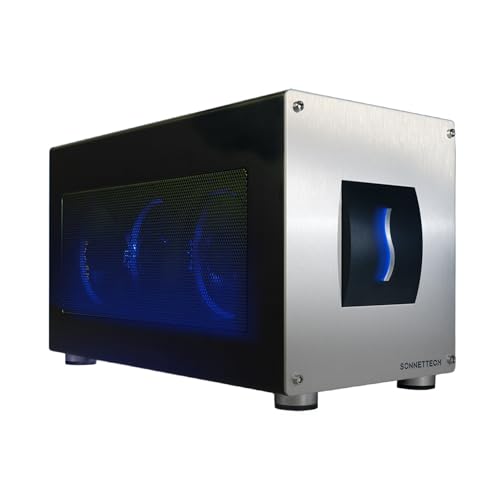
If you’re a creative professional seeking to elevate your workflow, the Sonnet Breakaway Box 850 T5 eGPU Enclosure is your go-to solution. This powerhouse supports Thunderbolt 5, Thunderbolt 4, and USB4, making it perfect for Windows 11 laptops. With 80 Gbps bi-directional bandwidth, it delivers near-desktop GPU power, markedly boosting editing, rendering, and visual effects tasks. Its 850W power supply guarantees it meets the demands of high-performance GPUs, while the temperature-controlled fan keeps everything cool. Plus, the built-in Thunderbolt 5 dock and multiple USB ports provide versatile connectivity options, supercharging your AI-driven applications and enhancing your creative capabilities.
Best For: Creative professionals and gamers looking to enhance their performance with external GPU capabilities for demanding tasks.
Pros:
- High-performance boost: Delivers near-desktop GPU power with 80 Gbps bi-directional bandwidth for intensive workflows.
- Versatile connectivity: Features a built-in Thunderbolt 5 dock and multiple USB ports for enhanced connectivity options.
- Efficient cooling system: Equipped with a large, temperature-controlled fan to ensure optimal performance of installed graphics cards.
Cons:
- Compatibility limitations: Primarily designed for Windows 11 laptops, which may exclude users of other operating systems.
- Size and weight: The enclosure may be bulky and less portable compared to smaller eGPU options.
- Price point: The investment in high-performance GPUs and the enclosure can be significant, which may not fit all budgets.
eGPU Enclosure Thunderbolt 3/4 External GPU Dock (MK-L18)

The eGPU Enclosure Thunderbolt 3/4 External GPU Dock (MK-L18) is an ideal choice for gamers and professionals seeking high-performance graphics capabilities. With support for NVIDIA RTX 50 series and AMD RX 7000 series graphics cards, it delivers exceptional performance on Windows, Linux, and MacOS. The dock features a robust aluminum alloy design, ensuring durability while accommodating various card lengths. You’ll appreciate its dual Thunderbolt ports, offering 85W and 15W charging. Plus, with PCIe 4.0 x16 data transfer speeds of up to 32Gbps, you’ll experience smooth gameplay and enhanced productivity with this powerful eGPU solution.
Best For: Gamers and professionals seeking high-performance graphics capabilities and compatibility with various systems.
Pros:
- Supports high-performance NVIDIA and AMD graphics cards, enhancing gaming and productivity.
- Durable aluminum alloy construction with an open design accommodates various graphics card lengths.
- Dual Thunderbolt ports provide significant power delivery and fast data transfer speeds.
Cons:
- Type-C port functionality is limited to devices with Thunderbolt 3/4 or USB4 support.
- May require additional setup and compatibility checks for certain graphics cards.
- Potentially higher cost compared to standard GPU setups without eGPU functionality.
eGPU Enclosure for Thunderbolt 3/4 and USB4
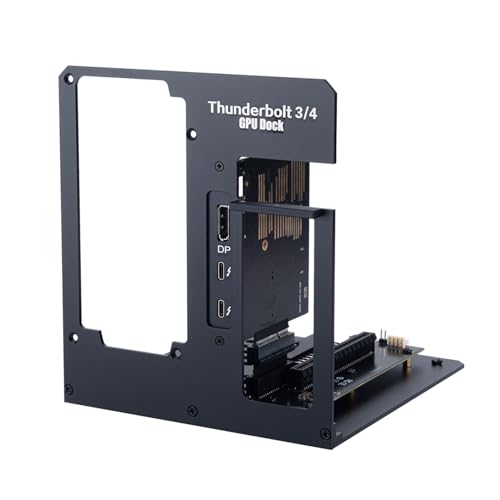
Looking to supercharge your laptop’s graphics performance? The eGPU enclosure for Thunderbolt 3/4 and USB4 is your solution. It supports both NVIDIA and AMD graphics cards, easily connecting a desktop GPU to elevate your gaming, video editing, and AI tasks. With a PCIe x16 slot, it guarantees stable performance through a certified JHL7440 controller module. You can install your preferred ATX PSU (500W+ 80PLUS Gold recommended) and enjoy 85W Power Delivery for charging your laptop. The kit includes a Thunderbolt 4 cable, screwdriver, and screws for effortless assembly. Just add your GPU and PSU, and you’re ready to go!
Best For: Gamers, video editors, and AI professionals seeking to enhance their laptop’s graphics performance with external GPU capabilities.
Pros:
- Supports a wide range of NVIDIA and AMD graphics cards for versatile performance upgrades.
- Easy assembly with included Thunderbolt 4 cable, screwdriver, and screws.
- Provides up to 85W Power Delivery for charging connected laptops while using the eGPU.
Cons:
- GPU and power supply are not included, requiring additional purchases.
- Compatibility may vary with certain laptops depending on Thunderbolt support.
- Performance may be limited by the laptop’s internal hardware and bandwidth.
AOOSTAR AG02 EGPU Dock with 800W PSU

For gamers and content creators seeking a powerful solution, the AOOSTAR AG02 eGPU Dock with its robust 800W power supply stands out as an ideal choice. It supports a maximum GPU power consumption of 600W, accommodating most graphics cards. With dimensions of 22.5 x 11 x 6 cm and a weight of 1.5 kg, it’s compact yet powerful. The OCuLink interface delivers 64Gbps bandwidth, enhancing performance. Plus, it’s compatible with both Mac and Windows, although hot-swapping is limited to TGX devices. Enjoy a secure connection and reliable support with a year of customer service included. This dock is a game-changer!
Best For: Gamers and content creators looking for a powerful, compact eGPU solution to enhance their graphics performance.
Pros:
- Robust 800W power supply supports high-performance graphics cards with a maximum consumption of 600W.
- OCuLink interface provides impressive 64Gbps bandwidth for optimized performance in PCIe 4.0 x4 lanes.
- Versatile compatibility with both Mac and Windows operating systems, ensuring a wide range of usability.
Cons:
- Hot-swap feature is only available for TGX devices, limiting flexibility with other peripherals.
- Exclusion of specific models like 5090 and 5090D may restrict options for some users.
- Requires manual power management when connecting or disconnecting the OCuLink cable, as power must be turned off.
External GPU Enclosure (eGPU) Compatible with Thunderbolt 3/4

If you’re a gamer or a professional needing robust graphics performance, the best high wattage eGPU enclosures compatible with Thunderbolt 3/4 are designed specifically for you. These enclosures exclusively support Thunderbolt 3/4 and USB4, ensuring peak performance with Windows 11. Equipped with an Intel JHL7440 chip, they handle demanding tasks like gaming and 3D modeling smoothly. You’ll benefit from daisy chain support, providing 32Gbps data transfer rates. Plus, with multiple connectivity options, including USB-A and Thunderbolt ports, you can easily connect additional devices. They also support ATX power supplies, making them versatile for various PCIe devices.
Best For: Gamers and professionals seeking enhanced graphics performance through external GPU solutions.
Pros:
- High compatibility with Thunderbolt 3/4 and USB4 ensures optimal performance for modern devices.
- Efficient data transfer rates of up to 32Gbps with daisy chain support, perfect for demanding applications.
- Versatile power supply options with ATX compatibility and PD charging up to 85W for various PCIe devices.
Cons:
- Limited to Windows 11 for optimal performance, which may not suit all users.
- Exclusively supports Thunderbolt 3/4 and USB4, making it incompatible with older interfaces.
- Potentially high initial investment for eGPU enclosure and compatible graphics card.
Tangxi External GPU Dock Station for Laptop PC
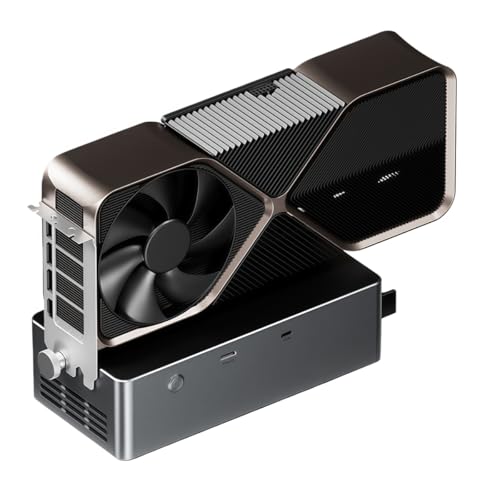
The Tangxi External GPU Dock Station is an ideal choice for gamers and content creators who demand high performance from their graphics cards. With its built-in 800W power supply, it supports graphics cards consuming up to 600W, ensuring you get the power you need. Its open metal chassis is both stylish and functional, accommodating various graphics card lengths. Plus, the PCIe x16 interface and OCuLink provide impressive bandwidth of 64 Gbps. Compatible with most external graphics cards, this dock also supports hot swapping, making it easy to upgrade. Just remember, it’s not compatible with 5090 or 5090D models.
Best For: Gamers and content creators who require high-performance graphics capabilities for demanding applications.
Pros:
- High Power Capacity: Built-in 800W power supply supports graphics cards with a maximum consumption of 600W.
- Fast Data Transfer: OCuLink interface provides impressive bandwidth of 64 Gbps for efficient data handling.
- Versatile Compatibility: Works with most external graphics cards and supports hot swapping for easy upgrades.
Cons:
- Limited Graphics Card Compatibility: Not compatible with 5090 or 5090D models, which may limit some users.
- Weight: Weighing 1.8 kg, it may be less portable compared to lighter alternatives.
- System Requirements: Only compatible with Windows 11 version 22H2 or higher, excluding users on earlier versions.
Thunderbolt 3/4 eGPU Enclosure for NVIDIA AMD Graphics Cards (VK-Y900)

Designed specifically for gamers and professionals seeking high-performance graphics, the Thunderbolt 3/4 eGPU Enclosure (VK-Y900) seamlessly supports a wide range of NVIDIA and AMD graphics cards. This enclosure is compatible with USB4 and works with most NVIDIA GPUs, including RTX up to the 50 series, as well as AMD Radeon RX up to the 9000 series. It’s perfect for NUCs, laptops, and handheld gaming consoles featuring Thunderbolt or USB4 ports. With a certified JHL7440 controller, it guarantees stable performance, and multiple output ports provide flexible connectivity options. Plus, an experienced support team is ready to help with any issues.
Best For: Gamers and professionals seeking high-performance graphics solutions for their NUCs, laptops, and handheld gaming consoles.
Pros:
- Supports a wide range of NVIDIA and AMD graphics cards, including the latest models.
- Equipped with a certified JHL7440 controller for stable and efficient performance.
- Multiple connectivity options with Thunderbolt and DP ports for versatile use.
Cons:
- May require additional power supply for high-end graphics cards.
- Limited to devices with Thunderbolt 3/4 or USB4 ports, restricting compatibility.
- Higher price point compared to standard GPU solutions.
Razer Core X V2 External Graphics Enclosure (eGPU) for Windows Laptops

For gamers and creative professionals seeking a powerful boost in graphics performance, the Razer Core X V2 External Graphics Enclosure stands out as an ideal solution. Compatible with Windows 11 and Thunderbolt 4/5 devices, it supports NVIDIA and AMD GPUs up to 4 slots wide. With Thunderbolt 5, you’ll enjoy ultra-fast bandwidth of up to 80 Gbps, perfect for demanding games and applications. The built-in 120 mm fan guarantees peak cooling. Installation’s a breeze with tool-free access for swapping GPUs and power supplies. Its durable steel chassis offers excellent airflow, making it a reliable choice for sustained performance during intense tasks.
Best For: Gamers and creative professionals seeking enhanced graphics performance through an external graphics solution.
Pros:
- Ultra-fast Thunderbolt 5 bandwidth of up to 80 Gbps for improved performance in demanding applications.
- Tool-free installation allows for quick and easy swapping of GPUs and power supplies.
- Durable steel chassis with excellent airflow for sustained performance during intensive tasks.
Cons:
- Power supply and GPU not included, requiring additional purchases.
- Compatibility limited to Windows 11 and specific Thunderbolt devices, excluding Mac devices with M1 or later chipsets.
- Larger size may not be ideal for users with limited desk space or mobility needs.
Sonnet eGPU Breakaway Box 750ex – External GPU Chassis

If you’re looking to elevate your graphics performance, the Sonnet eGPU Breakaway Box 750ex is an excellent choice, especially for those using demanding applications like video editing or 3D rendering. This external GPU chassis connects high-performance GPU cards to your computer via Thunderbolt 3, ensuring compatibility with both Mac and Windows systems (excluding M1 Macs). With a robust 750W power supply, it supports the latest GPU models, including NVIDIA’s RTX series and AMD’s Radeon VII. Plus, you’ll enjoy extra connectivity options with four USB Type A ports and an RJ45 Gigabit Ethernet port, maximizing your workflow efficiency.
Best For: Users seeking to enhance their graphics performance for demanding applications like video editing, 3D rendering, and animation on Mac and Windows systems.
Pros:
- High Performance: Significantly improves application task times with GPU acceleration.
- Future-Proof Design: Equipped with a 750W power supply to support the latest and upcoming GPU models.
- Additional Connectivity: Offers four USB Type A ports and an RJ45 Gigabit Ethernet port for enhanced workflow.
Cons:
- M1 Mac Compatibility: Not compatible with M1 Macs, limiting use for some Mac users.
- External Setup: Requires additional space and setup compared to internal GPU options.
- Investment Cost: May be considered expensive for casual users not needing high-end graphics performance.
Portable External GPU Enclosure for Thunderbolt 3 & USB4

A portable external GPU enclosure is an ideal choice for gamers and professionals seeking to boost their laptop or compact system’s graphics performance without sacrificing mobility. This aluminum eGPU dock for Thunderbolt 3 and USB4 supports PD 60W charging and offers lightning-fast 40Gbps data transfer. It’s compatible with NUCs, laptops, and gaming consoles, enhancing your gaming experience by connecting to powerful external GPUs. With PCIe 3.0 X4 speeds and support for PCIe X16 GPUs, it guarantees excellent performance. Plus, the easy installation process and compatibility with various power supplies make it a versatile option for any setup.
Best For: Gamers and professionals looking to enhance graphics performance on laptops or compact systems while maintaining portability.
Pros:
- High-speed data transfer: Achieves 40Gbps transfer speeds and PCIe 3.0 X4 performance for optimal GPU use.
- Versatile compatibility: Works with NUCs, laptops, and gaming consoles featuring USB4.0 interface.
- Easy installation: Aluminum alloy design supports SFX and ATX brackets for straightforward GPU and power supply setup.
Cons:
- Power supply requirements: Users need to prepare compatible power supplies based on their specific PCIe card requirements.
- Driver and hardware knowledge needed: Installation and setup require familiarity with driver compatibility and hardware settings.
- Limited to external GPUs: Users must purchase external GPUs separately, which can increase overall costs.
Factors to Consider When Choosing a High Wattage eGPU Enclosure
When you’re choosing a high wattage eGPU enclosure, there are several key factors to keep in mind. You’ll want to assess the power supply capacity, guarantee GPU compatibility, and consider the efficiency of cooling mechanisms. Additionally, think about interface connectivity options and the overall build quality and design to match your needs.
Power Supply Capacity
Power supply capacity is one of the key factors to evaluate in choosing a high wattage eGPU enclosure. It dictates the maximum wattage delivered to your graphics card, directly impacting performance and compatibility. Most high-performance GPUs need power supplies ranging from 600W to 850W for peak operation. A higher wattage guarantees your GPU maintains peak performance during demanding tasks like gaming, video editing, or rendering, preventing thermal throttling. Look for enclosures with built-in power supplies that match your GPU’s requirements. Additionally, pay attention to the efficiency rating; units rated 80 PLUS Gold or Platinum provide more stable power delivery and generate less heat, enhancing your overall experience. Choose wisely to release your gaming potential!
GPU Compatibility Range
Choosing the right eGPU enclosure involves guaranteeing it’s compatible with a broad range of GPUs, as this flexibility allows you to get the most out of your investment. Look for enclosures that support both NVIDIA and AMD graphics cards, particularly the latest series like NVIDIA GeForce RTX 30, 40, and 50, as well as AMD Radeon RX 6000 and 7000 series. Verify the PCIe interface compatibility, since most high-performance GPUs require a PCIe x16 connection to maximize their potential. Additionally, check that the enclosure can handle the power demands of high wattage GPUs, typically needing a power supply of at least 750W to 850W. Finally, consider the enclosure’s dimensions to guarantee a proper fit for your GPU’s length and cooling solution.
Cooling Mechanisms Efficiency
After guaranteeing your eGPU enclosure is compatible with a wide range of GPUs, it’s important to evaluate how effectively it manages heat. Effective cooling mechanisms are essential for maintaining peak temperatures, especially with high-performance graphics cards that generate significant heat. Look for enclosures featuring large, temperature-controlled fans that adjust their speed for efficient airflow while minimizing noise. Consider the enclosure design; open chassis designs typically allow for better airflow, while closed designs may need robust cooling systems. Additionally, materials like aluminum bodies or heat sinks enhance thermal management by facilitating quick heat dissipation. A well-cooled eGPU not only prolongs the lifespan of your graphics card but also guarantees consistent performance, preventing thermal throttling during intense gaming sessions.
Interface Connectivity Options
When you’re looking for a high wattage eGPU enclosure, it’s crucial to take into account the interface connectivity options to secure peak performance and compatibility with your devices. Opt for enclosures that support Thunderbolt 3, 4, or USB4 interfaces, as these provide ideal data transfer speeds for high-performance graphics cards. Multiple Thunderbolt ports are a bonus, allowing you to daisy chain devices for enhanced connectivity. Verify that the enclosure offers Power Delivery (PD) capabilities with higher wattage ratings—85W or more—to charge your laptop while in use. Additionally, consider enclosures with extra USB ports to connect peripherals, expanding your workstation’s versatility. Confirm the PCIe slots can accommodate various graphics cards, with x16 lanes for maximum performance in demanding applications.
Build Quality and Design
The interface connectivity options you’ve considered set the stage for performance, but the build quality and design of an eGPU enclosure are just as important. Look for enclosures made from durable materials like aluminum or steel to handle the weight and heat of high-performance GPUs. An open chassis design promotes better airflow, essential for cooling during intensive tasks. If portability matters, lightweight enclosures allow you to transport your setup easily without sacrificing structural integrity. Additionally, verify the design accommodates various graphics card lengths and configurations for future upgrades. A vented design prevents overheating, while temperature-controlled fans enhance cooling efficiency, ultimately prolonging the lifespan of your components. Prioritize these factors to maximize your eGPU experience.