
If you’re looking to boost your gaming experience while on the move, compact eGPU enclosures can be a game-changer. They provide the power of high-end GPUs without the bulk, perfect for gamers and creatives alike. In this guide, we’ll explore ten of the best options available, each with unique features and capabilities. Discover how these enclosures can elevate your graphics performance and which one might fit your needs best.
ANQ-L336 Mini eGPU Enclosure for Laptop

If you’re a gamer or a creative professional looking to supercharge your laptop’s graphics performance, the ANQ-L336 Mini eGPU Enclosure is a game-changer. This compact PCIe external GPU dock supports Windows, Linux, and MacOS, making it versatile for various setups. With a Thunderbolt 3/4 connection and a data transfer rate of 40Gbps, it guarantees fast performance, whether you’re gaming or rendering. The enclosure supports powerful NVIDIA RTX 50 Series and AMD RX 9000 Series GPUs, offering flexibility for your graphics needs. Plus, with multiple ports, it acts as a hub, enhancing your laptop’s connectivity without sacrificing portability.
Best For: Gamers and creative professionals seeking to enhance their laptop’s graphics performance with a portable, high-speed external GPU solution.
Pros:
- High data transfer rate of 40Gbps ensures fast performance for gaming and rendering.
- Supports a wide range of powerful GPUs, including NVIDIA RTX 50 Series and AMD RX 9000 Series.
- Multiple connectivity options with Thunderbolt 3/4 and USB-A ports, functioning as a hub for external devices.
Cons:
- Power supply unit (PSU) is not included, requiring an additional purchase.
- Customer rating of 3.9 out of 5 stars indicates mixed reviews from users.
- Limited portability due to its compact size, which may still be cumbersome for some users.
PCIe 4.0 x4 eGPU Dock with OCuLink SFF-8612 to PCIe x16 Cable

The PCIe 4.0 x4 eGPU Dock with OCuLink SFF-8612 to PCIe x16 Cable is perfect for gamers seeking high-performance graphics solutions for their laptops or mini PCs. With a transfer speed of 64Gbps, it supports various graphics cards, like the RTX 4090 and AMD RX 7900 XTX, ensuring you get top-tier performance. The detachable design enhances portability, while the flat, flexible SFF-8611 cable minimizes interference. You’ll also appreciate the multi-status LED indicators for real-time monitoring. Just remember, you’ll need to power off to unplug the OCuLink interface, as hot plugging isn’t supported. Enjoy gaming on the go!
Best For: Gamers and professionals seeking high-performance external graphics solutions for laptops and mini PCs.
Pros:
- Supports a wide range of high-end graphics cards, ensuring excellent performance.
- Detachable design enhances portability, making it easy to transport and store.
- Multi-status LED indicators allow for real-time monitoring of device status.
Cons:
- OCuLink interface does not support hot plugging, requiring power off to unplug.
- GPU and power supply are not included, adding to the overall setup cost.
- Limited to compatibility with standard ATX power supplies, which may restrict options for some users.
MINISFORUM DEG1 eGPU Dock for RTX 4090 and AMD RX 7900 XTX

For gamers seeking a powerful upgrade, the MINISFORUM DEG1 eGPU Dock is an excellent choice, especially if you’re looking to harness the capabilities of high-end graphics cards like the RTX 4090 or AMD RX 7900 XTX. This compact dock features an Oculink 4i connection for seamless PCIe 4.0 x4 performance. While it supports ATX and SFX power supplies, keep in mind that you’ll need to power off your machine to connect. Compatible with MINISFORUM Mini PCs, it offers a follow-start function, but note that the GPU and power supply aren’t included. Enjoy enhanced gaming on the go with this efficient solution!
Best For: Gamers and content creators looking to enhance their graphics performance with high-end GPUs like the RTX 4090 or AMD RX 7900 XTX while using MINISFORUM Mini PCs.
Pros:
- Supports advanced graphics cards for superior gaming and content creation performance.
- Oculink 4i connection enables high-speed PCIe 4.0 x4 data transfer.
- Flexible power supply options with compatibility for ATX and SFX standards.
Cons:
- Requires power-off to connect the dock, limiting convenience.
- GPU and power supply are not included, adding to overall costs.
- Thunderbolt support is not available, which may limit compatibility with some devices.
External GPU Enclosure Dock for Thunderbolt 3/4

Designed specifically for gamers and creators on the go, the External GPU Enclosure Dock for Thunderbolt 3/4 offers a seamless solution to boost graphics performance. It’s compatible with laptops and gaming handhelds, supporting powerful NVIDIA and AMD graphics cards. With the JHL7440 controller module, you’ll experience high performance in gaming, AI tasks, and 3D modeling. The dock features multiple connectivity options, including a 10Gbps USB A port and a daisy chain port, making it a versatile hub for your devices. Just verify your device has Thunderbolt 3/4 or USB 4 capabilities for peak functionality.
Best For: Gamers and creators on the go who need enhanced graphics performance for their laptops and handheld devices.
Pros:
- High compatibility with NVIDIA and AMD graphics cards, ensuring powerful performance for various applications.
- Versatile connectivity options including a 10Gbps USB A port and daisy chain support for connecting multiple devices.
- Utilizes advanced JHL7440 controller module for superior performance in gaming, AI tasks, and 3D modeling.
Cons:
- No graphics card or ATX power supply included in the package, requiring additional purchases.
- Requires Thunderbolt 3/4 or USB 4 port for functionality, limiting use with older devices.
- Incorrect cable insertion can trigger automatic power-off protection, necessitating careful setup to avoid issues.
External GPU Dock Station Compatible with Thunderbolt 3/4

If you’re a gamer seeking to enhance your system’s graphics performance without the bulk of traditional setups, a compact external GPU dock station compatible with Thunderbolt 3/4 is an ideal solution. This dock supports high-speed data transfer, offering over 32Gbps with the right setup. Confirm your Windows system runs the latest version of Windows 11 for detection. It features multiple ports, including a Thunderbolt 4 port and a 10Gbps USB A port, functioning as a versatile hub. Just remember, you’ll need an appropriate power supply for your PCIe card, as it doesn’t include one. Enjoy seamless gaming without the clutter!
Best For: Gamers and professionals looking to boost their graphics performance with a compact and efficient external GPU solution.
Pros:
- High-speed performance with data transfer rates exceeding 32Gbps when properly configured.
- Versatile connectivity options including Thunderbolt 4 and 10Gbps USB A ports, acting as a hub for multiple devices.
- Supports Power Delivery (PD) charging up to 85W, providing additional convenience for powering devices.
Cons:
- Requires specific compatibility with Thunderbolt 3/4 or USB4 interfaces, not supporting older Thunderbolt versions or USB-C products.
- Power supply not included, necessitating the purchase of an appropriate power supply for PCIe cards.
- Installation can be tricky, with risks of automatic power-off if cables are incorrectly connected.
eGPU Enclosure Dock Compatible with Thunderbolt 3/4

The eGPU Enclosure Dock, compatible with Thunderbolt 3/4 and USB4, is perfect for gamers and professionals seeking enhanced graphics performance on laptops and gaming handhelds. It supports powerful NVIDIA RTX 50 Series and AMD RX 7000 Series GPUs, enabling workstation-grade capabilities for gaming, AI tasks, and 3D rendering. This dock features a 10Gbps USB A port, a Thunderbolt 4 port, and a daisy chain port, letting you connect multiple devices. Just verify your device has the right port for operation. Follow usage guidelines to prevent issues, like avoiding the CPU cable insertion into the PCIe-8PIN port. Enjoy elite performance!
Best For: Gamers and professionals looking to enhance their laptop or gaming handheld’s graphics performance with powerful GPU support.
Pros:
- Supports high-performance NVIDIA RTX 50 Series and AMD RX 7000 Series GPUs for demanding applications.
- Equipped with multiple connectivity options, including a Thunderbolt 4 port and a daisy chain port for versatile device attachment.
- Powered by a JHL7440 controller, providing workstation-grade capabilities for gaming, AI training, and 3D rendering.
Cons:
- Does not include an ATX power supply or graphics card, requiring additional purchases.
- Requires a device with Thunderbolt 3/4 or USB4 port for operation, limiting compatibility with older devices.
- Incorrect cable connections can trigger automatic power-off protection, necessitating careful setup.
eGPU Dock Chassis Compatible with ANQ-L336 Motherboard
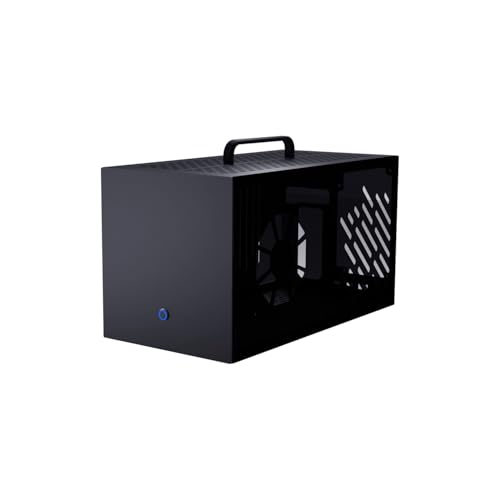
For gamers seeking an efficient solution to enhance their graphics performance, the eGPU Dock Chassis compatible with the ANQ-L336 motherboard stands out. This robust metal case, measuring 360mm x 195mm x 182mm, supports graphics cards up to 355mm in length. Its high-quality steel and aluminum construction, along with a translucent acrylic side panel, guarantees effective cooling while showcasing your RGB lighting. The front panel features a glowing blue switch, adding a sleek touch. Installation is straightforward with included screws and instructions, but remember, you’ll need to source the circuit board, power supply, and graphics card separately.
Best For: Gamers looking to boost their graphics performance with an external GPU solution compatible with the ANQ-L336 motherboard.
Pros:
- High-quality steel and aluminum construction provides durability and effective cooling.
- Translucent acrylic side panel showcases RGB lighting for an aesthetically pleasing look.
- Easy installation with included screws and clear instructions.
Cons:
- Compatibility limited to ANQ-L336 motherboard only.
- Does not include circuit board, power supply, graphics card, or fans, requiring additional purchases.
- Maximum graphics card size restriction may limit options for some users.
Sonnet eGPU Breakaway Box 750ex – External GPU Chassis

Designed specifically for gamers and creative professionals seeking enhanced graphics performance, the Sonnet eGPU Breakaway Box 750ex connects seamlessly to your computer via Thunderbolt 3 ports. This external GPU chassis dramatically boosts your graphics capabilities, improving editing, rendering, and animation tasks. With a robust 750W power supply, it supports the latest GPU models, ensuring you stay future-proofed. You can easily connect various GPUs, including AMD and NVIDIA options, to elevate your gaming experience. Plus, it offers four USB Type A ports and an RJ45 Ethernet port, expanding your connectivity for peripherals and network access. Elevate your setup effortlessly!
Best For: Gamers and creative professionals looking to enhance their graphics performance with a powerful external GPU solution.
Pros:
- Significantly boosts graphics capabilities, improving performance for editing, rendering, and animation tasks.
- Supports a wide range of GPU models, including both AMD and NVIDIA options, ensuring versatility for users.
- Includes additional connectivity options with multiple USB ports and an Ethernet port for enhanced peripheral and network access.
Cons:
- Not compatible with M1 Macs, limiting options for some Mac users.
- Requires Thunderbolt 3 ports, which may not be available on all computers.
- Initial investment may be high, considering the cost of both the chassis and compatible GPU cards.
Mini eGPU Enclosure Compatible with Thunderbolt 3/4

If you’re a gamer looking to enhance your laptop’s graphics performance without the bulk of traditional setups, a mini eGPU enclosure compatible with Thunderbolt 3/4 is an ideal solution. This compact device supports NVIDIA and AMD PCIe graphics cards, ensuring high-speed performance with a 40Gbps connection. It offers PD 85W charging and allows for daisy chaining with various power supplies. Just make sure your hardware meets the compatibility requirements before purchasing. The package includes the eGPU dock, a TB3/USB4 cable, and a user manual. Enjoy seamless gaming with this sleek and efficient upgrade for your laptop!
Best For: Gamers looking to enhance their laptop’s graphics performance with a compact and efficient solution.
Pros:
- Supports both NVIDIA and AMD PCIe graphics cards for versatile performance.
- Compact design allows for easy portability without sacrificing speed (40Gbps connection).
- Offers PD 85W charging and daisy chaining capabilities for added convenience.
Cons:
- Requires DIY knowledge for driver and hardware compatibility, which may be challenging for some users.
- Not recommended for handheld game consoles, limiting its use case.
- Graphics card and power supply are not included, adding extra costs for setup.
eGPU Enclosure Thunderbolt 3/4 External GPU Dock (MK-L18)

The eGPU Enclosure Thunderbolt 3/4 External GPU Dock (MK-L18) is perfect for gamers and content creators seeking to boost their system’s graphics performance without the bulk of traditional setups. This compact dock supports high-performance graphics cards like NVIDIA RTX 50 series and AMD RX 7000 series, ensuring compatibility with Windows, Linux, and MacOS. With PCIe 4.0 x16 data transfer speeds of 32Gbps, you’ll experience seamless performance. The durable aluminum design not only looks sleek but also accommodates unlimited graphics card lengths. Plus, its dual Thunderbolt ports provide essential charging capabilities, making this dock an ideal choice for on-the-go gaming.
Best For: Gamers and content creators looking to enhance their graphics performance with a portable and powerful external GPU solution.
Pros:
- Supports high-performance graphics cards such as NVIDIA RTX 50 series and AMD RX 7000 series for superior performance.
- Compact and lightweight aluminum design offers durability and sleek aesthetics, making it easy to transport.
- Dual Thunderbolt ports provide significant charging options and high-speed data transfer for seamless operation.
Cons:
- Type-C port compatibility requires Thunderbolt 3/4 or USB4 support, limiting use with some devices.
- Potentially high cost associated with purchasing a compatible high-performance graphics card separately.
- Bulkiness compared to integrated graphics options, which may not be ideal for all users.
Factors to Consider When Choosing a Compact eGPU Enclosure
When choosing a compact eGPU enclosure, you’ll want to take into account several key factors. Think about the size and portability to guarantee it fits your setup, along with GPU compatibility to enhance performance. Don’t forget to look at power supply options, connectivity interfaces, and cooling mechanisms for ideal usability.
Size and Portability
Choosing a compact eGPU enclosure often hinges on size and portability, especially for gamers who need a solution that fits their lifestyle. Most compact enclosures measure around 6.38 x 4.65 x 6.97 inches, making them perfect for limited desk space and easy transportation. Weighing just about 12.9 ounces, these mini enclosures are lightweight, allowing you to take them wherever you game. Look for detachable designs that enhance portability and simplify storage when not in use. Ultra-thin and flexible cables, like SFF-8611 male to male, help minimize clutter, contributing to a more organized setup. Additionally, ensuring compatibility with various power supply types gives you flexibility in choosing an enclosure that meets your space and power needs.
GPU Compatibility
Compact eGPU enclosures offer impressive portability, but their effectiveness hinges considerably on GPU compatibility. When choosing one, make sure it supports specific GPU models like NVIDIA’s RTX 50 Series and AMD’s RX 9000 Series for peak performance. Pay attention to the PCIe interface version; opting for PCIe 4.0 can provide the higher bandwidth needed for demanding graphics tasks. Don’t forget to check the enclosure’s dimensions, making certain it can accommodate the length and width of your chosen graphics card. Additionally, look for power supply compatibility, as some enclosures require standard ATX power supplies, influencing your GPU choice. Finally, verify hot plugging support—some interfaces, like OCuLink, may limit usability during operation.
Power Supply Options
Power supply options play an essential role in the performance and usability of your compact eGPU enclosure. These enclosures typically support various power supply types, like ATX, SFX, FLEX, and DC 12V, giving you flexibility for different setups. It’s important to match the power requirements of your graphics card; a sufficient power supply guarantees stable operation during intense gaming sessions. Many enclosures offer Power Delivery (PD) charging, with some capable of delivering up to 85W to connected devices. Keep in mind that some enclosures may not include a power supply, requiring you to source one separately, which can affect your overall cost and convenience. Always check for compatibility with standard ATX power supplies and any restrictions on size or type.
Connectivity Interfaces
Selecting the right connectivity interfaces is vital when you’re looking at compact eGPU enclosures. Confirm it supports Thunderbolt 3/4 or USB4 for peak data transfer rates, reaching up to 40Gbps. Check for multiple connectivity options, like additional USB-A ports or daisy chain capabilities, to easily connect other peripherals. Compatibility with various graphics cards, including NVIDIA and AMD, is significant, so verify that the enclosure accommodates your GPU’s specific PCIe slot. Also, consider if it supports power delivery charging—common up to 85W—to keep your devices powered while gaming. Finally, verify the design allows for effortless installation and removal of the graphics card, especially if it features a detachable cable system for portability.
Cooling Mechanisms
When choosing a compact eGPU enclosure, you can’t overlook the importance of effective cooling mechanisms, as they play an essential role in maintaining ideal performance. High-performance graphics cards generate significant heat, so look for enclosures with good airflow features like ventilation holes and fans. These elements enhance heat dissipation, keeping temperatures in check. Some models use aluminum alloy, which not only offers sturdy construction but also helps with passive cooling due to its thermal conductivity. If you’re serious about gaming, consider advanced cooling solutions like liquid cooling systems, as they manage heat more efficiently in tight spaces. Finally, don’t forget regular maintenance—cleaning dust from ventilation areas is critical for preventing thermal throttling during intense gaming sessions.
Performance Features
While considering a compact eGPU enclosure, you should focus on performance features that directly impact your gaming experience. Look for enclosures that use high-performance controllers, like the JHL7440 module, to support demanding tasks such as gaming, AI training, and 3D rendering. Make sure it supports PCIe 4.0 x4 or higher for ideal data transfer rates, ideally reaching up to 64Gbps, which enhances graphics performance. Power delivery (PD) charging of up to 85W is also beneficial, allowing connected devices to charge while in use. Compatibility with a wide range of graphics cards, including the latest NVIDIA RTX 50 Series and AMD RX 9000 Series, secures future-proofing. Finally, features like daisy chaining support help maintain high speeds with multiple devices connected.
Build Quality Materials
Build quality is vital in guaranteeing your compact eGPU enclosure not only performs well but also lasts through intense gaming sessions. Look for enclosures made from high-quality materials like steel and aluminum alloy; they provide durability and effective heat dissipation. Translucent acrylic side panels can enhance aesthetics, showcasing RGB lighting and your internal components for a modern look. Proper ventilation holes are essential to maintain peak temperatures during extended use. A detachable design improves portability, making it easier to transport your eGPU setup. Additionally, features like gold-plated contacts on the PCB enhance conductivity, boosting overall performance. Choosing the right materials guarantees your enclosure can withstand the rigors of gaming while keeping your components cool and stylish.
Price and Value
Choosing the right compact eGPU enclosure involves more than just the aesthetics and build quality; price and value play a significant role in your decision. Prices typically range from $200 to over $600, influenced by features like power supply compatibility and data transfer rates. Evaluate the value by considering the performance benefits, such as enhanced gaming experiences or quicker rendering times, which might justify a higher cost. Look for additional features like multiple connectivity options and power delivery capabilities to boost overall value. Don’t forget to check warranty and customer support, as these can impact your long-term satisfaction. Ultimately, user reviews can provide insights into whether the price reflects actual performance and reliability, helping you make an informed choice.