
As gaming technology advances, you’re likely looking for ways to enhance your setup. The right eGPU enclosure can dramatically boost your laptop’s performance, offering desktop-like power wherever you are. With options featuring robust connectivity and advanced cooling, these enclosures cater to both gamers and creatives alike. But how do you choose the best one for your needs? Let’s explore what’s available and what factors to keep in mind for your ultimate gaming experience.
Razer Core X V2 External Graphics Enclosure (eGPU) for Windows 11

If you’re a gamer or creative professional looking to elevate your setup, the Razer Core X V2 External Graphics Enclosure is an excellent choice. Compatible with Windows 11 and Thunderbolt 4/5 devices, it supports both NVIDIA and AMD GPUs up to four slots wide. With Thunderbolt 5 technology, you’ll enjoy ultra-fast bandwidth of up to 80 Gbps, perfect for demanding games and creative applications. The tool-free installation process makes swapping GPUs a breeze, while its durable vented steel chassis guarantees peak airflow during intense tasks. Upgrade your performance effortlessly and experience gaming like never before with this powerful eGPU.
Best For: Gamers and creative professionals seeking to enhance their graphics performance with an external GPU solution.
Pros:
- Ultra-fast Thunderbolt 5 bandwidth of up to 80 Gbps for optimal performance in demanding applications.
- Tool-free installation allows for easy swapping of GPUs and power supplies, making upgrades hassle-free.
- Durable vented steel chassis ensures optimal airflow and sustained performance during intensive tasks.
Cons:
- Power supply and GPU not included, requiring additional purchases for full functionality.
- Incompatibility with Mac devices featuring M1 or later chipsets limits user options.
- Size may be bulky for users with limited desk space or portability requirements.
PCIe 4.0 eGPU Dock with OCuLink Cable for Laptop and Mini PC

The PCIe 4.0 eGPU Dock with OCuLink Cable is an ideal choice for gamers using laptops and mini PCs who demand high-performance graphics capabilities. With a transfer speed of up to 64Gbps, this dock supports a range of external graphics cards, including the latest RTX 4090 and AMD RX 7900 XTX. Its detachable design enhances portability, while the 10μ gold-plated contacts guarantee superior conductivity. The included SFF-8611 cable is ultra-thin and flexible, reducing interference. Remember, you’ll need to power off your device to unplug the OCuLink cable, guaranteeing a stable connection for your gaming sessions.
Best For: Gamers using laptops and mini PCs who require high-performance graphics capabilities.
Pros:
- Supports high-speed transfer rates of up to 64Gbps, ensuring optimal performance with the latest graphics cards.
- Detachable design allows for improved portability and easier storage.
- Ultra-thin and flexible cable minimizes interference, enhancing overall connectivity.
Cons:
- GPU and power supply not included, requiring additional purchases for full setup.
- OCuLink interface does not support hot plugging, necessitating power off to unplug the cable.
- Limited to standard ATX power supply, which may not suit all user setups.
ANQ-L336 Mini eGPU Enclosure for Laptops

For gamers and creative professionals looking to boost their laptop’s graphics performance, the ANQ-L336 Mini eGPU Enclosure stands out with its high-speed Thunderbolt 3/4 and USB4 connectivity. This PCIe external GPU dock supports powerful NVIDIA RTX 50 and AMD RX 9000 series graphics cards, delivering exceptional performance for gaming, 3D modeling, and AI tasks. With a data transfer rate of 40Gbps and daisy chain support, you’ll enjoy seamless multitasking. Plus, it features multiple ports, including a 10Gbps USB-A and two Thunderbolt 4 ports, making it a versatile hub for all your external devices. Elevate your setup with this compact powerhouse!
Best For: Gamers and creative professionals seeking to enhance their laptop’s graphics performance with a powerful external GPU solution.
Pros:
- High-speed connectivity with Thunderbolt 3/4 and USB4 for seamless data transfer.
- Supports powerful NVIDIA RTX 50 and AMD RX 9000 series graphics cards for exceptional performance in gaming and 3D modeling.
- Versatile hub functionality with multiple ports, including a 10Gbps USB-A and two Thunderbolt 4 ports for connecting external devices.
Cons:
- Power supply unit (PSU) not included, requiring additional purchase for operation.
- Limited customer rating of 3.9 out of 5 stars may indicate mixed user experiences.
- Compact design may limit compatibility with larger graphics cards due to size constraints.
PCIE 3.0 x16 eGPU Dock with Thunderbolt 4 Cable
Designed for gamers and content creators who demand top-tier performance, the PCIE 3.0 x16 eGPU Dock with Thunderbolt 4 Cable delivers unmatched speed and compatibility. It supports NVIDIA and AMD graphics cards, making it perfect for any GPU enthusiast. With a blazing transfer speed of 22Gbps, you’ll experience enhanced stability in graphics work, video editing, and AAA gaming. It’s compatible with Windows, Linux, and certain consoles, ensuring versatility across devices. Plus, flexible power input options cater to your specific needs. Included accessories, like the high-quality Thunderbolt 4 cable, make setup a breeze, elevating your gaming experience to new heights.
Best For: Gamers and content creators seeking high-performance graphics solutions for multiple devices.
Pros:
- High transfer speed of 22Gbps ensures smooth performance for graphics-intensive tasks.
- Wide compatibility with both NVIDIA and AMD graphics cards, as well as various operating systems and consoles.
- Flexible power input options allow for customization based on user requirements.
Cons:
- Potential BIOS updates may be required for some consoles to utilize USB4 functionality.
- Limited to devices with Thunderbolt ports, which can restrict compatibility with older hardware.
- Higher initial investment compared to traditional graphics card setups.
eGPU Dock Chassis Compatible with ANQ-L336 Motherboard
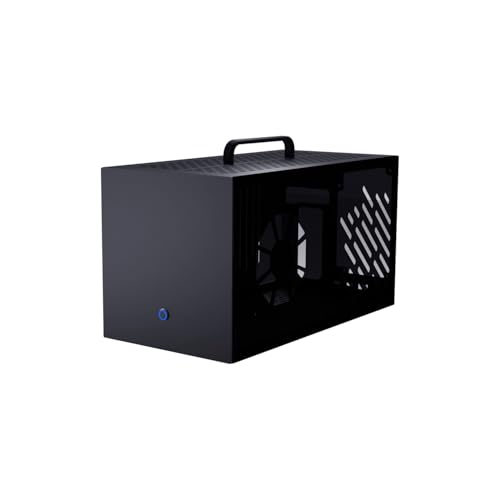
Compatible with the ANQ-L336 motherboard, the eGPU Dock Chassis is an ideal choice for gamers seeking to enhance their graphics performance without compromising on style. With external dimensions of 360mm x 195mm x 182mm, it accommodates graphics cards up to 355mm in length. Its high-quality steel and aluminum alloy construction, paired with a translucent acrylic side panel, not only guarantees durability but also showcases RGB lighting beautifully. The thoughtful design includes ventilation holes for maximum cooling. Assembly is straightforward with included instructions, but remember, you’ll need to source the compatible circuit board, power supply, and graphics card separately.
Best For: Gamers looking to enhance their graphics performance with a stylish and customizable eGPU solution.
Pros:
- High-quality construction from steel and aluminum alloy ensures durability and longevity.
- Translucent acrylic side panel allows for a stylish display of RGB lighting, enhancing the aesthetic appeal.
- Effective cooling features with ventilation holes help maintain optimal temperatures during intense gaming sessions.
Cons:
- Limited compatibility as it only works with the ANQ-L336 motherboard.
- No included components such as circuit board, power supply, graphics card, or fans require additional purchases.
- Assembly required which may not be suitable for those who prefer a plug-and-play solution.
Sonnet Breakaway Box 850 T5 eGPU Enclosure
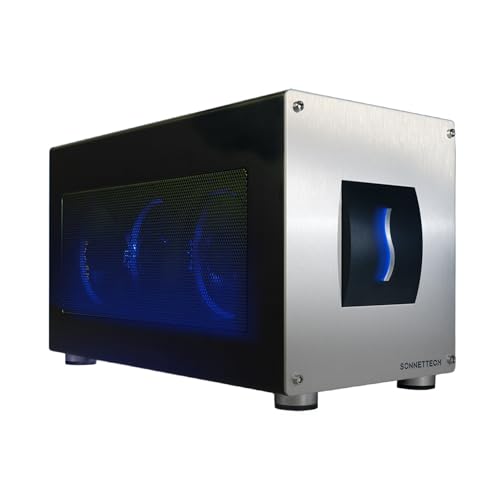
The Sonnet Breakaway Box 850 T5 eGPU Enclosure stands out for gamers and creative professionals seeking to release the full potential of their Windows 11 laptops. With support for Thunderbolt 5, Thunderbolt 4, and USB4, it provides exceptional performance. You’ll enjoy 80 Gbps bi-directional bandwidth, enabling near-desktop GPU power for tasks like editing and rendering. This enclosure accommodates top GPUs, including NVIDIA GeForce and AMD Radeon series. Plus, its 850W power supply and efficient cooling guarantee your graphics card runs smoothly. With built-in connectivity options, it streamlines your setup—perfect for anyone looking to supercharge their gaming or creative workflows.
Best For: Gamers and creative professionals looking to enhance their Windows 11 laptops with powerful external GPU capabilities.
Pros:
- Exceptional performance with 80 Gbps bi-directional bandwidth for near-desktop GPU power.
- Supports a wide range of GPUs, including NVIDIA GeForce and AMD Radeon series, catering to various user needs.
- Robust connectivity options with built-in Thunderbolt 5 dock and multiple USB ports for streamlined setups.
Cons:
- High initial investment due to the cost of the enclosure and compatible high-performance GPUs.
- Limited to Windows 11 laptops, which may exclude users with older operating systems.
- Potential noise from cooling fan, depending on workload and environmental conditions.
External GPU Dock Station Compatible with Thunderbolt 3/4

For gamers seeking high-quality performance, the external GPU dock station that supports Thunderbolt 3/4 is a game changer. This dock offers compatibility with Thunderbolt 3, 4, and USB4, ensuring excellent connectivity. With the powerful JHL7440 controller, you’ll experience data transfer speeds surpassing 22Gbps, and daisy chaining allows for up to 32Gbps with PCIE3.0X4. It also features a 10Gbps USB A port and supports Power Delivery charging up to 85W. Just remember, it requires an appropriate power supply and Windows 11 for peak performance. Get ready to elevate your gaming experience with this essential accessory!
Best For: Gamers and professionals seeking superior graphics performance and fast data transfer through Thunderbolt 3/4 connectivity.
Pros:
- High-speed performance with data transfer rates exceeding 22Gbps and up to 32Gbps with daisy chaining.
- Versatile connectivity options including a 10Gbps USB A port and a Thunderbolt 4 port for multiple external devices.
- Power Delivery support allows for charging up to 85W, enhancing usability with laptops and other devices.
Cons:
- Limited compatibility as it does not support Thunderbolt 1, Thunderbolt 2, Type C, or USB-C products.
- Requires Windows 11 for optimal detection and performance, limiting use for those on older systems.
- No included power supply or graphics card, requiring additional purchases for complete functionality.
External GPU Enclosure Dock Compatible with Thunderbolt 3/4

Designed specifically for gamers and creators on the go, the External GPU Enclosure Dock harnesses Thunderbolt 3/4 technology to deliver high-performance graphics capabilities. It’s compatible with laptops and gaming handhelds, supporting NVIDIA and AMD PCIe graphics cards. Using the advanced JHL7440 controller, it excels in gaming, AI tasks, and 3D modeling. With robust connectivity options, including a 10Gbps USB A port and a daisy chain port, you can easily connect external devices. Just make sure your device has a Thunderbolt 3/4 or USB 4 port to maximize functionality. Remember to avoid incorrect cable connections for peak performance.
Best For: Gamers and content creators who need high-performance graphics on the go.
Pros:
- High-performance capabilities with support for NVIDIA and AMD PCIe graphics cards.
- Versatile connectivity options including a 10Gbps USB A port and daisy chain port for additional devices.
- Designed for portability, making it easy to enhance gaming and creative experiences on laptops and handhelds.
Cons:
- Requires Thunderbolt 3/4 or USB 4 port for functionality, limiting compatibility with some devices.
- Does not include ATX power supply or graphics card, necessitating additional purchases.
- Incorrect cable connections can lead to power-off protection, potentially complicating setup.
MINISFORUM DEG1 eGPU Dock for RTX 4090 and AMD RX 7900 XTX

If you’re looking to elevate your gaming experience with powerful graphics capabilities, the MINISFORUM DEG1 eGPU Dock is an excellent choice. Designed for the RTX 4090 and AMD RX 7900 XTX, this eGPU enclosure connects via Oculink 4i, ensuring high-speed performance. While it supports ATX and SFX power supplies for flexibility, keep in mind that the power supply isn’t included. The follow-start function works exclusively with MINISFORUM Mini PCs. Just remember, the Oculink interface doesn’t allow hot plugging, so always power off your machine before connecting. With the DEG1, you’ll enjoy enhanced graphics without hassle.
Best For: Gamers and creators seeking a high-performance external GPU solution for enhanced graphics capabilities with RTX 4090 or AMD RX 7900 XTX.
Pros:
- Supports high-speed Oculink 4i connection for optimal performance.
- Compatible with ATX and SFX power supplies, providing flexible power options.
- Designed specifically for RTX 4090 and AMD RX 7900 XTX, ensuring powerful graphics enhancement.
Cons:
- Power supply is not included, requiring an additional purchase.
- Follow-start function is limited to MINISFORUM Mini PCs only.
- Oculink interface does not support hot plugging, necessitating a machine power-off for connection.
eGPU Enclosure Thunderbolt 3/4 Compatible with NVIDIA/AMD Graphics Cards

Gamers looking to supercharge their laptop or compact gaming setup will find the eGPU Enclosure Thunderbolt 3/4 an ideal choice. It seamlessly supports both NVIDIA and AMD graphics cards, delivering exceptional performance on Windows 10/11, Linux, and macOS. With a PCIe 4.0 x16 data transfer mode and a remarkable 40Gbps bandwidth, you’ll experience smooth gameplay and stunning visuals. Its aluminum alloy design guarantees durability while accommodating unlimited graphics card lengths. Plus, the dual Thunderbolt ports offer convenient charging options. Whether you’re using a NUC, laptop, or handheld console, this enclosure elevates your gaming experience to new heights.
Best For: Gamers and professionals seeking to enhance their laptop or compact gaming setup with high-performance graphics capabilities.
Pros:
- High compatibility with both NVIDIA and AMD graphics cards, supporting various operating systems including Windows, Linux, and macOS.
- Fast data transfer with PCIe 4.0 x16 mode and 40Gbps bandwidth, ensuring smooth gameplay and excellent performance.
- Durable aluminum alloy design with an open structure that accommodates unlimited graphics card lengths.
Cons:
- Requires Thunderbolt 3/4 or USB4 support, limiting compatibility with some devices.
- Potentially high cost associated with purchasing both the eGPU enclosure and a high-performance graphics card.
- Limited to Thunderbolt ports, which may not provide enough charging options for multiple devices simultaneously.
Factors to Consider When Choosing an eGPU Enclosure
When you’re choosing an eGPU enclosure, you’ll want to contemplate several key factors. Compatibility with your devices, performance specifications, and cooling solutions all play an essential role in your gaming experience. Don’t forget about power supply options and how easy the installation process is, as these can greatly influence your setup.
Compatibility With Devices
How can you guarantee your eGPU enclosure will work seamlessly with your devices? First, check the interface compatibility—make sure it supports Thunderbolt 3, Thunderbolt 4, or USB4, as this directly impacts connectivity and performance. Next, verify the operating system support; some enclosures are tailored for Windows, Linux, or macOS, with specific OS version requirements. You’ll also want to confirm that the enclosure accommodates the physical dimensions and power needs of your chosen graphics card. It’s wise to select enclosures that support a range of GPU models, including NVIDIA and AMD, for flexibility. Finally, verify the enclosure has the appropriate power supply type—like ATX or SFX—so it can meet your graphics card’s power demands.
Performance Specifications
Verifying your eGPU enclosure is compatible with your devices sets the stage for evaluating its performance specifications. Look for data transfer rates, which can range from 22Gbps to 80Gbps, depending on the PCIe version and interface. Advanced controllers, like the JHL7440, offer higher bandwidth and stability, essential for graphic-intensive tasks. Check the maximum supported graphics card size and PCIe lanes, with options like PCIe 4.0 x16 providing ideal data throughput. Additionally, consider the power delivery capabilities; some enclosures can charge laptops with up to 85W while needing sufficient power supplies for the graphics card. These factors directly impact your gaming experience, so choose wisely to guarantee top performance.
Cooling Solutions Available
To maintain peak performance in gaming, effective cooling solutions in eGPU enclosures are essential. Overheating can cause thermal throttling, reducing your GPU’s efficiency during intensive tasks. Many enclosures come with built-in fans, like 120 mm or variable-speed models, that adjust their speed based on component temperatures. This guarantees ideal cooling when your GPU is under heavy load.
Some designs utilize advanced materials such as aluminum and steel to enhance heat dissipation and airflow, making them capable of handling high-performance graphics cards. You might also find vented chassis designs that promote natural airflow or even optional liquid cooling systems for superior thermal management. Monitoring systems with LED indicators can help you keep track of temperature status, guaranteeing your eGPU stays cool when it matters most.
Power Supply Options
Cooling solutions are just one piece of the puzzle when it comes to maximizing your eGPU’s performance. When choosing an eGPU enclosure, compatibility with the power supply is essential. Many enclosures support standard ATX, SFX, or FLEX power supplies, each varying in size and output capacity. Check the power delivery (PD) capability; some models can deliver up to 85W via Thunderbolt, perfect for powering laptops during use. Remember, enclosures often don’t include power supplies, so make sure you have a suitable one. The total wattage should meet your GPU’s needs—high-performance options like the RTX 4090 require at least 850W. Flexible power input options also enhance compatibility with different graphics cards and systems, so consider that too.
Installation Ease
When you’re selecting an eGPU enclosure, installation ease can make a significant difference in your overall experience. Look for models that offer tool-free installation, allowing you to swap GPUs and power supplies effortlessly. Clear installation instructions and a simple assembly process can save you time and frustration during setup. It’s also wise to choose enclosures that come with necessary cables, like Thunderbolt or OCuLink, so you won’t need to buy extras later. Evaluate design features, such as detachable components, which enhance portability and simplify storage. Finally, check for enclosures that provide access to modular components, making upgrades or maintenance straightforward without extensive disassembly. Choosing wisely guarantees a smoother gaming experience from the start.
Port Connectivity Types
After ensuring a smooth installation process, your next consideration should be the port connectivity types of the eGPU enclosure. Look for compatibility with Thunderbolt 3, Thunderbolt 4, or USB4, as these determine your data transfer speeds and overall performance. Thunderbolt 4 offers up to 40 Gbps, while Thunderbolt 5 can provide even higher rates, perfect for demanding graphics tasks. Multiple Thunderbolt ports enable daisy chaining, letting you connect additional devices without losing speed. Some enclosures also include extra USB ports for peripherals, enhancing functionality. Finally, check if the enclosure supports hot plugging; some connections, like OCuLink, require powering off the system before disconnecting, which can affect your overall ease of use. Choose wisely for the best experience!
Size and Portability
Choosing the right eGPU enclosure involves careful consideration of size and portability. First, check the physical dimensions; some enclosures support graphics cards up to 355mm long, while others may have limited space. Portability is key, especially if you need to move your setup. Lightweight enclosures typically weigh around 12.9 ounces, making them easier to transport than heavier options. Consider detachable designs that enhance portability and storage convenience, allowing you to disassemble the enclosure. If you have limited desk space or frequently change locations, compact enclosures will fit seamlessly with your hardware. Finally, verify the enclosure accommodates your GPU’s dimensions and any cooling requirements, as larger GPUs may need extra space for airflow.
Build Quality and Durability
Portability and size aren’t the only factors to think about; build quality and durability play a significant role in the performance and longevity of your eGPU enclosure. Look for enclosures made from steel or aluminum, as these materials enhance durability and improve heat dissipation. A well-constructed design should feature ventilation or active cooling solutions, like fans, to maintain performance during demanding tasks. High-quality connectors and circuit boards with gold-plated contacts boost conductivity and minimize signal interference. Opt for robust, modular designs that allow for easy upgrades with various graphics cards and power supplies. Additionally, reinforced side panels and protective casings help shield internal components from physical damage, ensuring your investment lasts longer.