
As you gear up for 2026, the world of high-end gaming motherboards is evolving rapidly. It’s essential to stay informed about the top contenders that promise unmatched performance and advanced features. From powerful power delivery systems to robust cooling solutions, these motherboards are designed for serious gamers. But what factors should you consider before making a choice? Let’s explore the best options that could elevate your gaming experience.
ASUS TUF Gaming B850-PLUS WiFi AMD AM5 Motherboard

If you’re a serious gamer seeking a motherboard that can handle the latest AMD Ryzen processors, the ASUS TUF Gaming B850-PLUS WiFi is an excellent choice. It features an ATX form factor with an AMD AM5 socket, supporting Ryzen 9000, 8000, and 7000 series CPUs. With a robust 14+2+1 power stage design and an 8-layer PCB, you’ll enjoy stable power delivery. Storage options include one PCIe 5.0 M.2 slot and two PCIe 4.0 slots, all equipped with heatsinks. Plus, with Wi-Fi 7 and 2.5Gb LAN, you’ll stay connected at lightning speed, future-proofing your gaming setup.
Best For: Serious gamers looking for a reliable motherboard that supports the latest AMD Ryzen processors and offers advanced connectivity options.
Pros:
- Excellent power delivery with a robust 14+2+1 power stage design.
- Future-proof features, including support for PCIe 5.0 and Wi-Fi 7.
- Ample storage options with multiple M.2 slots equipped with heatsinks for optimal performance.
Cons:
- May be overkill for casual gamers or those not utilizing high-end components.
- Higher price point compared to basic motherboards.
- The ATX form factor may not fit in smaller cases.
ASUS ROG Crosshair X870E Hero AMD ATX Motherboard

The ASUS ROG Crosshair X870E Hero AMD ATX Motherboard is an ideal choice for serious gamers and overclocking enthusiasts who demand top-tier performance and advanced features. With an AMD X870E chipset and AM5 socket, it supports Ryzen 9000, 8000, and 7000 series processors. You’ll appreciate the robust 18+2+2 power stages, AI overclocking, and AI cooling technologies that enhance your gaming experience. Plus, with PCIe 5.0, five M.2 slots, and USB4® connectivity, you’re future-proofed for demanding applications. Its advanced design caters to AI computing, ensuring you’re ready for whatever gaming challenges lie ahead.
Best For: Serious gamers and overclocking enthusiasts seeking top-tier performance and advanced features.
Pros:
- Robust 18+2+2 power stages support high-performance overclocking.
- Future-proof with PCIe 5.0, five M.2 slots, and USB4® connectivity options.
- AI technologies simplify overclocking and enhance cooling efficiency.
Cons:
- Higher price point compared to standard motherboards.
- May require advanced knowledge for optimal overclocking settings.
- Limited compatibility with non-AMD processors.
ASUS ROG Strix X870-A Gaming Motherboard

For gamers and enthusiasts seeking top-tier performance, the ASUS ROG Strix X870-A Gaming Motherboard is an exceptional choice. It supports AMD Ryzen 7000, 8000, and 9000 series processors, ensuring compatibility with cutting-edge tech. With its robust 16+2+2 power stages and Dynamic OC Switcher, overclocking becomes effortless. The motherboard’s advanced AI capabilities enhance performance, featuring ASUS-exclusive AI Overclocking and AI Cooling II. You’ll also benefit from multiple connectivity options, including WiFi 7 and USB4®, alongside 4x M.2 slots for swift storage expansion. Embrace the future of gaming with PCIe® 5.0 support for unparalleled graphics and peripherals.
Best For: Gamers and PC enthusiasts looking for high-performance components and advanced AI capabilities in their builds.
Pros:
- Supports the latest AMD Ryzen 7000, 8000, and 9000 series processors for cutting-edge performance.
- Features robust overclocking technologies and AI enhancements for optimized gaming and computing experiences.
- Offers extensive connectivity options, including WiFi 7 and PCIe® 5.0, for future-proofing your setup.
Cons:
- May come at a higher price point compared to standard motherboards.
- Potentially complex setup for users unfamiliar with overclocking technologies.
- Limited compatibility with non-AMD processors, restricting options for some users.
MSI MAG X870 Tomahawk WiFi Gaming Motherboard

Gamers seeking superior performance will find the MSI MAG X870 Tomahawk WiFi Gaming Motherboard an exceptional choice. This motherboard supports AMD Ryzen 9000, 8000, and 7000 series processors, utilizing the AM5 socket for maximum compatibility. With DDR5 memory support and M.2 Gen5 slots, you’ll enjoy blazing-fast speeds and ample storage options. Connectivity is excellent, featuring USB 40Gbps, Wi-Fi 7, and Bluetooth 5.4. The extended PWM heatsink guarantees peak thermal management, while Audio Boost 5 provides immersive sound. With the MSI MAG X870, you’re equipped for an unparalleled gaming experience, making every session more thrilling and responsive.
Best For: Gamers seeking high-performance components and advanced features for an immersive gaming experience.
Pros:
- Supports the latest AMD Ryzen processors for maximum compatibility and performance.
- DDR5 memory and M.2 Gen5 slots provide high-speed data transfer and ample storage capacity.
- Advanced connectivity options including USB 40Gbps, Wi-Fi 7, and Bluetooth 5.4 enhance overall user experience.
Cons:
- Higher price point compared to entry-level motherboards may be a barrier for budget-conscious users.
- Limited availability of DDR5 memory and M.2 Gen5 storage options may affect immediate upgrades.
- Potential compatibility issues with older hardware components due to new socket design.
GIGABYTE B850 AORUS Elite WIFI7 Motherboard

Designed for enthusiasts seeking top-tier performance, the GIGABYTE B850 AORUS Elite WIFI7 Motherboard stands out with its robust support for AMD’s latest Ryzen processors, including the 9000, 8000, and 7000 series. This ATX motherboard features a powerful 14+2+2 power design and four DDR5 memory slots for ideal multitasking. You’ll benefit from three M.2 slots and PCIe 5.0 connectivity, ensuring lightning-fast data transfer. With a USB-C port, 2.5GbE LAN, and WIFI7, your gaming experience remains seamless and lag-free. Plus, the 5-year warranty gives you peace of mind as you push your system to its limits.
Best For: Enthusiasts and gamers looking for a high-performance motherboard that supports the latest AMD Ryzen processors and offers advanced connectivity features.
Pros:
- Powerful 14+2+2 power design for optimal performance and stability.
- Supports DDR5 memory with four DIMM slots for enhanced multitasking capabilities.
- Advanced connectivity options including PCIe 5.0, USB-C, 2.5GbE LAN, and WIFI7 for fast data transfer and seamless online gaming.
Cons:
- Higher price point compared to entry-level motherboards.
- Limited compatibility with non-AMD processors, restricting options for users with different CPU preferences.
- Potential overkill for casual users who may not need the extensive features offered.
ASUS TUF Gaming Z790-Plus WiFi ATX Gaming Motherboard
The ASUS TUF Gaming Z790-Plus WiFi ATX Gaming Motherboard stands out as an ideal choice for enthusiasts who demand robust performance and reliability. With support for 12th, 13th, and 14th Gen Intel Core processors, it’s ready for Windows 11 right out of the box. Its enhanced power solution features military-grade components and Digi+ VRM for durability. Cooling is a breeze with thorough heatsinks and hybrid fan headers. Enjoy ultra-fast networking with WiFi 6 and 2.5Gb LAN, plus multiple connectivity options, including PCIe 5.0 and DDR5 support. This motherboard guarantees you’re equipped for peak gaming performance.
Best For: Enthusiasts and gamers seeking a high-performance motherboard with advanced features for Intel processors.
Pros:
- Versatile Compatibility: Supports 12th, 13th, and 14th Gen Intel Core processors, ensuring longevity and upgrade options.
- Robust Cooling Solutions: Equipped with comprehensive cooling features, including multiple heatsinks and hybrid fan headers for optimal thermal management.
- Advanced Networking: Offers ultra-fast WiFi 6 and 2.5Gb LAN capabilities for seamless online gaming experiences.
Cons:
- Size Limitations: ATX form factor may not fit in smaller cases, limiting compatibility for compact builds.
- Price Point: As a high-end motherboard, it may be more expensive compared to entry-level options.
- Potential Overkill: Some features may be excessive for casual users who do not require top-tier performance.
ASUS ROG Strix Z890-F Gaming Motherboard

For those seeking top-tier performance in their gaming rigs, the ASUS ROG Strix Z890-F Gaming Motherboard stands out with its cutting-edge AI technologies. Powered by the Intel® Z890 chipset and LGA 1851 socket, it supports Intel Core Ultra processors (Series 2) for exceptional processing power. The robust 16(110A)+2(90A)+1(90A)+2(80A) power stages guarantee stability during intense gaming sessions. You’ll also benefit from features like NPU Boost, AI Overclocking, and AI Cooling II, enhancing performance and efficiency. With advanced connectivity options like WiFi 7 and Thunderbolt™ 4, this motherboard is a powerhouse for any gamer.
Best For: Gamers seeking high-performance hardware with advanced AI technologies for an optimized gaming experience.
Pros:
- Exceptional Performance: Supports Intel Core Ultra processors and features robust power stages for stable performance during intensive gaming.
- Advanced AI Features: Includes NPU Boost, AI Overclocking, and AI Cooling II to enhance system efficiency and performance.
- High Connectivity Options: Offers WiFi 7, Thunderbolt™ 4, and multiple M.2 slots for versatile connectivity and fast data transfer.
Cons:
- Price Point: May be more expensive compared to other motherboards on the market.
- Complexity for Beginners: Advanced features might be overwhelming for novice users who are unfamiliar with high-end configurations.
- Size Limitations: ATX form factor may not fit in smaller cases, limiting compatibility with compact builds.
Micro Center AMD Ryzen 7 9700X CPU Processor with ASUS TUF Gaming B850-PLUS Motherboard
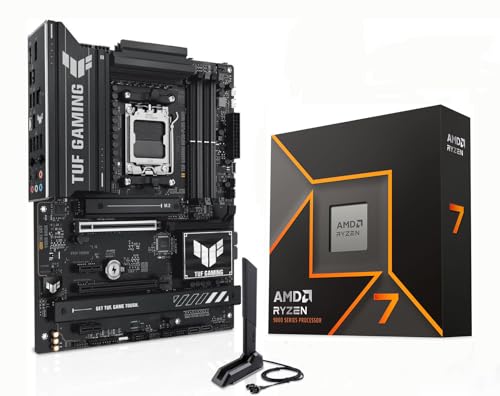
If you’re a serious gamer looking to elevate your rig, the combination of the AMD Ryzen 7 9700X CPU and ASUS TUF Gaming B850-PLUS motherboard offers an unbeatable performance upgrade. With its 8 cores, 16 threads, and a max boost of 5.5 GHz, the Ryzen 7 guarantees you get over 100 FPS in popular titles. The TUF B850-PLUS supports dual-channel DDR5 memory and PCIe 5.0, giving you ultrafast connectivity. Plus, with thorough cooling solutions and DIY-friendly features, you’re set for both performance and ease of upgrade. This pairing is perfect for gamers who demand the best from their systems.
Best For: Serious gamers looking to enhance their gaming performance with a high-capacity CPU and motherboard combo.
Pros:
- High Performance: The AMD Ryzen 7 9700X CPU delivers over 100 FPS in popular games, ensuring an exceptional gaming experience.
- Future-Proof Features: The ASUS TUF Gaming B850-PLUS motherboard supports advanced technologies like PCIe 5.0 and DDR5 memory for superior speed and connectivity.
- Comprehensive Cooling Solutions: Enhanced cooling systems and DIY-friendly design make it easy to maintain optimal performance during intense gaming sessions.
Cons:
- Price Point: The combination may be on the higher end of the budget spectrum for some gamers.
- Compatibility: Some users may need to ensure their existing hardware is compatible with the latest technologies like DDR5 and PCIe 5.0.
- Overclocking Complexity: While the CPU is unlocked for overclocking, it may require advanced knowledge and additional cooling solutions to maximize performance.
MSI X870E Gaming Plus WiFi Motherboard

Gamers seeking top-tier performance will find the MSI X870E Gaming Plus WiFi Motherboard an exceptional choice. Supporting AMD Ryzen 9000, 8000, and 7000 processors, it features a powerful 14 Duet Rail Power System for stable performance. With four DDR5 DIMM slots allowing extreme overclocking up to 8200+ MT/s, your memory speed will soar. The PCIe 5.0 x16 slot guarantees compatibility with cutting-edge graphics cards. Plus, it offers triple M.2 connectors for fast storage options and includes a full-speed Wi-Fi 7 module for seamless connectivity. With excellent cooling features, you’ll enjoy unmatched gaming performance without overheating.
Best For: Gamers and performance enthusiasts seeking high-end specifications and extreme overclocking capabilities.
Pros:
- Supports the latest AMD Ryzen 9000/8000/7000 processors for exceptional processing power.
- Offers extreme memory overclocking with speeds up to 8200+ MT/s using DDR5 technology.
- Features advanced networking options with Wi-Fi 7 and 5Gbps LAN for seamless online gaming.
Cons:
- High-performance components may lead to increased power consumption.
- Premium features could come with a higher price point compared to standard motherboards.
- Overclocking capabilities may require advanced knowledge and careful tuning for optimal performance.
ASUS ROG Strix B650-A Gaming WiFi Motherboard

The ASUS ROG Strix B650-A Gaming WiFi motherboard stands out as an exceptional choice for enthusiasts who demand high-quality performance from their gaming rigs. Compatible with AMD’s latest Ryzen™ 9000, 8000, and 7000 Series processors, this ATX motherboard guarantees robust support with its 12 + 2 power stages and premium power connectors. Its optimized thermal design features massive VRM heatsinks and airflow channels to keep your system cool. Additionally, with three M.2 slots and support for 2.5G LAN and WiFi 6E, you’ll enjoy lightning-fast connectivity and expandability for all your gaming needs.
Best For: Gamers and PC enthusiasts seeking a high-performance motherboard compatible with the latest AMD Ryzen™ processors.
Pros:
- High-quality power solution with 12 + 2 power stages for enhanced stability during intensive tasks.
- Optimized thermal management featuring massive VRM heatsinks and airflow channels to maintain cool operation.
- Versatile connectivity options including three M.2 slots, 2.5G LAN, and WiFi 6E for fast data transfer and expandability.
Cons:
- BIOS update may be required for compatibility with Ryzen 9000 and 8000 Series processors, which could be inconvenient for users.
- Limited to ATX form factor, potentially restricting options for smaller builds.
- Higher price point compared to entry-level motherboards, which may not be suitable for budget-conscious users.
Factors to Consider When Choosing a High End Gaming Motherboard
When choosing a high-end gaming motherboard, you need to take into account several key factors. You’ll want to guarantee it supports your processor, has a solid power delivery system, and offers effective cooling solutions. Additionally, think about the connectivity options and expansion slots available to maximize your gaming experience.
Processor Compatibility and Support
Choosing a high-end gaming motherboard requires careful consideration of processor compatibility and support, especially with the rapid evolution of CPU technology. Make sure your motherboard supports the latest processor sockets, like AMD AM5, for Ryzen 9000, 8000, and 7000 series CPUs. Look for robust power delivery systems, featuring multiple power stages, to provide stability during intense gaming or overclocking. Advanced cooling solutions for VRMs are also essential, as powerful processors can generate significant heat. Don’t forget to check for ample PCIe slots, ensuring you can accommodate next-gen graphics cards and high-speed PCIe 5.0 M.2 SSDs. Finally, verify the BIOS compatibility and any update requirements to fully support the latest CPUs.
Power Delivery System
While selecting a high-end gaming motherboard, one of the most vital aspects to take into account is its power delivery system. Look for motherboards with 14 to 18 power phases for stable and efficient power distribution to your CPU, especially under load. Advanced components like DrMOS, alloy chokes, and durable capacitors enhance thermal performance and longevity, which are fundamental for intense gaming. ProCool power connectors can guarantee reliable connections, essential for overclocking. Multi-layer PCBs, such as 8-layer designs, help reduce voltage fluctuations while optimizing power delivery. Additionally, consider the presence of VRM heatsinks and airflow optimization to effectively dissipate heat, ensuring your system runs smoothly and dependably during those marathon gaming sessions.
Cooling Solutions and Design
Effective cooling solutions are essential for high-end gaming motherboards, especially since they prevent thermal throttling during intense gaming sessions. Look for motherboards with multiple heatsinks, including VRM heatsinks and M.2 thermal guards, to efficiently dissipate heat. Enhanced circuit designs and high-quality thermal pads improve thermal conductivity, helping maintain ideal temperatures for critical components. Advanced models often include hybrid fan headers and customizable fan control utilities, so you can optimize airflow based on your system’s demands. Additionally, consider boards with extended PWM heatsink designs for better cooling of the power delivery system, ensuring stable performance even under heavy loads. Thorough cooling features should also include multiple M.2 slots with dedicated heatsinks to protect high-speed storage from overheating.
Connectivity Options Available
Cooling solutions play a pivotal role in maintaining your system’s performance, but connectivity options can greatly enhance your gaming experience. High-end gaming motherboards come equipped with multiple M.2 slots, often supporting the latest PCIe 5.0 standard for rapid storage and improved data transfer rates. You’ll also find USB ports with speeds like 20Gbps Type-C and USB4, allowing for quicker peripheral connections and seamless data synchronization. Advanced networking features, including Wi-Fi 7 and high-speed Ethernet up to 2.5Gbps, guarantee stable internet connections for online gaming. Additionally, Bluetooth technology enables effortless connections to wireless devices like headsets and controllers. Thunderbolt headers further expand your options, letting you connect various external devices for a more versatile gaming setup.
Expansion Slot Configuration
When choosing a high-end gaming motherboard, expansion slot configuration is essential for maximizing your system’s potential. Look for multiple PCIe 5.0 slots, which let you install the latest graphics and expansion cards to enhance your gaming experience. An ideal setup includes several M.2 slots with PCIe 4.0 or 5.0 support, allowing you to utilize the fastest NVMe SSDs for quick load times and improved responsiveness. Reinforced PCIe slots, like those with Steel Armor, support heavy graphics cards while preventing sagging. If you’re considering dual graphics cards, verify the motherboard supports NVIDIA SLI or AMD CrossFire for a significant performance boost. Finally, having enough USB ports, including USB 4.0 and Type-C, guarantees versatile connectivity for your peripherals.
Future-Proofing Features
As you explore high-end gaming motherboards, considering future-proofing features can greatly impact your system’s longevity and performance. Look for motherboards that support the latest PCIe 5.0 standard, guaranteeing compatibility with next-gen graphics cards and storage devices for faster data transfer. Multiple M.2 slots that support both PCIe 5.0 and 4.0 technologies are essential for high-speed SSDs and expansion. Advanced AI capabilities, like AI Overclocking and AI Cooling, adapt to future hardware demands, optimizing your experience. Additionally, verify the motherboard supports the latest wireless standards, such as Wi-Fi 7, for superior internet connectivity. Finally, opt for robust power solutions and high-quality components to handle multi-core processors, assuring stability during demanding tasks as technology evolves.