
If you’re looking to create a gaming setup that won’t disrupt your peace, choosing the right silent PC case is essential. A well-designed case can greatly reduce noise while maintaining ideal airflow. With options like the be quiet! Pure Base 501 and the Fractal Design North, you’ve got plenty of choices. But what else should you consider in your quest for the perfect whisper-quiet experience? Let’s explore some of the top contenders.
be quiet! Pure Base 501 Black ATX Case
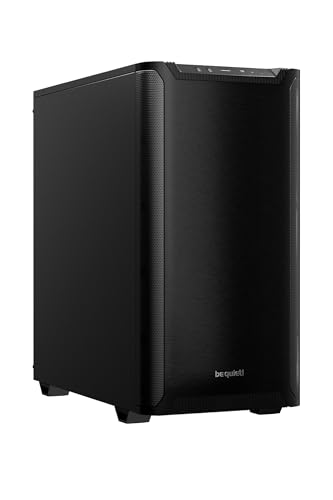
Pure Base 501 Black ATX Case is your go-to for a whisper-quiet PC setup. With a sleek design in black, it measures 20.47 x 20.47 x 11.42 inches and weighs just 14.74 pounds. This case comes equipped with two Pure Wings 3 140mm PWM fans, optimizing airflow while minimizing noise. You’ll appreciate the space for high-end graphics cards and large coolers, plus the option for vertical GPU installation. Front I/O features USB 3.2 Gen. 2 Type C for fast connectivity. Rated 4.7 stars by 1,767 reviewers, it’s a top choice for silent gaming.
Best For: Those seeking a quiet and efficient PC case for gaming or high-performance builds.
Pros:
- Optimized airflow with two preinstalled Pure Wings 3 fans for improved cooling.
- Supports high-end components, including large graphics cards and coolers, with options for vertical GPU installation.
- Sleek black design with front I/O featuring USB 3.2 Gen. 2 Type C for fast connectivity.
Cons:
- Limited color options as it only comes in black.
- Moderate weight may make it less portable for frequent movers.
- Some users may find the need for additional fans for optimal cooling in demanding setups.
be quiet! Pure Base 600 ATX Midi Tower PC Case

For those seeking a perfect blend of silence and performance, the be quiet! Pure Base 600 ATX Midi Tower PC Case is your ideal choice. Its versatile design allows you to customize the layout with repositionable HDD slots and a removable ODD cage. Equipped with two pre-installed Pure Wings 2 fans, it guarantees whisper-quiet operation while promoting efficient airflow. You can even enhance cooling further with support for water cooling setups up to 360mm. Plus, with a 3-year manufacturer’s warranty, you can trust in its quality and performance, making it a reliable option for your quiet gaming rig.
Best For: Those who prioritize silent computing without compromising on performance and customization options in their gaming rig.
Pros:
- Versatile design allows for customization with repositionable HDD slots and a removable ODD cage.
- Whisper-quiet operation with two pre-installed Pure Wings 2 fans for efficient airflow.
- Supports water cooling with radiators up to 360mm, enhancing cooling options.
Cons:
- May require additional fans for optimal cooling in high-performance setups.
- Limited front panel connectivity options compared to some competitors.
- The aesthetic may not appeal to users preferring more flashy designs.
be quiet! Silent Base 802 ATX Midi Tower PC Case

If you’re seeking a perfect blend of silence and performance, the be quiet! Silent Base 802 ATX Midi Tower PC Case is a fantastic choice. Its interchangeable top cover and front panel let you prioritize either airflow or silent operation, tailored to your needs. With three pre-installed Pure Wings 2 fans and a state-of-the-art IO panel featuring a fan controller and USB 3.2 Gen. 2 Type C, cooling is efficient. Plus, the extra thick insulation mats considerably reduce noise, ensuring your setup remains whisper-quiet. Designed for versatility, it accommodates an inverted layout for even more customizable performance.
Best For: Those who prioritize a quiet computing experience without compromising on airflow and cooling performance.
Pros:
- Interchangeable panels allow for customization between silent operation and enhanced airflow.
- Three pre-installed Pure Wings 2 fans provide efficient cooling right out of the box.
- Extra thick insulation mats effectively reduce noise levels, ensuring a quieter workspace.
Cons:
- Limited color options, as it only comes in black.
- Inverted layout setup may not be suitable for all users, requiring additional adjustments.
- Higher price point compared to basic PC cases without advanced features.
CORSAIR 4000D RS ARGB Mid-Tower ATX PC Case

Looking for a PC case that blends aesthetics with performance? The CORSAIR 4000D RS ARGB Mid-Tower ATX PC Case is a great choice. It boasts high airflow with three pre-installed RS ARGB fans, ensuring your components stay cool while looking stunning. You’ll appreciate the InfiniRail™ Fan Mounting System, allowing you to customize fan placement for ideal cooling. With features like a modular design and Zero RPM mode, it adapts to your needs while maintaining a whisper-quiet operation. Plus, the 3D Y-Pattern Airflow Panel enhances airflow, making this case a must-have for your silent gaming setup.
Best For: Enthusiasts looking for a customizable, high-performance PC case that offers both aesthetic appeal and efficient cooling.
Pros:
- High airflow design with 3D Y-Pattern Airflow Panel and pre-installed RS ARGB fans for optimal cooling.
- Modular features allow for extensive customization, including fan placement and upgrades to the motherboard tray.
- Quiet operation thanks to Zero RPM mode, ensuring minimal noise at low loads.
Cons:
- Limited front I/O options may require additional upgrades for extra USB ports.
- Size constraints in a mid-tower design may limit compatibility with larger components.
- Potential learning curve for users unfamiliar with modular systems and fan configurations.
Fractal Design North Mid Tower PC Gaming Case

The Fractal Design North Mid Tower PC Gaming Case stands out with its unique combination of genuine walnut wood and tempered glass, making it an ideal choice for gamers who value aesthetics as much as performance. With an open front design and fine-patterned mesh, it guarantees excellent airflow, keeping your components cool. You’ll appreciate the customization options with seven bridgeless expansion slots and multiple drive mounts. It supports a variety of motherboard sizes and GPUs, fitting seamlessly into your setup. Plus, user ratings of 4.8 out of 5 highlight its quality, making it a worthy investment for a whisper-quiet gaming experience.
Best For: Gamers looking for a stylish and functional mid-tower case that combines natural materials with excellent airflow and customization options.
Pros:
- Stylish design featuring genuine walnut wood and tempered glass for an aesthetic appeal.
- Excellent airflow due to the open front design and fine-patterned mesh.
- Ample customization options with seven expansion slots and multiple drive mounts.
Cons:
- Heavier than some other mid-tower cases, weighing 20.9 pounds.
- Limited GPU clearance with only 300 mm available when using a 360 mm front radiator.
- Higher restocking fees may apply for misrepresented returns, which could deter some buyers.
NZXT H5 Flow Compact ATX Mid-Tower PC Gaming Case

For gamers and PC builders seeking a silent yet efficient setup, the NZXT H5 Flow Compact ATX Mid-Tower PC Gaming Case stands out with its exceptional airflow design. Its ultra-fine mesh panels maximize airflow while keeping dust at bay. You’ll appreciate the pre-installed 120mm Quiet Airflow fans that guarantee ideal cooling without the noise. With support for up to a 360mm radiator in front and a 240mm radiator on top, your GPU stays cool under pressure. Plus, the clever cable management system keeps your build tidy, making it an ideal choice for a clean and quiet gaming experience.
Best For: Gamers and PC builders seeking a compact, high-performance case with excellent airflow and noise reduction.
Pros:
- Exceptional airflow design with ultra-fine mesh panels and dust filtration for optimal cooling.
- Pre-installed Quiet Airflow fans provide effective cooling while minimizing noise levels.
- Efficient cable management system with wide channels and hooks for a clean and organized build.
Cons:
- Limited space for additional cooling components due to its compact size.
- Only two fans included, which may not be sufficient for users with high-performance builds needing more cooling.
- Tempered glass design may be prone to fingerprints and smudges, requiring regular cleaning.
be quiet! Pure Base 501 White PC Case

Designed for users who prioritize tranquility without sacrificing performance, the be quiet! Pure Base 501 White PC Case excels in both design and functionality. Its minimalistic aesthetics focus on effective noise reduction, backed by German engineering. Cooling is enhanced with a Pure Wings 3 140mm PWM fan, while the case supports multiple fans and radiators for superior airflow. You’ll appreciate the flexibility for high-end GPUs with 90° rotating PCIe slots, preventing sag. Smart cable management complements its spacious layout, and front I/O ports with USB 3.2 Gen 2 Type C offer fast access, making it an ideal choice for quiet gaming.
Best For: Users who seek a quiet yet high-performance PC case with excellent cooling capabilities and a sleek design.
Pros:
- Effective noise reduction thanks to its minimalistic design and high-quality engineering.
- Enhanced cooling potential with support for multiple fans and radiators, ensuring optimal airflow.
- Flexible GPU installation with 90° rotating PCIe slots, allowing for vertical mounting and preventing sag.
Cons:
- Limited color options may not appeal to users looking for more customization.
- Potentially high price point compared to other cases with similar features.
- Installation of additional cooling systems may require extra planning due to the compact layout.
Lian Li LANCOOL 217 Mid-Tower ATX Computer Case
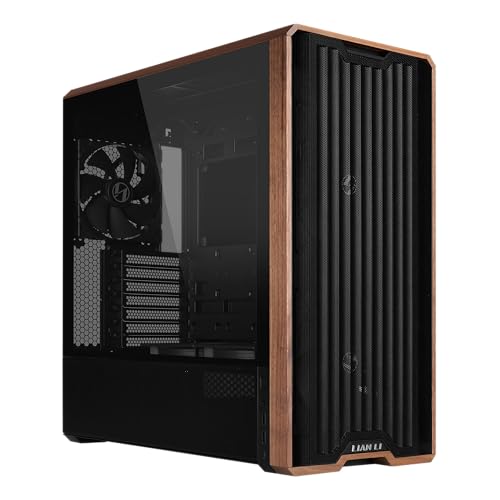
Offering exceptional cooling with its five pre-installed fans, the Lian Li LANCOOL 217 Mid-Tower ATX Computer Case is perfect for gamers and content creators who demand peak performance. The case features two large front fans and a rear fan that guarantee your CPU and GPU stay cool during intense sessions. You can easily customize the airflow thanks to the toolless mounting system. With real wood accents, it adds a modern touch to your setup. Dual PSU configurations simplify cable management, while back-connect motherboard support keeps everything tidy. Enjoy easy access with dual power buttons, making your gaming experience seamless.
Best For: Gamers and content creators seeking a high-performance computer case with excellent cooling and customizable airflow options.
Pros:
- Exceptional cooling performance with five pre-installed fans, ensuring optimal temperature for CPU and GPU.
- Modern design with real wood accents that enhance the aesthetic appeal of the setup.
- Dual PSU mounting configurations and back-connect motherboard support simplify cable management for a cleaner look.
Cons:
- Limited space for larger PSUs over 220mm may restrict some users’ choices.
- The use of wood accents may not appeal to all users seeking a more traditional, tech-focused design.
- Some may find the toolless mounting system less secure compared to traditional methods.
NZXT H3 Flow Micro-ATX PC Case

The NZXT H3 Flow Micro-ATX PC Case stands out as an ideal choice for gamers and content creators who demand high-performance components without compromising on silence. Its space-efficient design accommodates full-sized GPUs up to 377 mm, ensuring you can utilize powerful graphics. The high-airflow structure features ultra-fine steel mesh, promoting effective cooling while minimizing dust buildup. With support for up to seven fans and radiators of 240 mm at the top or 280 mm at the front, you’ll enjoy peak thermal performance. Plus, the included rear fan enhances exhaust airflow, keeping your system cool and quiet during intense sessions.
Best For: Gamers and content creators seeking a compact yet powerful micro-ATX case with excellent cooling capabilities.
Pros:
- Supports a wide range of high-performance components, accommodating full-sized GPUs up to 377 mm.
- High-airflow design with ultra-fine steel mesh promotes effective cooling and reduces dust buildup.
- Includes a pre-installed rear fan for enhanced exhaust airflow and thermal performance.
Cons:
- Limited space for additional cooling options if front fans are installed, reducing GPU length capacity.
- Micro-ATX form factor may not appeal to users preferring larger ATX cases for more component flexibility.
- Potentially less room for cable management compared to larger cases, which could affect build aesthetics.
Lian Li A3 Micro Form Factor Chassis (A3X-WD)

For those seeking a compact yet powerful solution for their PC builds, the Lian Li A3 Micro Form Factor Chassis (A3X-WD) stands out with its sleek design and impressive compatibility. This mATX chassis, designed in collaboration with DAN Cases, supports M-ATX and ITX motherboards while accommodating GPUs up to 415mm. With its modular design and steel mesh side and top panels, you’ll enjoy efficient airflow. You can mount an ATX, SFX, or SFX-L power supply either sideways or frontways. Just keep in mind, it doesn’t come with fans, so you’ll need to add your own for ideal cooling.
Best For: Those looking for a compact, customizable chassis that supports powerful components in a stylish and efficient design.
Pros:
- Modular design allows for flexible configurations and easy upgrades.
- Accommodates large GPUs up to 415mm, making it suitable for high-performance builds.
- Efficient airflow with steel mesh panels promoting cooling and ventilation.
Cons:
- No fans included, requiring additional purchases for optimal cooling.
- Limited to M-ATX and ITX motherboards, which may restrict options for some users.
- Compact size may limit cable management and space for other components.
Factors to Consider When Choosing a Silent PC Case
When choosing a silent PC case, you’ll want to focus on several key factors. Noise reduction features and cooling efficiency are essential for maintaining a quiet yet effective setup. Additionally, consider the build materials, airflow design, and cable management solutions to guarantee peak performance.
Noise Reduction Features
While searching for the perfect silent PC case, it’s essential to take into account various noise reduction features that can greatly enhance your computing experience. Look for cases with extra thick insulation mats; these enhance noise reduction capabilities and minimize sound transmission. Consider models with decoupled components, like a decoupled motherboard tray, to reduce vibrations and internal noise. Opt for cases equipped with optimized fans to minimize noise-generating turbulence for quieter airflow. Evaluate designs with sound dampening features, such as sealed panels and sound-absorbing materials, which can markedly lower noise levels. Finally, select cases that allow adjustable airflow configurations, letting you balance noise reduction and cooling performance based on your preferences.
Cooling Efficiency
Cooling efficiency plays an essential role in selecting a silent PC case, as effective airflow can help keep fan speeds low, reducing noise levels considerably. Look for cases with multiple pre-installed fans and airflow-optimized designs; these can enhance cooling performance while maintaining quiet operation. Supporting larger radiators, like up to 360mm, and various fan configurations guarantees better heat dissipation, keeping your components cool without excessive noise. Also, consider cases featuring noise-reduction materials, such as thick insulation mats, which improve cooling efficiency by minimizing sound while preserving airflow. Finally, clever cable management and strategic airflow designs can optimize cooling performance, allowing for smoother airflow paths and reducing turbulence, making your gaming experience both cool and quiet.
Build Materials Quality
Choosing the right build materials for your silent PC case can greatly impact its noise reduction performance. Thicker and denser materials, like steel and aluminum, provide superior sound insulation compared to thinner plastic options. When selecting a case, look for those that incorporate specialized sound-dampening materials, which can effectively minimize vibrations and noise.
Additionally, cases featuring insulation mats or acoustic foam can absorb sound waves produced by components like fans and hard drives, enhancing overall quietness. Design elements such as decoupled panels and rubber grommets further reduce direct contact between vibrating parts and the case. High-quality cases often combine these materials and design strategies to create an ideal environment for quiet operation while still ensuring effective cooling.
Airflow Design
Effective airflow design plays an essential role in ensuring your silent PC case runs efficiently and quietly, as it helps maintain ideal temperatures for your components. Look for cases with perforated panels and mesh designs that enhance airflow, providing unobstructed paths for cool air intake and hot air exhaust. The positioning and number of pre-installed fans can greatly impact airflow; cases that support additional fans allow for better cooling potential. A well-optimized airflow design reduces the need for high-speed fans, which helps minimize noise levels during operation. Features like adjustable vents and modular fan mounting options let you customize airflow based on your cooling needs, ensuring your gaming experience remains as silent as possible while keeping your components cool.
Cable Management Solutions
When building a silent PC, considering cable management solutions is essential for both aesthetics and performance. Effective cable management enhances airflow, reducing thermal issues and promoting system efficiency. Look for features like cable routing channels, hooks, and straps, which create organized pathways for your cables, minimizing clutter and improving the overall look of your build. Some cases even come with integrated power supply shrouds that hide cables, making maintenance easier. Tool-less mounting options for drive bays can save you time during assembly and upgrades, allowing for quicker cable management. A well-designed cable system not only keeps your setup tidy but also aids in noise reduction by preventing cables from obstructing airflow and dampening vibrations from components.
Size and Compatibility
Selecting the right size and compatibility for your silent PC case is vital to guarantee all your components fit seamlessly. First, verify it matches your motherboard size, whether it’s ATX, mATX, or ITX. Next, check the GPU clearance; some cases only support graphics cards up to a certain length, which could limit your options. Adequate space for cooling systems is essential, so look for cases that support radiators or multiple fans to maintain airflow while keeping noise down. Additionally, evaluate the dimensions to confirm it fits your desk or PC area. Finally, consider cases with modular features, like repositionable HDD slots or removable drive cages, to enhance customization and airflow efficiency.
Aesthetic Appeal
Finding the right silent PC case isn’t just about functionality; aesthetic appeal plays a significant role in your overall satisfaction. Look for streamlined, minimalistic designs that balance elegance with performance. Many silent cases use thick insulation mats or wood accents, enhancing noise reduction while adding sophistication. Neutral color schemes, like black or white, help your setup blend seamlessly into any environment while keeping a modern vibe. Consider cases with tempered glass panels that showcase your internal components, appealing to both aesthetics and acoustics. Customization options, such as interchangeable front panels and modular layouts, let you tailor the look of your silent PC case to reflect your personal style, ensuring it’s not just quiet but visually appealing too.