
If you’re looking to elevate your gaming setup, choosing the right dual chamber PC case can make all the difference. With options that balance cooling efficiency and striking aesthetics, the 2026 market offers an impressive array of choices. From advanced airflow designs to customizable RGB lighting, these cases cater to both performance enthusiasts and style aficionados. Let’s explore the top contenders that could transform your build into a statement piece.
NZXT H6 Flow Compact Mid-Tower Airflow Case

If you’re looking for a compact yet highly efficient case for your gaming or workstation setup, the NZXT H6 Flow Compact Mid-Tower Airflow Case is an excellent choice. Its sleek dual-chamber design not only enhances thermal performance but also gives you a clean, modern aesthetic. With three pre-installed 120mm fans and airflow-optimized panels, cooling becomes effortless, keeping your components stable. You’ll appreciate the wraparound glass panels, providing an unobstructed view of your setup. Plus, the intuitive cable management system makes organization a breeze, ensuring your build looks as good as it performs. Upgrade your rig with the NZXT H6 Flow today!
Best For: Gamers and content creators seeking a compact case that combines efficient cooling with a sleek aesthetic.
Pros:
- Excellent airflow with three pre-installed 120mm fans and optimized panel designs.
- Stylish wraparound glass panels offer a clear view of internal components.
- User-friendly cable management system ensures a clean and organized build.
Cons:
- Limited space for larger components due to its compact design.
- Potential for noise from the fans if not adjusted properly.
- Price point may be higher compared to some basic cases on the market.
Thermaltake View 380 XL TG ARGB Case (CA-11E-00M1WN-AZ)
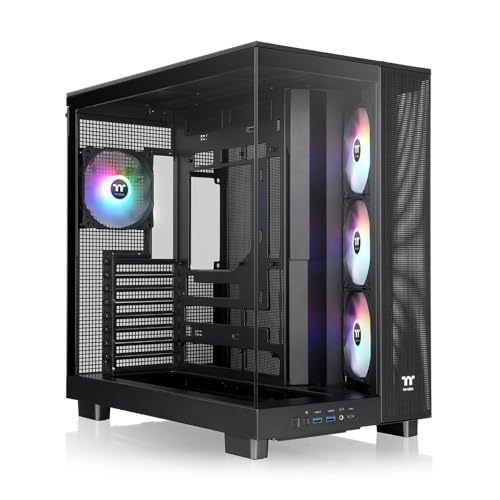
The Thermaltake View 380 XL TG ARGB Case (CA-11E-00M1WN-AZ) is an excellent choice for gamers and PC enthusiasts who prioritize aesthetics and cooling efficiency. With its sleek black design, 4mm tempered glass, and mesh panels, you’ll enjoy excellent visibility of your internal components. This dual chamber case supports up to ten 120mm fans, including four preinstalled ARGB Lite fans to kickstart your cooling setup. Plus, the spacious interior allows for GPUs up to 420mm and accommodates ATX hidden connector motherboards for a cleaner build. Get ready to elevate your gaming rig’s style and performance!
Best For: Gamers and PC enthusiasts looking for a stylish case with excellent cooling capabilities.
Pros:
- Spacious interior supports GPUs up to 420mm, accommodating high-performance graphics cards.
- Dual chamber design enhances airflow and provides excellent visibility of internal components.
- Comes with four preinstalled ARGB Lite fans, ensuring efficient cooling right out of the box.
Cons:
- Limited to a specific number of fan placements, which might restrict customization for some users.
- The use of tempered glass may require regular cleaning to maintain aesthetics.
- The angled mesh panel might not appeal to everyone’s design preferences.
NZXT H9 Flow Large Dual-Chamber ATX Mid-Tower PC Case

For gamers and PC enthusiasts seeking ideal thermal performance and sleek aesthetics, the NZXT H9 Flow Large Dual-Chamber ATX Mid-Tower PC Case stands out as an excellent choice. Its dual-chamber design effectively separates components from the PSU and drives, enhancing cooling and cable management. The panoramic tempered glass panels showcase your build beautifully. You’ll enjoy optimized airflow with pre-installed fans and the ability to add more, accommodating up to a 420mm radiator. Plus, generous cable management features make routing effortless. With ample space for high-end GPUs, it’s perfect for your next powerful setup.
Best For: Gamers and PC enthusiasts seeking a balance of thermal performance and aesthetics in a spacious mid-tower case.
Pros:
- Optimized airflow design with pre-installed fans enhances cooling efficiency.
- Dual-chamber layout improves cable management and separates components for better thermal performance.
- Ample space for high-end GPUs and large cooling solutions, including support for a 420mm radiator.
Cons:
- The large size may not be suitable for compact setups or smaller spaces.
- The panoramic tempered glass panels may require regular cleaning to maintain aesthetics.
- Additional fans and radiators must be purchased separately, which can increase overall cost.
H1 HYXN ATX PC Case with 7 PWM ARGB Fans

Designed for gamers and PC builders who crave efficient cooling and striking aesthetics, the H1 HYXN ATX PC Case stands out with its impressive seven PWM ARGB fans. This mid-tower case features a dual-chamber design, allowing for ideal airflow through its vertical intake channels. With room for three 360mm radiators, your components will stay cool even during intense gaming sessions. The panoramic tempered glass panels provide a stunning view of your setup, while the daisy connection method simplifies cable management. With compatibility for ATX, M-ATX, and ITX motherboards, it’s a versatile choice that meets all your gaming needs.
Best For: Gamers and PC builders looking for a stylish, high-performance case with excellent cooling capabilities.
Pros:
- Impressive cooling: Equipped with seven PWM ARGB fans and support for multiple radiators ensures optimal airflow and temperature management.
- Aesthetic appeal: The dual-chamber design and panoramic tempered glass panels create a visually striking setup.
- Versatile compatibility: Supports ATX, M-ATX, and ITX motherboards, making it suitable for various builds.
Cons:
- Limited storage options: Only accommodates one HDD and two SSDs or three SSDs, which may not be sufficient for users with extensive storage needs.
- Weight: At 11 pounds, it may be heavier compared to other mid-tower cases in the market.
- Complex cable management: While the daisy connection method simplifies some aspects, it may still be challenging for those unfamiliar with cable management techniques.
Hyte Y70 Modern Aesthetic Mid-Tower Gaming Case

If you’re looking to build a high-performance gaming rig, the Hyte Y70 Modern Aesthetic Mid-Tower Gaming Case stands out with its dual chamber design that enhances cable management and airflow. Weighing 24.3 pounds and featuring a sleek 3-piece panoramic tempered glass design, it’s not just stylish but functional too. You can support massive graphics cards and up to 10 fans for ideal cooling. With extensive cable management options and a tool-less design for easy access, this case makes upgrades a breeze. Plus, its impressive customer rating of 4.8 stars shows it’s a favorite among gamers.
Best For: Gamers seeking a stylish and functional mid-tower case with excellent cooling and cable management features.
Pros:
- Supports massive graphics cards and up to 10 fans for optimal cooling configurations.
- Tool-less design allows for easy access to panels, simplifying upgrades and maintenance.
- Impressive 4.8-star customer rating indicates high satisfaction among users.
Cons:
- Weighing 24.3 pounds, it might be heavier compared to some other cases on the market.
- Limited color options may not appeal to all aesthetic preferences.
- Potential restocking fees for returns may deter some buyers if the product does not meet expectations.
Lian Li O11Vision Compact ATX Mid Tower Computer Case

The Lian Li O11Vision Compact ATX Mid Tower Computer Case stands out for PC enthusiasts seeking a perfect blend of aesthetics and functionality. Its stunning three-panel tempered glass design offers an uninterrupted view of your components, while the top mesh panel guarantees superior airflow for cooling solutions. You’ll appreciate its compatibility with back-connect motherboards, allowing you to neatly conceal AIO tubing in the second chamber. This case not only enhances the visual appeal of your setup but also supports advanced cooling systems, making it an ideal choice for anyone looking to showcase their build with style and efficiency.
Best For: PC enthusiasts looking for a stylish and functional case that enhances component visibility and cooling efficiency.
Pros:
- Stunning three-panel tempered glass design allows for an uninterrupted view of components.
- Top mesh panel included for optimal airflow and cooling solutions.
- Compatible with back-connect motherboards, allowing for neat concealment of AIO tubing.
Cons:
- Limited space for larger components may restrict some build options.
- Glass panels require regular cleaning to maintain clarity and aesthetics.
- Potential for higher price point compared to standard cases without premium features.
AeroCool P500C Mid-Tower PC Case

For gamers and PC enthusiasts seeking ideal cooling and striking aesthetics, the AeroCool P500C Mid-Tower PC Case stands out with its impressive dual chamber design. With full tempered glass front and side panels, you’ll enjoy a clear view of your setup. The case comes equipped with four pre-installed ARGB fans, featuring a fascinating “mirage” infinity mirror effect. It supports radiators up to 360mm and offers a total of 10 fan slots, ensuring you can customize airflow to your liking. Plus, effective cable management keeps your interior tidy, enhancing both airflow and style for your powerful gaming build.
Best For: Gamers and PC enthusiasts looking for a mid-tower case that combines optimal cooling with striking aesthetics.
Pros:
- Full tempered glass front and side panels provide excellent visibility of internal components.
- Equipped with 4 pre-installed ARGB fans, including a unique “mirage” infinity mirror effect for enhanced visual appeal.
- Supports extensive cooling options with up to 10 fan slots and radiator compatibility of up to 360mm.
Cons:
- The dual chamber design may require more space compared to traditional cases.
- Limited airflow options if fans are not customized properly.
- Potential challenges in cable management for users with numerous components or peripherals.
NZXT H9 Flow RGB Mid-Tower PC Case

Designed for gamers and PC builders seeking peak performance, the NZXT H9 Flow RGB Mid-Tower PC Case excels with its dual-chamber layout that enhances thermal efficiency. You’ll appreciate the panoramic view with seamless tempered glass, showcasing your components beautifully. The optimized airflow from perforated steel panels and pre-installed fans guarantees your system stays cool. With support for large radiators and high-end GPUs, your build will thrive. Plus, the extra-wide cable management channels and Velcro straps make routing a breeze. This case combines style and functionality, making it a top choice for your next gaming rig.
Best For: Gamers and PC builders seeking a stylish and efficient case for high-performance components.
Pros:
- Dual-chamber design enhances thermal performance and simplifies cable management.
- Panoramic tempered glass paneling provides an elegant view of your components.
- Supports large radiators and high-end GPUs, making it ideal for powerful builds.
Cons:
- Limited pre-installed fans may require additional purchases for optimal cooling.
- Size may be cumbersome for smaller spaces or setups.
- Black color option may not appeal to those looking for more color variety.
FOIFKIN F300 (2025) ATX Mid-Tower Gaming PC Case

Gamers and PC builders seeking a blend of style and functionality will find the FOIFKIN F300 (2025) ATX Mid-Tower Gaming PC Case an excellent choice. Its sleek design features a 270° panoramic tempered glass panel, showcasing your high-end components while providing good sound insulation. Cooling’s a breeze with four pre-installed fans and support for multiple cooling options. You’ll appreciate the quick disassembly of the glass side panel for easy maintenance. Compatible with various motherboard sizes, it offers ample space for your hardware and includes essential I/O ports. Plus, FOIFKIN backs its product with solid customer support, ensuring peace of mind.
Best For: Gamers and PC builders looking for a stylish and functional case to showcase their high-end hardware while ensuring effective cooling.
Pros:
- Sleek and modern design with a 270° panoramic tempered glass panel for an impressive visual display.
- Excellent cooling capabilities with four pre-installed fans and support for additional fans and liquid coolers.
- Quick disassembly of the glass side panel for easy installation and maintenance.
Cons:
- Limited internal storage options with only one HDD and one SSD mount or two HDDs available.
- Maximum GPU length limit of 400mm may restrict compatibility with some larger graphics cards.
- Sound insulation, while good, may not be sufficient for those seeking complete noise isolation in very quiet environments.
MUSETEX ATX PC Case with 7 PWM ARGB Fans

If you’re looking to build a high-performance gaming rig, the MUSETEX K2 ATX PC case with 7 PWM ARGB fans is an excellent choice. It features a stunning 270° panoramic dual tempered glass design, allowing you to showcase your hardware beautifully. With support for various motherboard sizes and GPUs up to 415mm, installation is a breeze. The innovative airflow design, along with adjustable speed ARGB fans, guarantees your components stay cool while looking great. Plus, the upgraded I/O panel and magnetic dust filters add convenience and functionality. MUSETEX also backs their product with solid customer support for your peace of mind.
Best For: Gamers and PC builders looking for a stylish, high-performance case with excellent cooling capabilities and ample customization options.
Pros:
- Features 7 pre-installed PWM ARGB fans for superior cooling and customizable lighting.
- Spacious design supports various motherboard sizes and large GPUs, making installation easy.
- Upgraded I/O panel with modern connectivity options and magnetic dust filters for convenience.
Cons:
- The case may be overkill for casual users or those with lower-end hardware.
- Limited to a maximum of 10 fans, which might not satisfy extreme cooling enthusiasts.
- The tempered glass design may require regular cleaning to maintain its appearance.
Factors to Consider When Choosing a Dual Chamber PC Case
When choosing a dual chamber PC case, you need to think about several key factors. Cooling efficiency, cable management features, and component compatibility are essential for peak performance. Don’t forget to also consider aesthetic design and build quality to guarantee your setup not only runs well but looks great too.
Cooling Efficiency
Choosing the right dual chamber PC case can greatly impact your system’s cooling efficiency, especially since these designs effectively separate heat-generating components from critical elements like the power supply. Look for cases with enhanced airflow, featuring perforated panels and multiple fan mounts to improve air circulation. A higher number of fan support—ranging from 7 to 10 or more—offers customizable cooling options tailored to your needs. If you’re considering liquid cooling, check for radiator support that accommodates large setups, like 420mm radiators. This guarantees your high-performance components stay cool during intense tasks. By prioritizing these features, you’ll create a more efficient cooling system, protecting your investment while maintaining peak performance.
Cable Management Features
Effective cooling isn’t just about airflow; cable management plays a significant role in maintaining your PC’s performance. When choosing a dual chamber case, look for designs with extra-wide channels and built-in Velcro straps to keep your wiring organized and clutter-free. Dedicated compartments for your power supply unit (PSU) and drives can separate cables from main components, enhancing both airflow and aesthetics. Integrated tie-down points allow for secure cable routing, improving the overall cleanliness of your build. Opt for cases with easy access to cable management areas, especially those featuring tool-less designs that simplify installation and maintenance. A robust cable management system not only keeps your setup neat but also boosts cooling efficiency by minimizing airflow obstruction caused by tangled cables.
Component Compatibility
Selecting the right dual chamber PC case hinges on guaranteeing component compatibility, as this influences overall performance and system stability. First, check the motherboard size compatibility—whether you’re using ATX, Micro-ATX, or Mini-ITX, it’s essential to make sure your case supports your chosen board. Next, verify GPU clearance; many dual chamber cases accommodate graphics cards up to 420mm, perfect for high-end setups. Don’t forget to assess CPU cooler height restrictions, typically allowing coolers up to 170mm. Additionally, verify your power supply unit (PSU) fits, as most cases support PSUs up to 220mm. Finally, consider storage options; look for cases that offer ample space for both HDDs and SSDs to keep your data organized.
Aesthetic Design Appeal
While aesthetics might not be the first thing on your mind when building a PC, the design of your dual chamber case can considerably enhance your setup’s overall appeal. Many dual chamber cases feature panoramic tempered glass, giving you a stunning 270° view of your components. You’ll find sleek, modern designs with seamless edges and customizable RGB lighting that create a visually striking environment. The separation of components not only boosts airflow but also promotes a cleaner, more organized look. High-quality materials like tempered glass and aluminum elevate the case’s aesthetic. Additionally, innovative designs often include cable management channels and hidden compartments, minimizing clutter and ensuring a streamlined appearance that complements your personal style.
Build Quality and Durability
When you’re choosing a dual chamber PC case, build quality and durability should be top priorities to confirm your components are well-protected. Look for cases made with high-quality materials like tempered glass and steel; these enhance durability and shield your hardware from damage. A robust dual chamber design improves component separation, which aids in reducing heat build-up and prolonging hardware life. Ascertain the case has a solid structure with minimal flexing, indicating a well-designed product. Thicker panels generally offer better insulation and impact resistance, so don’t overlook this detail. Finally, evaluate customer reviews and ratings for insights on long-term durability, as real user experiences can reveal potential weaknesses or strengths in the case’s construction.
Airflow Optimization
To keep your components running cool and efficiently, optimizing airflow in a dual chamber PC case is crucial. These designs separate heat-generating components, like your CPU and GPU, from the power supply and drives, enhancing airflow and reducing temperature buildup. Look for cases that feature perforated panels and strategically placed fans to maximize airflow, allowing cooler air to enter while expelling warmer air effectively. Pre-installed fans can greatly boost your cooling performance, and many cases support multiple fan configurations for even better airflow. Additionally, effective airflow management helps minimize dust accumulation by reducing stagnant air zones, which keeps your internal components cleaner and performing at their best. Prioritize these features to guarantee a well-cooled system.
Expansion Options Available
Choosing a dual chamber PC case involves considering various expansion options that cater to your specific needs. You’ll find that these cases typically offer multiple expansion slots for various motherboard sizes, including ATX, M-ATX, and ITX. If you’re planning on a high-end build, many dual chamber cases support graphics cards with clearances ranging from 400mm to 450mm. You’ll also appreciate the flexibility for cooling solutions, with support for up to 10 fans and large radiators, like 360mm units, to keep your system cool. Additionally, look for dedicated storage mounts for HDDs and SSDs, along with smart cable management features like wide channels and Velcro straps to keep everything organized and enhance airflow.