
If you’re looking to create a powerful and customizable PC, barebone builds offer a compelling solution. These systems allow you to choose your components, ensuring ideal performance tailored to your needs. With options ranging from compact mini PCs to robust gaming setups, there’s something for every enthusiast. But how do you decide which build is right for you? Let’s explore the top contenders that can elevate your computing experience.
ASUS NUC 15 Pro Slim Mini PC

The ASUS NUC 15 Pro Slim Mini PC is an ideal choice for tech enthusiasts who crave power and versatility in a compact form. With an Intel Core 3 100U processor and support for up to 96GB DDR5 RAM, it packs a punch for demanding applications. Its dual storage design and toolless chassis access make upgrades a breeze. You can connect up to four 4K displays through HDMI 2.1 and Thunderbolt 4, enhancing your visual experience. Plus, with Wi-Fi 7 and Bluetooth 5.4, your connectivity options are exceptional. This mini PC also boasts 24/7 reliability and MIL-STD-810H durability for peace of mind.
Best For: Tech enthusiasts seeking a powerful and versatile mini PC that offers exceptional performance and connectivity in a compact design.
Pros:
- High performance: Supports up to 96GB DDR5 RAM and features an Intel Core 3 100U processor.
- Versatile connectivity: Connects up to four 4K displays via HDMI 2.1 and Thunderbolt 4.
- Durable design: MIL-STD-810H certification ensures reliability in extreme conditions.
Cons:
- Barebones configuration: Requires additional components like RAM and storage to be fully functional.
- Potential heat issues: High performance may lead to increased heat generation without adequate cooling.
- Limited upgrade options: The compact design may restrict some hardware upgrades compared to larger PCs.
ASUS NUC 15 Pro Tall Barebones Mini PC

For those seeking a powerful yet compact solution, the ASUS NUC 15 Pro Tall Barebones Mini PC stands out with its Intel Series 2 Core Ultra 5 225H processor and integrated Intel Arc 130T graphics. You can expand your system with up to 96GB DDR5 RAM and utilize dual storage options for flexibility. Connectivity is exceptional, featuring Intel Wi-Fi 7 for lightning-fast transfer rates and Bluetooth 5.4 for superior audio quality. Plus, it supports four 4K displays through HDMI 2.1 and Thunderbolt 4. With 24/7 reliability and an advanced cooling system, this mini PC is engineered for lasting performance.
Best For: Users seeking a compact yet powerful mini PC for high-performance tasks, gaming, or multi-display setups.
Pros:
- High performance with Intel Core Ultra 5 processor and integrated graphics for demanding applications.
- Expandable memory options with up to 96GB DDR5 RAM for enhanced multitasking capabilities.
- Versatile connectivity with support for multiple 4K displays and advanced wireless technologies.
Cons:
- Barebones design may require additional components for complete functionality, increasing overall cost.
- Limited upgrade options for graphics performance as it relies on integrated Intel Arc graphics.
- Potentially higher noise levels due to the advanced cooling system under heavy loads.
ASUS NUC 15 Pro Slim Mini PC

If you’re looking for a compact yet powerful solution for demanding tasks, the ASUS NUC 15 Pro Slim Mini PC is an excellent choice. With its Intel Core i5 processor and 16GB DDR5 RAM, it handles AI workloads effortlessly. The 512GB PCIe NVMe SSD guarantees quick load times, while Intel Wi-Fi 7 and Bluetooth 5.4 provide exceptional connectivity. You can connect up to four 4K displays through HDMI 2.1 and Thunderbolt 4. Its tool-less chassis allows for easy upgrades, and the VESA mount offers flexible placement. Compact and durable, this mini PC is designed for reliable, 24/7 performance.
Best For: Those in need of a compact and powerful mini PC for demanding tasks such as AI workloads, with excellent connectivity options.
Pros:
- High Performance: Features an Intel Core i5 processor and 16GB DDR5 RAM for efficient multitasking and handling of AI tasks.
- Exceptional Connectivity: Supports up to four 4K displays and boasts Intel Wi-Fi 7 and Bluetooth 5.4 for superior wireless performance.
- User-Friendly Design: Tool-less chassis for easy upgrades and included VESA mount for flexible placement options.
Cons:
- Limited Storage: Comes with a 512GB SSD, which may not be sufficient for users with extensive data needs.
- Integrated Graphics Only: Lacks a dedicated graphics card, which may limit performance for high-end gaming or graphic-intensive applications.
- No Optical Drive: Does not include a built-in optical drive, which may be a drawback for users who still rely on physical media.
ASRock DESKMINI X300W Barebone

Compact and versatile, the ASRock DESKMINI X300W Barebone is perfect for tech-savvy users who crave a customizable mini PC experience. Weighing just 4.44 lbs and measuring 9 x 8.5 x 7.5 inches, it’s easy to fit into any workspace. Supporting AMD AM4 CPUs and up to 64GB of DDR4 RAM, it offers robust performance. With multiple graphics outputs, Gigabit LAN, and Wi-Fi options, connectivity is a breeze. Plus, its three USB 3.2 ports guarantee fast data transfer. Highly rated with 4.5 stars from 150 reviews, this barebone system is an excellent choice for your next build.
Best For: Tech-savvy users looking for a customizable mini PC experience in a compact form factor.
Pros:
- Compact Size: Easy to fit into any workspace with dimensions of 9 x 8.5 x 7.5 inches.
- Robust Performance: Supports AMD AM4 CPUs and up to 64GB of DDR4 RAM for powerful computing.
- Multiple Connectivity Options: Offers various graphics outputs, Gigabit LAN, and three USB 3.2 ports for fast data transfer.
Cons:
- Limited Built-in Features: As a barebone system, additional components like CPU and RAM need to be purchased separately.
- Weight Considerations: While compact, the 4.44 lbs might be heavier compared to some other mini PC options.
- No Pre-installed OS: Users will need to install their own operating system, which may require additional technical knowledge.
AZULLE Elite Mini PC Barebone Desktop Computer
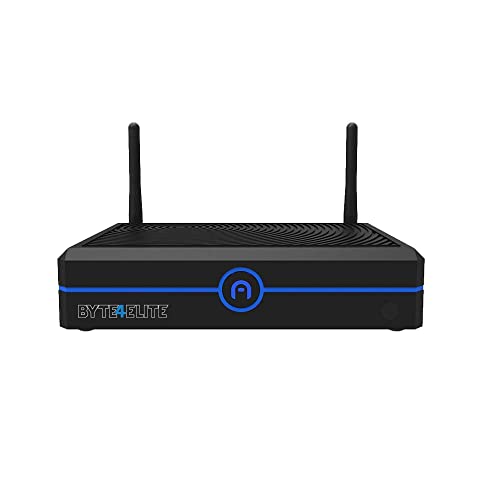
The AZULLE Elite Mini PC Barebone Desktop Computer stands out as an exceptional choice for tech enthusiasts looking to customize their setup without the bulk of traditional desktops. With an Intel Core i3-1315U processor, it delivers seamless multitasking and impressive performance, reaching speeds up to 4.5GHz. You can enhance responsiveness with support for up to 64GB DDR4 RAM and enjoy stunning visuals thanks to integrated Intel UHD Graphics. Storage options include fast SATA and NVMe SSDs, while connectivity features like multiple USB ports, HDMI, Wi-Fi 6, and Bluetooth 5.1 guarantee you stay connected and productive.
Best For: Tech enthusiasts and professionals looking for a customizable, compact desktop computer with powerful performance.
Pros:
- Seamless multitasking capabilities with the Intel Core i3-1315U processor.
- High storage flexibility with support for both SATA and NVMe SSDs.
- Advanced connectivity options including Wi-Fi 6 and Bluetooth 5.1 for enhanced productivity.
Cons:
- RAM and storage not included, requiring additional investment for a complete setup.
- Limited graphics performance due to reliance on integrated Intel UHD Graphics.
- Potentially higher costs for necessary components to maximize performance.
Intel NUC 11 Extreme Kit Mini PC (Core i9 11th Gen)

For gamers and power users seeking top-tier performance in a small form factor, the Intel NUC 11 Extreme Kit Mini PC is a standout choice. Powered by the Core i9 11th Gen i9-11900KB octa-core processor, it delivers exceptional speed and efficiency. You can easily enhance performance by installing DDR4 SDRAM to minimize processor idle time. With 12 USB ports, connecting and disconnecting devices is a breeze, all without shutting down. Plus, the Serial ATA/600 interface guarantees high-speed data transfer and reliability, making this mini PC perfect for demanding applications and gaming. Experience unmatched performance in a compact design!
Best For: Gamers and power users seeking high-performance computing in a compact mini PC.
Pros:
- Exceptional performance with the Core i9 11th Gen octa-core processor for demanding applications and gaming.
- Versatile connectivity with 12 USB ports, allowing easy connection and disconnection of devices without shutting down.
- High-speed data transfer and reliability ensured by the Serial ATA/600 interface.
Cons:
- Limited upgrade options due to the small form factor, which may restrict future enhancements.
- Potentially high cost compared to other mini PCs with lower specifications.
- Cooling requirements may be higher due to the powerful processor, requiring effective thermal management.
Glorious Gaming GMMK 2 Compact 65% Barebones Mechanical Gaming Keyboard Frame

If you’re a gamer seeking a customizable experience, the Glorious Gaming GMMK 2 Compact 65% Barebones Mechanical Gaming Keyboard Frame is an ideal choice. This compact TKL keyboard features a robust aluminum construction, ensuring durability and a premium feel. With hot-swap sockets, you can easily swap out switches without soldering, accommodating popular brands like Cherry and Gateron. The customizable per-key RGB lighting adds a personal touch, while pre-installed lubricated stabilizers provide smooth key presses. Its compact layout maximizes space without sacrificing functionality, making it perfect for any gaming setup. Get ready to elevate your gaming experience with this impressive keyboard frame.
Best For: Gamers and keyboard enthusiasts looking for a customizable and durable mechanical keyboard experience.
Pros:
- Hot-swap sockets allow for easy switch customization without soldering.
- Robust aluminum construction ensures durability and a premium feel.
- Customizable per-key RGB lighting adds a personal touch to your setup.
Cons:
- Barebones frame requires additional investment in switches and keycaps.
- Compact layout may not suit users accustomed to full-sized keyboards.
- Limited built-in features compared to fully assembled keyboards.
Glorious GMMK PRO 75% Barebones Modular Mechanical Gaming Keyboard

Designed with the modular enthusiast in mind, the Glorious GMMK PRO 75% Barebones Mechanical Gaming Keyboard offers unparalleled customization options that let you tailor your typing experience. Weighing 3.3 lbs, its CNC-machined aluminum frame is durable and scratch-resistant, providing a sleek, satin-like finish. With a 5-pin hotswap design, you can easily replace switches from various brands. The keyboard’s fully customizable appearance lets you swap the top frame, rotary knob, and cable. Enjoy different acoustic profiles by switching plates or adjusting foam inside the case. Your perfect combination of aesthetics and performance awaits with this exceptional keyboard.
Best For: Modular gaming enthusiasts and typists looking for a highly customizable keyboard experience.
Pros:
- Durable Construction: CNC-machined aluminum frame ensures longevity and a premium feel.
- Switch Customization: The 5-pin hotswap design allows for easy switch replacement, compatible with multiple brands.
- Acoustic Flexibility: Adjustable foam and interchangeable plates enable personalized sound and typing feel.
Cons:
- Barebones Design: Does not come with pre-installed switches or keycaps, requiring additional purchases.
- Weight: At 3.3 lbs, it may be less portable than lighter keyboard options.
- Learning Curve: The extensive customization options may overwhelm beginners unfamiliar with mechanical keyboards.
GMK104 Mechanical Keyboard Kit with Screen & Knob

The GMK104 Mechanical Keyboard Kit with Screen & Knob is a must-have for DIY enthusiasts seeking a customizable and immersive typing experience. This full-size keyboard features 104 keys, a gasket mount structure for cushioned typing, and a vibrant south-facing RGB backlight. You’ll love the VIA software support, enabling you to remap keys, create macros, and adjust lighting. Its versatile connectivity options include Bluetooth 5.0, 2.4GHz wireless, and USB-C. The interactive screen and volume knob enhance functionality, while the 4000mAh battery guarantees long use. Compatible with both Windows and macOS, it’s perfect for any setup.
Best For: DIY enthusiasts and users looking for a highly customizable mechanical keyboard experience.
Pros:
- Full customization options through VIA software, allowing for personalized key remapping and macros.
- Multiple connectivity modes (Bluetooth 5.0, 2.4GHz wireless, USB-C) ensure versatility for various setups.
- Interactive screen and volume knob provide convenient access to functions and enhance user experience.
Cons:
- Gasket mount design may not appeal to all users, particularly those who prefer a different typing feel.
- DIY assembly required, which may not be suitable for those looking for a plug-and-play solution.
- Limited battery life compared to wired options, especially with extensive use of RGB lighting.
Intel NUC 11 Extreme Kit Mini Desktop Gaming PC

For gamers and tech enthusiasts seeking a compact powerhouse, the Intel NUC 11 Extreme Kit Mini Desktop Gaming PC offers an impressive 11th Gen Intel i9 processor that delivers exceptional performance. Weighing just 9.9 lbs and measuring 4.75 x 14 x 7.75 inches, it fits seamlessly into any setup. With 8 cores and a boost clock of up to 4.9 GHz, this mini PC is ready for intense gaming sessions. Connectivity is excellent, featuring Wi-Fi 6E, Bluetooth 5.2, and multiple USB ports. Just remember, it’s a barebone system, so you’ll need to add your own RAM, SSD, and OS.
Best For: Gamers and tech enthusiasts looking for a compact yet powerful mini desktop gaming PC.
Pros:
- Powerful Performance: Equipped with an 11th Gen Intel i9 processor with boost clock speeds up to 4.9 GHz.
- Compact Design: Lightweight and small dimensions make it easy to integrate into any gaming setup.
- Excellent Connectivity: Features Wi-Fi 6E, Bluetooth 5.2, and multiple USB ports for versatile connectivity options.
Cons:
- Barebone System: Does not include RAM, SSD, or operating system, requiring additional purchases.
- Customer Reviews: Low rating of 2.0 out of 5 stars may indicate dissatisfaction among users.
- Restocking Fees: Potential fees for returns may apply for misrepresented conditions or customer misuse.
Factors to Consider When Choosing a Barebone PC Enthusiast Build
When choosing a barebone PC enthusiast build, you should consider several key factors. Processor performance, memory capacity, and storage options all play an essential role in how well your system will run. Additionally, don’t overlook connectivity features and the design, as they can impact your overall experience.
Processor Performance Considerations
Choosing the right processor is vital for your barebone PC build, as it directly influences performance across a range of tasks. Focus on core count and clock speed; higher counts and speeds enhance multitasking and responsiveness in demanding applications. Don’t overlook the processor generation—newer models come with architectural improvements and better power efficiency, boosting overall performance. If you won’t use a dedicated GPU, integrated graphics capabilities are essential for visual output quality in casual gaming or media. Guarantee compatibility with RAM types, like DDR4 or DDR5, to optimize memory bandwidth. Finally, consider thermal design power (TDP) ratings, as they indicate heat generation and help you choose suitable cooling solutions for your build’s longevity and performance.
Memory Capacity and Speed
After selecting the right processor, memory capacity and speed play a significant role in your barebone PC build. You’ll want to choose at least 16GB of DDR5 RAM, but aiming for up to 96GB can help you multitask effectively and handle intensive applications. Opt for higher RAM speeds, like DDR5-5600 MHz, to boost performance in data-heavy tasks and gaming. Implementing a dual-channel memory configuration can enhance data transfer rates, leading to improved responsiveness. Verify compatibility with the latest memory standards to take advantage of better bandwidth and reduced latency. Finally, consider future upgrades; some motherboards have limitations on maximum supported RAM capacity and speed, so plan accordingly for your evolving needs.
Storage Options and Configuration
While selecting the right storage options can seem overwhelming, it’s essential for optimizing your barebone PC’s performance. Look for systems that support dual storage, allowing you to combine SSDs for speed and HDDs for capacity. Check the motherboard’s maximum storage capacity; some models can accommodate up to 2 M.2 drives and multiple SATA connections. Evaluate the SSD interface types—PCIe NVMe provides exceptional speeds, while SATA is great for standard setups. Don’t overlook RAM compatibility, as models supporting up to 96GB of DDR5 can enhance multitasking. Finally, confirm your barebone system has adequate cooling solutions to manage the heat generated by high-performance storage configurations. This balance will give you a robust and efficient setup.
Connectivity Features and Ports
When you’re building a barebone PC, connectivity features and ports play a fundamental role in ensuring your system can support all your peripherals and devices. Start by checking the number and types of USB ports available, including USB 2.0, USB 3.0, and USB Type-C. These will determine your connection options. Make sure the build supports HDMI 2.1 and Thunderbolt 4 for high-resolution displays and fast data transfers. Don’t overlook wireless connectivity—opt for the latest Wi-Fi standards like Wi-Fi 6 or Wi-Fi 7, and Bluetooth 5.4 for enhanced compatibility. Multiple display outputs are essential for multi-monitor setups, and reliable Ethernet ports are critical for stable wired internet connections. Evaluate these features to maximize your build’s performance.
Design and Form Factor
Choosing the right design and form factor for your barebone PC can greatly impact its compatibility and overall performance. You’ll want to evaluate whether a compact design, like a mini PC, fits your needs, as it emphasizes space efficiency without sacrificing essential ports. The materials used in the chassis matter too; aluminum and steel provide better durability and heat dissipation compared to plastic. Opt for a tool-less chassis design to simplify upgrades and maintenance—no extra tools required! Additionally, if you want flexibility in placement, look for VESA mount options. This allows you to save space by mounting your barebone PC behind your monitor or on the wall, keeping your setup clean and organized.
Cooling and Durability Requirements
After settling on a suitable design and form factor for your barebone PC, you need to think about cooling and durability. Effective cooling systems are vital for maintaining peak performance and preventing overheating, especially during demanding tasks. Look for advanced cooling solutions that include heat sinks, fans, and airflow optimization to manage heat dissipation efficiently. Durability matters, too; consider barebone PCs with MIL-STD-810H certification, which guarantees reliability under extreme conditions. Robust chassis designs and materials can enhance durability, resisting wear and tear. Don’t forget about regular maintenance—cleaning dust from fans and maintaining proper airflow will sustain cooling efficiency and overall system reliability, giving you a long-lasting high-performance machine.