
If you’re a DIY enthusiast looking to build a custom PC, barebone systems offer a solid starting point. These compact machines come with high-performance components, ensuring you get the power you need for gaming or professional tasks. With various options available, it’s important to know what features matter most for your specific needs. Let’s explore the best barebone PCs that can elevate your custom build to the next level.
MINISFORUM UN1290 Barebone Mini PC with Intel Core i9-12900HK

If you’re a gamer or a business professional seeking a compact yet powerful solution, the MINISFORUM UN1290 Barebone Mini PC with Intel Core i9-12900HK is an excellent choice. With a 14-core processor and Intel Iris Xe Graphics, it handles demanding tasks effortlessly. You’ll enjoy UHD 4K output and connect up to three displays using its versatile ports. The dual-channel DDR4 memory and M.2 2280 PCIe 4.0 SSD guarantee fast data access. Plus, MINISFORUM offers customization options tailored to your needs. This mini PC is perfect for high-performance gaming, multitasking, and boosting productivity in any workspace.
Best For: The MINISFORUM UN1290 is best for gamers and business professionals seeking a compact yet powerful mini PC solution for high performance and multitasking.
Pros:
- Powerful Intel Core i9-12900HK processor with 14 cores and seamless multitasking capabilities.
- Supports UHD 4K output and multiple display connections for enhanced productivity.
- Customization options available for tailored solutions to meet specific user needs.
Cons:
- Barebone design may require additional components for full functionality.
- Limited expandability options compared to larger desktop PCs.
- Higher price point may not be suitable for budget-conscious users.
MINISFORUM M1-1295 Mini PC with Intel Core i9-12950HX
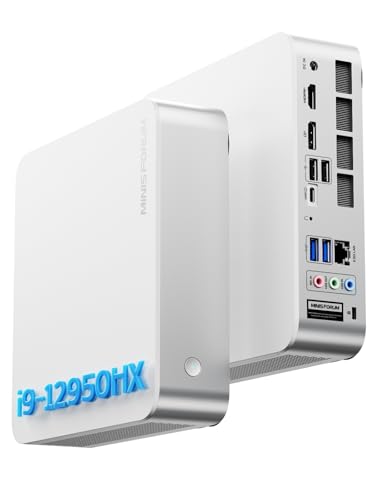
The MINISFORUM M1-1295 Mini PC with Intel Core i9-12950HX is an exceptional choice for power users seeking a compact yet robust system for demanding tasks. With a staggering 16 cores and 24 threads, this processor delivers impressive multi-core performance and speeds up to 5.0GHz. You can expand storage with 2x DDR4 SO-DIMM slots and 2x M.2 PCIe 4.0 SSD slots, accommodating up to 8TB. It supports 4K@60Hz video for stunning visuals and connects effortlessly via Wi-Fi 6E and various ports. Its sleek design and advanced cooling guarantee efficient performance without compromising space.
Best For: Power users and professionals seeking a compact yet high-performance mini PC for demanding applications and multitasking.
Pros:
- Impressive Performance: Equipped with an Intel Core i9-12950HX processor featuring 16 cores and 24 threads, allowing for efficient multitasking and high-speed operations.
- Expandable Storage: Offers ample upgrade options with 2x DDR4 SO-DIMM slots and 2x M.2 PCIe 4.0 SSD slots, supporting up to 8TB of storage.
- Advanced Connectivity: Features Wi-Fi 6E and a variety of ports for fast and versatile connectivity, including support for multiple 4K displays.
Cons:
- Price Point: As a high-performance mini PC, it may be more expensive than other standard options on the market.
- Size Limitations: While compact, the design may still be bulkier compared to ultra-compact alternatives.
- Cooling Noise: The advanced cooling system may produce more noise under heavy loads compared to quieter, less powerful systems.
Reatan X7 AI Oculink Gaming Mini PC

Designed for gamers and content creators, the Reatan X7 AI Oculink Gaming Mini PC packs a powerful punch with its AMD Ryzen 7 255 processor and Radeon 780M graphics. With 8 cores and 16 threads, it handles multitasking effortlessly, while supporting 4K media playback. Expand your memory up to 96GB and add two SSDs for a total of 4TB storage. Enjoy lightning-fast connectivity with Wi-Fi 7 and multiple display options, including 8K output. Its all-metal chassis and dedicated cooling fans guarantee durability and stable performance, making it a top choice for your next custom build. Experience versatility and power in a compact design!
Best For: Gamers and content creators seeking a powerful, compact PC with exceptional performance and expandability.
Pros:
- High-performance hardware with AMD Ryzen 7 255 processor and Radeon 780M graphics for seamless multitasking and 4K media playback.
- Expandable storage and memory, allowing up to 4TB of SSD space and 96GB RAM for handling large files and applications.
- Advanced connectivity options including Wi-Fi 7 and multiple display outputs, supporting up to 8K resolution for an immersive experience.
Cons:
- Barebone design may require additional investment in components like RAM and SSDs for full functionality.
- Compact size could lead to limited internal cooling efficiency under heavy loads despite dedicated cooling fans.
- Higher price point compared to standard mini PCs might not fit all budget ranges.
MINISFORUM AI X1-255 Mini PC Barebone with AMD Ryzen 7 255

For tech enthusiasts seeking a powerful yet compact solution, the MINISFORUM AI X1-255 Mini PC Barebone with AMD Ryzen 7 255 stands out. With its 8-core processor, you’ll experience exceptional multi-threaded performance and smooth HD graphics for office tasks, light gaming, and multimedia editing. It supports up to 64 GB of DDR5 RAM and dual M.2 slots for expansive storage. Connectivity is excellent, featuring USB4, HDMI, and 2.5G LAN for seamless networking. Plus, its efficient cooling keeps noise levels low, ensuring a quiet yet powerful experience. This mini PC is perfect for anyone looking to build a high-performance, compact setup.
Best For: Tech enthusiasts and professionals looking for a powerful, compact mini PC for multi-threaded tasks, light gaming, and multimedia editing.
Pros:
- Exceptional Performance: Powered by an AMD Ryzen 7 255 with 8 cores and 16 threads, ensuring smooth multitasking and HD graphics.
- Expandable Storage: Dual M.2 PCIe slots support up to 4 TB SSD each, allowing for extensive storage capabilities.
- Excellent Connectivity: Features USB4, HDMI, and 2.5G LAN for high-speed networking and multiple display options.
Cons:
- No Hot Swapping Support: OCuLink connection requires a specific configuration and does not allow for hot swapping.
- Limited Pre-installed Components: As a barebone system, users need to invest in RAM and storage separately.
- Noise Levels Under Load: While designed for quiet operation, noise can reach up to 45dB under full load, which may be noticeable in quiet environments.
MINISFORUM Mini PC MS-01-S1390 Barebone with Intel Core i9-13900H

If you’re seeking a powerful solution for demanding tasks, the MINISFORUM Mini PC MS-01-S1390 is an exceptional choice. With its Intel Core i9-13900H, boasting 14 cores and speeds up to 5.4GHz, you’ll experience outstanding performance. It supports dual-channel DDR5 memory, expandable up to 96GB, and offers impressive storage capabilities with up to three M.2 NVMe SSDs. Connectivity features include two 10Gbps SFP+ Ethernet ports, ensuring high-speed networking. Plus, Intel vPRO support enhances security and virtualization efficiency. This mini PC is designed for enthusiasts who demand both power and versatility in their custom builds.
Best For: Enthusiasts and professionals who require high-performance computing for demanding tasks like gaming, content creation, and data analysis.
Pros:
- Outstanding Performance: With an Intel Core i9-13900H and up to 5.4GHz speeds, it handles intensive applications with ease.
- Expandable Memory and Storage: Supports up to 96GB of DDR5 RAM and three M.2 NVMe SSDs, allowing for significant customization.
- High-Speed Connectivity: Features dual 10Gbps SFP+ Ethernet ports for superior networking capabilities.
Cons:
- Price Point: Premium specifications may come at a higher cost compared to entry-level mini PCs.
- Size and Portability: While compact, it may still be bulkier than some ultra-compact alternatives, potentially affecting portability.
- Complex Setup for Upgrades: Users may need technical expertise to fully utilize expansion options like RAID configurations and additional GPUs.
GMK104 Barebones Keyboard Kit (Black)

Building a custom keyboard that fits your needs is easier than ever with the GMK104 Barebones Keyboard Kit (Black). This kit lets you personalize your keyboard’s look, feel, and sound for a truly unique experience. Equipped with a smart display that updates in real-time, it also features multimedia buttons and a metal knob for effortless volume control. You’ll appreciate the full programmability of its 104 keys, allowing for macros and custom lighting. With Bluetooth 5.0, 2.4GHz, and wired Type-C connectivity, the 4000mAh battery guarantees long-lasting use, making it perfect for both work and gaming. Enjoy cushioned typing with its gasket-mounted design!
Best For: The GMK104 Barebones Keyboard Kit is best for tech enthusiasts and gamers who value customization and performance in their keyboard setup.
Pros:
- Fully programmable with 104 keys for enhanced customization and macros.
- Multiple connectivity options including Bluetooth 5.0 and wired Type-C for versatile use.
- Gasket-mounted design provides a cushioned typing experience, ideal for long hours of use.
Cons:
- Requires assembly and customization, which may not appeal to all users.
- The smart display and additional features may increase the overall cost compared to standard keyboards.
- Limited built-in key switch options, as users must purchase switches separately.
75% Custom Barebones Mechanical Gaming Keyboard Kit (M87 Kit-Black)

The M87 Kit-Black is perfect for gamers and enthusiasts seeking a customizable, high-performance keyboard. This 75% barebones kit features a gasket-mounted design, ensuring a whisper-quiet typing experience thanks to sound-absorbing foam and a silicon bottom pad. The PCB is hot-swappable for 3-pin and 5-pin switches, allowing you to easily install your preferred MX switches without soldering. With south-facing RGB lighting and compatibility for both Windows and Mac, you can enjoy stunning visuals while gaming. Plus, the detachable USB-C cable enhances portability, making it a fantastic choice for on-the-go gaming. Customize your setup with up to 18 lighting modes and macros!
Best For: Gamers and keyboard enthusiasts who prioritize customization and a quiet typing experience in a compact keyboard design.
Pros:
- Hot-swappable PCB allows for easy installation of various MX switches without soldering.
- Gasket-mounted design ensures a comfortable and quiet typing experience with sound absorption features.
- Customizable RGB lighting with multiple modes enhances both aesthetics and functionality.
Cons:
- Barebones kit requires additional components (switches, keycaps) for full functionality.
- Limited to 75% layout, which may not suit users accustomed to full-sized keyboards.
- Custom software may require a learning curve for users unfamiliar with keyboard programming.
ASUS NUC 13 Pro Tall Barebone with Intel 13th Gen Core i3-1315U

For tech enthusiasts seeking a compact yet powerful solution, the ASUS NUC 13 Pro Tall Barebone with Intel 13th Gen Core i3-1315U stands out. This ultra-small 4×4 form factor allows you to maximize productivity without cluttering your workspace. You can support up to 64GB of DDR4 RAM and enjoy 24/7 operation, making it ideal for various applications. With multiple connectivity options, including dual HDMI and Thunderbolt 4 Type-C ports, you can connect an 8K or quad 4K display. Plus, the security features and internal expansion bay offer peace of mind and flexibility for your future upgrades.
Best For: Tech enthusiasts and professionals looking for a compact, powerful computing solution for multitasking and multimedia applications.
Pros:
- Supports up to 64GB DDR4 RAM for enhanced performance in demanding applications.
- Compact 4×4 form factor with VESA mount option, perfect for space-saving setups.
- Multiple connectivity options, including dual HDMI and Thunderbolt 4 Type-C, allowing for high-resolution display support.
Cons:
- Barebone configuration requires additional components (like RAM and storage) to be fully functional.
- Integrated graphics may not be suitable for high-end gaming or graphic-intensive tasks.
- Limited upgrade options compared to larger desktop systems due to its compact design.
Glorious Gaming GMMK 3 Barebones Custom Gaming Keyboard Kit

Release your creativity with the Glorious Gaming GMMK 3 Barebones Custom Gaming Keyboard Kit, perfect for gamers and typists who crave a personalized experience. This 75% mechanical keyboard features a sturdy aluminum switch plate and a modular design that lets you customize every aspect. With nine points of modularity and a gasket system, you can adjust the typing firmness to your liking. Plus, the 5-pin MX hotswap support means you can easily swap switches without any soldering. Enhanced acoustic features, like sound-dampening foam, guarantee a clean sound profile, while the programmable knob adds functionality for media control and custom actions.
Best For: Gamers and typists who desire a highly customizable and personalized keyboard experience.
Pros:
- Modular design allows for extensive customization of appearance, sound, and feel.
- 5-pin MX hotswap support makes it easy to change switches without soldering.
- Sound-dampening foam enhances acoustic profile, reducing unwanted resonance.
Cons:
- Barebones kit means additional parts (like switches and keycaps) must be purchased separately.
- Customization can be time-consuming, requiring some assembly and setup.
- Limited out-of-the-box functionality; users need to configure settings through software for full experience.
AOOSTAR GODY Mini Gaming PC
Gamers and content creators seeking high performance in a compact form will find the AOOSTAR GODY Mini Gaming PC an ideal choice. With its AMD R9 7940HX CPU and Radeon RX 7600XT, you can effortlessly handle 1080p and 1440p gaming and even tackle 8K video editing. It supports up to 64 GB of DDR5 RAM and 8TB of NVME SSD storage, ensuring ample space and speed. Connectivity is robust, featuring multiple USB ports and 4K support across three screens. Plus, its innovative cooling system keeps temperatures low, while energy efficiency saves you power without sacrificing performance.
Best For: Gamers and content creators looking for a high-performance, compact PC that excels in 1080p and 1440p gaming as well as 8K video editing.
Pros:
- Powerful AMD R9 7940HX CPU and Radeon RX 7600XT graphics for seamless performance.
- Extensive connectivity options support multiple displays and fast data transfers.
- Innovative cooling system maintains low temperatures for stable operation under heavy workloads.
Cons:
- Compact design may limit upgrade options compared to larger desktop PCs.
- Higher price point compared to entry-level gaming PCs.
- Limited availability of compatible DDR5 RAM and PCIe 5.0 SSDs may affect upgrades.
Factors to Consider When Choosing a Barebone PC for Custom Build
When you’re choosing a barebone PC for your custom build, there are several key factors to think about. You’ll want to assess performance requirements, expandability options, and cooling solutions that fit your needs. Additionally, consider connectivity features and the size and form factor to guarantee everything works together seamlessly.
Performance Requirements
Choosing the right barebone PC for your custom build hinges on understanding its performance requirements, especially since the components you select can greatly impact your system’s efficiency. First, assess the processor’s cores and threads; higher counts, like 16 cores and 24 threads, boost multitasking and performance in demanding applications. Don’t overlook the maximum clock speed—CPUs that reach up to 5.4 GHz can complete tasks faster. Evaluate integrated graphics, too, since some models support high-resolution outputs essential for gaming or multimedia. Memory capacity matters as well; look for motherboards that allow expansion up to 96GB for smoother performance. Finally, check for storage expansion options, such as M.2 slots with PCIe 4.0 or 5.0, to enhance data access speeds.
Expandability Options
As you explore expandability options for your barebone PC, keep in mind that flexibility in upgrading components can greatly enhance your system’s longevity and performance. Start by checking the number of memory slots available—systems with dual-channel support and expandable capacities can boost multitasking. Look for models with multiple M.2 PCIe slots for SSDs, enabling substantial storage expansion for large files and applications. Verify the power supply options and support for external GPUs meet your needs, as these upgrades can considerably improve graphics performance. Finally, assess the potential for future upgrades, especially if you plan to run resource-intensive applications. This foresight will help you build a system that evolves alongside your demands.
Cooling Solutions
Effective cooling solutions are essential for maintaining your barebone PC’s performance, especially if you’re using high-performance components that can generate a lot of heat. Look for advanced cooling designs that include multiple heat pipes, large-area heat spreaders, and dedicated cooling fans to effectively dissipate heat during demanding tasks. Noise management is also key; larger fans or innovative designs can keep your system quieter while still providing ample cooling. Some barebone PCs even offer customizable cooling options, letting you choose between silent, standard, or performance modes based on your workload. Finally, guarantee proper airflow design within the chassis, as strategically placed vents and grilles will enhance cooling efficiency, promoting the circulation of cool air and expelling hot air effectively.
Connectivity Features
When you’re building a custom barebone PC, connectivity features play an essential role in ensuring your system meets your needs. Look for multiple connectivity options like USB-C, HDMI, and DisplayPort to support various devices and peripherals. A built-in Ethernet port, preferably 2.5GbE or higher, is vital for fast and stable wired connections. Additionally, check for Wi-Fi 6E or Wi-Fi 7 capabilities to enhance wireless speeds and reduce latency during online activities. Don’t forget to take into account the number of available USB ports, including USB 3.2 and USB4, to connect multiple peripherals efficiently. Finally, verify that your system supports multi-monitor setups for improved productivity and a better gaming experience.
Size and Form Factor
Choosing the right size and form factor for your barebone PC is vital, especially since it directly affects how well your setup fits in your available space. Compact models like mini PCs, often featuring a 4×4 inch form factor, are perfect for tight areas and help you maintain productivity without clutter. If you plan on a multi-monitor setup, consider the physical space for displays and cable management. Additionally, the choice between a tall or flat design can impact cooling efficiency; taller units typically allow for better airflow, which is critical for high-performance components. Always check the dimensions and layout to guarantee proper ventilation and easy access to ports and expansion slots during your custom build process.
Budget Considerations
Finding the right barebone PC for your custom build requires careful budgeting. Start by establishing a clear budget range, keeping in mind that prices fluctuate with components like the processor, memory, and storage. Don’t forget to factor in extra costs for essential components such as RAM, storage drives, and cooling solutions that might not come with the barebone kit. Consider investing a bit more in higher-quality parts for better performance and longevity. Look for potential savings by choosing compatible components, as some systems offer discounts for bundled parts. Finally, set aside a portion of your budget for future upgrades or expansions, allowing you to enhance your system and improve overall value over time.