
If you’re a tech enthusiast looking for a customizable PC solution, barebone systems might be just what you need. These compact units pack powerful processors and offer ample expansion options. From gaming to content creation, there’s a perfect match for every user. However, not all barebone PCs are created equal. Let’s explore some top contenders that could elevate your computing experience.
MINISFORUM M1-1295 Mini PC with Intel Core i9-12950HX
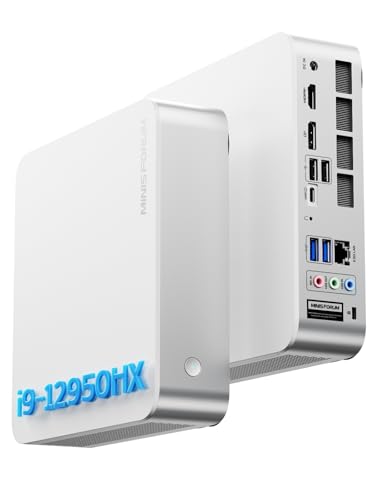
If you’re a power user looking for exceptional performance in a compact form, the MINISFORUM M1-1295 Mini PC with Intel Core i9-12950HX is the perfect choice. With its 16 cores and 24 threads, it delivers impressive speeds up to 5.0GHz, ensuring seamless multitasking. You can expand storage with two M.2 PCIe slots, accommodating up to 8TB. The integrated Intel UHD Graphics supports stunning 4K video editing and can connect to three displays. Plus, with 2.5GbE Ethernet and Wi-Fi 6E, your connectivity options are outstanding, making this mini PC a powerhouse for any tech enthusiast.
Best For: Power users and tech enthusiasts seeking high-performance computing in a compact form factor.
Pros:
- Impressive performance with 16 cores and 24 threads, reaching speeds up to 5.0GHz for seamless multitasking.
- Expandable storage options with dual M.2 PCIe slots supporting up to 8TB, ideal for large files and gaming.
- Advanced connectivity features including 2.5GbE Ethernet and Wi-Fi 6E for faster internet speeds and low latency.
Cons:
- Limited integrated graphics may not satisfy hardcore gamers or users requiring high-end gaming capabilities.
- Compact design may lead to thermal concerns under heavy loads despite the advanced cooling system.
- Potentially high price point compared to standard desktops with similar specifications.
Reatan X7 AI Oculink Gaming Mini PC

The Reatan X7 AI Oculink Gaming Mini PC is an excellent choice for gamers and content creators seeking powerful performance in a compact form. With an AMD Ryzen 7 255 processor and Radeon 780M graphics, it handles gaming, multitasking, and 4K media playback effortlessly. You’ll appreciate the expandability, featuring dual SODIMM slots for up to 96GB RAM and two M.2 slots for 4TB of SSD storage. Connectivity options include Wi-Fi 7, DP 2.1, HDMI 2.1, and USB4 ports for multiple displays. Its robust cooling system and three performance modes guarantee stability, making it a reliable powerhouse for your needs.
Best For: Gamers and content creators who require high-performance capabilities in a compact mini PC.
Pros:
- Powerful AMD Ryzen 7 255 processor and Radeon 780M graphics for exceptional gaming and multitasking performance.
- Expandable storage and memory options with support for up to 4TB SSD and 96GB RAM, catering to large file needs.
- Advanced connectivity features including Wi-Fi 7 and multiple display outputs for enhanced multitasking and immersive experiences.
Cons:
- As a barebone mini PC, additional components such as RAM and storage must be purchased separately.
- Limited to two M.2 slots for SSDs, which may restrict storage expansion for some users.
- The compact design may lead to thermal management challenges under sustained high-performance use, despite the cooling system.
MINISFORUM X1 Lite-255 Mini PC with AMD Ryzen 7 255
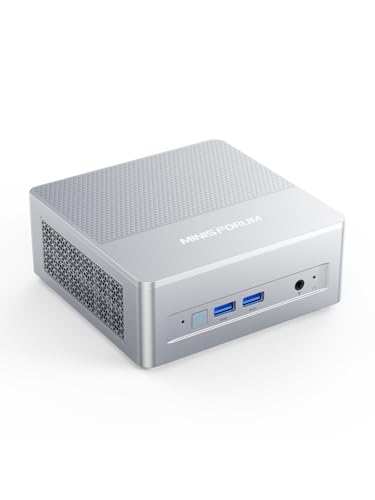
For professionals and enthusiasts seeking a compact yet powerful computing solution, the MINISFORUM X1 Lite-255 Mini PC with AMD Ryzen 7 255 stands out with its exceptional multi-threaded performance. With an 8-core processor and Radeon 780M, it’s perfect for tasks like image editing and lightweight gaming. You’ll appreciate the robust connectivity options, including Wi-Fi 6e and USB4 for rapid data transfer. Plus, it supports dual-channel DDR5 RAM and dual M.2 slots for extensive storage. Its triple display capability enhances productivity, while efficient cooling guarantees reliability. With a three-year warranty, MINISFORUM assures solid support for your tech needs.
Best For: Professionals and enthusiasts in need of a compact and powerful computing solution for tasks like image editing, web browsing, and lightweight gaming.
Pros:
- Exceptional multi-threaded performance with AMD Ryzen 7 255, ideal for demanding applications.
- Robust connectivity options including Wi-Fi 6e and USB4 for fast data transfer and stable connections.
- Triple display support enhances productivity with the ability to connect three independent monitors.
Cons:
- Limited gaming performance for more demanding titles due to integrated Radeon 780M graphics.
- Potentially higher heat generation under heavy loads, requiring effective cooling solutions.
- Higher price point compared to basic Mini PCs, which may not be justified for casual users.
MINISFORUM NAB8 Plus Mini PC Barebone with Intel Core i7-12800H

Designed for power users and gamers alike, the MINISFORUM NAB8 Plus Mini PC Barebone with Intel Core i7-12800H stands out with its impressive 14-core processor, enabling seamless multitasking and high-performance computing. With support for powerful external graphics via OCuLink, you can enjoy ultra-high frame rates at 4K resolutions, enhancing your gaming experience. Its connectivity options, including USB4 and Wi-Fi 6E, guarantee rapid data transfer and stable connections. Plus, triple-screen support allows for efficient multitasking, while the expandable memory and storage options let you handle large projects effortlessly. It’s a top choice for anyone seeking performance in a compact form.
Best For: Power users and gamers looking for high-performance computing in a compact mini PC.
Pros:
- Exceptional multitasking capabilities with a powerful 14-core Intel processor.
- Supports external graphics cards for enhanced gaming performance and ultra-high frame rates.
- Triple-screen output allows for efficient multitasking and workspace management.
Cons:
- Barebone design means additional components like RAM and storage must be purchased separately.
- Compact size may limit upgrade options compared to larger desktops.
- Potential heat generation from high-performance components may require effective cooling solutions.
MINISFORUM UM870 Slim Mini PC Barebone with AMD Ryzen 7 8745H

If you’re a power user seeking a compact yet powerful computing solution, the MINISFORUM UM870 Slim Mini PC Barebone with AMD Ryzen 7 8745H is an excellent choice. With its 8-core processor and Radeon 780M graphics, it delivers performance rivaling the GTX 1650, perfect for heavy multitasking. You can expand storage with up to 96GB DDR5 RAM and 4TB SSD space, ensuring smooth operation for large files. Plus, it supports triple displays for enhanced productivity. Connectivity options like USB4.0 and Wi-Fi 6E guarantee fast network speeds, making the UM870 a versatile powerhouse for your needs.
Best For: Power users who need a compact yet high-performance mini PC for heavy multitasking and multitasking applications.
Pros:
- High-performance processing with AMD Ryzen 7 8745H and Radeon 780M graphics, suitable for demanding tasks.
- Expandable storage options allow for up to 96GB RAM and 4TB SSD, ensuring ample space for large files and smooth operations.
- Triple display support enhances productivity by enabling multitasking across multiple screens.
Cons:
- Barebone configuration means additional components (RAM, SSD) are required for full functionality, increasing initial setup costs.
- Limited discrete graphics performance compared to higher-end dedicated GPUs, which may not satisfy hardcore gamers or graphic designers.
- Compact design may lead to thermal concerns under heavy loads, potentially affecting performance during extended use.
MINISFORUM AI Mini PC Barebone M1 Pro-125H

The MINISFORUM AI Mini PC Barebone M1 Pro-125H is an ideal choice for tech enthusiasts and professionals who demand high performance in a compact form factor. Powered by the Intel Core Ultra 5 Processor 125H, it delivers exceptional multi-threaded computing and light gaming capabilities. With support for up to 128 GB of DDR5 RAM and dual M.2 slots for expansive SSD storage, you can enjoy rapid load times. Connectivity options are robust, featuring triple display support and Wi-Fi 7. Plus, effective cooling guarantees peak performance. MINISFORUM backs it with a 3-year warranty and dedicated customer support for peace of mind.
Best For: Tech enthusiasts and professionals seeking high performance in a compact mini PC.
Pros:
- Exceptional multi-threaded computing and light gaming capabilities with Intel Core Ultra 5 Processor.
- Supports up to 128 GB of DDR5 RAM and dual M.2 SSD slots for rapid load times.
- Robust connectivity options including triple display support and Wi-Fi 7 for low-latency connections.
Cons:
- Requires additional components (RAM, SSD) for full functionality as it is a barebone system.
- External GPU installation is non-hot-swappable, which may limit flexibility for upgrades.
- Noise level may reach 40dB under Performance Mode, which could be noticeable in quiet environments.
Apevia SPIRIT600W 600W ATX Power Supply
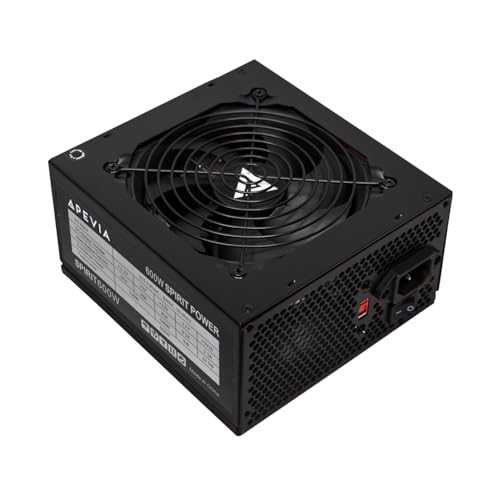
For builders looking for a reliable power source in their barebone PCs, the Apevia SPIRIT600W 600W ATX Power Supply stands out with its robust 600 watts of power and versatile connector options. You’ll appreciate the auto-thermally controlled 120mm fan that keeps things cool while ensuring efficient performance. With multiple connectors, including PCI-E and SATA, it easily supports dual or quad-core CPUs. Plus, the heavy-duty protections against short-circuiting and over-voltage give you peace of mind. Weighing just 3.67 pounds, it’s compact yet powerful, making it a solid choice for any tech enthusiast aiming for stability and efficiency.
Best For: Tech enthusiasts and builders looking for a reliable and efficient power supply for their barebone PCs.
Pros:
- High 600W output suitable for demanding systems.
- Versatile connector options including PCI-E and SATA for various components.
- Comprehensive safety features to protect against electrical issues.
Cons:
- Some users may find the weight of 3.67 pounds slightly heavier compared to other models.
- Limited to a single 12V output, which may not be ideal for extremely high-end builds.
- Customer reviews indicate occasional concerns about long-term reliability.
Computer PC Power Supply Tester with 1.8” LCD Screen
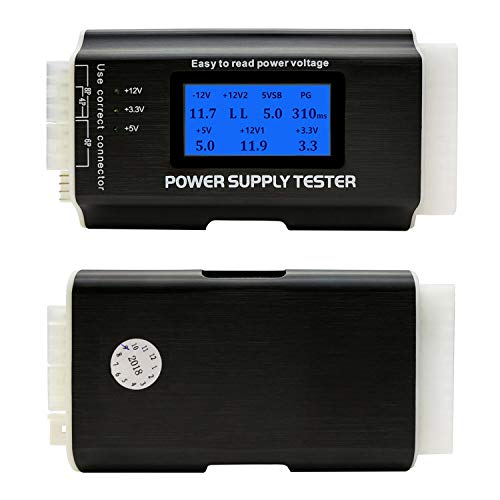
Designed for tech enthusiasts and professionals alike, the Computer PC Power Supply Tester with a 1.8” LCD screen offers an invaluable tool for evaluating power supply functionality. It supports a variety of connectors, including 20-pin ATX, SATA, and PCI-e, ensuring thorough testing. The clear LCD display shows critical voltages like +3.3V and +12V, while LED indicators provide quick feedback for IDE and SATA connections. With a beep alarm for out-of-range values, you’ll get immediate alerts. Lightweight and user-friendly, this tester is perfect for on-the-go assessments, helping you maintain ideal power supply performance effortlessly.
Best For: Tech enthusiasts and professionals seeking a reliable tool to evaluate computer power supplies efficiently.
Pros:
- Versatile Compatibility: Supports a wide range of connectors including ATX, SATA, and PCI-e for comprehensive testing.
- Clear Display: The 1.8” LCD screen provides easy-to-read voltage outputs and status indicators.
- Immediate Feedback: Beep alarm alerts users when values are out of the normal range, ensuring quick responses to potential issues.
Cons:
- Limited Connector Types: Does not support PCI-e 8-pin connectors, which may limit testing capabilities for some power supplies.
- Screen Protection: The protective film can be a hassle to remove and may cause visibility issues if left on.
- Basic Functionality: Lacks advanced testing features found in more sophisticated power supply testers.
ASUS NUC 15 Pro Tall Barebones Mini PC

If you need a powerful yet compact solution for demanding tasks, the ASUS NUC 15 Pro Tall Barebones Mini PC is an excellent choice. It’s powered by an Intel Core i7 240H processor with integrated Intel Graphics, ensuring smooth performance. You can upgrade memory up to 96GB DDR5 and enjoy dual storage for speed and capacity. With Intel Wi-Fi 7, you’ll experience faster transfer rates, and connecting to four 4K displays is a breeze. Built for durability, it’s MIL-STD-810H certified. Plus, the eco-friendly packaging and advanced cooling system highlight its commitment to sustainability and reliability.
Best For: Professionals and creators who require a powerful, compact mini PC for demanding tasks and multi-display setups.
Pros:
- Supports up to 96GB DDR5 RAM for high-performance multitasking.
- Dual storage design enhances speed and capacity, making it ideal for large projects.
- MIL-STD-810H certification ensures durability for use in extreme conditions.
Cons:
- Barebones design requires additional components like RAM and storage to be purchased separately.
- Limited to Intel integrated graphics, which may not meet the needs of high-end gaming or graphics-intensive applications.
- Higher initial investment compared to standard desktop PCs.
ViprTech Stryker 3.0 Gaming PC
The ViprTech Stryker 3.0 Gaming PC is an exceptional choice for gamers and content creators seeking top-tier performance without the hassle of building their own systems. With an AMD Ryzen 7 2700 processor and a powerful GeForce RTX 3060, you’ll experience stunning graphics and fast frame rates. The 1TB SSD guarantees lightning-fast bootup times, making it perfect for gaming, streaming, and video editing. Its sleek design features RGB lighting and white braided cables, adding a touch of style. Plus, built in the USA and stress-tested before shipping, you can trust its quality. Enjoy seamless connectivity with Windows 11 Pro, WiFi, and Bluetooth.
Best For: Gamers and content creators looking for high-performance computing without the complexities of building their own systems.
Pros:
- Insanely fast bootup times with a 1TB SSD, ensuring quick access to games and applications.
- Optimized for high FPS gaming, making it ideal for immersive gaming experiences and content creation.
- Stylish design featuring RGB lighting and white braided cables, enhancing the overall aesthetic of your setup.
Cons:
- Limited upgrade options for graphics in the future, as the RTX 3060 may become outdated for demanding games.
- Non-customizable software pre-installed with Windows 11 Pro may not suit all users’ preferences.
- Higher initial cost compared to building a similar PC from individual components.
Factors to Consider When Choosing a Barebone PC with Power Supply
When choosing a barebone PC with a power supply, you should consider performance specifications to guarantee it meets your needs. Expandability and upgrade options are also vital for future-proofing your setup. Additionally, check for compatibility with your components and the availability of cooling solutions and connectivity features.
Performance Specifications Importance
Choosing the right barebone PC with a power supply hinges on understanding performance specifications, which serve as the backbone of your computing experience. These specs determine your PC’s processing power, multitasking capabilities, and overall efficiency. Higher core counts and clock speeds enhance performance in demanding applications like gaming and video editing. Consider the processor architecture, whether it’s AMD Zen 4 or Intel’s hybrid design, as it can greatly impact multi-threaded task performance. Integrated graphics, such as Intel UHD or AMD Radeon, are essential for rendering and high-resolution displays. Additionally, robust connectivity options, including the latest Wi-Fi standards and fast USB interfaces, guarantee peak data transfer and peripheral compatibility, making your computing experience smooth and versatile.
Expandability and Upgrade Options
Understanding performance specifications is just the beginning; expandability and upgrade options are equally important in guaranteeing your barebone PC remains relevant as your needs change. First, check if the system supports expandable memory options, like multiple SO-DIMM slots or DDR4/DDR5 RAM, so you can upgrade in the future. Look for multiple M.2 PCIe slots for SSDs, which enhance storage capacity and speed. Dual-channel memory support is another feature to take into account, as it boosts performance by using two memory modules. Additionally, verify advanced connectivity options like USB4 or Thunderbolt are available for future peripherals. Finally, assess the power supply’s wattage and connector options to accommodate higher-end components as your requirements evolve.
Compatibility With Components
Selecting a barebone PC with a power supply requires careful consideration of compatibility with your chosen components. First, verify the barebone supports the appropriate socket type for your CPU, as each processor demands specific motherboards. Next, check the maximum RAM capacity and type—like DDR4 or DDR5—so it aligns with your desired memory modules. It’s essential to confirm that the PSU’s voltage and wattage ratings can handle the power needs of all components, including the motherboard and peripherals. Additionally, verify the number and types of expansion slots available for future upgrades, like GPUs or storage drives. Finally, assess the chassis layout and size to confirm it accommodates your cooling solutions and any extra hardware you plan to integrate.
Cooling Solutions and Efficiency
While it might be tempting to overlook cooling solutions when opting for a barebone PC, effective heat management is essential for maintaining ideal performance and longevity of your components. Look for models with advanced cooling designs, such as multiple heat pipes and large ventilation openings, which enhance airflow and reduce noise levels. Efficient cooling systems directly impact your hardware’s lifespan, preventing overheating that can cause performance throttling and failures. A well-designed cooling solution allows your system to run in higher performance modes, maximizing processing power without thermal constraints. When you select a barebone PC with robust cooling mechanisms, you enhance overall system stability—especially during intensive tasks like gaming, content creation, or multitasking.
Connectivity Features and Ports
When choosing a barebone PC with power supply, connectivity features and ports play an essential role in your overall experience. Look for options like USB4, HDMI 2.1, and DisplayPort to guarantee high-speed data transfer and support for multi-monitor setups. Make certain the device includes at least a 2.5G Ethernet port, which can greatly improve internet speeds over standard Gigabit Ethernet. Evaluate wireless capabilities, such as Wi-Fi 6E or Wi-Fi 7, for faster speeds and lower latency. Additionally, check for various USB ports, including USB 3.2 Gen2 and USB-C, to connect different peripherals easily. Finally, consider models that support external GPUs via OCuLink to enhance your graphics performance for gaming and content creation.
Power Supply Quality Assurance
Choosing a barebone PC with a reliable power supply is vital for guaranteeing your system runs smoothly and efficiently. Look for a power supply that has robust safety features, such as protections against short-circuits, over-current, over-voltage, and overheating. These safeguards guarantee safe operation during demanding tasks. A single 12V output is essential for performance-intensive applications, so prioritize that. Check for an 80 PLUS certification, which indicates energy efficiency and can help reduce electricity costs. Quality power supplies also have auto-thermally controlled fans that offer efficient cooling without excessive noise. Finally, verify the power supply includes a variety of connectors like 20/24-pin, PCIe, and SATA to ensure compatibility and expandability within your barebone PC setup.
Price and Value Assessment
Evaluating the price and value of a barebone PC with a power supply is essential to making a smart investment. Start by determining the total cost of the package, ensuring it fits your budget for both the initial purchase and future upgrades. Consider performance specs like processor speed, memory capacity, and graphics capabilities to gauge whether you’re getting good value. Don’t overlook warranty options and customer support, as these can impact your long-term satisfaction. Research market prices for similar configurations to avoid overpaying. Finally, factor in expandability; a slightly higher upfront cost might lead to greater long-term value if the system adapts to your future needs. Make sure every dollar counts toward your tech goals!